Archive
Citrix Worx Apps announced! – part 2, #CitrixSynergy, #BYOD
Hi again,
Ok, yesterday I posted that Citrix announces the Worx apps which I think is a GREAT story and it looks as the killer apps!
Citrix Worx Apps announced! #CitrixSynergy, #BYOD
I got you excited I guess, but this is of course also not something that we’ll see released in May! The first release now in June will release the Worx Enroll and Worx Home apps, but Worx Home will only be the “store” for Mobile and Web apps. The XenDesktop/XenApp integration comes in the next release so until then the Receiver is still the client for that type of delivery.
I got to play around with Worx Home a bit yesterday and I really liked the way it displays the apps and how they easily can be sorted in a groups by type or folder structure. And then when you get XA/XD items in there and they are placed right next to all the other apps on your mobile device and you can launch Excel from you iPad directly instead of going through and opening the Worx Home or Receiver app the integration is really user friendly. But then again; don’t we still for the majority of the use cases think that XA/XD are “legacy” solutions? wouldn’t we rather strive to get into a complete SaaS model instead of adding these expensive hosted solutions? I know it won’t go away and there are great use cases for XA and XD but I would still say it’s legacy, park it and contain it and work on your strategy to change the model and become future ready! 😉
And for those that don’t go off and purchase the Mobile Solution Bundle in the future can continue to use the Receiver for their “legacy” XenApp/XenDesktop service delivery. The question is how this will be evolving though, I foresee a risk that to much of the focus in the future will be agains the Worx apps and that is something that may lead to longer release cycles of fixes and updates of the Receiver. That my of course not be an issue either though many companies today are struggling with that Citrix “goes to fast” and it’s hard to keep up (and Citrix has a hard time keeping up as well).
Stay tuned for a more complete update after Synergy!
//Richard
#CitrixSynergy keynote – What will be announced?
So here we are! Keynote is about to start!
what can we expect? This is one thing that I definitely like to see:
– MDM + MAM + MIM + XA/XD= one solution/service! Have they finally made some progress into integrating Zenprise, AppController and StoreFront into one “App Store” and policy governance model so that we have one (1) app that handles both MDM, MAM and MIM from a device/user perspective?
Let the show begin! 🙂
//Richard

Enable Enterprise #Mobility and Secure Android, iOS and Windows Devices – #BYOD
This is a good blog post from Christopher Campbell that also has links to Citrix BYOD Solutions and Citrix BYOD Starter Kit.
Lots of devices with many different operating systems. Lots of users bringing Android, iOS and Windows mobile devices into the workplace. Securing all these devices and the apps and data they’re accessing can make enabling Enterprise Mobility an intimidating task. Is it going to be BYOD, COPE, MDM, MAM, MIM or a combination? One size doesn’t fit all and addressing these challenges can be painful if you’re deploying a multiple vendor solution stack.

Some of the top mobile threats now include but are not limited to:
- Data loss from lost and stolen devices
- Information stealing mobile malware
- Vulnerabilities from device, OS and 3rd party apps
- Insecure Wi-Fi, network access and rogue access points
- Insufficient management tools and capabilities
Join Citrix Chief Security Strategist Kurt Roemer to find out how IT can maintain control and protect business information accessed from Android, iOS and Windows tablets and smartphones.
Watch Now and you will learn:
- Security considerations and risk mitigation options when supporting BYOD
- The architecture required to support tablets and smartphones accessing sensitive business information
- How Citrix BYOD solutions enable secure access to enterprise desktops, apps and files from any device
- Best practices for IT to maintain control over Android, Apple iOS and Windows tablets and smartphones used in the workplace
WATCH ON-DEMAND TODAY and learn how to make a complete end-to-end, fully integrated Enterprise Mobility solution work for the business, user and IT…
Continue reading here!
//Richard
#Citrix #Receiver 5.7.2 for iOS released
Yet another Receiver have been released!

What’s new
The 5.7.2 release gives you the following improvements:
– You can download an @Work app, even when your Receiver has a poor connection.
– You can now see the correct name of the UTC time zone on your device when the “Use local time of client” policy setting is configured on the desktop.
– On the iPad when connected to a session, you can rotate your iPad many times and the session continues to run.
– When connected to a WiFi network with your iPad, you can roam from one WiFi network to another and continue to access apps through Receiver.
//Richard
#Citrix Knowledge Center Top 10 – March 2013
Citrix Support is focused on ensuring Customer and Partner satisfaction with our products.
One of our initiatives is to increase the ability of our Partners and Customers to leverage self-service avenues via our Knowledge Center.
Find below the Citrix Knowledge Center Top 10 for March 2013.
Top 10 Technical Articles
| Article Number | Article Title |
|---|---|
| CTX129229 | Recommended Hotfixes for XenApp 6.0 and Later on Windows Server 2008 R2 |
| CTX129082 | Application Launch Fails with Web Interface using Internet Explorer 9 |
| CTX804493 | Users Prompted to Download ICA File, Launch.ica, Instead of Launching the Connection |
| CTX132875 | Citrix Receiver Error 2320 |
| CTX105793 | Error: Cannot connect to the Citrix server. Protocol Driver Error |
| CTX127030 | Citrix Guidelines for Antivirus Software Configuration |
| CTX115637 | Citrix Multi-Monitor Configuration Settings and Reference |
| CTX133997 | Citrix Receiver 3.x – Issues Fixed in This Release |
| CTX325140 | Manually and Safely Removing Files after Uninstalling the Receiver for Windows |
| CTX101644 | Seamless Configuration Settings |
Top 10 Whitepapers
| Article Number | Article Title |
|---|---|
| CTX131577 | XenApp 6.x (Windows 2008 R2) – Optimization Guide |
| CTX132799 | XenDesktop and XenApp Best Practices |
| CTX101997 | Citrix Secure Gateway Secure Ticket Authority Frequently Asked Questions |
| CTX136546 | Citrix Virtual Desktop Handbook 5.x |
| CTX136547 | StoreFront Planning Guide |
| CTX133185 | Citrix CloudGateway Express 2.0 – Implementation Guide |
| CTX129761 | XenApp Planning Guide – Virtualization Best Practices |
| CTX134081 | Planning Guide – Citrix XenApp and XenDesktop Policies |
| CTX130888 | Technical Guide for Upgrading/Migrating to XenApp 6.5 |
| CTX122978 | XenServer: Understanding Snapshots |
Top 10 Hotfixes
| Article Number | Article Title |
|---|---|
| CTX136714 | Hotfix XS61E016 – For XenServer 6.1.0 |
| CTX132122 | Hotfix Rollup Pack 1 for Citrix XenApp 6.5 for Microsoft Windows Server 2008 R2 |
| CTX126653 | Citrix Online Plug-in 12.1.44 for Windows with Internet Explorer 9 Support |
| CTX136483 | Hotfix XS61E014 – For XenServer 6.1.0 |
| CTX133882 | Hotfix Rollup Pack 2 for Citrix XenApp 6 for Microsoft Windows Server 2008 R2 |
| CTX133066 | 12.3 Online Plug-In – Issues Fixed in This Release |
| CTX136253 | Hotfix XS61E010 – For XenServer 6.1.0 |
| CTX136482 | Hotfix XS61E013 – For XenServer 6.1.0 |
| CTX136085 | Hotfix XA650R01W2K8R2X64061 – For Citrix XenApp 6.5 |
| CTX136674 | Hotfix XS61E012 – For XenServer 6.1.0 |
Top 10 Presentations
| Article Number | Article Title |
|---|---|
| CTX135521 | TechEdge Barcelona 2012 PowerPoint and Video Presentations – Reference List |
| CTX129669 | TechEdge 2011 – Overview of XenServer Distributed Virtual Switch/Controller |
| CTX121090 | Planning and implementing a Provisioning Server high availability (HA) solution |
| CTX133375 | TechEdge 2012 PowerPoint and Video Presentations – Reference List |
| CTX135356 | TechEdge Barcelona 2012 – Understanding and Troubleshooting ICA Session Initialisation |
| CTX135358 | TechEdge Barcelona 2012 – XenDesktop Advanced Troubleshooting |
| CTX133374 | TechEdge 2012 – Monitoring your NetScaler Traffic with AppFlow |
| CTX135361 | Troubleshooting Tools: How to Isolate and Resolve Issues in your XA and XD Env Rapidly |
| CTX135360 | TechEdge Barcelona 2012 – Planning, Implementing and Troubleshooting PVS 6.x |
| CTX135357 | TechEdge Barcelona 2012 – Implementing and Troubleshooting SF and Rec for Windows |
Top 10 Tools
| Article Number | Article Title |
|---|---|
| CTX122536 | Citrix Quick Launch |
| CTX135075 | Citrix Diagnostics Toolkit – 64bit Edition |
| CTX130147 | Citrix Scout |
| CTX111961 | CDFControl |
| CTX106226 | Repair Clipboard Chain 2.0.1 |
| CTX109374 | StressPrinters 1.3.2 for 32-bit and 64-bit Platforms |
| CTX124406 | StressPrinters 1.3.2 for 32-bit and 64-bit Platforms |
| CTX113472 | Citrix ICA File Creator |
| CTX123278 | XDPing Tool |
Continue reading here!
//Richard
How to check which #NetScaler policy that your #Citrix #Receiver or web browser hits?
Ok, this is a common issue that you’ll end up in when setting up Access Gateway access scenarios:
How do you know which policy that is hit when your different Receivers are logging in?
Well, there are a couple of nice commands that can help you troubleshooting your access scenario! I guess that most of you have a simple scenario where you have one domain to authenticate against and some simple PNA, CVPN and potentially SSL VPN policies and profiles to deal with, and they are all linked to the virtual server like something like this simple example:

But in more complex scenarios you may end up controlling which browser the user is accessing with (for giving nice error messages instead of Citrix default messages when users may use an unsupported browser etc.), or when you have multiple AD domains and AD groups to link different policies to etc. Then it may be complex and you have multiple policies and profiles for the same config with minor changes like the SSO domain name etc. So how do you then troubleshoot that easily?
First we have the must know command that hooks into the auth process of the NetScaler and gives you a view of the authentication process:
cat /tmp/aaad.debug
When you run that and you authenticate you’ll see the result of your auth process agains for instance LDAP and RADIUS sources like the result here when I logged in to our little environment:
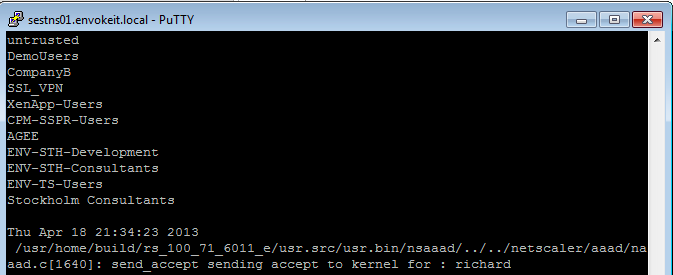
At the top of the output you see all the AD groups that I’m a member of that needs to match the group that you like to use on the NetScaler side, and last you see that accept from AD for my authentication request.
Then you know that you’re authentication ok, but which of the session polices are we hitting? Then you need to have a look at this great command:
nsconmsg -d current -g pol_hits
This is the output when I access using my Receiver on OS X:

#Citrix #Receiver for Win 8 and RT 1.3 now on the Windows Store
Blog post from Citrix on Windows RT and Win 8 pro devices and Receiver!
Our first official update for our touch-enabled Receiver for Windows RT and Windows 8 Pro devices! This version adds the ability to use multiple sessions as well as a number of usability improvements. It can be used with StoreFront or Web Interface deployments. Connections can be direct or through Access Gateway Enterprise Edition version 10.
Click here to try this version. It is still a good idea to ask your IT department if it can be used in your environment. IT managers can find details on configurations supported and settings at Citrix eDocs.
What’s new?
- Users can run multiple apps within a single session, switching between them with the in-session app bar.

- Sessions now use the keyboard layout and input language in effect on the device (as configured on the Windows 8 Language bar) whether its a physical and touch keyboard.
- A Refresh button on the My Apps and All Apps pages enables users to easily refresh the apps list.
- A default icon appears in My Apps, All Apps, and Search results until the correct app icon downloads.
And we have even more great things planned for the next update, including support for Access Gateway Enterprise 9.3 with…
Continue reading here!
//Richard
Configuring Email-Based Account Discovery for #Citrix #Receiver
Check out this great blog post from Avinash Golusula:
Configuring Email-Based Account Discovery
1 Add DNS Service Location (SRV) record to enable email based discovery
During initial configuration, Citrix Receiver can contact Active Directory Domain Name System (DNS) servers to obtain details of the stores available for users. This means that users do not need to know the access details for their stores when they install and configure Citrix Receiver. Instead, users enter their email addresses and Citrix Receiver contacts the DNS server for the domain specified in the email address to obtain the required information.
To enable Citrix Receiver to locate available stores on the basis of users’ email addresses, configure Service Location (SRV) locator resource records for Access Gateway or StoreFront/AppController connections on your DNS server. If no SRV record is found, Citrix Receiver searches the specified domain for a machine named “discoverReceiver” to identify a StoreFront/AppController server.
You must install a valid server certificate on the Access Gateway appliance and StoreFront/AppController server to enable email-based account discovery. The full chain to the root certificate must also be valid. For the best user experience, install either a certificate with a Subject or Subject Alternative Name entry of discoverReceiver.domain, or a wildcard certificate for the domain containing your users’ email accounts.
To allow users to configure Citrix Receiver by using an email address, you need to add a SRV record to your DNS zone.
- Log in to your DNS server
- In DNS > Right-click your Forward Lookup Zone
- Click on Other New Records

- Scroll down to Service Location (SRV)
- Configuring Email-Based Account Discovery
- Choose Create Record

#Citrix #Receiver 5.7.1 for iOS released
Ok, another version of Citrix Receiver released!
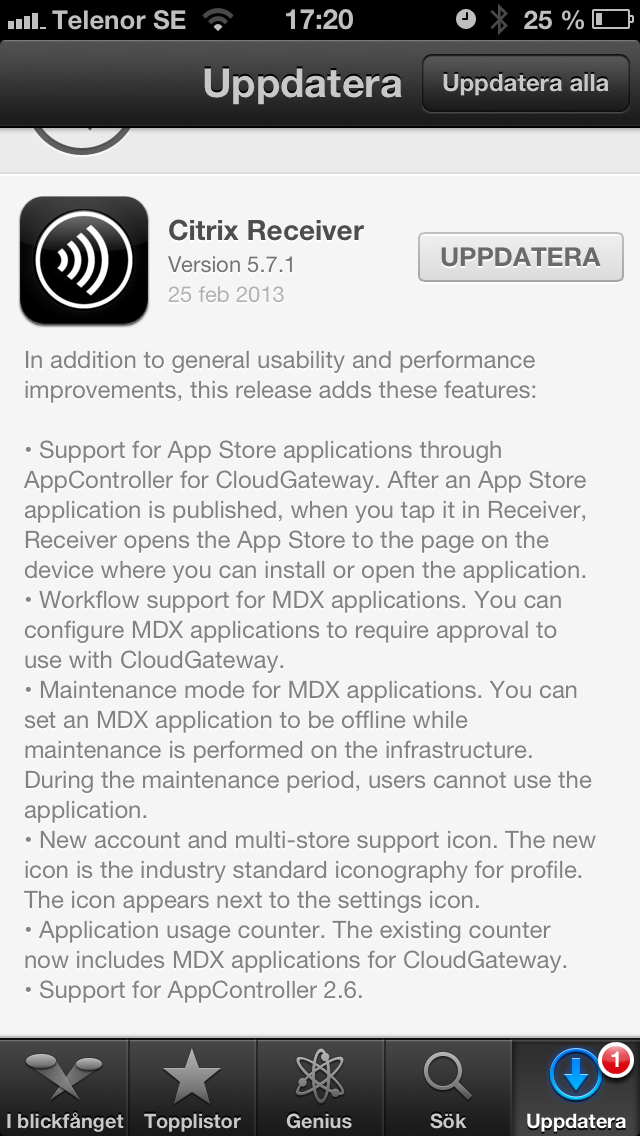
Read more about it here (no detailed 5.7.1 info yet but I guess it’s coming soon)!
//Richard
It’s here! #Citrix #Receiver for Win 8/RT 1.2
The first official release for your touch-enabled Win RT tablet or Windows 8 Pro device now on the Windows Store! It adds the ability to connect to XenApp Services and XenDesktop Services sites for Web Interface deployments, not just StoreFront enabled sites. Connections can be direct or through Access Gateway Enterprise Edition. We also added the ability to open ica files if you’re using browser access. And we shouldn’t overlook the ability to save your password, if allowed by server policy.
This version will be useable in more configurations.
Click here to try this version. It is still a good idea to ask your IT department if it can be used in your environment. IT managers can find details on configurations supported and settings at Citrix eDocs.
Here is what it provides:
- Secure access to virtual desktops and enterprise apps
- Secure access to Web and SaaS apps (requires CloudGateway Enterprise)
- Work anywhere on any Windows 8 computer or tablet
- Account configuration using your email address, a server URL, or a provisioning file
- Auto-provisioned applications
- Use one published app at a time, along with multiple Web and SaaS apps
- Automatic display of the keyboard when needed
- Use of native controls for selecting an item from a list
- Option to save your Receiver password if allowed by server
And more functionality is coming
Look for updates every few months. Among other improvements, we’ve started work on multi-touch, audio, session sharing (support for multiple sessions)…
Continue reading here!
//Richard




 The IT Melting Pot!