Archive
#App-V and #XenDesktop 7 – #Citrix, #AppV
A couple of good posts from Citrix (Ram Kumar Mantena & Nagendra Kumar) around the support for App-V on XenDesktop 7 and what to think of etc.
Tips/Tricks for Using App-V Integration with XenDesktop 7.0
XenDesktop 7.0 is released and it supports both Apps and Desktop Virtualization. One of the key features of this release is support for Microsoft App-V. As this is the first release for App-V support, here are some tips/things to consider for an easy deployment of App-V 5.0 in a XenDesktop Environment.
- XenDesktop 7.0 supports Server based App-V deployment scenario where Admin uses App-V Publishing Server and Management Server to manage apps.
- Microsoft App-V client does not support more than 5 Publishing Servers. In Citrix Desktop Studio, although the admin can add one Management and one Publishing server through Studio UI, he can also add multiple Publishing Servers using low level SDKs. It is recommended to add only 5 Publishing Servers. Though Studio low level SDKs take more than five Publishing Servers, studio enumerates App-V apps from first 5 Publishing Servers.
- When adding the Management Server and Publishing Server in App-V publishing node, if the test connection fails and App-V Server is up and running, make sure WinRm is up and running.
- Once the Virtual Desktop Agent is installed on Server/Client, make sure CtxAppVCOMAdmin is member of Administrator group. This is required as some of the App-V operations on VDA side need administrator privileges. This is the user account pre-created by Citrix XenDesktop VDA installation. [CTX138057]
- It is recommended to enable SharedContentStoreMode…. Read more…
Citrix Worx Apps announced! – part 2, #CitrixSynergy, #BYOD
Hi again,
Ok, yesterday I posted that Citrix announces the Worx apps which I think is a GREAT story and it looks as the killer apps!
Citrix Worx Apps announced! #CitrixSynergy, #BYOD
I got you excited I guess, but this is of course also not something that we’ll see released in May! The first release now in June will release the Worx Enroll and Worx Home apps, but Worx Home will only be the “store” for Mobile and Web apps. The XenDesktop/XenApp integration comes in the next release so until then the Receiver is still the client for that type of delivery.
I got to play around with Worx Home a bit yesterday and I really liked the way it displays the apps and how they easily can be sorted in a groups by type or folder structure. And then when you get XA/XD items in there and they are placed right next to all the other apps on your mobile device and you can launch Excel from you iPad directly instead of going through and opening the Worx Home or Receiver app the integration is really user friendly. But then again; don’t we still for the majority of the use cases think that XA/XD are “legacy” solutions? wouldn’t we rather strive to get into a complete SaaS model instead of adding these expensive hosted solutions? I know it won’t go away and there are great use cases for XA and XD but I would still say it’s legacy, park it and contain it and work on your strategy to change the model and become future ready! 😉
And for those that don’t go off and purchase the Mobile Solution Bundle in the future can continue to use the Receiver for their “legacy” XenApp/XenDesktop service delivery. The question is how this will be evolving though, I foresee a risk that to much of the focus in the future will be agains the Worx apps and that is something that may lead to longer release cycles of fixes and updates of the Receiver. That my of course not be an issue either though many companies today are struggling with that Citrix “goes to fast” and it’s hard to keep up (and Citrix has a hard time keeping up as well).
Stay tuned for a more complete update after Synergy!
//Richard
#Citrix #Receiver 5.7.2 for iOS released
Yet another Receiver have been released!

What’s new
The 5.7.2 release gives you the following improvements:
– You can download an @Work app, even when your Receiver has a poor connection.
– You can now see the correct name of the UTC time zone on your device when the “Use local time of client” policy setting is configured on the desktop.
– On the iPad when connected to a session, you can rotate your iPad many times and the session continues to run.
– When connected to a WiFi network with your iPad, you can roam from one WiFi network to another and continue to access apps through Receiver.
//Richard
#Citrix Knowledge Center Top 10 – March 2013
Citrix Support is focused on ensuring Customer and Partner satisfaction with our products.
One of our initiatives is to increase the ability of our Partners and Customers to leverage self-service avenues via our Knowledge Center.
Find below the Citrix Knowledge Center Top 10 for March 2013.
Top 10 Technical Articles
| Article Number | Article Title |
|---|---|
| CTX129229 | Recommended Hotfixes for XenApp 6.0 and Later on Windows Server 2008 R2 |
| CTX129082 | Application Launch Fails with Web Interface using Internet Explorer 9 |
| CTX804493 | Users Prompted to Download ICA File, Launch.ica, Instead of Launching the Connection |
| CTX132875 | Citrix Receiver Error 2320 |
| CTX105793 | Error: Cannot connect to the Citrix server. Protocol Driver Error |
| CTX127030 | Citrix Guidelines for Antivirus Software Configuration |
| CTX115637 | Citrix Multi-Monitor Configuration Settings and Reference |
| CTX133997 | Citrix Receiver 3.x – Issues Fixed in This Release |
| CTX325140 | Manually and Safely Removing Files after Uninstalling the Receiver for Windows |
| CTX101644 | Seamless Configuration Settings |
Top 10 Whitepapers
| Article Number | Article Title |
|---|---|
| CTX131577 | XenApp 6.x (Windows 2008 R2) – Optimization Guide |
| CTX132799 | XenDesktop and XenApp Best Practices |
| CTX101997 | Citrix Secure Gateway Secure Ticket Authority Frequently Asked Questions |
| CTX136546 | Citrix Virtual Desktop Handbook 5.x |
| CTX136547 | StoreFront Planning Guide |
| CTX133185 | Citrix CloudGateway Express 2.0 – Implementation Guide |
| CTX129761 | XenApp Planning Guide – Virtualization Best Practices |
| CTX134081 | Planning Guide – Citrix XenApp and XenDesktop Policies |
| CTX130888 | Technical Guide for Upgrading/Migrating to XenApp 6.5 |
| CTX122978 | XenServer: Understanding Snapshots |
Top 10 Hotfixes
| Article Number | Article Title |
|---|---|
| CTX136714 | Hotfix XS61E016 – For XenServer 6.1.0 |
| CTX132122 | Hotfix Rollup Pack 1 for Citrix XenApp 6.5 for Microsoft Windows Server 2008 R2 |
| CTX126653 | Citrix Online Plug-in 12.1.44 for Windows with Internet Explorer 9 Support |
| CTX136483 | Hotfix XS61E014 – For XenServer 6.1.0 |
| CTX133882 | Hotfix Rollup Pack 2 for Citrix XenApp 6 for Microsoft Windows Server 2008 R2 |
| CTX133066 | 12.3 Online Plug-In – Issues Fixed in This Release |
| CTX136253 | Hotfix XS61E010 – For XenServer 6.1.0 |
| CTX136482 | Hotfix XS61E013 – For XenServer 6.1.0 |
| CTX136085 | Hotfix XA650R01W2K8R2X64061 – For Citrix XenApp 6.5 |
| CTX136674 | Hotfix XS61E012 – For XenServer 6.1.0 |
Top 10 Presentations
| Article Number | Article Title |
|---|---|
| CTX135521 | TechEdge Barcelona 2012 PowerPoint and Video Presentations – Reference List |
| CTX129669 | TechEdge 2011 – Overview of XenServer Distributed Virtual Switch/Controller |
| CTX121090 | Planning and implementing a Provisioning Server high availability (HA) solution |
| CTX133375 | TechEdge 2012 PowerPoint and Video Presentations – Reference List |
| CTX135356 | TechEdge Barcelona 2012 – Understanding and Troubleshooting ICA Session Initialisation |
| CTX135358 | TechEdge Barcelona 2012 – XenDesktop Advanced Troubleshooting |
| CTX133374 | TechEdge 2012 – Monitoring your NetScaler Traffic with AppFlow |
| CTX135361 | Troubleshooting Tools: How to Isolate and Resolve Issues in your XA and XD Env Rapidly |
| CTX135360 | TechEdge Barcelona 2012 – Planning, Implementing and Troubleshooting PVS 6.x |
| CTX135357 | TechEdge Barcelona 2012 – Implementing and Troubleshooting SF and Rec for Windows |
Top 10 Tools
| Article Number | Article Title |
|---|---|
| CTX122536 | Citrix Quick Launch |
| CTX135075 | Citrix Diagnostics Toolkit – 64bit Edition |
| CTX130147 | Citrix Scout |
| CTX111961 | CDFControl |
| CTX106226 | Repair Clipboard Chain 2.0.1 |
| CTX109374 | StressPrinters 1.3.2 for 32-bit and 64-bit Platforms |
| CTX124406 | StressPrinters 1.3.2 for 32-bit and 64-bit Platforms |
| CTX113472 | Citrix ICA File Creator |
| CTX123278 | XDPing Tool |
Continue reading here!
//Richard
#Citrix #Receiver for Win 8 and RT 1.3 now on the Windows Store
Blog post from Citrix on Windows RT and Win 8 pro devices and Receiver!
Our first official update for our touch-enabled Receiver for Windows RT and Windows 8 Pro devices! This version adds the ability to use multiple sessions as well as a number of usability improvements. It can be used with StoreFront or Web Interface deployments. Connections can be direct or through Access Gateway Enterprise Edition version 10.
Click here to try this version. It is still a good idea to ask your IT department if it can be used in your environment. IT managers can find details on configurations supported and settings at Citrix eDocs.
What’s new?
- Users can run multiple apps within a single session, switching between them with the in-session app bar.

- Sessions now use the keyboard layout and input language in effect on the device (as configured on the Windows 8 Language bar) whether its a physical and touch keyboard.
- A Refresh button on the My Apps and All Apps pages enables users to easily refresh the apps list.
- A default icon appears in My Apps, All Apps, and Search results until the correct app icon downloads.
And we have even more great things planned for the next update, including support for Access Gateway Enterprise 9.3 with…
Continue reading here!
//Richard
Demystifying Citrix Excalibur Architecture – via @kbaggerman
A great blog post by Kees Baggerman! 🙂
For all XenApp admins and consultants out there Project Avalon will bring a big change as we are used to having XenApp servers running on the (what seemed to be) everlasting Citrix Independent Management Architecture and we’re heading to Citrix FlexCast Management Architecture (already included in XenDesktop at this moment) and will be included in the Citrix Excalibur Architecture.
IMA
When looking up IMA in the eDocs you’ll find:
Independent Management Architecture (IMA) is the underlying architecture used in XenApp for configuring, monitoring, and operating all XenApp functions. The IMA data store stores all XenApp configurations.
Basically IMA exists to manage the XenApp or Presentation Server farms by enabling the communications between servers. As stated it transfers information about all XenApp functions like licenses, policies, sessions and server loads. All management tooling within these versions of Citrix’s PS/XA rely on this service for information.
According to Communication ports used by Citrix Technologies IMA uses the following ports:
| Ports | Source | Prot. | Comment |
| 2512 | Common Citrix Communication Ports | TCP | Independent Management Architecture (IMA) |
| 2513 | Access Gateway 5.0 Controller administration | TCP | IMA-based Communication |
As we can see IMA uses 2512 (by default) to communicate with other servers and the Access Gateway Controller uses 2513 (by default) for IMA-based communication. The port IMA uses can be changed or queried via the commandline tool IMAPORT.
Brian Madden did a blogpost way back in 2007 but it’s definition of IMA is still current:
Independent Management Architecture is:
- A data store, which is a database for storing MetaFrame XP server configuration information, such as published applications, total licenses, load balancing configuration, MetaFrame XP security rights, and printer configuration.
- A protocol for transferring the ever-changing background information between MetaFrame XP servers, including server load, current users and connections, and licenses in use
FMA
With the introduction of XenDesktop we got a new architecture called Flexcast Management Architecture. This new architecture has got an agent-based setup where we can install the operating system including the basic applications that need to be installed and after that we can install an agent. This agent registers itself to a controller and is offered through StoreFront to the end user.
This will be delivered by two different types of agents, one to support Windows Server OS’s and one for Windows Desktop OS’s.
Andrew Wood did an article on Excalibur and used this diagram to explain the architecture:
 Citrix FlexCast Management Architecture
- Receiver provides users with self-service access to published resources.
- StoreFront authenticates users to site(s) hosting resources and manages stores of desktops and applications that users access – Web Interface as a platform is essentially resting, but it will cease to be.
- Studio is a single management console that enables you to configure and manage your deployment, a dramatic reduction over the 23 consoles you could well have today. Studio provides various wizards to guide you through the process of setting up an environment, creating workloads to host applications and desktops, and assigning applications and desktops to users.
- Delivery Controller distributes applications and desktops, manages user access, and optimizes…
Continue reading here!
//Richard
Tech Preview of #Citrix #XenApp support for the #Lync 2013 VDI Plug-in
Good info from Derek Thorslund.
As you may have already noticed, earlier this week we opened up our Tech Preview program for optimized support of the Microsoft Lync™ 2013 client to all current Citrix XenApp customers under active Subscription Advantage. This phase of the Tech Preview program gives our customers the opportunity to evaluate the Citrix Receiver Display Adapter that integrates with Microsoft’s Lync™ 2013 VDI Plug-in for Windows. The Display Adapter plug-in has been posted on the Citrix Downloads page under “Citrix Receiver” in the “Betas and Tech Previews” section (visible to Citrix customers and partners after login). Please use the Support Forum to provide feedback or request assistance from the community.
Read more here!
//Richard
Configuring Email-Based Account Discovery for #Citrix #Receiver
Check out this great blog post from Avinash Golusula:
Configuring Email-Based Account Discovery
1 Add DNS Service Location (SRV) record to enable email based discovery
During initial configuration, Citrix Receiver can contact Active Directory Domain Name System (DNS) servers to obtain details of the stores available for users. This means that users do not need to know the access details for their stores when they install and configure Citrix Receiver. Instead, users enter their email addresses and Citrix Receiver contacts the DNS server for the domain specified in the email address to obtain the required information.
To enable Citrix Receiver to locate available stores on the basis of users’ email addresses, configure Service Location (SRV) locator resource records for Access Gateway or StoreFront/AppController connections on your DNS server. If no SRV record is found, Citrix Receiver searches the specified domain for a machine named “discoverReceiver” to identify a StoreFront/AppController server.
You must install a valid server certificate on the Access Gateway appliance and StoreFront/AppController server to enable email-based account discovery. The full chain to the root certificate must also be valid. For the best user experience, install either a certificate with a Subject or Subject Alternative Name entry of discoverReceiver.domain, or a wildcard certificate for the domain containing your users’ email accounts.
To allow users to configure Citrix Receiver by using an email address, you need to add a SRV record to your DNS zone.
- Log in to your DNS server
- In DNS > Right-click your Forward Lookup Zone
- Click on Other New Records

- Scroll down to Service Location (SRV)
- Configuring Email-Based Account Discovery
- Choose Create Record

Working with #XenMobile #AppController and Me@Work apps – #Citrix, #BYOD
I got to play around with @WorkWeb and @WorkMail apps a bit… and I must say that the process to get the Me@Work apps into AppController isn’t the simplest there is for someone that haven’t been doing iOS app development before.
But what I’m describing here is what’s now named XenMobile AppController and a part of the XenMobile bundle:
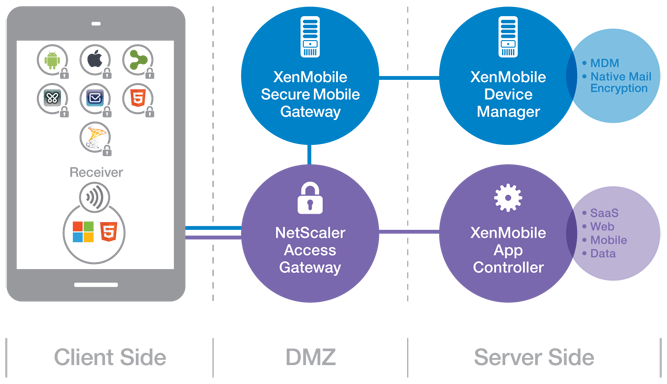
(Note: picture from Citrix)
So lets try to summarise the steps involved in getting these @WorkWeb and@WorkMail apps into your AppController and then published them to your users!
- Get your hands on a Macbook!
- Download the App Preparation Tool for iOS Applications and install it on the client
- Download and install Xcode (not 100% necessary but I recommend that you do that to simplify the creation/download of Distribution certificates and Distribution Profiles)
- Open XCode and open Preferences->Downloads,
 Read more…

#Citrix #BYOD Architecture overview – #XenMobile, #Mobility
I must say that this blog post is of course Citrix “twisted”, but I really like it! And it shows how Citrix provides a pretty complete offering in order to deliver Mobility- and BYO-compliant services.
The Citrix blog written by Christopher Campbell makes sense and I also agree that a picture is worth a thousand words! 🙂
I’m going to make this real easy and simple. As my grandfather would say “A picture is worth a thousand words”.
If you’re a XenDesktop or XenApp customer this is what your environment probably looks like.

Now this is what you need to enable BYOD and add that MAM, MDM, MIM (Data) and overall EMM functionality you’re looking for.

This is what your environment looks like after you enable BYOD.

Didn’t get that? OK, here is what BYOD looks like with multiple vendors.

Now, here is what BYOD looks like with Citrix.

Got it?
Read the whole blog post here!
//Richard




 The IT Melting Pot!