Archive
#CitrixSynergy keynote – What will be announced?
So here we are! Keynote is about to start!
what can we expect? This is one thing that I definitely like to see:
– MDM + MAM + MIM + XA/XD= one solution/service! Have they finally made some progress into integrating Zenprise, AppController and StoreFront into one “App Store” and policy governance model so that we have one (1) app that handles both MDM, MAM and MIM from a device/user perspective?
Let the show begin! 🙂
//Richard

#BYOD: From optional to mandatory by 2017, says #Gartner
I agree with this great article and the analysis made by Gartner.
Bring-your-own-device (BYOD) has for some time been gaining traction in the workplace, as not only a way of freeing up IT costs but also liberalizing workers from being virtually chained, clunky, aging machines at their desks.
But latest research from Gartner suggests that by 2017, half of employers may impose a mandatory BYOD policy — requiring staffs to bring their own laptop, tablet and smartphone to work.
As an optional policy, workplaces still have an IT fallback option, but many are choosing to bring their own tablets and smartphones to work in order to work more effectively using the technology they feel more comfortable with.
Some interesting tidbits from the research:
- 38 percent of companies expect to stop providing workplace devices to staff by 2016. (PCs, such as desktops and laptops, are included in the definition of BYOD.)
- BYOD is most prevalent in midsize and larger enterprises, often generating between $500m-$5bn in revenue per year, with 2,500-5,000 employees on the roster.
- BRIC nations, such as India, China, and Brazil, will most likely already be using a personal device — typically a “standard mobile phone” — at work.
- Meanwhile, companies in the U.S. are more likely to allow BYOD than those in Europe (likely due to stronger data protection rules, see below).
- Around half of all BYOD programs provide a partial reimbursement, while full reimbursement costs “will become rare.”
- Gartner vice president David Willis says companies should “subsidize only the service plan on a smartphone.”
But there’s a problem within. Those who have yet to adopt a BYOD policy often generally cite one of two good reasons (or both): interoperability and…
Continue reading here!
//Richard
Enable Enterprise #Mobility and Secure Android, iOS and Windows Devices – #BYOD
This is a good blog post from Christopher Campbell that also has links to Citrix BYOD Solutions and Citrix BYOD Starter Kit.
Lots of devices with many different operating systems. Lots of users bringing Android, iOS and Windows mobile devices into the workplace. Securing all these devices and the apps and data they’re accessing can make enabling Enterprise Mobility an intimidating task. Is it going to be BYOD, COPE, MDM, MAM, MIM or a combination? One size doesn’t fit all and addressing these challenges can be painful if you’re deploying a multiple vendor solution stack.

Some of the top mobile threats now include but are not limited to:
- Data loss from lost and stolen devices
- Information stealing mobile malware
- Vulnerabilities from device, OS and 3rd party apps
- Insecure Wi-Fi, network access and rogue access points
- Insufficient management tools and capabilities
Join Citrix Chief Security Strategist Kurt Roemer to find out how IT can maintain control and protect business information accessed from Android, iOS and Windows tablets and smartphones.
Watch Now and you will learn:
- Security considerations and risk mitigation options when supporting BYOD
- The architecture required to support tablets and smartphones accessing sensitive business information
- How Citrix BYOD solutions enable secure access to enterprise desktops, apps and files from any device
- Best practices for IT to maintain control over Android, Apple iOS and Windows tablets and smartphones used in the workplace
WATCH ON-DEMAND TODAY and learn how to make a complete end-to-end, fully integrated Enterprise Mobility solution work for the business, user and IT…
Continue reading here!
//Richard
Login VSI 4.0 – #LoginVSI, #VDI, #Scalability, #BYOD – @LoginVSI
Login VSI 4.0 released!!
Wow, I can’t believe that my week was this busy… tooo bad though I must say thank you so much to the Login VSI team for giving me the privilege to test Login VSI 4.0 Pro prior to the release… but did I have the time? Nooooo…. 😦
But it’s gonna be one of the first things I do when I get some spare time over some night/weekend in the near future!!
Below you find the press release and a bunch of pictures I got as a part of the “blogger preview” kit!
Improved ease of installation
- Minimized test image footprint
- Centralized management and updates
- Direct Desktop Launch Mode, saves on infrastructure
Improved ease of test creation
- New intuitive and workflow oriented UI
- New editor simplifies workload customization
- Benchmarking mode simplifies comparisons
Improved test realism
- More realistic user workload patterns
- More realistic dataset and data/file access
- Real-world test execution with multiple phases
Improved test insight
- New dashboard with real-time test feedback
- Enhanced VSImax accuracy
- Automated reporting of all relevant data
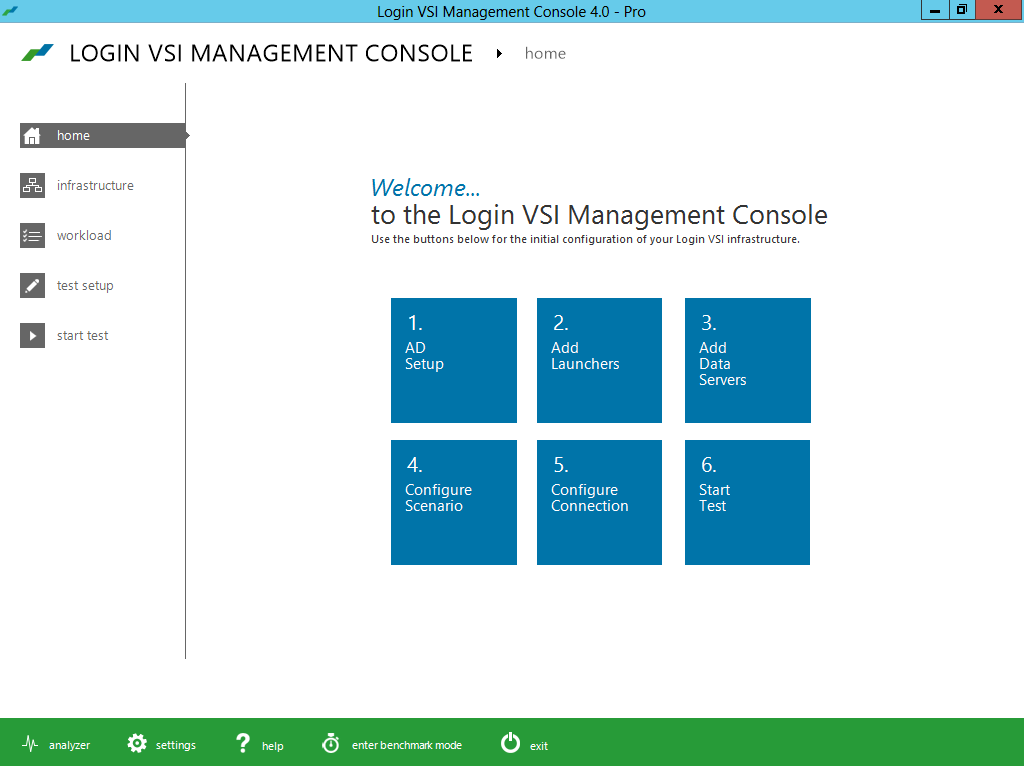
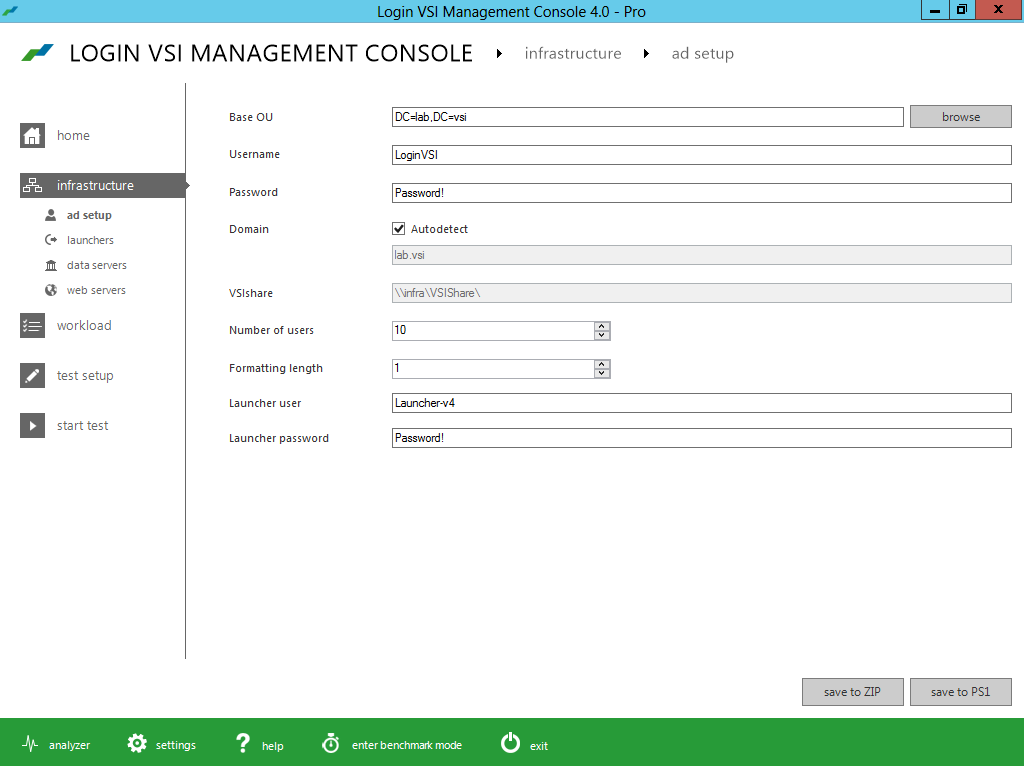
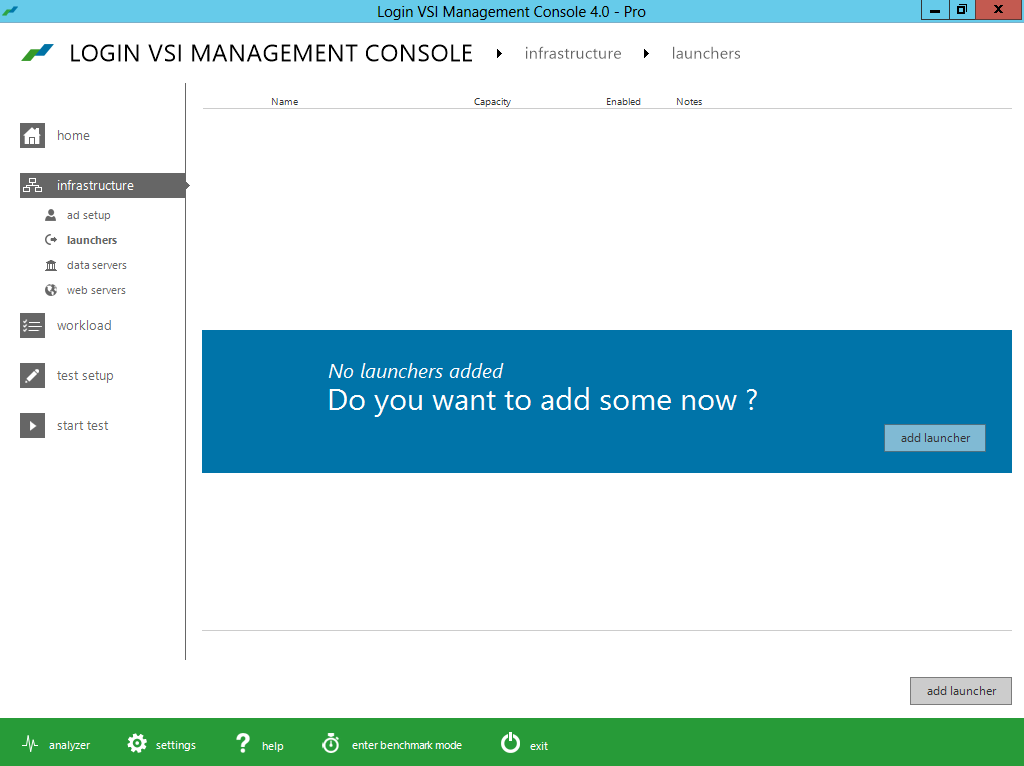

#Citrix #Receiver 5.7.2 for iOS released
Yet another Receiver have been released!

What’s new
The 5.7.2 release gives you the following improvements:
– You can download an @Work app, even when your Receiver has a poor connection.
– You can now see the correct name of the UTC time zone on your device when the “Use local time of client” policy setting is configured on the desktop.
– On the iPad when connected to a session, you can rotate your iPad many times and the session continues to run.
– When connected to a WiFi network with your iPad, you can roam from one WiFi network to another and continue to access apps through Receiver.
//Richard
WOW! – MS readies ‘Mohoro’ Windows desktop as a service – #BYOD, #DaaS – via @brianmadden
What can you say!?!? It wouldn’t surprise me a bit!! Of course Microsoft would come out with an Azure based cloud offerings of Desktops as a Service! I will follow this progress for sure, interesting and NOT so nice for quite a number of partners out there…
Summary: Microsoft is believed to be building a Windows Azure-hosted desktop virtualization service that could be available on a pay-per-use basis.
In yet another example of its growing emphasis on remaking itself as a devices and services company, Microsoft looks to be developing a pay-per-use “Windows desktop as a service” that will run on Windows Azure.

The desktop virtualization service, codenamed Mohoro, is in a very early development phase, from what I’ve heard from sources. I don’t know the final launch target, but I wouldn’t be surprised if it isn’t until the second half of 2014.
Mohoro is a town located on the island of Grande Comore in the Comoros Islands in the Indian Ocean. Given that members of the Microsoft India Development Center may be playing a key role in Mohoro’s development, according to my sources, the codename choice seems appropriate.
Microsoft owns the Mohoro.com and Mohoro.Net domain names.
Mohoro, like another Windows service, Windows Intune, is a product of Microsoft’s Server and Tools unit, I hear. Windows Intune is still not yet hosted on Windows Azure (as far as I know), but supposedly the plan is to move it to Azure at some point. Windows Intune already does make use of Windows Azure Active Directory as its directory and authentication service.
The same way that Windows Intune is the cloud complement to System Center, Mohoro seems to be the cloud version of Remote Desktop/Remote App.
This is like “Remote App as a hosted service,” said one of my contacts. It could be for companies who want thin clients or to run legacy apps on new PCs. Right now, companies have to have their own servers in the equation to do this, but “with Mohoro, you click a few buttons, deploy your apps, use Intune to push out configuration to all of your company’s devices, and you’re done,” my contact added.
Microsoft currently offers multiple ways for users to access their Windows desktops remotely via different virtualization technologies and products.
The aforementioned Remote App/Remote Desktop allows Windows users to connect to a remote Windows PC and access resources from it. On the Windows RT front, given that operating system’s restrictions on use of almost any existing Win32 applications, Remote Desktop provides a way for users to continue to use apps they already have on new hardware like the Microsoft Surface RT. Licensing of Remote Desktop and Remote Desktop Services is complex, however, and requires access to server infrastructure on the back-end.
Currently, it is not possible under Microsoft’s licensing terms to run Windows client in virtual machines hosted on Windows Azure. (The new Azure VMs do allow…
Continue to read this great blog post by Mary Jo Foley here!
//Richard
#Citrix Knowledge Center Top 10 – March 2013
Citrix Support is focused on ensuring Customer and Partner satisfaction with our products.
One of our initiatives is to increase the ability of our Partners and Customers to leverage self-service avenues via our Knowledge Center.
Find below the Citrix Knowledge Center Top 10 for March 2013.
Top 10 Technical Articles
| Article Number | Article Title |
|---|---|
| CTX129229 | Recommended Hotfixes for XenApp 6.0 and Later on Windows Server 2008 R2 |
| CTX129082 | Application Launch Fails with Web Interface using Internet Explorer 9 |
| CTX804493 | Users Prompted to Download ICA File, Launch.ica, Instead of Launching the Connection |
| CTX132875 | Citrix Receiver Error 2320 |
| CTX105793 | Error: Cannot connect to the Citrix server. Protocol Driver Error |
| CTX127030 | Citrix Guidelines for Antivirus Software Configuration |
| CTX115637 | Citrix Multi-Monitor Configuration Settings and Reference |
| CTX133997 | Citrix Receiver 3.x – Issues Fixed in This Release |
| CTX325140 | Manually and Safely Removing Files after Uninstalling the Receiver for Windows |
| CTX101644 | Seamless Configuration Settings |
Top 10 Whitepapers
| Article Number | Article Title |
|---|---|
| CTX131577 | XenApp 6.x (Windows 2008 R2) – Optimization Guide |
| CTX132799 | XenDesktop and XenApp Best Practices |
| CTX101997 | Citrix Secure Gateway Secure Ticket Authority Frequently Asked Questions |
| CTX136546 | Citrix Virtual Desktop Handbook 5.x |
| CTX136547 | StoreFront Planning Guide |
| CTX133185 | Citrix CloudGateway Express 2.0 – Implementation Guide |
| CTX129761 | XenApp Planning Guide – Virtualization Best Practices |
| CTX134081 | Planning Guide – Citrix XenApp and XenDesktop Policies |
| CTX130888 | Technical Guide for Upgrading/Migrating to XenApp 6.5 |
| CTX122978 | XenServer: Understanding Snapshots |
Top 10 Hotfixes
| Article Number | Article Title |
|---|---|
| CTX136714 | Hotfix XS61E016 – For XenServer 6.1.0 |
| CTX132122 | Hotfix Rollup Pack 1 for Citrix XenApp 6.5 for Microsoft Windows Server 2008 R2 |
| CTX126653 | Citrix Online Plug-in 12.1.44 for Windows with Internet Explorer 9 Support |
| CTX136483 | Hotfix XS61E014 – For XenServer 6.1.0 |
| CTX133882 | Hotfix Rollup Pack 2 for Citrix XenApp 6 for Microsoft Windows Server 2008 R2 |
| CTX133066 | 12.3 Online Plug-In – Issues Fixed in This Release |
| CTX136253 | Hotfix XS61E010 – For XenServer 6.1.0 |
| CTX136482 | Hotfix XS61E013 – For XenServer 6.1.0 |
| CTX136085 | Hotfix XA650R01W2K8R2X64061 – For Citrix XenApp 6.5 |
| CTX136674 | Hotfix XS61E012 – For XenServer 6.1.0 |
Top 10 Presentations
| Article Number | Article Title |
|---|---|
| CTX135521 | TechEdge Barcelona 2012 PowerPoint and Video Presentations – Reference List |
| CTX129669 | TechEdge 2011 – Overview of XenServer Distributed Virtual Switch/Controller |
| CTX121090 | Planning and implementing a Provisioning Server high availability (HA) solution |
| CTX133375 | TechEdge 2012 PowerPoint and Video Presentations – Reference List |
| CTX135356 | TechEdge Barcelona 2012 – Understanding and Troubleshooting ICA Session Initialisation |
| CTX135358 | TechEdge Barcelona 2012 – XenDesktop Advanced Troubleshooting |
| CTX133374 | TechEdge 2012 – Monitoring your NetScaler Traffic with AppFlow |
| CTX135361 | Troubleshooting Tools: How to Isolate and Resolve Issues in your XA and XD Env Rapidly |
| CTX135360 | TechEdge Barcelona 2012 – Planning, Implementing and Troubleshooting PVS 6.x |
| CTX135357 | TechEdge Barcelona 2012 – Implementing and Troubleshooting SF and Rec for Windows |
Top 10 Tools
| Article Number | Article Title |
|---|---|
| CTX122536 | Citrix Quick Launch |
| CTX135075 | Citrix Diagnostics Toolkit – 64bit Edition |
| CTX130147 | Citrix Scout |
| CTX111961 | CDFControl |
| CTX106226 | Repair Clipboard Chain 2.0.1 |
| CTX109374 | StressPrinters 1.3.2 for 32-bit and 64-bit Platforms |
| CTX124406 | StressPrinters 1.3.2 for 32-bit and 64-bit Platforms |
| CTX113472 | Citrix ICA File Creator |
| CTX123278 | XDPing Tool |
Continue reading here!
//Richard
Simplified VDI Architecture – #Citrix, #XenDesktop
This is a great start of a blog series from Citrix!
There’s a perception that VDI is complicated. I’m far from being a rocket scientist, and I’ve managed to implement many successful VDI projects over the past ten years. I truly believe that VDI is one of those things that is only as complicated as you make it.
It’s like saying that driving is complicated. You’d have to be crazy [or very brave] to take your first lesson in Manhattan…during rush hour. That’s why your driving instructor starts you off on a quiet street. You need to know your boundaries. Being successful with VDI is the same – keep things simple to start with and slowly increase complexity at your own pace, when you’re ready for it.
This raises the question – what’s the quiet street equivalent of a beginner’s VDI architecture? It might not be the most optimized and efficient solution, but it would be quick to implement, do the job well and wouldn’t require specialist knowledge or skills. I’ve been thinking about this a lot lately, and I’d like to share my thoughts.
There’s a lot to consider, so I’m going to break this up over four different blog posts:
- Simplified VDI Architecture – Introduction & FlexCast
- Simplified VDI Architecture – Storage
- Simplified VDI Architecture – Provisioning
- Simplified VDI Architecture – Reference Architecture
Martin Zugec will be helping me out with this blog series and will be referring to his experience on actual customer projects that followed many of these recommendations.
XenDesktop or VDI in a Box?
First up, you need to make a decision on VDI in a Box or XenDesktop. VDI in a Box is easier to setup but does have some limitations. Check out Allen Furmanski’s excellent blog post for guidance on how to make this decision. I’m going to concentrate on XenDesktop for this post.
FlexCast
Although each FlexCast model has its own unique advantages, each additional model included adds complexity to the overall project. There is a great table in the Virtual Desktop Handbook (FlexCast Model Selection – Table 11) that provides guidance on the capabilities of each model. The main thing to note is that all scenarios, apart from offline, can be accommodated using the Hosted VDI model (XenDesktop), either with or without a Personal vDisk. It may not be the optimal selection in every instance, but it is almost always a viable solution.
There are a number of reasons why I think that XenDesktop is simpler than XenApp, including:
- Desktop applications are developed to run on desktop operating systems such as Windows XP or Windows 7. There aren’t many developers that test their applications on Windows Server 2003 or 2008. Therefore, you’re far less likely to run into application issues with XenDesktop than you are with XenApp. Even if your applications run okay on 2008 with XenApp, you’re probably going to have issues getting support from the application vendors.
- Hosting applications on multi-user operating systems can introduce additional application compatibility challenges. Users may share the same configuration files and registry hives, especially if the applications are not multi-user aware. This means that one user may change a setting that affects all other users of that server. There are a ton of tips and tricks to get these apps working correctly but we want to keep things simple and choosing XenDesktop helps us achieve this goal.
- As multiple users are hosted on the same operating system, it is important that XenApp desktops are locked down to prevent security breaches and misconfiguration that could impact all users sharing the environment. Typically, this results in an extremely controlled and restricted user experience, hindering user satisfaction and acceptance.
- With XenApp desktops, a single user can consume a disproportionate amount of resources, impacting the performance of other users sharing the same XenApp server. XenDesktop, on the other hand, allows vCPU and RAM assignments to be controlled on a per-user basis. For this reason, I strongly recommend that heavy users are hosted on XenDesktop rather than XenApp.
- With XenDesktop, it is possible to provide users with fully personalized desktops. This includes the ability for users to install their own applications.
- Unlike XenApp, XenDesktop supports generic USB redirection:

I’m a huge fan of Remote PC, especially when you consider just how simple it is to deploy. However, there are some things Remote PC just can’t do, including:
- You don’t have the flexibility to quickly provision or de-provision desktops based on business demands.
- Image management is more complicated than a virtual desktop because you can’t use MCS and PVS can be challenging with desktops outside of the data center
- You need to have a good connection between your XenDesktop Controllers and the physical desktops. Something not always available for WAN users.
Regardless, Remote PC is a great solution in many scenarios. Consider deploying Remote PC at the very start of your project. It allows you to realize immediate value while you’re designing and implementing your full VDI solution.
If XenDesktop is so much simpler why do so many projects still standardize on XenApp? It all comes down to cost – XenApp offers significantly higher levels of scalability than XenDesktop (some sources quote 300% more users). Let’s take a look at this in more detail.
Processor
The Virtual Desktop Handbook provides us with guidelines on processor requirements for both XenApp and XenDesktop (Processor Requirements by Workload – Table 22):

If processor is the bottleneck, we can estimate the scalability of XenApp and XenDesktop for a fairly typical server configuration (2×8 cores):

As you can see, XenApp offers between 17% (heavy user) and 28% (light user) more users than XenDesktop – but nowhere near 300%! Let’s put this into context, if you had 1,000 concurrent normal users, you would need seven physical servers for ‘XenDesktop: Windows 7’ and six physical servers for ‘XenApp: 2008 R2’. Is one additional server per ~1,000 users enough to justify the additional complexity of XenApp?
RAM
For RAM, the Virtual Desktop Handbook table (Memory Requirements by Workload – Table 23) shows us that ‘XenDesktop: Windows 7’ requires significantly…
Continue reading here!
//Richard
How to avoid the 7 pitfalls of desktop virtualization
Have a look at this!
When it comes to desktop virtualization, we’ve all messed up. Some of us more than others.
But the best among us tend to learn from our mistakes so we don’t repeat them. And the really smart ones learn from others’ mistakes so they don’t have to collect the bruises themselves.
That’s the spirit behind our latest eBook for desktop virtualization project teams:
The 7 Big, Bad Pitfalls of Desktop Virtualization Deployment:
Very avoidable ways things can go wrong (and how to avoid them)

This eBook is all about helping you succeed with your Citrix desktop virtualization deployments. It distills the expertise of our top Citrix consultants into seven of the most common mistakes that project teams make.
And each pitfall has a short list of evasive actions to take to make sure you don’t fall in. It’s a quick read and you’ll come away with some useful ways to keep your next project on track.
Go on: Download it now
BTW – The eBook is brought to you by the team behind the Citrix Project Accelerator, the all-singing, all-dancing desktop transformation project management environment. If you haven’t set up a project in it yet, you’re in for a treat.
How to check which #NetScaler policy that your #Citrix #Receiver or web browser hits?
Ok, this is a common issue that you’ll end up in when setting up Access Gateway access scenarios:
How do you know which policy that is hit when your different Receivers are logging in?
Well, there are a couple of nice commands that can help you troubleshooting your access scenario! I guess that most of you have a simple scenario where you have one domain to authenticate against and some simple PNA, CVPN and potentially SSL VPN policies and profiles to deal with, and they are all linked to the virtual server like something like this simple example:

But in more complex scenarios you may end up controlling which browser the user is accessing with (for giving nice error messages instead of Citrix default messages when users may use an unsupported browser etc.), or when you have multiple AD domains and AD groups to link different policies to etc. Then it may be complex and you have multiple policies and profiles for the same config with minor changes like the SSO domain name etc. So how do you then troubleshoot that easily?
First we have the must know command that hooks into the auth process of the NetScaler and gives you a view of the authentication process:
cat /tmp/aaad.debug
When you run that and you authenticate you’ll see the result of your auth process agains for instance LDAP and RADIUS sources like the result here when I logged in to our little environment:
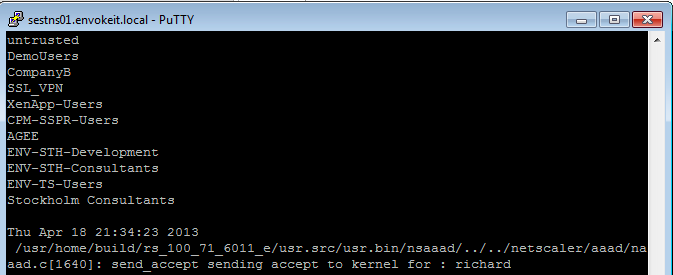
At the top of the output you see all the AD groups that I’m a member of that needs to match the group that you like to use on the NetScaler side, and last you see that accept from AD for my authentication request.
Then you know that you’re authentication ok, but which of the session polices are we hitting? Then you need to have a look at this great command:
nsconmsg -d current -g pol_hits
This is the output when I access using my Receiver on OS X:




 The IT Melting Pot!