Archive
#Citrix #XenMobile 8.5 MAM upgrade! Part 1 – #StoreFront, #AppController, #NetScaler
In this little blog series series you’ll follow a little upgrade process to XenMobile 8.5 for Mobile Application Management (previously known as CloudGateway).
Ok, I don’t exactly know where to begin. I must first say that Citrix is THE master when it comes to renaming products, updating/changing the architecture, changing consoles (claiming to reducing the number of them like every year but at the same time introduce new ones).
How hard can it be to make crystal clear documentation and upgrade processes that works and are easy? I feel already that my tone in this blog post is “a bit” negative… but I think that Citrix actually deserves it this time.
I must now take a step back and calm down and point out that Citrix is delivering some MAJOR changes and good news/features in the new XenMobile 8.5 release though! It’s great (when you’ve got it up and running) and I must say that I don’t see anyone that is near them in delivering all these capabilities in a nice end-to-end delivery!! 🙂
Have a look at everything that is new, deployment scenarios etc. here before you even start thinking to upgrade or change your current NetScaler, StoreFront and AppController environment!
Once you’ve started to read the different design scenarios you’ll see that App Controller can be placed in front of StoreFront, in the back of StoreFront or totally without StoreFront… all the options just make your head spin! Because Citrix doesn’t really make it clear on how all of this should work with a Receiver and Worx Home depending if the device is on the internal network, external through NetScaler or what the capabilities that you need are supported in the different scenarios in a simple way, just text that explains it. And I find the pictures and text a bit misleading:

As you see above the App Controller is added as a “Farm” just as in 2.6, but is that the truth now in version 2.8 of App Controller?
If you have a look at the text from this page it’s getting even more confusing: Read more…
Finally multi-site and enterprise readiness of #StoreFront subscription DB! – #Citrix
This has been one of the things that many larger companies where asking for in the earlier versions of StoreFront (and to get rid of the SQL database of course). Before you could not in a supported/good/easy way get the user subscription database that contained all the items (apps and desktops) that the end-user had subscribed to replicated between sites and StoreFront groups.
For instance if you had a datacenter in Stockholm and then one in Beijing, and had a storefront server group at each datacenter and then used GSLB to load balance the StoreFront or Access Gateway access into those then users could travel and then end up on the other StoreFront group of servers and then didn’t have his/her subscriptions… this was not that good but with StoreFront 2.0 there is now support for how to synchronize the subscription database between the stores on the different groups/sites.
This is still a messy configuration I must say, how hard is it to build it into the console Citrix?!?! Same things as many of the config changes that you still have to do in web.config files…. really not that admin-friendly…
But here you find you how to setup the replication “jobs”:
And of course Citrix also added some other features in this new release:
What’s new
Separate database no longer required. The requirement for a separate database has been removed. Users’ application subscription data are stored locally and automatically replicated between StoreFront servers. For more information, see Plan your StoreFront deployment.
High availability and multi-site configuration. To enable load balancing and failover between the deployments providing the desktops and applications, you can define groupings and hierarchies, including specific backup deployments. You can restrict user access to specific resources by mapping deployments to Active Directory user groups. For more information, see StoreFront high availability and multi-site configuration.
Smart card authentication. StoreFront supports smart card authentication through both Receiver for Windows and NetScaler Gateway. Smart card authentication from desktop appliances and repurposed PCs through Desktop Appliance sites and XenApp Services URLs is also supported. For more information, see Use smart cards with StoreFront.
Receiver for HTML5 integration. You can configure Receiver for Web sites to enable users who cannot install Citrix Receiver to access their desktops and applications directly within HTML5-compatible web browsers. For more information, see Receiver for Web sites.
Desktop Appliance sites. You can enable users to access their desktops from non-domain-joined desktop appliances. The web browser on the appliance is configured to access the Desktop Appliance site for a store in full-screen mode at startup. For more information, see Desktop Appliance sites.
Receiver for Web site shortcuts. You can embed on your websites links to desktops and applications available through Receiver for Web sites. For more information, seeReceiver for Web sites.
XenMobile App Controller workflow integration. Receiver for Web site users can subscribe to applications to which you are managing access with App Controller user account management. For more information about App Controller user account management, see Configuring Applications for User Account Management.
#Citrix #XenDesktop 7 released – #RTW, #BYOD, #HSD, #VDI
Ok, it’s here! The official release is now available for everyone!
There are tons of blog posts and materials already out there and some great features as well that comes with this new release from Citrix. If you haven’t already played with the Excalibur release and know about them I suggest that you start evaluating and testing now!
Here are some good links to have a look at:
- XenDesktop 7 Overview
- XenDesktop 7 Feature matrix
- Excalibur is XenDesktop 7: what does this mean for XenApp and XenDesktop customers?
- XenDesktop 7: Upgrade & migration paths for XenDesktop and XenApp customers
- XenDesktop 7: AppDNA and Platinum Activation
- Reference Architecture: Director and EdgeSight
- XenDesktop 7 edocs – Documentation
- XenDesktop 7 Admin Guide
- XenDesktop 7 Upgrade Guide
- XenDesktop 7 Install Guide
Enjoy! 🙂
//Richard
#CitrixSynergy keynote – What will be announced?
So here we are! Keynote is about to start!
what can we expect? This is one thing that I definitely like to see:
– MDM + MAM + MIM + XA/XD= one solution/service! Have they finally made some progress into integrating Zenprise, AppController and StoreFront into one “App Store” and policy governance model so that we have one (1) app that handles both MDM, MAM and MIM from a device/user perspective?
Let the show begin! 🙂
//Richard

#Citrix Knowledge Center Top 10 – March 2013
Citrix Support is focused on ensuring Customer and Partner satisfaction with our products.
One of our initiatives is to increase the ability of our Partners and Customers to leverage self-service avenues via our Knowledge Center.
Find below the Citrix Knowledge Center Top 10 for March 2013.
Top 10 Technical Articles
| Article Number | Article Title |
|---|---|
| CTX129229 | Recommended Hotfixes for XenApp 6.0 and Later on Windows Server 2008 R2 |
| CTX129082 | Application Launch Fails with Web Interface using Internet Explorer 9 |
| CTX804493 | Users Prompted to Download ICA File, Launch.ica, Instead of Launching the Connection |
| CTX132875 | Citrix Receiver Error 2320 |
| CTX105793 | Error: Cannot connect to the Citrix server. Protocol Driver Error |
| CTX127030 | Citrix Guidelines for Antivirus Software Configuration |
| CTX115637 | Citrix Multi-Monitor Configuration Settings and Reference |
| CTX133997 | Citrix Receiver 3.x – Issues Fixed in This Release |
| CTX325140 | Manually and Safely Removing Files after Uninstalling the Receiver for Windows |
| CTX101644 | Seamless Configuration Settings |
Top 10 Whitepapers
| Article Number | Article Title |
|---|---|
| CTX131577 | XenApp 6.x (Windows 2008 R2) – Optimization Guide |
| CTX132799 | XenDesktop and XenApp Best Practices |
| CTX101997 | Citrix Secure Gateway Secure Ticket Authority Frequently Asked Questions |
| CTX136546 | Citrix Virtual Desktop Handbook 5.x |
| CTX136547 | StoreFront Planning Guide |
| CTX133185 | Citrix CloudGateway Express 2.0 – Implementation Guide |
| CTX129761 | XenApp Planning Guide – Virtualization Best Practices |
| CTX134081 | Planning Guide – Citrix XenApp and XenDesktop Policies |
| CTX130888 | Technical Guide for Upgrading/Migrating to XenApp 6.5 |
| CTX122978 | XenServer: Understanding Snapshots |
Top 10 Hotfixes
| Article Number | Article Title |
|---|---|
| CTX136714 | Hotfix XS61E016 – For XenServer 6.1.0 |
| CTX132122 | Hotfix Rollup Pack 1 for Citrix XenApp 6.5 for Microsoft Windows Server 2008 R2 |
| CTX126653 | Citrix Online Plug-in 12.1.44 for Windows with Internet Explorer 9 Support |
| CTX136483 | Hotfix XS61E014 – For XenServer 6.1.0 |
| CTX133882 | Hotfix Rollup Pack 2 for Citrix XenApp 6 for Microsoft Windows Server 2008 R2 |
| CTX133066 | 12.3 Online Plug-In – Issues Fixed in This Release |
| CTX136253 | Hotfix XS61E010 – For XenServer 6.1.0 |
| CTX136482 | Hotfix XS61E013 – For XenServer 6.1.0 |
| CTX136085 | Hotfix XA650R01W2K8R2X64061 – For Citrix XenApp 6.5 |
| CTX136674 | Hotfix XS61E012 – For XenServer 6.1.0 |
Top 10 Presentations
| Article Number | Article Title |
|---|---|
| CTX135521 | TechEdge Barcelona 2012 PowerPoint and Video Presentations – Reference List |
| CTX129669 | TechEdge 2011 – Overview of XenServer Distributed Virtual Switch/Controller |
| CTX121090 | Planning and implementing a Provisioning Server high availability (HA) solution |
| CTX133375 | TechEdge 2012 PowerPoint and Video Presentations – Reference List |
| CTX135356 | TechEdge Barcelona 2012 – Understanding and Troubleshooting ICA Session Initialisation |
| CTX135358 | TechEdge Barcelona 2012 – XenDesktop Advanced Troubleshooting |
| CTX133374 | TechEdge 2012 – Monitoring your NetScaler Traffic with AppFlow |
| CTX135361 | Troubleshooting Tools: How to Isolate and Resolve Issues in your XA and XD Env Rapidly |
| CTX135360 | TechEdge Barcelona 2012 – Planning, Implementing and Troubleshooting PVS 6.x |
| CTX135357 | TechEdge Barcelona 2012 – Implementing and Troubleshooting SF and Rec for Windows |
Top 10 Tools
| Article Number | Article Title |
|---|---|
| CTX122536 | Citrix Quick Launch |
| CTX135075 | Citrix Diagnostics Toolkit – 64bit Edition |
| CTX130147 | Citrix Scout |
| CTX111961 | CDFControl |
| CTX106226 | Repair Clipboard Chain 2.0.1 |
| CTX109374 | StressPrinters 1.3.2 for 32-bit and 64-bit Platforms |
| CTX124406 | StressPrinters 1.3.2 for 32-bit and 64-bit Platforms |
| CTX113472 | Citrix ICA File Creator |
| CTX123278 | XDPing Tool |
Continue reading here!
//Richard
How to check which #NetScaler policy that your #Citrix #Receiver or web browser hits?
Ok, this is a common issue that you’ll end up in when setting up Access Gateway access scenarios:
How do you know which policy that is hit when your different Receivers are logging in?
Well, there are a couple of nice commands that can help you troubleshooting your access scenario! I guess that most of you have a simple scenario where you have one domain to authenticate against and some simple PNA, CVPN and potentially SSL VPN policies and profiles to deal with, and they are all linked to the virtual server like something like this simple example:

But in more complex scenarios you may end up controlling which browser the user is accessing with (for giving nice error messages instead of Citrix default messages when users may use an unsupported browser etc.), or when you have multiple AD domains and AD groups to link different policies to etc. Then it may be complex and you have multiple policies and profiles for the same config with minor changes like the SSO domain name etc. So how do you then troubleshoot that easily?
First we have the must know command that hooks into the auth process of the NetScaler and gives you a view of the authentication process:
cat /tmp/aaad.debug
When you run that and you authenticate you’ll see the result of your auth process agains for instance LDAP and RADIUS sources like the result here when I logged in to our little environment:
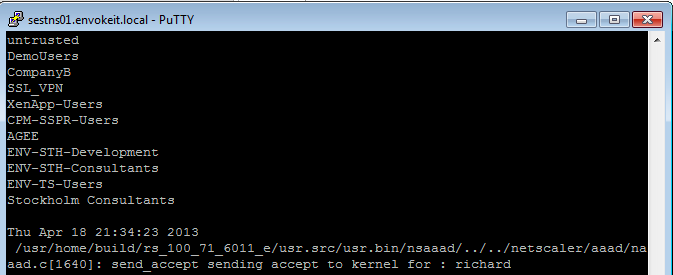
At the top of the output you see all the AD groups that I’m a member of that needs to match the group that you like to use on the NetScaler side, and last you see that accept from AD for my authentication request.
Then you know that you’re authentication ok, but which of the session polices are we hitting? Then you need to have a look at this great command:
nsconmsg -d current -g pol_hits
This is the output when I access using my Receiver on OS X:

New v3 #AWS CloudFormation Template for #XenApp with support for #NetScaler and #StoreFront
Great info and post from Peter Bats!
Since Paul Wilson and myself first introduced a CloudFormation template in the blog “Jumpstarting your XenDesktop Farm in AWS with a CloudFormation Template,” we’ve added support for multiple Regions and Availability Zones in a v2 version of this CloudFormation template in the blog “Announcing the Multi-Region AWS CloudFormation Template for XenDesktop”.
We are now announcing the third version of our AWS CloudFormation template which adds the new Asia Pacific Sydney region and support for StoreFront and NetScaler Access Gateway Enterprise. This release makes use of the NetScaler VPX instances available via AWS MarketPlace, and replaces Web Interface with StoreFront to be able to support all the advanced features of our latest Citrix Receivers.
Version 3 of the CloudFormation JSON template can be downloaded from here.
We’ve also made a video available for you that walks you through the whole process on Citrix TV. Check it out here.
For detailed instructions on using the v3 CloudFormation template, download the setup guide here.
Using this new template, in only a couple of hours you’ve constructed a XenApp farm in your selected Region within the AWS cloud using Netscaler and StoreFront technology. You can use the farm for a number of purposes, including:
- Application Testing
- Business Continuity
- Proof-of-Concept
- Testing XenApp performance in the cloud
- Learning how to manage AWS resources
We welcome your…
Continue reading here!
//Richard
#Citrix #StoreFront Slowness, Join and Replication issue – check list!
Ok, I guess that you may have seen issue with StoreFront before… and it you have not then good for U!
But in the case that you have experience it here are a couple of things that you can do and hopefully it solves your issue with slow StoreFront console startup, server join issues or replication issues. Sometimes I’ve seen that the join, replication and slowness is ok and the process goes through. But then all of a sudden you get an error and the propagation fails… and this can be because of a timeout in the StoreFront process that you’ve initiated.
I already assume that you’ve checked the basic stuff.. that the servers can reach each other (ping server name and FQDN etc. and that there are no FW issues)….
You may have an issue because you/your server cannot reach the Internet, and some of the components of the product is signed with SSL certificates and StoreFront will try to perform a check whether the publishers certificate is ok or not. So if your servers are behind a proxy serevr that you usually configure in your browser to be able to connect from your companies internal network to the Internet then you should do the following.
1. Log on to your first StoreFront server and create a copy of the original aspnet.config file under C:\Windows\Microsoft.NET\Framework\v2.0.50727 (verify which framework version that your app is using in IIS and modify that appropriate aspnet.config file, more info about this change can also be found here and is for Web Interface but is also applicable to StoreFront)
2. Open Notepad as an Admin (if you have UAC of course enabled) and open the asp net.config file

It will have the content as described by the picture above, add this line to it: <generatePublisherEvidence enabled=”false”/>
#Citrix #StoreFront Planning Guide
Ok, this product has caused some headache since it was released. And I must say that this guide is something that Citrix should have release a long time ago… there are so many companies out there struggling with how to deal with Web Interface being faced out and how/what to do with StoreFront!
So enjoy!
Download StoreFront Planning Guide!
//Richard
SSO to StoreFront not working in CVPN mode – #Citrix, #NetScaler, #StoreFront
Single Sign-On from Access Gateway to StoreFront not working in CVPN mode
There is yet another “thing” to have in mind when setting up Access Gateway and StoreFront in CVPN mode!
It’s been an interesting day (or days/weeks/months I must admit) with some “issues” with a NetScaler ADC, Access Gateway with CVPN profiles and StoreFront 1.2. And one thing that we have been struggling with was Single Sign-On to StoreFront when we had the AG configured for CVPN access. And it was just this environment where I’ve seen this issue!!
After a lot of troubleshooting the Citrix guys came up with an explanation on why SSO from AG doesn’t work in this specific environment! And it’s not an obvious one to find I must say… but I now understand why it doesn’t work!
So let’s explain the design reason for why it doesn’t work (so bear with me, solution at the end!!)…
The following picture tries to give a VERY rough picture of how it could look like, clients on the Internet on the left, then a NetScaler ADC with the Access Gateway feature enabled and a vServer configured. This AG vServer has session policies and profiles for ICA proxy (old traditional ICA proxy policy) and the little newer CVPN mode. And YES; I’ve left out a lot of stuff like AD etc. to simplify this picture A LOT…

The overall idea and config is that AG authenticates the user and then shall do SSO to StoreFront. The CVPN policy have been created according to all best practices etc. (Citrix CloudGateway Express 2.0 – Implementation Guide).
But SSO still doesn’t work!! If you login through a browser when having the CVPN policy linked to the vServer you’ll see that authentication works perfectly but then when it tries to passthrough the authentication to StoreFront it fails.
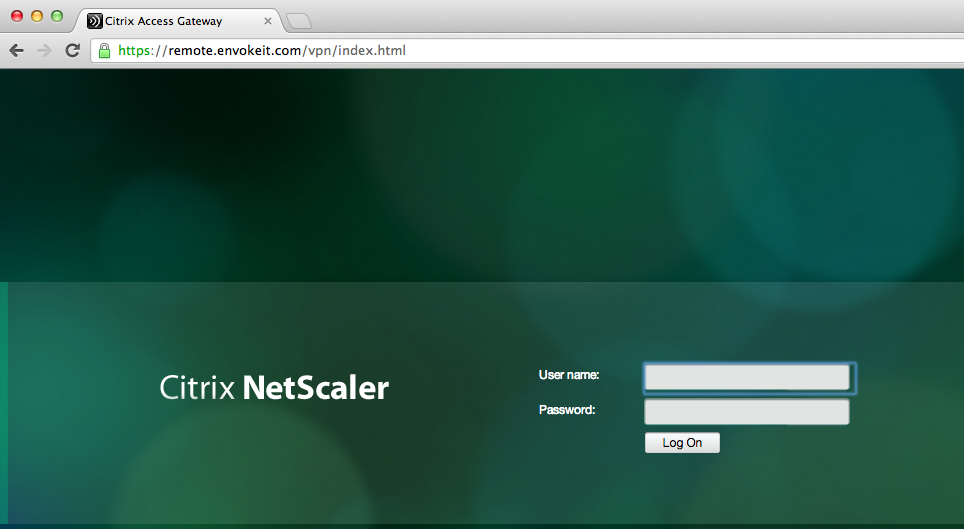
This picture just shows the login to the NetScaler ADC Access Gateway vServer:




 The IT Melting Pot!