Archive
#Citrix Knowledge Center Top 10 – March 2013
Citrix Support is focused on ensuring Customer and Partner satisfaction with our products.
One of our initiatives is to increase the ability of our Partners and Customers to leverage self-service avenues via our Knowledge Center.
Find below the Citrix Knowledge Center Top 10 for March 2013.
Top 10 Technical Articles
| Article Number | Article Title |
|---|---|
| CTX129229 | Recommended Hotfixes for XenApp 6.0 and Later on Windows Server 2008 R2 |
| CTX129082 | Application Launch Fails with Web Interface using Internet Explorer 9 |
| CTX804493 | Users Prompted to Download ICA File, Launch.ica, Instead of Launching the Connection |
| CTX132875 | Citrix Receiver Error 2320 |
| CTX105793 | Error: Cannot connect to the Citrix server. Protocol Driver Error |
| CTX127030 | Citrix Guidelines for Antivirus Software Configuration |
| CTX115637 | Citrix Multi-Monitor Configuration Settings and Reference |
| CTX133997 | Citrix Receiver 3.x – Issues Fixed in This Release |
| CTX325140 | Manually and Safely Removing Files after Uninstalling the Receiver for Windows |
| CTX101644 | Seamless Configuration Settings |
Top 10 Whitepapers
| Article Number | Article Title |
|---|---|
| CTX131577 | XenApp 6.x (Windows 2008 R2) – Optimization Guide |
| CTX132799 | XenDesktop and XenApp Best Practices |
| CTX101997 | Citrix Secure Gateway Secure Ticket Authority Frequently Asked Questions |
| CTX136546 | Citrix Virtual Desktop Handbook 5.x |
| CTX136547 | StoreFront Planning Guide |
| CTX133185 | Citrix CloudGateway Express 2.0 – Implementation Guide |
| CTX129761 | XenApp Planning Guide – Virtualization Best Practices |
| CTX134081 | Planning Guide – Citrix XenApp and XenDesktop Policies |
| CTX130888 | Technical Guide for Upgrading/Migrating to XenApp 6.5 |
| CTX122978 | XenServer: Understanding Snapshots |
Top 10 Hotfixes
| Article Number | Article Title |
|---|---|
| CTX136714 | Hotfix XS61E016 – For XenServer 6.1.0 |
| CTX132122 | Hotfix Rollup Pack 1 for Citrix XenApp 6.5 for Microsoft Windows Server 2008 R2 |
| CTX126653 | Citrix Online Plug-in 12.1.44 for Windows with Internet Explorer 9 Support |
| CTX136483 | Hotfix XS61E014 – For XenServer 6.1.0 |
| CTX133882 | Hotfix Rollup Pack 2 for Citrix XenApp 6 for Microsoft Windows Server 2008 R2 |
| CTX133066 | 12.3 Online Plug-In – Issues Fixed in This Release |
| CTX136253 | Hotfix XS61E010 – For XenServer 6.1.0 |
| CTX136482 | Hotfix XS61E013 – For XenServer 6.1.0 |
| CTX136085 | Hotfix XA650R01W2K8R2X64061 – For Citrix XenApp 6.5 |
| CTX136674 | Hotfix XS61E012 – For XenServer 6.1.0 |
Top 10 Presentations
| Article Number | Article Title |
|---|---|
| CTX135521 | TechEdge Barcelona 2012 PowerPoint and Video Presentations – Reference List |
| CTX129669 | TechEdge 2011 – Overview of XenServer Distributed Virtual Switch/Controller |
| CTX121090 | Planning and implementing a Provisioning Server high availability (HA) solution |
| CTX133375 | TechEdge 2012 PowerPoint and Video Presentations – Reference List |
| CTX135356 | TechEdge Barcelona 2012 – Understanding and Troubleshooting ICA Session Initialisation |
| CTX135358 | TechEdge Barcelona 2012 – XenDesktop Advanced Troubleshooting |
| CTX133374 | TechEdge 2012 – Monitoring your NetScaler Traffic with AppFlow |
| CTX135361 | Troubleshooting Tools: How to Isolate and Resolve Issues in your XA and XD Env Rapidly |
| CTX135360 | TechEdge Barcelona 2012 – Planning, Implementing and Troubleshooting PVS 6.x |
| CTX135357 | TechEdge Barcelona 2012 – Implementing and Troubleshooting SF and Rec for Windows |
Top 10 Tools
| Article Number | Article Title |
|---|---|
| CTX122536 | Citrix Quick Launch |
| CTX135075 | Citrix Diagnostics Toolkit – 64bit Edition |
| CTX130147 | Citrix Scout |
| CTX111961 | CDFControl |
| CTX106226 | Repair Clipboard Chain 2.0.1 |
| CTX109374 | StressPrinters 1.3.2 for 32-bit and 64-bit Platforms |
| CTX124406 | StressPrinters 1.3.2 for 32-bit and 64-bit Platforms |
| CTX113472 | Citrix ICA File Creator |
| CTX123278 | XDPing Tool |
Continue reading here!
//Richard
How to check which #NetScaler policy that your #Citrix #Receiver or web browser hits?
Ok, this is a common issue that you’ll end up in when setting up Access Gateway access scenarios:
How do you know which policy that is hit when your different Receivers are logging in?
Well, there are a couple of nice commands that can help you troubleshooting your access scenario! I guess that most of you have a simple scenario where you have one domain to authenticate against and some simple PNA, CVPN and potentially SSL VPN policies and profiles to deal with, and they are all linked to the virtual server like something like this simple example:

But in more complex scenarios you may end up controlling which browser the user is accessing with (for giving nice error messages instead of Citrix default messages when users may use an unsupported browser etc.), or when you have multiple AD domains and AD groups to link different policies to etc. Then it may be complex and you have multiple policies and profiles for the same config with minor changes like the SSO domain name etc. So how do you then troubleshoot that easily?
First we have the must know command that hooks into the auth process of the NetScaler and gives you a view of the authentication process:
cat /tmp/aaad.debug
When you run that and you authenticate you’ll see the result of your auth process agains for instance LDAP and RADIUS sources like the result here when I logged in to our little environment:
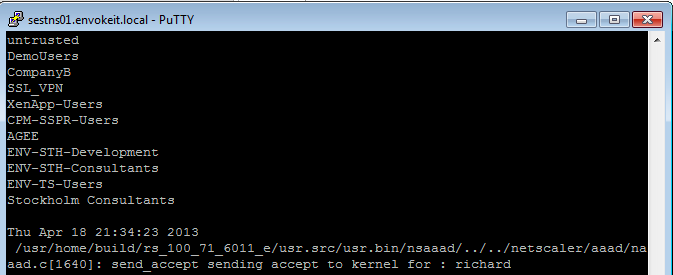
At the top of the output you see all the AD groups that I’m a member of that needs to match the group that you like to use on the NetScaler side, and last you see that accept from AD for my authentication request.
Then you know that you’re authentication ok, but which of the session polices are we hitting? Then you need to have a look at this great command:
nsconmsg -d current -g pol_hits
This is the output when I access using my Receiver on OS X:

New v3 #AWS CloudFormation Template for #XenApp with support for #NetScaler and #StoreFront
Great info and post from Peter Bats!
Since Paul Wilson and myself first introduced a CloudFormation template in the blog “Jumpstarting your XenDesktop Farm in AWS with a CloudFormation Template,” we’ve added support for multiple Regions and Availability Zones in a v2 version of this CloudFormation template in the blog “Announcing the Multi-Region AWS CloudFormation Template for XenDesktop”.
We are now announcing the third version of our AWS CloudFormation template which adds the new Asia Pacific Sydney region and support for StoreFront and NetScaler Access Gateway Enterprise. This release makes use of the NetScaler VPX instances available via AWS MarketPlace, and replaces Web Interface with StoreFront to be able to support all the advanced features of our latest Citrix Receivers.
Version 3 of the CloudFormation JSON template can be downloaded from here.
We’ve also made a video available for you that walks you through the whole process on Citrix TV. Check it out here.
For detailed instructions on using the v3 CloudFormation template, download the setup guide here.
Using this new template, in only a couple of hours you’ve constructed a XenApp farm in your selected Region within the AWS cloud using Netscaler and StoreFront technology. You can use the farm for a number of purposes, including:
- Application Testing
- Business Continuity
- Proof-of-Concept
- Testing XenApp performance in the cloud
- Learning how to manage AWS resources
We welcome your…
Continue reading here!
//Richard
#Citrix #NetScaler 10 on Amazon Web Services – #AWS
Yes, it’s here! 🙂
Mainstream IT is fast embracing the enterprise cloud transformation and selecting the right cloud networking technologies has thus quickly emerged to be an imperative. As mainstream IT adopts IaaS (Internet as a service) cloud services, they will require a combination of the elasticity and flexibility, expected of cloud offerings and the powerful advanced networking services used within emerging enterprise cloud datacenters.
Citrix® NetScaler® 10 delivers elasticity, simplicity and expandability of the cloud to enterprise cloud datacenters and already powers the largest and most successful public clouds in the world. With NetScaler 10, Citrix delivers a comprehensive cloud network platform that mainstream enterprises can leverage to fully embrace a cloud-first network design.
Citrix and Amazon Web Services (AWS) have come together to deliver industry-leading application delivery controller technology. NetScaler on AWS delivers the same services used to ensure the availability, scalability and security of the largest public and private clouds for AWS environments. Whether the need is to optimize, secure or control delivery of enterprise and cloud services, NetScaler for AWS can help accomplish these initiatives economically, and according to business demands.
The full suite of NetScaler capabilities such as availability, acceleration, offload and security functionality is available in AWS, enabling users to leverage tried-and-true NetScaler functionality such as rewrites and redirects, content caching, Citrix Access Gateway™ Enterprise SSL VPN, and application firewall within their AWS deployments. Additional benefits include usage of Citrix CloudBridge™ and Citrix Branch Repeater™ as a joint solution.
Citrix NetScaler transforms the cloud into an extension of the datacenter by eliminating the barriers to enterprise-class cloud deployments. Together, NetScaler and AWS delivers a broad set of capabilities for the Enterprise IT:
Hybrid Cloud Environment
Hybrid clouds that span enterprise datacenters and extend into AWS can benefit from the same cloud networking platform, significantly easing…
Continue reading here!
//Richard
Configuring Email-Based Account Discovery for #Citrix #Receiver
Check out this great blog post from Avinash Golusula:
Configuring Email-Based Account Discovery
1 Add DNS Service Location (SRV) record to enable email based discovery
During initial configuration, Citrix Receiver can contact Active Directory Domain Name System (DNS) servers to obtain details of the stores available for users. This means that users do not need to know the access details for their stores when they install and configure Citrix Receiver. Instead, users enter their email addresses and Citrix Receiver contacts the DNS server for the domain specified in the email address to obtain the required information.
To enable Citrix Receiver to locate available stores on the basis of users’ email addresses, configure Service Location (SRV) locator resource records for Access Gateway or StoreFront/AppController connections on your DNS server. If no SRV record is found, Citrix Receiver searches the specified domain for a machine named “discoverReceiver” to identify a StoreFront/AppController server.
You must install a valid server certificate on the Access Gateway appliance and StoreFront/AppController server to enable email-based account discovery. The full chain to the root certificate must also be valid. For the best user experience, install either a certificate with a Subject or Subject Alternative Name entry of discoverReceiver.domain, or a wildcard certificate for the domain containing your users’ email accounts.
To allow users to configure Citrix Receiver by using an email address, you need to add a SRV record to your DNS zone.
- Log in to your DNS server
- In DNS > Right-click your Forward Lookup Zone
- Click on Other New Records

- Scroll down to Service Location (SRV)
- Configuring Email-Based Account Discovery
- Choose Create Record

How does #Citrix #NetScaler SDX isolate its instances?
Ok, I received this question the other day and this article is really spot on! Get a cup of coffee and enjoy! 😉
And remember this: YOU CAN ONLY HAVE 7 INSTANCES/1Gbps NIC!!!! So if you intend to host more than 7 VPX’s on your SDX then ensure that you plan your network design if you use 1Gbps otherwise go for the 10Gbps ports and SPFS.
NetScaler SDX Appliance with SR-IOV and Intel-VTd
This article contains information about the Single Root I/O Virtualization (SR-IOV) and Intel Virtualization Technology for Directed I/O (Intel-VTd) technology and how NetScaler appliance uses this technology to achieve fully isolated high performance NetScaler instances.
NetScaler SDX Appliance with SR-IOV and Intel-VTd
Server Virtualization presents both a tremendous opportunity and a major challenge for Enterprise Data Centers and Cloud Computing infrastructure. Current Hypervisors already facilitate the consolidation of many servers that are not utilized efficiently to a smaller number of physical servers delivering better space utilization, lower power consumption, and reduced overhead costs.
Virtualization architectures are built on a virtualization layer called a Virtual Machine Monitor or Domain 0 that becomes the primary interface between a virtual machine and the physical hardware. Even though virtualization allows multiple virtual machines to share the same hardware, it also creates additional overhead and can lower server performance as it becomes the bottleneck between a virtual machine and input/output (I/O) hardware as the number of virtual machines increase.
The NetScaler SDX appliance breaks through these performance bottlenecks by leveraging next generation of I/O virtualization technology called SR-IOV as defined by the PCI-Special Interest Group (SIG). SR-IOV enabled Intel chips along with Intel VT-d enable the NetScaler SDX appliance to significantly reduce virtualized network processing overheads, and provide more secure and predictable mechanisms for sharing I/O device among multiple virtual machines.
Intel Implementation of Single Root I/O Virtualization
Intel has worked with the PCI-SIG to define the SR-IOV specification. As shown in the following image, SR-IOV provides dedicated I/O to virtual machines bypassing the software virtual switch in the Virtual Machine Manager (VMM) completely, and Intel Ethernet Controllers improve data isolation among virtual machines. Another feature of SR-IOV is a feature called Virtual Functions. These are Lightweight PCIe functions that allow a single physical port to look like multiple ports. Therefore, multiple virtual machines can now have direct assignment on the same port. This increases the scalability of the number of virtual machines on the machine through more efficient I/O device sharing.

Intel VT-d Technology
Intel VT-d is a hardware enhancement for I/O virtualization that is implemented as part of core logic chipset. Intel VT-d defines an architecture for DMA remapping that improves system reliability, enhances security and…
Continue reading here!
//Richard
#Citrix #NetScaler Insight (NI) – Citrix TV videos
Citrix has released some videos related to NetScaler Insight. Have a look at them and try it out!
Setting up NetScaler Insight 1.0
NetScaler Insight – Adding NetScaler Instances to NetScaler Insight
Application visibility using NetScaler Insight
NetScaler Insight – Adding NetScaler Instances to NetScaler Insight
Cheers!
//Richard
#Citrix #CloudBridge Connecting to Microsoft #Azure – Technology Preview
This is really interesting!!! Can’t wait to try it out, I just got Azure up and running with a couple of VM’s in it and will set this up and try it ASAP! 🙂
CloudBridge Connecting to Microsoft Azure
Release Date: Feb 15, 2013
| Citrix CloudBridge connects enterprise datacenters to external clouds and hosting environments, making the cloud a secure extension of the enterprise network.
This technology preview offers standard based secure connectivity to Microsoft Azure. With this enhancement, a customer can connect their enterprise data center to the Azure VPN gateway and access the IaaS and PaaS offerings from Microsoft. The following are the key points to note :
Images and Licenses: We are making available virtual appliances running on XenServer (xva images). These appliances need EVAL licenses. Please follow links to sign-up and get these EVAL licenses. To get started:
Helpful Resources:
Have Questions? Go to the CloudBridge discussion forum to get help from… |
Continue reading here!
//Richard
SSO to StoreFront not working in CVPN mode – #Citrix, #NetScaler, #StoreFront
Single Sign-On from Access Gateway to StoreFront not working in CVPN mode
There is yet another “thing” to have in mind when setting up Access Gateway and StoreFront in CVPN mode!
It’s been an interesting day (or days/weeks/months I must admit) with some “issues” with a NetScaler ADC, Access Gateway with CVPN profiles and StoreFront 1.2. And one thing that we have been struggling with was Single Sign-On to StoreFront when we had the AG configured for CVPN access. And it was just this environment where I’ve seen this issue!!
After a lot of troubleshooting the Citrix guys came up with an explanation on why SSO from AG doesn’t work in this specific environment! And it’s not an obvious one to find I must say… but I now understand why it doesn’t work!
So let’s explain the design reason for why it doesn’t work (so bear with me, solution at the end!!)…
The following picture tries to give a VERY rough picture of how it could look like, clients on the Internet on the left, then a NetScaler ADC with the Access Gateway feature enabled and a vServer configured. This AG vServer has session policies and profiles for ICA proxy (old traditional ICA proxy policy) and the little newer CVPN mode. And YES; I’ve left out a lot of stuff like AD etc. to simplify this picture A LOT…

The overall idea and config is that AG authenticates the user and then shall do SSO to StoreFront. The CVPN policy have been created according to all best practices etc. (Citrix CloudGateway Express 2.0 – Implementation Guide).
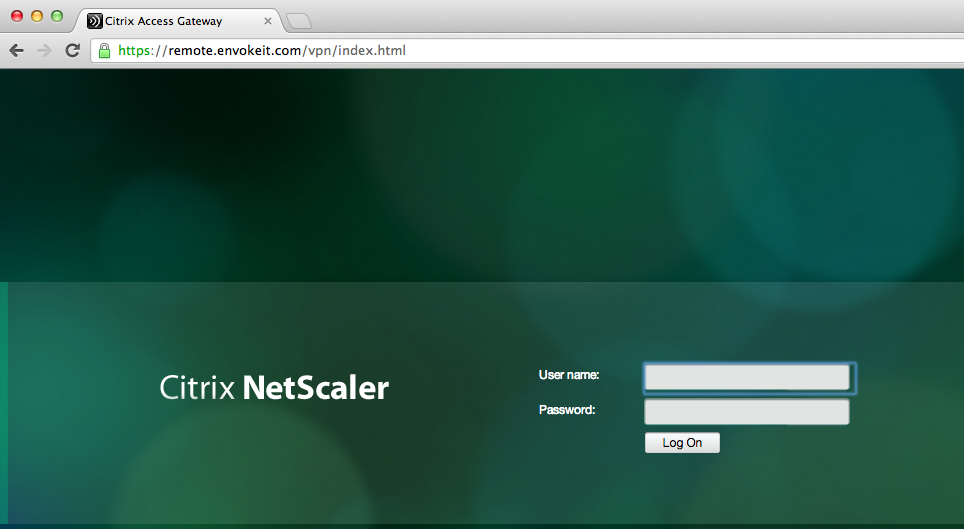
But SSO still doesn’t work!! If you login through a browser when having the CVPN policy linked to the vServer you’ll see that authentication works perfectly but then when it tries to passthrough the authentication to StoreFront it fails.
This picture just shows the login to the NetScaler ADC Access Gateway vServer:
Host checks/EPA scans are not for everyone – #Citrix, #NetScaler, #AccessGateway
This is an interesting blog post from Citrix… It captures a scenario that I know one of my previous customers was thinking of, so have a look at it!
The main thing that think of when reading this though is that EPA scans are NOT for everyone, I agree. And please also read my earlier posts on why it cannot be done with todays products from Citrix.
#Citrix #SmartAccess = A complete story or not? – #NetScaler #AGEE #EPA
Even though the latest Receiver Receivers changed some scenarios and enables host checks/EPA scans it still doesn’t provide the full picture. But I’ll be publishing a more detailed picture on why later, some late night I’ll be able to complete it! 😉
Here you have the blog post from Tobias Frigger:
A customer of one of my Citrix Consulting colleagues recently came up with an interesting request.
Like many others they are using Citrix NetScaler’s Access Gateway Enterprise Edition module to grant remote secure remote access to applications and desktops.
Additionally, they use a client management and software distribution solution to deploy the EPA plugin to client computers and therefore wanted to suppress Access Gateway offering the EPA scan plugin for download through the browser. This introduces some additional level of control over which client is entitled to connect through Access Gateway.
An approach restricting certain user groups from logging in by using group memberships is a more common scenario, but in this case the customer intended to restrict the end points and not the users. When end users lack administrative permissions to install custom software, preventing the download is indeed an effective measure.
A job for Citrix Consulting!
As you know, Access Gateway Enterprise Edition offers two ways of running Endpoint Analysis (EPA) scans – before and after authentication. Consequently, there are two procedures.
The formal requirements
- Remove the download button displayed when accessing the AGEE virtual server and the plugin is not detected by the browser or if the plugin is outdated
- Alter the message text such that it refers user to contact their system administrator if they think the plugin should be installed.
- When using a post-authentication EPA scan, add a “logout” button.

Backup
As a precaution, we want to make backup copies…
Continue reading here!
//Richard




 The IT Melting Pot!