Archive
MS to Release Emergency IE Patch on Monday – #Microsoft, #IE – via @appcompatguy
The patch will fix a vulnerability in Internet Explorer 6, 7 and 8
Sun, January 13, 2013
IDG News Service — Microsoft will release a patch on Monday for older versions of its Internet Explorer browser, deviating from its normal repair schedule due to the seriousness of the problem.
The vulnerability, which is present in IE 6, 7 and 8, is a memory corruption issue. It can be exploited by an attacker via a drive-by download, a term for loading a website with attack code that delivers malware to a victim’s computer if the person merely visits the website.
Microsoft released a quick fix for the issue earlier this month, but did not have a more permanent patch ready when it released its monthly batch of patches last Tuesday. The company will occasionally release an emergency patch if the software vulnerability is considered a high risk.
“While we have still seen only a limited number of customers affected by the issue, the potential exists that more customers could be affected in the future,” wrote Dustin Childs, group manager for the company’s Trustworthy Computing Group, on a company blog on Sunday.
The patch, which will be released at 10 AM PST, will be distributed through Windows Update. Childs wrote users…
Continue reading here!
//Richard
Lifecycle Milestones for Citrix Receiver – #Citrix, #Receiver
For each major version (e.g., v3.0) of a Citrix Receiver for Windows, Mac, Linux, Java, or WinCE, customers will receive a minimum lifecycle of four years. The lifecycle consists of a Mainstream Maintenance Phase for at least the first three years followed by an Extended Maintenance Phase for the remainder of the lifecycle. The specific dates for each major release of these components will be posted in the tables below.
During the Mainstream Maintenance phase, customers that remain current in a Citrix Technical Support program receive 24x7x365 worldwide support. Support includes assistance from experts and connects you to the latest troubleshooting tools, techniques and resources you need to protect your Citrix investment. Citrix will provide code-level maintenance in the form of minor version releases, and in some cases, Cumulative Updates (maintenance releases containing multiple fixes) when Citrix determines they are required to resolve issues with Receiver. The release of a minor version or Cumulative Update may define a new maintenance baseline. Citrix customers may be required to upgrade to a specific minor version or Cumulative Update to receive continued maintenance. When a new maintenance baseline is defined, Citrix will continue to provide support for each minor version (e.g., v3.3) for a minimum of 12 months after the release of the next minor version (e.g., v3.4). Minor versions may include functional enhancements as well as code-level maintenance.
During the Extended Maintenance Phase, technical support continues as before but code-level maintenance will be limited to security-related issues deemed critical by Citrix.
For Citrix Receiver for Android, Chromebook, iOS, or Windows 8/RT, customers that remain current in a Citrix Technical Support program receive 24x7x365 worldwide support for the version of Receivers that are currently available from the respective vendor app store. Code-level maintenance is provided with the next version made available in the respective vendor app store.
Lifecycle dates for Citrix Receiver for Windows, Mac, Linux, Java, and WinCE
The tables below list the major versions…
Put Citrix Receiver App Banners in Web Interface for Android and iOS – #Citrix, #Receiver
A good blog post from Roy Tokeshi about Citrix Receiver setup and provisioning.
I’ve used the Citrix Mobile Receiver Setup URL Generator for quite some time and like it (but now of course you’ll get pretty far with email-based enrolment if you can use that), but it’s still valid for some use cases and scenarios. But to add the banner to the download of the app itself is something I’ve not done, interesting!
One of the cool things you can do to help your users connect to your XenDesktop and XenApp environments is the Citrix Mobile Receiver Setup URL Generator at:http://community.citrix.com/MobileReceiverSetupUrlGenerator/

The output of this generator is a couple of links. The first is an iOS configuration link and the second is the Android configuration link. What is great about this is once the user gets this link on their iOS or Android device, via email, text message, or carrier pigeon with a micro SD card strapped to its leg , all the user has to do is click on the link and the local instance of the mobile Citrix Receiver is auto-configured.
- VCDC Email
- Application warning iOS
Something that Apple had made available is called a Smart App Banner. (I suggest that you don’t shout “Smart App Banners!” across the cube farm unless you want to start a bunch of prairie dogging or HR emails.) Regardless, the folks at Apple created an easy way for you to advertise the Citrix Receiver app itself from within web interface. At Citrix Systems we have had had a couple of different temporarily consistent hostnames we point at to get our apps and desktops. Among my customers, apps.company.com or atwork.company.com have popped up a few times. The point being, the user puts a name in the browser and the web interface client detect takes over, suggests a client version for Mac, Windows, Java and off they go to application or desktop nirvana. But what about the lonely neglected mobile devices. We tell our bosses that we need iPhones, iPads, and Androids for work. So the smart thing to do is to get a few work apps on there before bosses catch us playing Angry Birds, or Radical.FM So the question is, “How do I use this on my web interface?” That is an excellent question. We are going to take the cute little meta tag referenced in that Apple Dev article and paste that right into the login.aspx file in our web interface site. For the purposes of demonstration, I’m going to use our Virtual Computing Demo Center or VCDC as an example. The default web interface that acts as a front end of the demo instance is hosted on a virtual machine acting as the DDC for XenDesktop. The screenshots I am using are based on the connection I make to a XenApp desktop logged on as administrator. \\ddc\c$\inetpub\wwwroot\Citrix\DesktopWeb\auth\login.aspx looked like this:

Now, modified at the top line it looks like this.

Remember that this is something that is only supported in iOS and in fact from the default Safari browser. Here are some screenshots…
Continue reading here!
//Richard
Magic Quadrant for Endpoint Protection Platforms – #Gartner, #EPP via @rspruijt
Magic Quadrant for Endpoint Protection Platforms
VIEW SUMMARY
The endpoint protection platform provides a collection of security utilities to protect PCs and tablets. Vendors in this market compete on the quality of their protection capabilities, the depth and breadth of features, and the ease of administration.

Market Definition/Description
The enterprise endpoint protection platform (EPP) market is a composite market primarily made up of collections of products. These include:
- Anti-malware
- Anti-spyware
- Personal firewalls
- Host-based intrusion prevention
- Port and device control
- Full-disk and file encryption, also known as mobile data protection
- Endpoint data loss prevention (DLP)
- Vulnerability assessment
- Application control (see Note 1)
- Mobile device management (MDM)
These products and features are typically centrally managed and ideally integrated by shared policies.
DLP, MDM and vulnerability assessment are also evaluated in their own Magic Quadrant or MarketScope analyses. Longer term, portions of these markets will get subsumed by the EPP market, as the personal firewall, host intrusion prevention, device control and anti-spyware markets have in the past. EPP suites are a logical place for convergence of these functions. Indeed, 53% of organizations in a recent Gartner survey1 already use a single vendor for several of these functions, or are actively consolidating products. In particular, mobile data protection is the leading complement to EPP and purchasing decisions regarding the two products are increasingly made together. For most organizations, selecting a mobile data protection system from their incumbent EPP vendors will meet their requirements.
In 2012, the large enterprise EPP market is still dominated by Symantec, McAfee and Trend Micro, which together represent approximately 68% of the total revenue of Magic Quadrant participants. Sophos and Kaspersky Lab are the two other global leaders that are competitive across multiple functions and geographies, and push the combined Leaders quadrant market share to 85%. Despite the introduction of new players, the displacement of incumbents is still a significant challenge in the large enterprise market. The biggest impact of the Magic Quadrant Challengers and Visionaries is to push the dominant market players to invest in new features and functionality (sometimes via acquisitions) to stay ahead, and to keep pricing rational. In the less demanding small and midsize market, competition is more intense. A number of Niche Player solutions are dominant in specific regions.
The total EPP revenue of the Magic Quadrant participants at year-end 2011 was roughly $2.8 billion, up 4% from 2010. We attribute this growth primarily to increased buying of more-expensive suites, offset by lower prices for low-end malware-only solutions. Consequently, EPP revenue growth is more a result of an inflow of revenue from other markets. We anticipate that growth will continue to be in the low single digits in 2013.
Microsoft is the best vendor in a position to challenge the incumbent Leaders, primarily due to attractive pricing in its enterprise agreements. Approximately one-third of enterprise buyers1 indicate they are actively considering Microsoft or plan to do so during their next renewal periods. However, Microsoft’s slow development, the lack of a single unified security management interface and mediocre test results will temper its adoption. Longer term, we believe that increased displacement of Windows endpoints with application-controlled OSs (such as Microsoft WinRT and Apple’s iOS and OS X Mountain Lion) is the biggest market threat. These solutions shift the value proposition of EPP solutions from traditional anti-malware to MDM and data protection capabilities.
Magic Quadrant

Source: Gartner (January 2013)
Vendor Strengths and Cautions
Arkoon Network Security
Arkoon Network Security’s StormShield EPP solution (formerly offered by SkyRecon Systems) is designed as a seamless integrated EPP with a focus on behavioral protection. Arkoon’s Ability to Execute score is hampered by its relatively small market share and limited geographic presence, as well as its still-maturing management capabilities….
Continue reading here!
//Richard
Windows utilities and tools, accessible from the web. – #Windows, #SysInternals
Ok, yet another little “old school” tip of the day! I was troubleshooting a setup and really needed to troubleshoot a process and what it was doing. And nowadays you don’t have to install the tools etc on the box! Yes, you can run it straight from the web if needed and most of the tools you need daily from a windows perspective are either installable easily on the box without a hazzle or you can run them from here;
Sysinternals Live
Sysinternals Live is a service that enables you to execute Sysinternals tools directly from the Web without hunting for and manually downloading them. Simply enter a tool’s Sysinternals Live path into Windows Explorer or a command prompt as http://live.sysinternals.com/<toolname> or \\live.sysinternals.com\tools\<toolname>.
You can view the entire Sysinternals Live tools directory in a browser at http://live.sysinternals.com.
What’s new with Access Gateway MAC Plug-in release 2.1.4 – #Citrix, #AG, #Receiver
Another great blog post from Prashant! You rock! 😉
The new Citrix Access Gateway Appliance release 10.0.71.6014.e brings along with it the new MAC plug-in release 2.1.4. MAC OS, along with Microsoft Windows, are the two main desktop platforms supported by Citrix Access Gateway for full SSL Tunnel. The AG plug-in is most commonly used in tandem with Citrix Receiver, to provide access to your virtual applications and desktops, provided by XenApp & XenDesktop respectively. The Receiver and AG plug-in also work together to provide end users access to intranet web and SaaS resources via Citrix CloudGateway.
The new 2.1.4 plug-in brings the following new enhancements for Citrix Receiver users:
- Seamless Desktop Receiver experience: With this release of Access Gateway plug-in, end users will no longer have to sign into the plug-ins as a manual step, to access apps / sites that require a full SSL tunnel. Receivers automatically launch a SSL VPN session via Access Gateway as needed. Result is – end user just deals with Citrix Receiver and Receiver internally (and automatically) deals with Access Gateway on user’s behalf.
- EPA with ICAProxy / CVPN: Receivers can now seamlessly launch AG plug-ins to connect to an Access Gateway vServer configured with End Point Analysis policies, in ICAProxy and CVPN modes as well. Earlier, this was supported only for Full Tunnel access.
- ….
Continue reading here!
//Richard
Great UI Theme improvement setting – #AccessGateway, #NetScaler, #Citrix
I must say finally! It’s not a 100% yet for everyone out there but it’s a step in the right direction. The NetScaler, Access Gateway, Web Interface, StoreFront and Receiver has not really been in synch when it comes to UI and end-user experience…. But now Citrix has improved it!
Access Gateway is a secure remote access product and hence tends to be the entry point for corporate users, wanting to access their enterprise applications and desktops. Given this, it makes sense for corporates, to try and customize the logon experience on Access Gateway, to match their corporate look and feel.
Access Gateway has always allowed for this customization, though, it’s been somewhat of a tedious process. With the new 10.0.71.6014.e release, we are making an attempt to simplify this experience.
UI Customization on Access Gateway is a multi-step process:
- Access the built in theme web pages and customize them, to match the corporate requirements
- Apply the modified theme (collection of web pages) at the right location
- Modify certain scripts to make this change persistent
- Every time the firmware has to be upgraded, take a backup of the customized pages and scripts and re-apply the same after the upgrade.
A quick Google search will give you a number of helpful and very accurate blogs/articles, on how to tweak the web pages to customize and create your corporate look and feel. Some of my favorites are:
- http://blogs.citrix.com/2012/04/19/green-bubble-theme-for-citrix-netscaler/
- http://jariangibson.com/2012/04/16/apply-citrix-receiver-theme-to-netscaleraccess-gateway-10/
With this new release, we have automated all the other steps (i.e. 2-4) for you. Instead of having to worry about how to apply this theme, or having to take backups every time you upgrade, the new release will automatically handle this for you.
To see the new offering in this r…

Continue reading here!
//Richard
Correct – SCCM 2012 doesn’t support SQL Mirroring! via @agerlund – #SCCM
Beware before upgrading to SP1. SCCM does not support database mirroring and if you’ve configured it don’t just try to upgrade! Thx @agerlund!
As stated here SQL mirroring is not supported for the ConfigMgr database. However a technet article do not stop all database administrors’s from enabling the setting anyway believing that it will not cause any issues – but boy it does. SQL mirroring will break the SCCM SP1 upgrade process and leave the primary site server in a non-functional mode where a site restore is the only way back.
The issue can be found in the ConfigMgrSetup.log file.
Continue reading here!
//Richard
Forrester: 84% Of U.S. Adults Now Use The Web Daily, 50% Own Smartphones, Tablet Ownership Doubled To 19% In 2012
Forrester Research just published its annual “State of Consumers and Technology” report. As usual, it’s chock-full of interesting statistics about how U.S. consumers use the Internet, but the most interesting statistic is probably that the overall online penetration rate in the U.S. has stabilized at 79 percent (the same number Forrester found in 2011). That’s the percentage of U.S. adults that go online at least monthly. What has changed, however, is how many adults go online at least daily: In 2011, that was 78 percent of U.S. adults, and in 2012, Forrester reports that 84 percent now go online at least once per day.
One of the reasons for this is, of course, the growing smartphone and tablet penetration. Forrester found that about half of U.S. online adults now own a smartphone and two-thirds even own multiple connected devices. Tablet adoption doubled since 2011 and is now at 19 percent.
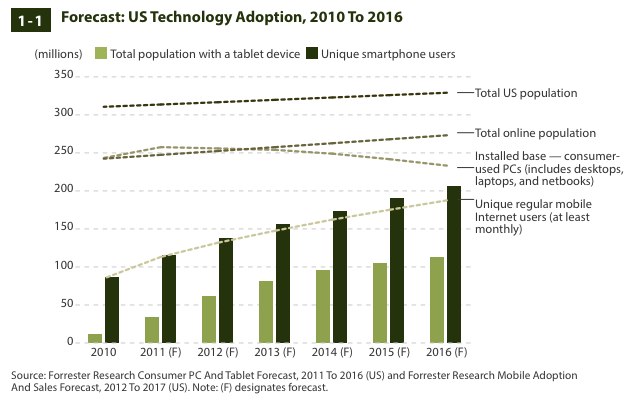
One trend that the Forrester report, which includes…
Continue reading here!
//Richard




 The IT Melting Pot!