Archive
#App-V and #XenDesktop 7 – #Citrix, #AppV
A couple of good posts from Citrix (Ram Kumar Mantena & Nagendra Kumar) around the support for App-V on XenDesktop 7 and what to think of etc.
Tips/Tricks for Using App-V Integration with XenDesktop 7.0
XenDesktop 7.0 is released and it supports both Apps and Desktop Virtualization. One of the key features of this release is support for Microsoft App-V. As this is the first release for App-V support, here are some tips/things to consider for an easy deployment of App-V 5.0 in a XenDesktop Environment.
- XenDesktop 7.0 supports Server based App-V deployment scenario where Admin uses App-V Publishing Server and Management Server to manage apps.
- Microsoft App-V client does not support more than 5 Publishing Servers. In Citrix Desktop Studio, although the admin can add one Management and one Publishing server through Studio UI, he can also add multiple Publishing Servers using low level SDKs. It is recommended to add only 5 Publishing Servers. Though Studio low level SDKs take more than five Publishing Servers, studio enumerates App-V apps from first 5 Publishing Servers.
- When adding the Management Server and Publishing Server in App-V publishing node, if the test connection fails and App-V Server is up and running, make sure WinRm is up and running.
- Once the Virtual Desktop Agent is installed on Server/Client, make sure CtxAppVCOMAdmin is member of Administrator group. This is required as some of the App-V operations on VDA side need administrator privileges. This is the user account pre-created by Citrix XenDesktop VDA installation. [CTX138057]
- It is recommended to enable SharedContentStoreMode…. Read more…
#Citrix Knowledge Center Top 10 – March 2013
Citrix Support is focused on ensuring Customer and Partner satisfaction with our products.
One of our initiatives is to increase the ability of our Partners and Customers to leverage self-service avenues via our Knowledge Center.
Find below the Citrix Knowledge Center Top 10 for March 2013.
Top 10 Technical Articles
| Article Number | Article Title |
|---|---|
| CTX129229 | Recommended Hotfixes for XenApp 6.0 and Later on Windows Server 2008 R2 |
| CTX129082 | Application Launch Fails with Web Interface using Internet Explorer 9 |
| CTX804493 | Users Prompted to Download ICA File, Launch.ica, Instead of Launching the Connection |
| CTX132875 | Citrix Receiver Error 2320 |
| CTX105793 | Error: Cannot connect to the Citrix server. Protocol Driver Error |
| CTX127030 | Citrix Guidelines for Antivirus Software Configuration |
| CTX115637 | Citrix Multi-Monitor Configuration Settings and Reference |
| CTX133997 | Citrix Receiver 3.x – Issues Fixed in This Release |
| CTX325140 | Manually and Safely Removing Files after Uninstalling the Receiver for Windows |
| CTX101644 | Seamless Configuration Settings |
Top 10 Whitepapers
| Article Number | Article Title |
|---|---|
| CTX131577 | XenApp 6.x (Windows 2008 R2) – Optimization Guide |
| CTX132799 | XenDesktop and XenApp Best Practices |
| CTX101997 | Citrix Secure Gateway Secure Ticket Authority Frequently Asked Questions |
| CTX136546 | Citrix Virtual Desktop Handbook 5.x |
| CTX136547 | StoreFront Planning Guide |
| CTX133185 | Citrix CloudGateway Express 2.0 – Implementation Guide |
| CTX129761 | XenApp Planning Guide – Virtualization Best Practices |
| CTX134081 | Planning Guide – Citrix XenApp and XenDesktop Policies |
| CTX130888 | Technical Guide for Upgrading/Migrating to XenApp 6.5 |
| CTX122978 | XenServer: Understanding Snapshots |
Top 10 Hotfixes
| Article Number | Article Title |
|---|---|
| CTX136714 | Hotfix XS61E016 – For XenServer 6.1.0 |
| CTX132122 | Hotfix Rollup Pack 1 for Citrix XenApp 6.5 for Microsoft Windows Server 2008 R2 |
| CTX126653 | Citrix Online Plug-in 12.1.44 for Windows with Internet Explorer 9 Support |
| CTX136483 | Hotfix XS61E014 – For XenServer 6.1.0 |
| CTX133882 | Hotfix Rollup Pack 2 for Citrix XenApp 6 for Microsoft Windows Server 2008 R2 |
| CTX133066 | 12.3 Online Plug-In – Issues Fixed in This Release |
| CTX136253 | Hotfix XS61E010 – For XenServer 6.1.0 |
| CTX136482 | Hotfix XS61E013 – For XenServer 6.1.0 |
| CTX136085 | Hotfix XA650R01W2K8R2X64061 – For Citrix XenApp 6.5 |
| CTX136674 | Hotfix XS61E012 – For XenServer 6.1.0 |
Top 10 Presentations
| Article Number | Article Title |
|---|---|
| CTX135521 | TechEdge Barcelona 2012 PowerPoint and Video Presentations – Reference List |
| CTX129669 | TechEdge 2011 – Overview of XenServer Distributed Virtual Switch/Controller |
| CTX121090 | Planning and implementing a Provisioning Server high availability (HA) solution |
| CTX133375 | TechEdge 2012 PowerPoint and Video Presentations – Reference List |
| CTX135356 | TechEdge Barcelona 2012 – Understanding and Troubleshooting ICA Session Initialisation |
| CTX135358 | TechEdge Barcelona 2012 – XenDesktop Advanced Troubleshooting |
| CTX133374 | TechEdge 2012 – Monitoring your NetScaler Traffic with AppFlow |
| CTX135361 | Troubleshooting Tools: How to Isolate and Resolve Issues in your XA and XD Env Rapidly |
| CTX135360 | TechEdge Barcelona 2012 – Planning, Implementing and Troubleshooting PVS 6.x |
| CTX135357 | TechEdge Barcelona 2012 – Implementing and Troubleshooting SF and Rec for Windows |
Top 10 Tools
| Article Number | Article Title |
|---|---|
| CTX122536 | Citrix Quick Launch |
| CTX135075 | Citrix Diagnostics Toolkit – 64bit Edition |
| CTX130147 | Citrix Scout |
| CTX111961 | CDFControl |
| CTX106226 | Repair Clipboard Chain 2.0.1 |
| CTX109374 | StressPrinters 1.3.2 for 32-bit and 64-bit Platforms |
| CTX124406 | StressPrinters 1.3.2 for 32-bit and 64-bit Platforms |
| CTX113472 | Citrix ICA File Creator |
| CTX123278 | XDPing Tool |
Continue reading here!
//Richard
How to check which #NetScaler policy that your #Citrix #Receiver or web browser hits?
Ok, this is a common issue that you’ll end up in when setting up Access Gateway access scenarios:
How do you know which policy that is hit when your different Receivers are logging in?
Well, there are a couple of nice commands that can help you troubleshooting your access scenario! I guess that most of you have a simple scenario where you have one domain to authenticate against and some simple PNA, CVPN and potentially SSL VPN policies and profiles to deal with, and they are all linked to the virtual server like something like this simple example:

But in more complex scenarios you may end up controlling which browser the user is accessing with (for giving nice error messages instead of Citrix default messages when users may use an unsupported browser etc.), or when you have multiple AD domains and AD groups to link different policies to etc. Then it may be complex and you have multiple policies and profiles for the same config with minor changes like the SSO domain name etc. So how do you then troubleshoot that easily?
First we have the must know command that hooks into the auth process of the NetScaler and gives you a view of the authentication process:
cat /tmp/aaad.debug
When you run that and you authenticate you’ll see the result of your auth process agains for instance LDAP and RADIUS sources like the result here when I logged in to our little environment:
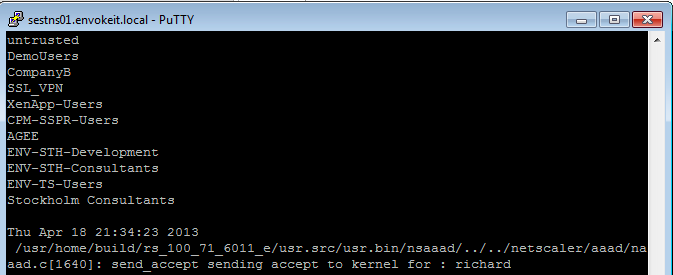
At the top of the output you see all the AD groups that I’m a member of that needs to match the group that you like to use on the NetScaler side, and last you see that accept from AD for my authentication request.
Then you know that you’re authentication ok, but which of the session polices are we hitting? Then you need to have a look at this great command:
nsconmsg -d current -g pol_hits
This is the output when I access using my Receiver on OS X:

Get Started with #SharePoint Server 2013 Quickly on #Windows #Azure
Another good blog posts by Bill Baer (Microsoft) that shows how easy it is to try out SharePoint Server 2013 on Azure!
In order to remain competitive in today’s business climate you need to be able to respond to change and challenges quickly. Sometimes that means adjusting your SharePoint infrastructure on a moment’s notice to maintain a competitive advantage.
Infrastructure as a Service solves these challenges through a ready-to-use, pay as you go solution which means you can deploy in hours as opposed to days, whether you’re looking to deploy a simple SharePoint-based Internet site or to quickly provision a development environment.
SharePoint 2013 on Windows Azure Virtual Machines enables you to rapidly deploy and host your business websites on a secure, scalable cloud infrastructure.
What are Windows Azure Virtual Machines?
Windows Azure Virtual Machines enable organizations to deploy custom Windows Server images to Windows Azure. Virtual Machines provide developers complete control of the application environment and allow easy migration of existing applications to the cloud. To learn more about Windows Azure Virtual Machines see also http://www.windowsazure.com/en-us/home/scenarios/virtual-machines/.
How can I benefit from Azure IaaS?
Business Mobility
Windows Azure Virtual Machines allow you to easily move your applications and infrastructure back and forth from on-premises to the cloud without requiring any changes to the existing code – if you’ve virtualized SharePoint 2013 in on-premises you can quickly and easily move your virtual hard drives between your datacenter and the cloud.
License Mobility
With License Mobility through Software Assurance, you can deploy certain server application licenses purchased under your Volume Licensing agreement in an Authorized Mobility Partner’s datacenter. To learn more about License Mobility see also http://www.microsoft.com/licensing/software-assurance/license-mobility.aspx . With License Mobility through Software Assurance, you can deploy certain server application licenses purchased under your Volume Licensing agreement in an Authorized Mobility Partner’s datacenter. Read more…
Vulnerability in Remote Desktop Client – #RDS
Microsoft Security Bulletin MS13-029 – Critical
Vulnerability in Remote Desktop Client Could Allow Remote Code Execution (2828223)
Published: Tuesday, April 09, 2013 | Updated: Wednesday, April 10, 2013
Version: 1.1
This security update resolves a privately reported vulnerability in Windows Remote Desktop Client. The vulnerability could allow remote code execution if a user views a specially crafted webpage. An attacker who successfully exploited the vulnerability could gain the same user rights as the current user. Users whose accounts are configured to have fewer user rights on the system could be less impacted than users who operate with administrative user rights.
This security update is rated Critical for Remote Desktop Connection 6.1 Client, Remote Desktop Connection 7.0 Client, and Remote Desktop Connection 7.1 Client where affected on Windows XP, Windows Vista, and Windows 7. It is rated Moderate for Remote Desktop Connection 6.1 Client, Remote Desktop Connection 7.0 Client, and Remote Desktop 7.1 Client where affected on Windows Server 2003, Windows Server 2008, and Windows Server 2008 R2. For more information, see the subsection, Affected and Non-Affected Software, in this section.
The security update addresses the vulnerability by modifying the way that Remote Desktop Client handles objects in memory. For more information about the vulnerability, see the Frequently Asked Questions (FAQ) subsection for the specific vulnerability entry under the next section, Vulnerability Information.
Recommendation. Most customers have automatic updating enabled…
Continue reading here!
//Richard
#Windows #Azure Virtual Machines and Virtual Network now are generally available
As I use to write; THIS IS INTERESTING! I think that Microsoft will take some market share for sure with their cloud service offerings!
Windows Azure Virtual Machines and Virtual Network now are generally available. We have new prices for Virtual Machines, Virtual Network, and Cloud Services.
Today is a major milestone for Windows Azure and all of our customers and partners. We are excited to announce that Windows Azure Virtual Machines and Windows Azure Virtual Network now are generally available. We also want to update you on new prices for Virtual Machines, Virtual Network, and Cloud Services.
Virtual Machines and Virtual Network help you meet changing business needs by providing on-demand, scalable infrastructure. These infrastructure services enable you to extend your data centers and workloads into the cloud while using your existing skills and investments. With these services, you can:
- Provision Microsoft SharePoint farms in minutes without up-front hardware investments. Integrate full-trust code to run rich apps and provide Internet-facing collaboration sites.
- Prototype your newest app or extend data marts into the cloud using Virtual Machines as a robust infrastructure for Microsoft SQL Server software. Scale on demand and connect to your on-premises infrastructure using Virtual Network.
- Embrace rapid innovation using the cloud for development and test scenarios. You can spin up any test lab or sandbox quickly, and be agile in your learning, development, and prototyping.
Let’s take a closer look at the news that we are announcing today with general availability.
New high-memory instances for Virtual Machines
When your apps need more memory, new 28-gigabyte (GB) and 56-GB instances deliver.
Updated SLA
When you deploy multiple instances of Virtual Machines, Microsoft provides a financially backed 99.95 percent monthly service level agreement (SLA).
Customer support
Our customer support team is ready and available to help you troubleshoot 24 hours a day, seven days a week. We have several support plans tailored to meet your needs—from basic developer support to Premier Support. When you work with Microsoft, you have a single vendor to call for cloud and on-premises needs.
Validated workloads
The best of Microsoft server products are validated to run on Virtual Machines, including Microsoft Dynamics NAV 2013, SharePoint Server 2013, BizTalk Server 2013, and more. We also offer prebuilt virtual machine images—such as BizTalk Server and SQL Server—through the Windows Azure Virtual Machines Image Gallery with hourly pricing. Prebuilt Linux images—such as CentOS, Ubuntu, and Suse Linux Enterprise Server (SLES)—are available in the Image Gallery from commercial distributors. In addition, a wide variety of the most popular open source applications are available as prebuilt images in VM Depot, a self-service community portal. Read more…
Demystifying Citrix Excalibur Architecture – via @kbaggerman
A great blog post by Kees Baggerman! 🙂
For all XenApp admins and consultants out there Project Avalon will bring a big change as we are used to having XenApp servers running on the (what seemed to be) everlasting Citrix Independent Management Architecture and we’re heading to Citrix FlexCast Management Architecture (already included in XenDesktop at this moment) and will be included in the Citrix Excalibur Architecture.
IMA
When looking up IMA in the eDocs you’ll find:
Independent Management Architecture (IMA) is the underlying architecture used in XenApp for configuring, monitoring, and operating all XenApp functions. The IMA data store stores all XenApp configurations.
Basically IMA exists to manage the XenApp or Presentation Server farms by enabling the communications between servers. As stated it transfers information about all XenApp functions like licenses, policies, sessions and server loads. All management tooling within these versions of Citrix’s PS/XA rely on this service for information.
According to Communication ports used by Citrix Technologies IMA uses the following ports:
| Ports | Source | Prot. | Comment |
| 2512 | Common Citrix Communication Ports | TCP | Independent Management Architecture (IMA) |
| 2513 | Access Gateway 5.0 Controller administration | TCP | IMA-based Communication |
As we can see IMA uses 2512 (by default) to communicate with other servers and the Access Gateway Controller uses 2513 (by default) for IMA-based communication. The port IMA uses can be changed or queried via the commandline tool IMAPORT.
Brian Madden did a blogpost way back in 2007 but it’s definition of IMA is still current:
Independent Management Architecture is:
- A data store, which is a database for storing MetaFrame XP server configuration information, such as published applications, total licenses, load balancing configuration, MetaFrame XP security rights, and printer configuration.
- A protocol for transferring the ever-changing background information between MetaFrame XP servers, including server load, current users and connections, and licenses in use
FMA
With the introduction of XenDesktop we got a new architecture called Flexcast Management Architecture. This new architecture has got an agent-based setup where we can install the operating system including the basic applications that need to be installed and after that we can install an agent. This agent registers itself to a controller and is offered through StoreFront to the end user.
This will be delivered by two different types of agents, one to support Windows Server OS’s and one for Windows Desktop OS’s.
Andrew Wood did an article on Excalibur and used this diagram to explain the architecture:
 Citrix FlexCast Management Architecture
- Receiver provides users with self-service access to published resources.
- StoreFront authenticates users to site(s) hosting resources and manages stores of desktops and applications that users access – Web Interface as a platform is essentially resting, but it will cease to be.
- Studio is a single management console that enables you to configure and manage your deployment, a dramatic reduction over the 23 consoles you could well have today. Studio provides various wizards to guide you through the process of setting up an environment, creating workloads to host applications and desktops, and assigning applications and desktops to users.
- Delivery Controller distributes applications and desktops, manages user access, and optimizes…
Continue reading here!
//Richard
SP1 for Windows 7 and for Windows Server 2008 R2 available
Service Pack 1 (SP1) for Windows 7 and for Windows Server 2008 R2 is now available. This service pack is an update to Windows 7 and to Windows Server 2008 R2 that addresses customer and partner feedback.
SP1 for Windows 7 and for Windows Server 2008 R2 is a recommended collection of updates and improvements to Windows that are combined into a single installable update.
Windows 7 SP1 can help make your computer safer and more reliable. Windows Server 2008 R2 SP1 provides a comprehensive set of innovations for enterprise-class virtualization. This includes new virtualization capabilities with Dynamic Memory and Microsoft RemoteFX.
Consumer end-users can find general information about Windows 7 SP1 at the following Microsoft website:
Performance Tuning Guidelines for #Windows Server 2012
This is a whitepaper that all techies out there should read if you’re dealing with Windows Server 2012!
About This Download
This guide describes important tuning parameters and settings that you can adjust to improve the performance and energy efficiency of the Windows Server 2012 operating system. It describes each setting and its potential effect to help you make an informed decision about its relevance to your system, workload, and performance goals.
The guide is for information technology (IT) professionals and system administrators who need to tune the performance of a server that is running Windows Server 2012.
Included in this white paper:
- Choosing and Tuning Server Hardware
- Performance Tuning for the Networking Subsystem
- Performance Tools for Network Workloads
- Performance Tuning for the Storage Subsystem
- Performance Tuning for Web Servers
- Performance Tuning for File Servers
- Performance Tuning for a File Server Workload (FSCT)
- Performance Counters for SMB 3.0
- Performance Tuning for File Server Workload (SPECsfs2008)
- Performance Tuning for Active Directory Servers
- Performance Tuning for Remote Desktop Session Host (Formerly Terminal Server)
- Performance Tuning for Remote Desktop Virtualization Host
- Performance Tuning for Remote Desktop Gateway
- Performance Tuning Remote Desktop Services Workload for Knowledge Workers
- Performance Tuning for Virtualization Servers
- Performance Tuning for SAP Sales and Distribution
- Performance Tuning for OLTP Workloads
Download here!
//Richard




 The IT Melting Pot!