Archive
VDI Smackdown: Head-to-head analysis of Citrix XenDesktop, Microsoft etc… via @rpruijt
Great work!!!! 🙂 Continue reading!!!

Are you looking for an independent overview of desktop virtualization solutions and curious about the different strategy questions? Do you want detailed information about the features and functions each desktop virtualization vendor is offering!? If so the VDI Smackdown you definitely must read!
In the current market there is an increasing demand for unbiased information about desktop virtualization solutions. This white paper is focused on solutions that are anticipated to have an important role in desktop virtualization deployments. An overview of available features of each solution has been created to allow an understanding and comparison of capabilities.
The latest solutions included in the feature matrix are: Citrix XenDesktop 5.6FP1, Citrix VDI-in-a-Box 5.2, Dell vWorkspace 7.6, Microsoft RDVH Windows8/Server 2012 and VMware View 5.2; The English whitepaper can be downloaded here. The Japanese version will be available as soon as possible.
Empowering the end-user by giving access to Windows, Web and Mobile applications so he can access data and information systems from both private and public datacenters regardless of the device or location is the ultimate strategic objective.
The delivery of the classic (Windows) desktop interface can be divided in two segments:
- the classic desktop and laptop, running Windows, Linux or Mac OS X;
- the virtual desktop running in the datacenter or local on the classic workstation.
In essence “desktop virtualization” is the de-coupling of the desktop, operating system and the applications from the underlying endpoint or device. This kind of virtualization can be subdivided into two types:
- With the first type applications are executed remotely, server hosted, and presented at the endpoint via a remote display protocol.
- With the second type applications are executed at the endpoint, client-side and presented locally.
Making Windows, Web and Mobile applications available to the end-user, regardless of the technology being used, is an important strategic objective of an advanced IT infrastructure. The Virtual Desktop (vDesktop) is an essential component in the range of Application and Desktop delivery solutions and in essence, it provides the following functions:
- Flexibility: Detach the vDesktop from the endpoint; Several vDesktops can be used next to one another
- BYO: enables delivery of applications and desktops for BYO scenario’s;
- Access: vDesktop works independently of location, endpoint and network;
- Security: Server Hosted – VDI; data in the computing center;
- Freedom: Every user can have his own desktop with administrator privileges when needed;
- Management: Centrally managed and hardware independent;
- Legacy: It is simple to offer legacy applications on a state-of-the-art platform;
- Sustainability: Power Management, handling the necessary resources in an efficient manner
The transition to a dynamic and optimized desktop is causing many IT organizations to reevaluate traditional IT operations, deployment, delivery, packaging, support, and management methods.
Desktop virtualization is a key component in the optimized desktop. It’s important to have a Vision and Strategy around application and desktop delivery and enterprise mobility. Designing, building, managing and maintaining the desktop virtualization…
Continue reading here!
//Richard
#Citrix Nails Its Enterprise Mobility Strategy – #XenMobile, #BYOD – via @ekhnaser
Read this great article and see if you agree! 😉
Citrix Nails Its Enterprise Mobility Strategy
I have been very pleased with the strategy, execution and the road map that Citrix has developed around Enterprise Mobility. With the announcement of XenMobile MDM and the Mobile Solutions bundle, I can very easily say that the Citrix solution is the most complete and feature-rich offering on the market today.
XenMobile MDM is simply a name change for Zenprise, which Citrix acquired a few months earlier. I expected Citrix to simply change the “Z” to “X” and keep the name, but I guess Citrix marketing did not find that as amusing. That is not the only change that occurred: A new version of “Zenprise” also accompanies this release, and XenMobile MDM now brings it to version 8.0.1.
Many customers and colleagues have asked me why Citrix acquired an MDM provider — what are the value-adds and isn’t the world moving towards MAM anyway? To answer, we have to make a clear distinction between the use cases. I agree and concur that for BYOD initiatives, MAM is a better, cleaner way of doing this things and that MDM is not the ideal solution.
That being said, there are plenty of use cases where MDM is the only solution that makes sense and I will give you real-world examples. Have you heard of the “Belly” card? It is a customer recognition and rewards program from a company HQ’ed in Chicago that offers merchants a locked down iPad for display in their place of business. Customers can come in and scan their mobile phones on the iPad provided and after a certain number of check-ins they are offered a reward for their loyalty. In this case, belly would have very little use for MAM; they need an MDM solution to manage the thousands of iPads they have deployed.
Another example: United Airlines and American Airlines allow customers to use mobile devices in the cabin to purchase goods in-flight. Obviously, the airlines don’t want the flight attendants to use their own device for this, MDM shines again here.
Finally, what about financial institutions that want to continue to issue corporate-managed devices of different flavors? It’d be for security reasons, obviously. In this case, MDM shines.
When I see bloggers and analysts disqualify MDM, they are not thinking beyond BYOD, where the business world could have a use case built around an application they issue on a mobile device.
Did Citrix strike gold with its acquisition of Zenprise? I will say this much: It was one of the best acquisitions the company has ever made. The natural follow-up question is, what about CloudGateway? And my answer is, it is the glue that holds everything together and is the most important product in the Citrix solution today. Everything will go through CloudGateway moving forward and at version 2.5 has the following features:
- Enterprise app store with identity management capabilities for a single sign-on like experience
- Windows Applications and Desktops through XenApp and XenDesktop
- Mobile applications integration, provisioning, etc.
- SaaS applications integration, provisioning, etc
- Integration with Citrix ShareFile for enterprise DropBox functionality
CloudGateway also has a connector for Citrix Podio, and here I’ll be critical of Citrix the same way I’m critical of VMware for not integrating SocialCast. Why Citrix doesn’t make Podio…
Continue reading here!
//Richard
Vulnerability in #Citrix Access Gateway Standard Edition 5.0 – #AG
Vulnerability in Citrix Access Gateway Standard Edition 5.0 Could Result in Unauthorized Access to Network Resources
Document ID: CTX136623 / Created On: Mar 5, 2013 / Updated On: Mar 5, 2013
 (1 ratings)
Description of Problem
A vulnerability has been identified in Citrix Access Gateway Standard Edition that could allow an unauthenticated user to gain access to network resources.
This vulnerability has been assigned the following CVE number:
• CVE-2013-2263
This vulnerability affects all 5.0.x versions of the Citrix Access Gateway Standard Edition appliance firmware earlier than 5.0.4.223524.
Citrix Access Gateway Standard Edition versions 4.5.x and 4.6.x are not affected by this vulnerability.
What Customers Should Do
A patch for version 5.0.4 of the Citrix Access Gateway Standard Edition firmware has been released to address this vulnerability. Citrix strongly recommends that all customers using affected versions of Citrix Access Gateway Standard Edition apply this patch to their appliances as soon as possible.
This patch can be found at the following location under the Appliance Firmware section (you will need to login with your MyCitrix ID):
http://www.citrix.com/downloads/netscaler-access-gateway/product-software/access-gateway-504.html
Acknowledgements
Citrix thanks Ben Williams, David Middlehurst and James Eaton-Lee of NCCGroup (http://www.nccgroup.com) for working with us to protect Citrix customers.
What Citrix Is Doing
Citrix is notifying customers and channel partners…
Continue reading here!
//Richard
#Citrix #StoreFront Slowness, Join and Replication issue – check list!
Ok, I guess that you may have seen issue with StoreFront before… and it you have not then good for U!
But in the case that you have experience it here are a couple of things that you can do and hopefully it solves your issue with slow StoreFront console startup, server join issues or replication issues. Sometimes I’ve seen that the join, replication and slowness is ok and the process goes through. But then all of a sudden you get an error and the propagation fails… and this can be because of a timeout in the StoreFront process that you’ve initiated.
I already assume that you’ve checked the basic stuff.. that the servers can reach each other (ping server name and FQDN etc. and that there are no FW issues)….
You may have an issue because you/your server cannot reach the Internet, and some of the components of the product is signed with SSL certificates and StoreFront will try to perform a check whether the publishers certificate is ok or not. So if your servers are behind a proxy serevr that you usually configure in your browser to be able to connect from your companies internal network to the Internet then you should do the following.
1. Log on to your first StoreFront server and create a copy of the original aspnet.config file under C:\Windows\Microsoft.NET\Framework\v2.0.50727 (verify which framework version that your app is using in IIS and modify that appropriate aspnet.config file, more info about this change can also be found here and is for Web Interface but is also applicable to StoreFront)
2. Open Notepad as an Admin (if you have UAC of course enabled) and open the asp net.config file

It will have the content as described by the picture above, add this line to it: <generatePublisherEvidence enabled=”false”/>
Working with #XenMobile #AppController and Me@Work apps – #Citrix, #BYOD
I got to play around with @WorkWeb and @WorkMail apps a bit… and I must say that the process to get the Me@Work apps into AppController isn’t the simplest there is for someone that haven’t been doing iOS app development before.
But what I’m describing here is what’s now named XenMobile AppController and a part of the XenMobile bundle:
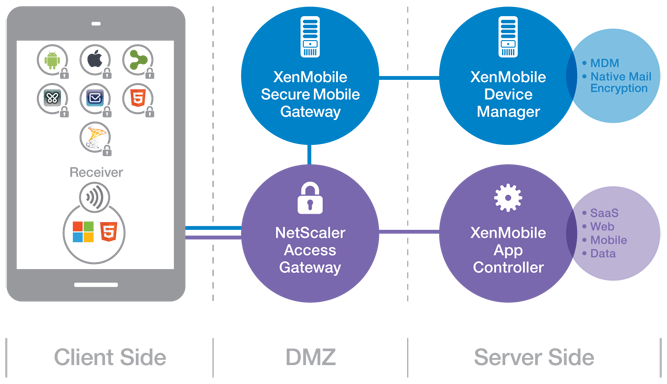
(Note: picture from Citrix)
So lets try to summarise the steps involved in getting these @WorkWeb and@WorkMail apps into your AppController and then published them to your users!
- Get your hands on a Macbook!
- Download the App Preparation Tool for iOS Applications and install it on the client
- Download and install Xcode (not 100% necessary but I recommend that you do that to simplify the creation/download of Distribution certificates and Distribution Profiles)
- Open XCode and open Preferences->Downloads,
 Read more…

#Citrix Partner Central, the new partner portal is live!
 Attention Partners: It’s official. My Citrix is retired and Partner Central, your new portal is live.
You may be wondering why Citrix made this change, what’s the motivation and why now. At Citrix, we believe in innovating, improving and adapting. We have been monitoring partner feedback from various sources and have identified opportunities to provide a better web experience. The market landscape has changed, the needs of our partners have expanded, and the way we communicate has evolved. It’s time for our private portal experiences to reflect these changing needs.
Partner Central, a start of something great
We understand that you have specific needs from a web site. We listened to your feedback about what you want to experience and how you want content to be prioritized. You’ll find real-time announcements from Citrix and the industry, links to resources you use most often, links to what’s new and tools that have been integrated within each main section: training and certification, sales, marketing, licensing and renewals and support.
Partner Central is easy to use, intuitive and you still have access to the same tools and content you had before with My Citrix. More good news is that your same username and password will still work with the new site. You will be able to conduct activities such as:
- Reviewing product pricing, new sales promotions and trainings
- Managing customer renewals, products, Advisor Rewards and leads
- Accessing partner notification documents, Key Play campaign materials and product sales kits
You can access Partner Central at www.Citrix.com/PartnerCentral to start exploring. We’re confident that your experience will be improved…
Continue reading here!
//Richard
Future Workplace Formula = 1 person x 6 devices @ two-thirds of a desk
This was an interesting news/announcement from Citrix, and I must agree with it! We’re moving into a new workplace era!
Get ready for redesigned offices that reduce real estate through fewer desks, redesigned space, increased mobility and use of BYO devices
SANTA CLARA, Calif. » By 2020 organizations are set to reduce office space by almost a fifth (17 percent) according to a new study by Citrix, a leader in mobile and cloud technology. The workplace of the future will provide just seven desks for every ten office workers, with each person accessing the corporate IT network from an average of six different computing devices. The figure for 2020 is as low as six desks for every ten workers in Singapore, the Netherlands, the USA and the UK. Some of the highest desk to worker ratios in 2020 will be in Japan (8.77), South Korea (7.95) and Germany (7.90).
Almost every organization says they will redesign office space to be more appealing. The workplace of the future will foster creativity, be inspiring and encourage collaboration by enabling people to work from wherever, whenever and on whatever device so that work becomes something people do, not a place people go.
The Citrix Workplace of the Future report, which polled 1,900 senior IT decision-makers across 19 countries, shows that a third of people (29 percent) will no longer work from their traditional office. Instead employees will base themselves from various semi-permanent locations including the home (64 percent), field and project sites (60 percent), and customer or partner premises (50 percent). People are also expected to access corporate applications, data and services from locations such as hotels, airports, coffee shops and while in transit.
The trend towards fewer office-based employees – who use multiple computing devices to access corporate apps, data and services from a range of locations outside of the traditional office – is part of a global trend called mobile workstyles. Globally, a quarter (24 percent) of organizations have already fully adopted mobile workstyles. By the middle of 2014, 83 percent of organizations will have embraced mobile workstyles.
Mobile workstyles have been adopted widely and rapidly because it offers a number of benefits.
- For organizations, workshifting – where people move work to more optimal times and locations – creates a more flexible, agile workplace (73 percent), lower employee-related costs (53 percent), reduce real estate costs (48 percent) and help attract (47 percent) and retain (44 percent) top talent.
- Employees benefit from workshifting with more flexibility (65 percent), increased personal productivity (62 percent), less commuting time (61 percent), and abetter work/life balance (55 percent). It also…
Continue reading here!
//Richard
#Citrix #BYOD Architecture overview – #XenMobile, #Mobility
I must say that this blog post is of course Citrix “twisted”, but I really like it! And it shows how Citrix provides a pretty complete offering in order to deliver Mobility- and BYO-compliant services.
The Citrix blog written by Christopher Campbell makes sense and I also agree that a picture is worth a thousand words! 🙂
I’m going to make this real easy and simple. As my grandfather would say “A picture is worth a thousand words”.
If you’re a XenDesktop or XenApp customer this is what your environment probably looks like.

Now this is what you need to enable BYOD and add that MAM, MDM, MIM (Data) and overall EMM functionality you’re looking for.

This is what your environment looks like after you enable BYOD.

Didn’t get that? OK, here is what BYOD looks like with multiple vendors.

Now, here is what BYOD looks like with Citrix.

Got it?
Read the whole blog post here!
//Richard
Top 5 #Citrix #XenServer Questions from the Citrix Master Class
Below are the top 5 XenServer questions raised from the Citrix Master Class posted by Amanda Saunders!
Let’s face it, XenServer has been around for quite a while. Citrix purchased the hypervisor back in 2007 and released it entirely free to the market in 2009. Since then, we’ve seen over 1 million downloads of the product and mass adoption in all sorts of businesses from SMBs to the largest service providers. Despite all this, we had almost 700 first time attendees on our XenServer Master Class last week taking a look at what this product has to offer. The newbies were joined by 300 additional Master Class veterans who continue to return to see what we’ll be showing off this time on our British radio show inspired, tech webinar. All of the attendees joined in to keep us busy, asking hundreds of questions for our XenServer experts to answer live on the webinar. If you missed it, watch the recording and read a summary of the top questions asked by the audience.
Why are cloud providers choosing XenServer to power their clouds?
This question could have an entire blog post dedicated to it, but I will try to address it as simply as possible. Currently 80% of Citrix CloudPlatform and Apache CloudStack environments are built on top of Xen or XenServer. Why? The high level reasons are scalability and cost*.
Scalability comes from XenServer’s fully replicated architecture across all hosts in an environment. This means there is no management server required to manage a given number of hosts. Should the master host in a pool go down, any other host can be promoted to replace it with no loss of functionality or configuration. In practice, this means cloud providers can freely choose to cluster hosts as required without incurring any additional configuration or management complexity based on cluster size.
While cost is an important factor for every company to consider, it is particularly important when you’re looking at licensing hundreds or even thousands of hosts. Both the open source version of XenServer and the premium version of XenServer that is included as part of your CloudPlatform entitlement, mean cloud providers can get the virtualization layer of their cloud at no cost. These savings can then be turned into additional differentiated service offerings or added savings to their end user.
*other reasons include open source base, flexibility, VM density and tenant isolation.
 XenMotion, what is it and is it free?
We have a competitor in the space who likes to use “v” in a lot of their feature names. A good rule of thumb to find the corresponding feature in XenServer is to replace “v” with “Xen”. XenMotion is our live migration feature that allows you to move VMs from one host in a pool to another provided that the pool has shared storage attached. This has been available in our free version since 2009.
Storage XenMotion is a brand new feature that we released with XenServer 6.1. This feature enables you to move VMs between hosts without the requirement of shared storage which lessens the hardware requirement/expense for both cloud providers using commodity hardware and SMBs with smaller environments. Storage XenMotion is available in our advanced version of XenServer.
Is there an easy way to get support for my environment, even if I’m running on free?
For those of you running a premium edition of XenServer (Advanced, Enterprise and Platinum) we recently changed our support model to offer unlimited, 24×7 support for paid editions of XenServer at about 7% of license cost. What does this mean to the free users out there? Well, it means you can no longer purchase support from Citrix for your XenServer environment. That being said, in addition to the incredible support you can get on the forums, we’ve also introduced a new Citrix Auto Support tool that can do a sanity check of your environment. Simply upload a log file and we’ll check for any issues that we recognize including missing patches, known bugs or configuration errors. This tool can be used for both free or paid editions, so try it out for yourself at http://taas.citrix.com.
What is MonitorIT?

A big thank you to our friends at Goliath Technologies who demoed their brand new version of MonitorIT on our XenServer Master Class. This solution delivers proactive monitoring of your entire environment right out of XenCenter or directly from a browser. What do we mean by “entire environment”? Virtual servers, physical servers, VDI, applications, databases, log management, network, storage, data center components, workstations – EVERYTHING! Do you have multiple hypervisors in your environment? Monitor your vSphere clusters straight from your XenCenter console using this product. You can go one step further and have MonitorIT proactively make changes to alleviate bottlenecks in your environment so the business can keep doing business without interruption. Don’t take my word for it, check out their free trial for yourself. They’ve even opened up their early access program so you can access all the great new features that…
Continue reading here!
//Richard
#Citrix #XenServer Multiple Security Updates released
Severity: Medium
Description of Problem
A number of security vulnerabilities have been identified in Citrix XenServer. These vulnerabilities affect all currently supported versions of Citrix XenServer up to and including version 6.1.
The following vulnerabilities have been addressed:
• interrupt remap entries shared and old ones not cleared on AMD IOMMUs (CVE-2013-0153)
• oxenstored incorrect handling of certain Xenbus ring states (CVE-2013-0215)
• Linux netback DoS via malicious guest ring (CVE-2013-0216, CVE-2013-0217)
• Linux pciback DoS via not rate limited log messages (CVE-2013-0231)
What Customers Should Do
Hotfixes have been released to address these issues in all supported versions and update levels of Citrix XenServer. Citrix recommends that customers using Citrix XenServer identify and apply all the hotfixes that relate to their deployed versions.
Customers using XenServer with AMD CPUs that pass through PCI devices (e.g. using the GPU passthrough feature) should review the hotfix release notes below for more information relevant to their specific deployments.
Continue reading and download updates here!
//Richard




 The IT Melting Pot!