Archive
PLEASE Citrix fix integration with Azure Stack! – #AzureStack, #CitrixCSP, #CitrixSynergy, #MSIgnite
Hi,
Ok, Microsoft have made some really cool announcements of Azure Stack, yes STACK not Pack. Azure Stack is NOT version 2.0 of Windows Azure Pack.. this is really important to note!
Azure Stack is basically the Azure technology used by the public Azure cloud but you can take that on-premise to your datacenter to deliver your own Azure cloud. No need of VMM or the traditional Fabric Management infrastructure!
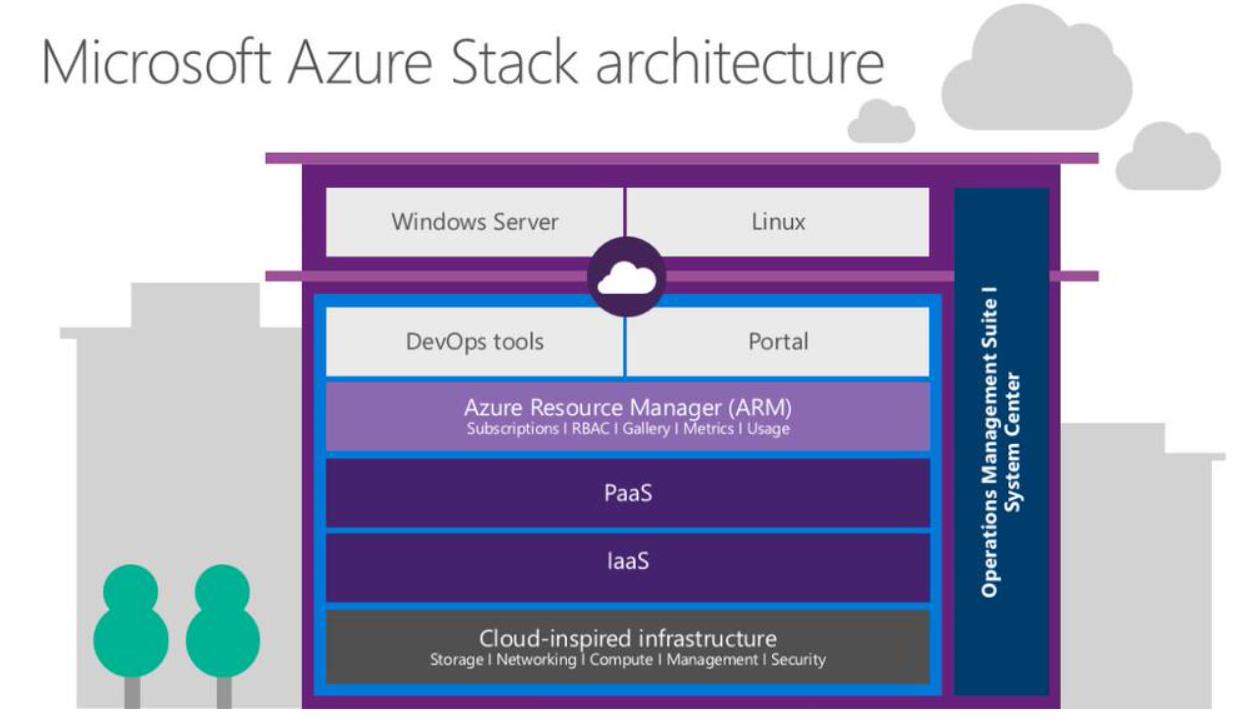
This is how Microsoft puts it:
Microsoft Azure Stack brings proven innovation from Microsoft’s hyper-scale public cloud into your datacenter, providing agility and productivity for application owners, flexibility and control for IT, and assurance that corporate assets are protected.
So then we come to the topic of this post, if we know get this really 1st class IaaS and PaaS capabilties on-premise using Azure Stack HOW can we then leverage that to provision Desktop-as-a-Service offerings with Citrix XenApp/XenDesktop on top of it?
My dream would of course be that Citrix provides Workpace Services and the main XenApp/XenDesktop infrastructure as a SaaS service, and that you internally just build your Azure Stack Resource Groups with all components needed for the DaaS tenant (network, storage, AD, VM’s to slap the VDA on etc.) using Visual Studio to leverage intellisense and builtin objects/IDE capabilities to add resources to your json deployment template file. So when you provision this deployment into your Azure Stack IaaS solution you spin up everything for the tenant and then slap the VDA on there that just connects to the XenApp/XenDesktop infrastructure in the Citrix cloud to automate this and reduce the need of managing that part!
That would be awesome!
Please Citrix deliver this instead of App Orchestration!
//R
#Outlook for Android released with some minor spelling mistakes :-) – #Office365, #Microsoft, #Mobility via @Office365 and @Outlook
Microsoft has now released the Outlook app from Android, it’s no longer a preview.
There has been a lot of debate around this app and how it handles your credentials etc. but I must say that from a usability point of view it’s good!
One little fun thing that I saw is that they have missed how they spelled Dropbox in the “getting started intro” of the app… 🙂
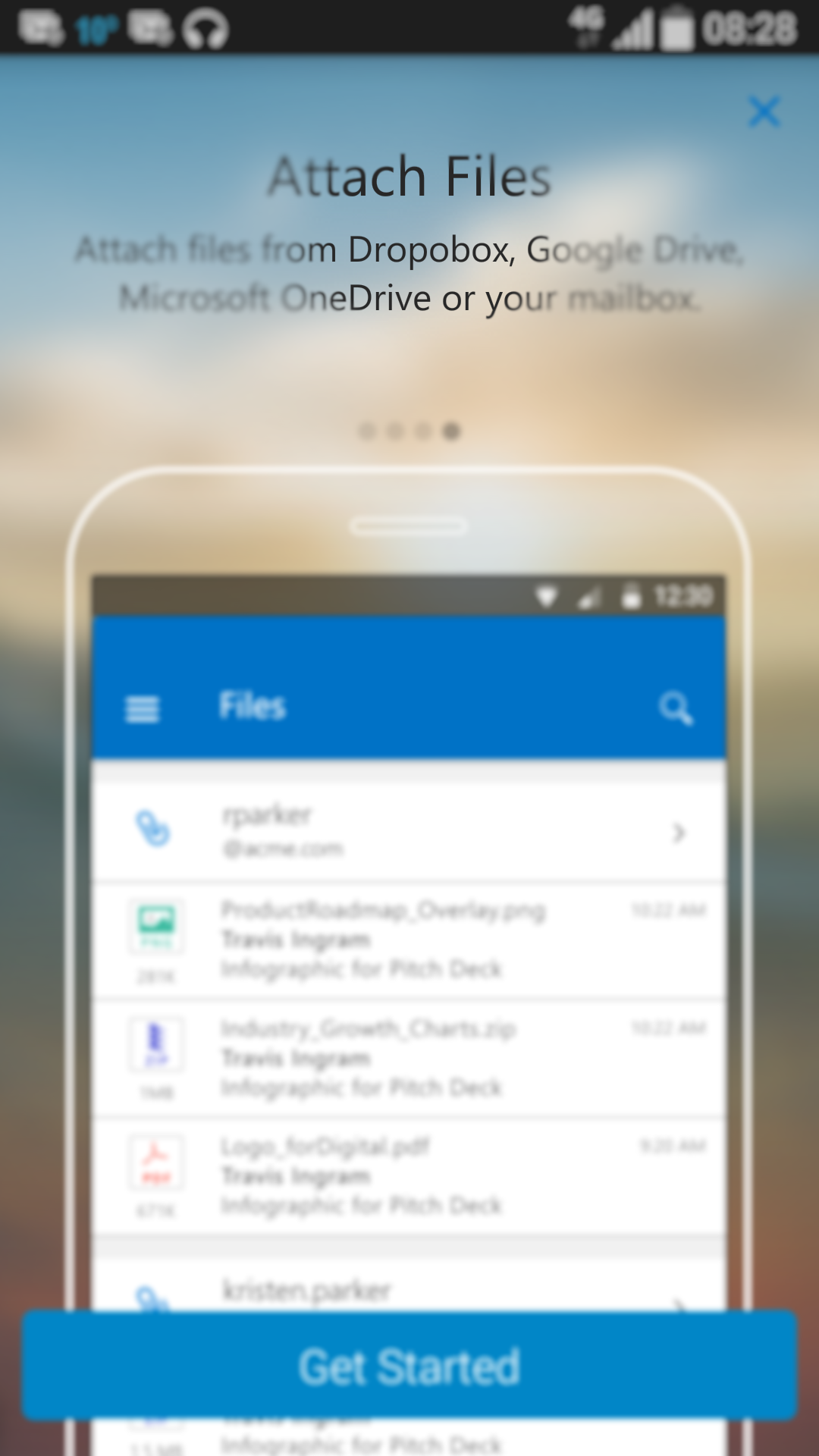
Today we are excited to announce we have removed the preview label from Outlook for Android.
In January, we released Outlook for iOS and a preview of Outlook for Android. At the time, the iOS version of Outlook was ahead of the Android version in terms of features and performance. We set a high bar for where we wanted Outlook for Android to be before we removed the preview label. Since our preview release we’ve updated Outlook for Android 17 times—that’s more than one update per week—to meet this bar. A big part of that work has been improving the performance and stability of the app along with work on localization, accessibility and other fit and finish pieces. The other part of this work was about delivering features to add new value, match the iOS version and respond to your feedback.
Along with apps like Sway, the new Office universal apps for Windows 10, OneNote and others—Outlook is an example of Office’s new development model for building mobile apps—deliver a great first version of our apps and then iterate quickly with the help and feedback of our users. This removal from preview is not a change in that plan or a statement that we are ‘done.’ We will continue our pace of updates to make the app better each week in response your feedback.
In case you haven’t been using Outlook as your primary email app yet, here are some of the end user features we have delivered in the past three months:
Improved look and feel
We’ve continued to polish the look and feel of the app. We updated our icon sets and simplified our fonts to provide a more consistent Outlook experience across operating systems and devices. But it was also important for Outlook to feel like a natural part of Android. We use common Android design principles like the Navigation Drawer to house the multiple tools offered in the app and have common actions like settings available in the App Overflow menu.

IMAP support
How to monitor your Internet facing service globally – #Azure, #ApplicationInsights, #Citrix, #NetScaler, #EnvokeIT
Hi again all!
It’s been quite a long time since I wrote a blog post.. I’ve just been too busy working! 🙂
But this is a really cool capability that I think that many of you will like, how often do your company or service provider have a good way of monitoring availability, performance etc. from the public Internet? And if they do then most of the time the larger service providers will build a service and install their own probes on different geographical locations and then they charge quite a lot for this service, and every time you change your application the charge you again for modifying the scripts that the probes use etc.
What I’ve tried and now think is going to be great for both smaller and larger organisations is the Azure Application Insights service. It’s really great and can assist with just this, it’s a service that microsoft provide from their locations globally where you can test your apps in Azure or course but also any web site out there on the Internet. And it doesn’t stop there, you can also use the server installer to also provide metrics from your Windows IIS server up to Azure to get more detailed statistics about the web server itself and requests etc.
Just think about how much it would take for you to setup monitoring from APAC, Americas and Europe for your NetScaler environment.. that would not be done in 10 minutes if you talk to your standard service provider. It took me 10 minutes to setup this reporting to ensure that the NetScaler is available from different locations around the world:
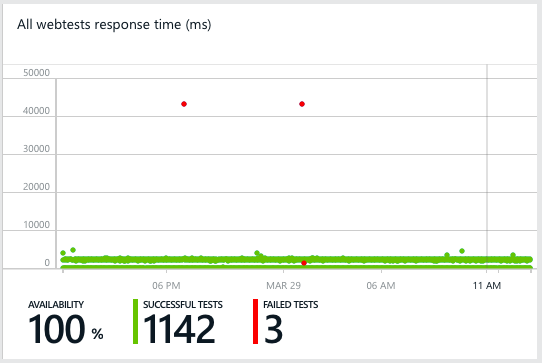
And this is just a simple url ping test to ensure that we get a proper 200 OK response from our EnvokeIT Lab environment that my colleague Björn have setup and modified so nicely with the X1 StoreFront look & feel.


Of course you can make a more proper test than just a url ping test like in this case, the service supports multi-step tests and also content matching etc. It’s also very easy to create one application/service that then consists of multiple locations that you want to monitor, for instance if you’re using GSLB FQDNs as well as regional to ensure that you get the full picture.
More information about what can be done you can find on the Azure Application Insights page. Read more…
Deploying #SCCM 2012 Packages and Programs with the #Citrix Connector – #DaaS, #XenDesktop
This is a really good blog post by Christopher Fife, it touches on a couple of scenarios and explains the solution to how best you would accommodate the solution to them. Good work Christopher! 🙂
The Citrix Connector 7.5 for System Center 2012 Configuration Manager, also known simply as the Citrix Connector, integrates XenApp and XenDesktop 7 with Configuration Manager 2012 (CM). The Connector streamlines use of Configuration Manager deployment technology to automate Citrix server and desktop image management. The Connector leverages the new Application/Deployment Type (App/DT) feature of Configuration Manager 2012 to orchestrate deployment to the right images at the right time. Administrators can optionally use the App/DT model to deliver the actual application publications.
Many of our customers are still early in migrating to the App/DT model. They are still leveraging their extensive library of Packages and Programs developed with great care over many years. These Citrix customers want to know how to use all the goodness of the Connector with these Packages and Programs. So, if you are interested in using the Citrix Connector to deploy Packages and Programs to your Citrix servers and desktop, this post is for you.
In many cases deploying Packages and Programs with the Citrix Connector is a straight forward process familiar to any CM administrator. However there are two scenarios in which specific actions are required to avoid unintended consequences when deploying Packages and Programs with the Citrix Connector.
Scenario 1 – Deploying to Image Managed (MCS or PVS) Citrix hosts
The first scenario that requires special consideration is deploying Packages and Programs to VMs created with Citrix XenDesktop Machine Creation Services (MCS) or Citrix Provisioning Services (PVS). As an administrator, you want to deploy software on the master image of a Machine Catalog and rely on XenDesktop/XenApp to clone worker VMs. Deploying directly to VM clones wastes compute, storage, and network resources because each clone will discard the changes on reboot.
Thus, the Citrix Connector is optimized to only install applications on the master image of a Machine Catalog while entirely skipping application installation on the clones of the master image. The key enabler that allows us to selectively install applications is a CM client policy that puts a 3rd party agent like the Citrix Connector in charge of when to install application or updates.
Here’s the problem. CM client policy does not stop the installation of Packages and Programs or Task Sequences; it only applies to the App/DT model and Windows Updates. This means that the Citrix Connector cannot prevent the installation of Packages and Programs on MCS or PVS clones, leading to unnecessary resource utilization.
Solution
Create a device collection that contains just the update device and deploy Packages and Programs to this device collection instead of the device collection created by the Citrix Connector.
Scenario 2 – App Publishing from the CM Console
The second scenario comes into play when using the CM Console to publish the Package/Program as a XenApp-hosted application. The Citrix Connector uses CM application detection logic to ensure that the application is installed before publishing it to Citrix Receiver. This is to prevent an icon from appearing in Receiver before all the servers in a Delivery Group have the application installed.
Unfortunately Package/Program deployments do not have reliable, ongoing application detection logic. Consequently, this orchestration feature of the Citrix Connector cannot be supported when using the Citrix Application Publishing Wizard to publish apps from the Configuration Manager Console.
Solution 1
Use Citrix Studio to publish the application instead of the Citrix Application Publishing Wizard in the CM Console.
Solution 2
If you are using CM Application Catalog and want the Citrix hosted version of the installed program to appear there, you will need to create a new application with a Script deployment type and a Citrix deployment type. The Script DT supplies the application detection logic by looking for the application’s executable, while the Citrix DT creates the application publication in XenDesktop.
Solution Details
The remainder of this post is divided into two sections and will give specific examples of how to implement the solutions discussed above. The first focuses on image management and precisely targeting the program deployment at the update device for a Citrix device collection. The second section focuses on publishing the program installed by CM as a Citrix hosted app.
Solution for Image Management and Resource Utilization
As previously mentioned, the Citrix Connector cannot prevent the installation of Packages and Programs on pooled Citrix session hosts created with Machine Creation Service (MCS) or Provisioning Service (PVS). To prevent this potential inefficiency, a new device collection must be created that only contains the update device. There are 4 steps to accomplish this:
- create the new device collection,
- deploy the program to the new device collection,
- monitor for deployment success on the update device, and
- update the pooled Citrix session hosts with the updated image.
These steps are detailed below.
For background information about master image management with the Citrix Connector and the role of the update device, watch the Master Image Management video http://www.citrix.com/tv/#videos/11534 on CitrixTV.
Before you start, use the machine catalog properties to make sure there is a designated update device, the Update Method property value is “update device”, and the Update Device property value contain a machine name. This is a very important step. If an update device is not defined for a Citrix image managed device collection, the steps outlined below will result in a new device collection with zero members.

Step 1: Use the Configuration Manager Console to create a device collection
- In the Assets and Compliance section of the Configuration Manager Console, click the “Create device collection” action on toolbar ribbon.
- On the General Page of the Create Device Collection Wizard,
#Microsoft #Azure (#IaaS) Cost Estimator Tool version 1.2 released
Have a look at the new version of the Microsoft Azure Cost Estimator Tool, here is a good summary by Courtenay Bernier. It currently only supports US pricing but would give you a good estimate at least and hopefully it’s updated with all other country pricing as well soon!
Back in August of 2014 Microsoft released version 1.0 of the Azure (IaaS) Cost Estimator Tool (view my previous post here). Today I’m happy to announce the release of version 1.2!
The following new features have been updated/added:
- Support for all regions (apart from US) along with associated currencies.
- Support for D-Series virtual machines.
- Export data with new regions and currency symbols.
- Updated instance prices for all regions and currencies.
- Total monthly costs are now calculated over 31 days that’s 744 hours and is aligned with the costs displayed in the Azure portal. (In version 1.0 costs were calculated over 30 days).
Download: http://www.microsoft.com/en-us/download/details.aspx?id=43376

Estimated runtime of 31 days

D-Series VMs Added Read more…
Microsoft Infrastructure as a Service Foundations – #IaaS, #Cloud, #PaaS, #Microsoft, #Azure
This series of blog posts by Thomas W Shinder – MSFT and contributors is really great and do cover the best practises and principles behind building Microsoft based private or hybrid IaaS services. Have a look at their great work!
The goal of the Infrastructure-as-a-Service (IaaS) Foundations series is to help enterprise IT departments and cloud service providers understand, develop, and implement IaaS infrastructures. This series provides comprehensive conceptual background that combines Microsoft software, consolidated guidance, and validated configurations with partner technologies such as compute, network, and storage architectures, in addition to value-added software features.
The IaaS Foundations Series utilizes the core capabilities of the Windows Server 2012 R2 operating system, Hyper-V, System Center 2012 R2, Windows Azure Pack and Microsoft Azure to deliver on-premises and hybrid cloud Infrastructure as a Service.
Table of Contents
Chapter 1: Microsoft Infrastructure as a Service Foundations (this article)
Chapter 2: Microsoft Infrastructure as a Service Compute Foundations
Chapter 3: Microsoft Infrastructure as a Service Network Foundations
Chapter 4: Microsoft Infrastructure as a Service Storage Foundations
Chapter 5: Microsoft Infrastructure as a Service Virtualization Platform Foundations
Chapter 6: Microsoft Infrastructure as a Service Design Patterns–Overview
Chapter 7: Microsoft Infrastructure as a Service Foundations—Converged Architecture Pattern
Chapter 8: Microsoft Infrastructure as a Service Foundations-Software Defined Architecture Pattern
Chapter 9: Microsoft Infrastructure as a Service Foundations-Multi-Tenant Designs
Microsoft Infrastructure as a Service Foundations is written and presented in a way that enables architects, designers, implementers and operators to view the content that is most relevant to them. Some readers will choose the read the entire “book”, while others will focus on areas that are most interesting and relevant to them.
At this time, the Microsoft IaaS Foundations “book” is available in web format only. In the coming days, individual files (one for each chapter) and a single file that represents a compilation of all the chapters, will be made available for download. A link to these files will be included in this article, and in each of the articles included in this “book”.
The world of cloud computing moves quickly and the underlying technologies supporting the infrastructure that powers the cloud change and improve just as fast. For this reason, each of the chapters includes a published date and the versions of the software that are discussed in the text. For non-versioned software and services (such as Microsoft Azure), a note of “feature set and capabilities as of…” date is included.
Your feedback is crucial
A lot of time, energy and expense goes…
Continue reading here!
//Richard
Which #DaaS architecture is right? – #Azure, #RemoteApp, #Microsoft, #Citrix, #Workspace
I really feel for you Solution Architects out there that have to struggle with how to revamp your companies or customers Hosted Desktop/App services. They may be provided by a service provider today, or you do it yourself on-premise and manage them, or you’ve already taken the step to purchase it as a true DaaS/SaaS service from a public cloud provider. Today the options are many, and too many if you add all the hosting models and the technology options you have. From a business perspective you’re getting the heat to deliver something with the word “cloud” in it just because it’s hot, and management then expect that TCO is sooooo low and that you have now problems in delivering at all within a couple of weeks and you can scale up and down without any issues at all from a financial or technical perspective… 😉
Often you also don’t even have the business, security, functional or technical requirements either so you’re supposed to come with the magic solution that fits all needs! 😉
My personal view is also that some of our vendors/partners out there don’t seem to have one (1) clear strategy either (at least not officially).
Some are building and providing their own “cloud architecture” models for DaaS for partners to build on (VMware, Citrix, Microsoft etc.), and then they also are providing specific models for certain partners as well that run on top of other cloud solutions, like Citrix Service Provider (CSP) offerings on Azure or on-premise. As a partner to these companies you also are in a tough spot, are you to partner with them and deliver their technology on your infrastructure, or shall you wait until they deliver a fully working public cloud offering (like WorkSpace Services) and then add your added value on top of that? Options are many and I don’t think that Citrix has given their whole story yet, I still think that they business wise need to go where Microsoft is going by providing a DaaS service by themselves directly to customers and thereby also “cut” the partner network out because once the technology and self-service becomes to easy then what shall they add as value then? There will always be customers that wants help to onboard, operate etc. of course but this will be another type of service and many Citrix and Microsoft partners need to be become more solution focused and get away from the SME space and deliver integration and more IT management consulting skill sets instead.
But let’s get back to more technology…
I’ve been kind of waiting to get some time over to test the RemoteApp service in Azure. I personally think that this is the future and they way that many small to medium size business fairly short shall start to look at. Not all of these companies have the skill set or financials to look at building a good Software-as-a-Service (SaaS) offerings of Windows applications internally. I’m a bit annoyed though that out of the box there isn’t any Desktop-as-a-Service (DaaS) offering and that it’s still just the RDS/Hosted Shared Desktop model that is provided. A real Hosted Virtual Desktop or VDI offering would be nice and a license model that goes with it from Microsoft.
There are today so many different options that companies that want to provide or consume a DaaS service can leverage today, Citrix Service Providers have all of their options in terms of technology stacks (CloudStack, CloudPlatform, CSP for Azure, App Orchestration 2.5, Microsoft System Center, Azure Pack and all options that are out there)… but which one shall/can you select? And what if you’re NOT a Citrix service provider and have a huge datacenter and haven’t already done your CAPEX investments around compute, network and storage etc..? Where do you then turn?
I think that here is where RemoteApp and a future Workplace Services offerings with Citrix on top would be great! You as a customer can turn to a partner/consultant company to get guidance and assess all your requirements and then easily be provisioned an environment that is of the “standard cloud offering” or get a customised one tailored specifically for your needs.
Like in my little demo scenario here I provisioned a fully functional RemoteApp environment that hosted all of the Microsoft Office 2013 apps that I use and also got a lot of storage at the same time… in almost no time at all!
Azure RemoteApp helps employees stay productive anywhere, and on a variety of devices – Windows, Mac OS X, iOS, or Android. Your company’s applications run on Windows Server in the Azure cloud, where they’re easier to scale and update. Users can access their applications remotely from their Internet-connected laptop, tablet, or phone. While appearing to run on the users’ local device, the applications are centralized on Azure’s protected, reliable platform.
Azure RemoteApp combines Windows application experiences with the powerful capabilities of Remote Desktop Services on Microsoft Azure – the cloud for modern business.
I also like the licensing model:
- Azure RemoteApp is priced per user and is billed on a monthly basis.
- The service is offered in two tiers: Basic and Standard. Basic is designed for lighter weight applications (e.g. for task workers). Standard is designed for information workers to run productivity applications.
- Pricing: Each service has a starting price per user that includes 40 hours of service per user. Thereafter, a per hour charge is applied for each user hour up to a capped price per user. You will not pay for any additional usage beyond the capped price in a given month.

RDS on Azure example quote:
More Azure solution pricing examples: http://blogs.technet.com/b/uspartner_ts2team/archive/2014/10/14/more-azure-solution-pricing-examples.aspx
What if you then also shall put Citrix on top of that… cost increases of course and still you’re kind of limited of being a SPLA or CSP in order to build this, or you go and ask a SPLA/CSP to provide it for you if you’re an end-customer.
But back *again* to the test-drive that I did of RemoteApp…
Official GA of Dell with Nutanix!! – #Dell, #Nutanix, #IaaS, #Web-Scale
It’s official! Finally! 😀
WEB-SCALE CONVERGED APPLIANCE
This disruptive solution integrates Dell PowerEdge servers, storage, and Nutanix software to create a scalable, simple, and easy-to-deploy, Web-scale appliance.
WHAT IS WEB-SCALE?
Web-scale is a transformative approach to buying, deploying and managing infrastructure. Pioneered by Internet companies, now available to enterprises. Benefits include:
- Predictable scale: Scale with the needs of your business, one node at a time
- Business agility: Deploy within an hour, update latest software within minutes, and shorten business processes
- Low total cost of ownership: Reduce upfront and ongoing costs by automating processes and spending less time trouble shooting

DELL XC SERIES
Meet the Dell XC Web-scale Converged Appliance – With Software by Nutanix.

FORRESTER REPORT
Forrester Research Evaluates the Web-scale Converged Appliance from Dell and Nutanix.
Read more here!

GARTNER REPORT
Why Your Legacy Storage Vendor Doesn’t Want You to Adopt Web-scale IT Infrastructure.
//Richard
Magic Quadrant for Enterprise File Synchronization and Sharing – #ShareFile, #Citrix, #EMC, #Box, #Microsoft
It’s not new but it’s something that I discussed the other day with a customer; who is the market leader when it comes to “corporate dropbox” solutions for enterprises? Gartner did update the Magic Quadrant for Enterprise File Synchronization and Sharing services/solutions and it’s a good read I must say.
You know I am a Citrix fan and a like their story and think that they from an overall virtual workplace offerings are far superior to the other players if you look across the stack from providing “legacy” services like Windows Apps and Desktop, Enterprise Mobility Management capabilities and all the network capabilities to provide the end-to-end service delivery. So it’s really nice to see that they are picking up in the ability to execute and are competing with EMC in the Leaders box!
I just hope that Citrix can stay int he lead and ensure that they price and capacity wise stay in synch with the up comers that are starting to offer really large storage capacity as a part of their cloud offerings. I still see that the capabilities and features of ShareFile are really great, and in some aspects others like Box, Microsoft and others are coming with nice features as well. So let’s see who will rule this market, but currently I think that ShareFile is a really strong player for enterprises but Microsoft will continue to grow and I just wish they add the additional features around security etc that enterprises often require so they can go into the bigger companies as well.

Source: Gartner (July 2014)
Market Definition/Description
This document was revised on 14 July 2014. The document you are viewing is the corrected version. For more information, see the Corrections page on gartner.com.
EFSS refers to a range of on-premises or cloud-based capabilities that enable individuals to synchronize and share documents, photos, videos and files across multiple devices, such as smartphones, tablets and PCs. File sharing can be within the organization, as well as externally (e.g., with partners and customers) or on a mobile device as data sharing among apps. Security and collaboration support are critical capabilities of EFSS to address enterprise priorities.
Beyond file synchronization, sharing and access, EFSS offerings may include different levels of support for:
- Mobility, with native apps for a variety of mobile smartphones, tablets, notebooks and desktops, as well as Web browser support.
- Security, for protection of data on the device, in transit and in cloud services (or servers), such as password protection, remote wipe, data encryption, data loss prevention, digital rights management (DRM), access tracking and reporting. Mature products ensure that files leaving the sharing location are DRM-encrypted and only readable by those authorized to access the data. Audit and compliance support are also present in complete products.
- Administration and management, including integration with an Active Directory and Lightweight Directory Access Protocol (LDAP) policy enforcement.
- Back-end server integration, e.g., with SharePoint and other corporate platforms. Integration is achieved through connectors (e.g., based on the Content Management Interoperability Services [CMIS] standard and APIs).
- Content manipulation, such as file editing, PDF annotations and note taking.
- Collaboration, such as cooperative editing on a shared document using change tracking and comments; and document-based workflow process support.
- Simplicity and usability, with optimized UIs and interactions, such as file drag and drop and file open in applications.
- Storage, i.e., cloud-based EFSS services often include cloud storage as part of the bundle to implement the EFSS repository. Software EFSS products, instead, may integrate with repositories on-premises or be implemented with a separate repository on-site.
Typical architectures for EFSS offerings are:
- Cloud: Corporate files are accessed via mobile devices, or shared and are stored in the provider’s cloud. Organizations that want to replace the personal cloud services adopted by employees with an enterprise-class alternative under IT control, while preserving the user experience and enhancing mobile collaboration, prefer the cloud method.
- On-premises: The remote access, synchronization and sharing component is deployed on-premises and integrates with corporate data repositories, without file replicas. This method is preferred by organizations under strict regulations about data storage.
- Hybrid: The user and device authentication, security and search mechanisms are implemented in the provider’s cloud. Files and documents are kept in their original location, or can be in third-party clouds. Organizations that want to simplify mobile users’ access to corporate data through the cloud, without creating data replicas in someone else’s cloud, prefer the hybrid method.
There are two types of EFSS offerings:
- Destinations — Stand-alone products with file sync and share as a core capability, which represents a new purchase for an organization.
- Extensions — File sync and share capabilities added, and wrapped around established products or applications — e.g., for collaboration, content management or storage. Organizations can use extensions as part of the broader platform (see “Destinations and Wraparounds Will Reshape the Enterprise File Synchronization and Sharing Market”).
Continue reading here!
//Richard
Azure ExpressRoute is a really cool and important feature – #Microsoft, #Azure, #ExpressRoute
Everyone talks about the “cloud” and how you can leverage all the benefits or a public, private or hybrid cloud model. And one challenge and huge risks that enterprises see with moving into a public cloud like Azure is the dependency to the public Internet.
Is the connection secure, stable, available and how can you determine that I have the connectivity between my on-premise stuff and Azure..?
It’s here where I think that Microsoft really has made a HUGE step towards getting more traction with the larger enterprises with the new ExpressRoute feature! Now you can get your own dedicated connection to Azure through it’s partner network of service providers like AT&T and Verizon etc.!

Microsoft Azure ExpressRoute lets you create private connections between Azure datacenters and infrastructure that’s on your premises or in a co-location environment. With ExpressRoute, you can establish connections to Azure at an ExpressRoute partner co-location facility or directly connect to Azure from your existing WAN network (such as a MPLS VPN provided by a Network Service Provider). Read more…




 The IT Melting Pot!