Archive

Posts Tagged ‘enterprise’

#Citrix Nails Its Enterprise Mobility Strategy – #XenMobile, #BYOD – via @ekhnaser

Read this great article and see if you agree! 😉

Citrix Nails Its Enterprise Mobility Strategy

I have been very pleased with the strategy, execution and the road map that Citrix has developed around Enterprise Mobility. With the announcement of XenMobile MDM and the Mobile Solutions bundle, I can very easily say that the Citrix solution is the most complete and feature-rich offering on the market today.

XenMobile MDM is simply a name change for Zenprise, which Citrix acquired a few months earlier. I expected Citrix to simply change the “Z” to “X” and keep the name, but I guess Citrix marketing did not find that as amusing. That is not the only change that occurred: A new version of “Zenprise” also accompanies this release, and XenMobile MDM now brings it to version 8.0.1.

Many customers and colleagues have asked me why Citrix acquired an MDM provider — what are the value-adds and isn’t the world moving towards MAM anyway? To answer, we have to make a clear distinction between the use cases. I agree and concur that for BYOD initiatives, MAM is a better, cleaner way of doing this things and that MDM is not the ideal solution.

That being said, there are plenty of use cases where MDM is the only solution that makes sense and I will give you real-world examples. Have you heard of the “Belly” card? It is a customer recognition and rewards program from a company HQ’ed in Chicago that offers merchants a locked down iPad for display in their place of business. Customers can come in and scan their mobile phones on the iPad provided and after a certain number of check-ins they are offered a reward for their loyalty. In this case, belly would have very little use for MAM; they need an MDM solution to manage the thousands of iPads they have deployed.

Another example: United Airlines and American Airlines allow customers to use mobile devices in the cabin to purchase goods in-flight. Obviously, the airlines don’t want the flight attendants to use their own device for this, MDM shines again here.

Finally, what about financial institutions that want to continue to issue corporate-managed devices of different flavors? It’d be for security reasons, obviously. In this case, MDM shines.

When I see bloggers and analysts disqualify MDM, they are not thinking beyond BYOD, where the business world could have a use case built around an application they issue on a mobile device.

Did Citrix strike gold with its acquisition of Zenprise? I will say this much: It was one of the best acquisitions the company has ever made. The natural follow-up question is, what about CloudGateway? And my answer is, it is the glue that holds everything together and is the most important product in the Citrix solution today. Everything will go through CloudGateway moving forward and at version 2.5 has the following features:

  • Enterprise app store with identity management capabilities for a single sign-on like experience
  • Windows Applications and Desktops through XenApp and XenDesktop
  • Mobile applications integration, provisioning, etc.
  • SaaS applications integration, provisioning, etc
  • Integration with Citrix ShareFile for enterprise DropBox functionality

CloudGateway also has a connector for Citrix Podio, and here I’ll be critical of Citrix the same way I’m critical of VMware for not integrating SocialCast. Why Citrix doesn’t make Podio…

Continue reading here!

//Richard

Five enterprise-ready antivirus systems – #Webroot, @Webroot

This is an interesting article! And I’m happy to see the only cloud-based product on the list!

5: Webroot SecureAnywhere Business – Endpoint Protection

Webroot SecureAnywhere Business – Endpoint Protection is the only solution on this list that is cloud-based only. Some of the others offer a cloud-based service option, but Webroot is the only one that does not offer an on-premise system. However, Webroot is still one of the most impressive applications in the list. The dashboard gives admins a quick overview of their enterprise, endpoint details can be quickly checked, and policies, reports, and logs can be easily viewed. On top of that, though, is the client: it installs in seconds (literally about 6-8 seconds for me) and scans in less than two minutes (1 minute, 42 seconds for my test system). Also, Webroot claims that their client software will run alongside any other security software without conflict. The main disadvantage of this system is its cloud-based nature – company’s deploying Webroot may have limited Internet bandwidth or security concerns with cloud software.

Read the whole article and the other 4 products listed here!

And you can also read my previous blog post about my little review of Webroot here.

//Richard

Surprising Stats About Mobile Security

February 28, 2013 Leave a comment

Another good article!!

Surprising Stats About Mobile Security

IT security and data protection are the top ranked challenges faced by many mobile IT asset managers. This was certainly brought to light in Mobile Enterprise’s IT headaches executive survey, and recent research from the International Association of IT Asset Managers (IAITAM) brings this to light as well.

When IAITAM asked: how do organizations handle mobility and security? Fifty five percent of respondents access the enterprise from a remote location during off hours and the same number can access enterprise information from any BYOD device. Yet only 60% of organizations track how, how long or who is accessing remotely.
Out of those employees who do access the enterprise remotely, slightly more than half use a secure key or digital pass, while 49% use a login name and password on a secure site. A little more than half (53%) of organizations surveyed have an intrusion protection system for deployed mobile units.

Lost/Stolen Devices Covered
Nearly 90% of respondents have a mobile device policy and process in place for lost, misplaced or stolen mobile devices. At the same time, little more than a quarter have real-time location system tracking on any/all mobile devices. Still, 56% say they are able to perform a remote wipe of all data.
Less than half (43%) will automatically replace a lost, misplaced or stolen device within a 24 to 48 hour period. Eighty-four percent of companies have a firm policy that employees leaving the company must surrender their mobile device(s).
Tracking software downloaded on devices and preventing software downloads came in third and fourth as the most challenging issues, respectively, but with the predicted growth of mobile malware, this number could change going forward.

Asset Tracking?
Nearly 60% believe that they are managing mobile security adequately, but nearly 75% surveyed felt that licensing and management of mobile device assets is a challenge; 52% track their assets using an automated tool, while 36% still use spreadsheets. Another 12% are not tracking mobile assets at all. Members of the Mobile Enterprise Editorial Advisory recently had few things to say about this topic.
The main software programs accessed through a mobile handheld device or smartphone are Microsoft (85%), Google (52%) and Adobe (26%). Many of these same software publishers aggressively protect their intellectual property through software audits.

BYOD
Fifty-one percent of organizations surveyed had a BYOD or BYOT [technology] program that allows employees to use their personal mobile devices for work purposes. Surprisingly, 60% who took advantage of a BYOD program only accounted for 25% or less of employees who brought in their personal devices. 
 
More than three-quarters (77%) allow their employees…
Continue reading here!
//Richard

#Citrix #AppController 2.5 Implementation Tips – #CloudGateway, #BYOD

February 19, 2013 Leave a comment

Great blog post by Matthew Brooks!

AppController is a component of the Citrix CloudGateway Enterprise suite that orchestrates access to Enterprise Cloud applications.  Those applications may take many forms including Mobile Applications, Software-as-a-Service hosted in public clouds, and Web links.  Below I provided some tips to help with the implementation of AppController 2.5 (which is the latest version as of the publishing of this blog).

System Related

Including settings such as the Hostname, SSL certificates, and Restore.

TIPs:

  • Take a hypervisor level snapshot after the initial installation so that you can easily return to that base level if configuration or integrations efforts go awry.
  • The hostname cannot contain special characters in the AppController certificate signing request.
  • The hostname must match SSL certificate.
  • The system cert must be chained to its CA/(s).

Active Directory Related

Including settings such as the Server (Domain Controller), Base DN, and Service Account credentials.

TIPs:

  • The AppController only supports integration with a single domain.  Multiple domains require multiple AppControllers.  The NetScaler Access Gateway may be configured to allow users to access a single fully qualified domain name, yet be directed to their respective domain AppController through the use of Global Groups.  See CTX116169 for more informationhttp://support.citrix.com/article/CTX116169
  • All user accounts must have a first name, last name, and email address configured or they will receive an authorization error when attempting to launch applications.  The bind Administrator account must also have email address configured or directory integration will fail.
  • Only LDAP (TCP 389) may be configured through the wizard that must be completed initially.  Thereafter LDAPS (TCP 636) may be configured through the full administration menu.
  • If the server name domain name is a load balanced DNS entry the initial import may work, yet subsequent bind attempts will fail.  Alternatively you may use the IP address of an LDAPS load balancer on a Netscaler with specific domain controllers configured as services.  See CTX135092 for more information http://support.citrix.com/article/CTX135092

Network Related

Including settings such as the IP address, @Workweb and NTP server.

TIPs:

  • Use IP private addresses as system addresses if possible.  When Trust Settings are configured for NetScaler Access Gateway it does not allow SSO to public addresses.  If public addresses must be used the NetScaler may be configured with an SSL Bridge to access the AppController.  See NetScaler Traffic Management document for more information.
  • NTP must be configured or SAML authentication may fail for SaaS sites if the time difference is significant.
  • When Trust Settings are configured for NetScaler Access…

Continue reading here!

//Richard

#Microsoft #Office 2013 lockdown aims to boost cloud services

February 19, 2013 Leave a comment

Microsoft Office 2013 lockdown aims to boost cloud services

If a computer dies, so does the Office license, unless you have enterprise deals

Microsoft has confirmed that a retail copy of Office 2013 is permanently tied to the first PC on which it’s installed, preventing customers from deleting the suite from one machine they own and installing it on another.

The move is a change from past Office end-user licensing agreements (EULAs), experts said, and is another way Microsoft is pushing customers, especially consumers, to opt for new “rent-not-own” subscription plans.

“That’s a substantial shift in Microsoft licensing,” said Daryl Ullman, co-founder and managing director of the Emerset Consulting Group, which specializes in helping companies negotiate software licensing deals. “Let’s be frank. This is not in the consumer’s best interest. They’re paying more than before, because they’re not getting the same benefits as before.”

Prior to Office 2013, which debuted last month, Microsoft’s EULA for retail copies of Office plainly stated that customers could reassign a license when, for example, they replaced an aged PC with a newer model, or the original machine gave out.

“You may reassign the license to a different device any number of times, but not more…

Continue reading here! 

//Richard

#Citrix #CloudBridge Connecting to Microsoft #Azure – Technology Preview

February 19, 2013 Leave a comment

This is really interesting!!! Can’t wait to try it out, I just got Azure up and running with a couple of VM’s in it and will set this up and try it ASAP! 🙂

CloudBridge Connecting to Microsoft Azure

Release Date: Feb 15, 2013

 
Citrix CloudBridge connects enterprise datacenters to external clouds and hosting environments, making the cloud a secure extension of the enterprise network.

This technology preview offers standard based secure connectivity to Microsoft Azure. With this enhancement, a customer can  connect their enterprise data center to the Azure VPN gateway and access the IaaS and PaaS offerings from Microsoft. 

The following are the key points to note :

  • Secure L3 connection to Azure VPN gateway
  • CloudBridge deployment on the enterprise data center only. It is not running inside Azure
  • No WAN Optimization or L2 extension supported in this solution since it needs deployment of CloudBridge on the Azure end as well.

Images and Licenses:

We are making available virtual appliances running on XenServer (xva images). These appliances need EVAL licenses. Please follow links to sign-up and get these EVAL licenses.

To get started:

  1. For the XenServer images of CloudBridge, please download from the list below
  2. Get and activate an EVAL license via the get license link for NetScaler VPX and follow the instructions. CloudBridge license is shared with NetScaler VPX Platinum Edition.

Helpful Resources:

  1. Download the CloudBridge@Azure Tech Preview deployment guide from the link below the Download section
  2. For help with licensing the instance, refer to the NetScaler VPX licensing guide
  3. New to NetScaler/CloudBridge? Documentation, knowledge base articles, additional tutorials and other information is available on the NetScaler Knowledge Center

Have Questions?

Go to the CloudBridge discussion forum to get help from…

Continue reading here!

//Richard

iOS 6.1 banned from corporate servers due to Exchange snafu – via @rspruijt

February 11, 2013 Leave a comment

Summary: iPads and iPhones running the newest version of iOS are being blocked in some enterprises because bugs are overloading corporate Exchange servers.

One of the benefits of Apple’s iOS devices such as the iPad and iPhone is that you can upgrade to the latest version as soon as it comes out. Being on the cutting edge is usually a good thing, but sometimes it can come back to bite you. If you are connecting to an Exchange server for mail and calendar services, the latest version of iOS has an unpleasant surprise in store for you.

Reports started surfacing in late January about excessive logging on Exchange servers caused by the upgrade to 6.1. A report on Microsoft Technet states:

I had a user upgrade to 6.1 and immediately after he finished, his phone/IPAD started causing excessive logging on the exchange server.  

I found the problem by using exmon and saw the CPU utilization in conjunction with high session count.

He shut down Outlook and the problem remained.  He turned off his iPad and the problem went away.  The only change he said he made that morning was upgrading to iOS 6.1.

This problem has been confirmed by many sources. Windows IT Pro’s Tony Redmond reports:

I’ve picked up a few other reports that cannot be publicly attributed at this point that also refer to excessive transaction log generation after iOS 6.1 devices are introduced into Exchange 2010 or Exchange 2007 environments. I assume the same is true for Exchange 2013 as the underlying cause is likely to be in Apple’s mail app code that calls ActiveSync…

Continue reading here!

//Richard

The Business Case for Mobility Services – #Mobility, #BYOD, #Citrix, #Gartner

January 28, 2013 Leave a comment

I must agree that all these mobile devices and BYOD etc. are putting challenges as well as opportunities on businesses. But there are not many out there with a clear strategy and business view on how to grasp the opportunities and WHY. Do you have a clear strategy on how to address for instance BYOD?

This video explores the business case for adopting and integrating Mobility Services into a Solution Provider’s deliverables.

And what’s also interesting in this topic of discussion is the Gartner Hype Cycle of Innovation.

This was the hype cycle for year 2012

Image Source :Givinginadigitalworld

//Richard

Good News: Office 365 ProPlus can be activated on RDS – #RDS, #XenApp, #Citrix

January 17, 2013 Leave a comment

This is interesting and good news!

Thanks for sharing Jesper_Osgaard!!!

In case you missed it – the latest Product Use Rights (january 2013) now includes a note under Additional Terms #3, page 82

“3. Each user may also use one of the five activations on a network server with the Remote Desktop Services (RDS) role enabled”

Note: Office 365 ProPlus is the upcoming version of Office 365

Source: Good News: Office 365 ProPlus can be activated on network server with RDS role enabled 

//Richard

Why only Platinum version of NetScaler SDX VPX Package? – #NetScaler #SDX #Citrix

December 4, 2012 Leave a comment

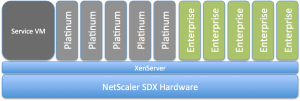
Why does Citrix only sell Platinum versions in bundles of 5 for the SDX platform? Wouldn’t it be great to be able to purchase for instance Enterprise or Standard for the VPX’s you want to setup for capabilities provided by the Enterprise version of NetScaler?

NetScaler_SDX_Platinum_Only


I’d like to buy that instead… what about you guys? Or does this model exist?

Citrix NetScaler DataSheet

//Richard