Archive
NutaniXpress – January 2014 – #Nutanix, #IaaS, #Virtualization, #Storage
Great NutaniXpress release!!!! There is a good prediction and I must say that I’m really impressed with this company and their product!!!
Read the whole NutaniXpress January 2014 article here!
| Deliver High Performance & Scalable Microsoft Exchange with NutanixWith more than 50% of Microsoft Exchange installations now virtualized, it is critical to select the right server and storage architecture to support such critical workloads. Read this solution brief to learn how the Nutanix Virtual Computing Platform overcomes the challenges of legacy storage architectures and makes for an ideal solution for your Microsoft Exchange virtualization needs. |  |
|
Learn More: Microsoft Exchange Solution Brief |
|
| Microsoft SQL Server on Nutanix: Best PracticesThis document makes recommendations for the design, optimization and scaling of Microsoft SQL Server deployments on Nutanix. It shows the scalability of the Nutanix Virtual Computing Platform and provides detailed performance and configuration information on the scale-out capabilities of the cluster when leveraged for MSSQL deployments. |
 |
|
Learn More: Microsoft SQL Server on Nutanix: Best Practices |
|
#Citrix #StoreFront subscription database replication, #GSLB, #NetScaler
Ok, so we’ve all started to use StoreFront (or have U?) and find out that there are A LOT of things that you have to do in order to get it to work as you most probably want it to.
This post is more around how you ensure that the StoreFront architecture supports an enterprise with multiple sites while still having a concistent end-user experience.
Just imagine that you’ve built your architecture out in a true high availability manner with global server load balancing across all products used in the stack to deliver your Windows apps and desktops to your end-users. It may look something similar to this:

In this view you can see that we’ve setup GSLB to ensure that external (Internet) connected users and devices are being connected to a NetScaler Gateway vServer in either London or Miami, and from there the NetScaler and the session profile that communicates with StoreFront (SF1 and 2 in each site) is also load balanced using GSLB to ensure high availability. So everything seems good, right! But no… consider that you as an end-user is being connected to the Miami site and that StoreFront group that has a subscription database containing all the apps and desktops etc. that you have selected and added to your workspace. You will see all these icons by default now when you login to Miami, but you will not see them in the case Miami goes down for some reason or if you travel to London and then gets connected to that StoreFront group as I try to show by this picture:

Penetration testing tips for your NetScaler – via @neilspellings – #Citrix, #NetScaler
This is a really good blog post by Neil! Keep up the good work! 😉
When working on Netscaler implementation projects, most of which tend to be internet-facing, one aspect that most organisations always perform is a penetration test. Having been through a number of these over the years, I thought it would be a good idea to share my experiences and some of the common aspects that get highlighted, to enable you to “pass first time” without having any remedial actions to work through and costly re-tests to perform.
The Netscaler has a number of IPs (NSIP, SNIP/MIP, Access Gateway VIPs etc) so what should you test against? The answer may well depend on corporate policy, but I usually test the internet-facing Access Gateway VIP and the management interface (NSIP). I also usually include StoreFront in any internal tests as this is an integral component of the overall solution, but I won’t cover StoreFront in this post.
Of course technically “bad guys” can only reach internet-facing IP addresses (as permissioned by your external firewall) but I recommend including internal-facing IPs for any DMZ-hosts to understand your exposure should another DMZ host get compromised (as your attacker can now potentially access internal IPs so the external firewall rules no longer protect you)
- Remove unnecessary management tools (telnet and FTP are considered insecure so should alwaysbe disabled). Also remove SNMP if your Netscalers are not being monitored or managed by an external monitoring service.

- Ensure that “Secure access only” is selected to force SSL access to the GUI
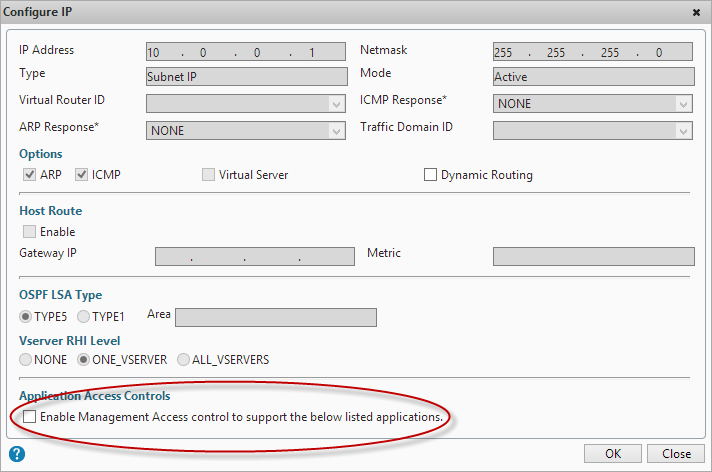
- Ensure that management applications are only available on an internal IP (NSIP or SNIP). Open the IP properties for the IP addresses that won’t be used for management and untick “Enable management access”
- Change the default nsroot password to something long (obvious you’d think but you’d be amazed how many Netscalers I’ve seen that I can just log straight into using the default credentials!)
- If you have set up integrated AD authentication via LDAP for administrative access to the GUI, ensure that you have protected access using a filter group, otherwise anyone with a valid AD account will be able to access your Netscaler GUI (although they won’t be able to make any changes, it’s still not a good idea them having this access!)
- If you are using…
Continue reading here!
//Richard
#Nutanix Triumphs at V3 Technology Awards 2013 for Best Virtualisation Product – #IaaS
This is great! A great product takes another award!!! 😉
V3 Readers Award Nutanix with Prestigious Industry Recognition in Highly Competitive Category
Nutanix also won the Best of VMworld 2013 Gold Award for Private Cloud Computing!
LONDON, December 3, 2013 – Nutanix, the leading provider of hyper-efficient, massively scalable and elegantly simple datacentre infrastructure solutions, has been awarded for its continuing innovation in optimising datacentre infrastructure at the V3 Technology Awards 2013. During a ceremony at the Waldorf Hilton Hotel, the company was awarded Best Virtualisation product, beating a host of well respected and larger, more established organisations in the virtualisation market.
V3.co.uk is a leading source of news and analysis for technology professionals, written by a team of expert IT journalists in the UK and Silicon Valley. The awards were hotly contested this year, with more than 450 entries from 150 companies.
“It’s great to see a new company like Nutanix being recognised at the V3 Technology Awards, among the industry giants. It wasn’t an easy task whittling down the hundreds of entries to create the shortlist, and then V3 readers voted in their thousands for their favourites, making this a significant achievement and a well-deserved win. Well done Nutanix!” said Madeline Bennett, Editor, V3 and The INQUIRER.
Alan Campbell, Regional Director of Western Europe at Nutanix, commented on the success: “Nutanix is a company that is constantly innovating and striving to provide the best platform for its customers, so this recognition by a highly respected publication is a testament to the hard work of our team. Virtualisation is a rapidly evolving technology which we are proud to be at the forefront of and to receive an award in the UK, a key market for us, is an honour.
As the fastest growing enterprise…
Continue reading here!
//Richard
#Gartner Magic Quadrant for Application Delivery Controllers – #ADC, #NetScaler, #Citrix
Citrix is positioned in the Leaders Quadrant for Application Delivery Controllers for the seventh consecutive year: the Gartner Magic Quadrant Report focuses on vendor’s ability to solve complex application deployment challenges. Don’t miss this chance to learn from Gartner’s independent research.
NetScaler is well established as the industry’s leading internet delivery system, touching an estimated 75 percent of internet users each day. Citrix builds on this leadership to provide the world’s most advanced cloud networking platform, giving customers a single, integrated solution that brings the elasticity, simplicity and expandability of the cloud to any network. This combination helps customers deliver public and private cloud services with the best performance, security and reliability to any device. Learn more about the importance of this recognition by reading this recent press release.

Source: Gartner (October 2013). The full 2013 Gartner Application Delivery Controller Magic Quadrant, report can be viewed on the Gartner website.
//Richard
#Citrix #ShareFile StorageZone controller 2.2 released – #BYOD
If you haven’t seen this then have a look at what 2.2 now has to offer!
- StorageZones for ShareFile Data — You can store ShareFile data in either Windows Azure cloud storage or a private single-tenant storage system that you maintain. You specify a storage option when you configure StorageZones for ShareFile Data.

What’s new
StorageZones Controller 2.2 provides the following enhancements:
Support for Windows Azure storage containers — If you have a Windows Azure account, you can use an Azure storage container for your private data storage instead of a locally-maintained share.
To get started create a new zone and choose the Azure option when you configure StorageZones for ShareFile Data.

Connectors to SharePoint root-level sites — You can now create a StorageZones Connector for a SharePoint root-level site or site collection, enabling users to navigate all of the subsites and document libraries in the site. To provide more limited access, you can continue to create connectors to individual SharePoint document libraries.
Connectors to user home drives based on Active Directory — You can now create a Connector for network file shares that reliably points to user home drives. To create a connector for user home drives, set the UNC path to the variable %homedrive%. StorageZones Controller will then create connectors based on the user home folder path property in Active Directory.
Installation on non-English operating systems — You can install the English version of StorageZones Controller on the following operating system versions: French, German, Japanese, Simplified Chinese, and Spanish.
Read more here!
//Richard
10TB of free #cloud #storage from China’s #Tencent
Wow, that really puts some pressure on the “other” guys!!! 10TB is a lot!
I’ve talked to people and some are concerned about that it’s a China owned company even though the storage will be located in the US and Southeast Asia though it’s the company that has the “power” to manage and control it, but let us set that aside for now! 10TB of free storage! 🙂
Chinese Internet giant Tencent is looking to dole out a jaw-dropping 10TB worth of free cloud storage to its international users soon, as it seeks to roll out an English version of its cloud storage product next year, PandoDaily reports.
Peter Zheng, the Shenzhen-based vice president of Tencent’s social network group, tells PandoDaily that the company will bring its cloud storage offering to the US in early 2014. It is also launching an English version of Story Camera, an Instagram-like watermark-based photo app already popular in China, in the next two to three weeks.
In August, Tencent started courting Chinese users with its very generous gift of space — as it sought to out-do its rivals Baidu and Qihoo, which started giving away 1TB worth of free storage.
As Tencent gets into the game with an English version of its cloud storage service though, it looks set to attract way more users around the world who want to get their hands on this colossal amount of space — which, to be honest, seems almost impossible to finish using.
The whopping 10TB puts the free space given by Dropbox, Box and Microsoft to shame. At their maximum amounts, Dropbox has offered free space amounts ranging from 25-50GB as part of promotional deals with Samsung and HTC, Box has offered 50GB of free storage with file-size limitations before, and Microsoft upped the storage space for its SkyDrive Pro offering from 7GB to 25GB.
However, just as with the Chinese rollout, Tencent will likely kick in the same caveat for its cloud storage offering — that is, you won’t get the whole 10TB worth of space at one go. Instead, Tencent will top up your storage space as you deplete it.
To put privacy concerns at ease, Zheng tells Pandodaily that the international data will probably be stored on servers outside of China — in the same way that Tencent’s messaging service WeChat uses servers in the US and Southeast Asia.
As Tencent is taking big strides…
Continue reading here!
//Richard
#Netscaler Insight and Integration with #XenDesktop Director – via @msandbu
Great blog post by Marius! 🙂
This is another one of Citrix hidden gems, Netscaler Insight. This product has been available from Citrix some time now, but with the latest update in became alot more useful. Insight is an virtual applance from Citrix which gathers AppFlow data and statistics from Netscaler to show performance data, kinda like old Edgesight. (NOTE: In order to use this functionality against Netscaler it requires atleast Netscaler Enterprise or Platinum)
Insight has two specific functions, called Web Insight and HDX insight.
Web Insight shows traffic related to web-traffic, for instance how many users, what ip-adresses, what kind of content etc.
HDX Insight is related to Access Gateway functionality of Citrix to show for instance how many users have accessed the solution, what kind of applications have they used, what kind of latency did the clients have to the netscaler etc.
You can download this VPX from mycitrix under Netscaler downloads, important to note as of now it is only supported on Vmware and XenServer (They haven’t mentioned any support coming for Hyper-V but I’m guessing its coming.
The setup is pretty simple like a regular Netscaler we need to define an IP-address and subnet mask (Note that the VPX does not require an license since it will only gather data from Netscaler appliances that have a platform license and it does not work on regular Netscaler gateways)
After we have setup the Insight VPX we can access it via web-gui, the username and password here is the same as Netscaler nsroot & nsroot

After this is setup we need to enable the insight features, we can start by setting up HDX insight, here we need to define a expression that allows all Gateway traffic to be gathered.
Here we just need to enable VPN equals true. We can also add mulitple Netscalers here, if you have a cluster or HA setup we need to add both nodes.

After we have added the node, just choose configure on the node and choose VPN from the list and choose expression true.
#Citrix #Receiver for Linux 13 released
Finally Citrix has released a Receiver version for Linux that for instance has StoreFront support! Can’t wait to try it out and see if it gives the same user experience etc like the one on OS X and Windows!
Here you have some details about it and links to the product documentation:
Access Windows applications and virtual desktops, as well as web and SaaS applications. Enable anywhere access from your Linux thin client/desktop or use web access.
What’s new
The following new features are available in this release:
- Support for XenDesktop 7 features – Receiver supports many of the new features and enhancements in XenDesktop 7, including Windows Media client-side content fetching, HDX 3D Pro, HDX RealTime webcam compression, Server-rendered Rich Graphics, and IPv6 support.
Note: Link-local network addresses are not supported in IPv6 environments. You must have at least one global or unique-local address assigned to your network interface.
- VDI-in-a-Box support – You can use Receiver to connect to virtual desktops created with Citrix VDI-in-a-Box.
- Self-service UI – A new graphical user interface (UI), like that in other Citrix Receivers, replaces the configuration manager, wfcmgr. After they are set up with an account, users can subscribe to desktops and applications, and then start them.
- Deprecated and removed utilities – The pnabrowse command-line utility is deprecated in favor of the new storebrowse command-line utility. The icabrowse and wfcmgr utilities have been removed.
- StoreFront support – You can now connect to StoreFront stores as well as Citrix XenApp sites (also known as Program Neighborhood Agent sites).
- UDP audio support – Most audio features are transported using the ICA stream and are secured in the same way as other ICA traffic. User Datagram Protocol (UDP) Audio uses a separate, unsecured, transport mechanism, but is more consistent when the network is busy. UDP Audio is primarily designed for Voice over IP (VoIP) connections and requires that audio traffic is of medium quality (that is Speex wideband) and unencrypted.
- Packaging – An armhf (hard float) Debian package and tarball are now included in the download packages. In addition, the Debian package for Intel systems uses multiarch (a Debian feature) for installations on 32- and 64-bit systems. 32-bit binaries are also available in RPM packages.
- System Flow Control – Video display has been enhanced on low-performance user devices that connect to high-performance servers. In such setups, System Flow Control prevents sessions becoming uncontrollable and unusable.
- Localization – Receiver is now available in German, Spanish, French, Japanese, and Simplified Chinese.
- Keyboard improvements – You can now specify which local key combination (Ctrl+Alt+End or Ctrl+Alt+Enter) generates the Ctrl+Alt+Delete combination on a remote Windows desktop. In addition, a new option supports Croatian keyboard layouts.
- Deferred XSync – While one frame is still on screen, Receiver can now decode tiles for the next frame. This provides a performance improvement compared with previous releases, in which Receiver waited for a frame to finish being displayed before decoding the next frame.
- Audio and webcam playback improvements – Various changes are implemented that conserve CPU cycles and reduce latency.
- Audio settings – Several new audio settings are now available in module.ini.
For more product and release info read here!
//Richard
Sizing #XenDesktop 7 App Edition VMs – #Citrix
A good update on VM sizing by Daniel Feller!
In the Mobilizing Windows applications for 500 users design guide, we made the recommendation to allocate 8vCPUs for each virtual XenDesktop 7 App Edition host (formerly known as XenApp). Spreading this out across a server with two Intel Xeon E5-2690 @2.9GHz processors and 192 GB of RAM, we were yielding about 200 users per physical server and roughly 50 users per virtual server.
Of course, the design guide is the end result of a lot of testing by the Citrix Solutions Lab. During the tests, we had the Solutions Lab compare many (and I mean many) different configurations where they changed the number of vCPU, RAM size, and RAM allocation (dynamic/static) as well as a few other things. All of these tests were done with Windows Server 2012 with Hyper-V. We ended up with the following:

A few interesting things:
- Dynamic vs static RAM in Hyper-V appeared to have little, if any, impact on overall scalability. The only time when the RAM allocation had a negative impact was when not enough RAM was allocated (no surprise there).
- The 8vCPU and the 4vCPU configurations resulted in very similar user concurrency levels. Get ready… The battle is about to begin as to whether we should use 8 or 4 vCPU. (Is anyone else besides me having flashbacks to 2009?)
A few years ago, we debated about using 2vCPU or 4vCPU for XenApp 5 virtual machines. A few years later, the debate is resurfacing but this time, the numbers have doubled: 4 or 8. Here is what you should be thinking about… VMs are getting bigger because the hardware is getting faster, RAM is getting cheaper and the hypervisors are getting better…
Continue reading here!
//Richard




 The IT Melting Pot!