Archive
#Citrix #XenMobile #MDM Integration With #Cisco ISE for #BYOD
Interesting and a good blog post by Sameer Mehta.
World of BYOD
Bring your own device (BYOD) initiatives are enabling employees to bring their own personal devices to work and allowing them corporate access to services such as Email. We did a recent audit using our ability to integrate with security incident and event management (SIEM) systems for a customer. The audit provided visibility into their ActiveSync traffic and found devices that belonged to executives that were not under IT management. Here’s a snapshot of their BYO devices.

There are several reasons to enable such access – for example, to boost employee productivity or convenience of accessing email from any device. Having said that, as Uncle Ben puts it, “with great power comes great responsibility”, and this responsibility is on the IT administrator from a security point of view. It’s IT’s responsibility to make sure that corporate data is not compromised or leaked in the following scenarios:
- What happens when this personal device is lost or stolen?
- What happens if this device is jailbroken or rooted?
- What happens if this device ends up outside an approved geofence. For example, outside of the US?
- What happens if the user inadvertently installs an application that has the ability and access to the entire device memory, thereby having unauthorized access to corporate data?
End User’s perspective on Enterprise Mobility
End users want access to corporate services such as email, intranet, ability to share and collaborate over documents, and also use 3rd party applications such as Evernote, Quick Office or GoodReader. With mobile solutions such as XenMobile MDM, CloudGateway, ShareFile and GoToAssist, Citrix provides ubiquity i.e. ‘access any app. from any device’, and a unified view for applications with an enterprise app store, documents via ShareFile. Having said that, since the user is accessing multiple applications; end user experience is a key component of mobility solutions. For example, bootstrap authentication and provide single sign on (SSO) to other applications.
Enterprise IT perspective on BYOD
As IT is providing access to corporate services, the main concern is around data loss prevention (DLP) and protecting corporate content on the mobile device. This means, encrypting data at rest for application data, and documents that are hosted either on Sharepoint, Network File share or Cloud storage. From a DLP perspective, for security conscious organizations, the mobile solutions bundle, which includes XenMobile MDM and CloudGateway…
Continue reading here!
//Richard
Enterprise Mobility Report – Lessons from the Mobile Cloud – #Citrix, #BYOD
Here is a good report done by Citrix, not that much that I didn’t expect but great to get some input!
We just released our quarterly enterprise mobility cloud report. Every quarter, we look out across our enterprise mobility customers deployed in the cloud and try to understand common practices by reviewing aggregate data on deployed apps, app blacklisting and whitelisting practices, policy deployments, and OS deployments by region and vertical industry. So here’s a small taste of what we saw in Q412.
Things we expected:
- iOS led in the enterprise. Definitely something we already knew.
- Industries like retail and restaurants – whose use cases involve direct one-on-one customer engagement, were iOS- (and iPad-) heavy. Makes sense.
- Industries with mobile field service organizations went for Android. Given the platform’s lower replacement cost, control-ability, and ubiquity, that makes sense.
- Facebook and Dropbox made the blacklist. Productivity and data security are major concerns, especially for corporate-issued devices.
Things we didn’t expect:
- Android gained in EMEA. Android gained eleven percentage points in Europe, the Middle East, and Africa in a quarter. Anecdotally, we know several organizations there that deployed big Android-based mobile line-of-business initiatives last quarter, but is there a bigger trend? Tell us what you think!
- Healthcare went for Android. 85% of deployed devices in our cloud in healthcare were Android. But healthcare organizations we talk to are standardizing on iOS, so it doesn’t add up! But remember: this is the cloud report. Most of our large healthcare customers have deployed our solution on-premise and those seem to be mostly iOS today. The cloud healthcare companies are really mobile themselves – usually home healthcare organizations like traveling nurses and therapists and hospice care workers who deliver end of life care to patients in their homes. It makes sense that these organizations would be big users of the cloud given the highly distributed nature of the business and the fact that there are some common HIPAA-compliant mobile apps that have developed for the Android platform.
- Dropbox was on the blacklist, but was also one of the most heavily-recommended apps from enterprise IT (in the enterprise app catalog). This juxtaposition speaks to Dropbox’s simultaneous usefulness and risk! Organizations can’t decide! Many of our customers talk to us about the “Dropbox dilemma” and most agree that if they could provide data sharing in a secure, enterprise-grade way, users would go for it.
Download the complete report here!
//Richard
XenMobile product overview… and It’s nice! via @BasvanKaam – #BYOD, #MDM, #Citrix
Wow! I must say that Bas van Kaam has done a great wrap-up here! I highly recommend you to read this blog post!!! 🙂
It was only about a month ago when I was writing my Blog about the CloudGateway that I wondered which route Citrix would take now that they acquired Zenprise, well… here it is… XenMobile, another Xen sibling sees the light! Lets jump right in…
I had the opportunity to make use of one of Citrix’s demo environments to have a closer look at MDM, which is an awesome way to explore new and existing products by the way, if your company is a Citrix partner and has access I definitely recommend having a look. Besides that I used the Citrix E-Docs website as well as Citrix.com to find as much information as possible.
The main focus of this article will be on XenMobile MDM as the Mobile Solutions Bundle (one of the two editions available) focuses primarily on the CloudGateway which I already discussed in one of my previous blogs.
MDM?
MDM stand for Mobile Device Management and it’s just that! Here’s what Citrix has to say about it: As per Citrix: XenMobile MDM is a robust mobile device management solution that delivers role-based management, configuration, and security for both corporate and employee-owned devices. Upon user device enrollment, IT can provision policies and apps to devices automatically, blacklist or whitelist apps, detect and protect against jailbroken or rooted devices, and selectively wipe a device that is lost, stolen, or out of compliance. Users can use any device they choose, while IT can ensure compliance of corporate assets and secure corporate content on the device.
Editions
There are two editions: XenMobile MDM and the Mobile Solutions Bundle. XenMobile MDM primarily focuses on (hardware) device management, more on it’s extensive feature set shortly. Every major platform is supported including: iPhone, iPad, Android, BlackBerry, Symbian and Microsoft Windows 8. It includes the XenMobile Secure Mobile Gateway (SMG) and XenMobile SharePoint Data Leak Prevention (DLP) as well as the XenMobile Mobile Service Provider (ZSM) and the XenMobile Remote Support Application Toolset.
#Citrix Nails Its Enterprise Mobility Strategy – #XenMobile, #BYOD – via @ekhnaser
Read this great article and see if you agree! 😉
Citrix Nails Its Enterprise Mobility Strategy
I have been very pleased with the strategy, execution and the road map that Citrix has developed around Enterprise Mobility. With the announcement of XenMobile MDM and the Mobile Solutions bundle, I can very easily say that the Citrix solution is the most complete and feature-rich offering on the market today.
XenMobile MDM is simply a name change for Zenprise, which Citrix acquired a few months earlier. I expected Citrix to simply change the “Z” to “X” and keep the name, but I guess Citrix marketing did not find that as amusing. That is not the only change that occurred: A new version of “Zenprise” also accompanies this release, and XenMobile MDM now brings it to version 8.0.1.
Many customers and colleagues have asked me why Citrix acquired an MDM provider — what are the value-adds and isn’t the world moving towards MAM anyway? To answer, we have to make a clear distinction between the use cases. I agree and concur that for BYOD initiatives, MAM is a better, cleaner way of doing this things and that MDM is not the ideal solution.
That being said, there are plenty of use cases where MDM is the only solution that makes sense and I will give you real-world examples. Have you heard of the “Belly” card? It is a customer recognition and rewards program from a company HQ’ed in Chicago that offers merchants a locked down iPad for display in their place of business. Customers can come in and scan their mobile phones on the iPad provided and after a certain number of check-ins they are offered a reward for their loyalty. In this case, belly would have very little use for MAM; they need an MDM solution to manage the thousands of iPads they have deployed.
Another example: United Airlines and American Airlines allow customers to use mobile devices in the cabin to purchase goods in-flight. Obviously, the airlines don’t want the flight attendants to use their own device for this, MDM shines again here.
Finally, what about financial institutions that want to continue to issue corporate-managed devices of different flavors? It’d be for security reasons, obviously. In this case, MDM shines.
When I see bloggers and analysts disqualify MDM, they are not thinking beyond BYOD, where the business world could have a use case built around an application they issue on a mobile device.
Did Citrix strike gold with its acquisition of Zenprise? I will say this much: It was one of the best acquisitions the company has ever made. The natural follow-up question is, what about CloudGateway? And my answer is, it is the glue that holds everything together and is the most important product in the Citrix solution today. Everything will go through CloudGateway moving forward and at version 2.5 has the following features:
- Enterprise app store with identity management capabilities for a single sign-on like experience
- Windows Applications and Desktops through XenApp and XenDesktop
- Mobile applications integration, provisioning, etc.
- SaaS applications integration, provisioning, etc
- Integration with Citrix ShareFile for enterprise DropBox functionality
CloudGateway also has a connector for Citrix Podio, and here I’ll be critical of Citrix the same way I’m critical of VMware for not integrating SocialCast. Why Citrix doesn’t make Podio…
Continue reading here!
//Richard
Working with #XenMobile #AppController and Me@Work apps – #Citrix, #BYOD
I got to play around with @WorkWeb and @WorkMail apps a bit… and I must say that the process to get the Me@Work apps into AppController isn’t the simplest there is for someone that haven’t been doing iOS app development before.
But what I’m describing here is what’s now named XenMobile AppController and a part of the XenMobile bundle:
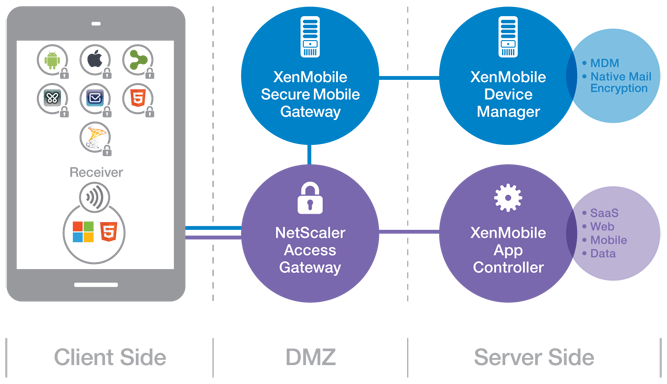
(Note: picture from Citrix)
So lets try to summarise the steps involved in getting these @WorkWeb and@WorkMail apps into your AppController and then published them to your users!
- Get your hands on a Macbook!
- Download the App Preparation Tool for iOS Applications and install it on the client
- Download and install Xcode (not 100% necessary but I recommend that you do that to simplify the creation/download of Distribution certificates and Distribution Profiles)
- Open XCode and open Preferences->Downloads,
 Read more…

Surprising Stats About Mobile Security
Another good article!!
Surprising Stats About Mobile Security
IT security and data protection are the top ranked challenges faced by many mobile IT asset managers. This was certainly brought to light in Mobile Enterprise’s IT headaches executive survey, and recent research from the International Association of IT Asset Managers (IAITAM) brings this to light as well.
Lost/Stolen Devices Covered
Asset Tracking?
BYOD
Future Workplace Formula = 1 person x 6 devices @ two-thirds of a desk
This was an interesting news/announcement from Citrix, and I must agree with it! We’re moving into a new workplace era!
Get ready for redesigned offices that reduce real estate through fewer desks, redesigned space, increased mobility and use of BYO devices
SANTA CLARA, Calif. » By 2020 organizations are set to reduce office space by almost a fifth (17 percent) according to a new study by Citrix, a leader in mobile and cloud technology. The workplace of the future will provide just seven desks for every ten office workers, with each person accessing the corporate IT network from an average of six different computing devices. The figure for 2020 is as low as six desks for every ten workers in Singapore, the Netherlands, the USA and the UK. Some of the highest desk to worker ratios in 2020 will be in Japan (8.77), South Korea (7.95) and Germany (7.90).
Almost every organization says they will redesign office space to be more appealing. The workplace of the future will foster creativity, be inspiring and encourage collaboration by enabling people to work from wherever, whenever and on whatever device so that work becomes something people do, not a place people go.
The Citrix Workplace of the Future report, which polled 1,900 senior IT decision-makers across 19 countries, shows that a third of people (29 percent) will no longer work from their traditional office. Instead employees will base themselves from various semi-permanent locations including the home (64 percent), field and project sites (60 percent), and customer or partner premises (50 percent). People are also expected to access corporate applications, data and services from locations such as hotels, airports, coffee shops and while in transit.
The trend towards fewer office-based employees – who use multiple computing devices to access corporate apps, data and services from a range of locations outside of the traditional office – is part of a global trend called mobile workstyles. Globally, a quarter (24 percent) of organizations have already fully adopted mobile workstyles. By the middle of 2014, 83 percent of organizations will have embraced mobile workstyles.
Mobile workstyles have been adopted widely and rapidly because it offers a number of benefits.
- For organizations, workshifting – where people move work to more optimal times and locations – creates a more flexible, agile workplace (73 percent), lower employee-related costs (53 percent), reduce real estate costs (48 percent) and help attract (47 percent) and retain (44 percent) top talent.
- Employees benefit from workshifting with more flexibility (65 percent), increased personal productivity (62 percent), less commuting time (61 percent), and abetter work/life balance (55 percent). It also…
Continue reading here!
//Richard
#Citrix #BYOD Architecture overview – #XenMobile, #Mobility
I must say that this blog post is of course Citrix “twisted”, but I really like it! And it shows how Citrix provides a pretty complete offering in order to deliver Mobility- and BYO-compliant services.
The Citrix blog written by Christopher Campbell makes sense and I also agree that a picture is worth a thousand words! 🙂
I’m going to make this real easy and simple. As my grandfather would say “A picture is worth a thousand words”.
If you’re a XenDesktop or XenApp customer this is what your environment probably looks like.

Now this is what you need to enable BYOD and add that MAM, MDM, MIM (Data) and overall EMM functionality you’re looking for.

This is what your environment looks like after you enable BYOD.

Didn’t get that? OK, here is what BYOD looks like with multiple vendors.

Now, here is what BYOD looks like with Citrix.

Got it?
Read the whole blog post here!
//Richard
#XenMobile, #MobileSolutions – Is this what we’ve been waiting for? – #Citrix, #ZenPrise, #BYOD
Ok, so Citrix has now presented their new offering after merging Zenprise into their product portfolio. And is this what you have been waiting for?
My personal answer to that is probably yes, now you have all the capabilities (almost) out there to get your BYOx program/strategy and architecture in place or if you just want to add additional capabilities to your existing service offerings.
I must say though that the packaging is compelling and VERY interesting!
Citrix Mobile Solutions Bundle
The Citrix Mobile Solutions Bundle, which is comprised of XenMobile MDMand CloudGateway, offers a complete enterprise mobility management solution that enables IT to manage and secure devices, apps, and data.
XenMobile MDM Edition
XenMobile MDM Edition offers market leading mobile device management capabilities that deliver role-based management, configuration and security of corporate and employee-owned devices.
What I’d like to see is a roadmap where Citrix becomes an even more complete provider of technology in the Mobility segment. I still believe that Mobility is not only about smartphones and tablets and all the apps that you shall deliver to those devices and non-managed and non-corporate owned devices. There is still a need to provide device management of corporate assets that are not smartphones and tablets! And why should you have to implement another device management service/product for those.
So please Citrix = add Windows 7/8, OS X and Linux device capabilities as well in your almost complete Enterprise Mobile Management offering!
The offering is of course also today an early release where the former Zenprise product and CloudGateway is provided under the same marketing and price bundle but I’m waiting for when we have one (1) enterprise app store! And all capabilities from one technical architecture and product that you enable each capability on a need basis and are licensed accordingly.
But this is a great step for Citrix and I must say that I’m looking forward to see where this is going, I mean the feature set is pretty awesome!
Compare Features |
XenMobile MDM Edition |
Mobile Solutions Bundle |
| Enterprise MDM | ||
| Device management |  |
|
| Configure policies | |
|
| Security and compliance | |
|
| Scalability and high-availability | |
|
| Ease of administration | |
|
| Provisioning and self-service enrollment | |
|
| Enterprise integration | |
|
| Monitor and support | |
|
| Decommission devices | |
|
| Secure email, browser and data sharing apps | ||
| @WorkMail | |
|
| Email attachment encryption | |
|
| @WorkWeb | |
|
| ShareFile integration | |
|
| Microsoft SharePoint integration | |
|
| Mobile app containers | ||
| Mobile application management | |
|
| MDX Vault | |
|
| MDX Interapp | |
|
| MDX Access | |
|
| App wrapping | |
|
| Unified app store | ||
| Enterprise app store | |
|
| Follow-me apps | |
|
| Identity management, single sign-on and scenario-based access control | ||
| Active Directory integration | |
|
| Instant application and data provisioning | |
|
| Single sign-on to apps and data | |
|
| App requests | |
|
| Instant application and data de-provisioning | |
|
| Strong authentication | |
|
| Secure remote access | |
|
| Policy enforcement | |
|
More information about the technologies have also been added to eDocs!

Of course also made their competition table:
Compare the Mobile Solutions Bundle to other enterprise mobility solutions
These are exciting times and I’m looking forward to play around with the whole bundle!
Read more about XenMobile/Mobile Solutions here!
//Richard
#ShareFile app for #Windows 8 – #Citrix, #BYOD
Citrix leads the way with the new ShareFile app for Windows 8

Users are excited about tablets and the market is growing rapidly. With Windows 8, Microsoft is providing a great tablet OS as well as their own hardware in the Microsoft Surface RT and Surface Pro. This article from CIO indicates that a Forrester survey showed that 32% of users want their next work tablet to run Windows.
Citrix is bringing easy file sharing to the latest version of Windows. If you are one of those users looking to get a tablet running Windows 8 or if you have a laptop/desktop running Windows 8, we now have multiple ways to leverage ShareFile on Windows 8 with the introduction of the new ShareFile app in the Windows Store. This app provides a full-screen experience on Windows 8 for accessing ShareFile and integrates directly with the new Windows 8 charm bar for OS-level integration with the Search, Share, and Settings charms. Of course, we included support for the great device security features like remote wipe and users can login with their AD credentials. The app also supports these great features:
- Browse your account
- Download and view documents
- Request and send files via email
- Transfer big files
- Add users to folders on your ShareFile account
- Offline access to view downloaded files
- For Enterprise accounts, users will be able to access their data using their corporate credentials
- IT administrators will be able to control and audit access
Check out a video of the app in action on YouTube. More details…
Continue reading here!
//Richard




 The IT Melting Pot!