Archive
Watch the #Citrix Consulting Best Practice Webcast Series
Citrix Consulting Best Practice Series
In these webinars, members of the Citrix Consulting team have taken an in-depth look at the steps to desktop virtualisation.
Beginning with the basics, looking at setting priorities, and passing on the knowledge needed to fully understand the processes, what is required for roll-out and of course the value of desktop virtualisation.
This series has been extremely popular and now, is available for you to view at your convenience.
Regardless of where you currently stand with your desktop virtualisation, feel free to look at a single phase or check out the whole series.
Content:
- Introduction: Desktop Virtualisation: Your Insight into the world of Desktop Virtualisation
- Phase 1: Establishing business priorities and mapping these to your desktop virtualisation project
- Phase 2: Analysis – understanding your existing IT infrastructure
- Phase 3: Design – key concepts and approaches for designing your desktop virtualisation solution
- Phase 4: Build/Test – validating your design and making improvements
- Phase 5: Rollout – Going Live and operational with your virtual desktops
Continue reading and watch the webcasts here!
//Richard
Lifecycle Milestones for Citrix Receiver – #Citrix, #Receiver
For each major version (e.g., v3.0) of a Citrix Receiver for Windows, Mac, Linux, Java, or WinCE, customers will receive a minimum lifecycle of four years. The lifecycle consists of a Mainstream Maintenance Phase for at least the first three years followed by an Extended Maintenance Phase for the remainder of the lifecycle. The specific dates for each major release of these components will be posted in the tables below.
During the Mainstream Maintenance phase, customers that remain current in a Citrix Technical Support program receive 24x7x365 worldwide support. Support includes assistance from experts and connects you to the latest troubleshooting tools, techniques and resources you need to protect your Citrix investment. Citrix will provide code-level maintenance in the form of minor version releases, and in some cases, Cumulative Updates (maintenance releases containing multiple fixes) when Citrix determines they are required to resolve issues with Receiver. The release of a minor version or Cumulative Update may define a new maintenance baseline. Citrix customers may be required to upgrade to a specific minor version or Cumulative Update to receive continued maintenance. When a new maintenance baseline is defined, Citrix will continue to provide support for each minor version (e.g., v3.3) for a minimum of 12 months after the release of the next minor version (e.g., v3.4). Minor versions may include functional enhancements as well as code-level maintenance.
During the Extended Maintenance Phase, technical support continues as before but code-level maintenance will be limited to security-related issues deemed critical by Citrix.
For Citrix Receiver for Android, Chromebook, iOS, or Windows 8/RT, customers that remain current in a Citrix Technical Support program receive 24x7x365 worldwide support for the version of Receivers that are currently available from the respective vendor app store. Code-level maintenance is provided with the next version made available in the respective vendor app store.
Lifecycle dates for Citrix Receiver for Windows, Mac, Linux, Java, and WinCE
The tables below list the major versions…
Put Citrix Receiver App Banners in Web Interface for Android and iOS – #Citrix, #Receiver
A good blog post from Roy Tokeshi about Citrix Receiver setup and provisioning.
I’ve used the Citrix Mobile Receiver Setup URL Generator for quite some time and like it (but now of course you’ll get pretty far with email-based enrolment if you can use that), but it’s still valid for some use cases and scenarios. But to add the banner to the download of the app itself is something I’ve not done, interesting!
One of the cool things you can do to help your users connect to your XenDesktop and XenApp environments is the Citrix Mobile Receiver Setup URL Generator at:http://community.citrix.com/MobileReceiverSetupUrlGenerator/

The output of this generator is a couple of links. The first is an iOS configuration link and the second is the Android configuration link. What is great about this is once the user gets this link on their iOS or Android device, via email, text message, or carrier pigeon with a micro SD card strapped to its leg , all the user has to do is click on the link and the local instance of the mobile Citrix Receiver is auto-configured.
- VCDC Email
- Application warning iOS
Something that Apple had made available is called a Smart App Banner. (I suggest that you don’t shout “Smart App Banners!” across the cube farm unless you want to start a bunch of prairie dogging or HR emails.) Regardless, the folks at Apple created an easy way for you to advertise the Citrix Receiver app itself from within web interface. At Citrix Systems we have had had a couple of different temporarily consistent hostnames we point at to get our apps and desktops. Among my customers, apps.company.com or atwork.company.com have popped up a few times. The point being, the user puts a name in the browser and the web interface client detect takes over, suggests a client version for Mac, Windows, Java and off they go to application or desktop nirvana. But what about the lonely neglected mobile devices. We tell our bosses that we need iPhones, iPads, and Androids for work. So the smart thing to do is to get a few work apps on there before bosses catch us playing Angry Birds, or Radical.FM So the question is, “How do I use this on my web interface?” That is an excellent question. We are going to take the cute little meta tag referenced in that Apple Dev article and paste that right into the login.aspx file in our web interface site. For the purposes of demonstration, I’m going to use our Virtual Computing Demo Center or VCDC as an example. The default web interface that acts as a front end of the demo instance is hosted on a virtual machine acting as the DDC for XenDesktop. The screenshots I am using are based on the connection I make to a XenApp desktop logged on as administrator. \\ddc\c$\inetpub\wwwroot\Citrix\DesktopWeb\auth\login.aspx looked like this:

Now, modified at the top line it looks like this.

Remember that this is something that is only supported in iOS and in fact from the default Safari browser. Here are some screenshots…
Continue reading here!
//Richard
What’s new with Access Gateway MAC Plug-in release 2.1.4 – #Citrix, #AG, #Receiver
Another great blog post from Prashant! You rock! 😉
The new Citrix Access Gateway Appliance release 10.0.71.6014.e brings along with it the new MAC plug-in release 2.1.4. MAC OS, along with Microsoft Windows, are the two main desktop platforms supported by Citrix Access Gateway for full SSL Tunnel. The AG plug-in is most commonly used in tandem with Citrix Receiver, to provide access to your virtual applications and desktops, provided by XenApp & XenDesktop respectively. The Receiver and AG plug-in also work together to provide end users access to intranet web and SaaS resources via Citrix CloudGateway.
The new 2.1.4 plug-in brings the following new enhancements for Citrix Receiver users:
- Seamless Desktop Receiver experience: With this release of Access Gateway plug-in, end users will no longer have to sign into the plug-ins as a manual step, to access apps / sites that require a full SSL tunnel. Receivers automatically launch a SSL VPN session via Access Gateway as needed. Result is – end user just deals with Citrix Receiver and Receiver internally (and automatically) deals with Access Gateway on user’s behalf.
- EPA with ICAProxy / CVPN: Receivers can now seamlessly launch AG plug-ins to connect to an Access Gateway vServer configured with End Point Analysis policies, in ICAProxy and CVPN modes as well. Earlier, this was supported only for Full Tunnel access.
- ….
Continue reading here!
//Richard
Great UI Theme improvement setting – #AccessGateway, #NetScaler, #Citrix
I must say finally! It’s not a 100% yet for everyone out there but it’s a step in the right direction. The NetScaler, Access Gateway, Web Interface, StoreFront and Receiver has not really been in synch when it comes to UI and end-user experience…. But now Citrix has improved it!
Access Gateway is a secure remote access product and hence tends to be the entry point for corporate users, wanting to access their enterprise applications and desktops. Given this, it makes sense for corporates, to try and customize the logon experience on Access Gateway, to match their corporate look and feel.
Access Gateway has always allowed for this customization, though, it’s been somewhat of a tedious process. With the new 10.0.71.6014.e release, we are making an attempt to simplify this experience.
UI Customization on Access Gateway is a multi-step process:
- Access the built in theme web pages and customize them, to match the corporate requirements
- Apply the modified theme (collection of web pages) at the right location
- Modify certain scripts to make this change persistent
- Every time the firmware has to be upgraded, take a backup of the customized pages and scripts and re-apply the same after the upgrade.
A quick Google search will give you a number of helpful and very accurate blogs/articles, on how to tweak the web pages to customize and create your corporate look and feel. Some of my favorites are:
- http://blogs.citrix.com/2012/04/19/green-bubble-theme-for-citrix-netscaler/
- http://jariangibson.com/2012/04/16/apply-citrix-receiver-theme-to-netscaleraccess-gateway-10/
With this new release, we have automated all the other steps (i.e. 2-4) for you. Instead of having to worry about how to apply this theme, or having to take backups every time you upgrade, the new release will automatically handle this for you.
To see the new offering in this r…

Continue reading here!
//Richard
Why no Snaphot feat. on NetScaler like on AG? – #Citrix, #NetScaler
Ok, I had the “pleasure” to be working with an Access Gateway setup a little while ago… and I don’t know if I should actually say that it was a pleasure when I all did was missing the NetScaler.
But there is one feature that Access Gateway has that NetScaler doesn’t that I like and see a need for; Snapshots!
Why hasn’t Citrix build the same EASY way to make a snapshot of a config on NetScaler??? This would simplify things a lot from a change management point of view. You could of course make this happen yourself but need to be savvy and it’s hazzle… It would also ensure that admins that aren’t hardcore NetScaler nerds actually could get some confidence to change stuff and have a back out plan to revert to a previous snapshot if something goes wrong.
And the great thing about a snapshot is that it represents all the Access Gateway settings, licenses, and certificates at a specific time. If you have multiple software versions installed on Access Gateway, you can have snapshots that span the different software versions. Imagine if there was a button you could press to do that done on the NetScaler!
Video of how it works: How To: Take and Restore Snapshots on Citrix Access Gateway 5.0
Creating Snapshots to Manage Access Gateway Configuration Settings
I think that this will be a good thing to add now when more shops will setup Access Gateway Enterprise on NetScaler and only use it for just that…especially now when it’s also going End of Life (EOL).
Citrix: Please make this happen! 😉
//Richard
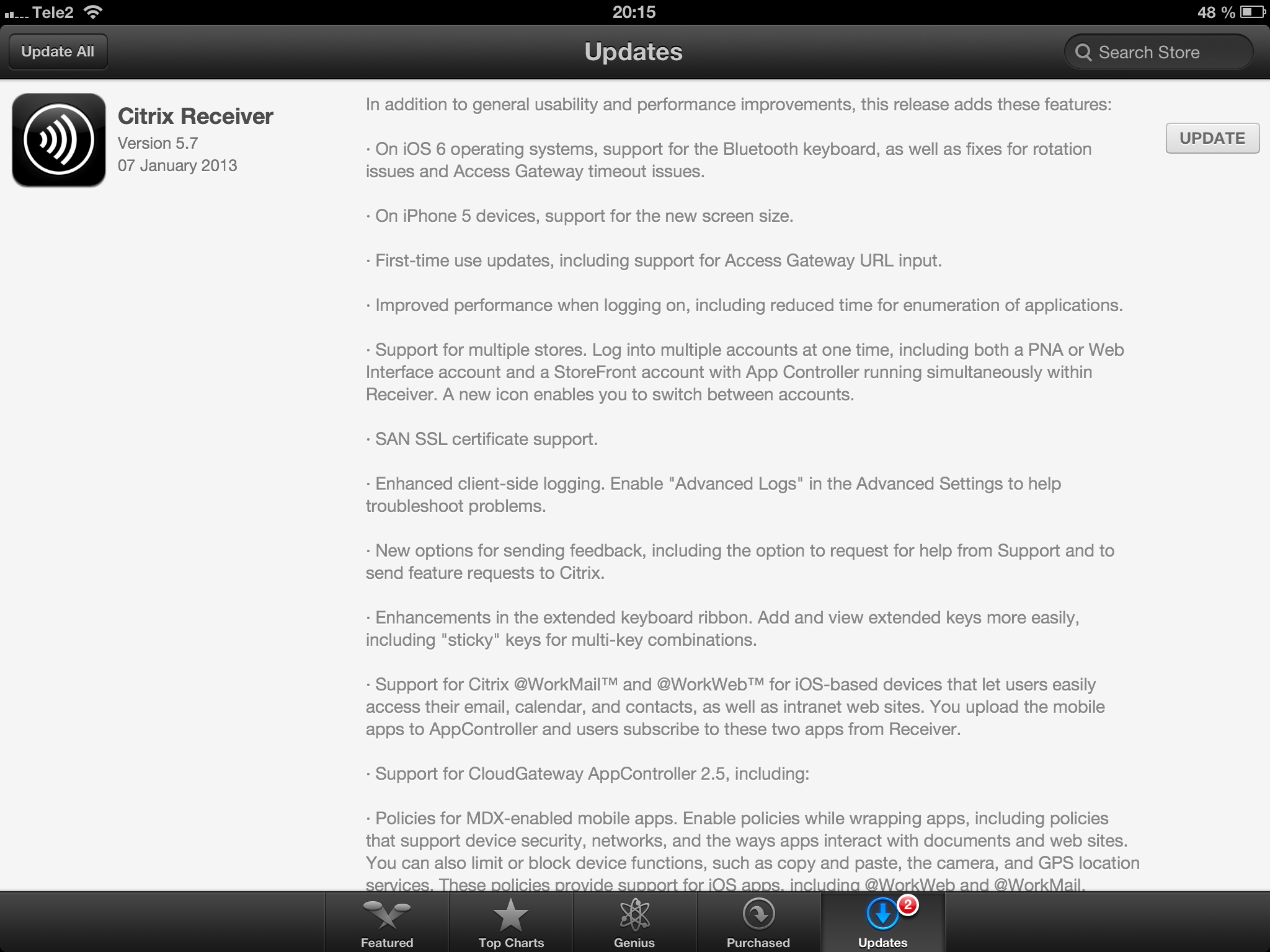
Receiver 5.7 for iOS released! – #Citrix, #Receiver, #CloudGateway
Receiver 5.7 for iOS is here!
//Richard
New Citrix Access Gateway Release – #AG, #SmartAccess, #Receiver, #Citrix
Ok, just as we expected there is now a new release of Access Gateway that goes hand in hand with the new Receivers as I wrote about in the following posts:
Receiver for Windows 3.4 released
Receiver for Mac 11.7 Released
And of course as you could read in the first post above there are great improvements of the end-user experience when accessing resources, now you have ONE login for both the Receiver and to the Access Gateway plugin. And as that posts also highlights is the support for host check (EPA scans) on Receiver use cases as well! Finally! 😉
More info on the new Access Gateway release 10.0.71.6014.e below:
With the release of Citrix CloudGateway 2.5, comes the release of Citrix Access Gateway 10.0.71.6014.e. Citrix CloudGateway as you are aware, is the Citrix Enterprise Mobility offering, complete with Citrix Receiver running enterprise applications on the end point, Citrix Storefront running your enterprise app store, Citrix AppController running your mobile policy management and Citrix Access Gateway providing remote access to all this infrastructure.
With every CloudGateway release, Access Gateway continues to build incredible integration and smart abilities, which makes it the de-facto remote access solution for your CloudGateway deployments. Access Gateway is the only remote access solution today, which can offer seamless Receiver configuration using Email based discovery and provide intelligent integration with Storefront and AppController, to provide single sign-on to all your enterprise applications.
With this new release, Citrix Access Gateway will be able to provide the following value additions in your CloudGateway deployments:
- Seamless Desktop Receiver experience: With this release of Access Gateway, end users will no longer have to sign into their Access Gateway plug-ins as a manual step, to access apps / sites that require a full SSL tunnel. Receivers automatically launch a SSL VPN session via Access Gateway as needed. Result is – end user just deals with Citrix Receiver and Receiver internally (and automatically) deals with Access Gateway on user’s behalf.
- EPA with ICAProxy / CVPN: Receivers can now seamlessly launch AG plug-ins to connect to an Access Gateway vServer configured with End Point Analysis policies, in ICAProxy and CVPN modes as well. Earlier, this was supported only for Full Tunnel access.
- Session Sharing: Receiver and AG plug-in have always been two separate entities, and because of that, they establish two parallel sessions with Access Gateway. With this release, we have added the smarts in our Receiver and Access Gateway integration, to understand each other, and be able to share the same session with Access Gateway appliance. Good News – this now leads to simplified access from end user perspective, and optimal session/license consumption from Administrator perspective.
- Device Wipe/Lock support for AppController: With CloudGateway 2.5, AppController is launching the ability to register and track mobile devices via AppController. These registered mobile devices can then be locked / wiped, if the..
Continue reading here!
//Richard
#Zenprise is now a part of #Citrix
Zenprise is now officially a part of Citrix! For a press release and additional info read here.
I am really excited about this!! But my initial question about this acquisition is how the offerings will be bundled together. Right now you can purchase CloudGateway to get the MAM capabilities for mobile apps and data, and of course then also deliver XenApp, XenDesktop plus SaaS and internal web services. And that’s a nice offering but now with the more capable MDM parts from Zenprise, what will the license model look like and what will in the end a “Platinum” license provide?
My hope is of course that the whole license model is changed to be aligned with all acquisitions from the past years so that you could purchase a “Platinum” license that truly covers all the capabilities and products to make life easier for everyone….
My fear though is that Zenprise will be added as a separate MDM capability on top of CloudGateway as the “Diamond” edition! 😉 and it will probably exist in both CCU and named user/device models to make life even harder…
Please Citrix: surprise us with a new price and license model that spans the whole product/service stack! 🙂
//Richard
#Citrix #Receiver 3.4 and 11.7 = is the #SmartAccess story more real now? – #CloudGateway, #AGEE, #NetScaler, #StoreFront
Citrix has now released version 3.4 of the Receiver for Mac and Windows, but what is the main added value with this release?
First of I’d like to ask you to review my previous post where I questioned the Citrix SmartAccess story that I believe is not there end-to-end and that really is a lacking feature for scenarios where you’d for instance want to support more BYOD models etc. You need to determine the person accessing the service and also what what type of device it is, trusted or not etc. And I in the previous post I argued that Citrix doesn’t deliver according to their SmartAccess story;
#Citrix #SmartAccess = A complete story or not? – #NetScaler #AGEE #EPA
And for you that haven’t read about the new Receiver 11.7 or OS X and 3.4 for Windows check these posts:
Receiver for Windows 3.4 released
Receiver for Mac 11.7 Released
The table below is from the previous SmartAccess post and my theoretical review right now is that the SmartAccess story for Windows and Mac OS X clients have improved. As you can see in the two rows for Receiver 3.3 and 11.6 where you would access through a Receiver through an AGEE you would NOT be able to perform host checks using the EPA scans.
This was just not possible though the native Receiver didn’t have that capability to trigger the EPA scans. And the EPA plugin itself was not available in the native Receiver on the OS X, it was bundled into the Access Gateway plugin.
| Client | Access method | EPA/Host-check possible on AGEE | Comment |
| Windows with Citrix Receiver for Windows 3.3 | Receiver 3.3 | NO | You’ll never be able to do host-checks on this device if Receiver access is used due to that the Receiver does not have EPA scan capabilities. |
| Windows with Citrix Receiver for Windows 3.4 | Receiver 3.4 | YES | Now when the Receiver is communicating with the Access Gateway plugin and shares login credentials then you can leverage the AGEE plugin to perform EPA scans and then allow different session policies and profiles depending on the EPA scan result, and at the same time of course also pass that through to StoreFront/WI and into XenApp/XenDesktop.It does however then require that you get the AGEE plugin installed on the devices, which may be another dilemma… |
| OS X with Citrix Receiver for Mac 11.6 | Receiver 11.6 | NO | You’ll never be able to do host-checks on this device if Receiver access is used due to that the Receiver does not have EPA scan capabilities. |
| OS X with Citrix Receiver for Mac 11.7 | Receiver 11.7 | YES | Now when the Receiver is communicating with the Access Gateway plugin and shares login credentials then you can leverage the AGEE plugin to perform EPA scans and then allow different session policies and profiles depending on the EPA scan result, and at the same time of course also pass that through to StoreFront/WI and into XenApp/XenDesktop.It does however then require that you get the AGEE plugin installed on the devices, which may be another dilemma… |




 The IT Melting Pot!