Archive
#Citrix #NetScaler Traffic Domains ins and outs – via @barryschiffer
Another great blog post by Barry!!! Keep up the great work!!
Citrix NetScaler Traffic Domains are a way of segmenting network traffic for different applications or even tenants. You are able to use a traffic domain to create fully isolated network environments on a single NetScaler instance. An instance is a single appliance or a HA setup of two appliances.
Citrix NetScaler Traffic Domains were introduced with NetScaler 10.0. At first NetScaler Traffic Domains started as a somewhat hidden feature which you could only configure by CLI. As of version 10.1 Traffic Domains are fully configurable in the NetScaler GUI which makes it a lot simpler to use.
In a way NetScaler Traffic Domains could compete with the NetScaler SDX platform. With Traffic Domains we segment networks on a single NetScaler instance instead of the SDX where we create a virtual appliance per network segment.
A downside of using NetScaler Traffic Domains is the fact that some features are only supported for usage inside of Traffic Domain 0. Traffic Domain 0 is the default Traffic Domain, all services run inside Traffic Domain 0 unless explicitly specified.
An example of non supported features are NetScaler Management and NetScaler Gateway. For a complete list of supported features follow this link.
For non supported features for which you need isolation you have two options, NetScaler SDX or additional NetScaler appliances (virtual or physical).
My expectations are that we will see more and more features being supported on NetScaler Traffic Domains. An amazing feature would be to enable management functionality on Traffic Domains where you would only be able to manage or create services assigned to that Traffic Domain. This would be especially useful for multi-tenancy or multi management in situations where for example one team manages Mobility and one team managing a web application.
A few use cases Citrix describes for NetScaler Traffic Domains:
- Use of duplicate IP addresses
- Use of duplicate NetScaler entities
- Multi Tenancy
A use case I’m actually using NetScaler Traffic Domains for is the ability to deliver services in a DMZ as well as an internal network.
Internal Network services like Microsoft Exchange Client Access Services and Microsoft App-V are heavy on traffic and I don’t like those services traversing the firewall in the DMZ. This also works great combined with Direct Server Return (DSR) which is blocked by most firewalls. Check out more on DSR combined with App-V on this article by Ingmar Verheij.
Penetration testing tips for your NetScaler – via @neilspellings – #Citrix, #NetScaler
This is a really good blog post by Neil! Keep up the good work! 😉
When working on Netscaler implementation projects, most of which tend to be internet-facing, one aspect that most organisations always perform is a penetration test. Having been through a number of these over the years, I thought it would be a good idea to share my experiences and some of the common aspects that get highlighted, to enable you to “pass first time” without having any remedial actions to work through and costly re-tests to perform.
The Netscaler has a number of IPs (NSIP, SNIP/MIP, Access Gateway VIPs etc) so what should you test against? The answer may well depend on corporate policy, but I usually test the internet-facing Access Gateway VIP and the management interface (NSIP). I also usually include StoreFront in any internal tests as this is an integral component of the overall solution, but I won’t cover StoreFront in this post.
Of course technically “bad guys” can only reach internet-facing IP addresses (as permissioned by your external firewall) but I recommend including internal-facing IPs for any DMZ-hosts to understand your exposure should another DMZ host get compromised (as your attacker can now potentially access internal IPs so the external firewall rules no longer protect you)
- Remove unnecessary management tools (telnet and FTP are considered insecure so should alwaysbe disabled). Also remove SNMP if your Netscalers are not being monitored or managed by an external monitoring service.

- Ensure that “Secure access only” is selected to force SSL access to the GUI
- Ensure that management applications are only available on an internal IP (NSIP or SNIP). Open the IP properties for the IP addresses that won’t be used for management and untick “Enable management access”
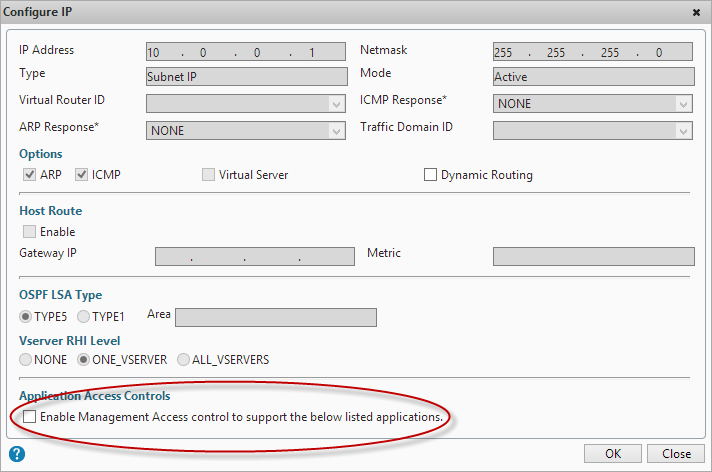
- Change the default nsroot password to something long (obvious you’d think but you’d be amazed how many Netscalers I’ve seen that I can just log straight into using the default credentials!)
- If you have set up integrated AD authentication via LDAP for administrative access to the GUI, ensure that you have protected access using a filter group, otherwise anyone with a valid AD account will be able to access your Netscaler GUI (although they won’t be able to make any changes, it’s still not a good idea them having this access!)
- If you are using…
Continue reading here!
//Richard
#Gartner Magic Quadrant for Application Delivery Controllers – #ADC, #NetScaler, #Citrix
Citrix is positioned in the Leaders Quadrant for Application Delivery Controllers for the seventh consecutive year: the Gartner Magic Quadrant Report focuses on vendor’s ability to solve complex application deployment challenges. Don’t miss this chance to learn from Gartner’s independent research.
NetScaler is well established as the industry’s leading internet delivery system, touching an estimated 75 percent of internet users each day. Citrix builds on this leadership to provide the world’s most advanced cloud networking platform, giving customers a single, integrated solution that brings the elasticity, simplicity and expandability of the cloud to any network. This combination helps customers deliver public and private cloud services with the best performance, security and reliability to any device. Learn more about the importance of this recognition by reading this recent press release.

Source: Gartner (October 2013). The full 2013 Gartner Application Delivery Controller Magic Quadrant, report can be viewed on the Gartner website.
//Richard
#Netscaler Insight and Integration with #XenDesktop Director – via @msandbu
Great blog post by Marius! 🙂
This is another one of Citrix hidden gems, Netscaler Insight. This product has been available from Citrix some time now, but with the latest update in became alot more useful. Insight is an virtual applance from Citrix which gathers AppFlow data and statistics from Netscaler to show performance data, kinda like old Edgesight. (NOTE: In order to use this functionality against Netscaler it requires atleast Netscaler Enterprise or Platinum)
Insight has two specific functions, called Web Insight and HDX insight.
Web Insight shows traffic related to web-traffic, for instance how many users, what ip-adresses, what kind of content etc.
HDX Insight is related to Access Gateway functionality of Citrix to show for instance how many users have accessed the solution, what kind of applications have they used, what kind of latency did the clients have to the netscaler etc.
You can download this VPX from mycitrix under Netscaler downloads, important to note as of now it is only supported on Vmware and XenServer (They haven’t mentioned any support coming for Hyper-V but I’m guessing its coming.
The setup is pretty simple like a regular Netscaler we need to define an IP-address and subnet mask (Note that the VPX does not require an license since it will only gather data from Netscaler appliances that have a platform license and it does not work on regular Netscaler gateways)
After we have setup the Insight VPX we can access it via web-gui, the username and password here is the same as Netscaler nsroot & nsroot

After this is setup we need to enable the insight features, we can start by setting up HDX insight, here we need to define a expression that allows all Gateway traffic to be gathered.
Here we just need to enable VPN equals true. We can also add mulitple Netscalers here, if you have a cluster or HA setup we need to add both nodes.

After we have added the node, just choose configure on the node and choose VPN from the list and choose expression true.
#Citrix #NetScaler Application Delivery Controller Denial of Service Vulnerability
A denial of service vulnerability has been identified in Citrix NetScaler Application Delivery Controller (ADC). This vulnerability, when exploited, could cause the Citrix NetScaler appliance to become temporarily unavailable for normal use.
This vulnerability affects Citrix NetScaler ADC version 10.0 prior to version 10.0-76.7 only.
Citrix NetScaler ADC versions 10.1 and 9.3 are not affected by this vulnerability.
Continue reading here!
//Richard
How to: #Citrix #XenMobile 8.5 MAM upgrade! Part 2 – #StoreFront, #AppController, #NetScaler
Hi again!
If you haven’t read Part 1 then I highly recommend doing so prior to going directly to the upgrade that we’re covering in this post!
Prepare for a journey in this post about Citrix StoreFront upgrade, uninstallation, console and how messy it could be! NOT all the time, sometimes it “just works”! 😉
My little NetScaler is already upgraded to 10.1 so unfortunately I couldn’t take you on that journey as well, so we’ll start with the StoreFront upgrade from 1.2 to 2.0 in this post. These are the steps that we need to cover as highlighted in the migration guide that seems very short and straight forward:
Upgrade StoreFront 1.2 to 2.0.
- Logon to the StoreFront server console.
- Upgrade StoreFront by running the StoreFront 2.0 installer as an administrator.
- When the upgrade is completed, open StoreFront administration snap-in, remove CloudGateway controller from each store as this will be moved in the migration solution.
- Open NetScaler Gateway Properties and for each gateway defined and change the version field in settings from 9.x to 10.0.x or later.
- Test the configuration by logging on through web browser or Citrix Receiver.
- Verify if the users are able to login and authenticate to StoreFront defined stores configured.
Is it this easy?
Ok, I’ve downloaded the 2.0 installer, and I’m logged on to the server.
Before we even start the upgrade there are things that could go wrong in removal or upgrades of StoreFront. And one that I’ve seen cause a lot of headache for a lot of people out there is that they have the Windows Firewall service disabled. Though the installation and removal wants to delete or add these rules the installation will fail unless this service is running. As you can see in this picture below you see the FW rule added in StoreFront 1.2:

So let’s verify that the Windows FW service is started, and it is!

I’ll now start the installation by double-clicking the StoreFront 2.0 installer!

What is this popup that came directly after starting the installer?

Wait, ok so you guys at Citrix couldn’t ask me whether you could do this for me? My plan is to upgrade, so please just add a little step in your upgrade program that does this for me… change request #1 for the next SF release and it’s upgrade process! Verify pre-requisites or deal with them!
#Citrix #XenMobile 8.5 MAM upgrade! Part 1 – #StoreFront, #AppController, #NetScaler
In this little blog series series you’ll follow a little upgrade process to XenMobile 8.5 for Mobile Application Management (previously known as CloudGateway).
Ok, I don’t exactly know where to begin. I must first say that Citrix is THE master when it comes to renaming products, updating/changing the architecture, changing consoles (claiming to reducing the number of them like every year but at the same time introduce new ones).
How hard can it be to make crystal clear documentation and upgrade processes that works and are easy? I feel already that my tone in this blog post is “a bit” negative… but I think that Citrix actually deserves it this time.
I must now take a step back and calm down and point out that Citrix is delivering some MAJOR changes and good news/features in the new XenMobile 8.5 release though! It’s great (when you’ve got it up and running) and I must say that I don’t see anyone that is near them in delivering all these capabilities in a nice end-to-end delivery!! 🙂
Have a look at everything that is new, deployment scenarios etc. here before you even start thinking to upgrade or change your current NetScaler, StoreFront and AppController environment!
Once you’ve started to read the different design scenarios you’ll see that App Controller can be placed in front of StoreFront, in the back of StoreFront or totally without StoreFront… all the options just make your head spin! Because Citrix doesn’t really make it clear on how all of this should work with a Receiver and Worx Home depending if the device is on the internal network, external through NetScaler or what the capabilities that you need are supported in the different scenarios in a simple way, just text that explains it. And I find the pictures and text a bit misleading:

As you see above the App Controller is added as a “Farm” just as in 2.6, but is that the truth now in version 2.8 of App Controller?
If you have a look at the text from this page it’s getting even more confusing: Read more…
#Citrix #NetScaler #SDX Installation Overview Video
This is a pretty good “quick” video of the SDX installation! Have a look at it, and remember not to use 1Gbps interfaces only if you want to run more than 7 VPX’s on the SDX! Then go for 10Gbps interfaces or many channels/interfaces of 1Gbps to not hit the SR-IOV limit of 7/1Gbps interface! 😉
Description
12:45 screen capture with PPT overview on IP Addressing, and walking through install, IP Change for SDX’s SVM and XS IPs, licenses, and then the install of a NetScaler instance with NSIP and SNIP. This is intended to be a quick overview before you set out on a first SDX install, and is in compliment with the SDX Quick Install Guide.
See the video here!
//Richard
Choose your #Citrix #NetScaler … wisely… – via @hlouwers
This is a question I get a lot and I must say that Henny Louwers did answer it well in this blog post!
I spend a lot of my time breaking down the different models of Citrix NetScaler appliances and different Software Editions within the Citrix NetScaler portfolio.
I decided to set up a blog about this since the path is usually pretty much (lengthy but) the same. This does not mean the answer is always easy because there are a lot of questions that need to be answered.
The first thing I would like to get off my chest is the following: Stop seeing/selling the Citrix NetScaler as a replacement for Secure Gateway. It is so much more than that. I often have discussions with various engineers and consultants telling me that Citrix NetScaler is so expensive for a Remote Access solution because Secure Gateway always used to be free. No offense but a Citrix NetScaler solution belongs to the networking department, not the Citrix XenApp sys admin department. Or maybe limited.
That leads me to the first difficult thing of a Citrix NetScaler project. The adoption of the Citrix NetScaler appliances to the networking guys of an organization. They need to embrace the solution to make this a success. For some reason they too see it as a ‘’Citrix’’ solution. For that reason one of the most important meetings to setup is usually with the networking guys to try to explain the L3-L7 functionality of the Citrix NetScaler solution. When they realize it competes with F5, Juniper, Cisco, etc then we are on the right track.
NetScaler Gateway or NetScaler Standard Edition
Usually the first question of a customer is regarding something simple like replacing the Remote Access solution. Since the NetScaler is going to be the main platform for publishing Citrix publications a NetScaler Gateway can be considered as a valid option. This is when I tell a customer it would be wise to spend a little extra on the NetScaler Standard Edition since this would leverage the solution be having full load balancing capabilities (among others). When you compare prices between the NetScaler Gateway and NetScaler Standard Edition you will see that the Standard Edition will be somewhat more expensive but I for one think that it is worth the difference given the feature set that come with the Standard Edition. Of course the NetScaler Gateway can always be upgraded to a NetScaler Standard Edition (or higher) if you will.
Another feature of Citrix NetScaler Standard Edition is the ability to run Citrix Web Interface on the appliance. Honestly, I do think is not really that important anymore….
Continue reading here!
//Richard
Monitoring #Netscaler with Operations Manager 2012 – #SCOM – via @msandbu
Another great blog post by msandbu!!
This guide has been written with Netscaler build 73 and Operations Manager 2012 SP1 (on WS2012) with the management pack from Citrix.
Operations Manager 2012 supports monitoring network devices either through SNMP (v1, 2 and 3) or through just basic ICMP.
Citrix has made a management pack solution, which you can use to enhance the monitoring capabilities in SCOM.
The pack also includes VMM PRO management pack (Which is not gone through in this guide, just the basic management pack)
The management pack can be downloaded from mycitrix (Requires login)
https://www.citrix.com/downloads/netscaler-adc/components/netscaler-management-pack-for-operations-manager-2012.html
(Just a side note: Comtrade is a Citrix Partner who is currently making a new management pack for Netscaler so stay tuned for the new release )
So when we have a functional Operations Manager server up and running we have to install the SNMP service on one of the servers.
This can be done via Server Manager.

After that is installed go into services.msc and choose “Accept SNMP packets from any host” or just enter the IP of the Netscaler server.
Make sure that firewall on the OpsMgr server allows for SNMP traffic in…
Continue reading here!
//Richard




 The IT Melting Pot!