- Why OpenStack is much more than just hype
- A summary of key OpenStack technologies
- Why to consider converged infrastructure for building private clouds
- The right way to scale-out OpenStack deployments
Watch the webinar here!
//Richard
Citrix has released Citrix StoreFront 2.5.2 with some good fixes…
Updated: 2014-06-18
Issues fixed in StoreFront 2.5.2
Fail to launch a XenApp session from the second delivery site.
The StoreFront server had problems with load balancing between two XenApp farms. When the first farm was completely loaded, StoreFront did not use the second farm and the application launch failed. [#432279]
Enhanced enumeration fails with socket pooling enabled.
Enumeration failed for two or more farms when socket pooling was enabled in the store configuration file. [#470666 and #458139]
Issues with finding the domain controller for a domain.
Slow logon times occurred when geographically distant domain controllers were chosen. [#479210]
Submitting the logon form after the authentication service session timed out results in an HTTP 400 Bad Request.
When the logon form was submitted after the authentication service session timed out, an HTTP 400 Bad Request response was generated preventing the user’s credentials from being resubmitted. [#479200]
Directory queries are not thread-safe.
Citrix default Domain Services crashed because the Directory services account look-up was not thread-safe. [#479188]
Issues fixed from StoreFront 2.1 to 2.5
Changing an expired password on next logon fails.
When prompted to change a password, client domain users using Windows would not be able to successfully change their passwords because of Windows Server 2003 domain controllers failing to handle the operation correctly. Microsoft has issued an update that resolves this problem. The update is available via Windows Update or may be downloaded from Microsoft support directly at http://support.microsoft.com/kb/2927811. [#438725]
A user with a large number of subscriptions loses the ability to manage subscriptions.
When logging on, users with 353 or more automatic app subscriptions would receive the following error: “Citrix Receiver cannot currently add, remove, or reposition apps.” [#432086]
The wrong user name is sometimes shown.
Clients would erroneously display a different username. [#430823]
PNA resource IDs do not match requirements of local launch logic.
PNA resources from XenApp were in a format different than StoreFront’s usage. This inconsistency led to slower performance due to excessive ICA connections.[#429055]
Partial wildcard certificates cause issues in the admin console.
The admin console would improperly display configured host names from the IIS bound certificates. [#424708]
Change password option is not available for some users.
Some users were not given the option to reset their password even though they were enabled to do so. [#416373]
Subscription export/import loses subscription properties.
StoreFront was not properly maintaining multiple subscription properties. [#408668]
DAC smart card authentication updated to use domain account services rather than IIS certificate mapping.
Desktop Appliance Connector certificate authentication with smart cards required manual configuration with IIS certificate mappings rather than using the default domain account services. [#406945]
A SAN web server certificate with no CN causes issues for the admin console.
StoreFront admin console was improperly handling common name entries in certificates which would cause console crashes.[#401815]
StoreFront home farms support gives a user access to all farms when they should have access to none.
When a user was configured without access to any farms, all farms were enumerated for that user.[#400869]
The admin console being closed would overwrite some manually applied changes made to the configuration file.
Some manual configuration changes were being lost when the admin console was closed. [#440946, #424460, #439887, #395155]
I’m not surprised at all and think that this is a good report by Gartner!
Nutanix is absolutely the visionary leader and once more and more units are shipped they will also climb higher into the leaders section and totally rule! I must say that this is a really impressive product that truly is web-scale ready for SMB to large enterprise workloads!! Contact us at EnvokeIT if you need more details! We know the product and how it can deliver value to you!
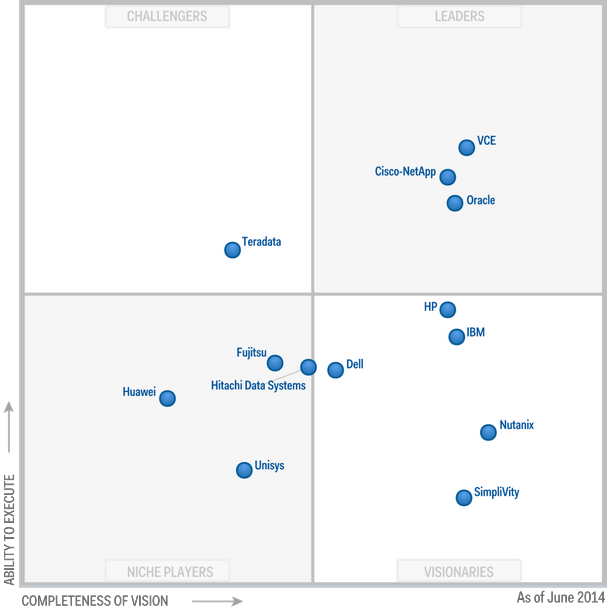
The integrated system market is growing at 50% or more per year, creating an unusual mix of major vendors and startups to consider. This new Magic Quadrant will aid vendor selection in this dynamic sector.
Nutanix has close working relationships with multiple top software vendors, and workloads like VDI, Hadoop and DBMS servers are well-represented among the installed base. Maximum neutrality is a major focus for Nutanix, as it works to build trust across a wide variety of vendors. The vendor frequently targets specific workload needs to penetrate new accounts, and then expands the workload reach to compete with incumbent vendors as client confidence is built. Nutanix claims that 50% of first-time clients expand their configurations within six months (and 70% do so within 12 months).

Integrated systems are combinations of server, storage and network infrastructure, sold with management software that facilitates the provisioning and management of the combined unit. The market for integrated systems can be subdivided into broad categories, some of which overlap. Gartner categorizes these classes of integrated systems (among others):
Read the whole Gartner Magic Quadrant for Integrated Systems here!
//Richard
Well, I can’t count the number of times that I’ve heard people saying that they wished they had GotoMeeting licenses or a similar capability that is free… and what just happened!?! Citrix released a free version! 🙂
It of course has some limitations and lack of capabilities compared to the full service you get when being it, but if you can survive with using a Chrome browser to collaborate with you colleagues, friends and loved ones then this is a great service!

Mathieu Hofman, researcher and developer of GoToMeeting Free, and Eric Bensley, GoToMeeting Senior Product Manager, explain what motivated them to create the newest member of the GoToMeeting product line, GoToMeeting Free.
Hi, Mathieu and Eric here. We are really excited about the launch of GoToMeeting Free! This started simply as technology innovation and now has evolved into the latest addition to our award-winning communications solutions. GoToMeeting Free is an entirely free, browser-based (Chrome), unlimited-use video conferencing product for up to three people. And we made it simple: no need to log in, download additional software, or enable plug-ins.
When our teams first began working on this product it was not about adding to GoToMeeting but rather seeing what would happen if we took great technology – Chrome and WebRTC – and created something that would let people connect instantly in a face-to-face experience. In our efforts there were a few things we aimed to address:
The result: GoToMeeting Free is like the “casual coffee” of meetings by removing the barriers to quickly connecting with anyone in a meaningful way…
And here you have some other details from the GotoMeeting blog:
What You Need to Know about GoToMeeting Free
The cost of doing business these days can be daunting. And with the growth of small-business startups comes the need for low-cost and highly collaborative software solutions. Enter GoToMeeting Free.
What is GoToMeeting Free? It’s an entirely free addition to the Citrix collaboration suite that offers unlimited-use video conferencing for up to three people. And did we mention it’s completely browser-based in Google Chrome? Meaning no need to download any additional software.

Who can use GoToMeeting Free? Everyone. GoToMeeting Free was designed with lean startups and entrepreneurs in mind, but this software is open to anyone with Chrome, a webcam and a reliable Internet connection.
Why use GoToMeeting Free? If you are hosting small informal meetings for dispersed teams or your office doesn’t have the budget for a company-sponsored video conferencing account, then this is the solution. There’s no limit to the amount of meetings you can host, and it allows you to connect instantly with a face-to-face experience.
We wanted to build tool that was something that we would use ourselves, so here are a few of the areas we looked to address:
We’ve gotten rave reviews so far on the simple and straight-forward experience of GoToMeeting Free. And we are in development for additional features that will allow teams an even higher lever of collaboration in the near future. We hope you’ll try it out.
Continue reading here and here!
//Richard
This is a good post by Dwayne Lessner around how perfect match OpenStack and Nutanix is (not just OpenStack of course, Nutanix rocks with VMware and Microsoft as well)!
Nutanix NDFS also provides an advanced and unique feature set for OpenStack based
private clouds. Key features include:

Read more here.
Here you also have the link to the webinar with topic:
Building OpenStack on a Single 2U Appliance
Watch the webinar here!
//Richard
This is a great blog post by Christopher Campbell and good picture to show the overall capabilities and architecture of the Citrix offering!
You’ve heard us talk about Mobile Workspaces and if you’re a techie you’re probably wondering if Citrix really has the architectural components (a complete, comprehensive and fully integrated architecture) that can deliver any app and data to any user on any device over any network?
Well let’s first identify a few of the market leading technologies that make up the Citrix Mobile Workspaces solution:
OK, OK. We know you have the products but do they really integrate?
Yes. Don’t believe me? Well as they say a picture is worth a thousand words. This is what the Mobile Workspace Architecture looks like.

OK. I get it. You have the architecture but that doesn’t necessarily translate to a seamless user experience.
Still don’t believe huh? Well this is what the user experience looks like.

XenMobile is a key ingredient in delivering a mobile workspace. Along with XenApp and XenDesktop it allows organizations to deliver on giving users access to any app from any device. In fact, if you’re an existing XenApp or XenDesktop customer, XenMobile seamlessly plugs into your existing architecture.
If you’re a XenDesktop or XenApp customer this is what your environment probably looks like.

Now this is what you need to enable EMM for BYO and COPE (Corporate Owned, Personally Enabled) devices and add that MDM, MAM, Secure Email, Secure Data…
Continue reading here!
//Richard
Finally it’s released, just go and download and enjoy (hopefully)! 😉
https://www.citrix.com/downloads/xendesktop/product-software/xendesktop-75-platinum.html
Documentation is available online in Citrix eDocs. Keeping in mind that the online documentation will be periodically updated, you may also download a PDF file with a current snapshot for offline use:
Admin Guide
Upgrade Guide
Install Guide
This single package contains the Core and components needed to deploy the server-side infrastructure supporting Windows 8.1 and Server 2012 R2 and includes Director, Studio, Delivery Controller, Virtual Delivery Agent, Personal vDisk, Universal Print Server, Receiver and StoreFront, Profile Management, HDX, Migration tool, License Server and CloudBridge (Branch Repeater) plug in.
//Richard
This is cool!
Paul Andrew is a technical product manager on the Office 365 team working on identity.
Today we’re adding Multi-Factor Authentication for Office 365 to Office 365 Midsize Business, Enterprise plans, Academic plans, Nonprofit plans, and standalone Office 365 plans, including Exchange Online and SharePoint Online. This will allow organizations with these subscriptions to enable multi-factor authentication for their Office 365 users without requiring any additional purchase or subscription.
Multi-factor authentication increases the security of user logins for cloud services above and beyond just a password. With Multi-Factor Authentication for Office 365, users are required to acknowledge a phone call, text message, or an app notification on their smartphone after correctly entering their password. Only after this second authentication factor has been satisfied can a user sign in.
Multi-factor authentication has been available for Office 365 administrative roles since June 2013, and today we’re extending this capability to any Office 365 user. We’re also enhancing the capabilities that have been available since June. We’re adding App Passwords for users so they can authenticate from Office desktop applications as these are not yet updated to enable multi-factor authentication. And we’re enabling users who are authenticated from a federated on-premises directory to be enabled for multi-factor authentication.
This addition of multi-factor authentication is part of our ongoing effort to enhance security for Office 365, and we’re already working on Office desktop application improvements to Multi-Factor Authentication for Office 365, which we’ll introduce later in this post. Office 365 offers many robust built-in security features for all customers and also optional controls that enable subscribers to customize their security preferences. More information about security in Office 365 is available inthe Office 365 Trust Center.
Let’s take a look at how Office 365 customers can take advantage of multi-factor authentication and configure it, including using App Passwords for Office desktop applications.

After entering your account password, you see a message like this while your phone is being called for acknowledgement.
Office 365 administrators enroll users for multi-factor authentication through the Office 365 admin center.
A couple of nice videos from Albert Alvarez here about how to cluster XenMobile device manager!
In my previous post we configured clustered Node 1. In this second Part we will complete the cluster configuration in Node 2 and will validate and test the configuration..
//Richard
Ok, we’ve had some issues with Citrix Receiver version 13 for Linux.. and it’s not just ONE issue. I found one that I thought I just have to share… so it’s lab Saturday for me at the office in a true geek manner with two XenClients and my favourite MacBook!
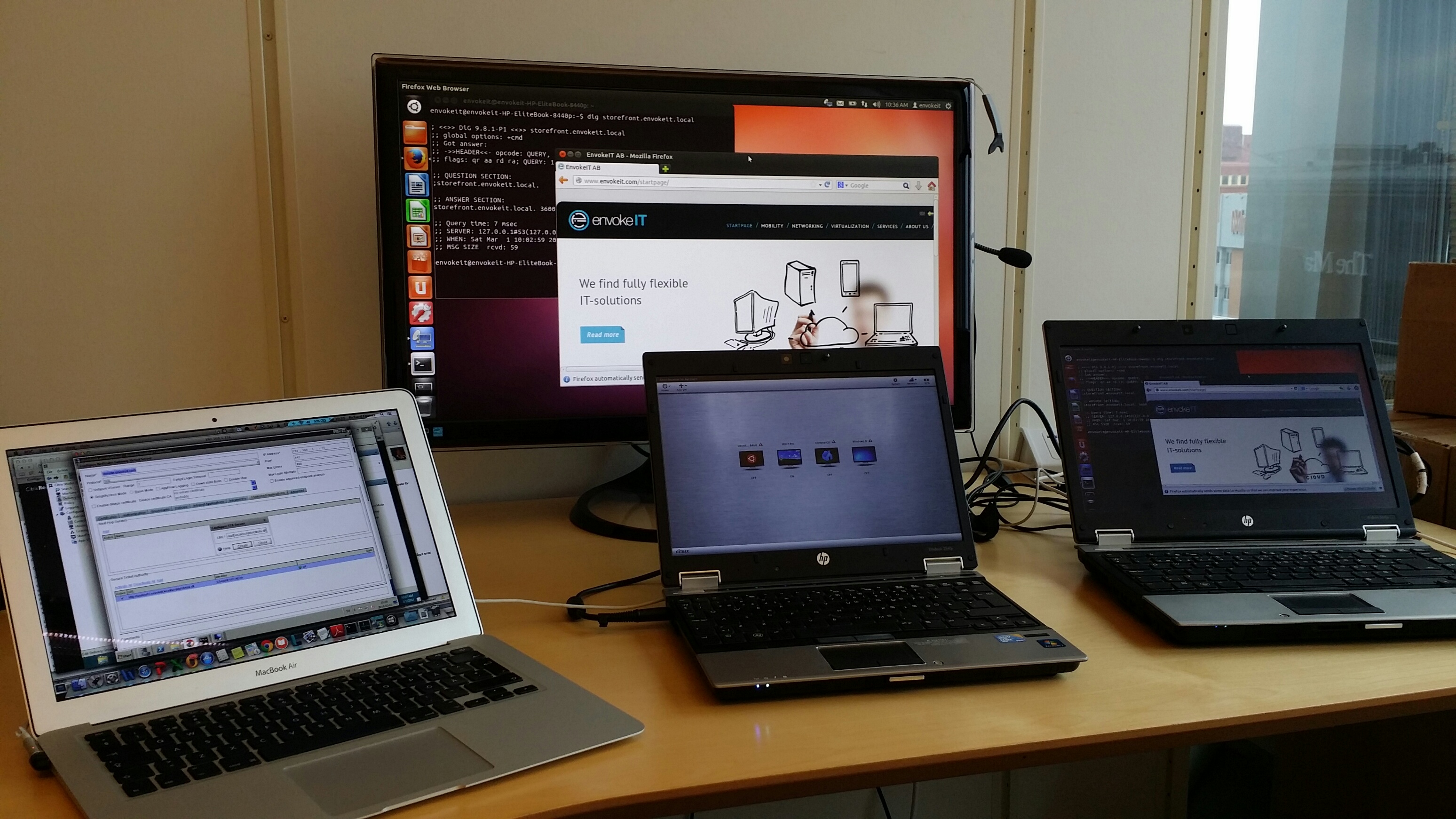
I guess that some of you have tried the Linux Receiver and knows how hard it is to get working, especially on a 64-bit distribution of Linux like Ubuntu 12.04 LTS och 13.10 LTS.
If you follow these instructions you can get it onto the device and then login through a browser (local Receiver UI may still not be full functioning!)..
https://help.ubuntu.com/community/CitrixICAClientHowTo
What I’m about to show you is that it’s not just only getting Receiver on the device and ensuring that the SSL certificates are trusted. You then have to be able to use it as well externally through a NetScaler Gateway (NSG) into StoreFront and your XenApp/XenDesktop VDA’s.
Just assume that you have a production environment that consists of a NetScaler Gateway and a StoreFront server, if you then in StoreFront have configured your NetScaler Gateway correctly and the appropriate STA configuration (with MULTIPLE STA’s) then you will notice that you can’t launch a session.
BTW, the recommendation from Citrix is to use multiple STA’s, right! See this from edocs:
For all deployments, if you are making resources provided by XenDesktop, XenApp, or VDI-in-a-Box available in the store, list on the Secure Ticket Authority (STA) page URLs for servers running the STA. Add URLs for multiple STAs to enable fault tolerance, listing the servers in order of priority to set the failover sequence. If you configured a grid-wide virtual IP address for your VDI-in-a-Box deployment, you need only specify this address to enable fault tolerance.
Important: VDI-in-a-Box STA URLs must be entered in the form https://serveraddress/dt/sta in the Add Secure Ticket Authority URL dialog box, where serveraddress is the FQDN or IP address of the VDI-in-a-Box server, or the grid-wide virtual IP address.
The STA is hosted on XenDesktop, XenApp, and VDI-in-a-Box servers and issues session tickets in response to connection requests. These session tickets form the basis of authentication and authorization for access to XenDesktop, XenApp, and VDI-in-a-Box resources.
If you want XenDesktop, XenApp, and VDI-in-a-Box to keep disconnected sessions open while Citrix Receiver attempts to reconnect automatically, select theEnable session reliability check box. If you configured multiple STAs and want to ensure that session reliability is always available, select the Request tickets from two STAs, where available check box. Read more…
Hi,
If you’ve worked with XenMobile and especially the AppController to deploy WorxMail and WorxWeb you know that these establish a MicroVPN tunnel to reach internal resources when needed.
One thing that I noted today was that when you upgrade your AppController and NetScalers and people also upgrade their Worx Home app on Android you can run into an issue unless you upgrade and align your Worx Home and WorxWeb apps.
The new Worx Home 8.6.1 on Android requires that you run WorxWeb 1.3.3 from Citrix, otherwise the MicroVPN tunnel won’t be established and you won’t reach your internal resources through it.
So it’s more important than ever to ensure that you try your NetScaler, AppController and Worx apps and align their releases.. once they work then you see this great progress and tunnel being established.
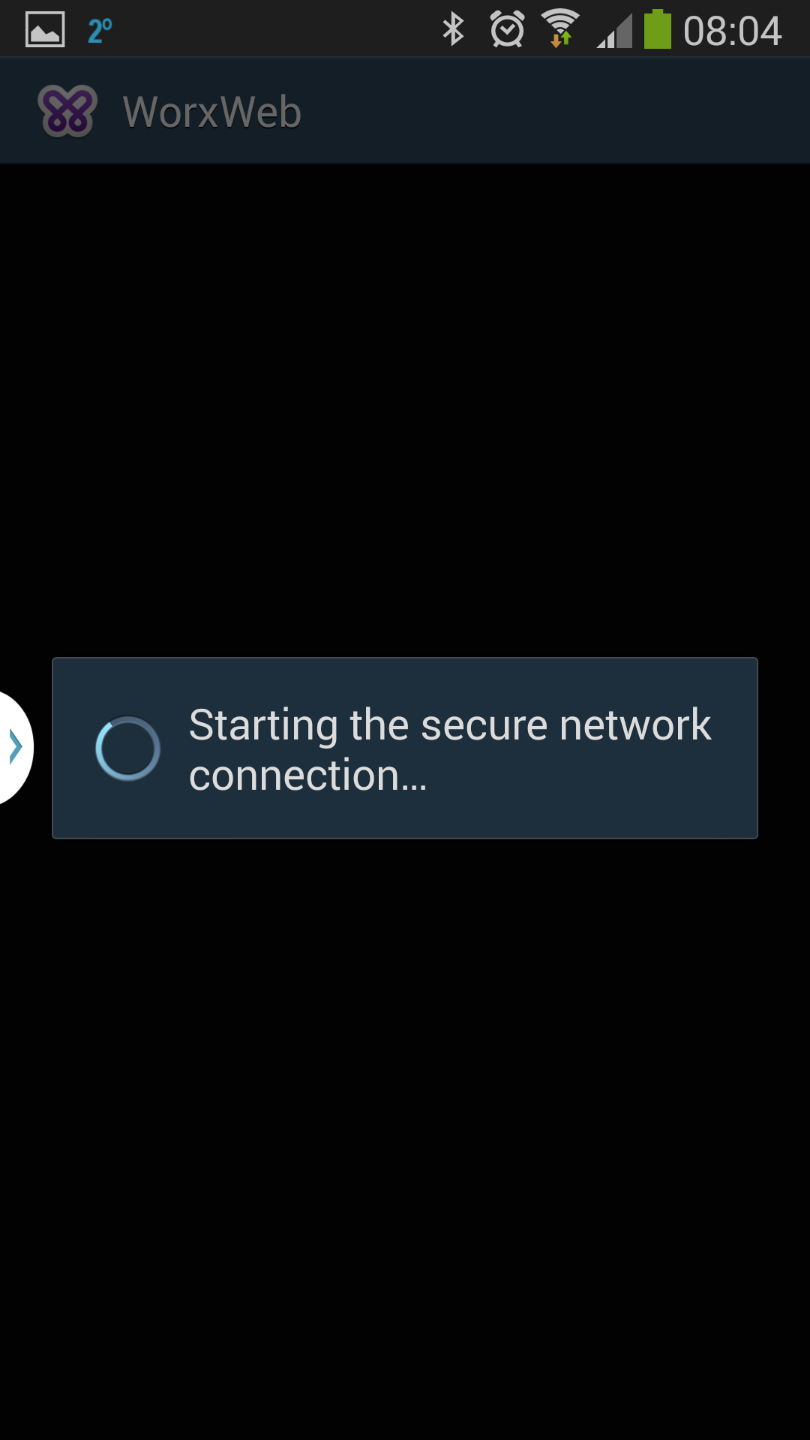
It would be nice to get a good table of which versions of each product/component that you should run and which ones that can support all use cases like; XenMobile , ShareFile on prem, ICA/HDX proxy, SSL VPN and SmartAccess for RfW and proxy! I’ve not yet found one combination that delivers everything. 😉
Happy XenMobile’ing!
//Richard




 The IT Melting Pot!