Archive
#XenMobile and the #Citrix Mobile Workspaces Architecture – #BYOD
This is a great blog post by Christopher Campbell and good picture to show the overall capabilities and architecture of the Citrix offering!
You’ve heard us talk about Mobile Workspaces and if you’re a techie you’re probably wondering if Citrix really has the architectural components (a complete, comprehensive and fully integrated architecture) that can deliver any app and data to any user on any device over any network?
Well let’s first identify a few of the market leading technologies that make up the Citrix Mobile Workspaces solution:
- XenApp mobilizes and secures Windows apps on any device
- XenDesktop securely delivers virtual Windows desktops and apps on any device
- XenMobile manages and secures mobile, web and SaaS apps on mobile devices
- GoToMeeting empowers people to meet and collaborate with anyone, anywhere
- ShareFile shares and syncs corporate data securely from any location
- NetScaler optimizes and secures app delivery and on any network
- CloudPlatform orchestrates and provisions apps, desktops and IT services from any cloud
OK, OK. We know you have the products but do they really integrate?
Yes. Don’t believe me? Well as they say a picture is worth a thousand words. This is what the Mobile Workspace Architecture looks like.

OK. I get it. You have the architecture but that doesn’t necessarily translate to a seamless user experience.
Still don’t believe huh? Well this is what the user experience looks like.

XenMobile is a key ingredient in delivering a mobile workspace. Along with XenApp and XenDesktop it allows organizations to deliver on giving users access to any app from any device. In fact, if you’re an existing XenApp or XenDesktop customer, XenMobile seamlessly plugs into your existing architecture.
If you’re a XenDesktop or XenApp customer this is what your environment probably looks like.

Now this is what you need to enable EMM for BYO and COPE (Corporate Owned, Personally Enabled) devices and add that MDM, MAM, Secure Email, Secure Data…
Continue reading here!
//Richard
#XenMobile on Android and MicroVPN issue unless you really synch Worx releases…
Hi,
If you’ve worked with XenMobile and especially the AppController to deploy WorxMail and WorxWeb you know that these establish a MicroVPN tunnel to reach internal resources when needed.
One thing that I noted today was that when you upgrade your AppController and NetScalers and people also upgrade their Worx Home app on Android you can run into an issue unless you upgrade and align your Worx Home and WorxWeb apps.
The new Worx Home 8.6.1 on Android requires that you run WorxWeb 1.3.3 from Citrix, otherwise the MicroVPN tunnel won’t be established and you won’t reach your internal resources through it.
So it’s more important than ever to ensure that you try your NetScaler, AppController and Worx apps and align their releases.. once they work then you see this great progress and tunnel being established.
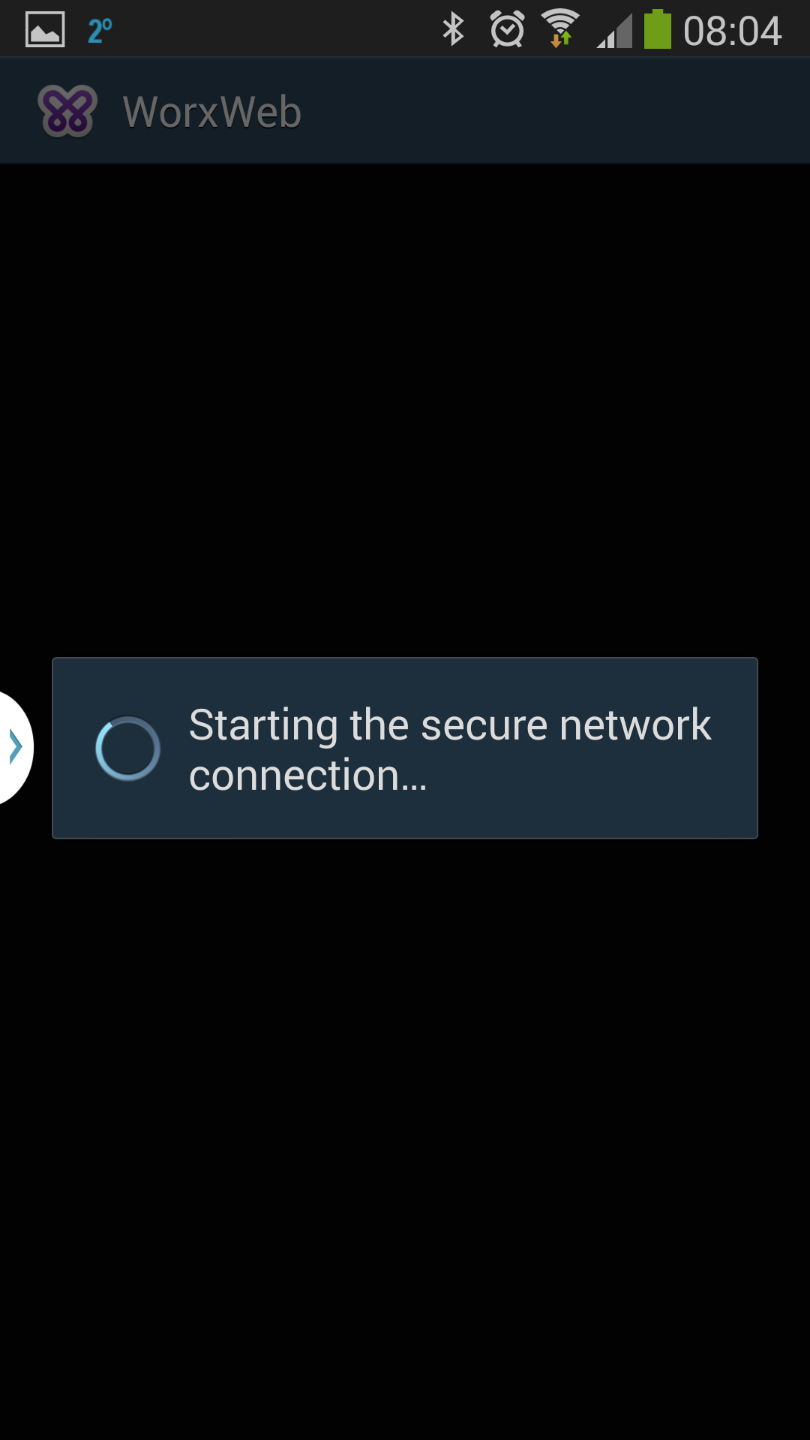
It would be nice to get a good table of which versions of each product/component that you should run and which ones that can support all use cases like; XenMobile , ShareFile on prem, ICA/HDX proxy, SSL VPN and SmartAccess for RfW and proxy! I’ve not yet found one combination that delivers everything. 😉
Happy XenMobile’ing!
//Richard
VMware acquires AirWatch! – #EMM, #MDM, #BYOD, #VMware, #AirWatch
This is really interesting! I’m not that surprised though, it was about time VMware did something!
I must agree with a lot of people who have written about this, they are really going for a leader! So they mean business! Will be fun to see how well the can integrate this into their offerings and how that will look like.
VMware buys AirWatch for $1.54 billion, acquires mobility strategy
VMware will acquire AirWatch, a mobile device management company, in a $1.17 billion cash deal that will give the virtualization software provider a play in mobility. VMware will also pay $365 million in installment payments and unvested stock options.

Mobile device management has been a hot sector desperately in need of consolidation given there are more than 100 vendors. Large enterprises increasingly want mobile device management put together with content management and collaboration. VMware’s acquisition follows IBM’s purchase of FiberLink and Citrix’s acquisition of Xenprise in 2013.
VMware’s spin is that AirWatch will give it a foothold in mobility as well as its end-user computing strategy, which revolves around desktop virtualization and delivering enterprise apps to tablets and smartphones.
Here’s Gartner’s Magic Quadrant on the sector.

According to VMware, AirWatch will continue to be led by CEO John Marshall. AirWatch will be lumped into VMware’s end-user computing group, which… continue reading here!
VMWare Announces Definitive Agreement to Acquire AirWatch
Acquisition will Provide Customers with the Most Complete Solution to Manage Users, Devices and Applications across Desktop and Mobile Environments.
PALO ALTO, Calif., January 22, 2014 – VMware, Inc. (NYSE: VMW), the global leader in virtualization and cloud infrastructure, and AirWatch today announced that they have signed a definitive agreement under which VMware will acquire AirWatch, the leading provider of enterprise mobile management and security solutions. VMware will acquire AirWatch for approximately $1.175B in cash and approximately $365M of installment payments and assumed unvested equity. The AirWatch team will continue to report to founder and chief executive officer John Marshall as part of VMware’s End-User Computing group, led by Sanjay Poonen, EVP and GM. Alan Dabbiere, AirWatch’s cofounder and chairman, will be overseeing a new AirWatch operating board which will report to Pat Gelsinger, VMware chief executive officer.
“AirWatch provides best-in-class, secure, enterprise-mobile management to thousands of businesses around the world,” said Pat Gelsinger, chief executive officer, VMware. “With this acquisition VMware will add a foundational element to our end-user computing portfolio that will… continue reading here!
//Richard
#Ericsson Mobility Report – November – via @Ericsson, #mobility
This is really interesting to read! Great job Ericsson!
On the pulse of the Networked Society
Ericsson has performed in-depth data traffic measurements since the early days of mobile broadband from a large base of live networks covering all regions of the world.
The aim of this report is to share analysis based on these measurements, internal forecasts and other relevant studies to provide insights into the current traffic and market trends.
We will continue to share traffic and market data, along with our analysis, on a regular basis. We hope you find it engaging and valuable.
In the last issue of the Ericsson Mobility Report we described app coverage. In the November 2013 edition we take this analysis a step further by using the radio characteristics of a WCDMA/HSPA network to predict coverage area and indoor penetration for popular smartphone applications such as streaming music and video, video telephony, and circuit-switched voice. We also apply the same app type requirements on downlink speed to compare network performance in 17 cities globally.
Download the November report here!
What’s also cool is that Ericsson have published a Traffic Exploration tool that is really cool! 🙂
Create your own graph

Create your own graphs, tables and data using our Traffic Exploration tool that contains data from the Ericsson Mobility Report.
To read more about the Ericsson mobility reports do so here!
//Richard
#Microsoft to acquire #Nokia’s devices & services business
This is interesting, but I must admin that I’m not that surprised…

Microsoft to acquire Nokia’s devices & services business, license Nokia’s patents and mapping services
REDMOND, Washington and ESPOO, Finland – Sept. 3, 2013 – Microsoft Corporation and Nokia Corporation today announced that the Boards of Directors for both companies have decided to enter into a transaction whereby Microsoft will purchase substantially all of Nokia’s Devices & Services business, license Nokia’s patents, and license and use Nokia’s mapping services.
Under the terms of the agreement, Microsoft will pay EUR 3.79 billion to purchase substantially all of Nokia’s Devices & Services business, and EUR 1.65 billion to license Nokia’s patents, for a total transaction price of EUR 5.44 billion in cash. Microsoft will draw upon its overseas cash resources to fund the transaction. The transaction is expected to close in the first quarter of 2014, subject to approval by Nokia’s shareholders, regulatory approvals and other closing conditions.
Building on the partnership with Nokia announced in February 2011 and the increasing success of Nokia’s Lumia smartphones, Microsoft aims to accelerate the growth of its share and profit in mobile devices through faster innovation, increased synergies, and unified branding and marketing. For Nokia, this transaction is expected to be significantly accretive to earnings, strengthen its financial position, and provide a solid basis for future investment in its continuing businesses. Read more…
Microsoft is progressing quickly! – SkyDrive Pro updated to 25GB and improved sharing – via @BasvanKaam
I must say this once again, Microsoft looks to be on the right track when it comes to getting back as one strong supplier of services in the future/present “BYOD” world. As I wrote in my post #Microsoft – On the right track! – #Windows, #BYOD, #Citrix now Microsoft is actually targeting to solve many of the gaps that we see with today services for BYOx scenarios. For instance how to manage what you want on top of the device (Azure, Intune, SkyDrive, Work Folders etc…) in a controllable fashion and not a full managed device that costs you a fortune to manage… and ShareFile, Box and others are great solutions that have many features that SkyDrive doesn’t have. But there is one thing that they all lack (or please enlighten me!!):
Encryption at rest on Windows, OS X and Linux OS’s/distributions, here all providers are leaning on that you already have hard drive encryption like BitLocker etc. But who manages that then? Can you then say that your service is “BYOD-compliant”? I wouldn’t say so… It’s not only SmartPhones and Tablet devices that we loose… but here Microsoft and SkyDrive may be the first to come with encryption on at least Windows 8.1 devices and somewhat manageable…
But again back to the announcement from Microsoft and SkyDrive:
Microsoft announced today that it is giving business users more storage space and a better way to share files across multiple devices. As first reported by TechCrunch, through its SkyDrive Pro accounts, employees will now receive 25GB of storage to start out with, a sharp increase from 7GB — and even this capacity can be increased to 50GB or even 100GB. Additionally, using SkyDrive’s Shared with Me view, users can share files with their friends and co-workers securely and in real-time.
According to Microsoft Senior Product Managers Mark Kashman and Tejas Mehta, the new storage space limits will be available for both new and existing customers.
This certainly makes the service standout among its competitors, namely Dropbox and Box. It was only about a week or so ago when the latter heralded in the launch of a new pricing plan aiming to increase the number of small businesses using its service. For personal users, Box also wound up doubling the amount of free storage they received.
Here’s how you can figure out the overall storage for each user:
With Office 365, you get 25 GB of SkyDrive Pro storage + 25 GB of email storage + 5 GB for each site mailbox you create + your total available tenant storage, which for every Office 365 business customer starts at 10 GB + (500 MB x # of user(s)1).
While Dropbox, Box, and Hightail certainly are some of the popular services out there today, SkyDrive isn’t something to be trifled with either. Through its integration with the Surface, Windows Phone, and other Microsoft products, along with iOS and Android devices, it has the potential to be a very powerful service.
As for the new sharing feature, just like you would perhaps see in Google Drive or any other cloud storage service, SkyDrive Pro is now offering a Shared with Me view that lets you take a shared document and view, edit, re-share, download, and more — all as if it were in your own storage bin.

But Microsoft isn’t stopping there, as it is adding several minor, but interesting enhancements to SkyDrive. The company has also increased the overall file upload limit to its SharePoint Online service to 2GB per file. Files placed into the recycle bin will now remain…
Continue reading here!
//Richard
A look at Work Folders – #Microsoft, #WorkFolders, #MIM, #BYOD – via @STEALTHPUPPY
This is an interesting new feature by Microsoft. I’ve touched upon the topic in my earlier post: #Microsoft – On the right track! – #Windows, #BYOD, #Citrix
And here you have another good blog post from Aaron Parker around the topic!
Microsoft announced some interesting new features in Windows Server 2012 R2 at TechEd 2013 and one of those that piqued my interest is Work Folders. I’m not the biggest fan of Redirected Folders and Offline files, but it’s essentially the only enterprise solution Microsoft provides today for taking your data offline. Microsoft needs to provide a completely new method of syncing file data – one that is designed for todays use cases and computing environment.
Work Folders is a brand new direction for enabling access to data in offline scenarios, along the lines of Citrix ShareFile and Dropbox, but without the web and sharing features. Like most Microsoft OS features, Work Folders is tied to a specific release of Windows; however according to this Channel 9 video, Microsoft will release Work Folders for Windows 7, iOS and “other devices” (presumably Android). This is excellent news.
Here’s a short look at setting up and connecting to Work Folders using the preview releases of Windows Server 2012 R2 and Windows 8.1 – what’s version 1.0 going to deliver?
Server Configuration
For a more detailed walkthrough on deploying Work Folders, download this document: Windows Server 2012 R2: Enabling Windows Server Work Folders.
Work Folders is a component of the File and Storage Services role in Windows Server. I’ve installed Windows Server 2012 R2 into a virtual machine and am using local storage.

Once installed, Work Folders is managed through Server Manager:

Creating a new sync share is performed via a wizard which will first ask where the Sync Share will be located. This can be a new folder or an existing share – mixing user home drives and Work Folders should be possible. Note that at this time, Work Folders only supports providing users with exclusive access to Sync Share location – there is no provision for providing access to shared data. Read more…
#Microsoft – On the right track! – #Windows, #BYOD, #Citrix
I don’t know if you all agree but I find that Microsoft is making some really good strategic decisions to align themselves and be ready for the “next generation” workplace and client services. Everyone has been talking about BYOx and that everyone will bring their own device and consume business services and functions on that device in parallel to doing personal stuff.
But has BYOD taken off yet?
I personally think that it hasn’t to the extent that many thought it would, there are some companies in some countries that have adopted it for some use cases and user categories, but the majority is still struggling with it though their business apps and functions aren’t really there to support this way of working yet.
Even if they have a NetScaler or similar remote access capabilities with some sort of Desktop and App virtualization (like Citrix XenDesktop) to run the apps it’s still not enough. How do you solve the offline working scenario? And isn’t hosted apps and desktops just a legacy workaround until those business processes have been SaaS’ified? And what about “dropbox” alternatives, H: drives and G: drives, Sharepoint data etc. There is still a user data mess (read my earlier post on this) that needs to be solved and especially a “mega aggregator” tool for getting data/content and synch across devices in a secure manner (data also encrypted at rest on ALL devices and not just mobiles)…
Microsoft is kind of stepping up here I must say from a strategy point of view that makes me believe in them, even though I’ve said that no one ever will take my MacBook Air from me! Have a look at the features that are coming with Windows 8.1 to support a more “semi-controlled” or “semi-trusted” device, and the new cloud services like Azure AD, Windows Intunes offerings in combination with the online messaging and collaboration Office 365 services. And they are apparently also working on a “legacy” cloud service to offer desktops as a service (DaaS) as I wrote in a previous blog post as well.
I think that Microsoft is moving in the right direction towards offering the next generation enterprise IT services and to support the new way of working, and fast!
Have a look at these posts/articles on the news in Windows 8.1:
Everything you need, right from (the) Start
Microsoft is focused on delivering one experience across all the devices in your life. The centerpiece of that strategy and experience are the Microsoft services and apps that come right from (the) Start on your new Windows device.
This is the first blog post in a series that will highlight the apps and services driving toward this “one experience” vision. This experience comes to life through more than 20 new and improved Microsoft apps and services that come as part of Windows 8.1, including a new one that we are announcing today – Skype, right from (the) Start!

It’s where you want to go today….
10 Mobile Device Management Leaders That Help IT Control #BYOD, #Gartner, #Citrix, #MDM
Consumers love their smartphones and tablets, so it should come as no surprise that they want to use their devices at work. The pressure to develop and deploy a bring-your-own-device (BYOD) policy is on and coming from every direction, including the ‘C’ suite of executives who tend to be especially keen on using smartphones and tablets for their work.
Managing devices in a BYOD environment is no small feat, and the right mobile device management (MDM) product is a key component in making it work. Here are 10 leading MDM vendors in the market today, drawn from the leaders and visionaries in Gartner’s 2013 Magic Quadrant for Mobile Device Management Software.
Magic Quadrant

#BYOD + #Messaging + #Collaboration + #Data securely = How??
Yes, how do you solve this?
I’m running into this topic lately with a lot of people and customers….
It’s around the whole BYOD and unmanaged devices and how useful they are in an enterprise world and all the capabilities and way of working that you’re used to in a secure and still cost effective way (and let’s not forget in a USER FRIENDLY way)!
One question that I’ve not yet found an answer to is:
How do we have all offline capabilities needed for an “Office” worker on a BYOD in our enterprise landscape? How do we ensure that you can use our Messaging, Collaboration and Data/Info services on this totally unmanaged device in a SECURE way?
This is a tough challenge! I guess that most of your users are used to using the Office suite locally on their managed device where they can use Outlook offline, work with data/files in Excel and Word etc offline. But what happens if you tell them to use an unmanaged device or their own personal device of their choice?
All of a sudden there is no real good way of providing them with offline messaging and collaboration (Outlook Anywhere and Lync for instance) capabilities in a secure manner. This BYOD/unmanaged device is not a part of your AD, you have no control and cannot enforce anything! So Outlook that is installed on it may use your Outlook Anywhere service but then its data sits on that unmanaged device unencrypted and unsecured!
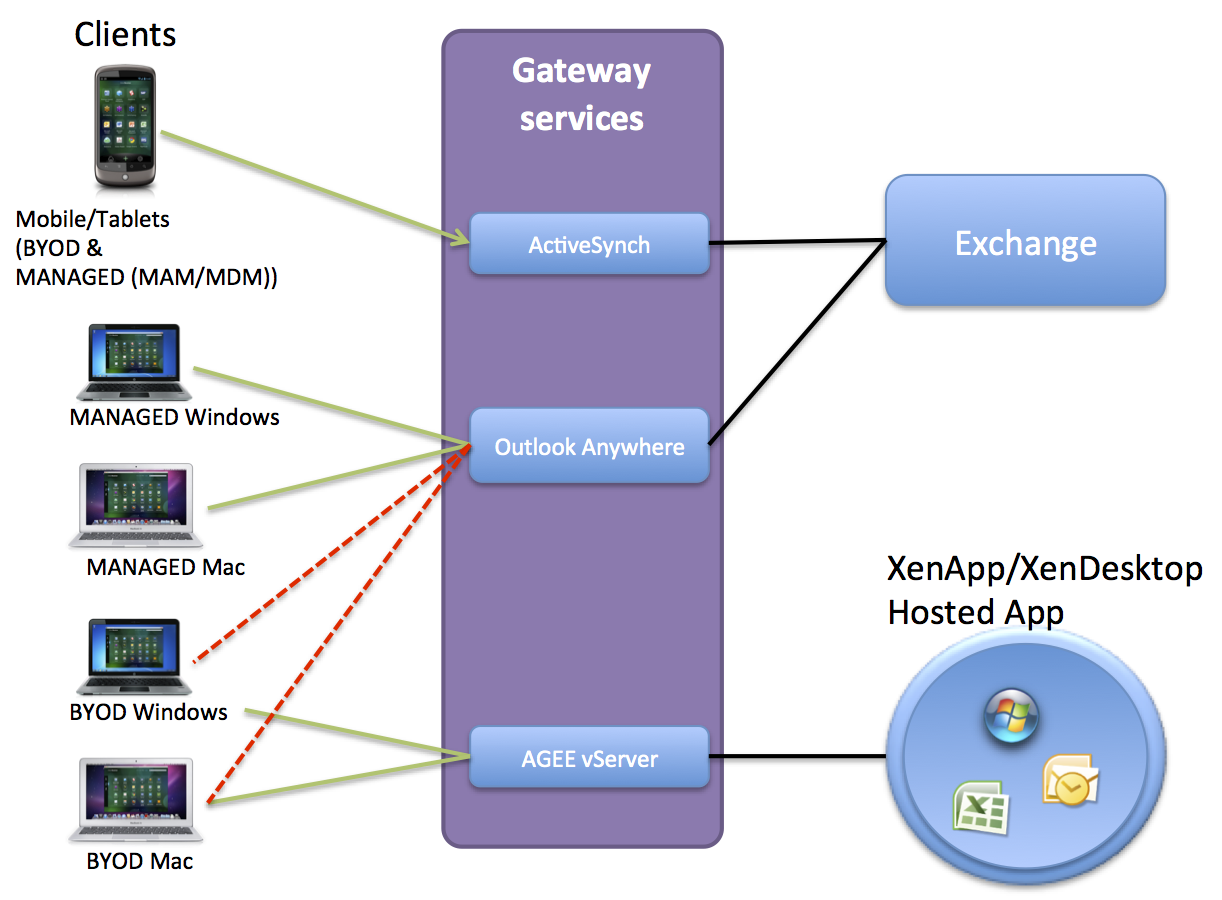
Think of the picture above (yes I know it’s a mess but I just want to illustrate the issue), you have BYOD devices that are running Windows 7, XP, 8 etc and also Mac OS X. What if you open up your Outlook anywhere service to those devices, then all your emails etc. will be unsecured on them!
Citrix and others are focusing on providing this email capability in a secure manner on all mobile OS’s like iOS and Android etc through it’s Citrix Worx apps for mail and also the newly announced Hosted MobileMail. But these are more or less just targeted against mobile devices (smartphones and tablets), but what about the standard laptop users!?!?! They need something as well!
And Windows RMS and other solutions just wont fit very well here… Citrix XenVault was something that could have worked to enable offline support for corporate Messaging services but it’s not there… I’d like to run corporate apps locally on the device offline in a secure and controllable container!!
The same issue you have with Data!!!
ShareFile doesn’t support encryption on Windows or OS X!!!
But it does on mobile devices.. I guess you have to trust your users and BYOD devices that they are encrypted using BitLocker or FileVault etc…. but can you?
So please enlighten me here what the missing puzzle piece is!! Because I have a hard time taking away a managed device form a user and tell them that they on their BYOD device HAVE TO BE ONLINE TO WORK! It’s a step back from a usability and productiveness point of view… but it may be a cost saver though… but is a BYOD/unmanaged device and a VDI or Hosted Shared Desktop always a good option to provide business apps to that laptop? NO! I guess everyone have understood that making business apps and functions web-based or mobile app based is good and a lot of focus is there, but we cannot forget the traditional productive device that the laptop is!
If you know the magic solution to these challenges please let me know! 🙂
Cheers!
//Richard




 The IT Melting Pot!