Archive
Solving the Compute and Storage scalability dilemma – #Nutanix, via @josh_odgers
The topic of Compute, Network and STORAGE is a hot topic as I’ve written in blog posts before this one (How to pick virtualization (HW, NW, Storage) solution for your #VDI environment? – #Nutanix, @StevenPoitras) … and still a lot of colleagues and customers are struggling with finding better solutions and architecture.
How can we ensure that we get the same or better performance of our new architecture? How can we scale in a more simple and linear manner? How can we ensure that we don’t have a single point of failure for all of our VM’s etc..? How are others scaling and doing this in a better way?
I’m not a storage expert, but I do know and read that many companies out there are working on finding the optimal solution for Compute and Storage, and how they can get the cost down and be left with a more simple architecture to manage…
This is a topic that most need to address as well now when more and more organisations are starting to build their private clouds, because how are you going to scale it and how can you get closer to the delivery that the big players provide? Gartner even had Software-Defined-Storage (SDS) as the number 2 trend going forward: #Gartner Outlines 10 IT Trends To Watch – via @MichealRoth, #Nutanix, #VMWare
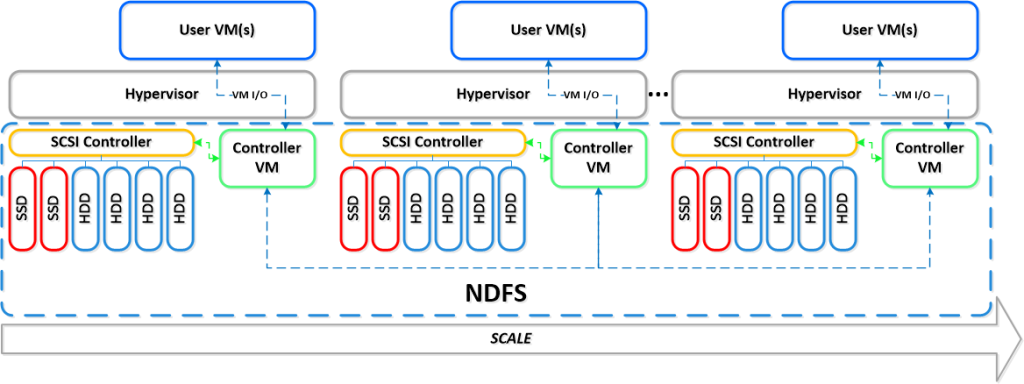
Right now I see Nutanix as the leader here! They rock! Just have a look at this linear scalability:
If you want to learn more how Nutanix can bring great value please contact us at EnvokeIT!
For an intro of Nutanix in 2 minutes have a look at these videos:
Overview:
How to pick virtualization (HW, NW, Storage) solution for your #VDI environment? – #Nutanix, @StevenPoitras
Here we are again… a lot of companies and Solution Architects are scratching their heads thinking about how we’re going to do it “this time”.
Most of you out there have something today, probably running XenApp on your VMware or XenServer hypervisor with a FC SAN or something, perhaps provisioned using PVS or just managed individually. There is also most likely a “problem” with talking to the Storage team that manage the storage service for the IaaS service that isn’t built for the type of workloads that XenApp and XenDesktop (VDI) requires.
So how are you going to do it this time? Are you going to challenge the Storage and Server/IaaS service and be innovative and review the new cooler products and capabilities that now exists out there? They are totally changing the way that we build Virtual Cloud Computing solutions where; business agility, simplicity, cost savings, performance and simple scale out is important!
There is no one solution for everything… but I’m getting more and more impressed by some of the “new” players on the market when it comes to providing simple and yet so powerful and performing Virtual Cloud Computing products. One in particular is Nutanix that EnvokeIT has partnered with and they have a truly stunning product.
But as many have written in many great blog posts about choosing your storage solution for your VDI solution you truly need to understand what your service will require from the underlying dependency services. And is it really worth to do it the old way? You have your team that manages the IaaS service, and most of the times it just provides a way for ordering/provisioning VM’s, then the “VDI” team leverages that one using PVS or MCS. Some companies are not even where they can order that VM as a service or provision it from the Image Provisioning (PVS/MCS) service, everything is manual and they call it a IaaS service… is it then a real IaaS service? My answer would be now… but let’s get back to the point I was trying to make!
This HW, Hypervisor, Network, Storage (and sometimes orchestrator) components are often managed by different teams. Each team are also most of the times not really up to date in terms of understanding what a Virtualization/VDI service will require from them and their components. They are very competent in understanding the traditional workload of running a web server VM or similar, but not really dealing with boot storms from hundreds to thousands of VDI’s booting up, people logging in at the same time and the whole pattern of IOPS that is generated in these VM’s “life-cycle”.
This is where I’d suggest everyone to challenge their traditional view on building Virtualization and Storage services for running Hosted Shared Desktop (XenApp/RDS) and Hosted Virtual Desktop (VDI/XenDesktop) on!
You can reduce the complexity, reduce your operational costs and integrate Nutanix as a real power compute part of your internal/private cloud service!
One thing that also is kind of cool is the integration possibilities of the Nutanix product with OpenStack and other cloud management products through its REST API’s. And it supports running both Hyper-V, VMware ESXi and KVM as hypervisors in this lovely bundled product.
If you want the nitty gritty details about this product I highly recommend that you read the Nutanix Bible post by Steven Poitras here.

#Microsoft to acquire #Nokia’s devices & services business
This is interesting, but I must admin that I’m not that surprised…

Microsoft to acquire Nokia’s devices & services business, license Nokia’s patents and mapping services
REDMOND, Washington and ESPOO, Finland – Sept. 3, 2013 – Microsoft Corporation and Nokia Corporation today announced that the Boards of Directors for both companies have decided to enter into a transaction whereby Microsoft will purchase substantially all of Nokia’s Devices & Services business, license Nokia’s patents, and license and use Nokia’s mapping services.
Under the terms of the agreement, Microsoft will pay EUR 3.79 billion to purchase substantially all of Nokia’s Devices & Services business, and EUR 1.65 billion to license Nokia’s patents, for a total transaction price of EUR 5.44 billion in cash. Microsoft will draw upon its overseas cash resources to fund the transaction. The transaction is expected to close in the first quarter of 2014, subject to approval by Nokia’s shareholders, regulatory approvals and other closing conditions.
Building on the partnership with Nokia announced in February 2011 and the increasing success of Nokia’s Lumia smartphones, Microsoft aims to accelerate the growth of its share and profit in mobile devices through faster innovation, increased synergies, and unified branding and marketing. For Nokia, this transaction is expected to be significantly accretive to earnings, strengthen its financial position, and provide a solid basis for future investment in its continuing businesses. Read more…
Are #Microsoft Losing Friends and Alienating IT Pros? – via @andyjmorgan, @stevegoodman
This is a great blog post by Steve Goodman!
Regular readers of my blog will know I’m a big fan of Microsoft products. As well as being an Exchange MVP, I’m very much a cloud fan – you’ll find me at Exchange Connections in a few weeks time talking about migrating to Exchange Online amongst other subjects. What I’m about to write doesn’t change any of that, and I hope the right people will read this and have a serious re-think.
Microsoft’s “Devices and Services” strategy is leaving many in the industry very confused at the moment.
If you’ve been living under a rock – I’ll give you an overview. They’ve dropped MCSM, the leading certification for their Server products. They’ve dropped TechNet subscriptions, the benchmark for how a vendor lets its IT pros evaluate and learn about their range of products. And they’ve been very lax with the quality of updates for their on-premises range of products, Exchange included, whilst at the same time releasing features only in their cloud products.
A range of MCMs and MCSMs – Microsoft employees included – have been expressing their opinions here, here, here, hereand in numerous other places. We’ve discussed the TechNet Subscriptions on The UC Architects’ podcast.
One thing is key – this kind of behaviour absolutely destroys trust in Microsoft. After the last round of anti-trust issues, it took a long time for Microsoft to gain a position of trust along with many years of incrementally releasing better and better products. A few years ago Microsoft was just about “good enough” to let into your datacentre; now it’s beginning to lead the way, especially with Hyper-V, Exchange and Lync.
Before I get started on Microsoft’s cloud strategy, let’s take a jovial look at what (from my experience) is Google’s strategy:
- Tell the customer their internal IT sucks (tactfully), ideally without IT present so they can talk about the brilliance of being “all in” the cloud without a dose of reality getting in the way.
- Class all line of business apps as irrelevant – the sales person was probably still in nursery when they were deployed. Because those apps are old, they must be shit.
- Show a picture of something old and irrelevant – like a mill generating it’s own energy. Tell them that’s what their IT is! You, the customer, don’t run a power station, so why would you run your own IT? If you do run your own IT you are irrelevant and getting left behind.
- Make out the customer’s own IT is actually less reliable than it is. Don’t mention that recent on-premises products cost less, are easy for the right people to implement and from a user perspective are often more reliable than an overseas cloud service.
- Only provide your products in the cloud so once you’re in… you’re in.
- Don’t let anyone from the outside be a real expert on the technology. You don’t need a Google “MVP”, because 99% of Google server products can only be provided by one company.
- Once you’ve signed up a customer remember, you don’t need to give them good support. They can’t go anyway without spending money on a third party solution to get their data out.
From a Microsoft MVP point of view, Google’s strategy is brilliant. It means that although we like a lot of their products, it drives away customers in their droves. Microsoft’s traditional approach to the cloud – and partner ecosystem would be a breath of fresh air to someone who’s been though the Google machine.
Unfortunately, based on recent experiences by myself and others – the above is actually looking pretty similar to Microsoft’s new strategy….
Continue reading here!
//Richard
Today is the RTM for #Windows Server 2012 R2! – #Microsoft
Microsoft blog post about the RTM release of Windows Server 2012 R2:
 |
As noted in my earlier post about the availability dates for the 2012 R2 wave, we are counting the days until our partners and customers can start using these products. Today I am proud to announce a big milestone: Windows Server 2012 R2 has been released to manufacturing!
This means that we are handing the software over to our hardware partners for them to complete their final system validations; this is the final step before putting the next generation of Windows Server in your hands.
While every release milestone provides ample reason to celebrate (and trust me, there’s going to be a party here in Redmond), we are all particularly excited this time around because we’ve delivered so much in such a short amount of time. The amazing new features in this release cover virtualization, storage, networking, management, access, information protection, and much more.
By any measure, this is a lot more than just one year’s worth of innovation since the release of Windows Server 2012!
As many readers have noticed, this release is being handled a bit differently than in years past. With previous releases, shortly after the RTM Microsoft provided access to software through our MSDN and TechNet subscriptions. Because this release was built and delivered at a much faster pace than past products, and because we want to ensure that you get the very highest quality product, we made the decision to complete the final validation phases prior to distributing the release. It is enormously important to all of us here that you have the best possible experience using R2 to build your private and hybrid cloud infrastructure.
We are all incredibly proud of this release and, on behalf of the Windows Server engineering team, we are honored to share this release with you. The opportunity to deliver such a wide range of powerful, interoperable R2 products is a powerful example of the Common Engineering Criteria that I’ve written about before.
Also of note: The next update to Windows Intune will be available at the time of GA, and we are also on track to deliver System Center 2012 R2.
Thank you to everyone who provided feedback during….
Continue reading here!
//Richard
Microsoft is progressing quickly! – SkyDrive Pro updated to 25GB and improved sharing – via @BasvanKaam
I must say this once again, Microsoft looks to be on the right track when it comes to getting back as one strong supplier of services in the future/present “BYOD” world. As I wrote in my post #Microsoft – On the right track! – #Windows, #BYOD, #Citrix now Microsoft is actually targeting to solve many of the gaps that we see with today services for BYOx scenarios. For instance how to manage what you want on top of the device (Azure, Intune, SkyDrive, Work Folders etc…) in a controllable fashion and not a full managed device that costs you a fortune to manage… and ShareFile, Box and others are great solutions that have many features that SkyDrive doesn’t have. But there is one thing that they all lack (or please enlighten me!!):
Encryption at rest on Windows, OS X and Linux OS’s/distributions, here all providers are leaning on that you already have hard drive encryption like BitLocker etc. But who manages that then? Can you then say that your service is “BYOD-compliant”? I wouldn’t say so… It’s not only SmartPhones and Tablet devices that we loose… but here Microsoft and SkyDrive may be the first to come with encryption on at least Windows 8.1 devices and somewhat manageable…
But again back to the announcement from Microsoft and SkyDrive:
Microsoft announced today that it is giving business users more storage space and a better way to share files across multiple devices. As first reported by TechCrunch, through its SkyDrive Pro accounts, employees will now receive 25GB of storage to start out with, a sharp increase from 7GB — and even this capacity can be increased to 50GB or even 100GB. Additionally, using SkyDrive’s Shared with Me view, users can share files with their friends and co-workers securely and in real-time.
According to Microsoft Senior Product Managers Mark Kashman and Tejas Mehta, the new storage space limits will be available for both new and existing customers.
This certainly makes the service standout among its competitors, namely Dropbox and Box. It was only about a week or so ago when the latter heralded in the launch of a new pricing plan aiming to increase the number of small businesses using its service. For personal users, Box also wound up doubling the amount of free storage they received.
Here’s how you can figure out the overall storage for each user:
With Office 365, you get 25 GB of SkyDrive Pro storage + 25 GB of email storage + 5 GB for each site mailbox you create + your total available tenant storage, which for every Office 365 business customer starts at 10 GB + (500 MB x # of user(s)1).
While Dropbox, Box, and Hightail certainly are some of the popular services out there today, SkyDrive isn’t something to be trifled with either. Through its integration with the Surface, Windows Phone, and other Microsoft products, along with iOS and Android devices, it has the potential to be a very powerful service.
As for the new sharing feature, just like you would perhaps see in Google Drive or any other cloud storage service, SkyDrive Pro is now offering a Shared with Me view that lets you take a shared document and view, edit, re-share, download, and more — all as if it were in your own storage bin.

But Microsoft isn’t stopping there, as it is adding several minor, but interesting enhancements to SkyDrive. The company has also increased the overall file upload limit to its SharePoint Online service to 2GB per file. Files placed into the recycle bin will now remain…
Continue reading here!
//Richard
A look at Work Folders – #Microsoft, #WorkFolders, #MIM, #BYOD – via @STEALTHPUPPY
This is an interesting new feature by Microsoft. I’ve touched upon the topic in my earlier post: #Microsoft – On the right track! – #Windows, #BYOD, #Citrix
And here you have another good blog post from Aaron Parker around the topic!
Microsoft announced some interesting new features in Windows Server 2012 R2 at TechEd 2013 and one of those that piqued my interest is Work Folders. I’m not the biggest fan of Redirected Folders and Offline files, but it’s essentially the only enterprise solution Microsoft provides today for taking your data offline. Microsoft needs to provide a completely new method of syncing file data – one that is designed for todays use cases and computing environment.
Work Folders is a brand new direction for enabling access to data in offline scenarios, along the lines of Citrix ShareFile and Dropbox, but without the web and sharing features. Like most Microsoft OS features, Work Folders is tied to a specific release of Windows; however according to this Channel 9 video, Microsoft will release Work Folders for Windows 7, iOS and “other devices” (presumably Android). This is excellent news.
Here’s a short look at setting up and connecting to Work Folders using the preview releases of Windows Server 2012 R2 and Windows 8.1 – what’s version 1.0 going to deliver?
Server Configuration
For a more detailed walkthrough on deploying Work Folders, download this document: Windows Server 2012 R2: Enabling Windows Server Work Folders.
Work Folders is a component of the File and Storage Services role in Windows Server. I’ve installed Windows Server 2012 R2 into a virtual machine and am using local storage.

Once installed, Work Folders is managed through Server Manager:

Creating a new sync share is performed via a wizard which will first ask where the Sync Share will be located. This can be a new folder or an existing share – mixing user home drives and Work Folders should be possible. Note that at this time, Work Folders only supports providing users with exclusive access to Sync Share location – there is no provision for providing access to shared data. Read more…
Remote Desktop Services are now allowed on #Windows #Azure – #RDS, #TS, #XenDesktop
This is a great thing that you should have a look at and investigate how it would fit you and your organization! Finally Microsoft has changed the license model! They still have some work to be done on it though so we can run Virtual Desktops (VDI’s) as well!! 😉
Read this great blog post from lpanzano:
I’ve not seen a lot of news about this so I thought it was worth writing a short post just to remember everyone that on July 1st, Microsoft has officially changed Windows Azure licensing terms (PUR) to allow the use of Remote Desktop Services (RDS) on Windows Azure Virtual Machines. Previously this scenario was not allowed in Windows Azure. Before July 1st you could only access an Azure Windows Server VM for purpose of server administration or maintenance (up to 2 simultaneous sessions are authorized for this service).
Let’s see some details about this change:
-
To enable more than 2 simultaneous sessions you will need to purchase RDS Subscriber Access Licenses (SALs) through the Microsoft Services Provider Licensing Agreement (SPLA) for each user or device that will access your solution on Windows Azure. SPLA is separate from an Azure agreement and is contracted through an authorized SPLA reseller. Click here for more information about SPLA benefits and requirements.
-
RDS Client Access Licenses (CALs) purchased from Microsoft VL programs such as EA, do not get license mobility to shared cloud platforms, hence they cannot be used on Azure.
-
Windows ‘Client’ OS (e.g. Windows 8) virtual desktops, or VDI deployments, will continue to not be allowed on Azure, because Windows client OS product use rights prohibit such use on multi-tenant/shared cloud environments.
-
Customers can use 3rd party application hosting products that require RDS sessions functionality (e.g. Citrix XenDesktop), subject to product use terms set by those 3rd party providers, and provided these products leverage only RDS session-hosting (Terminal Services) functionality. Note that RDS SALs are still required when using these 3rd party products.
Continue reading this post here!
Citrix also created a good blog post on their view of the top 5 scenarios for putting XenDesktop on Azure:
Top 5 Scenarios for XenDesktop on Windows Azure
Since Windows Azure launched I have looked forward to the day Citrix would be able to work jointly with Microsoft to support XenDesktop and XenApp workloads. We are excited that today is the day we announce support for XenDesktop 7 and XenApp 6.5 on Windows Azure. Customers can now take advantage of the leading Citrix desktop virtualization solution and all of the HDX user experience goodness on Microsoft’s leading public cloud. With the announcement we’ve published two design guides (here andhere) to help get you started with your deployments.
#Microsoft – On the right track! – #Windows, #BYOD, #Citrix
I don’t know if you all agree but I find that Microsoft is making some really good strategic decisions to align themselves and be ready for the “next generation” workplace and client services. Everyone has been talking about BYOx and that everyone will bring their own device and consume business services and functions on that device in parallel to doing personal stuff.
But has BYOD taken off yet?
I personally think that it hasn’t to the extent that many thought it would, there are some companies in some countries that have adopted it for some use cases and user categories, but the majority is still struggling with it though their business apps and functions aren’t really there to support this way of working yet.
Even if they have a NetScaler or similar remote access capabilities with some sort of Desktop and App virtualization (like Citrix XenDesktop) to run the apps it’s still not enough. How do you solve the offline working scenario? And isn’t hosted apps and desktops just a legacy workaround until those business processes have been SaaS’ified? And what about “dropbox” alternatives, H: drives and G: drives, Sharepoint data etc. There is still a user data mess (read my earlier post on this) that needs to be solved and especially a “mega aggregator” tool for getting data/content and synch across devices in a secure manner (data also encrypted at rest on ALL devices and not just mobiles)…
Microsoft is kind of stepping up here I must say from a strategy point of view that makes me believe in them, even though I’ve said that no one ever will take my MacBook Air from me! Have a look at the features that are coming with Windows 8.1 to support a more “semi-controlled” or “semi-trusted” device, and the new cloud services like Azure AD, Windows Intunes offerings in combination with the online messaging and collaboration Office 365 services. And they are apparently also working on a “legacy” cloud service to offer desktops as a service (DaaS) as I wrote in a previous blog post as well.
I think that Microsoft is moving in the right direction towards offering the next generation enterprise IT services and to support the new way of working, and fast!
Have a look at these posts/articles on the news in Windows 8.1:
Everything you need, right from (the) Start
Microsoft is focused on delivering one experience across all the devices in your life. The centerpiece of that strategy and experience are the Microsoft services and apps that come right from (the) Start on your new Windows device.
This is the first blog post in a series that will highlight the apps and services driving toward this “one experience” vision. This experience comes to life through more than 20 new and improved Microsoft apps and services that come as part of Windows 8.1, including a new one that we are announcing today – Skype, right from (the) Start!

It’s where you want to go today….




 The IT Melting Pot!