Archive
#Citrix #AppController 2.6 released as part of #MobileSolutions #Bundle #BYOD
As a part of the Mobile Solutions Bundle that now is available on MyCitrix you can find a new version of AppController.
AppController 2.6 supports the following new features:
- Certificate support. When you configure AppController for the first time in the web-based management console, you can add or create certificates on the Active Directory settings page.
- Microsoft Hyper-V support. You can install the AppController 2.6 virtual machine on Windows Server 2012 with Hyper-V enabled or on Microsoft Hyper-V Server 2012.
- Migration support to AppController 2.6. You can upgrade to AppController 2.6 from AppController 2.0 or from AppController 2.5.
- Mobile store support. You can upload mobile apps from the Apple App Store or Google Play to AppController. You can use the Citrix App Preparation Tool to wrap iOS and Android apps from the Apple App Store or Google Play. When you wrap the app, you can secure access and enforce policies. When you upload the app to AppController, you can configure the policies. You can also upload an app from the App Store or Google Play to AppController without using the App Preparation Tool.
- Secure connections to Active Directory. You can configure secure connections to Active Directory when you configure AppController 2.6 for the first time.
- ShareFile updates. In previous AppController versions, when you configured ShareFile, the domain sharefile.com was automatically appended to the domain name. In this release, the domain sharefile.com does not automatically append to the ShareFile domain name. You must enter the entire ShareFile domain name.
- Support for mobile links. You can configure mobile links to retrieve the name and description of apps automatically from the Apple App Store. For apps available through the Google Play Store, you enter the name, description and URL of the app. When you configure mobile links, links appear in Receiver with the Play Store or App Store name.
- Web proxy user name format. When you configure the web proxy, you can use either the SAMAccount format or the User Principal Name (UPN) as the user name.
Read more about it here!
//Richard
#XenMobile, #MobileSolutions – Is this what we’ve been waiting for? – #Citrix, #ZenPrise, #BYOD
Ok, so Citrix has now presented their new offering after merging Zenprise into their product portfolio. And is this what you have been waiting for?
My personal answer to that is probably yes, now you have all the capabilities (almost) out there to get your BYOx program/strategy and architecture in place or if you just want to add additional capabilities to your existing service offerings.
I must say though that the packaging is compelling and VERY interesting!
Citrix Mobile Solutions Bundle
The Citrix Mobile Solutions Bundle, which is comprised of XenMobile MDMand CloudGateway, offers a complete enterprise mobility management solution that enables IT to manage and secure devices, apps, and data.
XenMobile MDM Edition
XenMobile MDM Edition offers market leading mobile device management capabilities that deliver role-based management, configuration and security of corporate and employee-owned devices.
What I’d like to see is a roadmap where Citrix becomes an even more complete provider of technology in the Mobility segment. I still believe that Mobility is not only about smartphones and tablets and all the apps that you shall deliver to those devices and non-managed and non-corporate owned devices. There is still a need to provide device management of corporate assets that are not smartphones and tablets! And why should you have to implement another device management service/product for those.
So please Citrix = add Windows 7/8, OS X and Linux device capabilities as well in your almost complete Enterprise Mobile Management offering!
The offering is of course also today an early release where the former Zenprise product and CloudGateway is provided under the same marketing and price bundle but I’m waiting for when we have one (1) enterprise app store! And all capabilities from one technical architecture and product that you enable each capability on a need basis and are licensed accordingly.
But this is a great step for Citrix and I must say that I’m looking forward to see where this is going, I mean the feature set is pretty awesome!
Compare Features |
XenMobile MDM Edition |
Mobile Solutions Bundle |
| Enterprise MDM | ||
| Device management |  |
|
| Configure policies | |
|
| Security and compliance | |
|
| Scalability and high-availability | |
|
| Ease of administration | |
|
| Provisioning and self-service enrollment | |
|
| Enterprise integration | |
|
| Monitor and support | |
|
| Decommission devices | |
|
| Secure email, browser and data sharing apps | ||
| @WorkMail | |
|
| Email attachment encryption | |
|
| @WorkWeb | |
|
| ShareFile integration | |
|
| Microsoft SharePoint integration | |
|
| Mobile app containers | ||
| Mobile application management | |
|
| MDX Vault | |
|
| MDX Interapp | |
|
| MDX Access | |
|
| App wrapping | |
|
| Unified app store | ||
| Enterprise app store | |
|
| Follow-me apps | |
|
| Identity management, single sign-on and scenario-based access control | ||
| Active Directory integration | |
|
| Instant application and data provisioning | |
|
| Single sign-on to apps and data | |
|
| App requests | |
|
| Instant application and data de-provisioning | |
|
| Strong authentication | |
|
| Secure remote access | |
|
| Policy enforcement | |
|
More information about the technologies have also been added to eDocs!

Of course also made their competition table:
Compare the Mobile Solutions Bundle to other enterprise mobility solutions
These are exciting times and I’m looking forward to play around with the whole bundle!
Read more about XenMobile/Mobile Solutions here!
//Richard
#Citrix #Receiver 5.7.1 for iOS released
Ok, another version of Citrix Receiver released!
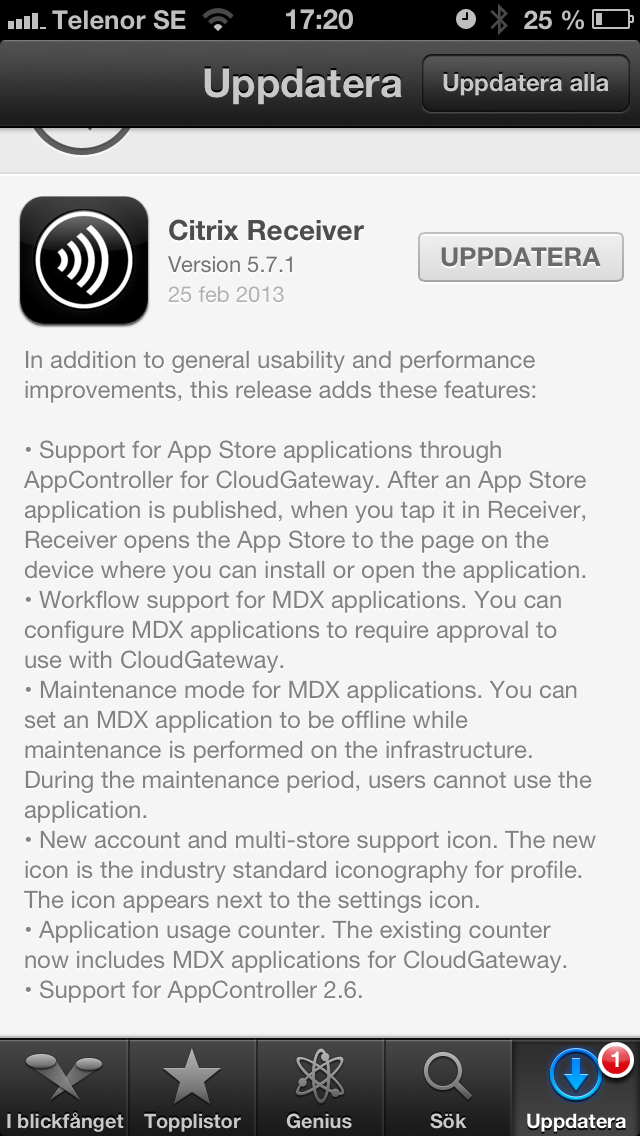
Read more about it here (no detailed 5.7.1 info yet but I guess it’s coming soon)!
//Richard
February Edition of #Citrix #XenDesktop Technical Newsletter Now Available
February XenDesktop newsletter is out! Here’s a subset of what you can read from the Citrix blog post.
Using XenDesktop? Then you need to get the XenDesktop Technical Newsletter! The newsletter is comprised of the best technical resources from across Citrix Services: Consulting, Technical Support, Education, and Technical Readiness. In its third year the newsletter is designed to help customers run their XenDesktop optimally and get more out of their investment in Citrix desktop virtualization. And its FREE!
I am pleased to announce that the February 2013 edition of the newsletter is now available.
Check out the archive page, where you can access both the current and past issues, as well as subscribe to the FREE monthly newsletter.
The February edition of the newsletter is packed with great content, including:
- Optimal XenApp 6.5 VM Configuration (Blog)
- Introduction to the new Project Accelerator (Blog)
- Deploying XenApp 6.5 using PVS (Blog)
- Insider Troubleshooting tips for Administrators (eBook)
- Whats new with Excalibur (Blog)
- Top Knowledge Center content for December 2012 (Articles, hotfixes, whitepapers, etc…)
- How to configure Access Gateway 5 standalone for use with XD5 (tech note)
- XenDesktop Tools & Hotfixes
- And much more.
If you have any feedback/suggestions please let us know. Also don’t forget to Sign-up now!
//Richard
It all ADDS up with #BYOD (Assess + Design + Deploy + Support = Success)
Below you can read about a couple of webinars coming up on Citrix’s view on how to get your BYOD strategy up and running!
Cowboy consumerization is here…and it’s here to stay. You may not want to admit it, but you already have a few “outlaws” in your organization who are using their own devices, regardless of whether you allow them to or not. In fact, you probably have entire departments accessing email, apps and data on devices and through services that are not secure. The consumerization of IT is here to stay, so you may as well embrace it.
 When business information is accessed by user-owned, consumer-grade devices, the right technology foundation is essential to ensure IT control. The question is where to begin. What are the business, user and IT benefits of enabling bring-your-own device (BYOD)?
The business wants to make employees more productive yet remain compliant. Users want access to all their enterprise apps and data from their many devices and IT wants to ensure security and control in a way that’s simple to manage.
Before you begin a BYOD initiative, it’s important to understand the underlying products that will become a part of your BYOD solution and their functionality and feature sets. One size does not fit all and, even though a BYOD solution may seem complex, it’s important to realize that it all boils down to addressing four key things:
- Multiple Devices – Employees are bringing their own devices (on average 3) into the workplace – whether you like it or not.
- Lots of Apps – IT have lots of them and different types (Windows, Web, SaaS and Mobile) that everyone want access to from their device.
- Unmanaged Data – Employees are..
Continue reading here!
//Richard
#Citrix #NetScaler Insight (NI) – Citrix TV videos
Citrix has released some videos related to NetScaler Insight. Have a look at them and try it out!
Setting up NetScaler Insight 1.0
NetScaler Insight – Adding NetScaler Instances to NetScaler Insight
Application visibility using NetScaler Insight
NetScaler Insight – Adding NetScaler Instances to NetScaler Insight
Cheers!
//Richard
#Citrix #AppController 2.5 Implementation Tips – #CloudGateway, #BYOD
Great blog post by Matthew Brooks!
AppController is a component of the Citrix CloudGateway Enterprise suite that orchestrates access to Enterprise Cloud applications. Those applications may take many forms including Mobile Applications, Software-as-a-Service hosted in public clouds, and Web links. Below I provided some tips to help with the implementation of AppController 2.5 (which is the latest version as of the publishing of this blog).
System Related
Including settings such as the Hostname, SSL certificates, and Restore.
TIPs:
- Take a hypervisor level snapshot after the initial installation so that you can easily return to that base level if configuration or integrations efforts go awry.
- The hostname cannot contain special characters in the AppController certificate signing request.
- The hostname must match SSL certificate.
- The system cert must be chained to its CA/(s).
Active Directory Related
Including settings such as the Server (Domain Controller), Base DN, and Service Account credentials.
TIPs:
- The AppController only supports integration with a single domain. Multiple domains require multiple AppControllers. The NetScaler Access Gateway may be configured to allow users to access a single fully qualified domain name, yet be directed to their respective domain AppController through the use of Global Groups. See CTX116169 for more informationhttp://support.citrix.com/article/CTX116169
- All user accounts must have a first name, last name, and email address configured or they will receive an authorization error when attempting to launch applications. The bind Administrator account must also have email address configured or directory integration will fail.
- Only LDAP (TCP 389) may be configured through the wizard that must be completed initially. Thereafter LDAPS (TCP 636) may be configured through the full administration menu.
- If the server name domain name is a load balanced DNS entry the initial import may work, yet subsequent bind attempts will fail. Alternatively you may use the IP address of an LDAPS load balancer on a Netscaler with specific domain controllers configured as services. See CTX135092 for more information http://support.citrix.com/article/CTX135092
Network Related
Including settings such as the IP address, @Workweb and NTP server.
TIPs:
- Use IP private addresses as system addresses if possible. When Trust Settings are configured for NetScaler Access Gateway it does not allow SSO to public addresses. If public addresses must be used the NetScaler may be configured with an SSL Bridge to access the AppController. See NetScaler Traffic Management document for more information.
- NTP must be configured or SAML authentication may fail for SaaS sites if the time difference is significant.
- When Trust Settings are configured for NetScaler Access…
Continue reading here!
//Richard
#Citrix #CloudBridge Connecting to Microsoft #Azure – Technology Preview
This is really interesting!!! Can’t wait to try it out, I just got Azure up and running with a couple of VM’s in it and will set this up and try it ASAP! 🙂
CloudBridge Connecting to Microsoft Azure
Release Date: Feb 15, 2013
| Citrix CloudBridge connects enterprise datacenters to external clouds and hosting environments, making the cloud a secure extension of the enterprise network.
This technology preview offers standard based secure connectivity to Microsoft Azure. With this enhancement, a customer can connect their enterprise data center to the Azure VPN gateway and access the IaaS and PaaS offerings from Microsoft. The following are the key points to note :
Images and Licenses: We are making available virtual appliances running on XenServer (xva images). These appliances need EVAL licenses. Please follow links to sign-up and get these EVAL licenses. To get started:
Helpful Resources:
Have Questions? Go to the CloudBridge discussion forum to get help from… |
Continue reading here!
//Richard
[Announcing] #ShareFile 2.0 for Android – #Citrix, #BYOD
Ok, Citrix has now also released an updated version of the ShareFile app for Android to incorporate the new security features there as well!
NICE!!!! 😀
Read the Citrix blog post below for more info and source link!
I’m pleased to announce the new version of the ShareFile application for Android tablets and phones. ShareFile for Android enables secure mobile work styles by providing users with a rich follow-me-data experience while offering IT the management and control needed to ensure sensitive corporate data is secure at all times. By 2020, the workplace will evolve to the point where there will be 7 desks for every 10 office workers, with each person accessing their company’s IT network from an average of 6 different devices.
According to a new report from Forrester, an estimated 258 million workers around the world choose their own laptops and 129 million buy their own smartphones. Currently 37% of all BYOD smartphones run on Google’s Android platform. The Citrix mobile application suite balances connectivity and personal freedom, allowing employees to access everything they need to securely conduct business regardless of whether they are working from home or on the road.
New Features
Pin Passcode |
Jail Break Detection |
| Gives users easier access to their data instead of having to type their password every time they start the application. | Allows administrators to prevent their users from accessing their ShareFile data from jail broken devices. |
 |
 |
Another security feature added to this release is local device encryption for improved security of sensitive data.
ShareFile in action
The Salinas Police Department Deputy….
Continue reading here!




 The IT Melting Pot!