Archive
New #Citrix #Visio Stencils – via @djfeller – #XenApp #XenDesktop #XenClient #XenServer
Thanks a lot for the great work you did on Project Accelerator, and for sharing the Visio stencils!! 🙂
By spending a little time in the Assess phase, Project Accelerator creates this awesome looking diagram

The truth is, this diagram took many, many, many revisions. We wanted to create something that was easy to follow while providing the most important information people wanted to see, which included IOPS, servers, VMs, storage space, desktop images, infrastructure components, and so much more. It took a few revisions before I had something in Visio that did all of that. Then we gave my diagram to Marta Guerra, a senior designer on the Project Accelerator team. She turned the diagram into something easy to follow and very clean with new images/icons for all of the components. I’m still impressed. I know many of you are too because you’ve asked for the Visio stencils.
Unfortunately, Project Accelerator diagrams aren’t done in Visio, but that didn’t stop us from giving you what you wanted. With the help of Marta, I’ve been able to turn these images into a new set of Citrix Visio Stencils.
Get them here!
//Richard
Jan. Edition of XenDesktop Technical Newsletter Now Available – #XenDesktop, #Citrix
It’s out again with more exciting topics! Check it out!!!
Using XenDesktop? Then you need to get the XenDesktop Technical Newsletter! The newsletter is comprised of the best technical resources from across Citrix Services: Consulting, Technical Support, Education, and Technical Readiness. In its third year the newsletter is designed to help customers run their XenDesktop optimally and get more out of their investment in Citrix desktop virtualization. And its FREE!
I am pleased to announce that the January 2013 edition of the newsletter is now available.
Check out the archive page, where you can access both the current and past issues, as well as subscribe to the FREE monthly newsletter.
The January edition of the newsletter is packed with great content, including:
- Optimal XenApp 6.5 VM Configuration (Blog)
- Introduction to the new Project Accelerator (Blog)
- Deploying XenApp 6.5 using PVS (Blog)
- Insider Troubleshooting tips for Administrators (eBook)
- Whats new with Excalibur (Blog)
- Top Knowledge Center content for December 2012 (Articles, hotfixes, whitepapers, etc…)
- How to configure Access Gateway 5 standalone for use with XD5 (tech note)
- XenDesktop Tools & Hotfixes
- And much more.
If you have any..
Continue reading here!
//Richard
#Citrix Knowledge Center Top 10 – December 2012
Citrix Support is focused on ensuring Customer and Partner satisfaction with our products.
One of our initiatives is to increase the ability of our Partners and Customers to leverage self-service avenues via our Knowledge Center.
Find below the Citrix Knowledge Center Top 10 for December 2012.
Top 10 Technical Articles
| Article Number | Article Title |
|---|---|
| CTX129229 | Recommended Hotfixes for XenApp 6.0 and Later on Windows Server 2008 R2 |
| CTX129082 | Application Launch Fails with Web Interface using Internet Explorer 9 |
| CTX132875 | Citrix Receiver Error 2320 |
| CTX804493 | Users Prompted to Download ICA File, Launch.ica, Instead of Launching the Connection |
| CTX105793 | Error: Cannot connect to the Citrix server. Protocol Driver Error |
| CTX133997 | Citrix Receiver 3.x – Issues Fixed in This Release |
| CTX127030 | Citrix Guidelines for Antivirus Software Configuration |
| CTX101644 | Seamless Configuration Settings |
| CTX676151 | How to Install the Citrix ICA Web Clien |
| CTX325140 | Manually and Safely Removing Files that might remain on a System |
Top 10 Whitepapers
| Article Number | Article Title |
|---|---|
| CTX131577 | XenApp 6.x (Windows 2008 R2) – Optimization Guide |
| CTX132799 | XenDesktop and XenApp Best Practices |
| CTX101997 | Citrix Secure Gateway Secure Ticket Authority Frequently Asked Questions |
| CTX133185 | Citrix CloudGateway Express 2.0 – Implementation Guide |
| CTX129761 | XenApp Planning Guide – Virtualization Best Practices |
| CTX134943 | XenDesktop and XenApp Printing – Planning Guide |
| CTX122978 | XenServer: Understanding Snapshots |
| CTX134081 | Planning Guide – Citrix XenApp and XenDesktop Policies |
| CTX128277 | Logon Optimization Guide – XenApp/XenDesktop |
| CTX110351 | User Profile Best Practices for MetaFrame Presentation Server |
Top 10 Hotfixes
| Article Number | Article Title |
|---|---|
| CTX132122 | Hotfix Rollup Pack 1 for Citrix XenApp 6.5 for Microsoft Windows Server 2008 R2 |
| CTX126653 | Citrix Online Plug-in 12.1.44 for Windows with Internet Explorer 9 Support |
| CTX133066 | 12.3 Online Plug-In – Issues Fixed in This Release |
| CTX133882 | Hotfix Rollup Pack 2 for Citrix XenApp 6 for Microsoft Windows Server 2008 R2 |
| CTX135025 | Hotfix XA650R01W2K8R2X64033- For Citrix XenApp 6.5 for Windows Server 2008 R2 |
| CTX116550 | Credential Handling Weakness in Presentation Server Client for Windows |
| CTX135709 | Hotfix XS61E006 – For XenServer 6.1.0 |
Continue reading here!
//Richard
#EnvokeIT is expanding – looking for a new exciting career? #Mobility, #Networking, #Citrix
It’s exciting! EnvokeIT continues to expand and we are looking for new colleagues within the Mobility, Networking and Virtualization areas. It doesn’t matter if you currently are a Junior or Senior consultant! It doesn’t matter, just as long as you have the will to grow! Come join us on our exciting journey!

We are looking for someone who wants to grow with us!
EnvokeIT are confident that our employees are our most important assets. Employees who are happy and like to go to work makes a difference. Our continued success is based on finding, retaining and developing talents that understands customers’ business processes and future IT needs. As a consultant with EnvokeIT you are employed by us but you work with one of our clients. Assignments can be for longer or shorter periods depending on what you are working with, what customers need and your personal preferences. You build on your resume with new experiences and skills, while contributing to customer business activities with your knowledge and skills.
We want to be one of the best and most exciting employers in the IT industry. As an employee of EnvokeIT you are given a unique opportunity to participate in the company’s further development. Periodically, you will be invited to consultant meetings where you get the chance to meet your peers that are working on various assignments on EnvokeITs behalf. Sometimes we organize lectures that will be a part..
Continue reading and apply here!
//Richard
Free eBook – Secrets of the #Citrix Support Ninjas – #XenApp, #XenDesktop, #NetScaler
Secrets of the Citrix Support Ninjas

So we decided to pick their brains and gather a bunch of ‘power tips’ to help administrators like you run better Citrix environments.
The result is this free eBook: Secrets of the Support Ninjas.
It’s a quick, easy-to-browse collection of insider tips and tricks from the people who know best – organized by four products: XenApp, XenDesktop, XenServer and NetScaler.
If you only take away a single tip to help you run your environment, it’ll be well worth the download…
Download here!
//Richard
#AppController, #CloudGateway 2.5 released
Hi all,
I guess that some of you already are aware of the new 2.5 release of AppController (a part of the marketing product CloudGateway).. but it’s interesting with a release which I hope is making the product more enterprise ready and that the basic features now are there!
And I guess that many are interesting in that now Android apps, @WorkMail™ and @WorkWeb™ are supported!
I’ll of course do an upgrade and go through my little issue list I created earlier in the post-Synergy post… I hope that these items now are fixed!
- Enterprise/multi-site support with synch of the database. This to ensure that you can have an HA pair setup for instance in Europe and one in the North Americas and have the end-user be logged in against both and have their subscriptions etc. follow them (as well as of course reporting, monitoring etc. etc.)
- Support for really large AD domains with LARGE # of AD users and AD groups
- Support for AD domain structure where the BASE DN is different to where AD users and the AD security groups you want to use for roles
- Role based administration – this has just got to be there. Without it I wouldn’t call it an enterprise product…
These are the updates according to eDocs (they are quite a few so I have high hopes!) 😉
But when reading through the short list of updates I DON’T see multi-site support!! That’s not very Enterprise if you ask me…. This is the first thing I’m gonna check out!
Here is an architectural overview:
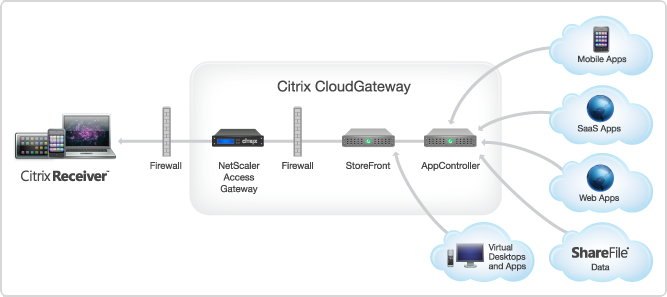
AppController 2.5 supports the following new features:
Receiver for Mac 11.7 Released
About Receiver for Mac 11.7
Updated: 2012-12-19
Citrix Receiver for Mac provides users with self-service access to resources published on XenApp or XenDesktop servers. Receiver combines ease of deployment and use, and offers quick, secure access to hosted applications, desktops, and data.
Receiver also provides on-demand access to Windows, Web, and Software as a Service (SaaS) applications. You can use it for Web access or configure it for use with Citrix CloudGateway.
What’s new
- Single authentication to the Access Gateway:
- Use of a single session for both VPN and clientless access so that a Receiver user logs on once for both types of access and consumes only one license.
- Automatic routing of ICA traffic through the Access Gateway ICA proxy for optimal user experience.
- Automatic start-up of a VPN tunnel when a user logs on. This feature requires that you disable the Single Sign-On with Windows setting on the Access Gateway.
- Improved logon and logoff operations:
- Users are prompted to log on to Receiver only when a logon is required. Actions that require a log on include starting an app from Receiver or the Finder, using the Refresh Apps command, viewing or searching for apps, or adding an account. A user is logged on only to the account associated with the requested resource.
- Users remain logged on until choosing to log off or exit Receiver, roam from the internal network to an external network, or delete passwords.
- A VPN tunnel is established only if needed. Internal users are logged on to StoreFront.
- Usability improvements, including:
- Upgraded FIPS support. Receiver supports certificates with a public key of 2,048-bit RSA and a SHA256 signature hash algorithm.
- Support for ShareFile StorageZones. Receiver provides support for ShareFile StorageZones. StorageZones enable you to optimize ShareFile performance by locating data storage close to users and also allow you to control storage for compliance purposes. For more information about StorageZones, see the Sharefile documentation in eDocs.
#Citrix #SmartAccess = A complete story or not? – #NetScaler #AGEE #EPA
This little blog post is about Citrix SmartAccess. I’ve been a fan of SmartAccess for a long time, and it’s also something that Citrix has been talking a lot about in their story. The way that Citrix technology can provide applications, desktops and information to end-users on any device in a secure and controlled way.
But the purpose of this blog post is to give you my view of this story, and how true the SmartAccess story is. Remember that this is my personal view and that I’ve actually not tested all my theories below so parts of it is purely theoretical at this stage.
So a bit of background first to build my case…
Citrix has been going on about SmartAccess, and it’s been true that the Access Gateway capabilities once added to Web Interface and XenApp/XenDesktop where great in terms of adding another layer of functionality that the IT supplier could use to determine how the XenApp and XenDesktop environments where accessed, and from what type of device. The device detection/classification is done through host checks (Endpoint Analysis Scans, EPA) that the Access Gateway feature provided as a pre- or post-authentication scan. This scan then resulted that either the device met the policies or didn’t, and then this policy could be leveraged by the other internal components (XenApp/XenDesktop) to control/manage which apps, desktops and functionality (virtual channels like printing, drive mapping etc.) that the end-user should get for that specific session.
And this was/is working well for certain scenarios from a technical point of view. But is it really working for the whole story that Citrix and the whole IT-industry is driving now with BYOD etc.? Think about the message that is being pushed out there today, use any device, we can control and deliver according to security policies, we can provide access from anywhere, etc…
And this is where it becomes interesting. All of a sudden then you as an architect are to take this vision that your CIO or IT-board has and realise it into manageable IT services that combined deliver a fully fledged IT delivery of Windows, Internal Web, SaaS, Mobile and Data for this great set of use cases and scenarios. Wow… you’ve got yourself a challenge mate!
This text is from the Citrix homepage about SmartAccess;
SmartAccess allows you to control access to published applications and desktops on a server through the use of Access Gateway session policies. This permits the use of preauthentication and post-authentication checks as a condition for access to published resources, along with other factors. These include anything you can control with a XenApp or XenDesktop policy, such as printer bandwidth limits, client drive mapping, client clipboard, client audio, and client printer mapping. Any XenApp or XenDesktop policy can be applied based on whether or not users pass an Access Gateway check.
So let’s start of then with going back to the SmartAccess which is the topic of this blog!
#NetScaler #SDX design and best practise
Ok, I understand that this is something that I’ve touched upon before as well and received some comments on (NetScaler MPX vs. SDX dilemma). But I’ll still continue the reasoning behind why I think that the NetScaler SDX architecture is great, and that is needs to be offered on all the different platforms/appliance types/sizes!
To kick off the reasoning I recommend that you read this post; #NetScaler #AAA on NS 10.00 Build 70.7 = watch out!. When you’ve read both previous posts I hope that you see where I’m now going with all of this…
Just have a look at this picture where I’m trying to illustrate two design options for how you could build your NetScaler service for a tenant;

And if you then keep in mind about the AAA bug that caused the whole NetScaler engine to crash, what happens in the top scenario if this VPX had been affected? Think about if that NetScaler hosted network connectivity to you public cloud services with workloads, all SSL VPN users connected to the enterprise, all ICA/HDX proxy users into XenApp/XenDesktop, and also provided AAA features to the enterprise web apps used by customers and partners etc.? Wow, that would actually mean that one single 401 basic authentication could have taken down EVERYTHING!
But; if you would have separated your capabilities/features into separate VPX’s then you wouldn’t have had that issue. The “only” thing that would have happened if you ran into an issue that caused the NetScaler to crash then it would only affect that VPX (AAA VPX in the scenario above).
So my personal view is that it’s great that Citrix provides all the features on one appliance/instance. But it also adds quality and test efforts on Citrix to ensure that they perform testing of ALL features and functions before releasing a new build. And that may affect the lead-time to get fixes and new builds released and quality may also be impacted… and that’s what I’m afraid of is happening. So a little word of advice; separate workloads/features when you can and when you don’t want this big of a risk, and prey that Citrix soon delivers the SDX architecture on all appliances! And they would of course perhaps not just sell the larger boxes like they force us into today even if the bandwidth capabilities of that box isn’t required. But they would instead sell more VPX’ on top of the HW, that’s at least what I think.
Comments?
Cheers!
//Richard
#Citrix #XenDesktop Monitoring: Desktop Availability – #EGinnovations #HP #BAC
Ok, this was an interesting blog post from Miguel Contreras. First of all I’d like to thank you Miguel for this post!
You can read the blog post here prior to reading my ramblings… 😉
XenDesktop Monitoring: Desktop Availability
The whole blog post message hits a spot that I know many of our EnvokeIT customers are looking for: AN E2E (END-TO-END) MONITORING CAPABILITY!
Citrix has great products and they work from a technical point of view, but I think that most part of the time development and evolvement of the products goes to fast so that the product teams doesn’t have time to synchronise how well they work together or what the service provider will need cross-products in the stack to deliver a managed IT service!
This blog post really proves it as well… Miguel has developed a powershell script that he schedules to run so that he could see in the morning if he could go to work or if everything is ok with his desktop service (or Windows as a Service (WaaS) as Citrix now talks about this type of service). And is that the way to go? I’m still looking for this E2E monitoring solution from Citrix that can provide real and good facts about how the overall WaaS service performs. Is the NetScaler VIP up, StoreFront, AppController, PVS/MCS, XenServer, the VM, File Server that hosts profiles etc. It’s only if yo get this full picture and fact that you can say that the service WaaS is available. It doesn’t matter if the desktop is running if the AGEE vip is down and he/she cannot reach it… or?
If Citrix isn’t getting into the monitoring business then please guide your customers to who of the partners that does the job, for instance EGinnovations, HP BAC etc.
Yeah yeah… my ramblings are over for tonight and this was not my first complaint about this “service readiness” stamp I’d like to see on enterprise products…
But still = I think no one else right now does the WaaS-job like Citrix!! But they can always improve like all of us! 😉
Cheers!
//Richard




 The IT Melting Pot!