Archive
#Citrix #XenApp and #XenDesktop 7.5 is released
Finally it’s released, just go and download and enjoy (hopefully)! 😉
https://www.citrix.com/downloads/xendesktop/product-software/xendesktop-75-platinum.html
Documentation is available online in Citrix eDocs. Keeping in mind that the online documentation will be periodically updated, you may also download a PDF file with a current snapshot for offline use:
Admin Guide
Upgrade Guide
Install Guide
This single package contains the Core and components needed to deploy the server-side infrastructure supporting Windows 8.1 and Server 2012 R2 and includes Director, Studio, Delivery Controller, Virtual Delivery Agent, Personal vDisk, Universal Print Server, Receiver and StoreFront, Profile Management, HDX, Migration tool, License Server and CloudBridge (Branch Repeater) plug in.
//Richard
Bug in Citrix Receiver 13 for Linux – cannot connect with multiple STAs – @CitrixSupport, @CitrixReceiver, #Citrix
Ok, we’ve had some issues with Citrix Receiver version 13 for Linux.. and it’s not just ONE issue. I found one that I thought I just have to share… so it’s lab Saturday for me at the office in a true geek manner with two XenClients and my favourite MacBook!
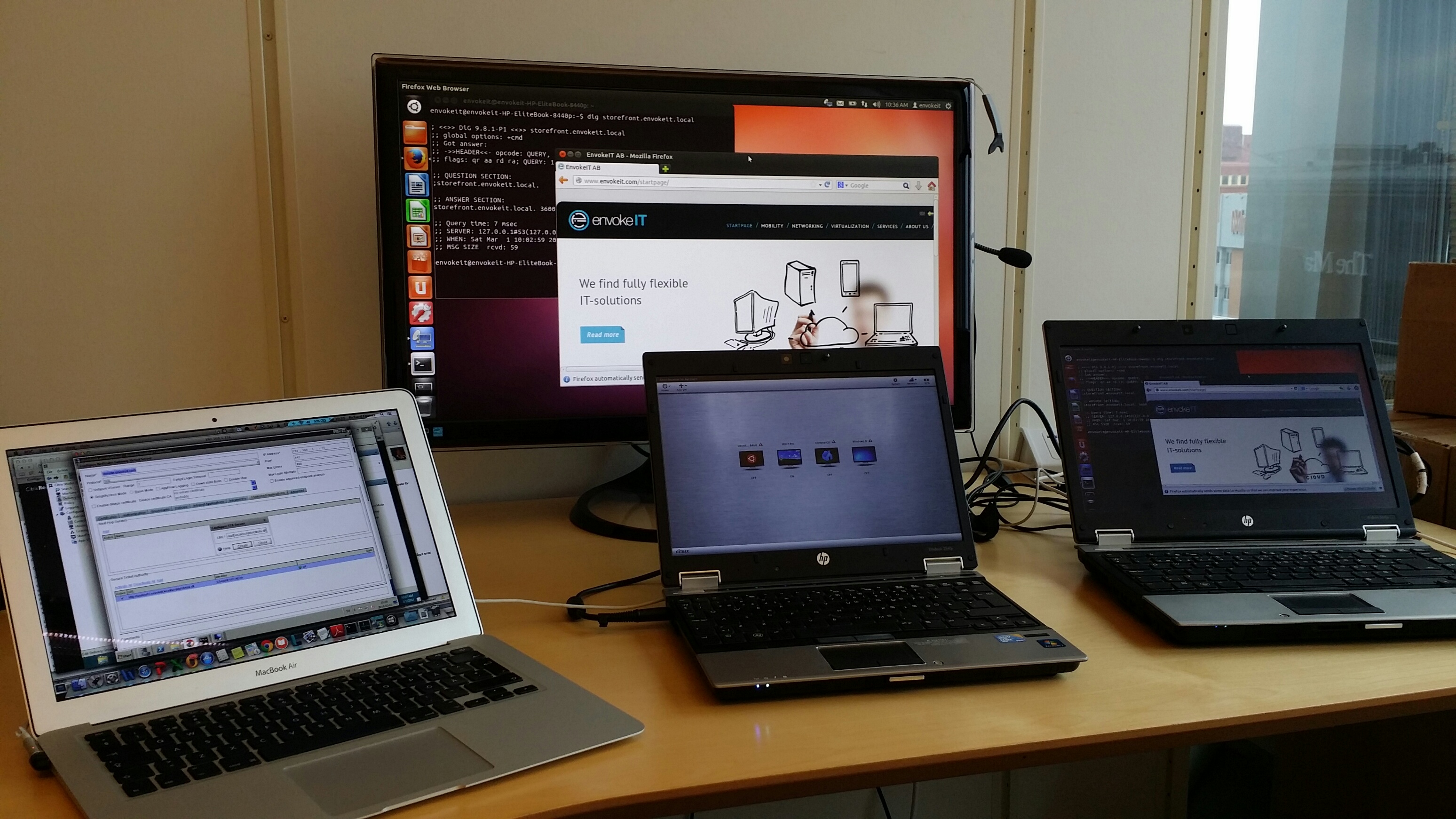
I guess that some of you have tried the Linux Receiver and knows how hard it is to get working, especially on a 64-bit distribution of Linux like Ubuntu 12.04 LTS och 13.10 LTS.
If you follow these instructions you can get it onto the device and then login through a browser (local Receiver UI may still not be full functioning!)..
https://help.ubuntu.com/community/CitrixICAClientHowTo
What I’m about to show you is that it’s not just only getting Receiver on the device and ensuring that the SSL certificates are trusted. You then have to be able to use it as well externally through a NetScaler Gateway (NSG) into StoreFront and your XenApp/XenDesktop VDA’s.
Just assume that you have a production environment that consists of a NetScaler Gateway and a StoreFront server, if you then in StoreFront have configured your NetScaler Gateway correctly and the appropriate STA configuration (with MULTIPLE STA’s) then you will notice that you can’t launch a session.
BTW, the recommendation from Citrix is to use multiple STA’s, right! See this from edocs:
For all deployments, if you are making resources provided by XenDesktop, XenApp, or VDI-in-a-Box available in the store, list on the Secure Ticket Authority (STA) page URLs for servers running the STA. Add URLs for multiple STAs to enable fault tolerance, listing the servers in order of priority to set the failover sequence. If you configured a grid-wide virtual IP address for your VDI-in-a-Box deployment, you need only specify this address to enable fault tolerance.
Important: VDI-in-a-Box STA URLs must be entered in the form https://serveraddress/dt/sta in the Add Secure Ticket Authority URL dialog box, where serveraddress is the FQDN or IP address of the VDI-in-a-Box server, or the grid-wide virtual IP address.
The STA is hosted on XenDesktop, XenApp, and VDI-in-a-Box servers and issues session tickets in response to connection requests. These session tickets form the basis of authentication and authorization for access to XenDesktop, XenApp, and VDI-in-a-Box resources.
If you want XenDesktop, XenApp, and VDI-in-a-Box to keep disconnected sessions open while Citrix Receiver attempts to reconnect automatically, select theEnable session reliability check box. If you configured multiple STAs and want to ensure that session reliability is always available, select the Request tickets from two STAs, where available check box. Read more…
#XenDesktop 7.1 on #Hyper-V Pilot Guide! – #Citrix
This is a great PoC guide, some thing I would have done differently in detail but overall great work!
You’ve heard of XenDesktop 7.1, experienced a demo and worked through the Reviewer’s Guide. Now where do you turn when you’re ready for a PoC, pilot and preparations for a full-scale rollout?
Here on the Citrix Readiness and Enablement Team, we’re always looking for ways to empower our customers to be successful on their projects. To this end, we’ve taken one of our most popular hands-on lab guides used to train hundreds of internal and external students and reworked it for consumption by the masses. The XenDesktop 7.1 on Hyper-V Pilot Guide can be download fromhttps://citrix.sharefile.com/d/scaa256260df4ab3b. In this guide we cover the following topics with step-by-step instructions and screenshots:
– Configuring System Center Virtual Machine Manager and Installing the Agent
– Setting Up SQL Server Mirroring for a XenDesktop site
– Setting up the XenDesktop Site
– Joining a Controller to an Existing Site
– Configuring StoreFront and Installing Certificates
– Configuring NetScaler for StoreFront Load Balancing
– Installing the VDA Software on Desktop and Server VMs
– Creating Catalogs of Machine for Desktops and Servers
– Creating Delivery Groups for Desktops and Servers
– Delivering Installed and App-V Applications
– Provisioning Services Configuration and Optimizations
– Using the XenDesktop Setup Wizard
– Setting up Remote Access with NetScaler and StoreFront
– Internal and External Connectivity Scenarios
– Load Evaluator Policies
– Monitoring with Director
– Exploring Configuration Logging
– Exploring Delegated Administration
– Working with PowerShell
And much more!
Take a look through the document and let us know your thoughts…
IMPORTANT: This guide is designed to be used as a reference for building PoC and/or pilot environments. Production environments should always be…
Continue reading here!
//Richard
#Citrix and Palo Alto Networks Team to Deliver Consolidated, Multi-tenant Network Security and #ADC Services on #NetScaler SDX
This is really interesting!!
With the myriad of features that we launched in PAN-OS 6.0, you may have missed a new deployment option for Palo Alto Networks VM-Series in your data center. In addition to the support of VM-Series for VMware environments, you can now deploy the VM-Series on the Citrix NetScaler SDX platform. We launched this with Citrix officially today.
Virtualized and cloud environments require the secure and efficient delivery of the right applications to the right users using any device and from any location. To do this, you need an infrastructure that supports all aspects of application delivery (security, availability, performance and visibility) and embraces the key characteristics of cloud:
- Multi-tenancy – the ability to support differing needs of new application owners, business units or service provider customers
- Agility – the services must have the ability to be provisioned and de-provisioned on demand, with support for automation and orchestration
- Scalability – the services must have the ability to flexibly scale up, scale out capacity to meet the needs of the business
Citrix NetScaler SDX is an open, multi-services platform that addresses these requirements. The NetScaler SDX platform consolidates NetScaler application delivery controller (ADC), and best-in-class network and security services required for application delivery. Now, with the introduction of VM-Series on Citrix NetScaler, you’ll be able to provide dedicated instances of security and ADC for per application load balancing with dedicated firewalling. You now also have a complete, integrated security and availability solution for Citrix XenApp XenDesktop deployments – from secure remote access, high-availability…
Continue reading here!
//Richard
#VDI Calculator v5 is Now Available with Major New Features – #IaaS, #Storage, #BYOD via @andreleibovici
This is awesome! Great work by @andreleibovici!
I am happy to announce the General Availability of the new VDI Calculator v5. This new version is the single biggest release since I started delivering the calculator. I have completely re-architected the way the calculator works, allowing multiple types of desktops to be configured in a single calculation for a single solution.
All existing features have been retained and will work in the exact same way you are used to, but you now have the ability to select different options for different types of desktops or desktop pools.
As an example, you may choose Desktop Type 1 to be a ‘student’ desktop using Linked Clones with 10 different pools; conversely you may choose Desktop Type 2 to be a ‘professor’ desktop using Full Clones with 5 individual pools. This new calculator gives you much more granular control over your calculations eliminating repetitive tasks when sizing larger environments.
To enable multi-desktop pool calculations just select ‘-’ and ‘+’ in the top bar menu.

Another additional feature is what I call ‘Ask for Help‘. During the application session when you select the Update option a new screen will show up asking if you would like to be contacted by VDI solutions vendors that can help reduce costs, improve performance or improve manageability of your VDI solution. If you are interested…
Continue reading here!
//Richard
How to: Create Desktop Appliance site on StoreFront – #Citrix, #StoreFront, #ThinClient
I guess that some of you out there by now are using Thin Clients and some are using Desktop Appliance site functionality in the old Web Interface for these thin clients that are XenApp- or XenDesktop-ready.
So now you have or are thinking on how to setup this on StoreFront!
Citrix has A LOT of work to do in order to ensure that StoreFront becomes a stable and enterprise ready! There are so many tweaks and configurations needed in config files etc. that just isn’t ok! Add them into the console! It’s not hard, even I could code in some menus, forms windows and trigger the underlying PowerShell scripts!
But back to the topic, how do we configure Desktop Appliance site in StoreFront? Well, first we need to have a look at the following edocs articles that explain how to do it:
Desktop Appliance sites – And the most important in this article is the bottom that details WHAT DOESN’T WORK!
Important considerations
Desktop Appliance sites are intended for local users on the internal network accessing desktops from non-domain-joined desktop appliances. When you decide whether to use Desktop Appliance sites to provide users with access to your stores, consider the following restrictions.
- If you plan to deploy domain-joined desktop appliances and repurposed PCs, do not configure them to access stores through Desktop Appliance sites. Instead, configure Citrix Receiver with the XenApp Services URL for the store. For more information, see XenApp Services URLs.
- Desktop Appliance sites do not support connections from remote users outside the corporate network. Users logging on to NetScaler Gateway cannot access Desktop Appliance sites.
How do you release this and don’t support connecting through a NetScaler Gateway? Then you miss the whole point of SmartAccess, you cannot trigger EPA (host checks) for instance to control ICA/HDX features like drive mapping etc. internally. And you cannot have thin clients on the Internet that connects into the enterprise through NetScaler Gateway!
Next you should read this article that details the PowerShell madness 😉
Configure Desktop Appliance sites
I won’t go into details of the article above but rather show you how it’s done and with some examples of arguments to pass to the PowerShell scripts.
Step one is to log on to your StoreFront server, and just to show you our current setup is that we have one Receiver for Web (RfW) sites used for browser access into StoreFront:

From a Store perspective you can see that we have one (1) store that the RfW site exposes:

#XenMobile Mobility promotion from #Citrix – #EMM, #BYOD, #XenDesktop
XenMobile mobile device management (MDM) or enterprise mobile management (EMM) capabilities for the price of Software Maintenance!
Personally I wonder if this is a move triggered by VMware’s acquisition of AirWatch where Citrix now is kind of pushing it’s MDM solution out the door to really get some more market, and at the same time push VMware to give their new MDM capabilities away together with Horizon View…
This is an interesting and good action, thank you Citrix!
XenApp and XenDesktop Platinum Mobility Promotion
Promotion effective From January 31, 2014 to September 30, 2014
|
The XenApp and XenDesktop Platinum Mobility Promotion is a limited-time promotion that offers new or existing XenApp or XenDesktop Platinum customers with perpetual licenses current on Subscription Advantage (SA) the ability to receive FREE XenMobile MDM edition licenses or get 20% off XenMobile Enterprise licenses with the purchase of first year Software Maintenance for all licenses obtained via this promotion. For either XenMobile promotion options, the maximum number of discounted licenses customers can purchase is based on the total number of XenApp and XenDesktop Platinum licenses owned. XenMobile MDM edition provides key device-level security capabilities for users accessing XenApp and XenDesktop desktops and apps on mobile devices. The mobile device management (MDM) solution lets you:
XenMobile Enterprise edition supports the next step in your EMM strategy by complementing the device-level security capabilities of XenMobile MDM edition with app-level security features. These include:
|
Continue reading here!
//Richard
GREAT VIDEO – #Citrix #XenDesktop vs. #VMware #Horizon #View installation video
This is really funny! Have a look at this video to see how you can compare a XenDesktop and a Horizon View installation side-by-side!
And another thing that is kind of funny is that VMware still compares Horizon View with XenDesktop 5.6: https://www.vmware.com/files/pdf/techpaper/VMware-View-vs-Citrix-XenDesktop-Datasheet.pdf
//Richard
NutaniXpress – January 2014 – #Nutanix, #IaaS, #Virtualization, #Storage
Great NutaniXpress release!!!! There is a good prediction and I must say that I’m really impressed with this company and their product!!!
Read the whole NutaniXpress January 2014 article here!
| Deliver High Performance & Scalable Microsoft Exchange with NutanixWith more than 50% of Microsoft Exchange installations now virtualized, it is critical to select the right server and storage architecture to support such critical workloads. Read this solution brief to learn how the Nutanix Virtual Computing Platform overcomes the challenges of legacy storage architectures and makes for an ideal solution for your Microsoft Exchange virtualization needs. |  |
|
Learn More: Microsoft Exchange Solution Brief |
|
| Microsoft SQL Server on Nutanix: Best PracticesThis document makes recommendations for the design, optimization and scaling of Microsoft SQL Server deployments on Nutanix. It shows the scalability of the Nutanix Virtual Computing Platform and provides detailed performance and configuration information on the scale-out capabilities of the cluster when leveraged for MSSQL deployments. |
 |
|
Learn More: Microsoft SQL Server on Nutanix: Best Practices |
|
#Nutanix Triumphs at V3 Technology Awards 2013 for Best Virtualisation Product – #IaaS
This is great! A great product takes another award!!! 😉
V3 Readers Award Nutanix with Prestigious Industry Recognition in Highly Competitive Category
Nutanix also won the Best of VMworld 2013 Gold Award for Private Cloud Computing!
LONDON, December 3, 2013 – Nutanix, the leading provider of hyper-efficient, massively scalable and elegantly simple datacentre infrastructure solutions, has been awarded for its continuing innovation in optimising datacentre infrastructure at the V3 Technology Awards 2013. During a ceremony at the Waldorf Hilton Hotel, the company was awarded Best Virtualisation product, beating a host of well respected and larger, more established organisations in the virtualisation market.
V3.co.uk is a leading source of news and analysis for technology professionals, written by a team of expert IT journalists in the UK and Silicon Valley. The awards were hotly contested this year, with more than 450 entries from 150 companies.
“It’s great to see a new company like Nutanix being recognised at the V3 Technology Awards, among the industry giants. It wasn’t an easy task whittling down the hundreds of entries to create the shortlist, and then V3 readers voted in their thousands for their favourites, making this a significant achievement and a well-deserved win. Well done Nutanix!” said Madeline Bennett, Editor, V3 and The INQUIRER.
Alan Campbell, Regional Director of Western Europe at Nutanix, commented on the success: “Nutanix is a company that is constantly innovating and striving to provide the best platform for its customers, so this recognition by a highly respected publication is a testament to the hard work of our team. Virtualisation is a rapidly evolving technology which we are proud to be at the forefront of and to receive an award in the UK, a key market for us, is an honour.
As the fastest growing enterprise…
Continue reading here!
//Richard




 The IT Melting Pot!