Archive
XenMobile product overview… and It’s nice! via @BasvanKaam – #BYOD, #MDM, #Citrix
Wow! I must say that Bas van Kaam has done a great wrap-up here! I highly recommend you to read this blog post!!! 🙂
It was only about a month ago when I was writing my Blog about the CloudGateway that I wondered which route Citrix would take now that they acquired Zenprise, well… here it is… XenMobile, another Xen sibling sees the light! Lets jump right in…
I had the opportunity to make use of one of Citrix’s demo environments to have a closer look at MDM, which is an awesome way to explore new and existing products by the way, if your company is a Citrix partner and has access I definitely recommend having a look. Besides that I used the Citrix E-Docs website as well as Citrix.com to find as much information as possible.
The main focus of this article will be on XenMobile MDM as the Mobile Solutions Bundle (one of the two editions available) focuses primarily on the CloudGateway which I already discussed in one of my previous blogs.
MDM?
MDM stand for Mobile Device Management and it’s just that! Here’s what Citrix has to say about it: As per Citrix: XenMobile MDM is a robust mobile device management solution that delivers role-based management, configuration, and security for both corporate and employee-owned devices. Upon user device enrollment, IT can provision policies and apps to devices automatically, blacklist or whitelist apps, detect and protect against jailbroken or rooted devices, and selectively wipe a device that is lost, stolen, or out of compliance. Users can use any device they choose, while IT can ensure compliance of corporate assets and secure corporate content on the device.
Editions
There are two editions: XenMobile MDM and the Mobile Solutions Bundle. XenMobile MDM primarily focuses on (hardware) device management, more on it’s extensive feature set shortly. Every major platform is supported including: iPhone, iPad, Android, BlackBerry, Symbian and Microsoft Windows 8. It includes the XenMobile Secure Mobile Gateway (SMG) and XenMobile SharePoint Data Leak Prevention (DLP) as well as the XenMobile Mobile Service Provider (ZSM) and the XenMobile Remote Support Application Toolset.
#Citrix #BYOD Architecture overview – #XenMobile, #Mobility
I must say that this blog post is of course Citrix “twisted”, but I really like it! And it shows how Citrix provides a pretty complete offering in order to deliver Mobility- and BYO-compliant services.
The Citrix blog written by Christopher Campbell makes sense and I also agree that a picture is worth a thousand words! 🙂
I’m going to make this real easy and simple. As my grandfather would say “A picture is worth a thousand words”.
If you’re a XenDesktop or XenApp customer this is what your environment probably looks like.

Now this is what you need to enable BYOD and add that MAM, MDM, MIM (Data) and overall EMM functionality you’re looking for.

This is what your environment looks like after you enable BYOD.

Didn’t get that? OK, here is what BYOD looks like with multiple vendors.

Now, here is what BYOD looks like with Citrix.

Got it?
Read the whole blog post here!
//Richard
#Citrix #NetScaler Insight (NI) – Citrix TV videos
Citrix has released some videos related to NetScaler Insight. Have a look at them and try it out!
Setting up NetScaler Insight 1.0
NetScaler Insight – Adding NetScaler Instances to NetScaler Insight
Application visibility using NetScaler Insight
NetScaler Insight – Adding NetScaler Instances to NetScaler Insight
Cheers!
//Richard
#Citrix #AppController 2.5 Implementation Tips – #CloudGateway, #BYOD
Great blog post by Matthew Brooks!
AppController is a component of the Citrix CloudGateway Enterprise suite that orchestrates access to Enterprise Cloud applications. Those applications may take many forms including Mobile Applications, Software-as-a-Service hosted in public clouds, and Web links. Below I provided some tips to help with the implementation of AppController 2.5 (which is the latest version as of the publishing of this blog).
System Related
Including settings such as the Hostname, SSL certificates, and Restore.
TIPs:
- Take a hypervisor level snapshot after the initial installation so that you can easily return to that base level if configuration or integrations efforts go awry.
- The hostname cannot contain special characters in the AppController certificate signing request.
- The hostname must match SSL certificate.
- The system cert must be chained to its CA/(s).
Active Directory Related
Including settings such as the Server (Domain Controller), Base DN, and Service Account credentials.
TIPs:
- The AppController only supports integration with a single domain. Multiple domains require multiple AppControllers. The NetScaler Access Gateway may be configured to allow users to access a single fully qualified domain name, yet be directed to their respective domain AppController through the use of Global Groups. See CTX116169 for more informationhttp://support.citrix.com/article/CTX116169
- All user accounts must have a first name, last name, and email address configured or they will receive an authorization error when attempting to launch applications. The bind Administrator account must also have email address configured or directory integration will fail.
- Only LDAP (TCP 389) may be configured through the wizard that must be completed initially. Thereafter LDAPS (TCP 636) may be configured through the full administration menu.
- If the server name domain name is a load balanced DNS entry the initial import may work, yet subsequent bind attempts will fail. Alternatively you may use the IP address of an LDAPS load balancer on a Netscaler with specific domain controllers configured as services. See CTX135092 for more information http://support.citrix.com/article/CTX135092
Network Related
Including settings such as the IP address, @Workweb and NTP server.
TIPs:
- Use IP private addresses as system addresses if possible. When Trust Settings are configured for NetScaler Access Gateway it does not allow SSO to public addresses. If public addresses must be used the NetScaler may be configured with an SSL Bridge to access the AppController. See NetScaler Traffic Management document for more information.
- NTP must be configured or SAML authentication may fail for SaaS sites if the time difference is significant.
- When Trust Settings are configured for NetScaler Access…
Continue reading here!
//Richard
#Citrix #CloudBridge Connecting to Microsoft #Azure – Technology Preview
This is really interesting!!! Can’t wait to try it out, I just got Azure up and running with a couple of VM’s in it and will set this up and try it ASAP! 🙂
CloudBridge Connecting to Microsoft Azure
Release Date: Feb 15, 2013
| Citrix CloudBridge connects enterprise datacenters to external clouds and hosting environments, making the cloud a secure extension of the enterprise network.
This technology preview offers standard based secure connectivity to Microsoft Azure. With this enhancement, a customer can connect their enterprise data center to the Azure VPN gateway and access the IaaS and PaaS offerings from Microsoft. The following are the key points to note :
Images and Licenses: We are making available virtual appliances running on XenServer (xva images). These appliances need EVAL licenses. Please follow links to sign-up and get these EVAL licenses. To get started:
Helpful Resources:
Have Questions? Go to the CloudBridge discussion forum to get help from… |
Continue reading here!
//Richard
#Citrix #StoreFront Planning Guide
Ok, this product has caused some headache since it was released. And I must say that this guide is something that Citrix should have release a long time ago… there are so many companies out there struggling with how to deal with Web Interface being faced out and how/what to do with StoreFront!
So enjoy!
Download StoreFront Planning Guide!
//Richard
SSO to StoreFront not working in CVPN mode – #Citrix, #NetScaler, #StoreFront
Single Sign-On from Access Gateway to StoreFront not working in CVPN mode
There is yet another “thing” to have in mind when setting up Access Gateway and StoreFront in CVPN mode!
It’s been an interesting day (or days/weeks/months I must admit) with some “issues” with a NetScaler ADC, Access Gateway with CVPN profiles and StoreFront 1.2. And one thing that we have been struggling with was Single Sign-On to StoreFront when we had the AG configured for CVPN access. And it was just this environment where I’ve seen this issue!!
After a lot of troubleshooting the Citrix guys came up with an explanation on why SSO from AG doesn’t work in this specific environment! And it’s not an obvious one to find I must say… but I now understand why it doesn’t work!
So let’s explain the design reason for why it doesn’t work (so bear with me, solution at the end!!)…
The following picture tries to give a VERY rough picture of how it could look like, clients on the Internet on the left, then a NetScaler ADC with the Access Gateway feature enabled and a vServer configured. This AG vServer has session policies and profiles for ICA proxy (old traditional ICA proxy policy) and the little newer CVPN mode. And YES; I’ve left out a lot of stuff like AD etc. to simplify this picture A LOT…

The overall idea and config is that AG authenticates the user and then shall do SSO to StoreFront. The CVPN policy have been created according to all best practices etc. (Citrix CloudGateway Express 2.0 – Implementation Guide).
But SSO still doesn’t work!! If you login through a browser when having the CVPN policy linked to the vServer you’ll see that authentication works perfectly but then when it tries to passthrough the authentication to StoreFront it fails.
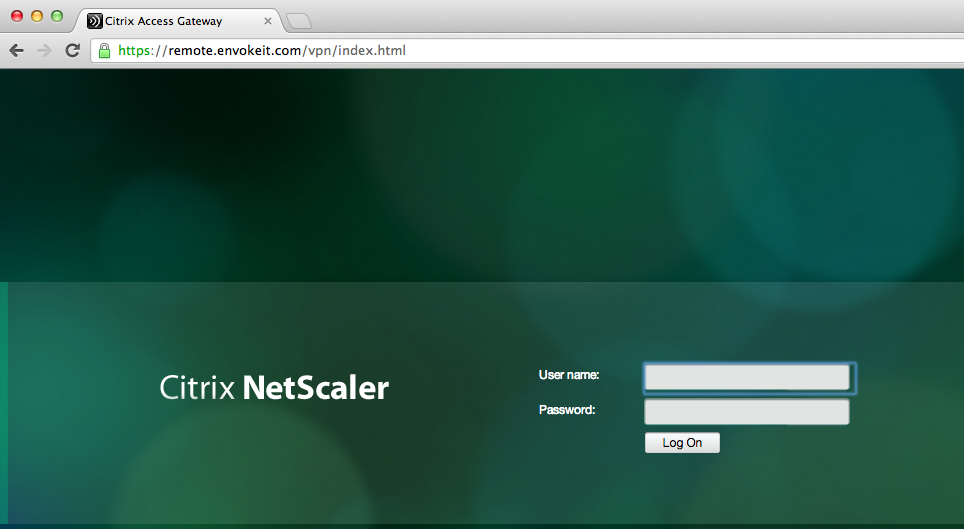
This picture just shows the login to the NetScaler ADC Access Gateway vServer:
Host checks/EPA scans are not for everyone – #Citrix, #NetScaler, #AccessGateway
This is an interesting blog post from Citrix… It captures a scenario that I know one of my previous customers was thinking of, so have a look at it!
The main thing that think of when reading this though is that EPA scans are NOT for everyone, I agree. And please also read my earlier posts on why it cannot be done with todays products from Citrix.
#Citrix #SmartAccess = A complete story or not? – #NetScaler #AGEE #EPA
Even though the latest Receiver Receivers changed some scenarios and enables host checks/EPA scans it still doesn’t provide the full picture. But I’ll be publishing a more detailed picture on why later, some late night I’ll be able to complete it! 😉
Here you have the blog post from Tobias Frigger:
A customer of one of my Citrix Consulting colleagues recently came up with an interesting request.
Like many others they are using Citrix NetScaler’s Access Gateway Enterprise Edition module to grant remote secure remote access to applications and desktops.
Additionally, they use a client management and software distribution solution to deploy the EPA plugin to client computers and therefore wanted to suppress Access Gateway offering the EPA scan plugin for download through the browser. This introduces some additional level of control over which client is entitled to connect through Access Gateway.
An approach restricting certain user groups from logging in by using group memberships is a more common scenario, but in this case the customer intended to restrict the end points and not the users. When end users lack administrative permissions to install custom software, preventing the download is indeed an effective measure.
A job for Citrix Consulting!
As you know, Access Gateway Enterprise Edition offers two ways of running Endpoint Analysis (EPA) scans – before and after authentication. Consequently, there are two procedures.
The formal requirements
- Remove the download button displayed when accessing the AGEE virtual server and the plugin is not detected by the browser or if the plugin is outdated
- Alter the message text such that it refers user to contact their system administrator if they think the plugin should be installed.
- When using a post-authentication EPA scan, add a “logout” button.

Backup
As a precaution, we want to make backup copies…
Continue reading here!
//Richard
#Citrix #NetScaler VPX on the #Cisco 1110 Virtual Network Services platform – via @pigram86
Interesting!!! 🙂
This week at Cisco live! in London, Citrix is demonstrating the Citrix NetScaler VPX virtual application delivery controller (vADC) on the Nexus 1110 Cloud Services Platform . NetScaler VPX is the industry-leading vADC and is further testimony to the expanding ecosystem for the Cisco Nexus 1000V virtual networking portfolio and the Cloud Network Services platform. The integrated Cisco-Citrix solution follows on the heels of last year’s agreement by the two companies that Cisco would reference sell the Citrix NetScaler portfolio, and Cisco’s demonstration of its Nexus 1000V virtual networking portfolio on Citrix XenServer.


The Nexus 1110 is the latest generation of appliances that started with the Nexus 1010. The Nexus 1110 helps customers that are virtualizing more of their application and security services and want to run them on a dedicated platform. For example, virtual firewalls, like our Virtual Security Gateway (VSG), complement physical firewall appliances to support virtual application deployments and VM mobility requirements. The Nexus 1110 appliance serves that need, running a range of virtual services on a platform that the networking and security teams can more directly control than the other application servers.
With Citrix NetScaler VPX integrated into the Nexus 1110 Cloud Services Platform, enterprise IT admins can scale-out deployments by enabling additional virtual NetScaler instances (VM’s) directly from the Nexus 1110. NetScaler VPX also provides feature and management consistency across physical and virtual ADC’s, as well as consistency across physical and virtual workloads that are being managed. The NetScaler…
Continue reading here!
//Richard
#Citrix #NetScaler 10 Build 73.5 released
Citrix has released yet another build….
These are the release notes:
Build 73.5
Replaces build: None
Release date: January 2013
Release notes version: 1.0
Language supported: English (US)
Changes and Fixes
Access Gateway
- Documentation: Starting with this maintenance release, for Access Gateway issues, see http://support.citrix.com/article/CTX133966.
Application Firewall
- Issue ID 0348647: On a NetScaler appliance that has the application firewall configured, if the client sends a web form with data that contains a plus sign (+), that form field triggers a form field consistency violation. This applies for data that the user types into the form, and for data in hidden fields that was generated by a javascript or sent to the user from the server. To work around this issue, ensure that no field contains a plus sign, or temporarily disable blocking for the form field consistency check.
- Issue ID 0354289: On a NetScaler appliance that has the application firewall configured, chunked requests sent by mobile devices to XML services might receive 400-level HTTP responses.
Configuration Utility
- Issue ID 0324797: The NetScaler configuration utility does not display the queue depth value for the configured priority queuing policies. This issue is observed only in a cluster setup.
- Issue ID 0334292: If you navigate to HTTP Compression >..
Continue reading release notes here!
//Richard




 The IT Melting Pot!