Archive
#Citrix #AppController 2.6 released as part of #MobileSolutions #Bundle #BYOD
As a part of the Mobile Solutions Bundle that now is available on MyCitrix you can find a new version of AppController.
AppController 2.6 supports the following new features:
- Certificate support. When you configure AppController for the first time in the web-based management console, you can add or create certificates on the Active Directory settings page.
- Microsoft Hyper-V support. You can install the AppController 2.6 virtual machine on Windows Server 2012 with Hyper-V enabled or on Microsoft Hyper-V Server 2012.
- Migration support to AppController 2.6. You can upgrade to AppController 2.6 from AppController 2.0 or from AppController 2.5.
- Mobile store support. You can upload mobile apps from the Apple App Store or Google Play to AppController. You can use the Citrix App Preparation Tool to wrap iOS and Android apps from the Apple App Store or Google Play. When you wrap the app, you can secure access and enforce policies. When you upload the app to AppController, you can configure the policies. You can also upload an app from the App Store or Google Play to AppController without using the App Preparation Tool.
- Secure connections to Active Directory. You can configure secure connections to Active Directory when you configure AppController 2.6 for the first time.
- ShareFile updates. In previous AppController versions, when you configured ShareFile, the domain sharefile.com was automatically appended to the domain name. In this release, the domain sharefile.com does not automatically append to the ShareFile domain name. You must enter the entire ShareFile domain name.
- Support for mobile links. You can configure mobile links to retrieve the name and description of apps automatically from the Apple App Store. For apps available through the Google Play Store, you enter the name, description and URL of the app. When you configure mobile links, links appear in Receiver with the Play Store or App Store name.
- Web proxy user name format. When you configure the web proxy, you can use either the SAMAccount format or the User Principal Name (UPN) as the user name.
Read more about it here!
//Richard
#XenMobile, #MobileSolutions – Is this what we’ve been waiting for? – #Citrix, #ZenPrise, #BYOD
Ok, so Citrix has now presented their new offering after merging Zenprise into their product portfolio. And is this what you have been waiting for?
My personal answer to that is probably yes, now you have all the capabilities (almost) out there to get your BYOx program/strategy and architecture in place or if you just want to add additional capabilities to your existing service offerings.
I must say though that the packaging is compelling and VERY interesting!
Citrix Mobile Solutions Bundle
The Citrix Mobile Solutions Bundle, which is comprised of XenMobile MDMand CloudGateway, offers a complete enterprise mobility management solution that enables IT to manage and secure devices, apps, and data.
XenMobile MDM Edition
XenMobile MDM Edition offers market leading mobile device management capabilities that deliver role-based management, configuration and security of corporate and employee-owned devices.
What I’d like to see is a roadmap where Citrix becomes an even more complete provider of technology in the Mobility segment. I still believe that Mobility is not only about smartphones and tablets and all the apps that you shall deliver to those devices and non-managed and non-corporate owned devices. There is still a need to provide device management of corporate assets that are not smartphones and tablets! And why should you have to implement another device management service/product for those.
So please Citrix = add Windows 7/8, OS X and Linux device capabilities as well in your almost complete Enterprise Mobile Management offering!
The offering is of course also today an early release where the former Zenprise product and CloudGateway is provided under the same marketing and price bundle but I’m waiting for when we have one (1) enterprise app store! And all capabilities from one technical architecture and product that you enable each capability on a need basis and are licensed accordingly.
But this is a great step for Citrix and I must say that I’m looking forward to see where this is going, I mean the feature set is pretty awesome!
Compare Features |
XenMobile MDM Edition |
Mobile Solutions Bundle |
| Enterprise MDM | ||
| Device management |  |
|
| Configure policies | |
|
| Security and compliance | |
|
| Scalability and high-availability | |
|
| Ease of administration | |
|
| Provisioning and self-service enrollment | |
|
| Enterprise integration | |
|
| Monitor and support | |
|
| Decommission devices | |
|
| Secure email, browser and data sharing apps | ||
| @WorkMail | |
|
| Email attachment encryption | |
|
| @WorkWeb | |
|
| ShareFile integration | |
|
| Microsoft SharePoint integration | |
|
| Mobile app containers | ||
| Mobile application management | |
|
| MDX Vault | |
|
| MDX Interapp | |
|
| MDX Access | |
|
| App wrapping | |
|
| Unified app store | ||
| Enterprise app store | |
|
| Follow-me apps | |
|
| Identity management, single sign-on and scenario-based access control | ||
| Active Directory integration | |
|
| Instant application and data provisioning | |
|
| Single sign-on to apps and data | |
|
| App requests | |
|
| Instant application and data de-provisioning | |
|
| Strong authentication | |
|
| Secure remote access | |
|
| Policy enforcement | |
|
More information about the technologies have also been added to eDocs!

Of course also made their competition table:
Compare the Mobile Solutions Bundle to other enterprise mobility solutions
These are exciting times and I’m looking forward to play around with the whole bundle!
Read more about XenMobile/Mobile Solutions here!
//Richard
#Citrix #Receiver 5.7.1 for iOS released
Ok, another version of Citrix Receiver released!
Read more about it here (no detailed 5.7.1 info yet but I guess it’s coming soon)!
//Richard
It all ADDS up with #BYOD (Assess + Design + Deploy + Support = Success)
Below you can read about a couple of webinars coming up on Citrix’s view on how to get your BYOD strategy up and running!
Cowboy consumerization is here…and it’s here to stay. You may not want to admit it, but you already have a few “outlaws” in your organization who are using their own devices, regardless of whether you allow them to or not. In fact, you probably have entire departments accessing email, apps and data on devices and through services that are not secure. The consumerization of IT is here to stay, so you may as well embrace it.
 When business information is accessed by user-owned, consumer-grade devices, the right technology foundation is essential to ensure IT control. The question is where to begin. What are the business, user and IT benefits of enabling bring-your-own device (BYOD)?
The business wants to make employees more productive yet remain compliant. Users want access to all their enterprise apps and data from their many devices and IT wants to ensure security and control in a way that’s simple to manage.
Before you begin a BYOD initiative, it’s important to understand the underlying products that will become a part of your BYOD solution and their functionality and feature sets. One size does not fit all and, even though a BYOD solution may seem complex, it’s important to realize that it all boils down to addressing four key things:
- Multiple Devices – Employees are bringing their own devices (on average 3) into the workplace – whether you like it or not.
- Lots of Apps – IT have lots of them and different types (Windows, Web, SaaS and Mobile) that everyone want access to from their device.
- Unmanaged Data – Employees are..
Continue reading here!
//Richard
More Than 50% of Mobile Apps Deployed Will be Hybrid – #Gartner, #BYOD
Gartner Says by 2016, More Than 50 Percent of Mobile Apps Deployed Will be Hybrid
Gartner’s 2013 Mobile and Wireless Predictions Reflect Mobility’s Impact on the Broader
With enterprises under extreme pressure from management and employees to develop and deploy mobile applications to accommodate mobile work styles and increase customer engagement, Gartner, Inc. predicts that more than 50 percent of mobile apps deployed by 2016 will be hybrid.
“Mobility has always been a separate topic for IT professionals, but it is now influencing mainstream strategies and tactics in the wider areas of technology enablement and enterprise architectures,” said Ken Dulaney, vice president and distinguished analyst at Gartner. “Increasingly, enterprises are finding that they need to support multiple platforms, especially as the [bring your own device] BYOD trend gains momentum.”
To address the need for mobile applications, enterprises are looking to leverage applications across multiple platforms. The advantages of the hybrid architecture, which combines the portability of HTML5 Web apps with a native container that facilitates access to native device features, will appeal to many enterprises.
The need for context awareness in mobile applications has increased with the capabilities of mobile devices, causing developers to consider both hybrid and native architectures. For applications to leverage location information, notification systems, mapping capabilities and even on-device hardware such as the camera, the applications need to be developed using either hybrid or native architectures. This has caused enterprise developers to consider alternatives to Web application……
Continue reading here!
//Richard
Native vs HTML5 – Which option is best?? – #Mobility via @appcelerator and @r0bsterry
This was a really good presentation from Appcelerator Inc!!
Check it out!!
Webinar – #Citrix Mobile Device Management – #CloudGateway – @RobSanders
How to secure native iOS and Android email as well as other apps for business use
Thursday, 24th January 2013, 3:00pm GMT (4:00pm CET)
Citrix provides two new mobile apps to support mobile workers with secure email and web browsing on their BYO and corporate mobile devices – @WorkMail and @WorkWeb.Come to this technical webinar to learn more about how these and other native iOS and Android applications can be securely distributed and managed for your business.
Topics include:
- Managing, securing and controlling web and native mobile applications and data
- Secure mobile containers
- Seamless app integration
- Policy-based access controls
- Application-specific Micro VPN
This live webinar presented by Rob Sanders and will be followed by a live Q&A session.
Space is limited.
Register here!
//Richard
AT&T boldly enters home security market with digital life – via @EricssonLabs, @ATT
This is cool! Great thinking and I like the aggressiveness in finding new business models and ideas!
One of the more ambitious and promising initiatives announced at CES was AT&T’s Digital Life. As the flagship announcement at AT&T Developer Summit, Digital LIfe is an application and services platform that will offer a broad range of services to consumer households including media management, home security services, home energy monitoring and a broad variety of sensor-based services such as water leak detection and water main control.
When launched in March 2013 in eight metropolitan markets in the US, the platform will be the first of its kind sold by mobile operators in the US in partnership with several firms including Cisco Systems, which will provide a control panel for the service. The service platform has been in development for well over a year, with a mansion full of demonstration prototypes given at CTIA in New Orleans in 2Q2012, and represents a significant strategic direction for AT&T which is aggressively pushing the traditional business model boundaries of a mobile operator. While pricing and service details won’t be available until later in the quarter, the new platform is designed to leverage AT&T’s ever expanding portfolio of connected devices and shared data plans launched in 2012.
While home media management and device connectivity are not new to AT&T, the platform’s home security service is a strong indication of AT&T’s ambitious plans to expand its business model and revenue base.
According to AT&T, the home security market is a highly fragmented industry that is ripe for disruption and under penetrated. With less than of 20 per cent of US households currently subscribing home security services and served by thousands of service providers, AT&T is convinced that its wireless IP-based services will offer both the scale and efficiency to carve out a leadership position in the space, challenging current market leader ADT.
AT&T’s new security business will offer two 24/7 call centers to respond to real-time…
Continue reading here!
//Richard
Put Citrix Receiver App Banners in Web Interface for Android and iOS – #Citrix, #Receiver
A good blog post from Roy Tokeshi about Citrix Receiver setup and provisioning.
I’ve used the Citrix Mobile Receiver Setup URL Generator for quite some time and like it (but now of course you’ll get pretty far with email-based enrolment if you can use that), but it’s still valid for some use cases and scenarios. But to add the banner to the download of the app itself is something I’ve not done, interesting!
One of the cool things you can do to help your users connect to your XenDesktop and XenApp environments is the Citrix Mobile Receiver Setup URL Generator at:http://community.citrix.com/MobileReceiverSetupUrlGenerator/

The output of this generator is a couple of links. The first is an iOS configuration link and the second is the Android configuration link. What is great about this is once the user gets this link on their iOS or Android device, via email, text message, or carrier pigeon with a micro SD card strapped to its leg , all the user has to do is click on the link and the local instance of the mobile Citrix Receiver is auto-configured.
- VCDC Email
- Application warning iOS
Something that Apple had made available is called a Smart App Banner. (I suggest that you don’t shout “Smart App Banners!” across the cube farm unless you want to start a bunch of prairie dogging or HR emails.) Regardless, the folks at Apple created an easy way for you to advertise the Citrix Receiver app itself from within web interface. At Citrix Systems we have had had a couple of different temporarily consistent hostnames we point at to get our apps and desktops. Among my customers, apps.company.com or atwork.company.com have popped up a few times. The point being, the user puts a name in the browser and the web interface client detect takes over, suggests a client version for Mac, Windows, Java and off they go to application or desktop nirvana. But what about the lonely neglected mobile devices. We tell our bosses that we need iPhones, iPads, and Androids for work. So the smart thing to do is to get a few work apps on there before bosses catch us playing Angry Birds, or Radical.FM So the question is, “How do I use this on my web interface?” That is an excellent question. We are going to take the cute little meta tag referenced in that Apple Dev article and paste that right into the login.aspx file in our web interface site. For the purposes of demonstration, I’m going to use our Virtual Computing Demo Center or VCDC as an example. The default web interface that acts as a front end of the demo instance is hosted on a virtual machine acting as the DDC for XenDesktop. The screenshots I am using are based on the connection I make to a XenApp desktop logged on as administrator. \\ddc\c$\inetpub\wwwroot\Citrix\DesktopWeb\auth\login.aspx looked like this:

Now, modified at the top line it looks like this.

Remember that this is something that is only supported in iOS and in fact from the default Safari browser. Here are some screenshots…
Continue reading here!
//Richard
Forrester: 84% Of U.S. Adults Now Use The Web Daily, 50% Own Smartphones, Tablet Ownership Doubled To 19% In 2012
Forrester Research just published its annual “State of Consumers and Technology” report. As usual, it’s chock-full of interesting statistics about how U.S. consumers use the Internet, but the most interesting statistic is probably that the overall online penetration rate in the U.S. has stabilized at 79 percent (the same number Forrester found in 2011). That’s the percentage of U.S. adults that go online at least monthly. What has changed, however, is how many adults go online at least daily: In 2011, that was 78 percent of U.S. adults, and in 2012, Forrester reports that 84 percent now go online at least once per day.
One of the reasons for this is, of course, the growing smartphone and tablet penetration. Forrester found that about half of U.S. online adults now own a smartphone and two-thirds even own multiple connected devices. Tablet adoption doubled since 2011 and is now at 19 percent.
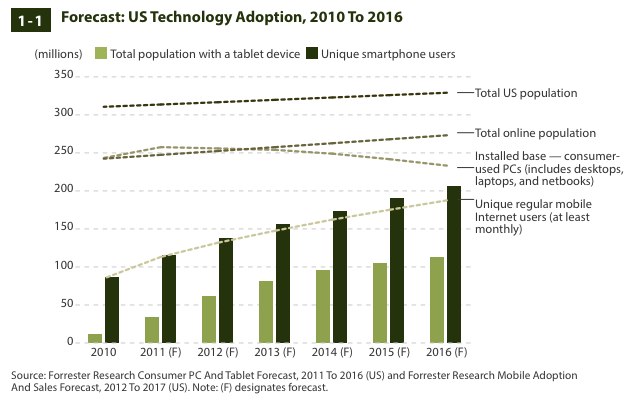
One trend that the Forrester report, which includes…
Continue reading here!
//Richard




 The IT Melting Pot!