Archive
Report: Android malware doubled in 2012, infecting 33M devices
Malware attacks on devices running Google’s (NASDAQ:GOOG) open-source Android mobile operating system more than doubled in 2012, security solutions firm NQ Mobile reports.
 |
| NQ Mobile saw a year-over-year increase of malware of 163 percent. |
NQ Mobile discovered 65,227 new pieces of mobile malware in 2012 compared to 24,794 in 2011, a year-over-year increase of 163 percent. Among all new malware discovered last year, 94.8 percent of threats were designed to attack Android, compared to just 4 percent targeting rival open-source platform Symbian. In all, more than 32.8 million Android devices were infected in 2012, up from 10.8 million in 2011, representing an increase of more than 200 percent.
Chinese devices accounted for 25.5 percent of infected Android devices, followed by India (19.4 percent), Russia (17.9 percent), the United States (9.8 percent) and Saudi Arabia (9.6 percent). Fifty-three percent of U.S. Android owners have installed a mobile security app on their device, NQ Mobile adds.
Sixty-five percent of mobile malware discovered in 2012 falls into the category of Potentially Unwanted Programs–e.g., root exploits, spyware, pervasive adware and Trojans (surveillance hacks). Twenty-eight percent was designed to collect and profit from a user’s personal data, and 7 percent was built to prevent the user’s device from functioning properly.
The primary methods for delivering malware in 2012 included App Repackaging (adding lines of malicious code into a legitimate app and reloading it onto a third-party marketplace), Smishing (asking consumers to click on a fraudulent link, triggering a malicious app download or directing their browser to a rogue website) and Malicious URLs (redirecting the browser from genuine websites to clone sites intended to collect personal data).
Critics maintain Google has failed to sufficiently police its Google Play digital storefront, making it easy for attackers to distribute malware via Android applications. Google has made strides to reduce Android threats, however: In early 2012, it unveiled Bouncer, which scans Google Play for malicious apps, and its Android 4.2 OS update, a.k.a. Jelly Bean, bakes in application verification tools.
The NQ Mobile report…
Continue reading here!
//Richard
Do you develop your own mobile apps? – #Mobility
Ok, this is a pretty hot topic! Mobility is here to stay for a while, everyone speaks about Enterprise Mobility Management (EMM), MDM, MAM, MIM etc….
But how are business tackling this need to support business processes and functions for todays mobile workforce? And how do you out there build your mobile apps that are to support your users and business?
Do you outsource your app development, or do you do it in-house? Do you use any of the “cloud services” to build your apps like the following examples?
Here are some really interesting blog posts/articles on the subject!
THE BEST WAY TO DEVELOP MOBILE APPS? DON’T DEVELOP MOBILE APPS! – via Jeffrey Hammond
Mobile app dev: Outsource or in-house?
This is an interesting mobile world we live in, but how shall all business adopt to it the best way? 😉
Please share your view if you want!
//Richard
Google puts pressure on Microsoft, launches #Quickoffice for iPhone and Android
This is interesting and Microsoft needs some competition for sure! Will have to test it and see how it works and how much of a real alternative to MS Office it is!
Computerworld – Google launched its Microsoft Office substitute, Quickoffice, for Apple’s iPhone, Android smartphones and Android tablets, fulfilling a promise made in December.
The release on Tuesday follows the launch of Quickoffice for Apple’s iPad late last year, when a Google executive said that iPhone and Android versions “are on the way.” The move was also preceded by a February announcement that Google was baking the Quickoffice technology into both its Chrome browser and Chrome OS.

The search giant acquired Quickoffice in mid-2012 and rolled the firm’s development team into its Google Apps group. On the iPhone, iPad and Android smartphones and tablets, Quickoffice lets customers view, create and edit Word, Excel and PowerPoint documents.
The new iOS and Android apps are available free to paying customers of Google Apps for Business, a cloud-based suite that costs $50 per user for a one-year subscription.
Customers that don’t subscribe to Google Apps can buy stand-alone apps — Quickoffice Pro for iPhones and Android smartphones, Quickoffice Pro HD for iPads and Android tablets — for $15 and $20, respectively.
Google also boasted that the new apps, as well as the December iPad app, which was updated Tuesday, are now more tightly tied to Google Drive, the search company’s online storage service…
Continue reading here!
//Richard
#Citrix #XenMobile #MDM Integration With #Cisco ISE for #BYOD
Interesting and a good blog post by Sameer Mehta.
World of BYOD
Bring your own device (BYOD) initiatives are enabling employees to bring their own personal devices to work and allowing them corporate access to services such as Email. We did a recent audit using our ability to integrate with security incident and event management (SIEM) systems for a customer. The audit provided visibility into their ActiveSync traffic and found devices that belonged to executives that were not under IT management. Here’s a snapshot of their BYO devices.

There are several reasons to enable such access – for example, to boost employee productivity or convenience of accessing email from any device. Having said that, as Uncle Ben puts it, “with great power comes great responsibility”, and this responsibility is on the IT administrator from a security point of view. It’s IT’s responsibility to make sure that corporate data is not compromised or leaked in the following scenarios:
- What happens when this personal device is lost or stolen?
- What happens if this device is jailbroken or rooted?
- What happens if this device ends up outside an approved geofence. For example, outside of the US?
- What happens if the user inadvertently installs an application that has the ability and access to the entire device memory, thereby having unauthorized access to corporate data?
End User’s perspective on Enterprise Mobility
End users want access to corporate services such as email, intranet, ability to share and collaborate over documents, and also use 3rd party applications such as Evernote, Quick Office or GoodReader. With mobile solutions such as XenMobile MDM, CloudGateway, ShareFile and GoToAssist, Citrix provides ubiquity i.e. ‘access any app. from any device’, and a unified view for applications with an enterprise app store, documents via ShareFile. Having said that, since the user is accessing multiple applications; end user experience is a key component of mobility solutions. For example, bootstrap authentication and provide single sign on (SSO) to other applications.
Enterprise IT perspective on BYOD
As IT is providing access to corporate services, the main concern is around data loss prevention (DLP) and protecting corporate content on the mobile device. This means, encrypting data at rest for application data, and documents that are hosted either on Sharepoint, Network File share or Cloud storage. From a DLP perspective, for security conscious organizations, the mobile solutions bundle, which includes XenMobile MDM and CloudGateway…
Continue reading here!
//Richard
Enterprise Mobility Report – Lessons from the Mobile Cloud – #Citrix, #BYOD
Here is a good report done by Citrix, not that much that I didn’t expect but great to get some input!
We just released our quarterly enterprise mobility cloud report. Every quarter, we look out across our enterprise mobility customers deployed in the cloud and try to understand common practices by reviewing aggregate data on deployed apps, app blacklisting and whitelisting practices, policy deployments, and OS deployments by region and vertical industry. So here’s a small taste of what we saw in Q412.
Things we expected:
- iOS led in the enterprise. Definitely something we already knew.
- Industries like retail and restaurants – whose use cases involve direct one-on-one customer engagement, were iOS- (and iPad-) heavy. Makes sense.
- Industries with mobile field service organizations went for Android. Given the platform’s lower replacement cost, control-ability, and ubiquity, that makes sense.
- Facebook and Dropbox made the blacklist. Productivity and data security are major concerns, especially for corporate-issued devices.
Things we didn’t expect:
- Android gained in EMEA. Android gained eleven percentage points in Europe, the Middle East, and Africa in a quarter. Anecdotally, we know several organizations there that deployed big Android-based mobile line-of-business initiatives last quarter, but is there a bigger trend? Tell us what you think!
- Healthcare went for Android. 85% of deployed devices in our cloud in healthcare were Android. But healthcare organizations we talk to are standardizing on iOS, so it doesn’t add up! But remember: this is the cloud report. Most of our large healthcare customers have deployed our solution on-premise and those seem to be mostly iOS today. The cloud healthcare companies are really mobile themselves – usually home healthcare organizations like traveling nurses and therapists and hospice care workers who deliver end of life care to patients in their homes. It makes sense that these organizations would be big users of the cloud given the highly distributed nature of the business and the fact that there are some common HIPAA-compliant mobile apps that have developed for the Android platform.
- Dropbox was on the blacklist, but was also one of the most heavily-recommended apps from enterprise IT (in the enterprise app catalog). This juxtaposition speaks to Dropbox’s simultaneous usefulness and risk! Organizations can’t decide! Many of our customers talk to us about the “Dropbox dilemma” and most agree that if they could provide data sharing in a secure, enterprise-grade way, users would go for it.
Download the complete report here!
//Richard
XenMobile product overview… and It’s nice! via @BasvanKaam – #BYOD, #MDM, #Citrix
Wow! I must say that Bas van Kaam has done a great wrap-up here! I highly recommend you to read this blog post!!! 🙂
It was only about a month ago when I was writing my Blog about the CloudGateway that I wondered which route Citrix would take now that they acquired Zenprise, well… here it is… XenMobile, another Xen sibling sees the light! Lets jump right in…
I had the opportunity to make use of one of Citrix’s demo environments to have a closer look at MDM, which is an awesome way to explore new and existing products by the way, if your company is a Citrix partner and has access I definitely recommend having a look. Besides that I used the Citrix E-Docs website as well as Citrix.com to find as much information as possible.
The main focus of this article will be on XenMobile MDM as the Mobile Solutions Bundle (one of the two editions available) focuses primarily on the CloudGateway which I already discussed in one of my previous blogs.
MDM?
MDM stand for Mobile Device Management and it’s just that! Here’s what Citrix has to say about it: As per Citrix: XenMobile MDM is a robust mobile device management solution that delivers role-based management, configuration, and security for both corporate and employee-owned devices. Upon user device enrollment, IT can provision policies and apps to devices automatically, blacklist or whitelist apps, detect and protect against jailbroken or rooted devices, and selectively wipe a device that is lost, stolen, or out of compliance. Users can use any device they choose, while IT can ensure compliance of corporate assets and secure corporate content on the device.
Editions
There are two editions: XenMobile MDM and the Mobile Solutions Bundle. XenMobile MDM primarily focuses on (hardware) device management, more on it’s extensive feature set shortly. Every major platform is supported including: iPhone, iPad, Android, BlackBerry, Symbian and Microsoft Windows 8. It includes the XenMobile Secure Mobile Gateway (SMG) and XenMobile SharePoint Data Leak Prevention (DLP) as well as the XenMobile Mobile Service Provider (ZSM) and the XenMobile Remote Support Application Toolset.
Working with #XenMobile #AppController and Me@Work apps – #Citrix, #BYOD
I got to play around with @WorkWeb and @WorkMail apps a bit… and I must say that the process to get the Me@Work apps into AppController isn’t the simplest there is for someone that haven’t been doing iOS app development before.
But what I’m describing here is what’s now named XenMobile AppController and a part of the XenMobile bundle:
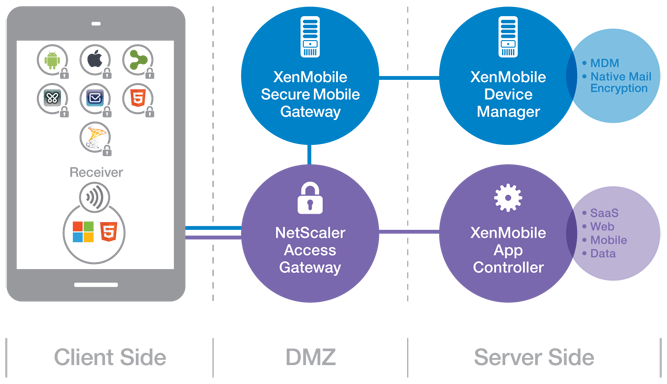
(Note: picture from Citrix)
So lets try to summarise the steps involved in getting these @WorkWeb and@WorkMail apps into your AppController and then published them to your users!
- Get your hands on a Macbook!
- Download the App Preparation Tool for iOS Applications and install it on the client
- Download and install Xcode (not 100% necessary but I recommend that you do that to simplify the creation/download of Distribution certificates and Distribution Profiles)
- Open XCode and open Preferences->Downloads,
 Read more…

Do you really need a #BYOD policy? – via @GeneMarks
This is a really good article by Gene Marks!
Social media. Cloud computing. Gamification. SaaS. Social CRM. Virtualization. Mobile. Every year we hear of the latest technology issues facing small business owners like me. And now it’s BYOD (Bring Your Own Device). Everywhere I read in the tech world it’s BYOD. That’s because with the proliferation of smartphones, tablets and mini-laptops it’s become the hot tech security issue. Whitepapers are written. Seminars are conducted. Roundtables are moderated. It’s a BYOD year.
I have 10 people in my company. And a half dozen other contractors. These people are using smartphones, tablets and laptops to access our data. We do not have a BYOD policy. Do I really need one? Do all businesses, big or small, need to really worry about this? Or is just another scare tactic from a bunch of IT guys looking to put fear into their clients’ minds and generate additional billable hours.
Hmmm.
The fact that everyone in my company has a different smartphone is of no concern to me. Why should I care if Sam prefers his iPhone but Josh likes his Droid? They are using their phones to call clients on Verizon or AT&T or whatever so I’m not exposed to any risk there. The same with texting. But uh oh…then there’s email. Am I exposed to security issues when they send and retrieve email from our server? No. That’s because we have a hosted mail server and each employee has their own login to their email account. They set up their email on their own with instructions we gave them. Viruses, spam and all the other evil things that could happen via email are (hopefully) controlled by the security software running at the server level.
#Citrix #AppController 2.6 released as part of #MobileSolutions #Bundle #BYOD
As a part of the Mobile Solutions Bundle that now is available on MyCitrix you can find a new version of AppController.
AppController 2.6 supports the following new features:
- Certificate support. When you configure AppController for the first time in the web-based management console, you can add or create certificates on the Active Directory settings page.
- Microsoft Hyper-V support. You can install the AppController 2.6 virtual machine on Windows Server 2012 with Hyper-V enabled or on Microsoft Hyper-V Server 2012.
- Migration support to AppController 2.6. You can upgrade to AppController 2.6 from AppController 2.0 or from AppController 2.5.
- Mobile store support. You can upload mobile apps from the Apple App Store or Google Play to AppController. You can use the Citrix App Preparation Tool to wrap iOS and Android apps from the Apple App Store or Google Play. When you wrap the app, you can secure access and enforce policies. When you upload the app to AppController, you can configure the policies. You can also upload an app from the App Store or Google Play to AppController without using the App Preparation Tool.
- Secure connections to Active Directory. You can configure secure connections to Active Directory when you configure AppController 2.6 for the first time.
- ShareFile updates. In previous AppController versions, when you configured ShareFile, the domain sharefile.com was automatically appended to the domain name. In this release, the domain sharefile.com does not automatically append to the ShareFile domain name. You must enter the entire ShareFile domain name.
- Support for mobile links. You can configure mobile links to retrieve the name and description of apps automatically from the Apple App Store. For apps available through the Google Play Store, you enter the name, description and URL of the app. When you configure mobile links, links appear in Receiver with the Play Store or App Store name.
- Web proxy user name format. When you configure the web proxy, you can use either the SAMAccount format or the User Principal Name (UPN) as the user name.
Read more about it here!
//Richard
[Announcing] #ShareFile 2.0 for Android – #Citrix, #BYOD
Ok, Citrix has now also released an updated version of the ShareFile app for Android to incorporate the new security features there as well!
NICE!!!! 😀
Read the Citrix blog post below for more info and source link!
I’m pleased to announce the new version of the ShareFile application for Android tablets and phones. ShareFile for Android enables secure mobile work styles by providing users with a rich follow-me-data experience while offering IT the management and control needed to ensure sensitive corporate data is secure at all times. By 2020, the workplace will evolve to the point where there will be 7 desks for every 10 office workers, with each person accessing their company’s IT network from an average of 6 different devices.
According to a new report from Forrester, an estimated 258 million workers around the world choose their own laptops and 129 million buy their own smartphones. Currently 37% of all BYOD smartphones run on Google’s Android platform. The Citrix mobile application suite balances connectivity and personal freedom, allowing employees to access everything they need to securely conduct business regardless of whether they are working from home or on the road.
New Features
Pin Passcode |
Jail Break Detection |
| Gives users easier access to their data instead of having to type their password every time they start the application. | Allows administrators to prevent their users from accessing their ShareFile data from jail broken devices. |
 |
 |
Another security feature added to this release is local device encryption for improved security of sensitive data.
ShareFile in action
The Salinas Police Department Deputy….
Continue reading here!




 The IT Melting Pot!