Archive
#NetScaler – Join Live Webinar: Learn More about #Citrix/#Cisco Partnership and Program (AMP)
Ok, this is interesting! Have a look and join this seminar!
JOIN US for an exciting Master Class experience! At this live webinar,Wednesday November 7th, you will learn about the most critical elements of cloud infrastructures and enterprise datacenter architectures. Get details on the latest features of NetScaler, tips and tricks for easy configuration, and get a chance to consult with the experts.
Agenda:
• News and views – Cisco partnership and Ace Migration Program (AMP)
• NetScaler 101 – Responder, rewrite and URL transformation?
• In the spotlight – Innovative security strategies for protecting apps and data
• What’s new – NetScaler product updates?
• Master Class extra – Be heard and get the answers you’re looking for
Read more and register here.
//Richard
#Citrix #NetScaler, #AGEE and Macbook OS X… bad start of the evening session!
Ok, I was just going to log in and play around and setup another AppController to verify some thoughts around a customer case in our EnvokeIT environment. And what did I do? I just opened my lovely Macbook Air (no one will ever take that one from me!!) and thought I would connect into our internal EnvokeIT lab environment and decided for some reason to connect over SSL VPN this time rather than running everything on the internally published desktop.
So I opened the browser and connected to our AGEE vip that presented me with the rather ok-looking login page as you can see here that my colleague modified to make it a bit more aligned with the StoreFront/Receiver for Web that we use in this little environment (otherwise you get that black ugly NetScaler login prompt, please get your product look & feel in synch Citrix!).
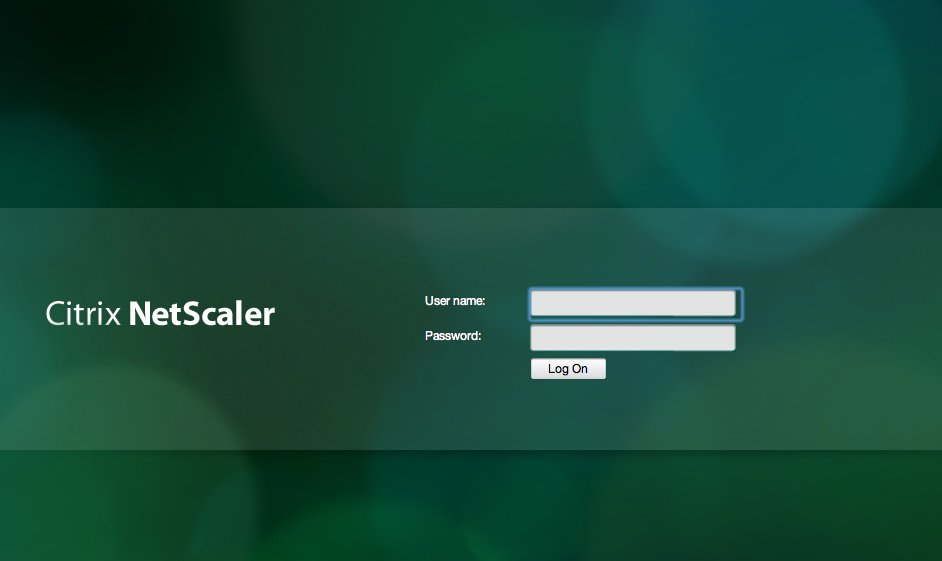
But then after I logged in I though that why not try out the SSL VPN client for my Mac! So I choose Network Access here;
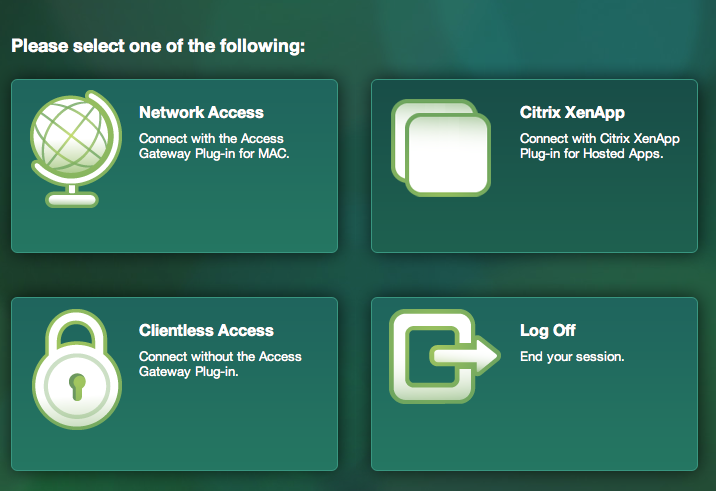
And then I realised that the modifications weren’t really all ok as you can see here when I was prompted to download the Access Gateway Plugin for OS X (SSL VPN client)…
My Post-Synergy View – Update 2 #CitrixSynergy #Citrix #CitrixSummit #XenApp #XenDesktop #NetScaler #Sanbolic
Hi again!
Ok, time to wrap up my Synergy update post series… In the previous post I started to give U my view of the takeaways from Citrix Synergy. So let’s continue! 🙂
As I wrote before I tried to structure the post using the following; each heading represents the enhancement request topic and/or the takeaway item, and then the subheading of Description and Status is showing you my personal view on the topic and its status.
NetScaler
Description:
These where the items that we had on the enhancement list before going to Synergy:
- Create SDX platform/architecture to run on all MPX appliances, for more info why see; NetScaler MPX vs. SDX dilemma; https://richardegenas.com/2012/10/03/netscaler-mpx-vs-sdx-dilemma/
- Add support for AG session policies so that ICA proxy can be turned on for specific published apps and desktops and not per session. This for situations where you might have one app or desktop that sits behind an AGEE and others don’t.
- The NetScaler/Access Gateway HTML/GUI pages used shall be able to be customized per AGEE/AAA Virtual Server. Today they are global pages so that specific modifications/customizations cannot be made and you have to buy an additional NetScaler unless major customizations are done and then life-cycle management becomes an issue.
- Change so that you can specify different Authentication policies and requirements mapped to Session policies instead of to a Virtual Server, AAA group etc. This could then provide a way so that you could offer ICA proxy mode with single auth and two-factor if you launch/select to open an SSL VPN tunnel. And then a user that has forgotten a hardtoken could still get access but only in ICA proxy mode and have all virtual channels disabled without having to have multiple accounts in the Receiver and admin doesn’t need multiple NS AGEE VS.
- It would be good to get the same Account Self-Service functionality that the Single Sign-On/Password Manager service can provide and have integrated into the AGEE login page where end-users can themselves unlock their accounts and reset their passwords without involving Service Desk. And the solution for how to get the single sign-on account self service feature should be an integration part of the NetScaler AGEE console rather than manually updating the HTML pages etc.
My Post-Synergy View – Update 1 #CitrixSynergy #Citrix #CitrixSummit #ShareFile #CloudGateway
Ok, the week has past and Citrix Summit & Synergy is over. And with this little post I’d like to give you all my view on what the key takeaways are and also how they are related to the enhancement list that I’ve been consolidating.
As always: this is my personal view and I hope you like it, if not browse off to somewhere else! And due to that I missed my wife and kids I took the weekend off completely so this is Update 1, and I’ll summarise my whole Synergy experience in Update 2 later this week! 🙂
I changed the post layout from being a table as we say it in the previous blog into a more “readable” format below. Each heading represents the enhancement request topic and/or the takeaway item, and then the subheading of Description and Status is showing you my personal view on the topic and its status.
Enjoy!
Licensing
Description:
One of the main issues with licensing is that all products don’t supports the license server (NetScaler etc.)
Status:
Not fulfilled.
All products do still not use the license server! This needs to be changed and I’d really like to get some real reporting capabilities in place that can present how licenses are used over time, by whom and by which component (product) in the service stack.
Monitoring & Reporting
Description:
- Ensure that you can get historical concurrent user reports that spans across ALL products (NetScaler/AG, XenApp, XenDesktop etc.).
- Ensure that Citrix provides an end-2-end monitoring and reporting service for the whole Citrix stack. This to ensure that delivery organizations can deliver reports like “Service Availability in %” over time that includes all service components (NetScaler AGEE VIP, StoreFront/WI, PVS/MSC, XenServer, XenApp/VDA, Profile Server, etc. If Citrix isn’t going to do this; then please point on a product that does the job.
Status:
Read more…
NetApp Virtual Storage Console for XenServer – #XenServer #CitrixSynergy #NetApp #VCS
This is looking really nice! Have a look at the capabilities of the NetApp VSC plugin for XenServer demo video;
Citrix Synergy 2012 demo: NetApp VSC 1.0 for Citrix XenServer – SR management
Virtual Storage Console reduce cost and complexity with integrated, end-to-end storage management for Citrix infrastructures. Improve administrative efficiency for both your Citrix and storage administrators.
So if you’re a NetApp shop why not try it out?
It’s really nice that you can do most of the config from the XenCenter console! I’m right now doing the Cisco UCS and XenDesktop lab here at Synergy and playing around with it and it’s neat! Once the plugin is installed you can interact directly with it from the XenCenter console.
Here you can configure the preferences in a simple way (even though the User Preference console/plugin isn’t the coolest looking tool)!

UCS and XenDesktop – Best Practises guide #Cisco #UCS #XenDesktop #VXI
I must admin that the Cisco, NetApp and Citrix story around providing a great offering around a complete server hardware, storage and networking solution!
I’m currently attending the 5h SYNBCN12-614W-Platform training on XenDesktop with Cisco Unified Computing System and NetApp session here and I must say that I like the offering due to the broad capabilities of the products included in the solution.
I think that one of the real added values that companies will like is that you have ONE (1) support contact (Cisco) for the whole solution, then Cisco wodk with the others to solve any potential issue etc.
And while playing around here the trainer also mentioned this best practise guide, and it looks good;
Additional info about the Cisco VXI – Desktop Virtualization can be found here.
Cheers!
//Richard
NetScaler SDX – value add, #CitrixSynergy #NetScaler
Sitting here listening to the SDX model and its capabilities etc. And I must agree that the concept is great in terms of isolation, flexibility, density and other added values that the platform provides…
But I still see the need for the same SDX model on the smaller appliances where you may need the capabilities of feature isolation etc but where you don’t need the performance/throughput etc. of the larger appliances where the SDX model starts.
If you look at the NetScaler data sheet I can’t understand why you don’t get the SDX model option on for instance the 8200 box and why not down to the 5500?
More on my thoughts on this from my previous blog can be found here.
//Richard
#CitrixSummit Day 2…
Ok, first day is over and right now I’m sitting in a VDI-in-a-Box session that is the first session day 2.
So the question is whether day 1 was; Bad, Ok or Great? This is a bit hard to summarize though there are many aspects to take into consideration of course. But to summarize day 1 from a technical aspect I must say that it was OK. I would have liked to see some more details and end-to-end alignment of all the products in the stack but the week isn’t over yet. 😉
One product that I’ve not worked with before most likely due to my customer type is VDI-in-a-Box. I must say that the product seems to be maturing and is getting ready and I can definitely see a use case for it within the SMB market and also for remote offices where local desktops are needed in the larger corporations where XenDesktop is not justifiable.
Speed, agility and scalability capabilities are there… Now I’d just like to see how it can be tied into the rest of the stack of products and get my hands dirty and try it out in detail.
But the rest of the day has some interesting sessions and meetings where I’ll follow up on the list of enhancement requests that I gathered in a previous post.
And of course it’s great to see all the partners that are here and the whole socializing and networking aspects which is great. If I was Mark I would really be thankful for the commitment that these partners are doing!
Have a great day all!
Cheers!
//Richard




 The IT Melting Pot!