Archive
#Citrix #NetScaler VPX on the #Cisco 1110 Virtual Network Services platform – via @pigram86
Interesting!!! 🙂
This week at Cisco live! in London, Citrix is demonstrating the Citrix NetScaler VPX virtual application delivery controller (vADC) on the Nexus 1110 Cloud Services Platform . NetScaler VPX is the industry-leading vADC and is further testimony to the expanding ecosystem for the Cisco Nexus 1000V virtual networking portfolio and the Cloud Network Services platform. The integrated Cisco-Citrix solution follows on the heels of last year’s agreement by the two companies that Cisco would reference sell the Citrix NetScaler portfolio, and Cisco’s demonstration of its Nexus 1000V virtual networking portfolio on Citrix XenServer.


The Nexus 1110 is the latest generation of appliances that started with the Nexus 1010. The Nexus 1110 helps customers that are virtualizing more of their application and security services and want to run them on a dedicated platform. For example, virtual firewalls, like our Virtual Security Gateway (VSG), complement physical firewall appliances to support virtual application deployments and VM mobility requirements. The Nexus 1110 appliance serves that need, running a range of virtual services on a platform that the networking and security teams can more directly control than the other application servers.
With Citrix NetScaler VPX integrated into the Nexus 1110 Cloud Services Platform, enterprise IT admins can scale-out deployments by enabling additional virtual NetScaler instances (VM’s) directly from the Nexus 1110. NetScaler VPX also provides feature and management consistency across physical and virtual ADC’s, as well as consistency across physical and virtual workloads that are being managed. The NetScaler…
Continue reading here!
//Richard
#Citrix #NetScaler 10 Build 73.5 released
Citrix has released yet another build….
These are the release notes:
Build 73.5
Replaces build: None
Release date: January 2013
Release notes version: 1.0
Language supported: English (US)
Changes and Fixes
Access Gateway
- Documentation: Starting with this maintenance release, for Access Gateway issues, see http://support.citrix.com/article/CTX133966.
Application Firewall
- Issue ID 0348647: On a NetScaler appliance that has the application firewall configured, if the client sends a web form with data that contains a plus sign (+), that form field triggers a form field consistency violation. This applies for data that the user types into the form, and for data in hidden fields that was generated by a javascript or sent to the user from the server. To work around this issue, ensure that no field contains a plus sign, or temporarily disable blocking for the form field consistency check.
- Issue ID 0354289: On a NetScaler appliance that has the application firewall configured, chunked requests sent by mobile devices to XML services might receive 400-level HTTP responses.
Configuration Utility
- Issue ID 0324797: The NetScaler configuration utility does not display the queue depth value for the configured priority queuing policies. This issue is observed only in a cluster setup.
- Issue ID 0334292: If you navigate to HTTP Compression >..
Continue reading release notes here!
//Richard
Magic Quadrant for Application Delivery Controllers – #Citrix, #NetScaler, #F5
The application delivery controller has evolved into a key component of the data center architecture, and enterprises should evaluate ADCs based on how they integrate with this architecture and support more-advanced features, such as user and traffic control and monitoring.

Market Definition/Description
Application delivery controllers (ADCs) provide functions that optimize enterprise application environments. The market evolved from the load-balancing systems that were specifically developed to ensure the availability and scalability of websites. Enterprises use ADCs to optimize reliability, end-user performance, data center resource use and security for a variety of enterprise applications.
Magic Quadrant

Source: Gartner (October 2012)
Vendor Strengths and Cautions
A10 Networks
A10 continues to gain market share and brand awareness, especially in Asia, and it is aggressively targeting the North American market. Its product development has placed focus on developing a scalable high-performance platform with a strong feature set but a more limited focus on establishing a data center architectural vision. While strong in its product focus, A10 has demonstrated more limited innovation and still has a more narrow feature support than leading vendors. A10 is a good choice for enterprises seeking a cost-effective…
Continue reading here!
//Richard
Jan. Edition of XenDesktop Technical Newsletter Now Available – #XenDesktop, #Citrix
It’s out again with more exciting topics! Check it out!!!
Using XenDesktop? Then you need to get the XenDesktop Technical Newsletter! The newsletter is comprised of the best technical resources from across Citrix Services: Consulting, Technical Support, Education, and Technical Readiness. In its third year the newsletter is designed to help customers run their XenDesktop optimally and get more out of their investment in Citrix desktop virtualization. And its FREE!
I am pleased to announce that the January 2013 edition of the newsletter is now available.
Check out the archive page, where you can access both the current and past issues, as well as subscribe to the FREE monthly newsletter.
The January edition of the newsletter is packed with great content, including:
- Optimal XenApp 6.5 VM Configuration (Blog)
- Introduction to the new Project Accelerator (Blog)
- Deploying XenApp 6.5 using PVS (Blog)
- Insider Troubleshooting tips for Administrators (eBook)
- Whats new with Excalibur (Blog)
- Top Knowledge Center content for December 2012 (Articles, hotfixes, whitepapers, etc…)
- How to configure Access Gateway 5 standalone for use with XD5 (tech note)
- XenDesktop Tools & Hotfixes
- And much more.
If you have any..
Continue reading here!
//Richard
Great UI Theme improvement setting – #AccessGateway, #NetScaler, #Citrix
I must say finally! It’s not a 100% yet for everyone out there but it’s a step in the right direction. The NetScaler, Access Gateway, Web Interface, StoreFront and Receiver has not really been in synch when it comes to UI and end-user experience…. But now Citrix has improved it!
Access Gateway is a secure remote access product and hence tends to be the entry point for corporate users, wanting to access their enterprise applications and desktops. Given this, it makes sense for corporates, to try and customize the logon experience on Access Gateway, to match their corporate look and feel.
Access Gateway has always allowed for this customization, though, it’s been somewhat of a tedious process. With the new 10.0.71.6014.e release, we are making an attempt to simplify this experience.
UI Customization on Access Gateway is a multi-step process:
- Access the built in theme web pages and customize them, to match the corporate requirements
- Apply the modified theme (collection of web pages) at the right location
- Modify certain scripts to make this change persistent
- Every time the firmware has to be upgraded, take a backup of the customized pages and scripts and re-apply the same after the upgrade.
A quick Google search will give you a number of helpful and very accurate blogs/articles, on how to tweak the web pages to customize and create your corporate look and feel. Some of my favorites are:
- http://blogs.citrix.com/2012/04/19/green-bubble-theme-for-citrix-netscaler/
- http://jariangibson.com/2012/04/16/apply-citrix-receiver-theme-to-netscaleraccess-gateway-10/
With this new release, we have automated all the other steps (i.e. 2-4) for you. Instead of having to worry about how to apply this theme, or having to take backups every time you upgrade, the new release will automatically handle this for you.
To see the new offering in this r…

Continue reading here!
//Richard
Why no Snaphot feat. on NetScaler like on AG? – #Citrix, #NetScaler
Ok, I had the “pleasure” to be working with an Access Gateway setup a little while ago… and I don’t know if I should actually say that it was a pleasure when I all did was missing the NetScaler.
But there is one feature that Access Gateway has that NetScaler doesn’t that I like and see a need for; Snapshots!
Why hasn’t Citrix build the same EASY way to make a snapshot of a config on NetScaler??? This would simplify things a lot from a change management point of view. You could of course make this happen yourself but need to be savvy and it’s hazzle… It would also ensure that admins that aren’t hardcore NetScaler nerds actually could get some confidence to change stuff and have a back out plan to revert to a previous snapshot if something goes wrong.
And the great thing about a snapshot is that it represents all the Access Gateway settings, licenses, and certificates at a specific time. If you have multiple software versions installed on Access Gateway, you can have snapshots that span the different software versions. Imagine if there was a button you could press to do that done on the NetScaler!
Video of how it works: How To: Take and Restore Snapshots on Citrix Access Gateway 5.0
Creating Snapshots to Manage Access Gateway Configuration Settings
I think that this will be a good thing to add now when more shops will setup Access Gateway Enterprise on NetScaler and only use it for just that…especially now when it’s also going End of Life (EOL).
Citrix: Please make this happen! 😉
//Richard
New Citrix Access Gateway Release – #AG, #SmartAccess, #Receiver, #Citrix
Ok, just as we expected there is now a new release of Access Gateway that goes hand in hand with the new Receivers as I wrote about in the following posts:
Receiver for Windows 3.4 released
Receiver for Mac 11.7 Released
And of course as you could read in the first post above there are great improvements of the end-user experience when accessing resources, now you have ONE login for both the Receiver and to the Access Gateway plugin. And as that posts also highlights is the support for host check (EPA scans) on Receiver use cases as well! Finally! 😉
More info on the new Access Gateway release 10.0.71.6014.e below:
With the release of Citrix CloudGateway 2.5, comes the release of Citrix Access Gateway 10.0.71.6014.e. Citrix CloudGateway as you are aware, is the Citrix Enterprise Mobility offering, complete with Citrix Receiver running enterprise applications on the end point, Citrix Storefront running your enterprise app store, Citrix AppController running your mobile policy management and Citrix Access Gateway providing remote access to all this infrastructure.
With every CloudGateway release, Access Gateway continues to build incredible integration and smart abilities, which makes it the de-facto remote access solution for your CloudGateway deployments. Access Gateway is the only remote access solution today, which can offer seamless Receiver configuration using Email based discovery and provide intelligent integration with Storefront and AppController, to provide single sign-on to all your enterprise applications.
With this new release, Citrix Access Gateway will be able to provide the following value additions in your CloudGateway deployments:
- Seamless Desktop Receiver experience: With this release of Access Gateway, end users will no longer have to sign into their Access Gateway plug-ins as a manual step, to access apps / sites that require a full SSL tunnel. Receivers automatically launch a SSL VPN session via Access Gateway as needed. Result is – end user just deals with Citrix Receiver and Receiver internally (and automatically) deals with Access Gateway on user’s behalf.
- EPA with ICAProxy / CVPN: Receivers can now seamlessly launch AG plug-ins to connect to an Access Gateway vServer configured with End Point Analysis policies, in ICAProxy and CVPN modes as well. Earlier, this was supported only for Full Tunnel access.
- Session Sharing: Receiver and AG plug-in have always been two separate entities, and because of that, they establish two parallel sessions with Access Gateway. With this release, we have added the smarts in our Receiver and Access Gateway integration, to understand each other, and be able to share the same session with Access Gateway appliance. Good News – this now leads to simplified access from end user perspective, and optimal session/license consumption from Administrator perspective.
- Device Wipe/Lock support for AppController: With CloudGateway 2.5, AppController is launching the ability to register and track mobile devices via AppController. These registered mobile devices can then be locked / wiped, if the..
Continue reading here!
//Richard
#Citrix #NetScaler Insight 1.0 GA unleashed!!
Ok, here it is! 🙂
Here is the Citrix blog about it;
NetScaler Insight 1.0 Beta has been received with great excitement and with a huge response from a range of customers and field.
Some were waiting for a product like NetScaler Insight since years, some wanted to see what AppFlow can do, some were taken away by the ease of configuration, whereas some ended up writing about ithttp://blog.itvce.com/?p=3101 & http://blog.itvce.com/?p=3167.
With the support and detailed feedback received from 1.0 Beta participants incorporated, we bring you theNetScaler Insight 1.0 GA!!
NetScaler Insight 1.0 brings following key features to the table:
- Centralized Dashboard
- Real time and Historical stats
- Layer 3 to Layer 7 stats
- Complete Application Stats
- Response time measurement
- Client/Server Statistics
- URL level stats with Waterfall
- HTTP request/response analytics
- Debugging and troubleshooting
- Few click setup and configuration
- NITRO API support for Automation
- Add NetScaler under Inventory with SNIP
- Access NetScaler Insight using hostname/IP address
People have been enthralled with what it can do. Don’t miss a chance to experience it yourself!
Download Link:
//Richard
Why only Platinum version of NetScaler SDX VPX Package? – #NetScaler #SDX #Citrix
Why does Citrix only sell Platinum versions in bundles of 5 for the SDX platform? Wouldn’t it be great to be able to purchase for instance Enterprise or Standard for the VPX’s you want to setup for capabilities provided by the Enterprise version of NetScaler?
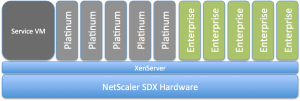
I’d like to buy that instead… what about you guys? Or does this model exist?
//Richard
#Citrix #GSLB blog post – GeoLite City as NetScaler location database
This was a good blog post! And I really like GSLB, of course there may be functionalities that you’d like to advance etc but it’s great! And this post addresses one topic of it;
You may know this problem: Your boss made you build several data centers around the globe with a bunch of NetScalers in the mix to load balance services across the various locations using GSLB (Global Server Load Balancing). But when it comes to configuring a static proximity geo IP database to help with that not too easy to understand dynamic proximity feature you notice most of these databases are commercial and you are out of budget. Luckily though, there are several free versions of geo IP databases out there, which reportedly work quite well. Before using one of those, you should carefully review the license terms. Some aren’t necessarily free for commercial use…
Moreover, these free versions are very popular, well maintained and were frequently updated (I say were because with the assignment of the last IP block by RIPE earlier in 2012 there shouldn’t be too many changes to the databases anymore) . So it’s fair to say that many of our clients who are using these databases are very satisfied with them.
Why is a database with IP addresses and address blocks necessary for such a setup? GSLB responds to DNS requests for a domain name with an IP address of a member service. Which service IP is returned is dependent on the load-balancing algorithm used, for example least connection, simple round robin or more commonly used, proximity to the client (or the clients local DNS to be precise). For proximity based GSLB, when a client sends a DNS request, the system determines the best suitable site…
Continue reading here!
//Richard




 The IT Melting Pot!