Archive
February Edition of #Citrix #XenDesktop Technical Newsletter Now Available
February XenDesktop newsletter is out! Here’s a subset of what you can read from the Citrix blog post.
Using XenDesktop? Then you need to get the XenDesktop Technical Newsletter! The newsletter is comprised of the best technical resources from across Citrix Services: Consulting, Technical Support, Education, and Technical Readiness. In its third year the newsletter is designed to help customers run their XenDesktop optimally and get more out of their investment in Citrix desktop virtualization. And its FREE!
I am pleased to announce that the February 2013 edition of the newsletter is now available.
Check out the archive page, where you can access both the current and past issues, as well as subscribe to the FREE monthly newsletter.
The February edition of the newsletter is packed with great content, including:
- Optimal XenApp 6.5 VM Configuration (Blog)
- Introduction to the new Project Accelerator (Blog)
- Deploying XenApp 6.5 using PVS (Blog)
- Insider Troubleshooting tips for Administrators (eBook)
- Whats new with Excalibur (Blog)
- Top Knowledge Center content for December 2012 (Articles, hotfixes, whitepapers, etc…)
- How to configure Access Gateway 5 standalone for use with XD5 (tech note)
- XenDesktop Tools & Hotfixes
- And much more.
If you have any feedback/suggestions please let us know. Also don’t forget to Sign-up now!
//Richard
#Citrix #NetScaler Insight (NI) – Citrix TV videos
Citrix has released some videos related to NetScaler Insight. Have a look at them and try it out!
Setting up NetScaler Insight 1.0
NetScaler Insight – Adding NetScaler Instances to NetScaler Insight
Application visibility using NetScaler Insight
NetScaler Insight – Adding NetScaler Instances to NetScaler Insight
Cheers!
//Richard
New #Citrix #Visio Stencils – via @djfeller – #XenApp #XenDesktop #XenClient #XenServer
Thanks a lot for the great work you did on Project Accelerator, and for sharing the Visio stencils!! 🙂
By spending a little time in the Assess phase, Project Accelerator creates this awesome looking diagram

The truth is, this diagram took many, many, many revisions. We wanted to create something that was easy to follow while providing the most important information people wanted to see, which included IOPS, servers, VMs, storage space, desktop images, infrastructure components, and so much more. It took a few revisions before I had something in Visio that did all of that. Then we gave my diagram to Marta Guerra, a senior designer on the Project Accelerator team. She turned the diagram into something easy to follow and very clean with new images/icons for all of the components. I’m still impressed. I know many of you are too because you’ve asked for the Visio stencils.
Unfortunately, Project Accelerator diagrams aren’t done in Visio, but that didn’t stop us from giving you what you wanted. With the help of Marta, I’ve been able to turn these images into a new set of Citrix Visio Stencils.
Get them here!
//Richard
#Citrix VDI-in-a-Box 5.2, now supports CloudGateway etc. – @VDIinaBox, @CitrixCG
Ok, now VDI-in-a-Box is becoming more and more “complete”! This release delivers some of the features many have wanted for a while! For instance the support of the latest hypervisors as well as CloudGateway!
Read more below taken from the Citrix blog post:
Version V5.2 is now ready for prime time. The focus of this release was to support the latest hypervisors and Citrix components. Actually we did a lot more because we added a few features that our users have been clamoring for.
Support for the latest hypervisors:
As always we need to stay current and so version 5.2 supports vSphere 5.1, XenServer 6.1 and Microsoft Hyper-V Server 2012. The latter should increase desktop density quite a bit. We’d love to hear your experiences along those lines. Please post on the forum what sort of density increases you are experiencing.
Unified access to VDI-in-a-Box desktops and your applications and data:
Version 5.2 now supports Citrix’s Cloud Gateway and allows you to access VDI-in-a-Box through it. Cloud Gateway provides a unified application and data store allowing you to access Windows, web, SaaS and Mobile applications seamlessly and so we felt it important that VDI-in-a-Box work with this application and data aggregation service.
Real-time collaboration with Microsoft Lync:
In addition, we support Microsoft Lync via the Citrix HDX RealTime Optimization Pack for Microsoft Lync. Now users can seamlessly participate in audio-video or audio-only calls to and from other HDX RealtTime users and other standards-based video desktop and conference room systems. This is especially good for call centers and the like who want wide ranging soft phone functionality with their virtual desktops.
Highly available Personal Desktops with PVD:
Many had asked that we provide some form of high availability for Personal (PVD) desktops. We provide this by allowing you to place PVD desktops on shared storage. Here’s how it works. You specify a third datastore which resides on shared storage and VDI-in-a-Box will honor this request and store all Personal desktops using PVD on it.
Turn old desktops into locked down thin clients:
Kids will be kids and so many school lab administrators have asked that we provide a way to lock down the devices used in their labs. Now, you can download the Desktop Lock from the VDI-in-a-Box download page on the Citrix web site. It will allow you to lock down the physical device and essentially turn your old desktops and workstations into a thin client that connects directly to VDI-in-a-Box and keeps the kids from doing any mischief.
Fully automated software update with our Touchless DTagent:
And since we’re always looking for ways to make things simpler, with V5.2, we now have a fully automated way for you to upgrade the VDI-in-a-Box software. We had two issues in the past. First, you had to manually install the VDI-in-a-Box desktop agent on a golden image (that is then used to stamp out multiple desktop instances). Second, when you upgraded the VDI-in-a-Box software, you had to manually update the agent on each existing golden image. In Version 5.1, we automatically install the agent on all new images. With V5.2, we now provide you a list of existing golden images whose agents need to be updated and once you click yes, we walk you through a wizard to automatically upgrade the agent and test the golden image. For more details on this, see the blog by David Liu: http://blogs.citrix.com/2013/01/22/viab-5-2-makes-updating-desktop-agents-easier/.
Continue reading here!
//Richard
PVS support in XenServer 6.1 – via @_POPPELGAARD – #XenServer, #Citrix, #PVS
Good blog post from Thomas Poppelgaard!
And this is something that many have waited for, either they upgraded and ran into the issues and had to revert back to 6.0.2… but now it’s fixed! 🙂
Citrix have released Hotfix XS61E009 & XS61E010 for XenServer 6.1 and now you are able to have Citrix Provisioning Services with XS 6.1 and use VVS.
I have been waiting for this for a while.
Issues Resolved In This Hotfix XS61E009
- Virtual Machines (VMs) with out of date XenServer Tools, may not be flagged as “out of date” in XenCenter. This hotfix resolves this issue and enables customers to be notified in XenCenter when new XenServer Tools are available.
- Booting a Citrix Provisioning Services (PVS) target device using a Boot Device Manager (BDM) image can take an extended time to complete. This hotfix resolves this issue.
Issues Resolved In This Hotfix XS61E010
- Customers using XenServer Platinum Edition to license Citrix Provisioning Services (PVS) may find that one PVS license per VM is checked out, rather than one PVS license per XenServer host. This may lead to a shortage of PVS licenses and an inability to provision VMs. Installing this hotfix along with CTX135672 – Hotfix CPVS61016 (Version 6.1.16) – For Citrix Provisioning Services 6.1 – English resolves this issue.
- Attempts to shut down Microsoft Windows Vista and later VMs can cause intermittent blue screen errors, with a "STOP: 0x0000009f..." error message.
- Adding more than eight NICs to Microsoft Windows Vista and later VMs, using the xe CLI can lead to a blue screen error on reboot.
- Copying data to a Microsoft Windows 2003 VM can cause the VMs to hang and lead to a grey screen error.
- When Dynamic Memory Control (DMC) is enabled, attempts to migrate Microsoft Windows XP and later VMs using XenMotion can cause the VMs to hang and lead to blue screen error.
- When the Citrix Xen Guest Agent service is running, Cut and Paste will not work between a XenDesktop virtual desktop and the endpoint device.
- Microsoft Windows XP and later VMs may hang during the boot process and may have to be forced to reboot.
- Attempting to install or upgrade the XenServer Tools on Microsoft Windows Vista and later VMs, which do not have access to a paravirtualized or an emulated network device can cause the installation process to hang.
- Manually installing the Legacy XenServer Tools without changing the device_id to 0001 can result in a "STOP: 0x0000007B..."error when rebooting a Windows VM. After installing this hotfix, customers will not be able to manually install the Legacy XenServer Tools by running xenlegacy.exe…
Continue reading here!
//Richard
NetApp Virtual Storage Console for XenServer – #XenServer #CitrixSynergy #NetApp #VCS
This is looking really nice! Have a look at the capabilities of the NetApp VSC plugin for XenServer demo video;
Citrix Synergy 2012 demo: NetApp VSC 1.0 for Citrix XenServer – SR management
Virtual Storage Console reduce cost and complexity with integrated, end-to-end storage management for Citrix infrastructures. Improve administrative efficiency for both your Citrix and storage administrators.
So if you’re a NetApp shop why not try it out?
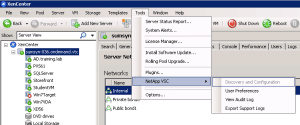
It’s really nice that you can do most of the config from the XenCenter console! I’m right now doing the Cisco UCS and XenDesktop lab here at Synergy and playing around with it and it’s neat! Once the plugin is installed you can interact directly with it from the XenCenter console.
Here you can configure the preferences in a simple way (even though the User Preference console/plugin isn’t the coolest looking tool)!

HEADS UP – PVS and XenServer compatibility issues
UPDATE!!! SEE THIS POST FOR MORE INFORMATION AND PVS SUPPORT ON XENSERVER 6.1; http://richardegenas.com/2013/01/22/pvs-support-in-xenserver-6-1-via-_poppelgaard-xenserver-citrix-pvs/
Ok, this is something that many may be aware of but I’m sure not all of you out there! Thanks Per Liif for the inputs to this little blog post!!
So what’s the issue? Well you can summarize it by saying that XenServer 6.1 and PVS is not compliant out of the box!
The Citrix information about this issue can be found here and basically tells you that; The standard XenServer Tools do not include support for Volume Shadow Copy Service (VSS) or Citrix Provisioning Services (PVS). For customers who wish to use VSS or PVS, the legacy XenServer Tools must be used.
What does this then mean in real life if you go ahead and use the standard XenServer tools and what errors might you be struggling with if you have this issue? Answer; you’ll see blue screens like this (xenvif.sys);
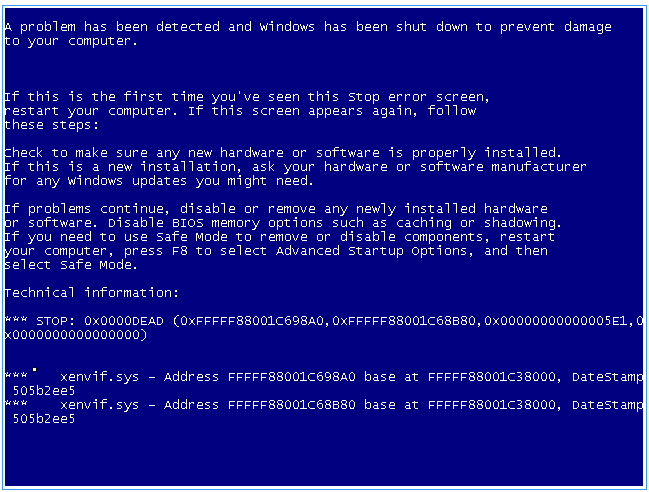 So what shall you do to prevent this, well use the steps in the support article from Citrix PRIOR to installing the legacy tools (xenlegacy.exe), otherwise you’ll end up with this blue screen (xenvbd.sys);

And of course you could argue whether Citrix could have provided a bit more heads up for everyone out there in the release notes and blog posts of XenServer 6.1. I hope that not many of you ran into this and spent to much time on it prior to finding the Citrix workaround article!
//Richard
Citrix Knowledge Center Top 10 – September 2012
Citrix has released the September Top 10 list, ensure you have a look at it!
Citrix Support is focused on ensuring Customer and Partner satisfaction with our products.
One of our initiatives is to increase the ability of our Partners and Customers to leverage self-service avenues via our Knowledge Center.
Find below the Citrix Knowledge Center Top 10 for September 2012.
Top 10 Technical Articles
| Article Number | Article Title |
|---|---|
| CTX129229 | Recommended Citrix and Microsoft Hotfixes for XenApp 6 and Windows Server 2008 R2 |
| CTX129082 | Application Launch Fails with Web Interface using Internet Explorer 9 |
| CTX132875 | Citrix Receiver Error 2320 |
| CTX804493 | Users Prompted to Download ICA File, Launch.ica, Instead of Launching the Connection |
| CTX105793 | Error: Cannot connect to the Citrix server. Protocol Driver Error |
| CTX101644 | Seamless Configuration Settings |
| CTX101810 | Communication Ports Used By Citrix Technologies |
| CTX127030 | Citrix Guidelines for Antivirus Software Configuration |
| CTX133037 | Citrix Receiver 3.2 – Issues Fixed in This Release |
| CTX115637 | Citrix Multi-Monitor Configuration Settings and Reference |
Continue reading here!
//Richard
XenServer 6.1 Releases
“Over the past several months, literally hundreds of people have asked me the question “When will Tampa release?” I am pleased to announce that earlier today, “Tampa” officially reached GA as XenServer 6.1. Within engineering, this is officially considered a “cloud centric” release. While on the surface that would seem to indicate a lack of features for traditional server virtualization and desktop, but the reality is quite different. When you consider that a cloud runs in a datacenter, and that cloud workloads typically translate into some pretty large VM densities, all with a requirement for a high degree of workload isolation; “cloud centric” actually translates into a set of pretty stringent performance requirements. To illustrate the point, let’s consider three key features, live storage migration, network security and VM conversion.
When you look at some of the most successful clouds, you’ll quickly see that the concept of resource pools are somewhat limiting. Regardless of the size of the pool, if your cloud is successful, eventually you’re going to have more customers than can fit in your cluster or pool. During the design phase for Storage XenMotion, we accounted for this with the result being a shared nothing live storage migration solution which works equally well across all storage types and without being confined to an arbitrary resource pool concept. While designed for the cloud, it fully supports enterprise storage management requirements, and even supports live VM migration between local storage for those cases where shared storage wasn’t implemented.”
Continue reading here…
//Richard
Hyper-V 2008 R2 Planning Guide for XenDesktop 5.6 Now Available
Ok, another great blog post from Citrix!
“A key advantage of XenDesktop is that it works with three of the most common virtualization products on the market today – Citrix XenServer, Microsoft Hyper-V and VMware vSphere. However, each of these Hypervisors has a different architecture and feature set. Since each XenDesktop design will vary according to the Hypervisor chosen, we’ve created three separate Planning Guides:
- CTX134944: XenDesktop Planning Guide – Integration with Microsoft Hyper-V
- CTX132110: XenDesktop Planning Guide – Integration with Citrix XenServer
- CTX132166: XenDesktop Planning Guide – Integration with VMware vSphere
It’s been a while since the first XenDesktop Planning Guide for Hyper-V was released and we’ve learned a lot in that time. That’s why Ed Duncan and I have just finished a complete rewrite of the Hyper-V Planning Guide (CTX134944) with help from Alex Balcanquall, Michael Cooper, Tony Sanchez and Frank Anderson. In the new release, we’ve added and revised a number of key design decisions for Hyper-V, including:
- Which edition of Hyper-V should I choose? The pros and cons of each edition are discussed and recommendations are provided on which edition should be used to host XenApp servers, virtual desktops and infrastructure servers.
- How many physical networks will I need to attach to my hosts? Details are provided on the typical physical networks requirements for a Hyper-V host supporting XenDesktop including recommendations on traffic separation and which networks should be teamed.
- Which virtual machines should be hosted on a Failover Cluster? Recommendations are given based on whether the virtual machines are infrastructure servers, dedicated desktops, pooled desktops or XenApp servers.
- Should I enable Dynamic Memory? The Planning guide will explore the benefits from enabling Dynamic Memory and provide recommendations on how to optimize this technology.
- Should I use Provisioning Services (PVS) or Machine Creation Services (MCS) with Hyper-V? The Planning Guide also highlights important considerations when deciding between Provisioning Services or Machine Creation Services.”
Read more here!
//Richard




 The IT Melting Pot!