Archive
#Netscaler Insight and Integration with #XenDesktop Director – via @msandbu
Great blog post by Marius! 🙂
This is another one of Citrix hidden gems, Netscaler Insight. This product has been available from Citrix some time now, but with the latest update in became alot more useful. Insight is an virtual applance from Citrix which gathers AppFlow data and statistics from Netscaler to show performance data, kinda like old Edgesight. (NOTE: In order to use this functionality against Netscaler it requires atleast Netscaler Enterprise or Platinum)
Insight has two specific functions, called Web Insight and HDX insight.
Web Insight shows traffic related to web-traffic, for instance how many users, what ip-adresses, what kind of content etc.
HDX Insight is related to Access Gateway functionality of Citrix to show for instance how many users have accessed the solution, what kind of applications have they used, what kind of latency did the clients have to the netscaler etc.
You can download this VPX from mycitrix under Netscaler downloads, important to note as of now it is only supported on Vmware and XenServer (They haven’t mentioned any support coming for Hyper-V but I’m guessing its coming.
The setup is pretty simple like a regular Netscaler we need to define an IP-address and subnet mask (Note that the VPX does not require an license since it will only gather data from Netscaler appliances that have a platform license and it does not work on regular Netscaler gateways)
After we have setup the Insight VPX we can access it via web-gui, the username and password here is the same as Netscaler nsroot & nsroot

After this is setup we need to enable the insight features, we can start by setting up HDX insight, here we need to define a expression that allows all Gateway traffic to be gathered.
Here we just need to enable VPN equals true. We can also add mulitple Netscalers here, if you have a cluster or HA setup we need to add both nodes.

After we have added the node, just choose configure on the node and choose VPN from the list and choose expression true.
#Citrix #Receiver for Linux 13 released
Finally Citrix has released a Receiver version for Linux that for instance has StoreFront support! Can’t wait to try it out and see if it gives the same user experience etc like the one on OS X and Windows!
Here you have some details about it and links to the product documentation:
Access Windows applications and virtual desktops, as well as web and SaaS applications. Enable anywhere access from your Linux thin client/desktop or use web access.
What’s new
The following new features are available in this release:
- Support for XenDesktop 7 features – Receiver supports many of the new features and enhancements in XenDesktop 7, including Windows Media client-side content fetching, HDX 3D Pro, HDX RealTime webcam compression, Server-rendered Rich Graphics, and IPv6 support.
Note: Link-local network addresses are not supported in IPv6 environments. You must have at least one global or unique-local address assigned to your network interface.
- VDI-in-a-Box support – You can use Receiver to connect to virtual desktops created with Citrix VDI-in-a-Box.
- Self-service UI – A new graphical user interface (UI), like that in other Citrix Receivers, replaces the configuration manager, wfcmgr. After they are set up with an account, users can subscribe to desktops and applications, and then start them.
- Deprecated and removed utilities – The pnabrowse command-line utility is deprecated in favor of the new storebrowse command-line utility. The icabrowse and wfcmgr utilities have been removed.
- StoreFront support – You can now connect to StoreFront stores as well as Citrix XenApp sites (also known as Program Neighborhood Agent sites).
- UDP audio support – Most audio features are transported using the ICA stream and are secured in the same way as other ICA traffic. User Datagram Protocol (UDP) Audio uses a separate, unsecured, transport mechanism, but is more consistent when the network is busy. UDP Audio is primarily designed for Voice over IP (VoIP) connections and requires that audio traffic is of medium quality (that is Speex wideband) and unencrypted.
- Packaging – An armhf (hard float) Debian package and tarball are now included in the download packages. In addition, the Debian package for Intel systems uses multiarch (a Debian feature) for installations on 32- and 64-bit systems. 32-bit binaries are also available in RPM packages.
- System Flow Control – Video display has been enhanced on low-performance user devices that connect to high-performance servers. In such setups, System Flow Control prevents sessions becoming uncontrollable and unusable.
- Localization – Receiver is now available in German, Spanish, French, Japanese, and Simplified Chinese.
- Keyboard improvements – You can now specify which local key combination (Ctrl+Alt+End or Ctrl+Alt+Enter) generates the Ctrl+Alt+Delete combination on a remote Windows desktop. In addition, a new option supports Croatian keyboard layouts.
- Deferred XSync – While one frame is still on screen, Receiver can now decode tiles for the next frame. This provides a performance improvement compared with previous releases, in which Receiver waited for a frame to finish being displayed before decoding the next frame.
- Audio and webcam playback improvements – Various changes are implemented that conserve CPU cycles and reduce latency.
- Audio settings – Several new audio settings are now available in module.ini.
For more product and release info read here!
//Richard
Sizing #XenDesktop 7 App Edition VMs – #Citrix
A good update on VM sizing by Daniel Feller!
In the Mobilizing Windows applications for 500 users design guide, we made the recommendation to allocate 8vCPUs for each virtual XenDesktop 7 App Edition host (formerly known as XenApp). Spreading this out across a server with two Intel Xeon E5-2690 @2.9GHz processors and 192 GB of RAM, we were yielding about 200 users per physical server and roughly 50 users per virtual server.
Of course, the design guide is the end result of a lot of testing by the Citrix Solutions Lab. During the tests, we had the Solutions Lab compare many (and I mean many) different configurations where they changed the number of vCPU, RAM size, and RAM allocation (dynamic/static) as well as a few other things. All of these tests were done with Windows Server 2012 with Hyper-V. We ended up with the following:

A few interesting things:
- Dynamic vs static RAM in Hyper-V appeared to have little, if any, impact on overall scalability. The only time when the RAM allocation had a negative impact was when not enough RAM was allocated (no surprise there).
- The 8vCPU and the 4vCPU configurations resulted in very similar user concurrency levels. Get ready… The battle is about to begin as to whether we should use 8 or 4 vCPU. (Is anyone else besides me having flashbacks to 2009?)
A few years ago, we debated about using 2vCPU or 4vCPU for XenApp 5 virtual machines. A few years later, the debate is resurfacing but this time, the numbers have doubled: 4 or 8. Here is what you should be thinking about… VMs are getting bigger because the hardware is getting faster, RAM is getting cheaper and the hypervisors are getting better…
Continue reading here!
//Richard
#XenDesktop 7.1 Service Template Tech Preview for System Center 2012 Virtual Machine Manager – #SCVMM
This is interesting! Really good and can’t wait to try it out!
Introduction
Let’s face it, installing distributed, enterprise-class virtual desktop and server based computing infrastructure is time consuming and complex. The infrastructure consists of many components that are installed on individual servers and then configured to work together. Traditionally this has largely been a manual, error prone process.
The Citrix XenDesktop 7.1 Service Template for System Center 2012 Virtual Machine Manager (SCVMM) leverages the rich automation capabilities available in Microsoft’s private cloud offering to significantly streamline and simplify the installation experience. The XenDesktop 7.1 Service Template enables rapid deployment of virtual app and desktop infrastructure on Microsoft System Center 2012 private clouds. This Tech Preview is available now and includes the latest 7.1 version of XenDesktop that supports Windows Server 2012 R2 and System Center 2012 R2 Virtual Machine Manager.
Key Benefits:
- Rapid Deployment – A fully configured XenDesktop 7.1 deployment that adheres to Citrix best practices is automatically installed in about an hour; a manual installation can take a day or more.
- Reduction of human errors and the unwanted consequences – IT administrators answer 9 questions about the XenDesktop deployment, including the VM Network to use, the domain to join, the SQL server used to host the database, the SCVMM server to host the desktops, and the administrative service accounts to connect to each of these resources. Once this information is entered, the Service Template automation installs the XenDesktop infrastructure the same way, every time, ensuring consistency and correctness.
- Reduction in cost of IT Operations – XenDesktop infrastructure consistently configured with automation is less costly to support because the configuration adheres to best practice standards.
- Free highly skilled and knowledgeable staff from repeatable and mundane tasks – A Citrix administrator’s time is better spent focused on ensuring that users get access to the applications they need, rather than lengthy production installation tasks.
- Simplified Eval to Retail Conversion – Windows Server 2012 and later, as well as XenDesktop 7.1, support conversion of evaluation product keys to retail keys. This means that a successful POC deployment of the XenDesktop 7.1 Service Template is easily converted to a fully supported and properly configured production deployment.
- Easy Scale-Out for greater capacity – SCVMM Service Templates support a scale-out model to increase user capacity. For example, as user demand increases additional XenDesktop Controllers and StoreFront servers are easily added with a few clicks and are automatically joined to the XenDesktop site.
The XenDesktop Service Templates were developed and tested with the support of our friends and partners at Dell, who, in support of the release of XenDesktop 7.1 and the Service Template technical preview, are expected to launch new and innovative solutions that include these and other automation capabilities this quarter. These solutions are based on the Dell DVS Enterprise for Citrix XenDesktop solutions.
Simplification of Distributed Deployments
The XenDesktop 7.1 in-box installation wizard is a fantastic user experience that automatically installs all the required prerequisites and XenDesktop components in under 30 minutes. The result is a fully installed XenDesktop deployment, all on a single server, that is excellent for POCs and product evaluations. The installation and configuration challenges occur when you want to install XenDesktop in production, with enterprise-class scalability, distributed across multiple servers.
Manual Installation Steps

Citrix Project Accelerator updated – #XenDesktop
“Customize My Design”, the Design release of Project Accelerator is here! We listened to your feedback and have delivered the ability to change FlexCast, application delivery, profiles and over 30 other decisions for your XenDesktop architecture. Across these decisions you will now be able to:
- Tailor your design to fit organizational and end user needs
- Visualize how your design “tweaks” affect hardware sizing and architecture
- On-the-fly comparison of Citrix Recommendations to your design decisions
- Review “Architect Comments”, guidance from the Citrix experts for each Decision
“Customize my Design” is the next step for Project Accelerator; the application that simplifies getting your XenDesktop, XenApp, or XenClient deployment done successfully the first time. It’s the Citrix environment where customers, partners, and Citrites can design a desktop virtualization project that more closely suits their business priorities, end user needs, and organizational preferences. And it is back-stopped by the real-world experience of Citrix Consulting, so you can use the results in your project.
Check it out right now or read more about what Project Accelerator can do for you here. Then tell us what you like, and let us…
Continue reading here!
//Richard
Performance tuning #Citrix #Storefront – via @msandbu
Great article by Marius!
Read it and also have a look here at my previous post related to this: #Citrix #StoreFront Slowness, Join and Replication issue – check list!
This is something I wanted to write about for some time now, after the release of XenDesktop 7 but there are only 24 hours in one day so therefore I didn’t have the time before now 
But the purpose of this post is to really say that Storefront is slow…..
Don’t get me wrong it not about Citrix but the combination of Storefront and IIS that makes it a bit complex and therefore this makes it a bit slow.
Now there are a couple of tricks that can tune the perfomance.
Socket Pooling
In Web Interface you could enable it from the console, but in StoreFront we have to change it in the store config. By enabling socket pooling, Storefront maintaines a pool of sockets instead of creating a socket each time a new user connects, this will give a better performance for SSL based traffic.
You can enable this by opening the web.config file under C:\inetpub\wwwroot\Citrix\storename\
pooledSockets="off"
And Change this to “on” after that you have to do an IIS reset.
Application Initialization
(NOTE: Make sure you backup the config files before making alterations)
With Windows Server 2012 we have a new feature in IIS called always running on the application pools, this allowed for IIS to make everything ready after an application pool has restarted, before this the previous IIS was set to start loading after the first user tried to login after a restart. This caused the first user to login after an application pool has restarted to take loooong time to login. With Server 2012 IIS we can change the application pool to always running.
With 2008 R2 not so easy. But we can make it happen
First we need to download the application initialization feature from Microsoft
http://www.iis.net/downloads/microsoft/application-initialization
After that is done and installed…
Continue reading here!
//Richard
Solving the Compute and Storage scalability dilemma – #Nutanix, via @josh_odgers
The topic of Compute, Network and STORAGE is a hot topic as I’ve written in blog posts before this one (How to pick virtualization (HW, NW, Storage) solution for your #VDI environment? – #Nutanix, @StevenPoitras) … and still a lot of colleagues and customers are struggling with finding better solutions and architecture.
How can we ensure that we get the same or better performance of our new architecture? How can we scale in a more simple and linear manner? How can we ensure that we don’t have a single point of failure for all of our VM’s etc..? How are others scaling and doing this in a better way?
I’m not a storage expert, but I do know and read that many companies out there are working on finding the optimal solution for Compute and Storage, and how they can get the cost down and be left with a more simple architecture to manage…
This is a topic that most need to address as well now when more and more organisations are starting to build their private clouds, because how are you going to scale it and how can you get closer to the delivery that the big players provide? Gartner even had Software-Defined-Storage (SDS) as the number 2 trend going forward: #Gartner Outlines 10 IT Trends To Watch – via @MichealRoth, #Nutanix, #VMWare
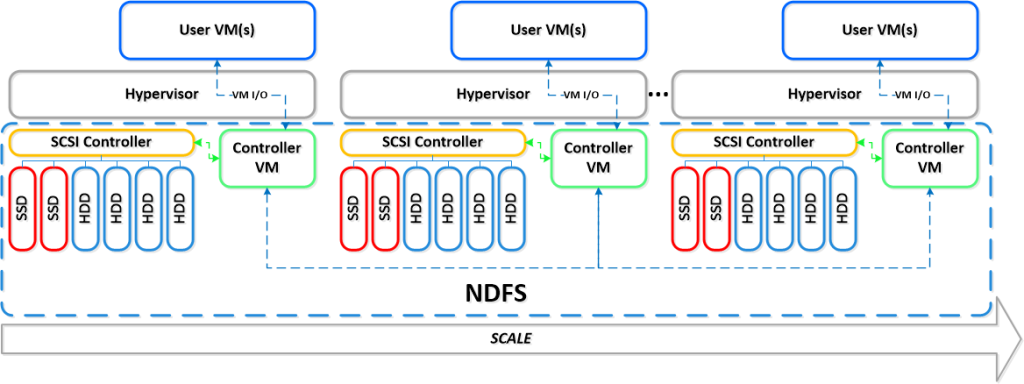
Right now I see Nutanix as the leader here! They rock! Just have a look at this linear scalability:
If you want to learn more how Nutanix can bring great value please contact us at EnvokeIT!
For an intro of Nutanix in 2 minutes have a look at these videos:
Overview:
#Citrix #XenServer and #XenDesktop, platforms for CAD – Grid, #vGPU, #NVidia
This is really cool! And I like the innovation that Citrix and NVIDIA is doing around solving this puzzle! Keep up the great job!
For many traditional CAD, CAE and PLM based industries with rigorous product lifecycle control such as Automotive and Aerospace, virtualisation has been approached with caution. CAD moves slowly and the cost of change is large and concerns over network speed, security and the maturity of solutions meant many held off, surveying the Cloud and virtualisation from afar, waiting to see if the benefits outweighed the risks.
This week, with a tech preview of GPU hardwaresharing for VDI; Citrix and NVIDIA introduced another piece to what is now a very compelling portfolio that delivers all the elements needed to virtualise CAD and PLM on large scales. Citrix XenServer and XenDesktop really have become the natural CAD and PLM platform.
vGPU – True hardware GPU sharing
Complementing Citrix’s existing GPU passthrough and GPU hardware sharing for Windows Server workloads,this new technology enables the benefits of GPU acceleration to be exploited at lower costs. GPU passthrough has been in use for a while, enabling designers like those at Boeing to work using applications such as Dassault CATIA remotely. Our existing software GPU sharing technologies have proved great at delivering graphically intensive applications such as Dassault SolidWorks, Ansys Workbench and Fluent and Autodesk Applications. By offering the full portfolio of GPU passthrough and true hardware shared GPUs via vGPU, Citrix’s portfolio offers organisations the best possible flexibility to optimise their usage of GPU technologies. Mayunk has detailed the options available and I’d recommendhis blog post and guides to explore the options.
We’ve been working not only with NVIDIA on their newest GRID cards but also the major server vendorssuch as HP, Dell, Cisco, IBM and Supermicro to ensure these technologies are fine tuned for theXenServer Hypervisor to maximise performance with the NVIDIA GPUs. HP themselves have produced aninsightful guide on the benefits of vGPU over other technologies.
Those who work in CAD know that for every designer designing…
Continue reading here!
//Richard
How to pick virtualization (HW, NW, Storage) solution for your #VDI environment? – #Nutanix, @StevenPoitras
Here we are again… a lot of companies and Solution Architects are scratching their heads thinking about how we’re going to do it “this time”.
Most of you out there have something today, probably running XenApp on your VMware or XenServer hypervisor with a FC SAN or something, perhaps provisioned using PVS or just managed individually. There is also most likely a “problem” with talking to the Storage team that manage the storage service for the IaaS service that isn’t built for the type of workloads that XenApp and XenDesktop (VDI) requires.
So how are you going to do it this time? Are you going to challenge the Storage and Server/IaaS service and be innovative and review the new cooler products and capabilities that now exists out there? They are totally changing the way that we build Virtual Cloud Computing solutions where; business agility, simplicity, cost savings, performance and simple scale out is important!
There is no one solution for everything… but I’m getting more and more impressed by some of the “new” players on the market when it comes to providing simple and yet so powerful and performing Virtual Cloud Computing products. One in particular is Nutanix that EnvokeIT has partnered with and they have a truly stunning product.
But as many have written in many great blog posts about choosing your storage solution for your VDI solution you truly need to understand what your service will require from the underlying dependency services. And is it really worth to do it the old way? You have your team that manages the IaaS service, and most of the times it just provides a way for ordering/provisioning VM’s, then the “VDI” team leverages that one using PVS or MCS. Some companies are not even where they can order that VM as a service or provision it from the Image Provisioning (PVS/MCS) service, everything is manual and they call it a IaaS service… is it then a real IaaS service? My answer would be now… but let’s get back to the point I was trying to make!
This HW, Hypervisor, Network, Storage (and sometimes orchestrator) components are often managed by different teams. Each team are also most of the times not really up to date in terms of understanding what a Virtualization/VDI service will require from them and their components. They are very competent in understanding the traditional workload of running a web server VM or similar, but not really dealing with boot storms from hundreds to thousands of VDI’s booting up, people logging in at the same time and the whole pattern of IOPS that is generated in these VM’s “life-cycle”.
This is where I’d suggest everyone to challenge their traditional view on building Virtualization and Storage services for running Hosted Shared Desktop (XenApp/RDS) and Hosted Virtual Desktop (VDI/XenDesktop) on!
You can reduce the complexity, reduce your operational costs and integrate Nutanix as a real power compute part of your internal/private cloud service!
One thing that also is kind of cool is the integration possibilities of the Nutanix product with OpenStack and other cloud management products through its REST API’s. And it supports running both Hyper-V, VMware ESXi and KVM as hypervisors in this lovely bundled product.
If you want the nitty gritty details about this product I highly recommend that you read the Nutanix Bible post by Steven Poitras here.

How to: #Citrix #XenMobile 8.5 MAM upgrade! Part 2 – #StoreFront, #AppController, #NetScaler
Hi again!
If you haven’t read Part 1 then I highly recommend doing so prior to going directly to the upgrade that we’re covering in this post!
Prepare for a journey in this post about Citrix StoreFront upgrade, uninstallation, console and how messy it could be! NOT all the time, sometimes it “just works”! 😉
My little NetScaler is already upgraded to 10.1 so unfortunately I couldn’t take you on that journey as well, so we’ll start with the StoreFront upgrade from 1.2 to 2.0 in this post. These are the steps that we need to cover as highlighted in the migration guide that seems very short and straight forward:
Upgrade StoreFront 1.2 to 2.0.
- Logon to the StoreFront server console.
- Upgrade StoreFront by running the StoreFront 2.0 installer as an administrator.
- When the upgrade is completed, open StoreFront administration snap-in, remove CloudGateway controller from each store as this will be moved in the migration solution.
- Open NetScaler Gateway Properties and for each gateway defined and change the version field in settings from 9.x to 10.0.x or later.
- Test the configuration by logging on through web browser or Citrix Receiver.
- Verify if the users are able to login and authenticate to StoreFront defined stores configured.
Is it this easy?
Ok, I’ve downloaded the 2.0 installer, and I’m logged on to the server.
Before we even start the upgrade there are things that could go wrong in removal or upgrades of StoreFront. And one that I’ve seen cause a lot of headache for a lot of people out there is that they have the Windows Firewall service disabled. Though the installation and removal wants to delete or add these rules the installation will fail unless this service is running. As you can see in this picture below you see the FW rule added in StoreFront 1.2:

So let’s verify that the Windows FW service is started, and it is!

I’ll now start the installation by double-clicking the StoreFront 2.0 installer!

What is this popup that came directly after starting the installer?

Wait, ok so you guys at Citrix couldn’t ask me whether you could do this for me? My plan is to upgrade, so please just add a little step in your upgrade program that does this for me… change request #1 for the next SF release and it’s upgrade process! Verify pre-requisites or deal with them!




 The IT Melting Pot!