Archive
#VMware, #vSphere 5.1 Hardening Guide – Official Release – via @douglasabrown
Thanks Douglas for sharing this info, and thanks Mike and all contributors!!!
Hi,
I’m pleased to announce to availabilty of the official release of the vSphere 5.1 Hardening Guide. The guide is being released as an Excel spreadsheet only. This guide follows the same format as the 5.0 guide.
All reference and documentation URL’s and code samples have been updated for 5.1. The guide is available below.
Please note: The permanent home for VMware security/hardening guides is located here:http://vmware.com/go/securityguides
This guide will move to that location soon.
Also availabe is a separate document containing the Change Log for the guide. The Change Log is available below.
Thanks to everyone who contributed feedback on…
Continue reading and downloading it here!
//Richard
VDI Smackdown: Head-to-head analysis of Citrix XenDesktop, Microsoft etc… via @rpruijt
Great work!!!! 🙂 Continue reading!!!

Are you looking for an independent overview of desktop virtualization solutions and curious about the different strategy questions? Do you want detailed information about the features and functions each desktop virtualization vendor is offering!? If so the VDI Smackdown you definitely must read!
In the current market there is an increasing demand for unbiased information about desktop virtualization solutions. This white paper is focused on solutions that are anticipated to have an important role in desktop virtualization deployments. An overview of available features of each solution has been created to allow an understanding and comparison of capabilities.
The latest solutions included in the feature matrix are: Citrix XenDesktop 5.6FP1, Citrix VDI-in-a-Box 5.2, Dell vWorkspace 7.6, Microsoft RDVH Windows8/Server 2012 and VMware View 5.2; The English whitepaper can be downloaded here. The Japanese version will be available as soon as possible.
Empowering the end-user by giving access to Windows, Web and Mobile applications so he can access data and information systems from both private and public datacenters regardless of the device or location is the ultimate strategic objective.
The delivery of the classic (Windows) desktop interface can be divided in two segments:
- the classic desktop and laptop, running Windows, Linux or Mac OS X;
- the virtual desktop running in the datacenter or local on the classic workstation.
In essence “desktop virtualization” is the de-coupling of the desktop, operating system and the applications from the underlying endpoint or device. This kind of virtualization can be subdivided into two types:
- With the first type applications are executed remotely, server hosted, and presented at the endpoint via a remote display protocol.
- With the second type applications are executed at the endpoint, client-side and presented locally.
Making Windows, Web and Mobile applications available to the end-user, regardless of the technology being used, is an important strategic objective of an advanced IT infrastructure. The Virtual Desktop (vDesktop) is an essential component in the range of Application and Desktop delivery solutions and in essence, it provides the following functions:
- Flexibility: Detach the vDesktop from the endpoint; Several vDesktops can be used next to one another
- BYO: enables delivery of applications and desktops for BYO scenario’s;
- Access: vDesktop works independently of location, endpoint and network;
- Security: Server Hosted – VDI; data in the computing center;
- Freedom: Every user can have his own desktop with administrator privileges when needed;
- Management: Centrally managed and hardware independent;
- Legacy: It is simple to offer legacy applications on a state-of-the-art platform;
- Sustainability: Power Management, handling the necessary resources in an efficient manner
The transition to a dynamic and optimized desktop is causing many IT organizations to reevaluate traditional IT operations, deployment, delivery, packaging, support, and management methods.
Desktop virtualization is a key component in the optimized desktop. It’s important to have a Vision and Strategy around application and desktop delivery and enterprise mobility. Designing, building, managing and maintaining the desktop virtualization…
Continue reading here!
//Richard
#Citrix Nails Its Enterprise Mobility Strategy – #XenMobile, #BYOD – via @ekhnaser
Read this great article and see if you agree! 😉
Citrix Nails Its Enterprise Mobility Strategy
I have been very pleased with the strategy, execution and the road map that Citrix has developed around Enterprise Mobility. With the announcement of XenMobile MDM and the Mobile Solutions bundle, I can very easily say that the Citrix solution is the most complete and feature-rich offering on the market today.
XenMobile MDM is simply a name change for Zenprise, which Citrix acquired a few months earlier. I expected Citrix to simply change the “Z” to “X” and keep the name, but I guess Citrix marketing did not find that as amusing. That is not the only change that occurred: A new version of “Zenprise” also accompanies this release, and XenMobile MDM now brings it to version 8.0.1.
Many customers and colleagues have asked me why Citrix acquired an MDM provider — what are the value-adds and isn’t the world moving towards MAM anyway? To answer, we have to make a clear distinction between the use cases. I agree and concur that for BYOD initiatives, MAM is a better, cleaner way of doing this things and that MDM is not the ideal solution.
That being said, there are plenty of use cases where MDM is the only solution that makes sense and I will give you real-world examples. Have you heard of the “Belly” card? It is a customer recognition and rewards program from a company HQ’ed in Chicago that offers merchants a locked down iPad for display in their place of business. Customers can come in and scan their mobile phones on the iPad provided and after a certain number of check-ins they are offered a reward for their loyalty. In this case, belly would have very little use for MAM; they need an MDM solution to manage the thousands of iPads they have deployed.
Another example: United Airlines and American Airlines allow customers to use mobile devices in the cabin to purchase goods in-flight. Obviously, the airlines don’t want the flight attendants to use their own device for this, MDM shines again here.
Finally, what about financial institutions that want to continue to issue corporate-managed devices of different flavors? It’d be for security reasons, obviously. In this case, MDM shines.
When I see bloggers and analysts disqualify MDM, they are not thinking beyond BYOD, where the business world could have a use case built around an application they issue on a mobile device.
Did Citrix strike gold with its acquisition of Zenprise? I will say this much: It was one of the best acquisitions the company has ever made. The natural follow-up question is, what about CloudGateway? And my answer is, it is the glue that holds everything together and is the most important product in the Citrix solution today. Everything will go through CloudGateway moving forward and at version 2.5 has the following features:
- Enterprise app store with identity management capabilities for a single sign-on like experience
- Windows Applications and Desktops through XenApp and XenDesktop
- Mobile applications integration, provisioning, etc.
- SaaS applications integration, provisioning, etc
- Integration with Citrix ShareFile for enterprise DropBox functionality
CloudGateway also has a connector for Citrix Podio, and here I’ll be critical of Citrix the same way I’m critical of VMware for not integrating SocialCast. Why Citrix doesn’t make Podio…
Continue reading here!
//Richard
New Online Training Sessions Available for System Center 2012 – #SC2012, #Microsoft

Microsoft Virtual Academy has released a new training series that delves into System Center 2012 SP1 Service Manager. Topics covered include:
– Import Data and Runbooks
– Build and Publish Request Offerings
– Create, Invoke & Monitor
– Chargeback
These sessions are now available to view online.
And now that System Center Universe 2013 is over, those sessions are also available online. You can now view the System Center Universe 2013 recordings online to learn about VMware and Hyper-V Data Protection, Advanced System Center Reporting, Windows Azure Infrastructure as a Service…
Continue reading here!
//Richard
Reference Architecture and Deployment Guide – Citrix XenDesktop 5.5 Built on Cisco UCS B-Series Blade Servers
For you that are thinking of looking at Cisco UCS and XenDesktop; have a look at this reference architecture document from Cisco…
“Citrix XenDesktop 5.5 Built on Cisco UCS B-Series Blade Servers, Cisco Nexus 5000 Series Switches, and VMware ESXi 5.0: Reference Architecture and Deployment Guide”
Download here!
//Richard
XenServer 6.1 Releases
“Over the past several months, literally hundreds of people have asked me the question “When will Tampa release?” I am pleased to announce that earlier today, “Tampa” officially reached GA as XenServer 6.1. Within engineering, this is officially considered a “cloud centric” release. While on the surface that would seem to indicate a lack of features for traditional server virtualization and desktop, but the reality is quite different. When you consider that a cloud runs in a datacenter, and that cloud workloads typically translate into some pretty large VM densities, all with a requirement for a high degree of workload isolation; “cloud centric” actually translates into a set of pretty stringent performance requirements. To illustrate the point, let’s consider three key features, live storage migration, network security and VM conversion.
When you look at some of the most successful clouds, you’ll quickly see that the concept of resource pools are somewhat limiting. Regardless of the size of the pool, if your cloud is successful, eventually you’re going to have more customers than can fit in your cluster or pool. During the design phase for Storage XenMotion, we accounted for this with the result being a shared nothing live storage migration solution which works equally well across all storage types and without being confined to an arbitrary resource pool concept. While designed for the cloud, it fully supports enterprise storage management requirements, and even supports live VM migration between local storage for those cases where shared storage wasn’t implemented.”
Continue reading here…
//Richard
Free Site Recovery Manager Training
Finally Monday! A new week with new opportunities! 😉
And why not start the week with some free VMware Site Recovery Manager Training videos? Thanks Douglas for sharing this!
Free Site Recovery Manager Training Videos
“We’ve created 11 short instructional videos that lay out the basics of VMware vCenter Site Recovery Manager. Andrew Elwood, Senior Technical Instructor, walks us through SRM, talking as he would one of his many classes on the following topics, but this time there is no charge to hear his instruction:
1. SRM5 Concepts/Architecture scroll to FREE SRM Training Videos
2. Installing SRM5
3. Site Pairing
4. Storage Replication – Part 1
5. Storage Replication – Part 2
6. Inventory Mapping Protection Groups
7. Protection Groups
8. Creating a Recovery Plan
9.Testing a Recovery Plan
10. SRM Failover
11. SRM Failback“
//Richard
Lync 2013 client preview for VDI/Hosted Virtual Desktop environments
This is an update in the right direction for getting all Lync features to work in a hosted environment! But where are we on this topic of getting the collaboration features etc. to our end-users in a good way to the “Any Device” and “Anywhere” or BYOD if that’s what you wanna call it?
Before there has been a lot of issues with running Lync and what’s supported feature-wise depending on where you ran Lync, what protocol you where accessing it over and how Lync was presented (either as published desktop or as a published app). And this had it’s challenges for companies that for instance wanted to go to a BYOD model where the end-point device the user was sitting on wsn’t managed and didn’t allowed Lync to be installed and where those users then were relying on their XenApp or XenDesktop environment. And then there are features that aren’t supported or let’s say; didn’t work that well and really loaded the host server.
The table below is from a great Microsoft blog post by Jesper Osgaard where he compares the features of Lync in a virtualized environment;
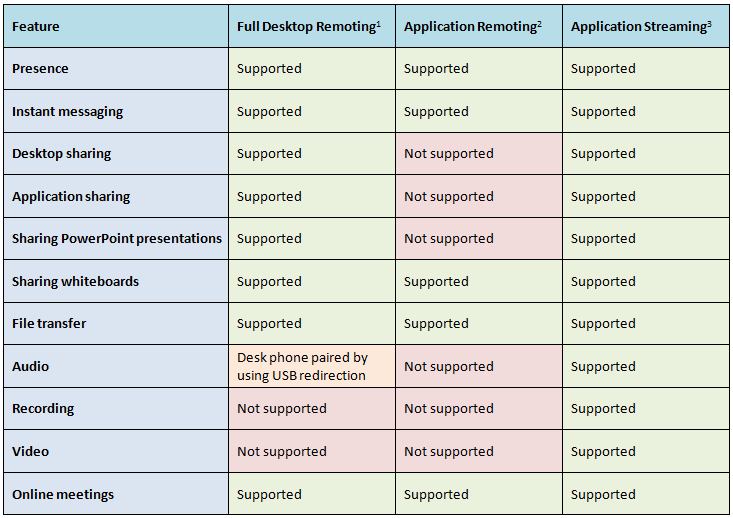
What did Citrix do about it? Well first they released the HDX Realtime Optimization Pack for Microsoft Lync to address these issues and to ensure improved Lync functionality. And I must give Citrix credit for adding support for Linux directly!
vCloud Architecture Toolkit (vCAT) 3.0 now available for download
Ok, this is interesting and a lot of people are sharing this right now! Read more and download it here!
“VMware is pleased to announce the release of the vCAT 3.0 material.
The VMware vCloud Architecture Toolkit provides technical and operational guidance for cloud success. It includes the tools and guidance to build, operate, and consume an industry-leading cloud computing infrastructure solution. Unlike a Reference Architecture which focuses on one use case, this architecture toolkit includes support for multiple use cases and combinations of use cases. It is based on field experience with hundreds of customers and partners. It is validated by internal and external individuals and is supported by VMware as the de-facto reference for vCloud deployments. This is offered free of charge.
VMworld 2012 video roundup




 The IT Melting Pot!