Archive
Simplified VDI Architecture – #Citrix, #XenDesktop
This is a great start of a blog series from Citrix!
There’s a perception that VDI is complicated. I’m far from being a rocket scientist, and I’ve managed to implement many successful VDI projects over the past ten years. I truly believe that VDI is one of those things that is only as complicated as you make it.
It’s like saying that driving is complicated. You’d have to be crazy [or very brave] to take your first lesson in Manhattan…during rush hour. That’s why your driving instructor starts you off on a quiet street. You need to know your boundaries. Being successful with VDI is the same – keep things simple to start with and slowly increase complexity at your own pace, when you’re ready for it.
This raises the question – what’s the quiet street equivalent of a beginner’s VDI architecture? It might not be the most optimized and efficient solution, but it would be quick to implement, do the job well and wouldn’t require specialist knowledge or skills. I’ve been thinking about this a lot lately, and I’d like to share my thoughts.
There’s a lot to consider, so I’m going to break this up over four different blog posts:
- Simplified VDI Architecture – Introduction & FlexCast
- Simplified VDI Architecture – Storage
- Simplified VDI Architecture – Provisioning
- Simplified VDI Architecture – Reference Architecture
Martin Zugec will be helping me out with this blog series and will be referring to his experience on actual customer projects that followed many of these recommendations.
XenDesktop or VDI in a Box?
First up, you need to make a decision on VDI in a Box or XenDesktop. VDI in a Box is easier to setup but does have some limitations. Check out Allen Furmanski’s excellent blog post for guidance on how to make this decision. I’m going to concentrate on XenDesktop for this post.
FlexCast
Although each FlexCast model has its own unique advantages, each additional model included adds complexity to the overall project. There is a great table in the Virtual Desktop Handbook (FlexCast Model Selection – Table 11) that provides guidance on the capabilities of each model. The main thing to note is that all scenarios, apart from offline, can be accommodated using the Hosted VDI model (XenDesktop), either with or without a Personal vDisk. It may not be the optimal selection in every instance, but it is almost always a viable solution.
There are a number of reasons why I think that XenDesktop is simpler than XenApp, including:
- Desktop applications are developed to run on desktop operating systems such as Windows XP or Windows 7. There aren’t many developers that test their applications on Windows Server 2003 or 2008. Therefore, you’re far less likely to run into application issues with XenDesktop than you are with XenApp. Even if your applications run okay on 2008 with XenApp, you’re probably going to have issues getting support from the application vendors.
- Hosting applications on multi-user operating systems can introduce additional application compatibility challenges. Users may share the same configuration files and registry hives, especially if the applications are not multi-user aware. This means that one user may change a setting that affects all other users of that server. There are a ton of tips and tricks to get these apps working correctly but we want to keep things simple and choosing XenDesktop helps us achieve this goal.
- As multiple users are hosted on the same operating system, it is important that XenApp desktops are locked down to prevent security breaches and misconfiguration that could impact all users sharing the environment. Typically, this results in an extremely controlled and restricted user experience, hindering user satisfaction and acceptance.
- With XenApp desktops, a single user can consume a disproportionate amount of resources, impacting the performance of other users sharing the same XenApp server. XenDesktop, on the other hand, allows vCPU and RAM assignments to be controlled on a per-user basis. For this reason, I strongly recommend that heavy users are hosted on XenDesktop rather than XenApp.
- With XenDesktop, it is possible to provide users with fully personalized desktops. This includes the ability for users to install their own applications.
- Unlike XenApp, XenDesktop supports generic USB redirection:

I’m a huge fan of Remote PC, especially when you consider just how simple it is to deploy. However, there are some things Remote PC just can’t do, including:
- You don’t have the flexibility to quickly provision or de-provision desktops based on business demands.
- Image management is more complicated than a virtual desktop because you can’t use MCS and PVS can be challenging with desktops outside of the data center
- You need to have a good connection between your XenDesktop Controllers and the physical desktops. Something not always available for WAN users.
Regardless, Remote PC is a great solution in many scenarios. Consider deploying Remote PC at the very start of your project. It allows you to realize immediate value while you’re designing and implementing your full VDI solution.
If XenDesktop is so much simpler why do so many projects still standardize on XenApp? It all comes down to cost – XenApp offers significantly higher levels of scalability than XenDesktop (some sources quote 300% more users). Let’s take a look at this in more detail.
Processor
The Virtual Desktop Handbook provides us with guidelines on processor requirements for both XenApp and XenDesktop (Processor Requirements by Workload – Table 22):

If processor is the bottleneck, we can estimate the scalability of XenApp and XenDesktop for a fairly typical server configuration (2×8 cores):

As you can see, XenApp offers between 17% (heavy user) and 28% (light user) more users than XenDesktop – but nowhere near 300%! Let’s put this into context, if you had 1,000 concurrent normal users, you would need seven physical servers for ‘XenDesktop: Windows 7’ and six physical servers for ‘XenApp: 2008 R2’. Is one additional server per ~1,000 users enough to justify the additional complexity of XenApp?
RAM
For RAM, the Virtual Desktop Handbook table (Memory Requirements by Workload – Table 23) shows us that ‘XenDesktop: Windows 7’ requires significantly…
Continue reading here!
//Richard
How to avoid the 7 pitfalls of desktop virtualization
Have a look at this!
When it comes to desktop virtualization, we’ve all messed up. Some of us more than others.
But the best among us tend to learn from our mistakes so we don’t repeat them. And the really smart ones learn from others’ mistakes so they don’t have to collect the bruises themselves.
That’s the spirit behind our latest eBook for desktop virtualization project teams:
The 7 Big, Bad Pitfalls of Desktop Virtualization Deployment:
Very avoidable ways things can go wrong (and how to avoid them)

This eBook is all about helping you succeed with your Citrix desktop virtualization deployments. It distills the expertise of our top Citrix consultants into seven of the most common mistakes that project teams make.
And each pitfall has a short list of evasive actions to take to make sure you don’t fall in. It’s a quick read and you’ll come away with some useful ways to keep your next project on track.
Go on: Download it now
BTW – The eBook is brought to you by the team behind the Citrix Project Accelerator, the all-singing, all-dancing desktop transformation project management environment. If you haven’t set up a project in it yet, you’re in for a treat.
How to check which #NetScaler policy that your #Citrix #Receiver or web browser hits?
Ok, this is a common issue that you’ll end up in when setting up Access Gateway access scenarios:
How do you know which policy that is hit when your different Receivers are logging in?
Well, there are a couple of nice commands that can help you troubleshooting your access scenario! I guess that most of you have a simple scenario where you have one domain to authenticate against and some simple PNA, CVPN and potentially SSL VPN policies and profiles to deal with, and they are all linked to the virtual server like something like this simple example:

But in more complex scenarios you may end up controlling which browser the user is accessing with (for giving nice error messages instead of Citrix default messages when users may use an unsupported browser etc.), or when you have multiple AD domains and AD groups to link different policies to etc. Then it may be complex and you have multiple policies and profiles for the same config with minor changes like the SSO domain name etc. So how do you then troubleshoot that easily?
First we have the must know command that hooks into the auth process of the NetScaler and gives you a view of the authentication process:
cat /tmp/aaad.debug
When you run that and you authenticate you’ll see the result of your auth process agains for instance LDAP and RADIUS sources like the result here when I logged in to our little environment:
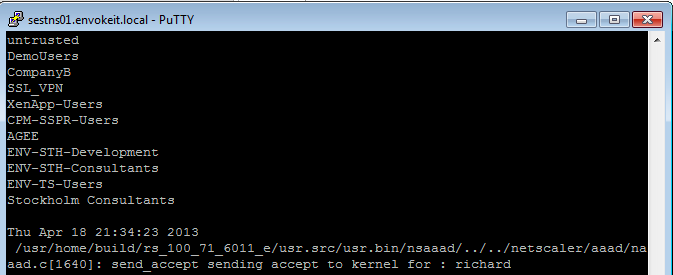
At the top of the output you see all the AD groups that I’m a member of that needs to match the group that you like to use on the NetScaler side, and last you see that accept from AD for my authentication request.
Then you know that you’re authentication ok, but which of the session polices are we hitting? Then you need to have a look at this great command:
nsconmsg -d current -g pol_hits
This is the output when I access using my Receiver on OS X:

#Citrix #Receiver for Win 8 and RT 1.3 now on the Windows Store
Blog post from Citrix on Windows RT and Win 8 pro devices and Receiver!
Our first official update for our touch-enabled Receiver for Windows RT and Windows 8 Pro devices! This version adds the ability to use multiple sessions as well as a number of usability improvements. It can be used with StoreFront or Web Interface deployments. Connections can be direct or through Access Gateway Enterprise Edition version 10.
Click here to try this version. It is still a good idea to ask your IT department if it can be used in your environment. IT managers can find details on configurations supported and settings at Citrix eDocs.
What’s new?
- Users can run multiple apps within a single session, switching between them with the in-session app bar.

- Sessions now use the keyboard layout and input language in effect on the device (as configured on the Windows 8 Language bar) whether its a physical and touch keyboard.
- A Refresh button on the My Apps and All Apps pages enables users to easily refresh the apps list.
- A default icon appears in My Apps, All Apps, and Search results until the correct app icon downloads.
And we have even more great things planned for the next update, including support for Access Gateway Enterprise 9.3 with…
Continue reading here!
//Richard
New v3 #AWS CloudFormation Template for #XenApp with support for #NetScaler and #StoreFront
Great info and post from Peter Bats!
Since Paul Wilson and myself first introduced a CloudFormation template in the blog “Jumpstarting your XenDesktop Farm in AWS with a CloudFormation Template,” we’ve added support for multiple Regions and Availability Zones in a v2 version of this CloudFormation template in the blog “Announcing the Multi-Region AWS CloudFormation Template for XenDesktop”.
We are now announcing the third version of our AWS CloudFormation template which adds the new Asia Pacific Sydney region and support for StoreFront and NetScaler Access Gateway Enterprise. This release makes use of the NetScaler VPX instances available via AWS MarketPlace, and replaces Web Interface with StoreFront to be able to support all the advanced features of our latest Citrix Receivers.
Version 3 of the CloudFormation JSON template can be downloaded from here.
We’ve also made a video available for you that walks you through the whole process on Citrix TV. Check it out here.
For detailed instructions on using the v3 CloudFormation template, download the setup guide here.
Using this new template, in only a couple of hours you’ve constructed a XenApp farm in your selected Region within the AWS cloud using Netscaler and StoreFront technology. You can use the farm for a number of purposes, including:
- Application Testing
- Business Continuity
- Proof-of-Concept
- Testing XenApp performance in the cloud
- Learning how to manage AWS resources
We welcome your…
Continue reading here!
//Richard
#VMware, #vSphere 5.1 Hardening Guide – Official Release – via @douglasabrown
Thanks Douglas for sharing this info, and thanks Mike and all contributors!!!
Hi,
I’m pleased to announce to availabilty of the official release of the vSphere 5.1 Hardening Guide. The guide is being released as an Excel spreadsheet only. This guide follows the same format as the 5.0 guide.
All reference and documentation URL’s and code samples have been updated for 5.1. The guide is available below.
Please note: The permanent home for VMware security/hardening guides is located here:http://vmware.com/go/securityguides
This guide will move to that location soon.
Also availabe is a separate document containing the Change Log for the guide. The Change Log is available below.
Thanks to everyone who contributed feedback on…
Continue reading and downloading it here!
//Richard
Designing a virtual desktop environment? – #XenDesktop, #Citrix
This is a good blog post by Niraj Patel.
Questions: How do you successfully design a virtual desktop solution for 1,000 users? How about 10,000 users? What about 50,000 users? What are the questions you should be asking? Most importantly, where do you start?
Answer: Hire Citrix Consulting for your next virtual desktop project! OK, that is one right answer, but not the only way to do it. The successful way to design a virtual desktop environment is to follow a modular approach using the 5 layers defined within the Citrix Virtual Desktop Handbook. Breaking apart a virtual desktop project into different layers provides a modular approach that reduces risks and increase chances for your project’s success no matter how larger you’re planned deployment is. What are the 5 layers and some examples of the decisions are defined within them?

- User Layer: Recommended end-points and the required user functionality.
- Access Layer: How the user will connect to their desktop hosted in the desktop layer. Decisions for local vs. remote access, firewalls and SSL-VPN communications are addressed within this layer.
- Desktop Layer: The desktop layer contains the user’s virtual desktop and is subdivided into three components; image, applications, and personalization. Decisions related to FlexCast model, application requirements, policy, and profile design are addressed in this layer.
- Control Layer: Within the control layer decisions surrounding the management and maintenance of the overall solution are addressed. The control layer is comprised of access controllers, desktop controllers and infrastructure controllers. Access controllers support the access layer, desktop controllers support the desktop layer, and infrastructure controllers provide the underlying support for each component within the architecture.
- Hardware Layer: The hardware layer contains the physical devices required to support the entire solution, and includes servers, processors, memory and storage devices.
Want to know how to get started? Try the Citrix Project Accelerator. Input criteria around your business requirements, technical expertise, end user requirements, applications, etc. to get started on your architecture based on the 5 layer model.
Lastly, don’t forget to come see SYN318…
Continue reading here!
//Richard
Latest Security Intelligence Report Shows 24 Percent of PCs are Unprotected
Interesting and scary facts from Microsoft… why not just add a simple cloud based solution like Webroot to your PC’s and Mac’s? Read more about Webroot that I think is a great product here from one of my earlier posts: 1st Test of Webroot SecureAnywhere – #Webroot, #SecureAnywhere, #BYOD
Today, Microsoft released new research as part of its Security Intelligence Report, volume 14, which takes a close look at the importance of running up-to-date antivirus software on your computer. The research showed that, on average, computers without antivirus software are 5.5 times more likely to be infected.
Antivirus software from Microsoft, McAfee, Symantec and others helps to guard against viruses, remove infections and protect your privacy. It can help protect your computer from malware trying to steal your credit card information, e-mail address book or even the files you’ve saved to your computer. It is one of the most crucial defenses computer users have to help protect against cybercriminals.

If you have been using computers as long as I have, long before almost every device was constantly connected to the Internet, you’ll recall the days when viruses were typically spread via sneaker-net, through infected floppy disks. Read more…
#Citrix transfers #Xen to the #Linux Foundation – via @scottjcutter
 |
In 2007 Citrix acquired XenSource gaining control over the development of the Xen Hypervisor part of the Xen project. Today Citrix announcedthat it will hand over the Xen Project to the Linux Foundation which will continue its development. After both Ian Pratt and Simon Crosby who came from XenSource left Citrix to start their company Bromium, Citrix has clearly been struggling on how to continue its involvement in the development of the Xen project, leading to this decision.
The following companies will contribute to and guide the Xen Project as founding members of the Collaborative Project at The Linux Foundation: Amazon Web Services, AMD, Bromium, Calxeda, CA Technologies, Cisco, Citrix, Google, Intel, Oracle, Samsung and Verizon.
Its interesting to note that the Linux Foundation also supports the Kernel-based Virtual Machine (KVM) development, the hypervisor included in…
Continue reading here!
//Richard
#Citrix #NetScaler 10 on Amazon Web Services – #AWS
Yes, it’s here! 🙂
Mainstream IT is fast embracing the enterprise cloud transformation and selecting the right cloud networking technologies has thus quickly emerged to be an imperative. As mainstream IT adopts IaaS (Internet as a service) cloud services, they will require a combination of the elasticity and flexibility, expected of cloud offerings and the powerful advanced networking services used within emerging enterprise cloud datacenters.
Citrix® NetScaler® 10 delivers elasticity, simplicity and expandability of the cloud to enterprise cloud datacenters and already powers the largest and most successful public clouds in the world. With NetScaler 10, Citrix delivers a comprehensive cloud network platform that mainstream enterprises can leverage to fully embrace a cloud-first network design.
Citrix and Amazon Web Services (AWS) have come together to deliver industry-leading application delivery controller technology. NetScaler on AWS delivers the same services used to ensure the availability, scalability and security of the largest public and private clouds for AWS environments. Whether the need is to optimize, secure or control delivery of enterprise and cloud services, NetScaler for AWS can help accomplish these initiatives economically, and according to business demands.
The full suite of NetScaler capabilities such as availability, acceleration, offload and security functionality is available in AWS, enabling users to leverage tried-and-true NetScaler functionality such as rewrites and redirects, content caching, Citrix Access Gateway™ Enterprise SSL VPN, and application firewall within their AWS deployments. Additional benefits include usage of Citrix CloudBridge™ and Citrix Branch Repeater™ as a joint solution.
Citrix NetScaler transforms the cloud into an extension of the datacenter by eliminating the barriers to enterprise-class cloud deployments. Together, NetScaler and AWS delivers a broad set of capabilities for the Enterprise IT:
Hybrid Cloud Environment
Hybrid clouds that span enterprise datacenters and extend into AWS can benefit from the same cloud networking platform, significantly easing…
Continue reading here!
//Richard




 The IT Melting Pot!