Archive
#Citrix #AppController 2.5 Implementation Tips – #CloudGateway, #BYOD
Great blog post by Matthew Brooks!
AppController is a component of the Citrix CloudGateway Enterprise suite that orchestrates access to Enterprise Cloud applications. Those applications may take many forms including Mobile Applications, Software-as-a-Service hosted in public clouds, and Web links. Below I provided some tips to help with the implementation of AppController 2.5 (which is the latest version as of the publishing of this blog).
System Related
Including settings such as the Hostname, SSL certificates, and Restore.
TIPs:
- Take a hypervisor level snapshot after the initial installation so that you can easily return to that base level if configuration or integrations efforts go awry.
- The hostname cannot contain special characters in the AppController certificate signing request.
- The hostname must match SSL certificate.
- The system cert must be chained to its CA/(s).
Active Directory Related
Including settings such as the Server (Domain Controller), Base DN, and Service Account credentials.
TIPs:
- The AppController only supports integration with a single domain. Multiple domains require multiple AppControllers. The NetScaler Access Gateway may be configured to allow users to access a single fully qualified domain name, yet be directed to their respective domain AppController through the use of Global Groups. See CTX116169 for more informationhttp://support.citrix.com/article/CTX116169
- All user accounts must have a first name, last name, and email address configured or they will receive an authorization error when attempting to launch applications. The bind Administrator account must also have email address configured or directory integration will fail.
- Only LDAP (TCP 389) may be configured through the wizard that must be completed initially. Thereafter LDAPS (TCP 636) may be configured through the full administration menu.
- If the server name domain name is a load balanced DNS entry the initial import may work, yet subsequent bind attempts will fail. Alternatively you may use the IP address of an LDAPS load balancer on a Netscaler with specific domain controllers configured as services. See CTX135092 for more information http://support.citrix.com/article/CTX135092
Network Related
Including settings such as the IP address, @Workweb and NTP server.
TIPs:
- Use IP private addresses as system addresses if possible. When Trust Settings are configured for NetScaler Access Gateway it does not allow SSO to public addresses. If public addresses must be used the NetScaler may be configured with an SSL Bridge to access the AppController. See NetScaler Traffic Management document for more information.
- NTP must be configured or SAML authentication may fail for SaaS sites if the time difference is significant.
- When Trust Settings are configured for NetScaler Access…
Continue reading here!
//Richard
1st Test of Webroot SecureAnywhere – #Webroot, #SecureAnywhere, #BYOD – via @WeCloud
It’s not very often that I test endpoint protection, antivirus or antimalware software. But tonight I started to have a look at Webroot and I must say that I’m really liking it!
There are some parts in particular that I like about it:
- It’s “cloud” based, so you don’t need your own costly infrastructure!
- It takes seconds to deploy to a new Windows instance
- It scanned the XenDesktop controller that I installed it on in 42 SECONDS! Wow! That’s amazing! 😀

- The footprint is close to NOTHING!
- The installer is just a couple of MB!!
- It fits into the BYOD model

First of I just started a new trial, which was really easy! Just log on to the webpage and register, then after entering your info you’re all set and ready do deploy your “agents”.
My first thought was that this is really great for environments where you’d like low footprint, quick installation and low maintenance efforts of your antivirus software. And the way that Webroot does the scanning of the files etc. is so great and makes the software so quick and neat!
This must be perfect for XenDesktop and XenApp environments is my thought!! I’ll try it our more and will let you know! And why not provide this as an option in your BYOD program?
Here are some reviews that I was given by WeCloud, and they pretty much (or actually more) confirm that this is some good software!


“Easy-to-use and excellently-designed malware protection with powerful central management and deployment features, and which should appeal to a wide range of businesses”.
Read the review here!

AV Wars (RescuTechs LLC)
“No antivirus program we tested performed better at detection and removal of rootkits and scareware.”
Read the review here!

AV Test (Independent IT-Security Institute)
“100% Protection against 0-day malware attacks, inclusive of web and e-mail threats (Real-World Testing)”
Read the review here!
It’s here! #Citrix #Receiver for Win 8/RT 1.2
The first official release for your touch-enabled Win RT tablet or Windows 8 Pro device now on the Windows Store! It adds the ability to connect to XenApp Services and XenDesktop Services sites for Web Interface deployments, not just StoreFront enabled sites. Connections can be direct or through Access Gateway Enterprise Edition. We also added the ability to open ica files if you’re using browser access. And we shouldn’t overlook the ability to save your password, if allowed by server policy.
This version will be useable in more configurations.
Click here to try this version. It is still a good idea to ask your IT department if it can be used in your environment. IT managers can find details on configurations supported and settings at Citrix eDocs.
Here is what it provides:
- Secure access to virtual desktops and enterprise apps
- Secure access to Web and SaaS apps (requires CloudGateway Enterprise)
- Work anywhere on any Windows 8 computer or tablet
- Account configuration using your email address, a server URL, or a provisioning file
- Auto-provisioned applications
- Use one published app at a time, along with multiple Web and SaaS apps
- Automatic display of the keyboard when needed
- Use of native controls for selecting an item from a list
- Option to save your Receiver password if allowed by server
And more functionality is coming
Look for updates every few months. Among other improvements, we’ve started work on multi-touch, audio, session sharing (support for multiple sessions)…
Continue reading here!
//Richard
Webinar – #Citrix Mobile Device Management – #CloudGateway – @RobSanders
How to secure native iOS and Android email as well as other apps for business use
Thursday, 24th January 2013, 3:00pm GMT (4:00pm CET)
Citrix provides two new mobile apps to support mobile workers with secure email and web browsing on their BYO and corporate mobile devices – @WorkMail and @WorkWeb.Come to this technical webinar to learn more about how these and other native iOS and Android applications can be securely distributed and managed for your business.
Topics include:
- Managing, securing and controlling web and native mobile applications and data
- Secure mobile containers
- Seamless app integration
- Policy-based access controls
- Application-specific Micro VPN
This live webinar presented by Rob Sanders and will be followed by a live Q&A session.
Space is limited.
Register here!
//Richard
#AppController, #CloudGateway 2.5 released
Hi all,
I guess that some of you already are aware of the new 2.5 release of AppController (a part of the marketing product CloudGateway).. but it’s interesting with a release which I hope is making the product more enterprise ready and that the basic features now are there!
And I guess that many are interesting in that now Android apps, @WorkMail™ and @WorkWeb™ are supported!
I’ll of course do an upgrade and go through my little issue list I created earlier in the post-Synergy post… I hope that these items now are fixed!
- Enterprise/multi-site support with synch of the database. This to ensure that you can have an HA pair setup for instance in Europe and one in the North Americas and have the end-user be logged in against both and have their subscriptions etc. follow them (as well as of course reporting, monitoring etc. etc.)
- Support for really large AD domains with LARGE # of AD users and AD groups
- Support for AD domain structure where the BASE DN is different to where AD users and the AD security groups you want to use for roles
- Role based administration – this has just got to be there. Without it I wouldn’t call it an enterprise product…
These are the updates according to eDocs (they are quite a few so I have high hopes!) 😉
But when reading through the short list of updates I DON’T see multi-site support!! That’s not very Enterprise if you ask me…. This is the first thing I’m gonna check out!
Here is an architectural overview:
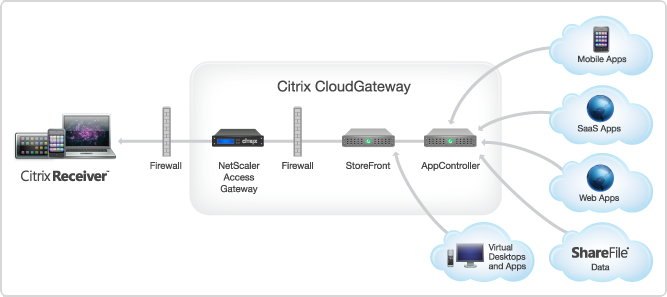
AppController 2.5 supports the following new features:
OpenSource “Device Tracker” service – Prey
Thanks Dan Brinkmann for this interesting tip about an online open source service that is available in a free and a Pro version. If you like to keep a track of your devices etc this may be something to look at.
Have a look at their webpage (http://preyproject.com) or check out this intro video that also is on their startup page;
Not a fully fledged MDM service but an interesting project and let’s see where this is heading in the future!
//Richard




 The IT Melting Pot!