Archive
#Sanbolic Brings Public Cloud Economics to the Enterprise – #Melio
Ok, I must say that this product is great!!! If you haven’t looked at it before then please do! And contact us at EnvokeIT if you want more details!
Sanbolic Enables Distributed Flash, SSD and HDD to Achieve Enterprise Systems Capability and Scale-Out In Server-Side and Commodity Storage Deployments
Waltham, MA – (March 18, 2013) – Sanbolic® today announced the general availability of its Melio version 5 (Melio5™) software – delivering distributed scale-out, high-availability and enterprise data services through software. Server-side flash has seen rapid adoption for applications such as hyperscale web serving, but limited adoption in general purpose enterprise applications. With the launch of Melio5, Sanbolic enables enterprise customers to dramatically improve their storage infrastructure economics by enabling server-side flash, SSD and HDD as primary persistent storage. Melio5 aggregates across nodes for scale-out and availability while providing RAID, remote replication, quality of Service (QoS), snapshots and systems functionality through a software layer on commodity hardware. This provides customers with the ability to deploy commodity and server-based storage architecture with similar economics and flexibility as public cloud data centers such as Google and Facebook.
With validation by hundreds of enterprise and government organizations running in production, Melio volume management and file system technology addresses the needs of high performing cost effective storage infrastructure on-premise. Melio5’s architecture is designed to scale up to 2,048 nodes and up to 65,000 storage devices enabling linear performance scalability in a cluster.
Melio5 also eliminates the need to deploy a redundant flash caching layer in front of legacy storage area network (SAN) hardware by directly incorporating flash into hybrid volumes and intelligently placing data based on file system access profiles. A hybrid volume will place random access data such as file system metadata on flash sectors while placing sequential data on low cost hard disk drives to greatly reduce the cost of capacity. The result is a highly scalable, high performance storage system, with a much lower cost than legacy storage arrays.
“Typically, server and disk drive vendors operate on gross margins in the 20-30% range. Storage array vendors, on the other hand, are often twice that or more,” said Eric Slack, Senior Analyst,Storage Switzerland. “Sanbolic’s approach leverages the architecture that the big social media and public cloud companies use, to fix this problem. By replacing storage arrays (and storage array margins) with commodity server and disk drive hardware and enabling it with intelligence through software, companies can significantly reduce storage infrastructure costs.”
Terri McClure, Senior Analyst, Enterprise Strategy Group (ESG), stated, “Sanbolic’s Melio5 software enables corporate users to take advantage of flash and SSD in conjunction with commodity hardware to create an intelligent, cost effective, and high performance storage architecture like the huge public cloud companies run, while still ensuring enterprise workload scalability and high availability.”
“Melio5 lets us solve one of the biggest challenges for our customers today – the upfront and management cost for storage – without sacrificing systems capability or performance. The Lego-like modular capability of Melio allows our customers to scale-out their storage and servers based on off-the-self commodity components, without downtime,” said Mattias Tornblom, CEO, EnvokeIT.
“LSI and Sanbolic’s shared vision and complementary products help customers to dramatically improve the performance, flexibility and economics of their on-premise storage infrastructure,” said Brent Blanchard, Senior Director of Worldwide Channel Sales and Marketing, LSI Corporation. “LSI’s Nytro™ family of server-side flash acceleration cards and leading SAS-based server storage connectivity solutions…
Continue reading here or here!
//Richard
#ShareFile app for #Windows 8 – #Citrix, #BYOD
Citrix leads the way with the new ShareFile app for Windows 8

Users are excited about tablets and the market is growing rapidly. With Windows 8, Microsoft is providing a great tablet OS as well as their own hardware in the Microsoft Surface RT and Surface Pro. This article from CIO indicates that a Forrester survey showed that 32% of users want their next work tablet to run Windows.
Citrix is bringing easy file sharing to the latest version of Windows. If you are one of those users looking to get a tablet running Windows 8 or if you have a laptop/desktop running Windows 8, we now have multiple ways to leverage ShareFile on Windows 8 with the introduction of the new ShareFile app in the Windows Store. This app provides a full-screen experience on Windows 8 for accessing ShareFile and integrates directly with the new Windows 8 charm bar for OS-level integration with the Search, Share, and Settings charms. Of course, we included support for the great device security features like remote wipe and users can login with their AD credentials. The app also supports these great features:
- Browse your account
- Download and view documents
- Request and send files via email
- Transfer big files
- Add users to folders on your ShareFile account
- Offline access to view downloaded files
- For Enterprise accounts, users will be able to access their data using their corporate credentials
- IT administrators will be able to control and audit access
Check out a video of the app in action on YouTube. More details…
Continue reading here!
//Richard
NetApp Virtual Storage Console for XenServer – #XenServer #CitrixSynergy #NetApp #VCS
This is looking really nice! Have a look at the capabilities of the NetApp VSC plugin for XenServer demo video;
Citrix Synergy 2012 demo: NetApp VSC 1.0 for Citrix XenServer – SR management
Virtual Storage Console reduce cost and complexity with integrated, end-to-end storage management for Citrix infrastructures. Improve administrative efficiency for both your Citrix and storage administrators.
So if you’re a NetApp shop why not try it out?
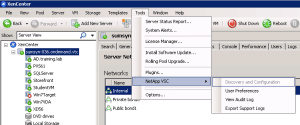
It’s really nice that you can do most of the config from the XenCenter console! I’m right now doing the Cisco UCS and XenDesktop lab here at Synergy and playing around with it and it’s neat! Once the plugin is installed you can interact directly with it from the XenCenter console.
Here you can configure the preferences in a simple way (even though the User Preference console/plugin isn’t the coolest looking tool)!

UCS and XenDesktop – Best Practises guide #Cisco #UCS #XenDesktop #VXI
I must admin that the Cisco, NetApp and Citrix story around providing a great offering around a complete server hardware, storage and networking solution!
I’m currently attending the 5h SYNBCN12-614W-Platform training on XenDesktop with Cisco Unified Computing System and NetApp session here and I must say that I like the offering due to the broad capabilities of the products included in the solution.
I think that one of the real added values that companies will like is that you have ONE (1) support contact (Cisco) for the whole solution, then Cisco wodk with the others to solve any potential issue etc.
And while playing around here the trainer also mentioned this best practise guide, and it looks good;
Additional info about the Cisco VXI – Desktop Virtualization can be found here.
Cheers!
//Richard
Online File Sharing service review
Personally I must say that Citrix has a compelling E2E solution going on that is very interesting for many reasons but mainly from an end-user experience point of view. Having both SaaS, iOS, Android, internal/external web apps, Data (ShareFile), XenApp apps and desktops and XenDesktops all delivered into a common look & feel of the Receiver, that’s a story no one else has I have the guts to say!
But of course the technical solution has some more capabilities to offer until it’s ready from an enterprise perspective, like why can’t we as a customer maintain the keys for encryption of the Amazon “blob” storage used and why isn’t the local data stored on all devices encrypted? And another interesting question is why the ShareFile role administration isn’t better? I’d like to control the device/client settings based on roles so that for instance certain user groups cannot access data while offline, but some may etc. This needs some work…
But all in all they are the best E2E provider of a mobility solution as I see it!
This was an interesting comparison! Read it for yourself and see which service that may fit you best.

Comments?
//Richard
Amazon Glacier – $0.01 per GB / month!!
Ok, this is really interesting I must say!
How much do you pay for enterprise storage today if you do the bottom up costing of all cost items (datacenter, HW, SW, staff, life-cycle mgmt etc…)?
How do you like $0.01 per GB / month? That is attractive! But what are the caveats? Need to go through the service offerings more in detail but it’s absolutely something that I think businesses will look at.
http://www.youtube.com/watch?v=jQR9JpVKc2A
And here you have the full service description;
http://aws.amazon.com/glacier/
Let’s try this out later and dig a bit deeper and see if it’s as good as it looks on paper, and how “enterprise ready” are they in terms of security etc?
Cheers!
/Richard




 The IT Melting Pot!