Archive
More Than 50% of Mobile Apps Deployed Will be Hybrid – #Gartner, #BYOD
Gartner Says by 2016, More Than 50 Percent of Mobile Apps Deployed Will be Hybrid
Gartner’s 2013 Mobile and Wireless Predictions Reflect Mobility’s Impact on the Broader
With enterprises under extreme pressure from management and employees to develop and deploy mobile applications to accommodate mobile work styles and increase customer engagement, Gartner, Inc. predicts that more than 50 percent of mobile apps deployed by 2016 will be hybrid.
“Mobility has always been a separate topic for IT professionals, but it is now influencing mainstream strategies and tactics in the wider areas of technology enablement and enterprise architectures,” said Ken Dulaney, vice president and distinguished analyst at Gartner. “Increasingly, enterprises are finding that they need to support multiple platforms, especially as the [bring your own device] BYOD trend gains momentum.”
To address the need for mobile applications, enterprises are looking to leverage applications across multiple platforms. The advantages of the hybrid architecture, which combines the portability of HTML5 Web apps with a native container that facilitates access to native device features, will appeal to many enterprises.
The need for context awareness in mobile applications has increased with the capabilities of mobile devices, causing developers to consider both hybrid and native architectures. For applications to leverage location information, notification systems, mapping capabilities and even on-device hardware such as the camera, the applications need to be developed using either hybrid or native architectures. This has caused enterprise developers to consider alternatives to Web application……
Continue reading here!
//Richard
Native vs HTML5 – Which option is best?? – #Mobility via @appcelerator and @r0bsterry
This was a really good presentation from Appcelerator Inc!!
Check it out!!
Faster, more secure access to business files on the go – #Citrix, #ShareFile,
Very interesting update to ShareFile apps or iOS! Especially the encryption on the devices by the pin-protection! This is something that I know companies have been waiting for! Thanks for a great blog post Peter Schulz!
Announcing all new updates to ShareFile for iPhone and iPad!
We hope you’ve had a chance to check out the ShareFile for iPhone and iPad apps – available for download from the Apple App Store. Today, we are excited to announce new features across both apps that address two major customer needs: 1) security and 2) access. These features include:
- Passcode support with local encryption – The ShareFile apps now allow the user to select a PIN to assign to an account in ShareFile. This provides a simpler means of accessing your account without having to type in your account password each time.
- Jailbreak Detection – This feature allows account administrators to block account access from devices that are detected to be jailbroken.
- Support for StorageZone Connectors – StorageZone Connectors let you connect existing file shares to ShareFile and access the data remotely on your iOS device. Customers have shared that they want easy access to their data wherever it’s stored across their organization. We built StorageZone Connectors with this in mind, allowing users to view data stored beyond ShareFile.

Each of these updates improves the mobile file sharing experience by making it easier and safer to access your data from anywhere. For everyday use, my personal favorite is passcode support with local encryption.

When I use my iPad, I don’t want to bother with setting up a device passcode for normal use, but I still want to protect my ShareFile data from anyone who might pick up the device. On the other hand, I don’t want to type in my (fairly long) password each time I launch the app. With this update, I can set a 4 digit PIN just for my ShareFile account. Where does the local encryption come in? ShareFile always flags your data for device encryption, but iOS will only enable that when you have a device passcode set. When you turn on the ShareFile PIN, we will encrypt your data using AES 256-bit encryption even though the iOS protection isn’t enabled…
Continue reading here!
//Richard
The Business Case for Mobility Services – #Mobility, #BYOD, #Citrix, #Gartner
I must agree that all these mobile devices and BYOD etc. are putting challenges as well as opportunities on businesses. But there are not many out there with a clear strategy and business view on how to grasp the opportunities and WHY. Do you have a clear strategy on how to address for instance BYOD?
This video explores the business case for adopting and integrating Mobility Services into a Solution Provider’s deliverables.
And what’s also interesting in this topic of discussion is the Gartner Hype Cycle of Innovation.
This was the hype cycle for year 2012

Image Source :Givinginadigitalworld
//Richard
@WorkWeb & @WorkMail release candidates available – #Citrix, #CloudGateway
Finally! The apps are available at MyCitrix! Stay tuned for test results etc…
//Richard
Webinar – #Citrix Mobile Device Management – #CloudGateway – @RobSanders
How to secure native iOS and Android email as well as other apps for business use
Thursday, 24th January 2013, 3:00pm GMT (4:00pm CET)
Citrix provides two new mobile apps to support mobile workers with secure email and web browsing on their BYO and corporate mobile devices – @WorkMail and @WorkWeb.Come to this technical webinar to learn more about how these and other native iOS and Android applications can be securely distributed and managed for your business.
Topics include:
- Managing, securing and controlling web and native mobile applications and data
- Secure mobile containers
- Seamless app integration
- Policy-based access controls
- Application-specific Micro VPN
This live webinar presented by Rob Sanders and will be followed by a live Q&A session.
Space is limited.
Register here!
//Richard
Tablets are crushing PC sales, Gartner finds
Don’t blame Windows 8 or the economy for poor PC sales, analyst says
People are buying tablets to replace old PCs, which explains why PC sales were so dismal over the holidays, according to Gartner.
Small, portable, capable, inexpensive, touchscreen tablets grab sales from low-end PCs and mean that old PCs will not be replaced with new ones, says Mikako Kitagawa, a Gartner principal analyst, and that is a significant change in how PC sales work.
“Whereas as once we imagined a world in which individual users would have both a PC and a tablet as personal devices, we increasingly suspect that most individuals will shift consumption activity to a personal tablet, and perform creative and administrative tasks on a shared PC,” Kitagawa says.
“This transformation was triggered by the availability of compelling low-cost tablets in 2012, and will continue until the installed base of PCs declines to accommodate tablets as the primary consumption device.”
That is the battle Windows 8 is fighting, Gartner says, although the scarcity of Windows 8 touch devices may so far have hampered sales. With new touch machines being promised for later this year, that may help Windows 8 grab a larger share of PC sales but not help the overall number of PCs sold, Gartner says.
Sales were down 4.9% in Q4 2012 compared to Q4 2011, Gartner says, which goes along with IDC numbers from last week, although IDC’s number, 6.4%, is larger. “During the holiday season, consumers no longer viewed PCs as the number one gift item,” Gartner said…
Continue to read here!
//Richard
Forrester: 84% Of U.S. Adults Now Use The Web Daily, 50% Own Smartphones, Tablet Ownership Doubled To 19% In 2012
Forrester Research just published its annual “State of Consumers and Technology” report. As usual, it’s chock-full of interesting statistics about how U.S. consumers use the Internet, but the most interesting statistic is probably that the overall online penetration rate in the U.S. has stabilized at 79 percent (the same number Forrester found in 2011). That’s the percentage of U.S. adults that go online at least monthly. What has changed, however, is how many adults go online at least daily: In 2011, that was 78 percent of U.S. adults, and in 2012, Forrester reports that 84 percent now go online at least once per day.
One of the reasons for this is, of course, the growing smartphone and tablet penetration. Forrester found that about half of U.S. online adults now own a smartphone and two-thirds even own multiple connected devices. Tablet adoption doubled since 2011 and is now at 19 percent.
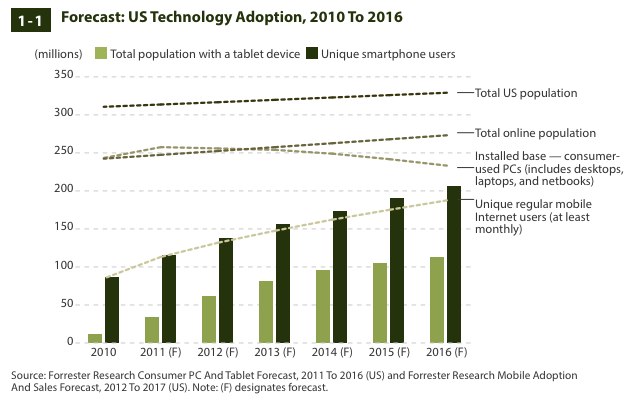
One trend that the Forrester report, which includes…
Continue reading here!
//Richard
Win RT jailbroken to run 3rd party Desktop apps – #Windows, #RT, thx @brianmadden
It was only a matter of time: Windows RT has been hacked to allow non-Microsoft applications to run in Desktop. Prior to this hack, your Windows RT tablet (such as the Surface RT) could only run Metro apps, a special, touch-oriented version of Office… and that’s it. Now, in theory, you can run any Desktop app on Windows RT [See: What is Windows RT?]
The hack, performed by Clokr, exploits a vulnerability in the Windows kernel that has existed for a long time — since before Microsoft ported Windows from x86 to ARM, in fact. Basically, the Windows kernel on your computer is configured to only execute files that meet a certain level of authentication. There are four levels: Unsigned (0), Authenticode (4), Microsoft (8), and Windows (12). On your x86 Windows system, the default setting is Unsigned — you can run anything you like. With Windows RT, the default, hard-coded setting is Microsoft (8); i.e. only apps signed by Microsoft, or parts of Windows itself, can be executed.
Continue reading here!
//Richard
#Zenprise is now a part of #Citrix
Zenprise is now officially a part of Citrix! For a press release and additional info read here.
I am really excited about this!! But my initial question about this acquisition is how the offerings will be bundled together. Right now you can purchase CloudGateway to get the MAM capabilities for mobile apps and data, and of course then also deliver XenApp, XenDesktop plus SaaS and internal web services. And that’s a nice offering but now with the more capable MDM parts from Zenprise, what will the license model look like and what will in the end a “Platinum” license provide?
My hope is of course that the whole license model is changed to be aligned with all acquisitions from the past years so that you could purchase a “Platinum” license that truly covers all the capabilities and products to make life easier for everyone….
My fear though is that Zenprise will be added as a separate MDM capability on top of CloudGateway as the “Diamond” edition! 😉 and it will probably exist in both CCU and named user/device models to make life even harder…
Please Citrix: surprise us with a new price and license model that spans the whole product/service stack! 🙂
//Richard




 The IT Melting Pot!
