Archive
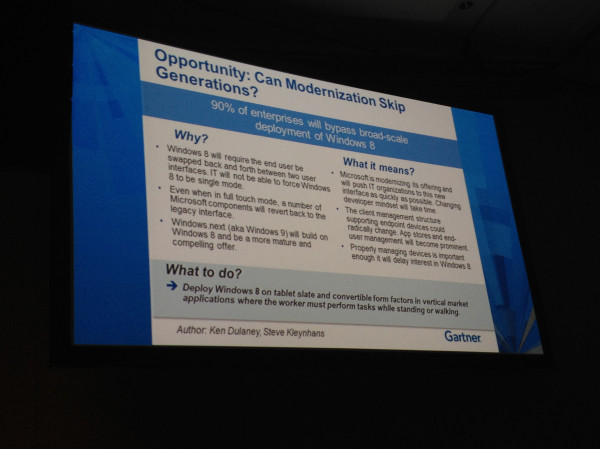
90% of enterprises will bypass broad-scale deployment of Windows 8
This picture/slide is so spot on! I couldn’t agree more! Great work Gartner!
I don’t think that Windows 8 will be adopted on a broader scale… it’s the new “Vista”. Win7 will and is being rolled out and will stay there for a long time as the new “XP”!
Thanks Charlie Isaacs for the picture!
//Richard
#Microsoft #Surface prices released – $499
Microsoft has now released the price of the Surface RT model!
Now we’ll see how it will be received by the market. Will users buy it? Are corporations ready to adopt them as BYOD devices or will they now see a tablet that they could introduce more quickly as a part of the managed client services?
Microsoft Prices Surface Starting at $499 to Rival IPad
A lot of questions and we’ll see how it goes….
Will I buy one? Don’t think so…. Will U? But I guess that this is easier for IT to adopt as an “OK” device for different reasons I’ve heard even though I don’t necessarily agree. Stop managing the devices and the old way of thinking, manage and control the apps, data/info and IPR and ensure that you’re device independent!
//Richard
READ THIS – Demystifying Microsoft virtual desktop licensing: SA vs. VDA vs. CDL
Why can’t you vendors out there make licensing less complex and more “logical”…??
“When it comes to virtual desktop infrastructure, administrators have a lot of choices. You may have wondered about the differences between VDI software options, remote display protocols or all the licenses out there. In this series, we tackle some of the biggest head-scratchers facing VDI admins to help you get things straight.”
Continue reading this great article here!
//Richard
Microsoft Security Newsletter – September 2012
Ok, didn’t have the time to search where online the newsletter is located so I just copied some of it into this post. I think that there where some interesting posts/articles around “BYO”, Cloud etc. So browse and enjoy! 😉
| Welcome to September’s Security Newsletter! |
This month’s newsletter focuses on personal devices in the workplace, often times referred to as “Bring Your Own Device,” or BYOD. BYOD is a very hot topic these days as organizations grapple with the challenge of managing the risks involved in allowing corporate data to be placed on personal devices such as smart phones. At face value, BYOD has the potential to be a win-win proposition. However, depending on how BYOD is implemented and managed, it could be a Pandora’s box.The primary challenge is that some of the devices employees decide to bring to work may not have basic security or management capabilities. This challenge is compounded by the risks associated with connecting to social networks and by the diverse ways organizations and people are choosing to connect and share data today – such as the utilization of cloud services. We recently conducted a study to find out more about how personal devices are being used in the business environment. Our study found that:
BYOD does have distinct advantages. From the standpoint of the IT department, BYOD is generally seen as a cost-cutting measure because the burden of supplying the equipment is shifted to the employees. Some organizations subsidize BYOD policies with a per diem to offset the costs for users, but it still results in lower costs for the organization by relieving IT of its traditional role of maintenance and support. Another advantage of BYOD is that individuals tend to upgrade and embrace new platforms and technologies much faster than businesses. The organization benefits from being able to take advantage of cutting edge tools and features without the pain of deploying new hardware to the entire company. From the user’s perspective, BYOD means using devices and applications that are more familiar. Empowering users with the ability to choose which hardware and platforms they use creates more satisfied and productive workers. It also allows them to carry a single mobile device instead of one for work and another for personal use. The list of smart personal devices capable of connecting to private and public networks is rapidly and constantly expanding. For chief information security officers (CISOs) and chief security officers (CSOs), managing an ever growing list of devices and applications isn’t a sustainable model. Some of the security professionals I have talked to are shifting their focus to managing the data instead of the devices. They have concluded that device security is only a proxy for data security; if they can’t effectively manage the security of the devices that employees bring to work, they will focus on managing the security of the data itself. I think the industry recognizes the importance of securing personal devices and are making steps toward better management controls in the future. If you are interested in learning more about BYOD, I encourage you to read these blog posts recently published on the topic:
|
Lync 2013 client preview for VDI/Hosted Virtual Desktop environments
This is an update in the right direction for getting all Lync features to work in a hosted environment! But where are we on this topic of getting the collaboration features etc. to our end-users in a good way to the “Any Device” and “Anywhere” or BYOD if that’s what you wanna call it?
Before there has been a lot of issues with running Lync and what’s supported feature-wise depending on where you ran Lync, what protocol you where accessing it over and how Lync was presented (either as published desktop or as a published app). And this had it’s challenges for companies that for instance wanted to go to a BYOD model where the end-point device the user was sitting on wsn’t managed and didn’t allowed Lync to be installed and where those users then were relying on their XenApp or XenDesktop environment. And then there are features that aren’t supported or let’s say; didn’t work that well and really loaded the host server.
The table below is from a great Microsoft blog post by Jesper Osgaard where he compares the features of Lync in a virtualized environment;
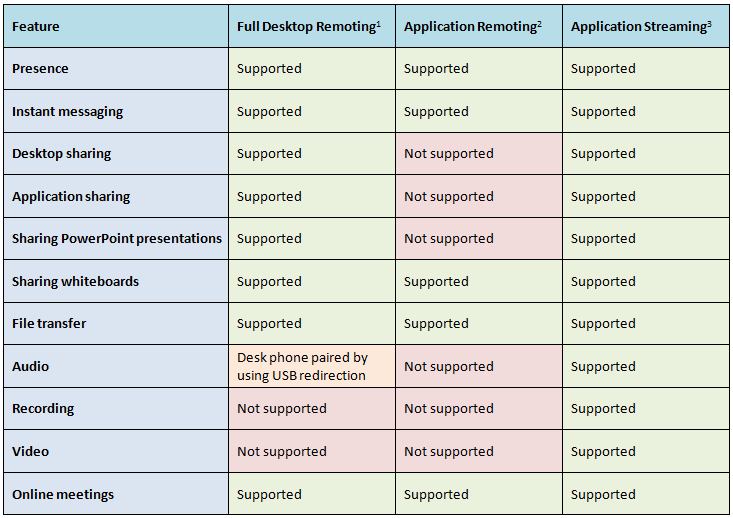
What did Citrix do about it? Well first they released the HDX Realtime Optimization Pack for Microsoft Lync to address these issues and to ensure improved Lync functionality. And I must give Citrix credit for adding support for Linux directly!
Hyper-V 2008 R2 Planning Guide for XenDesktop 5.6 Now Available
Ok, another great blog post from Citrix!
“A key advantage of XenDesktop is that it works with three of the most common virtualization products on the market today – Citrix XenServer, Microsoft Hyper-V and VMware vSphere. However, each of these Hypervisors has a different architecture and feature set. Since each XenDesktop design will vary according to the Hypervisor chosen, we’ve created three separate Planning Guides:
- CTX134944: XenDesktop Planning Guide – Integration with Microsoft Hyper-V
- CTX132110: XenDesktop Planning Guide – Integration with Citrix XenServer
- CTX132166: XenDesktop Planning Guide – Integration with VMware vSphere
It’s been a while since the first XenDesktop Planning Guide for Hyper-V was released and we’ve learned a lot in that time. That’s why Ed Duncan and I have just finished a complete rewrite of the Hyper-V Planning Guide (CTX134944) with help from Alex Balcanquall, Michael Cooper, Tony Sanchez and Frank Anderson. In the new release, we’ve added and revised a number of key design decisions for Hyper-V, including:
- Which edition of Hyper-V should I choose? The pros and cons of each edition are discussed and recommendations are provided on which edition should be used to host XenApp servers, virtual desktops and infrastructure servers.
- How many physical networks will I need to attach to my hosts? Details are provided on the typical physical networks requirements for a Hyper-V host supporting XenDesktop including recommendations on traffic separation and which networks should be teamed.
- Which virtual machines should be hosted on a Failover Cluster? Recommendations are given based on whether the virtual machines are infrastructure servers, dedicated desktops, pooled desktops or XenApp servers.
- Should I enable Dynamic Memory? The Planning guide will explore the benefits from enabling Dynamic Memory and provide recommendations on how to optimize this technology.
- Should I use Provisioning Services (PVS) or Machine Creation Services (MCS) with Hyper-V? The Planning Guide also highlights important considerations when deciding between Provisioning Services or Machine Creation Services.”
Read more here!
//Richard
What’s new in SCCM 2012 SP1 – update
In my last post around SCCM 2012 SP1 (yes I know that I’m not supposed to use that abbreviation but I’m still gonna do it!) I forgot to look at and mention another important feature I must say…
OS X support!!!
This is really interesting, I bet that there are so many companies and architects out there sitting with X amount of different MDM and MAM solutions just to fit their needs around device and application management. But there are few out there that are covering all the OS’s and device types in a good manner.
Is SCCM going to try and tackle this at least for the MS, Linux, UNIX and OS X devices? And will they succeed all the way, don’t think so short term but long term perhaps. So now we architects have something to look forward to when planning our wanted position in this area and start evaluating the options for the roadmap towards it!
What’s new in SCCM 2012 SP1 (find more here)
Client Deployment
The following items are new or have changed for client deployment in Configuration Manager SP1:
- Apple Macintosh ClientThe Mac client can be installed on computers that run Mac OS X and provides capabilities to deploy software, collect hardware inventory, and to manage compliance settings.For more information, see How to Install Clients on Mac Computers in Configuration Manager.
- Client for Linux and UnixThe client for Linux and UNIX can be installed on servers that run a supported version of Linux or UNIX, and provides capabilities to deploy software and collect hardware inventory.For more information, see How to Install Clients on Linux and UNIX Computers in Configuration Manager.
- Windows Embedded Client Deployment: You can deploy clients to embedded devices in the same way that you deploy clients to other Windows-based computers.For more information, see the Deploying the Configuration Manager Client to Embedded Devices section in the Introduction to Client Deployment in Configuration Manager topic.
And you guys that want a nice summary of the whole System Center SP1 suite have a look at this great summary from Thomas Maurer!
//Richard
Analysts: Windows 8 downgrade rights crucial to success
It’s an interesting point of view! Do you think that Win8 has the risk of becoming Microsofts next “Vista”?
Unless they really pull things off and gets Surface, app developers and Metro usable then I can certainly see that it may be a risk. I for sure didn’t like it but perhaps it just takes time to get used to, but is it then a success? It didn’t take many minutes to fall in love with OS X and my MacBook Air!
Analysts: Windows 8 downgrade rights crucial to success
Only future will tell…
//Richard
SCCM 2012 for Linux and UNIX
Ok, this is interesting! Microsoft is adding more support for Configuration Manager in terms of managing Linux and UNIX targets. It will be interesting to see what the end-result will be when SP1 ships and most interesting will be if Microsoft will be able to convince the Linux and UNIX community out there that this is something that is competitive with other solutions like Puppet, Chef, STAF etc.
Here is a summary of the feature set planned for the SP1 release;
| Functionality | More information |
|---|---|
| Collections, queries, and maintenance windows | Collections of Linux and UNIX Servers |
| Hardware inventory | Hardware Inventory for Linux and UNIX Servers |
| Software Distribution | Software Deployment to Linux and UNIX Servers |
| Monitoring and reporting | Monitoring the Configuration of Linux and UNIX Servers |
Surface – will it? Yes, and it’s not that far away…
But will it fly? My opinion is that the RT version is only going to take of if it’s priced low, I have a hard time seeing that all the iOS and Android developers all of a sudden just go over to Win 8 app development soon and that’s going to be the problem.
90 days later if the rumors are true the Pro version will be available, and that will definitely be a success unless I’m totally wrong. Why? Because all people that work in todays corporations who wants an iPad at work can now almost get one. IT departments has an issue with the whole BYOD challenge and how to allow people to use their personal devices at work, and some have of course also purchased the iPad’s as a corporate asset but those are few I’d say. But now with a Windows based device enterprise IT will have to adopt because all of these are Microsoft shops. There is a demand out there! But it’s going to be interesting to see how well it’s received, how long it will take for IT to “bring them into” the managed client service offerings. And how quick and agile will the major service providers be in adding this into their offerings, they have to have a strategy for this already (I hope).
This new device also makes it easier for architects to validate their future strategy and wanted positions in terms of how to support a more mobile and remote workplace, I think that this device fits most enterprise architectures without thinking of adding major MDM or MAM (wow, I have to make a post of this as well, DON’T MANAGE THE DEVICES!) solutions that have to support iOS, Android, Blackberry etc. This device is just another part of the Microsoft puzzle that will take a big market share within the enterprise corporations.
I just love my Macbook Air, iPad and iPhone! The whole concept and user experience is awesome and I must say that I don’t think that I’ll go back to the Windows world, but let’s see what Microsoft comes out with! And I hope that Microsoft get it right this time, they have to! But will the end-user that have the option to choose an iPad or Surface choose Surface? I don’t think so, but he/she may be forced to though IT will now support this device and not the iPad, we may end up in a situation where the device independence and BYOD concept gets more “locked” again which wouldn’t be good! Stop caring about the devices from a management point of view (unless you need to do asset mgmt of course for corporate assets), manage, secure and control the apps and data on them instead of manage, secure and control the whole device!
Cheers!
/Richard




 The IT Melting Pot!