- Why OpenStack is much more than just hype
- A summary of key OpenStack technologies
- Why to consider converged infrastructure for building private clouds
- The right way to scale-out OpenStack deployments
Watch the webinar here!
//Richard
This is a great summary recap that George Kuruvill has done of Citrix Synergy 2015! Great work and enjoy this blog post!
For those of you who were not able to attend Citrix Synergy this year & dont have the time to sit through the key note recordings, I decided to put together a condensed version of some of the key announcements. So here goes!
I wrote a blog on CWC and the value proposition a month back that you can find here.
This is just so cool and great! Finally we who have seen and played with it can talk about it in the open and Citrix is showing the new Workspace Cloud services!
You can also login and try it out at http://workspace.cloud.com
Of course it’s not 100% ready for all use cases etc. but the concept is just great! There are so many customer out there that don’t want to manage their XenDesktop infrastructure components and just want to purchase XenDesktop or XenMobile like a true cloud service.. and this is it!
Gunner Berger created this great demo video on how he just spins up a couple of Windows server with RDS in Azure and then installs the components on the servers and connector in order to be able to connect the domain and workers to the Workspace service, really cool!
Have a nice weekend and contact us at EnvokeIT if you like to know more about this or if you need help with Azure, Office365, Microsoft Infrastructure or Citrix XenDesktop, NetScaler or XenMobile! 😉
//Richard
Hi again all!
It’s been quite a long time since I wrote a blog post.. I’ve just been too busy working! 🙂
But this is a really cool capability that I think that many of you will like, how often do your company or service provider have a good way of monitoring availability, performance etc. from the public Internet? And if they do then most of the time the larger service providers will build a service and install their own probes on different geographical locations and then they charge quite a lot for this service, and every time you change your application the charge you again for modifying the scripts that the probes use etc.
What I’ve tried and now think is going to be great for both smaller and larger organisations is the Azure Application Insights service. It’s really great and can assist with just this, it’s a service that microsoft provide from their locations globally where you can test your apps in Azure or course but also any web site out there on the Internet. And it doesn’t stop there, you can also use the server installer to also provide metrics from your Windows IIS server up to Azure to get more detailed statistics about the web server itself and requests etc.
Just think about how much it would take for you to setup monitoring from APAC, Americas and Europe for your NetScaler environment.. that would not be done in 10 minutes if you talk to your standard service provider. It took me 10 minutes to setup this reporting to ensure that the NetScaler is available from different locations around the world:
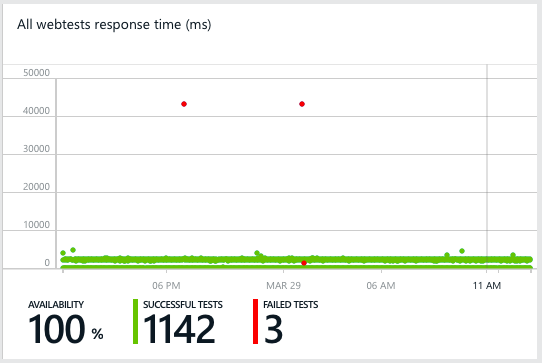
And this is just a simple url ping test to ensure that we get a proper 200 OK response from our EnvokeIT Lab environment that my colleague Björn have setup and modified so nicely with the X1 StoreFront look & feel.


Of course you can make a more proper test than just a url ping test like in this case, the service supports multi-step tests and also content matching etc. It’s also very easy to create one application/service that then consists of multiple locations that you want to monitor, for instance if you’re using GSLB FQDNs as well as regional to ensure that you get the full picture.
More information about what can be done you can find on the Azure Application Insights page. Read more…
Another great blog series from Thomas W Shinder – MSFT and contributors!
The Cloud Platform Integration Framework (CPIF) provides workload integration guidance for onboarding applications into a Microsoft Cloud Solution. CPIF describes how organizations, Microsoft Partners and Solution Integrators should design and deploy Cloud-targeted workloads utilizing the hybrid cloud platform and management capabilities of Azure, System Center and Windows Server
Table of Contents
1.1 Cloud Platform Integration Framework (CPIF) Overview
2 Azure Architectural Pattern Concepts
2.1 Overview of Azure Architectural Patterns
Prepared by:
Joel Yoker – Microsoft
David Ziembicki – Microsoft
Tom Shinder – Microsoft
Cloud Platform Integration Framework Overview and Patterns:
Cloud Platform Integration Framework – Overview and Architecture
Modern Datacenter Architecture Patterns-Multi-Site Data Tier
Modern Datacenter Architecture Patterns – Offsite Batch Processing Tier
Modern Datacenter Architecture Patterns-Global Load Balanced Web Tier
The Cloud Platform Integration Framework (CPIF) provides workload integration guidance for onboarding applications into a  Microsoft Cloud Solution. CPIF describes how organizations, Microsoft Partners and Solution Integrators should design and deploy Cloud-targeted workloads utilizing the hybrid cloud platform and management capabilities of Azure, System Center and Windows Server. The CPIF domains have been decomposed into the following functions:

Figure 1: Cloud Platform Integration Framework
By integrating these functions directly into workloads….
Continue reading here!
//Richard
As usual it’s very interesting when Gartner takes a look at the trends for the coming year. I must say that I agree with many of them, one of the trends is very close to my heart and what I think should have been on the agenda of most CIO’s prior to 2015, and this is: Web-Scale IT.
Why haven’t more enterprise and solution architects been looking earlier at how to simplify the delivery of the “commodity” service that IaaS should be in todays IT world. Yes I know that most enterprises have a “legacy” environment that is hard to just transform, they have a service delivery organisation with certain competences and are being bombarded by salesmen from the older legacy providers that this new way is scary (up until they themselves come up with a story on web-scale of course). But it’s time to wake up and look at how you can change your Compute, Network and Storage components to reduce complexity, increase flexibility/agility, focus on core business (apps and services on top) and also reduce your TCO.
One way is of course to move to the cloud and let someone else bother about this, but I yet don’t see that the larger enterprises are looking at this and there is a hesitation though most haven’t gotten to the point of understanding the TCO model and how to compare their As-Is costs to the cost that they get from the costing tools of Azure, Amazon etc. Why is this? My view is that most don’t have a clear understanding of their own As-Is TCO, they understand how much a server costs, and storage costs, but not the TCO when it comes to facility/datacenter costs, power & cooling, HW costs, support and operational costs, license costs and the overview of that in a TCO model they can understand or compare with “the cloud”.
Ok, as usual I’m getting a bit sidetracked but I love this topic and I must encourage you to contact EnvokeIT if you need help to understand the Web-Scale IT concept and how it can add value to you and your business. We work with Nutanix and Dell and can assist in assessing your existing As-Is solution and forming the To-Be target architecture and the strategy to get there based on your requirements and needs. Of course we’re not locked into Dell or Nutanix and have experience within Azure and other public cloud providers as well as other hardware vendor solutions like HP, NetApp etc.
If you like to see a really cool solution that is coming then have a look at my previous post including a short and cool video: Dell + Nutanix = awesome!
Here we have the top 10 trends for 2015 that Gartner have identified:
Analysts Examine Top Industry Trends at Gartner Symposium/ITxpo 2014, October 5-9 in Orlando
Gartner, Inc. today highlighted the top 10 technology trends that will be strategic for most organizations in 2015. Analysts presented their findings during the sold out Gartner Symposium/ITxpo, which is taking place here through Thursday.
Gartner defines a strategic technology trend as one with the potential for significant impact on the organization in the next three years. Factors that denote significant impact include a high potential for disruption to the business, end users or IT, the need for a major investment, or the risk of being late to adopt. These technologies impact the organization’s long-term plans, programs and initiatives.
Read more…
It’s not new but it’s something that I discussed the other day with a customer; who is the market leader when it comes to “corporate dropbox” solutions for enterprises? Gartner did update the Magic Quadrant for Enterprise File Synchronization and Sharing services/solutions and it’s a good read I must say.
You know I am a Citrix fan and a like their story and think that they from an overall virtual workplace offerings are far superior to the other players if you look across the stack from providing “legacy” services like Windows Apps and Desktop, Enterprise Mobility Management capabilities and all the network capabilities to provide the end-to-end service delivery. So it’s really nice to see that they are picking up in the ability to execute and are competing with EMC in the Leaders box!
I just hope that Citrix can stay int he lead and ensure that they price and capacity wise stay in synch with the up comers that are starting to offer really large storage capacity as a part of their cloud offerings. I still see that the capabilities and features of ShareFile are really great, and in some aspects others like Box, Microsoft and others are coming with nice features as well. So let’s see who will rule this market, but currently I think that ShareFile is a really strong player for enterprises but Microsoft will continue to grow and I just wish they add the additional features around security etc that enterprises often require so they can go into the bigger companies as well.

Source: Gartner (July 2014)
This document was revised on 14 July 2014. The document you are viewing is the corrected version. For more information, see the Corrections page on gartner.com.
EFSS refers to a range of on-premises or cloud-based capabilities that enable individuals to synchronize and share documents, photos, videos and files across multiple devices, such as smartphones, tablets and PCs. File sharing can be within the organization, as well as externally (e.g., with partners and customers) or on a mobile device as data sharing among apps. Security and collaboration support are critical capabilities of EFSS to address enterprise priorities.
Beyond file synchronization, sharing and access, EFSS offerings may include different levels of support for:
Typical architectures for EFSS offerings are:
There are two types of EFSS offerings:
Continue reading here!
//Richard
This is a good post by Dwayne Lessner around how perfect match OpenStack and Nutanix is (not just OpenStack of course, Nutanix rocks with VMware and Microsoft as well)!
Nutanix NDFS also provides an advanced and unique feature set for OpenStack based
private clouds. Key features include:

Read more here.
Here you also have the link to the webinar with topic:
Building OpenStack on a Single 2U Appliance
Watch the webinar here!
//Richard
A great review of the Nutanix Virtual Computing Platform! 🙂


What do you get when you combine four independent servers, lots of memory, standard SATA disks and SSD, 10Gb networking, and custom software in a single box? In this instance, the answer would be a Nutanix NX-3000. Pigeonholing the Nutanix product into a traditional category is another riddle altogether. While the company refers to each unit it sells as an “appliance,” it really is a clustered combination of four individual servers and direct-attached storage that brings shared storage right into the box, eliminating the need for a back-end SAN or NAS.
I was recently given the opportunity to go hands on with a Nutanix NX-3000, the four nodes of which were running version 3.5.1 of the Nutanix operating system. It’s important to point out that the Nutanix platform handles clustering and file replication independent of any hosted virtualization system. Thus, a Nutanix cluster will automatically handle node, disk, and network failures while providing I/O at the speed of local disk — and using local SSD to accelerate access to the most frequently used data. Nutanix systems support the VMware vSphere and Microsoft Hyper-V hypervisors, as well as KVM for Linux-based workloads.
[ The Nutanix NX-3000 is an InfoWorld 2014 Technology of the Year Award winner. Read about the other winning products in our slideshow, “InfoWorld’s 2014 Technology of the Year Award winners.” | For quick, smart takes on the news you’ll be talking about, check out InfoWorld TechBrief — subscribe today. ]
Nutanix was founded by experienced data center architects and engineers from the likes of Google, Facebook, and Yahoo. That background brings with it a keen sense of what makes a good distributed system and what software pieces are necessary to build a scalable, high-performance product. A heavy dose of innovation and ingenuity shows up in a sophisticated set of distributed cluster management services, which eliminate any single point of failure, and in features like disk block fingerprinting, which leverages a special Intel instruction set (for computing an SHA-1 hash) to perform data deduplication and to ensure data integrity and redundancy.
A Nutanix cluster starts at one appliance (technically three nodes, allowing for the failure of one node) and scales out to any number of nodes. The NDFS (Nutanix Distributed File System) provides a single store for all of your VMs, handling all disk and I/O load balancing and eliminating the need to use virtualization platform features like VMware’s Storage DRS. Otherwise, you manage your VMs no differently than you would on any other infrastructure, using VMware’s or Microsoft’s native management tools.
Nutanix architecture
The hardware behind the NX-3000 comes from SuperMicro. Apart from the fact that it squeezes four dual-processor server blades inside one 2U box, it isn’t anything special. All of the magic is in the software. Nutanix uses a combination of open source software, such as Apache Cassandra and ZooKeeper, plus a bevy of in-house developed tools. Nutanix built cluster configuration management services on ZooKeeper and heavily modified Cassandra for use as the primary object store for the cluster.
| Test Center Scorecard | |||||||
|---|---|---|---|---|---|---|---|
 |
 |
 |
 |
 |
 |
 |
|
| 20% | 20% | 20% | 20% | 10% | 10% | ||
| Nutanix NX-3000 Series | 10 | 9 | 10 | 9 | 9 | 8 |
9.3 EXCELLENT
|
Continue reading here!
//Richard
This is great! A great product takes another award!!! 😉
V3 Readers Award Nutanix with Prestigious Industry Recognition in Highly Competitive Category
Nutanix also won the Best of VMworld 2013 Gold Award for Private Cloud Computing!
LONDON, December 3, 2013 – Nutanix, the leading provider of hyper-efficient, massively scalable and elegantly simple datacentre infrastructure solutions, has been awarded for its continuing innovation in optimising datacentre infrastructure at the V3 Technology Awards 2013. During a ceremony at the Waldorf Hilton Hotel, the company was awarded Best Virtualisation product, beating a host of well respected and larger, more established organisations in the virtualisation market.
V3.co.uk is a leading source of news and analysis for technology professionals, written by a team of expert IT journalists in the UK and Silicon Valley. The awards were hotly contested this year, with more than 450 entries from 150 companies.
“It’s great to see a new company like Nutanix being recognised at the V3 Technology Awards, among the industry giants. It wasn’t an easy task whittling down the hundreds of entries to create the shortlist, and then V3 readers voted in their thousands for their favourites, making this a significant achievement and a well-deserved win. Well done Nutanix!” said Madeline Bennett, Editor, V3 and The INQUIRER.
Alan Campbell, Regional Director of Western Europe at Nutanix, commented on the success: “Nutanix is a company that is constantly innovating and striving to provide the best platform for its customers, so this recognition by a highly respected publication is a testament to the hard work of our team. Virtualisation is a rapidly evolving technology which we are proud to be at the forefront of and to receive an award in the UK, a key market for us, is an honour.
As the fastest growing enterprise…
Continue reading here!
//Richard
This is an interesting offering from Amazon! I however don’t like that everyone talks about the “VDI” concept all the time.. this is based on Windows server with Desktop Experience and not a client OS.
Amazon WorkSpaces is a fully managed desktop computing service in the cloud. Amazon WorkSpaces allows customers to easily provision cloud-based desktops that allow end-users to access the documents, applications and resources they need with the device of their choice, including laptops, iPad, Kindle Fire, or Android tablets. With a few clicks in the AWS Management Console, customers can provision a high-quality desktop experience for any number of users at a cost that is highly competitive with traditional desktops and half the cost of most virtual desktop infrastructure (VDI) solutions.
WorkSpace Bundles
Amazon WorkSpaces offers a choice of service bundles providing different hardware and software options to meet your needs. You can choose from the Standard or Performance family of bundles that offer different CPU, memory, and storage resources, based on the requirements of your users. If you would like to launch WorkSpaces with more software already pre-installed (e.g., Microsoft Office, Trend Micro Anti-Virus, etc.), you should choose the Standard Plus or Performance Plus options. If you don’t need the applications offered in those bundles or you would like to use software licenses for some of the applications in the Standard Plus or Performance Plus options that you’ve already paid for, we recommend the Standard or Performance bundles. Whichever option you choose, you can always add your own software whenever you like.
| WorkSpaces Bundle | Hardware Resources | Applications | Monthly Price |
| Standard | 1 vCPU, 3.75 GiB Memory, 50 GB User Storage | Utilities (Adobe Reader, Internet Explorer 9, Firefox, 7-Zip, Adobe Flash, JRE) | $35 |
| Standard Plus | 1 vCPU, 3.75 GiB Memory, 50 GB User Storage | Microsoft Office Professional 2010, Trend Micro Anti-Virus, Utilities (Adobe Reader, Internet Explorer 9, Firefox, 7-Zip, Adobe Flash, JRE) | $50 |
| Performance | 2 vCPU, 7.5 GiB Memory, 100 GB User Storage | Utilities (Adobe Reader, Internet Explorer 9, Firefox, 7-Zip, Adobe Flash, JRE) | $60 |
| Performance Plus | 2 vCPU, 7.5 GiB Memory, 100 GB User Storage | Microsoft Office Professional 2010, Trend Micro Anti-Virus, Utilities (Adobe Reader, Internet Explorer 9, Firefox, 7-Zip, Adobe Flash, JRE) | $75 |
All WorkSpaces Bundles provide the Windows 7 Experience to users (provided by Windows Server 2008 R2). Microsoft Office 2010 Professional includes Microsoft Excel 2010, Microsoft OneNote 2010, Microsoft PowerPoint 2010, Microsoft Word 2010, Microsoft Outlook 2010, Microsoft Publisher 2010 and Microsoft Access 2010.




 The IT Melting Pot!