Archive
XenServer 6.1 Releases
“Over the past several months, literally hundreds of people have asked me the question “When will Tampa release?” I am pleased to announce that earlier today, “Tampa” officially reached GA as XenServer 6.1. Within engineering, this is officially considered a “cloud centric” release. While on the surface that would seem to indicate a lack of features for traditional server virtualization and desktop, but the reality is quite different. When you consider that a cloud runs in a datacenter, and that cloud workloads typically translate into some pretty large VM densities, all with a requirement for a high degree of workload isolation; “cloud centric” actually translates into a set of pretty stringent performance requirements. To illustrate the point, let’s consider three key features, live storage migration, network security and VM conversion.
When you look at some of the most successful clouds, you’ll quickly see that the concept of resource pools are somewhat limiting. Regardless of the size of the pool, if your cloud is successful, eventually you’re going to have more customers than can fit in your cluster or pool. During the design phase for Storage XenMotion, we accounted for this with the result being a shared nothing live storage migration solution which works equally well across all storage types and without being confined to an arbitrary resource pool concept. While designed for the cloud, it fully supports enterprise storage management requirements, and even supports live VM migration between local storage for those cases where shared storage wasn’t implemented.”
Continue reading here…
//Richard
Mobile Application Management (MAM) = Complete Mobile Workplace?
Ok, so I’ve been looking at some of the players out there that say they have a “MAM” product and everybody seem so hooked on talking about MAM and how that’s gonna solve all the needs of a Mobile Workplace… and to be totally frank I think that people tend to run to fast with new cool and hip buzz-words or solutions.
To start of with, what is the definition of a MAM system? This is a pretty good summary I’d say that I stole from WikiPedia;
“Mobile Application Management (MAM) describes software and services that accelerate and simplify the creation of internally developed or “in-house” enterprise mobile applications. It also describes the deployment and management of in-house and commercially available mobile apps used in business settings on both company-provided and “bring your own” smartphones and tablet computers.
Mobile application management has also been defined as “the strategy and process around developing/procuring, securing, deploying, accessing, configuring, updating and removing (business) applications from mobile devices used by the employees. To read more at wikipedia click here…”
And does a solution like this provide all the capabilities for businesses today for a complete Mobile Workplace?
Cisco Ceasing Development Of Load-Balancer Products
Wow… ok, it may not be the biggest news but it’s indeed interesting!
“The ADN market has since become more crowded as the technology gets hotter. Behind F5 is No. 2 player Citrix(NSDQ:CTXS), estimated to hold between 15 percent and 17 percent, along with a host of other vendors, from Brocade and Radware to smaller, scrappier alternatives such as A10 Networks.
Suppiger’s research note highlighted F5, Citrix and A10 specifically as being well-positioned to take advantage of Cisco’s decline. Indeed, both F5 and A10 are among Cisco competitors that already are moving to capitalize on Cisco’s decision.”
Read more here!
//Richard
Microsoft Security Newsletter – September 2012
Ok, didn’t have the time to search where online the newsletter is located so I just copied some of it into this post. I think that there where some interesting posts/articles around “BYO”, Cloud etc. So browse and enjoy! 😉
| Welcome to September’s Security Newsletter! |
This month’s newsletter focuses on personal devices in the workplace, often times referred to as “Bring Your Own Device,” or BYOD. BYOD is a very hot topic these days as organizations grapple with the challenge of managing the risks involved in allowing corporate data to be placed on personal devices such as smart phones. At face value, BYOD has the potential to be a win-win proposition. However, depending on how BYOD is implemented and managed, it could be a Pandora’s box.The primary challenge is that some of the devices employees decide to bring to work may not have basic security or management capabilities. This challenge is compounded by the risks associated with connecting to social networks and by the diverse ways organizations and people are choosing to connect and share data today – such as the utilization of cloud services. We recently conducted a study to find out more about how personal devices are being used in the business environment. Our study found that:
BYOD does have distinct advantages. From the standpoint of the IT department, BYOD is generally seen as a cost-cutting measure because the burden of supplying the equipment is shifted to the employees. Some organizations subsidize BYOD policies with a per diem to offset the costs for users, but it still results in lower costs for the organization by relieving IT of its traditional role of maintenance and support. Another advantage of BYOD is that individuals tend to upgrade and embrace new platforms and technologies much faster than businesses. The organization benefits from being able to take advantage of cutting edge tools and features without the pain of deploying new hardware to the entire company. From the user’s perspective, BYOD means using devices and applications that are more familiar. Empowering users with the ability to choose which hardware and platforms they use creates more satisfied and productive workers. It also allows them to carry a single mobile device instead of one for work and another for personal use. The list of smart personal devices capable of connecting to private and public networks is rapidly and constantly expanding. For chief information security officers (CISOs) and chief security officers (CSOs), managing an ever growing list of devices and applications isn’t a sustainable model. Some of the security professionals I have talked to are shifting their focus to managing the data instead of the devices. They have concluded that device security is only a proxy for data security; if they can’t effectively manage the security of the devices that employees bring to work, they will focus on managing the security of the data itself. I think the industry recognizes the importance of securing personal devices and are making steps toward better management controls in the future. If you are interested in learning more about BYOD, I encourage you to read these blog posts recently published on the topic:
|
Lync 2013 client preview for VDI/Hosted Virtual Desktop environments
This is an update in the right direction for getting all Lync features to work in a hosted environment! But where are we on this topic of getting the collaboration features etc. to our end-users in a good way to the “Any Device” and “Anywhere” or BYOD if that’s what you wanna call it?
Before there has been a lot of issues with running Lync and what’s supported feature-wise depending on where you ran Lync, what protocol you where accessing it over and how Lync was presented (either as published desktop or as a published app). And this had it’s challenges for companies that for instance wanted to go to a BYOD model where the end-point device the user was sitting on wsn’t managed and didn’t allowed Lync to be installed and where those users then were relying on their XenApp or XenDesktop environment. And then there are features that aren’t supported or let’s say; didn’t work that well and really loaded the host server.
The table below is from a great Microsoft blog post by Jesper Osgaard where he compares the features of Lync in a virtualized environment;
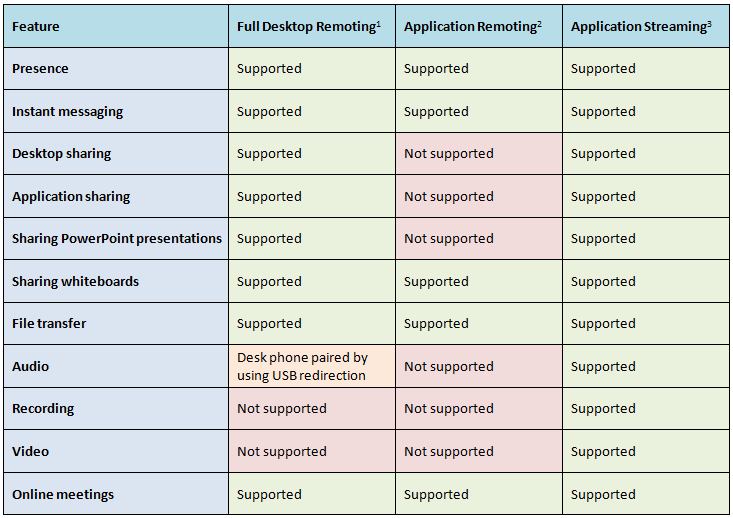
What did Citrix do about it? Well first they released the HDX Realtime Optimization Pack for Microsoft Lync to address these issues and to ensure improved Lync functionality. And I must give Citrix credit for adding support for Linux directly!
Hyper-V 2008 R2 Planning Guide for XenDesktop 5.6 Now Available
Ok, another great blog post from Citrix!
“A key advantage of XenDesktop is that it works with three of the most common virtualization products on the market today – Citrix XenServer, Microsoft Hyper-V and VMware vSphere. However, each of these Hypervisors has a different architecture and feature set. Since each XenDesktop design will vary according to the Hypervisor chosen, we’ve created three separate Planning Guides:
- CTX134944: XenDesktop Planning Guide – Integration with Microsoft Hyper-V
- CTX132110: XenDesktop Planning Guide – Integration with Citrix XenServer
- CTX132166: XenDesktop Planning Guide – Integration with VMware vSphere
It’s been a while since the first XenDesktop Planning Guide for Hyper-V was released and we’ve learned a lot in that time. That’s why Ed Duncan and I have just finished a complete rewrite of the Hyper-V Planning Guide (CTX134944) with help from Alex Balcanquall, Michael Cooper, Tony Sanchez and Frank Anderson. In the new release, we’ve added and revised a number of key design decisions for Hyper-V, including:
- Which edition of Hyper-V should I choose? The pros and cons of each edition are discussed and recommendations are provided on which edition should be used to host XenApp servers, virtual desktops and infrastructure servers.
- How many physical networks will I need to attach to my hosts? Details are provided on the typical physical networks requirements for a Hyper-V host supporting XenDesktop including recommendations on traffic separation and which networks should be teamed.
- Which virtual machines should be hosted on a Failover Cluster? Recommendations are given based on whether the virtual machines are infrastructure servers, dedicated desktops, pooled desktops or XenApp servers.
- Should I enable Dynamic Memory? The Planning guide will explore the benefits from enabling Dynamic Memory and provide recommendations on how to optimize this technology.
- Should I use Provisioning Services (PVS) or Machine Creation Services (MCS) with Hyper-V? The Planning Guide also highlights important considerations when deciding between Provisioning Services or Machine Creation Services.”
Read more here!
//Richard
Try it! – Profile Management Configuration Check Tool (UPMConfigCheck)
Ok, how often don’t you hear or see that technology just have been implemented with the “Next -> Next -> Finish” methodology? Now Citrix has introduced a tool to check whether you’ve configured your environment the most optimal way or not! Great!
“UPMConfigCheck is a PowerShell script that examines a live Profile management system and determines whether it is optimally configured.
UPMConfigCheck requires PowerShell 2. UPMConfigCheck is designed to run on XenApp servers and on XenDesktop virtual desktops with Profile management installed. Supported operating systems are the same as for Profile management.
These include:
• Windows XP
• Windows Vista
• Windows 7
• Windows Server 2003
• Windows Server 2008 / Windows Server 2008 R2
32-bit and 64-bit operating system versions, where available, are supported.”
Download it here and here you find a good blog post about it!
//Richard
Citrix Webinar: Increase your Citrix XenDesktop monitoring capabilities using HP Operations Management Software
Hot tip from Douglas:
Increase your Citrix XenDesktop monitoring capabilities using HP Operations Management Software
Citrix Ready Webinar with ComTrade
Join us to learn how ComTrade’s Smart Plug-in for Citrix (Citrix SPI) helps you measure, monitor and manage XenDesktop and gives you an end-to-end overview from within the HP Operations Manager and HP BSM. During this 45 minute webinar you will learn:
• Why customers buy SPI for Citrix and how it fits across the XenDesktop architecture
• How SPI for Citrix discovers your XenDesktop deployment, performs infrastructure health, checks and visualizes problematic areas
• How SPI for Citrix measures end-user experience, both real-user and synthetically, to help proactively identify issues before they impact your users
All of the above will be supplemented with real-world demos.
Speakers: Craig Ellrod (Senior Technical Marketing Manager, Citrix Systems) and Bogdan Viher (Senior Product Manager, ComTrade)
Date and Time: September 26th 2012, 1:00pm to 2:00pm EST
More info and registration here!
//Richard
Web Interface 5.4 vs. StoreFront 1.2 – What has changed since last comparison?
Hi all,
Ok, let’s start this post by thanking Thomas Koetzing for his newly updated post! Thx a lot man and keep up the great work!
Thomas has summarized most of the features that Web Interface 5.4 offers and how StoreFront matches that, it’s a really good table and one that all of you architects out there shall review and plan accordingly. What are you using today and what are the needs going forward, then once you have your business needs and requirements you have your wanted position and it’s just to make a roadmap of how your service gets there, or not if features are missing, then call Citrix!! 😉
I think that Thomas’s summary is good, one thing to consider though that I really urge you to think of is if you’re planning to use multiple access points around the world for an enterprise. How would this work? What if you have one in Europe, APAC and Americas? You would probably have a couple of NetScalers with AGEE and use GSLB to nicelly provide a simple URL for everyone and network proximity or so to direct the users to the closest entry point. But that regional NetScaler would most likely have its own set of StoreFront servers including a pair of AppControllers to ensure that you don’t have a single point of failure in terms of your internal WAN to get to another regional StoreFront/AppController setup from the local NetScaler AGEE? And if you then think like me; how are you going to do this?
The StoreFront server is relying on the DB for the subscriptions that the end-users have done in terms of selection apps etc for his “workspace”, and the same is with the AppController! There is no “supported” way today that I’ve found where you can synchronize two or multiple sets of HA-pairs of StoreFront or AppControllers so that no matter where the end-user is logging on he/she doesn’t get the same set of subscriptions (apps, desktops, SaaS, etc.) and neither his/her SSO credentials if AppController is used. And just imagine how it would be if you integrate and use the federation of SaaS applications on all locations and an end-user is logging in and subscribing from multiple AppControllers agains for instance Salesforce, and how would you do the overall enterprise reporting? This is the enterprise feature I’m missing and I’m hoping that we could see some solution to this fairly soon!
And it’s now you should start evaluating StoreFront, this is key to understand what it offers now so you know where you are compared to your As-Is architecture with Web Interface and map that to your wanted position going forward!
But a part from that I must say that Thomas did a great job in his comparison and read more about it in detail here!
//Richard
Receiver for Win8 – Requires Storefront and Access Gateway Enterprise
And all of a sudden we have a new week with new opportunities! 🙂
One interesting news is that the Preview of the Receiver for Windows 8 (WinRT) is out! I’ll try it out ASAP but one thing that many has noticed is the requirement that it has in terms of Storefront, and if you want to secure your connection then Access Gateway (Enterprise Edition) is needed! I wonder how this will be received amongst all of you out there if that requirement will be there when it’s released…
I guess that Citrix has some work to do in terms of adding all Web Interface features into StoreFront ASAP otherwise I think that many will be quite upset.
This release of Receiver for Windows 8 (WinRT) provides:
- Application and desktop virtualization
- Deployment through the Microsoft App Store
- Self-service account management and favorites
- Supported on Intel-based (32- and 64-bit) and ARM architectures
- Native Metro design
- Native gesture support
- Support for Storefront Services including follow me applications
- Support for Access Gateway Enterprise Edition
- In-session clipboard support
- In-session network printing
Citrix release blog of the preview version:
“You’ll need the Windows 8 RTM (release to manufacturing) version on your device. You’ll also need CloudGateway Express ( Storefront Services ) for desktop and applications access and a properly-configured Access Gateway (Enterprise Edition) for remote access.”
For more info see the edocs documentation here!
Have a great week!
//Richard




 The IT Melting Pot!