Archive
#Citrix #NetScaler Insight 1.0 GA unleashed!!
Ok, here it is! 🙂
Here is the Citrix blog about it;
NetScaler Insight 1.0 Beta has been received with great excitement and with a huge response from a range of customers and field.
Some were waiting for a product like NetScaler Insight since years, some wanted to see what AppFlow can do, some were taken away by the ease of configuration, whereas some ended up writing about ithttp://blog.itvce.com/?p=3101 & http://blog.itvce.com/?p=3167.
With the support and detailed feedback received from 1.0 Beta participants incorporated, we bring you theNetScaler Insight 1.0 GA!!
NetScaler Insight 1.0 brings following key features to the table:
- Centralized Dashboard
- Real time and Historical stats
- Layer 3 to Layer 7 stats
- Complete Application Stats
- Response time measurement
- Client/Server Statistics
- URL level stats with Waterfall
- HTTP request/response analytics
- Debugging and troubleshooting
- Few click setup and configuration
- NITRO API support for Automation
- Add NetScaler under Inventory with SNIP
- Access NetScaler Insight using hostname/IP address
People have been enthralled with what it can do. Don’t miss a chance to experience it yourself!
Download Link:
//Richard
#Citrix acquires #Zenprise to improve its BYOD capabilities
Wow!
I must say that this is a good move by Citrix! Citrix now gets access to one of the markets most extensive MDM solutions for mobile devices!
The whole story from Citrix has been;
DON’T manage the device, manage the apps and data!
But now I guess that Citrix realised that the need and ideas of many companies out there will require more management of the device and not just the delivery of the apps to it like you’d do with AppController (CloudGateway Enterprise).
So, hat off to this decision! 🙂
Read more about the news here;
Citrix Signs Definitive Agreement to Acquire MDM Leader Zenprise
And why not have a little look at these posts as well;
10 BYOD mobile device management suites you need to know
//Richard
Why only Platinum version of NetScaler SDX VPX Package? – #NetScaler #SDX #Citrix
Why does Citrix only sell Platinum versions in bundles of 5 for the SDX platform? Wouldn’t it be great to be able to purchase for instance Enterprise or Standard for the VPX’s you want to setup for capabilities provided by the Enterprise version of NetScaler?
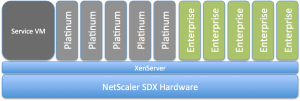
I’d like to buy that instead… what about you guys? Or does this model exist?
//Richard
User Data Mess! #ShareFile, #Podio, #DropBox #SmartAccess etc…
This blog post is not really supposed to give any clear message, just to confuse a bit more and see if anyone out there can assist in clearing the view going forward from a strategy point of view.
The main question is; how are users going to leverage and consume services so that they know where to store and get to their data, collaborate with it, archive it etc.?
Right now I personally live in a very confused world, but I’m still a bit of a geek so I got a fairly good idea on how and where to store my data so that I can reach it and store it the best possible way. But just today I have the following services and capabilities that I consume;
- Personal Data
- DropBox
- iCloud
- Local Macbook Air that is backed up to my TimeMachine
- DVD’s etc…
- Corporate Data
- ShareFile (On-premise and public ShareFile service)
- DropBox
- H:\ drive
- SharePoint (Office 365)
- Document management system
This picture is an ugly and quickly put together one but kind of highlight the problem we face as solution architects when we shall try and paint the way forward and the wanted position for our corporation in terms of how to provide cost effective, simple and intuitive storage services to our end-users.
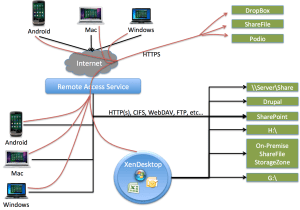
So how are users going to know where to store which type of data, and where and when they can get to it, from which device and from which application? This is getting confusing for them…
#Citrix #GSLB blog post – GeoLite City as NetScaler location database
This was a good blog post! And I really like GSLB, of course there may be functionalities that you’d like to advance etc but it’s great! And this post addresses one topic of it;
You may know this problem: Your boss made you build several data centers around the globe with a bunch of NetScalers in the mix to load balance services across the various locations using GSLB (Global Server Load Balancing). But when it comes to configuring a static proximity geo IP database to help with that not too easy to understand dynamic proximity feature you notice most of these databases are commercial and you are out of budget. Luckily though, there are several free versions of geo IP databases out there, which reportedly work quite well. Before using one of those, you should carefully review the license terms. Some aren’t necessarily free for commercial use…
Moreover, these free versions are very popular, well maintained and were frequently updated (I say were because with the assignment of the last IP block by RIPE earlier in 2012 there shouldn’t be too many changes to the databases anymore) . So it’s fair to say that many of our clients who are using these databases are very satisfied with them.
Why is a database with IP addresses and address blocks necessary for such a setup? GSLB responds to DNS requests for a domain name with an IP address of a member service. Which service IP is returned is dependent on the load-balancing algorithm used, for example least connection, simple round robin or more commonly used, proximity to the client (or the clients local DNS to be precise). For proximity based GSLB, when a client sends a DNS request, the system determines the best suitable site…
Continue reading here!
//Richard
HEADS UP!!! No #Citrix #Receiver in App Store – Where is Receiver for iOS?
Wow!! Not that good!

See this Citrix Blog for additional info and hopefully they’ll post updates on the issue there as well…
Receiver for iOS version 5.6.3 was released on November 28th into the App Store. On release, several customers reported an issue found only in the published release. The Citrix engineering team is researching the issue, working with the Apple team.
To limit the exposure to the customer base, the Receiver for iOS is temporarily removed from the App Store.
Please watch here for updated information.
Thank you for your feedback and patience while we resolve this issue and repost to the App Store.
Continue reading here!
//Richard
Content Switching instead of Load balancing of XenApp XML brokers? – #XenApp #NetScaler #CS #LB
Ok, I was contacted by another colleague today again about a customer and their setup of XenApp load balancing. They of course had NetScalers and had read the guidelines and best practises from Citrix on how to do load balancing and monitoring of XML brokers. But they had the same issue that many have, they had to contact the network team when they needed to add farms that they should load balance, and they needed an IP for each LB vServer per XenApp farm…
And this is not the first time I’ve seen this… why doesn’t people use Content Switching instead when doing load balancing of their XenApp farms (and other resources as well of course!)?
This is the Citrix picture on how to do it;

But what I’d do instead and recommend is to use Content Switching (CS) instead. Setup a CS vServer with an IP and an A-record in DNS, in the picture below it’s the one with bogus IP 10.10.10.10 and FQDN of cs8080.envokeit.local.
Then what you do is to configure a CNAME alias for each of your farms in DNS, like farm1.envokeit.local that you can see in the picture. Have the CNAME to be an alias of the CS you just created. Then in the NetScaler you setup your LB vServers just like you’ve always done and create the Service Group and add the correct monitors etc. to it. And remember that you in this case don’t have to have an IP set on the LB vServers, these don’t have to be directly addressable from the network, only through your CS that you just setup.
Then on the CS create your policies to do CS on the hostname of the incoming requests to the respective LB vServer. No more requesting IP’s per farm and all of that, one IP and you can support MANY farms…. I just love CS! 🙂

Happy content switching! 😉
//Richard
#Citrix #SmartAccess = A complete story or not? – #NetScaler #AGEE #EPA
This little blog post is about Citrix SmartAccess. I’ve been a fan of SmartAccess for a long time, and it’s also something that Citrix has been talking a lot about in their story. The way that Citrix technology can provide applications, desktops and information to end-users on any device in a secure and controlled way.
But the purpose of this blog post is to give you my view of this story, and how true the SmartAccess story is. Remember that this is my personal view and that I’ve actually not tested all my theories below so parts of it is purely theoretical at this stage.
So a bit of background first to build my case…
Citrix has been going on about SmartAccess, and it’s been true that the Access Gateway capabilities once added to Web Interface and XenApp/XenDesktop where great in terms of adding another layer of functionality that the IT supplier could use to determine how the XenApp and XenDesktop environments where accessed, and from what type of device. The device detection/classification is done through host checks (Endpoint Analysis Scans, EPA) that the Access Gateway feature provided as a pre- or post-authentication scan. This scan then resulted that either the device met the policies or didn’t, and then this policy could be leveraged by the other internal components (XenApp/XenDesktop) to control/manage which apps, desktops and functionality (virtual channels like printing, drive mapping etc.) that the end-user should get for that specific session.
And this was/is working well for certain scenarios from a technical point of view. But is it really working for the whole story that Citrix and the whole IT-industry is driving now with BYOD etc.? Think about the message that is being pushed out there today, use any device, we can control and deliver according to security policies, we can provide access from anywhere, etc…
And this is where it becomes interesting. All of a sudden then you as an architect are to take this vision that your CIO or IT-board has and realise it into manageable IT services that combined deliver a fully fledged IT delivery of Windows, Internal Web, SaaS, Mobile and Data for this great set of use cases and scenarios. Wow… you’ve got yourself a challenge mate!
This text is from the Citrix homepage about SmartAccess;
SmartAccess allows you to control access to published applications and desktops on a server through the use of Access Gateway session policies. This permits the use of preauthentication and post-authentication checks as a condition for access to published resources, along with other factors. These include anything you can control with a XenApp or XenDesktop policy, such as printer bandwidth limits, client drive mapping, client clipboard, client audio, and client printer mapping. Any XenApp or XenDesktop policy can be applied based on whether or not users pass an Access Gateway check.
So let’s start of then with going back to the SmartAccess which is the topic of this blog!
#Netscaler authentication based on nested groups
Ok, I have to thank my colleague Roger Eklund for this great post! Check it out if you want to use nested AD groups for AGEE authentication!
So i needed to create an LDAP authentication policy in the Netscaler where the users are divided into different groups (DEPT1, DEPT2, DEPT3), and those groups are themselves inside a group (MAINGRP). So i want to authenticate the users based on nested membership in MAINGRP.

Normally without nested groups you would use a LDAP filter with something like this:
memberOf=CN=DEPT1,OU=users,OU=subou,OU=ou,DC=domain,DC=com
Which would return a result to the Netscaler if the user…
Continue reading here!
//Richard
#NetScaler Master Class Webinar on December 5, 2:00 – 4:00 PM GMT
New Citrix NetScaler Master Class! Join and make your voice heard! 😉
Come and join us for our latest NetScaler Master Class. Go back to basics as well as find out what’s new and what’s coming up soon.
This webinar event provides you the opportunity to learn about the features of the NetScaler, the tips and tricks of configuration and of course, put your questions to the experts. Don’t miss this opportunity to have your say and find out what’s going on in the world of Application Delivery Control in general and NetScaler in particular.
Date: 5th December 2012
Time: 14:00 Hrs GMT (15:00 Hrs CET)
Agenda
NetScaler “101” – HTTP Callout
“In the Spotlight” – Command Center
What’s new – NetScaler products update
News and Views – What’s going on in the ADC world
Master Class Extra – Have your say
Read more and register here!
//Richard




 The IT Melting Pot!