Archive
Great UI Theme improvement setting – #AccessGateway, #NetScaler, #Citrix
I must say finally! It’s not a 100% yet for everyone out there but it’s a step in the right direction. The NetScaler, Access Gateway, Web Interface, StoreFront and Receiver has not really been in synch when it comes to UI and end-user experience…. But now Citrix has improved it!
Access Gateway is a secure remote access product and hence tends to be the entry point for corporate users, wanting to access their enterprise applications and desktops. Given this, it makes sense for corporates, to try and customize the logon experience on Access Gateway, to match their corporate look and feel.
Access Gateway has always allowed for this customization, though, it’s been somewhat of a tedious process. With the new 10.0.71.6014.e release, we are making an attempt to simplify this experience.
UI Customization on Access Gateway is a multi-step process:
- Access the built in theme web pages and customize them, to match the corporate requirements
- Apply the modified theme (collection of web pages) at the right location
- Modify certain scripts to make this change persistent
- Every time the firmware has to be upgraded, take a backup of the customized pages and scripts and re-apply the same after the upgrade.
A quick Google search will give you a number of helpful and very accurate blogs/articles, on how to tweak the web pages to customize and create your corporate look and feel. Some of my favorites are:
- http://blogs.citrix.com/2012/04/19/green-bubble-theme-for-citrix-netscaler/
- http://jariangibson.com/2012/04/16/apply-citrix-receiver-theme-to-netscaleraccess-gateway-10/
With this new release, we have automated all the other steps (i.e. 2-4) for you. Instead of having to worry about how to apply this theme, or having to take backups every time you upgrade, the new release will automatically handle this for you.
To see the new offering in this r…

Continue reading here!
//Richard
Why no Snaphot feat. on NetScaler like on AG? – #Citrix, #NetScaler
Ok, I had the “pleasure” to be working with an Access Gateway setup a little while ago… and I don’t know if I should actually say that it was a pleasure when I all did was missing the NetScaler.
But there is one feature that Access Gateway has that NetScaler doesn’t that I like and see a need for; Snapshots!
Why hasn’t Citrix build the same EASY way to make a snapshot of a config on NetScaler??? This would simplify things a lot from a change management point of view. You could of course make this happen yourself but need to be savvy and it’s hazzle… It would also ensure that admins that aren’t hardcore NetScaler nerds actually could get some confidence to change stuff and have a back out plan to revert to a previous snapshot if something goes wrong.
And the great thing about a snapshot is that it represents all the Access Gateway settings, licenses, and certificates at a specific time. If you have multiple software versions installed on Access Gateway, you can have snapshots that span the different software versions. Imagine if there was a button you could press to do that done on the NetScaler!
Video of how it works: How To: Take and Restore Snapshots on Citrix Access Gateway 5.0
Creating Snapshots to Manage Access Gateway Configuration Settings
I think that this will be a good thing to add now when more shops will setup Access Gateway Enterprise on NetScaler and only use it for just that…especially now when it’s also going End of Life (EOL).
Citrix: Please make this happen! 😉
//Richard
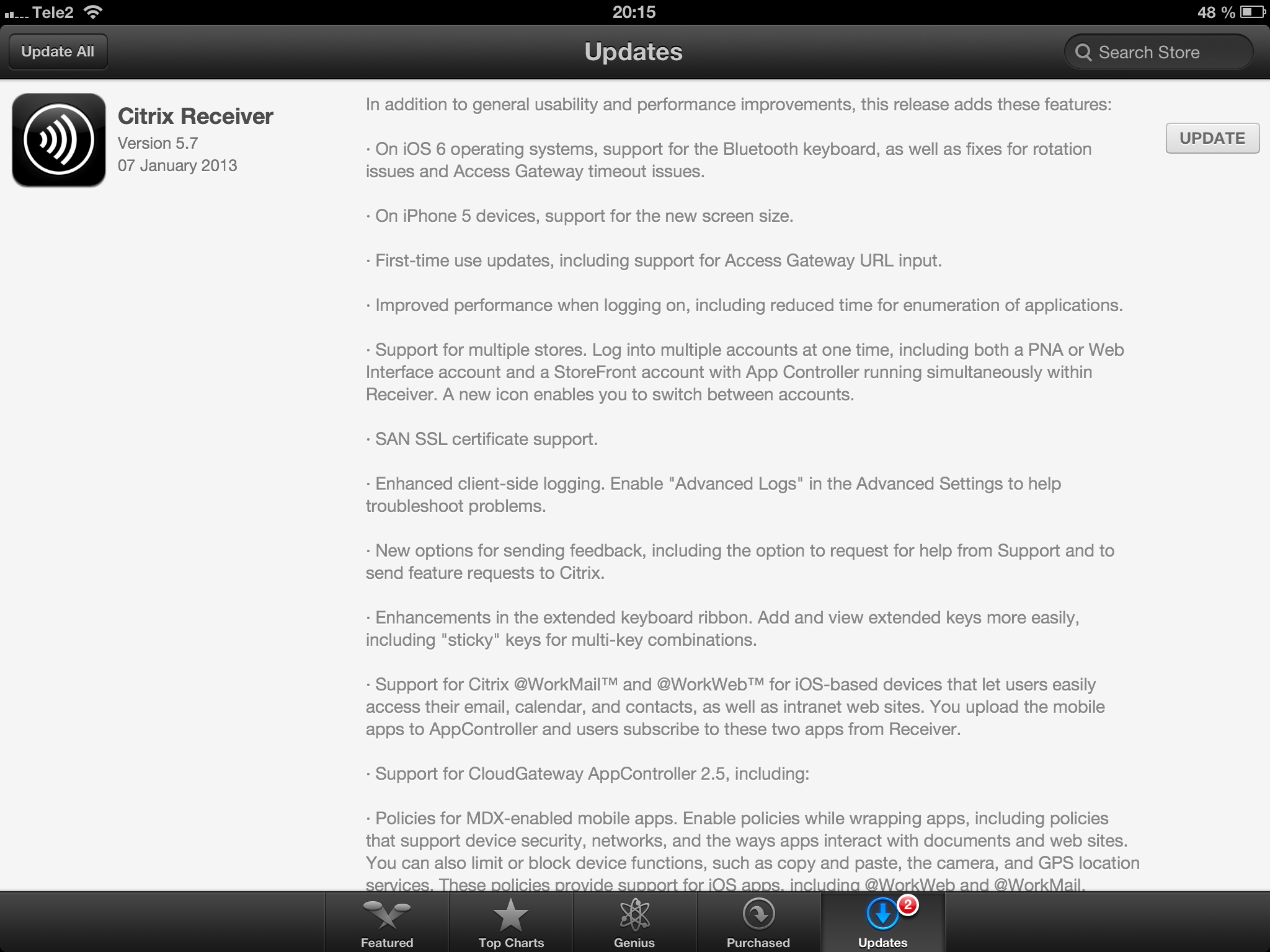
Receiver 5.7 for iOS released! – #Citrix, #Receiver, #CloudGateway
Receiver 5.7 for iOS is here!
//Richard
New Citrix Access Gateway Release – #AG, #SmartAccess, #Receiver, #Citrix
Ok, just as we expected there is now a new release of Access Gateway that goes hand in hand with the new Receivers as I wrote about in the following posts:
Receiver for Windows 3.4 released
Receiver for Mac 11.7 Released
And of course as you could read in the first post above there are great improvements of the end-user experience when accessing resources, now you have ONE login for both the Receiver and to the Access Gateway plugin. And as that posts also highlights is the support for host check (EPA scans) on Receiver use cases as well! Finally! 😉
More info on the new Access Gateway release 10.0.71.6014.e below:
With the release of Citrix CloudGateway 2.5, comes the release of Citrix Access Gateway 10.0.71.6014.e. Citrix CloudGateway as you are aware, is the Citrix Enterprise Mobility offering, complete with Citrix Receiver running enterprise applications on the end point, Citrix Storefront running your enterprise app store, Citrix AppController running your mobile policy management and Citrix Access Gateway providing remote access to all this infrastructure.
With every CloudGateway release, Access Gateway continues to build incredible integration and smart abilities, which makes it the de-facto remote access solution for your CloudGateway deployments. Access Gateway is the only remote access solution today, which can offer seamless Receiver configuration using Email based discovery and provide intelligent integration with Storefront and AppController, to provide single sign-on to all your enterprise applications.
With this new release, Citrix Access Gateway will be able to provide the following value additions in your CloudGateway deployments:
- Seamless Desktop Receiver experience: With this release of Access Gateway, end users will no longer have to sign into their Access Gateway plug-ins as a manual step, to access apps / sites that require a full SSL tunnel. Receivers automatically launch a SSL VPN session via Access Gateway as needed. Result is – end user just deals with Citrix Receiver and Receiver internally (and automatically) deals with Access Gateway on user’s behalf.
- EPA with ICAProxy / CVPN: Receivers can now seamlessly launch AG plug-ins to connect to an Access Gateway vServer configured with End Point Analysis policies, in ICAProxy and CVPN modes as well. Earlier, this was supported only for Full Tunnel access.
- Session Sharing: Receiver and AG plug-in have always been two separate entities, and because of that, they establish two parallel sessions with Access Gateway. With this release, we have added the smarts in our Receiver and Access Gateway integration, to understand each other, and be able to share the same session with Access Gateway appliance. Good News – this now leads to simplified access from end user perspective, and optimal session/license consumption from Administrator perspective.
- Device Wipe/Lock support for AppController: With CloudGateway 2.5, AppController is launching the ability to register and track mobile devices via AppController. These registered mobile devices can then be locked / wiped, if the..
Continue reading here!
//Richard
#Zenprise is now a part of #Citrix
Zenprise is now officially a part of Citrix! For a press release and additional info read here.
I am really excited about this!! But my initial question about this acquisition is how the offerings will be bundled together. Right now you can purchase CloudGateway to get the MAM capabilities for mobile apps and data, and of course then also deliver XenApp, XenDesktop plus SaaS and internal web services. And that’s a nice offering but now with the more capable MDM parts from Zenprise, what will the license model look like and what will in the end a “Platinum” license provide?
My hope is of course that the whole license model is changed to be aligned with all acquisitions from the past years so that you could purchase a “Platinum” license that truly covers all the capabilities and products to make life easier for everyone….
My fear though is that Zenprise will be added as a separate MDM capability on top of CloudGateway as the “Diamond” edition! 😉 and it will probably exist in both CCU and named user/device models to make life even harder…
Please Citrix: surprise us with a new price and license model that spans the whole product/service stack! 🙂
//Richard
#Citrix #Receiver 3.4 and 11.7 = is the #SmartAccess story more real now? – #CloudGateway, #AGEE, #NetScaler, #StoreFront
Citrix has now released version 3.4 of the Receiver for Mac and Windows, but what is the main added value with this release?
First of I’d like to ask you to review my previous post where I questioned the Citrix SmartAccess story that I believe is not there end-to-end and that really is a lacking feature for scenarios where you’d for instance want to support more BYOD models etc. You need to determine the person accessing the service and also what what type of device it is, trusted or not etc. And I in the previous post I argued that Citrix doesn’t deliver according to their SmartAccess story;
#Citrix #SmartAccess = A complete story or not? – #NetScaler #AGEE #EPA
And for you that haven’t read about the new Receiver 11.7 or OS X and 3.4 for Windows check these posts:
Receiver for Windows 3.4 released
Receiver for Mac 11.7 Released
The table below is from the previous SmartAccess post and my theoretical review right now is that the SmartAccess story for Windows and Mac OS X clients have improved. As you can see in the two rows for Receiver 3.3 and 11.6 where you would access through a Receiver through an AGEE you would NOT be able to perform host checks using the EPA scans.
This was just not possible though the native Receiver didn’t have that capability to trigger the EPA scans. And the EPA plugin itself was not available in the native Receiver on the OS X, it was bundled into the Access Gateway plugin.
| Client | Access method | EPA/Host-check possible on AGEE | Comment |
| Windows with Citrix Receiver for Windows 3.3 | Receiver 3.3 | NO | You’ll never be able to do host-checks on this device if Receiver access is used due to that the Receiver does not have EPA scan capabilities. |
| Windows with Citrix Receiver for Windows 3.4 | Receiver 3.4 | YES | Now when the Receiver is communicating with the Access Gateway plugin and shares login credentials then you can leverage the AGEE plugin to perform EPA scans and then allow different session policies and profiles depending on the EPA scan result, and at the same time of course also pass that through to StoreFront/WI and into XenApp/XenDesktop.It does however then require that you get the AGEE plugin installed on the devices, which may be another dilemma… |
| OS X with Citrix Receiver for Mac 11.6 | Receiver 11.6 | NO | You’ll never be able to do host-checks on this device if Receiver access is used due to that the Receiver does not have EPA scan capabilities. |
| OS X with Citrix Receiver for Mac 11.7 | Receiver 11.7 | YES | Now when the Receiver is communicating with the Access Gateway plugin and shares login credentials then you can leverage the AGEE plugin to perform EPA scans and then allow different session policies and profiles depending on the EPA scan result, and at the same time of course also pass that through to StoreFront/WI and into XenApp/XenDesktop.It does however then require that you get the AGEE plugin installed on the devices, which may be another dilemma… |
#AppController, #CloudGateway 2.5 released
Hi all,
I guess that some of you already are aware of the new 2.5 release of AppController (a part of the marketing product CloudGateway).. but it’s interesting with a release which I hope is making the product more enterprise ready and that the basic features now are there!
And I guess that many are interesting in that now Android apps, @WorkMail™ and @WorkWeb™ are supported!
I’ll of course do an upgrade and go through my little issue list I created earlier in the post-Synergy post… I hope that these items now are fixed!
- Enterprise/multi-site support with synch of the database. This to ensure that you can have an HA pair setup for instance in Europe and one in the North Americas and have the end-user be logged in against both and have their subscriptions etc. follow them (as well as of course reporting, monitoring etc. etc.)
- Support for really large AD domains with LARGE # of AD users and AD groups
- Support for AD domain structure where the BASE DN is different to where AD users and the AD security groups you want to use for roles
- Role based administration – this has just got to be there. Without it I wouldn’t call it an enterprise product…
These are the updates according to eDocs (they are quite a few so I have high hopes!) 😉
But when reading through the short list of updates I DON’T see multi-site support!! That’s not very Enterprise if you ask me…. This is the first thing I’m gonna check out!
Here is an architectural overview:
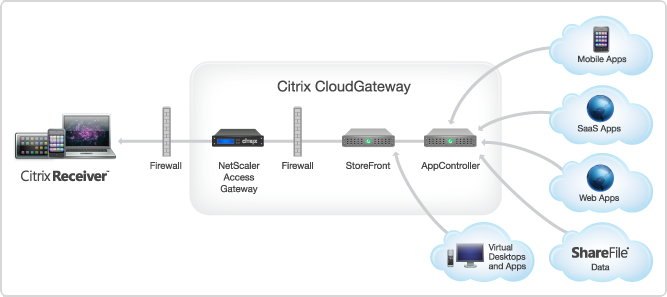
AppController 2.5 supports the following new features:
Receiver for Windows 3.4 released
About Receiver for Windows 3.4
Citrix Receiver for Windows provides users with self-service access to resources published on XenApp or XenDesktop servers. Receiver combines ease of deployment and use, and offers quick, secure access to hosted applications, desktops, and data. Receiver also provides on-demand access to Windows, Web, and Software as a Service (SaaS) applications. You can use it for Web access or configure it for use with Citrix CloudGateway.
What’s new
Citrix Receiver for Windows 3.4 (CitrixReceiver.exe) provides the following new features and enhancements.
- Single authentication to the Access Gateway:
- Use of a single session for both VPN and clientless access so that a Receiver user logs on once for both types of access and consumes only one license. This feature requires StoreFront.
- Automatic routing of ICA traffic through the Access Gateway ICA proxy for optimal user experience.
- Automatic start-up of a VPN tunnel when a user logs on. This feature requires that you disable the Single Sign-On with Windows setting on the Access Gateway.
- Support for Access Gateway SmartAccess controls.
- Improved logon and logoff operations:
- Users are prompted to log on to Receiver only when a logon is required. Actions that require a log on include starting an app from Receiver or the Start menu, using the Refresh Apps command, viewing or searching for apps, or adding an account. A user is logged on only to the account associated with the requested resource.
- Users remain logged on until choosing to log off or exit Receiver, roam from the internal network to an external network, or delete passwords.
- A VPN tunnel is established when a remote user performs an action that results in a logon. Internal users are logged on to StoreFront.
- Support for Windows 8. You can use Receiver for Windows 3.4 on Intel-based Windows 8 devices. (Receiver for Windows 8/RT is available on the Windows App Store for ARM-based Windows 8 devices.)
- Support for Windows Server 2012 R2, 64-bit edition.
- Support for Project Thor Technical Preview (XenApp Connector). Receiver for Windows 3.4 can be used with Project Thor Technical Preview to deliver apps with Microsoft System Center 2012 Configuration Manager.
- Usability improvements, including:
- App and desktop Start menu shortcuts are no longer copied to other devices, enabling users to control the location of shortcuts on each of their devices.
- The Request button is removed. Users can now simply click to add an app and, if a request for permission to add the app is required, a dialog box appears.
- Arrow keys can be used to navigate search results.
- Users will experience fewer dialog boxes when adding and removing apps.
- Error messages and certificate warnings are clearer.
- Users can reset Receiver to factory defaults. For information of preventing user resets, see http://support.citrix.com/article/CTX135941 in the Citrix Knowledge Center.
- Support for session pre-launch. The session pre-launch feature reduces launch times for applications delivered through Web Interface sites.
- Support for ShareFile StorageZones. Receiver for Windows supports both ShareFile-managed cloud storage and on-premises StorageZones.
- Upgraded FIPS support. Receiver for Windows 3.4 supports certificates with a minimum public key of 2,048-bit RSA and a SHA256 signature hash algorithm.
Receiver for Windows Enterprise
The Receiver for Windows Enterprise 3.4 package (CitrixReceiverEnterprise.exe) provides the following enhancements:
- Support for smart card single sign-on for Windows 7 devices. When used with Web Interface, Receiver for Windows Enterprise 3.4 enables smart card pass-through authentication from Windows 7 devices.
- Support for Fast Connect. Fast Connect provides the necessary technology for partners to rapidly authenticate users to Citrix sessions or desktops.
For information about Receiver for Windows Enterprise, including compatible systems, refer to the Receiver for Windows 3.2 documentation in Citrix eDocs.
Receiver for Mac 11.7 Released
About Receiver for Mac 11.7
Updated: 2012-12-19
Citrix Receiver for Mac provides users with self-service access to resources published on XenApp or XenDesktop servers. Receiver combines ease of deployment and use, and offers quick, secure access to hosted applications, desktops, and data.
Receiver also provides on-demand access to Windows, Web, and Software as a Service (SaaS) applications. You can use it for Web access or configure it for use with Citrix CloudGateway.
What’s new
- Single authentication to the Access Gateway:
- Use of a single session for both VPN and clientless access so that a Receiver user logs on once for both types of access and consumes only one license.
- Automatic routing of ICA traffic through the Access Gateway ICA proxy for optimal user experience.
- Automatic start-up of a VPN tunnel when a user logs on. This feature requires that you disable the Single Sign-On with Windows setting on the Access Gateway.
- Improved logon and logoff operations:
- Users are prompted to log on to Receiver only when a logon is required. Actions that require a log on include starting an app from Receiver or the Finder, using the Refresh Apps command, viewing or searching for apps, or adding an account. A user is logged on only to the account associated with the requested resource.
- Users remain logged on until choosing to log off or exit Receiver, roam from the internal network to an external network, or delete passwords.
- A VPN tunnel is established only if needed. Internal users are logged on to StoreFront.
- Usability improvements, including:
- Upgraded FIPS support. Receiver supports certificates with a public key of 2,048-bit RSA and a SHA256 signature hash algorithm.
- Support for ShareFile StorageZones. Receiver provides support for ShareFile StorageZones. StorageZones enable you to optimize ShareFile performance by locating data storage close to users and also allow you to control storage for compliance purposes. For more information about StorageZones, see the Sharefile documentation in eDocs.
Hotfix Rollup Pack 1 for #Citrix #XenApp 6.5 for Microsoft Windows Server 2008 R2
Ok, yet another update for XenApp we need to handle…. sigh…
But I suggest that you have a look at it, try it and get it rolled out…
Read more here!
//Richard




 The IT Melting Pot!