Archive
#Citrix #StoreFront Planning Guide
Ok, this product has caused some headache since it was released. And I must say that this guide is something that Citrix should have release a long time ago… there are so many companies out there struggling with how to deal with Web Interface being faced out and how/what to do with StoreFront!
So enjoy!
Download StoreFront Planning Guide!
//Richard
Mac Receiver Launches Application and Closes Abruptly – #Citrix, #Receiver
Ok, had a bit of a “challenge” today with my little Receiver 11.7 on my Macbook Air…. the darn thing just “vanished” after the XenApp/XenDesktop session was shown for about half a second…
And the solution was the following:
Symptoms
User is unable to login from a MacBook using the Citrix Receiver for Mac. The session launches and eventually disappears without any error message.
Cause
Since the Mac devices do not have a registry like Windows devices, a license needs to be issued to the client devices name. If the device does not have a name then it cannot be issued a license. It attempts to assign a license to a null value, which it cannot do and hence the session drops.
Resolution
- Find the System Preferences Icon on the toolbar.

- Open the Sharing folder in the System Preferences options.

Host checks/EPA scans are not for everyone – #Citrix, #NetScaler, #AccessGateway
This is an interesting blog post from Citrix… It captures a scenario that I know one of my previous customers was thinking of, so have a look at it!
The main thing that think of when reading this though is that EPA scans are NOT for everyone, I agree. And please also read my earlier posts on why it cannot be done with todays products from Citrix.
#Citrix #SmartAccess = A complete story or not? – #NetScaler #AGEE #EPA
Even though the latest Receiver Receivers changed some scenarios and enables host checks/EPA scans it still doesn’t provide the full picture. But I’ll be publishing a more detailed picture on why later, some late night I’ll be able to complete it! 😉
Here you have the blog post from Tobias Frigger:
A customer of one of my Citrix Consulting colleagues recently came up with an interesting request.
Like many others they are using Citrix NetScaler’s Access Gateway Enterprise Edition module to grant remote secure remote access to applications and desktops.
Additionally, they use a client management and software distribution solution to deploy the EPA plugin to client computers and therefore wanted to suppress Access Gateway offering the EPA scan plugin for download through the browser. This introduces some additional level of control over which client is entitled to connect through Access Gateway.
An approach restricting certain user groups from logging in by using group memberships is a more common scenario, but in this case the customer intended to restrict the end points and not the users. When end users lack administrative permissions to install custom software, preventing the download is indeed an effective measure.
A job for Citrix Consulting!
As you know, Access Gateway Enterprise Edition offers two ways of running Endpoint Analysis (EPA) scans – before and after authentication. Consequently, there are two procedures.
The formal requirements
- Remove the download button displayed when accessing the AGEE virtual server and the plugin is not detected by the browser or if the plugin is outdated
- Alter the message text such that it refers user to contact their system administrator if they think the plugin should be installed.
- When using a post-authentication EPA scan, add a “logout” button.

Backup
As a precaution, we want to make backup copies…
Continue reading here!
//Richard
#Citrix Receiver for HTML5 Version 1.1 Released – #Receiver
Citrix Receiver for HTML5 Version 1.1 is released.. And it now has the support for all the Major Desktop Browsers.
Version 1.1 supports the latest updates of the following Desktop browsers
- Internet Explorer 10
- Safari 6
- Google Chrome
- Firefox
You can download this from https://www.citrix.com/content/citrix/en_us/downloads/citrix-receiver/receivers-by-platform/receiver-for-html5/
eDocs Location : http://support.citrix.com/proddocs/topic/receiver-html5-11/receiver-html5-version-wrapper.html
Key things to check out for while installing and configuring Citrix Receiver for HTML5 v1.1
Direct Internal Acces
- XenApp 6.5 server to be updated with FP1 and latest Hotfix
- Install the NEW Citrix Receiver for HTML5 Version 1.1 on your Storefront 1.2 server (Uninstall the old version manually before installing this new version)
- Open the installed “Citrix HTML5 HDX Engine Configuration” tool and Add the “Receiver for Web” URLs to configure for HTML5 access
- You can now open the supported browsers listed above on the client side and enter the “Receiver for Web” URL
- If you are prompted with the logon screen where you have the option to download the native Citrix Receiver, just click on “Log on”
- Now, add your application/desktop and click on it to launch
- You have your application running in a browser Tab!!
- For this, you will just need to have the latest Access Gateway 10 version 10.0.71.6014.e
Forum : You can use Receiver for HTML5 Forum for reporting issues, questions, and general discussions.
KB articles : You can refer to the below KB articles to troubleshoot some of the cases.
Known Issue : With Internet…
Continue reading here!
//Richard
New #Citrix #Visio Stencils – via @djfeller – #XenApp #XenDesktop #XenClient #XenServer
Thanks a lot for the great work you did on Project Accelerator, and for sharing the Visio stencils!! 🙂
By spending a little time in the Assess phase, Project Accelerator creates this awesome looking diagram

The truth is, this diagram took many, many, many revisions. We wanted to create something that was easy to follow while providing the most important information people wanted to see, which included IOPS, servers, VMs, storage space, desktop images, infrastructure components, and so much more. It took a few revisions before I had something in Visio that did all of that. Then we gave my diagram to Marta Guerra, a senior designer on the Project Accelerator team. She turned the diagram into something easy to follow and very clean with new images/icons for all of the components. I’m still impressed. I know many of you are too because you’ve asked for the Visio stencils.
Unfortunately, Project Accelerator diagrams aren’t done in Visio, but that didn’t stop us from giving you what you wanted. With the help of Marta, I’ve been able to turn these images into a new set of Citrix Visio Stencils.
Get them here!
//Richard
Lifecycle Milestones for Citrix Receiver – #Citrix, #Receiver
For each major version (e.g., v3.0) of a Citrix Receiver for Windows, Mac, Linux, Java, or WinCE, customers will receive a minimum lifecycle of four years. The lifecycle consists of a Mainstream Maintenance Phase for at least the first three years followed by an Extended Maintenance Phase for the remainder of the lifecycle. The specific dates for each major release of these components will be posted in the tables below.
During the Mainstream Maintenance phase, customers that remain current in a Citrix Technical Support program receive 24x7x365 worldwide support. Support includes assistance from experts and connects you to the latest troubleshooting tools, techniques and resources you need to protect your Citrix investment. Citrix will provide code-level maintenance in the form of minor version releases, and in some cases, Cumulative Updates (maintenance releases containing multiple fixes) when Citrix determines they are required to resolve issues with Receiver. The release of a minor version or Cumulative Update may define a new maintenance baseline. Citrix customers may be required to upgrade to a specific minor version or Cumulative Update to receive continued maintenance. When a new maintenance baseline is defined, Citrix will continue to provide support for each minor version (e.g., v3.3) for a minimum of 12 months after the release of the next minor version (e.g., v3.4). Minor versions may include functional enhancements as well as code-level maintenance.
During the Extended Maintenance Phase, technical support continues as before but code-level maintenance will be limited to security-related issues deemed critical by Citrix.
For Citrix Receiver for Android, Chromebook, iOS, or Windows 8/RT, customers that remain current in a Citrix Technical Support program receive 24x7x365 worldwide support for the version of Receivers that are currently available from the respective vendor app store. Code-level maintenance is provided with the next version made available in the respective vendor app store.
Lifecycle dates for Citrix Receiver for Windows, Mac, Linux, Java, and WinCE
The tables below list the major versions…
Put Citrix Receiver App Banners in Web Interface for Android and iOS – #Citrix, #Receiver
A good blog post from Roy Tokeshi about Citrix Receiver setup and provisioning.
I’ve used the Citrix Mobile Receiver Setup URL Generator for quite some time and like it (but now of course you’ll get pretty far with email-based enrolment if you can use that), but it’s still valid for some use cases and scenarios. But to add the banner to the download of the app itself is something I’ve not done, interesting!
One of the cool things you can do to help your users connect to your XenDesktop and XenApp environments is the Citrix Mobile Receiver Setup URL Generator at:http://community.citrix.com/MobileReceiverSetupUrlGenerator/

The output of this generator is a couple of links. The first is an iOS configuration link and the second is the Android configuration link. What is great about this is once the user gets this link on their iOS or Android device, via email, text message, or carrier pigeon with a micro SD card strapped to its leg , all the user has to do is click on the link and the local instance of the mobile Citrix Receiver is auto-configured.
- VCDC Email
- Application warning iOS
Something that Apple had made available is called a Smart App Banner. (I suggest that you don’t shout “Smart App Banners!” across the cube farm unless you want to start a bunch of prairie dogging or HR emails.) Regardless, the folks at Apple created an easy way for you to advertise the Citrix Receiver app itself from within web interface. At Citrix Systems we have had had a couple of different temporarily consistent hostnames we point at to get our apps and desktops. Among my customers, apps.company.com or atwork.company.com have popped up a few times. The point being, the user puts a name in the browser and the web interface client detect takes over, suggests a client version for Mac, Windows, Java and off they go to application or desktop nirvana. But what about the lonely neglected mobile devices. We tell our bosses that we need iPhones, iPads, and Androids for work. So the smart thing to do is to get a few work apps on there before bosses catch us playing Angry Birds, or Radical.FM So the question is, “How do I use this on my web interface?” That is an excellent question. We are going to take the cute little meta tag referenced in that Apple Dev article and paste that right into the login.aspx file in our web interface site. For the purposes of demonstration, I’m going to use our Virtual Computing Demo Center or VCDC as an example. The default web interface that acts as a front end of the demo instance is hosted on a virtual machine acting as the DDC for XenDesktop. The screenshots I am using are based on the connection I make to a XenApp desktop logged on as administrator. \\ddc\c$\inetpub\wwwroot\Citrix\DesktopWeb\auth\login.aspx looked like this:

Now, modified at the top line it looks like this.

Remember that this is something that is only supported in iOS and in fact from the default Safari browser. Here are some screenshots…
Continue reading here!
//Richard
Receiver 5.7 for iOS released! – #Citrix, #Receiver, #CloudGateway
Receiver 5.7 for iOS is here!
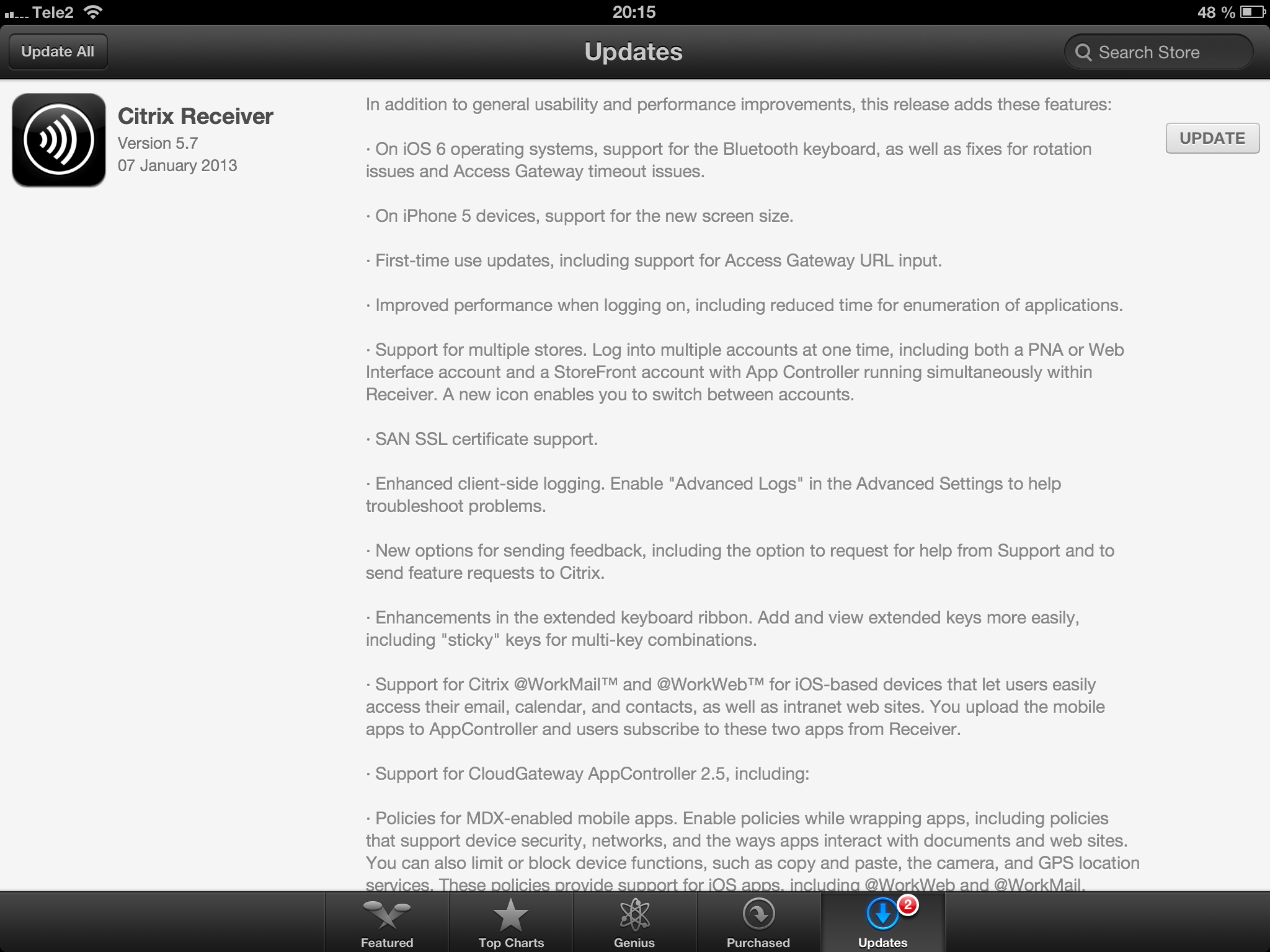
//Richard
New Citrix Access Gateway Release – #AG, #SmartAccess, #Receiver, #Citrix
Ok, just as we expected there is now a new release of Access Gateway that goes hand in hand with the new Receivers as I wrote about in the following posts:
Receiver for Windows 3.4 released
Receiver for Mac 11.7 Released
And of course as you could read in the first post above there are great improvements of the end-user experience when accessing resources, now you have ONE login for both the Receiver and to the Access Gateway plugin. And as that posts also highlights is the support for host check (EPA scans) on Receiver use cases as well! Finally! 😉
More info on the new Access Gateway release 10.0.71.6014.e below:
With the release of Citrix CloudGateway 2.5, comes the release of Citrix Access Gateway 10.0.71.6014.e. Citrix CloudGateway as you are aware, is the Citrix Enterprise Mobility offering, complete with Citrix Receiver running enterprise applications on the end point, Citrix Storefront running your enterprise app store, Citrix AppController running your mobile policy management and Citrix Access Gateway providing remote access to all this infrastructure.
With every CloudGateway release, Access Gateway continues to build incredible integration and smart abilities, which makes it the de-facto remote access solution for your CloudGateway deployments. Access Gateway is the only remote access solution today, which can offer seamless Receiver configuration using Email based discovery and provide intelligent integration with Storefront and AppController, to provide single sign-on to all your enterprise applications.
With this new release, Citrix Access Gateway will be able to provide the following value additions in your CloudGateway deployments:
- Seamless Desktop Receiver experience: With this release of Access Gateway, end users will no longer have to sign into their Access Gateway plug-ins as a manual step, to access apps / sites that require a full SSL tunnel. Receivers automatically launch a SSL VPN session via Access Gateway as needed. Result is – end user just deals with Citrix Receiver and Receiver internally (and automatically) deals with Access Gateway on user’s behalf.
- EPA with ICAProxy / CVPN: Receivers can now seamlessly launch AG plug-ins to connect to an Access Gateway vServer configured with End Point Analysis policies, in ICAProxy and CVPN modes as well. Earlier, this was supported only for Full Tunnel access.
- Session Sharing: Receiver and AG plug-in have always been two separate entities, and because of that, they establish two parallel sessions with Access Gateway. With this release, we have added the smarts in our Receiver and Access Gateway integration, to understand each other, and be able to share the same session with Access Gateway appliance. Good News – this now leads to simplified access from end user perspective, and optimal session/license consumption from Administrator perspective.
- Device Wipe/Lock support for AppController: With CloudGateway 2.5, AppController is launching the ability to register and track mobile devices via AppController. These registered mobile devices can then be locked / wiped, if the..
Continue reading here!
//Richard
#Citrix #Receiver 3.4 and 11.7 = is the #SmartAccess story more real now? – #CloudGateway, #AGEE, #NetScaler, #StoreFront
Citrix has now released version 3.4 of the Receiver for Mac and Windows, but what is the main added value with this release?
First of I’d like to ask you to review my previous post where I questioned the Citrix SmartAccess story that I believe is not there end-to-end and that really is a lacking feature for scenarios where you’d for instance want to support more BYOD models etc. You need to determine the person accessing the service and also what what type of device it is, trusted or not etc. And I in the previous post I argued that Citrix doesn’t deliver according to their SmartAccess story;
#Citrix #SmartAccess = A complete story or not? – #NetScaler #AGEE #EPA
And for you that haven’t read about the new Receiver 11.7 or OS X and 3.4 for Windows check these posts:
Receiver for Windows 3.4 released
Receiver for Mac 11.7 Released
The table below is from the previous SmartAccess post and my theoretical review right now is that the SmartAccess story for Windows and Mac OS X clients have improved. As you can see in the two rows for Receiver 3.3 and 11.6 where you would access through a Receiver through an AGEE you would NOT be able to perform host checks using the EPA scans.
This was just not possible though the native Receiver didn’t have that capability to trigger the EPA scans. And the EPA plugin itself was not available in the native Receiver on the OS X, it was bundled into the Access Gateway plugin.
| Client | Access method | EPA/Host-check possible on AGEE | Comment |
| Windows with Citrix Receiver for Windows 3.3 | Receiver 3.3 | NO | You’ll never be able to do host-checks on this device if Receiver access is used due to that the Receiver does not have EPA scan capabilities. |
| Windows with Citrix Receiver for Windows 3.4 | Receiver 3.4 | YES | Now when the Receiver is communicating with the Access Gateway plugin and shares login credentials then you can leverage the AGEE plugin to perform EPA scans and then allow different session policies and profiles depending on the EPA scan result, and at the same time of course also pass that through to StoreFront/WI and into XenApp/XenDesktop.It does however then require that you get the AGEE plugin installed on the devices, which may be another dilemma… |
| OS X with Citrix Receiver for Mac 11.6 | Receiver 11.6 | NO | You’ll never be able to do host-checks on this device if Receiver access is used due to that the Receiver does not have EPA scan capabilities. |
| OS X with Citrix Receiver for Mac 11.7 | Receiver 11.7 | YES | Now when the Receiver is communicating with the Access Gateway plugin and shares login credentials then you can leverage the AGEE plugin to perform EPA scans and then allow different session policies and profiles depending on the EPA scan result, and at the same time of course also pass that through to StoreFront/WI and into XenApp/XenDesktop.It does however then require that you get the AGEE plugin installed on the devices, which may be another dilemma… |




 The IT Melting Pot!