Archive
Webinar – #Citrix Mobile Device Management – #CloudGateway – @RobSanders
How to secure native iOS and Android email as well as other apps for business use
Thursday, 24th January 2013, 3:00pm GMT (4:00pm CET)
Citrix provides two new mobile apps to support mobile workers with secure email and web browsing on their BYO and corporate mobile devices – @WorkMail and @WorkWeb.Come to this technical webinar to learn more about how these and other native iOS and Android applications can be securely distributed and managed for your business.
Topics include:
- Managing, securing and controlling web and native mobile applications and data
- Secure mobile containers
- Seamless app integration
- Policy-based access controls
- Application-specific Micro VPN
This live webinar presented by Rob Sanders and will be followed by a live Q&A session.
Space is limited.
Register here!
//Richard
#Zenprise is now a part of #Citrix
Zenprise is now officially a part of Citrix! For a press release and additional info read here.
I am really excited about this!! But my initial question about this acquisition is how the offerings will be bundled together. Right now you can purchase CloudGateway to get the MAM capabilities for mobile apps and data, and of course then also deliver XenApp, XenDesktop plus SaaS and internal web services. And that’s a nice offering but now with the more capable MDM parts from Zenprise, what will the license model look like and what will in the end a “Platinum” license provide?
My hope is of course that the whole license model is changed to be aligned with all acquisitions from the past years so that you could purchase a “Platinum” license that truly covers all the capabilities and products to make life easier for everyone….
My fear though is that Zenprise will be added as a separate MDM capability on top of CloudGateway as the “Diamond” edition! 😉 and it will probably exist in both CCU and named user/device models to make life even harder…
Please Citrix: surprise us with a new price and license model that spans the whole product/service stack! 🙂
//Richard
#Citrix #Receiver 3.4 and 11.7 = is the #SmartAccess story more real now? – #CloudGateway, #AGEE, #NetScaler, #StoreFront
Citrix has now released version 3.4 of the Receiver for Mac and Windows, but what is the main added value with this release?
First of I’d like to ask you to review my previous post where I questioned the Citrix SmartAccess story that I believe is not there end-to-end and that really is a lacking feature for scenarios where you’d for instance want to support more BYOD models etc. You need to determine the person accessing the service and also what what type of device it is, trusted or not etc. And I in the previous post I argued that Citrix doesn’t deliver according to their SmartAccess story;
#Citrix #SmartAccess = A complete story or not? – #NetScaler #AGEE #EPA
And for you that haven’t read about the new Receiver 11.7 or OS X and 3.4 for Windows check these posts:
Receiver for Windows 3.4 released
Receiver for Mac 11.7 Released
The table below is from the previous SmartAccess post and my theoretical review right now is that the SmartAccess story for Windows and Mac OS X clients have improved. As you can see in the two rows for Receiver 3.3 and 11.6 where you would access through a Receiver through an AGEE you would NOT be able to perform host checks using the EPA scans.
This was just not possible though the native Receiver didn’t have that capability to trigger the EPA scans. And the EPA plugin itself was not available in the native Receiver on the OS X, it was bundled into the Access Gateway plugin.
| Client | Access method | EPA/Host-check possible on AGEE | Comment |
| Windows with Citrix Receiver for Windows 3.3 | Receiver 3.3 | NO | You’ll never be able to do host-checks on this device if Receiver access is used due to that the Receiver does not have EPA scan capabilities. |
| Windows with Citrix Receiver for Windows 3.4 | Receiver 3.4 | YES | Now when the Receiver is communicating with the Access Gateway plugin and shares login credentials then you can leverage the AGEE plugin to perform EPA scans and then allow different session policies and profiles depending on the EPA scan result, and at the same time of course also pass that through to StoreFront/WI and into XenApp/XenDesktop.It does however then require that you get the AGEE plugin installed on the devices, which may be another dilemma… |
| OS X with Citrix Receiver for Mac 11.6 | Receiver 11.6 | NO | You’ll never be able to do host-checks on this device if Receiver access is used due to that the Receiver does not have EPA scan capabilities. |
| OS X with Citrix Receiver for Mac 11.7 | Receiver 11.7 | YES | Now when the Receiver is communicating with the Access Gateway plugin and shares login credentials then you can leverage the AGEE plugin to perform EPA scans and then allow different session policies and profiles depending on the EPA scan result, and at the same time of course also pass that through to StoreFront/WI and into XenApp/XenDesktop.It does however then require that you get the AGEE plugin installed on the devices, which may be another dilemma… |
#AppController, #CloudGateway 2.5 released
Hi all,
I guess that some of you already are aware of the new 2.5 release of AppController (a part of the marketing product CloudGateway).. but it’s interesting with a release which I hope is making the product more enterprise ready and that the basic features now are there!
And I guess that many are interesting in that now Android apps, @WorkMail™ and @WorkWeb™ are supported!
I’ll of course do an upgrade and go through my little issue list I created earlier in the post-Synergy post… I hope that these items now are fixed!
- Enterprise/multi-site support with synch of the database. This to ensure that you can have an HA pair setup for instance in Europe and one in the North Americas and have the end-user be logged in against both and have their subscriptions etc. follow them (as well as of course reporting, monitoring etc. etc.)
- Support for really large AD domains with LARGE # of AD users and AD groups
- Support for AD domain structure where the BASE DN is different to where AD users and the AD security groups you want to use for roles
- Role based administration – this has just got to be there. Without it I wouldn’t call it an enterprise product…
These are the updates according to eDocs (they are quite a few so I have high hopes!) 😉
But when reading through the short list of updates I DON’T see multi-site support!! That’s not very Enterprise if you ask me…. This is the first thing I’m gonna check out!
Here is an architectural overview:
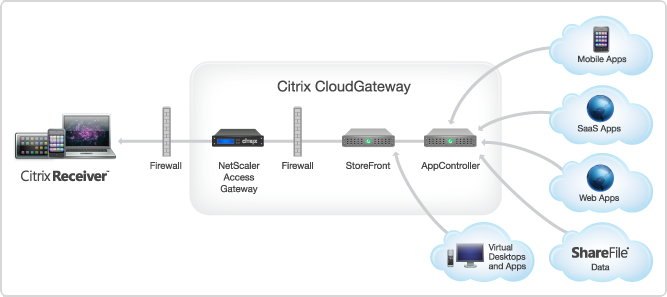
AppController 2.5 supports the following new features:
#Citrix #SmartAccess = A complete story or not? – #NetScaler #AGEE #EPA
This little blog post is about Citrix SmartAccess. I’ve been a fan of SmartAccess for a long time, and it’s also something that Citrix has been talking a lot about in their story. The way that Citrix technology can provide applications, desktops and information to end-users on any device in a secure and controlled way.
But the purpose of this blog post is to give you my view of this story, and how true the SmartAccess story is. Remember that this is my personal view and that I’ve actually not tested all my theories below so parts of it is purely theoretical at this stage.
So a bit of background first to build my case…
Citrix has been going on about SmartAccess, and it’s been true that the Access Gateway capabilities once added to Web Interface and XenApp/XenDesktop where great in terms of adding another layer of functionality that the IT supplier could use to determine how the XenApp and XenDesktop environments where accessed, and from what type of device. The device detection/classification is done through host checks (Endpoint Analysis Scans, EPA) that the Access Gateway feature provided as a pre- or post-authentication scan. This scan then resulted that either the device met the policies or didn’t, and then this policy could be leveraged by the other internal components (XenApp/XenDesktop) to control/manage which apps, desktops and functionality (virtual channels like printing, drive mapping etc.) that the end-user should get for that specific session.
And this was/is working well for certain scenarios from a technical point of view. But is it really working for the whole story that Citrix and the whole IT-industry is driving now with BYOD etc.? Think about the message that is being pushed out there today, use any device, we can control and deliver according to security policies, we can provide access from anywhere, etc…
And this is where it becomes interesting. All of a sudden then you as an architect are to take this vision that your CIO or IT-board has and realise it into manageable IT services that combined deliver a fully fledged IT delivery of Windows, Internal Web, SaaS, Mobile and Data for this great set of use cases and scenarios. Wow… you’ve got yourself a challenge mate!
This text is from the Citrix homepage about SmartAccess;
SmartAccess allows you to control access to published applications and desktops on a server through the use of Access Gateway session policies. This permits the use of preauthentication and post-authentication checks as a condition for access to published resources, along with other factors. These include anything you can control with a XenApp or XenDesktop policy, such as printer bandwidth limits, client drive mapping, client clipboard, client audio, and client printer mapping. Any XenApp or XenDesktop policy can be applied based on whether or not users pass an Access Gateway check.
So let’s start of then with going back to the SmartAccess which is the topic of this blog!
Heads up – Potential #StoreFront and .NET Security update KB2729452 issue – #Citrix, #StoreFront, #CloudGateway
Heads up out there! I’ve not verified this myself but it’s worth ensuring that you plan for an uninstallation in the event it’s true!
Mobile Application Management (MAM) = Complete Mobile Workplace?
Ok, so I’ve been looking at some of the players out there that say they have a “MAM” product and everybody seem so hooked on talking about MAM and how that’s gonna solve all the needs of a Mobile Workplace… and to be totally frank I think that people tend to run to fast with new cool and hip buzz-words or solutions.
To start of with, what is the definition of a MAM system? This is a pretty good summary I’d say that I stole from WikiPedia;
“Mobile Application Management (MAM) describes software and services that accelerate and simplify the creation of internally developed or “in-house” enterprise mobile applications. It also describes the deployment and management of in-house and commercially available mobile apps used in business settings on both company-provided and “bring your own” smartphones and tablet computers.
Mobile application management has also been defined as “the strategy and process around developing/procuring, securing, deploying, accessing, configuring, updating and removing (business) applications from mobile devices used by the employees. To read more at wikipedia click here…”
And does a solution like this provide all the capabilities for businesses today for a complete Mobile Workplace?
Web Interface 5.4 vs. StoreFront 1.2 – What has changed since last comparison?
Hi all,
Ok, let’s start this post by thanking Thomas Koetzing for his newly updated post! Thx a lot man and keep up the great work!
Thomas has summarized most of the features that Web Interface 5.4 offers and how StoreFront matches that, it’s a really good table and one that all of you architects out there shall review and plan accordingly. What are you using today and what are the needs going forward, then once you have your business needs and requirements you have your wanted position and it’s just to make a roadmap of how your service gets there, or not if features are missing, then call Citrix!! 😉
I think that Thomas’s summary is good, one thing to consider though that I really urge you to think of is if you’re planning to use multiple access points around the world for an enterprise. How would this work? What if you have one in Europe, APAC and Americas? You would probably have a couple of NetScalers with AGEE and use GSLB to nicelly provide a simple URL for everyone and network proximity or so to direct the users to the closest entry point. But that regional NetScaler would most likely have its own set of StoreFront servers including a pair of AppControllers to ensure that you don’t have a single point of failure in terms of your internal WAN to get to another regional StoreFront/AppController setup from the local NetScaler AGEE? And if you then think like me; how are you going to do this?
The StoreFront server is relying on the DB for the subscriptions that the end-users have done in terms of selection apps etc for his “workspace”, and the same is with the AppController! There is no “supported” way today that I’ve found where you can synchronize two or multiple sets of HA-pairs of StoreFront or AppControllers so that no matter where the end-user is logging on he/she doesn’t get the same set of subscriptions (apps, desktops, SaaS, etc.) and neither his/her SSO credentials if AppController is used. And just imagine how it would be if you integrate and use the federation of SaaS applications on all locations and an end-user is logging in and subscribing from multiple AppControllers agains for instance Salesforce, and how would you do the overall enterprise reporting? This is the enterprise feature I’m missing and I’m hoping that we could see some solution to this fairly soon!
And it’s now you should start evaluating StoreFront, this is key to understand what it offers now so you know where you are compared to your As-Is architecture with Web Interface and map that to your wanted position going forward!
But a part from that I must say that Thomas did a great job in his comparison and read more about it in detail here!
//Richard




 The IT Melting Pot!