Archive
#Citrix Nails Its Enterprise Mobility Strategy – #XenMobile, #BYOD – via @ekhnaser
Read this great article and see if you agree! 😉
Citrix Nails Its Enterprise Mobility Strategy
I have been very pleased with the strategy, execution and the road map that Citrix has developed around Enterprise Mobility. With the announcement of XenMobile MDM and the Mobile Solutions bundle, I can very easily say that the Citrix solution is the most complete and feature-rich offering on the market today.
XenMobile MDM is simply a name change for Zenprise, which Citrix acquired a few months earlier. I expected Citrix to simply change the “Z” to “X” and keep the name, but I guess Citrix marketing did not find that as amusing. That is not the only change that occurred: A new version of “Zenprise” also accompanies this release, and XenMobile MDM now brings it to version 8.0.1.
Many customers and colleagues have asked me why Citrix acquired an MDM provider — what are the value-adds and isn’t the world moving towards MAM anyway? To answer, we have to make a clear distinction between the use cases. I agree and concur that for BYOD initiatives, MAM is a better, cleaner way of doing this things and that MDM is not the ideal solution.
That being said, there are plenty of use cases where MDM is the only solution that makes sense and I will give you real-world examples. Have you heard of the “Belly” card? It is a customer recognition and rewards program from a company HQ’ed in Chicago that offers merchants a locked down iPad for display in their place of business. Customers can come in and scan their mobile phones on the iPad provided and after a certain number of check-ins they are offered a reward for their loyalty. In this case, belly would have very little use for MAM; they need an MDM solution to manage the thousands of iPads they have deployed.
Another example: United Airlines and American Airlines allow customers to use mobile devices in the cabin to purchase goods in-flight. Obviously, the airlines don’t want the flight attendants to use their own device for this, MDM shines again here.
Finally, what about financial institutions that want to continue to issue corporate-managed devices of different flavors? It’d be for security reasons, obviously. In this case, MDM shines.
When I see bloggers and analysts disqualify MDM, they are not thinking beyond BYOD, where the business world could have a use case built around an application they issue on a mobile device.
Did Citrix strike gold with its acquisition of Zenprise? I will say this much: It was one of the best acquisitions the company has ever made. The natural follow-up question is, what about CloudGateway? And my answer is, it is the glue that holds everything together and is the most important product in the Citrix solution today. Everything will go through CloudGateway moving forward and at version 2.5 has the following features:
- Enterprise app store with identity management capabilities for a single sign-on like experience
- Windows Applications and Desktops through XenApp and XenDesktop
- Mobile applications integration, provisioning, etc.
- SaaS applications integration, provisioning, etc
- Integration with Citrix ShareFile for enterprise DropBox functionality
CloudGateway also has a connector for Citrix Podio, and here I’ll be critical of Citrix the same way I’m critical of VMware for not integrating SocialCast. Why Citrix doesn’t make Podio…
Continue reading here!
//Richard
#Citrix #StoreFront Slowness, Join and Replication issue – check list!
Ok, I guess that you may have seen issue with StoreFront before… and it you have not then good for U!
But in the case that you have experience it here are a couple of things that you can do and hopefully it solves your issue with slow StoreFront console startup, server join issues or replication issues. Sometimes I’ve seen that the join, replication and slowness is ok and the process goes through. But then all of a sudden you get an error and the propagation fails… and this can be because of a timeout in the StoreFront process that you’ve initiated.
I already assume that you’ve checked the basic stuff.. that the servers can reach each other (ping server name and FQDN etc. and that there are no FW issues)….
You may have an issue because you/your server cannot reach the Internet, and some of the components of the product is signed with SSL certificates and StoreFront will try to perform a check whether the publishers certificate is ok or not. So if your servers are behind a proxy serevr that you usually configure in your browser to be able to connect from your companies internal network to the Internet then you should do the following.
1. Log on to your first StoreFront server and create a copy of the original aspnet.config file under C:\Windows\Microsoft.NET\Framework\v2.0.50727 (verify which framework version that your app is using in IIS and modify that appropriate aspnet.config file, more info about this change can also be found here and is for Web Interface but is also applicable to StoreFront)
2. Open Notepad as an Admin (if you have UAC of course enabled) and open the asp net.config file

It will have the content as described by the picture above, add this line to it: <generatePublisherEvidence enabled=”false”/>
Working with #XenMobile #AppController and Me@Work apps – #Citrix, #BYOD
I got to play around with @WorkWeb and @WorkMail apps a bit… and I must say that the process to get the Me@Work apps into AppController isn’t the simplest there is for someone that haven’t been doing iOS app development before.
But what I’m describing here is what’s now named XenMobile AppController and a part of the XenMobile bundle:
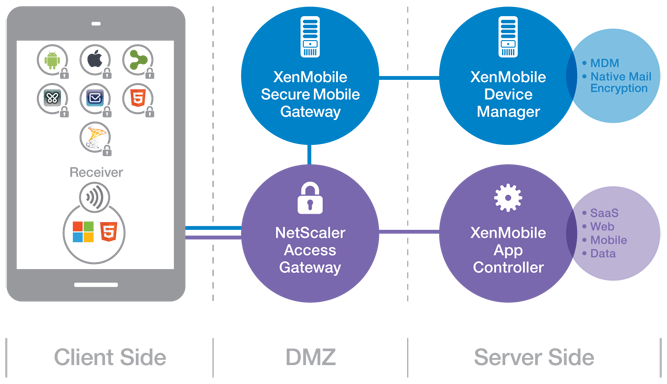
(Note: picture from Citrix)
So lets try to summarise the steps involved in getting these @WorkWeb and@WorkMail apps into your AppController and then published them to your users!
- Get your hands on a Macbook!
- Download the App Preparation Tool for iOS Applications and install it on the client
- Download and install Xcode (not 100% necessary but I recommend that you do that to simplify the creation/download of Distribution certificates and Distribution Profiles)
- Open XCode and open Preferences->Downloads,
 Read more…

#Citrix #BYOD Architecture overview – #XenMobile, #Mobility
I must say that this blog post is of course Citrix “twisted”, but I really like it! And it shows how Citrix provides a pretty complete offering in order to deliver Mobility- and BYO-compliant services.
The Citrix blog written by Christopher Campbell makes sense and I also agree that a picture is worth a thousand words! 🙂
I’m going to make this real easy and simple. As my grandfather would say “A picture is worth a thousand words”.
If you’re a XenDesktop or XenApp customer this is what your environment probably looks like.

Now this is what you need to enable BYOD and add that MAM, MDM, MIM (Data) and overall EMM functionality you’re looking for.

This is what your environment looks like after you enable BYOD.

Didn’t get that? OK, here is what BYOD looks like with multiple vendors.

Now, here is what BYOD looks like with Citrix.

Got it?
Read the whole blog post here!
//Richard
#Citrix #AppController 2.6 released as part of #MobileSolutions #Bundle #BYOD
As a part of the Mobile Solutions Bundle that now is available on MyCitrix you can find a new version of AppController.
AppController 2.6 supports the following new features:
- Certificate support. When you configure AppController for the first time in the web-based management console, you can add or create certificates on the Active Directory settings page.
- Microsoft Hyper-V support. You can install the AppController 2.6 virtual machine on Windows Server 2012 with Hyper-V enabled or on Microsoft Hyper-V Server 2012.
- Migration support to AppController 2.6. You can upgrade to AppController 2.6 from AppController 2.0 or from AppController 2.5.
- Mobile store support. You can upload mobile apps from the Apple App Store or Google Play to AppController. You can use the Citrix App Preparation Tool to wrap iOS and Android apps from the Apple App Store or Google Play. When you wrap the app, you can secure access and enforce policies. When you upload the app to AppController, you can configure the policies. You can also upload an app from the App Store or Google Play to AppController without using the App Preparation Tool.
- Secure connections to Active Directory. You can configure secure connections to Active Directory when you configure AppController 2.6 for the first time.
- ShareFile updates. In previous AppController versions, when you configured ShareFile, the domain sharefile.com was automatically appended to the domain name. In this release, the domain sharefile.com does not automatically append to the ShareFile domain name. You must enter the entire ShareFile domain name.
- Support for mobile links. You can configure mobile links to retrieve the name and description of apps automatically from the Apple App Store. For apps available through the Google Play Store, you enter the name, description and URL of the app. When you configure mobile links, links appear in Receiver with the Play Store or App Store name.
- Web proxy user name format. When you configure the web proxy, you can use either the SAMAccount format or the User Principal Name (UPN) as the user name.
Read more about it here!
//Richard
#XenMobile, #MobileSolutions – Is this what we’ve been waiting for? – #Citrix, #ZenPrise, #BYOD
Ok, so Citrix has now presented their new offering after merging Zenprise into their product portfolio. And is this what you have been waiting for?
My personal answer to that is probably yes, now you have all the capabilities (almost) out there to get your BYOx program/strategy and architecture in place or if you just want to add additional capabilities to your existing service offerings.
I must say though that the packaging is compelling and VERY interesting!
Citrix Mobile Solutions Bundle
The Citrix Mobile Solutions Bundle, which is comprised of XenMobile MDMand CloudGateway, offers a complete enterprise mobility management solution that enables IT to manage and secure devices, apps, and data.
XenMobile MDM Edition
XenMobile MDM Edition offers market leading mobile device management capabilities that deliver role-based management, configuration and security of corporate and employee-owned devices.
What I’d like to see is a roadmap where Citrix becomes an even more complete provider of technology in the Mobility segment. I still believe that Mobility is not only about smartphones and tablets and all the apps that you shall deliver to those devices and non-managed and non-corporate owned devices. There is still a need to provide device management of corporate assets that are not smartphones and tablets! And why should you have to implement another device management service/product for those.
So please Citrix = add Windows 7/8, OS X and Linux device capabilities as well in your almost complete Enterprise Mobile Management offering!
The offering is of course also today an early release where the former Zenprise product and CloudGateway is provided under the same marketing and price bundle but I’m waiting for when we have one (1) enterprise app store! And all capabilities from one technical architecture and product that you enable each capability on a need basis and are licensed accordingly.
But this is a great step for Citrix and I must say that I’m looking forward to see where this is going, I mean the feature set is pretty awesome!
Compare Features |
XenMobile MDM Edition |
Mobile Solutions Bundle |
| Enterprise MDM | ||
| Device management |  |
|
| Configure policies | |
|
| Security and compliance | |
|
| Scalability and high-availability | |
|
| Ease of administration | |
|
| Provisioning and self-service enrollment | |
|
| Enterprise integration | |
|
| Monitor and support | |
|
| Decommission devices | |
|
| Secure email, browser and data sharing apps | ||
| @WorkMail | |
|
| Email attachment encryption | |
|
| @WorkWeb | |
|
| ShareFile integration | |
|
| Microsoft SharePoint integration | |
|
| Mobile app containers | ||
| Mobile application management | |
|
| MDX Vault | |
|
| MDX Interapp | |
|
| MDX Access | |
|
| App wrapping | |
|
| Unified app store | ||
| Enterprise app store | |
|
| Follow-me apps | |
|
| Identity management, single sign-on and scenario-based access control | ||
| Active Directory integration | |
|
| Instant application and data provisioning | |
|
| Single sign-on to apps and data | |
|
| App requests | |
|
| Instant application and data de-provisioning | |
|
| Strong authentication | |
|
| Secure remote access | |
|
| Policy enforcement | |
|
More information about the technologies have also been added to eDocs!

Of course also made their competition table:
Compare the Mobile Solutions Bundle to other enterprise mobility solutions
These are exciting times and I’m looking forward to play around with the whole bundle!
Read more about XenMobile/Mobile Solutions here!
//Richard
#Citrix #AppController 2.5 Implementation Tips – #CloudGateway, #BYOD
Great blog post by Matthew Brooks!
AppController is a component of the Citrix CloudGateway Enterprise suite that orchestrates access to Enterprise Cloud applications. Those applications may take many forms including Mobile Applications, Software-as-a-Service hosted in public clouds, and Web links. Below I provided some tips to help with the implementation of AppController 2.5 (which is the latest version as of the publishing of this blog).
System Related
Including settings such as the Hostname, SSL certificates, and Restore.
TIPs:
- Take a hypervisor level snapshot after the initial installation so that you can easily return to that base level if configuration or integrations efforts go awry.
- The hostname cannot contain special characters in the AppController certificate signing request.
- The hostname must match SSL certificate.
- The system cert must be chained to its CA/(s).
Active Directory Related
Including settings such as the Server (Domain Controller), Base DN, and Service Account credentials.
TIPs:
- The AppController only supports integration with a single domain. Multiple domains require multiple AppControllers. The NetScaler Access Gateway may be configured to allow users to access a single fully qualified domain name, yet be directed to their respective domain AppController through the use of Global Groups. See CTX116169 for more informationhttp://support.citrix.com/article/CTX116169
- All user accounts must have a first name, last name, and email address configured or they will receive an authorization error when attempting to launch applications. The bind Administrator account must also have email address configured or directory integration will fail.
- Only LDAP (TCP 389) may be configured through the wizard that must be completed initially. Thereafter LDAPS (TCP 636) may be configured through the full administration menu.
- If the server name domain name is a load balanced DNS entry the initial import may work, yet subsequent bind attempts will fail. Alternatively you may use the IP address of an LDAPS load balancer on a Netscaler with specific domain controllers configured as services. See CTX135092 for more information http://support.citrix.com/article/CTX135092
Network Related
Including settings such as the IP address, @Workweb and NTP server.
TIPs:
- Use IP private addresses as system addresses if possible. When Trust Settings are configured for NetScaler Access Gateway it does not allow SSO to public addresses. If public addresses must be used the NetScaler may be configured with an SSL Bridge to access the AppController. See NetScaler Traffic Management document for more information.
- NTP must be configured or SAML authentication may fail for SaaS sites if the time difference is significant.
- When Trust Settings are configured for NetScaler Access…
Continue reading here!
//Richard
#Citrix #StoreFront Planning Guide
Ok, this product has caused some headache since it was released. And I must say that this guide is something that Citrix should have release a long time ago… there are so many companies out there struggling with how to deal with Web Interface being faced out and how/what to do with StoreFront!
So enjoy!
Download StoreFront Planning Guide!
//Richard
@WorkWeb & @WorkMail release candidates available – #Citrix, #CloudGateway
Finally! The apps are available at MyCitrix! Stay tuned for test results etc…
//Richard
Jan. Edition of XenDesktop Technical Newsletter Now Available – #XenDesktop, #Citrix
It’s out again with more exciting topics! Check it out!!!
Using XenDesktop? Then you need to get the XenDesktop Technical Newsletter! The newsletter is comprised of the best technical resources from across Citrix Services: Consulting, Technical Support, Education, and Technical Readiness. In its third year the newsletter is designed to help customers run their XenDesktop optimally and get more out of their investment in Citrix desktop virtualization. And its FREE!
I am pleased to announce that the January 2013 edition of the newsletter is now available.
Check out the archive page, where you can access both the current and past issues, as well as subscribe to the FREE monthly newsletter.
The January edition of the newsletter is packed with great content, including:
- Optimal XenApp 6.5 VM Configuration (Blog)
- Introduction to the new Project Accelerator (Blog)
- Deploying XenApp 6.5 using PVS (Blog)
- Insider Troubleshooting tips for Administrators (eBook)
- Whats new with Excalibur (Blog)
- Top Knowledge Center content for December 2012 (Articles, hotfixes, whitepapers, etc…)
- How to configure Access Gateway 5 standalone for use with XD5 (tech note)
- XenDesktop Tools & Hotfixes
- And much more.
If you have any..
Continue reading here!
//Richard




 The IT Melting Pot!