Archive
MS to Release Emergency IE Patch on Monday – #Microsoft, #IE – via @appcompatguy
The patch will fix a vulnerability in Internet Explorer 6, 7 and 8
Sun, January 13, 2013
IDG News Service — Microsoft will release a patch on Monday for older versions of its Internet Explorer browser, deviating from its normal repair schedule due to the seriousness of the problem.
The vulnerability, which is present in IE 6, 7 and 8, is a memory corruption issue. It can be exploited by an attacker via a drive-by download, a term for loading a website with attack code that delivers malware to a victim’s computer if the person merely visits the website.
Microsoft released a quick fix for the issue earlier this month, but did not have a more permanent patch ready when it released its monthly batch of patches last Tuesday. The company will occasionally release an emergency patch if the software vulnerability is considered a high risk.
“While we have still seen only a limited number of customers affected by the issue, the potential exists that more customers could be affected in the future,” wrote Dustin Childs, group manager for the company’s Trustworthy Computing Group, on a company blog on Sunday.
The patch, which will be released at 10 AM PST, will be distributed through Windows Update. Childs wrote users…
Continue reading here!
//Richard
Why no Snaphot feat. on NetScaler like on AG? – #Citrix, #NetScaler
Ok, I had the “pleasure” to be working with an Access Gateway setup a little while ago… and I don’t know if I should actually say that it was a pleasure when I all did was missing the NetScaler.
But there is one feature that Access Gateway has that NetScaler doesn’t that I like and see a need for; Snapshots!
Why hasn’t Citrix build the same EASY way to make a snapshot of a config on NetScaler??? This would simplify things a lot from a change management point of view. You could of course make this happen yourself but need to be savvy and it’s hazzle… It would also ensure that admins that aren’t hardcore NetScaler nerds actually could get some confidence to change stuff and have a back out plan to revert to a previous snapshot if something goes wrong.
And the great thing about a snapshot is that it represents all the Access Gateway settings, licenses, and certificates at a specific time. If you have multiple software versions installed on Access Gateway, you can have snapshots that span the different software versions. Imagine if there was a button you could press to do that done on the NetScaler!
Video of how it works: How To: Take and Restore Snapshots on Citrix Access Gateway 5.0
Creating Snapshots to Manage Access Gateway Configuration Settings
I think that this will be a good thing to add now when more shops will setup Access Gateway Enterprise on NetScaler and only use it for just that…especially now when it’s also going End of Life (EOL).
Citrix: Please make this happen! 😉
//Richard
#Citrix #Receiver 3.4 and 11.7 = is the #SmartAccess story more real now? – #CloudGateway, #AGEE, #NetScaler, #StoreFront
Citrix has now released version 3.4 of the Receiver for Mac and Windows, but what is the main added value with this release?
First of I’d like to ask you to review my previous post where I questioned the Citrix SmartAccess story that I believe is not there end-to-end and that really is a lacking feature for scenarios where you’d for instance want to support more BYOD models etc. You need to determine the person accessing the service and also what what type of device it is, trusted or not etc. And I in the previous post I argued that Citrix doesn’t deliver according to their SmartAccess story;
#Citrix #SmartAccess = A complete story or not? – #NetScaler #AGEE #EPA
And for you that haven’t read about the new Receiver 11.7 or OS X and 3.4 for Windows check these posts:
Receiver for Windows 3.4 released
Receiver for Mac 11.7 Released
The table below is from the previous SmartAccess post and my theoretical review right now is that the SmartAccess story for Windows and Mac OS X clients have improved. As you can see in the two rows for Receiver 3.3 and 11.6 where you would access through a Receiver through an AGEE you would NOT be able to perform host checks using the EPA scans.
This was just not possible though the native Receiver didn’t have that capability to trigger the EPA scans. And the EPA plugin itself was not available in the native Receiver on the OS X, it was bundled into the Access Gateway plugin.
| Client | Access method | EPA/Host-check possible on AGEE | Comment |
| Windows with Citrix Receiver for Windows 3.3 | Receiver 3.3 | NO | You’ll never be able to do host-checks on this device if Receiver access is used due to that the Receiver does not have EPA scan capabilities. |
| Windows with Citrix Receiver for Windows 3.4 | Receiver 3.4 | YES | Now when the Receiver is communicating with the Access Gateway plugin and shares login credentials then you can leverage the AGEE plugin to perform EPA scans and then allow different session policies and profiles depending on the EPA scan result, and at the same time of course also pass that through to StoreFront/WI and into XenApp/XenDesktop.It does however then require that you get the AGEE plugin installed on the devices, which may be another dilemma… |
| OS X with Citrix Receiver for Mac 11.6 | Receiver 11.6 | NO | You’ll never be able to do host-checks on this device if Receiver access is used due to that the Receiver does not have EPA scan capabilities. |
| OS X with Citrix Receiver for Mac 11.7 | Receiver 11.7 | YES | Now when the Receiver is communicating with the Access Gateway plugin and shares login credentials then you can leverage the AGEE plugin to perform EPA scans and then allow different session policies and profiles depending on the EPA scan result, and at the same time of course also pass that through to StoreFront/WI and into XenApp/XenDesktop.It does however then require that you get the AGEE plugin installed on the devices, which may be another dilemma… |
Free online Computer Science courses from #Harvard College
Ok, this is really interesting (at least for a nerd like myself)!
I just stumbled across this website where the Harvard College hosts some of its courses online, you can view video recording from classes, get access to all slides, source code etc and take the course for free yourself!
They now have the following courses up there;
- Computer Science 50: Introduction to Computer Science I – Introduction to the intellectual enterprises of computer science and the art of programming. This course teaches students how to think algorithmically and solve problems efficiently. Topics include abstraction, algorithms, encapsulation, data structures, databases, memory management, security, software development, virtualization, and websites. Languages include C, PHP, and JavaScript plus SQL, CSS, and HTML. Problem sets inspired by real-world domains of biology, cryptography, finance, forensics, and gaming. Designed for concentrators and non-concentrators alike, with or without prior programming experience.
- Computer Science 164: Mobile Software Engineering – Introduction to principles of software engineering for mobile devices and best practices, including code reviews, source control, and unit tests. Topics include Ajax, encapsulation, event handling, HTTP, memory management, MVC, object-oriented design, and user experience. Languages include HTML5, JavaScript, Objective-C, and PHP. Projects include mobile web apps and native iOS apps.
- Computer Science E1: Understanding Computers and the Internet – This course is all about understanding: understanding what’s going on inside your computer when you flip on the switch, why tech support has you constantly rebooting your computer, how everything you do on the Internet can be watched by others, and how your computer can become infected with a worm just by turning it on. In this course we demystify computers and the Internet, along with their jargon, so that students understand not only what they can do with each but also how it all works and why. Students leave this course armed with a new vocabulary and equipped for further exploration of computers and the Internet. Topics include hardware, software, the Internet, multimedia, security, website development, programming, and dotcoms. Through optional hands-on sections and workshops, local students have opportunities to dissect as well as upgrade a computer with additional hardware, search the Internet more effectively, build a wireless network, create digital images, eradicate spyware, and design webpages. Problem sets offer online students similar opportunities. This course is designed both for those with little, if any, computer experience and for those who use a computer every day.
- Computer Science E76: Building Mobile Applications – Today’s applications are increasingly mobile. Computers are no longer confined to desks and laps but instead live in our pockets and hands. This course teaches students how to build mobile apps for Android and iOS, two of today’s most popular platforms, and how to deploy them in Android Market and the App Store. Students learn how to write native apps for Android using Eclipse and the Android SDK, how to write native apps for iPhones, iPod touches, and iPads using Xcode and the iOS SDK, and how to write web apps for both platforms.
Continue reading and take the courses here!
Happy coding! 😉
//Richard
User Data Mess! #ShareFile, #Podio, #DropBox #SmartAccess etc…
This blog post is not really supposed to give any clear message, just to confuse a bit more and see if anyone out there can assist in clearing the view going forward from a strategy point of view.
The main question is; how are users going to leverage and consume services so that they know where to store and get to their data, collaborate with it, archive it etc.?
Right now I personally live in a very confused world, but I’m still a bit of a geek so I got a fairly good idea on how and where to store my data so that I can reach it and store it the best possible way. But just today I have the following services and capabilities that I consume;
- Personal Data
- DropBox
- iCloud
- Local Macbook Air that is backed up to my TimeMachine
- DVD’s etc…
- Corporate Data
- ShareFile (On-premise and public ShareFile service)
- DropBox
- H:\ drive
- SharePoint (Office 365)
- Document management system
This picture is an ugly and quickly put together one but kind of highlight the problem we face as solution architects when we shall try and paint the way forward and the wanted position for our corporation in terms of how to provide cost effective, simple and intuitive storage services to our end-users.
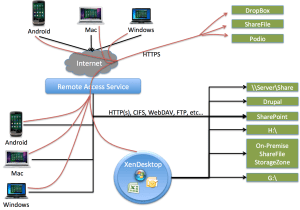
So how are users going to know where to store which type of data, and where and when they can get to it, from which device and from which application? This is getting confusing for them…
OpenSource “Device Tracker” service – Prey
Thanks Dan Brinkmann for this interesting tip about an online open source service that is available in a free and a Pro version. If you like to keep a track of your devices etc this may be something to look at.
Have a look at their webpage (http://preyproject.com) or check out this intro video that also is on their startup page;
Not a fully fledged MDM service but an interesting project and let’s see where this is heading in the future!
//Richard




 The IT Melting Pot!