Archive
#Citrix Knowledge Center Top 10 – December 2012
Citrix Support is focused on ensuring Customer and Partner satisfaction with our products.
One of our initiatives is to increase the ability of our Partners and Customers to leverage self-service avenues via our Knowledge Center.
Find below the Citrix Knowledge Center Top 10 for December 2012.
Top 10 Technical Articles
| Article Number | Article Title |
|---|---|
| CTX129229 | Recommended Hotfixes for XenApp 6.0 and Later on Windows Server 2008 R2 |
| CTX129082 | Application Launch Fails with Web Interface using Internet Explorer 9 |
| CTX132875 | Citrix Receiver Error 2320 |
| CTX804493 | Users Prompted to Download ICA File, Launch.ica, Instead of Launching the Connection |
| CTX105793 | Error: Cannot connect to the Citrix server. Protocol Driver Error |
| CTX133997 | Citrix Receiver 3.x – Issues Fixed in This Release |
| CTX127030 | Citrix Guidelines for Antivirus Software Configuration |
| CTX101644 | Seamless Configuration Settings |
| CTX676151 | How to Install the Citrix ICA Web Clien |
| CTX325140 | Manually and Safely Removing Files that might remain on a System |
Top 10 Whitepapers
| Article Number | Article Title |
|---|---|
| CTX131577 | XenApp 6.x (Windows 2008 R2) – Optimization Guide |
| CTX132799 | XenDesktop and XenApp Best Practices |
| CTX101997 | Citrix Secure Gateway Secure Ticket Authority Frequently Asked Questions |
| CTX133185 | Citrix CloudGateway Express 2.0 – Implementation Guide |
| CTX129761 | XenApp Planning Guide – Virtualization Best Practices |
| CTX134943 | XenDesktop and XenApp Printing – Planning Guide |
| CTX122978 | XenServer: Understanding Snapshots |
| CTX134081 | Planning Guide – Citrix XenApp and XenDesktop Policies |
| CTX128277 | Logon Optimization Guide – XenApp/XenDesktop |
| CTX110351 | User Profile Best Practices for MetaFrame Presentation Server |
Top 10 Hotfixes
| Article Number | Article Title |
|---|---|
| CTX132122 | Hotfix Rollup Pack 1 for Citrix XenApp 6.5 for Microsoft Windows Server 2008 R2 |
| CTX126653 | Citrix Online Plug-in 12.1.44 for Windows with Internet Explorer 9 Support |
| CTX133066 | 12.3 Online Plug-In – Issues Fixed in This Release |
| CTX133882 | Hotfix Rollup Pack 2 for Citrix XenApp 6 for Microsoft Windows Server 2008 R2 |
| CTX135025 | Hotfix XA650R01W2K8R2X64033- For Citrix XenApp 6.5 for Windows Server 2008 R2 |
| CTX116550 | Credential Handling Weakness in Presentation Server Client for Windows |
| CTX135709 | Hotfix XS61E006 – For XenServer 6.1.0 |
Continue reading here!
//Richard
#EnvokeIT is expanding – looking for a new exciting career? #Mobility, #Networking, #Citrix
It’s exciting! EnvokeIT continues to expand and we are looking for new colleagues within the Mobility, Networking and Virtualization areas. It doesn’t matter if you currently are a Junior or Senior consultant! It doesn’t matter, just as long as you have the will to grow! Come join us on our exciting journey!

We are looking for someone who wants to grow with us!
EnvokeIT are confident that our employees are our most important assets. Employees who are happy and like to go to work makes a difference. Our continued success is based on finding, retaining and developing talents that understands customers’ business processes and future IT needs. As a consultant with EnvokeIT you are employed by us but you work with one of our clients. Assignments can be for longer or shorter periods depending on what you are working with, what customers need and your personal preferences. You build on your resume with new experiences and skills, while contributing to customer business activities with your knowledge and skills.
We want to be one of the best and most exciting employers in the IT industry. As an employee of EnvokeIT you are given a unique opportunity to participate in the company’s further development. Periodically, you will be invited to consultant meetings where you get the chance to meet your peers that are working on various assignments on EnvokeITs behalf. Sometimes we organize lectures that will be a part..
Continue reading and apply here!
//Richard
Free eBook – Secrets of the #Citrix Support Ninjas – #XenApp, #XenDesktop, #NetScaler
Secrets of the Citrix Support Ninjas

So we decided to pick their brains and gather a bunch of ‘power tips’ to help administrators like you run better Citrix environments.
The result is this free eBook: Secrets of the Support Ninjas.
It’s a quick, easy-to-browse collection of insider tips and tricks from the people who know best – organized by four products: XenApp, XenDesktop, XenServer and NetScaler.
If you only take away a single tip to help you run your environment, it’ll be well worth the download…
Download here!
//Richard
Put Citrix Receiver App Banners in Web Interface for Android and iOS – #Citrix, #Receiver
A good blog post from Roy Tokeshi about Citrix Receiver setup and provisioning.
I’ve used the Citrix Mobile Receiver Setup URL Generator for quite some time and like it (but now of course you’ll get pretty far with email-based enrolment if you can use that), but it’s still valid for some use cases and scenarios. But to add the banner to the download of the app itself is something I’ve not done, interesting!
One of the cool things you can do to help your users connect to your XenDesktop and XenApp environments is the Citrix Mobile Receiver Setup URL Generator at:http://community.citrix.com/MobileReceiverSetupUrlGenerator/

The output of this generator is a couple of links. The first is an iOS configuration link and the second is the Android configuration link. What is great about this is once the user gets this link on their iOS or Android device, via email, text message, or carrier pigeon with a micro SD card strapped to its leg , all the user has to do is click on the link and the local instance of the mobile Citrix Receiver is auto-configured.
- VCDC Email
- Application warning iOS
Something that Apple had made available is called a Smart App Banner. (I suggest that you don’t shout “Smart App Banners!” across the cube farm unless you want to start a bunch of prairie dogging or HR emails.) Regardless, the folks at Apple created an easy way for you to advertise the Citrix Receiver app itself from within web interface. At Citrix Systems we have had had a couple of different temporarily consistent hostnames we point at to get our apps and desktops. Among my customers, apps.company.com or atwork.company.com have popped up a few times. The point being, the user puts a name in the browser and the web interface client detect takes over, suggests a client version for Mac, Windows, Java and off they go to application or desktop nirvana. But what about the lonely neglected mobile devices. We tell our bosses that we need iPhones, iPads, and Androids for work. So the smart thing to do is to get a few work apps on there before bosses catch us playing Angry Birds, or Radical.FM So the question is, “How do I use this on my web interface?” That is an excellent question. We are going to take the cute little meta tag referenced in that Apple Dev article and paste that right into the login.aspx file in our web interface site. For the purposes of demonstration, I’m going to use our Virtual Computing Demo Center or VCDC as an example. The default web interface that acts as a front end of the demo instance is hosted on a virtual machine acting as the DDC for XenDesktop. The screenshots I am using are based on the connection I make to a XenApp desktop logged on as administrator. \\ddc\c$\inetpub\wwwroot\Citrix\DesktopWeb\auth\login.aspx looked like this:

Now, modified at the top line it looks like this.

Remember that this is something that is only supported in iOS and in fact from the default Safari browser. Here are some screenshots…
Continue reading here!
//Richard
Great UI Theme improvement setting – #AccessGateway, #NetScaler, #Citrix
I must say finally! It’s not a 100% yet for everyone out there but it’s a step in the right direction. The NetScaler, Access Gateway, Web Interface, StoreFront and Receiver has not really been in synch when it comes to UI and end-user experience…. But now Citrix has improved it!
Access Gateway is a secure remote access product and hence tends to be the entry point for corporate users, wanting to access their enterprise applications and desktops. Given this, it makes sense for corporates, to try and customize the logon experience on Access Gateway, to match their corporate look and feel.
Access Gateway has always allowed for this customization, though, it’s been somewhat of a tedious process. With the new 10.0.71.6014.e release, we are making an attempt to simplify this experience.
UI Customization on Access Gateway is a multi-step process:
- Access the built in theme web pages and customize them, to match the corporate requirements
- Apply the modified theme (collection of web pages) at the right location
- Modify certain scripts to make this change persistent
- Every time the firmware has to be upgraded, take a backup of the customized pages and scripts and re-apply the same after the upgrade.
A quick Google search will give you a number of helpful and very accurate blogs/articles, on how to tweak the web pages to customize and create your corporate look and feel. Some of my favorites are:
- http://blogs.citrix.com/2012/04/19/green-bubble-theme-for-citrix-netscaler/
- http://jariangibson.com/2012/04/16/apply-citrix-receiver-theme-to-netscaleraccess-gateway-10/
With this new release, we have automated all the other steps (i.e. 2-4) for you. Instead of having to worry about how to apply this theme, or having to take backups every time you upgrade, the new release will automatically handle this for you.
To see the new offering in this r…

Continue reading here!
//Richard
Why no Snaphot feat. on NetScaler like on AG? – #Citrix, #NetScaler
Ok, I had the “pleasure” to be working with an Access Gateway setup a little while ago… and I don’t know if I should actually say that it was a pleasure when I all did was missing the NetScaler.
But there is one feature that Access Gateway has that NetScaler doesn’t that I like and see a need for; Snapshots!
Why hasn’t Citrix build the same EASY way to make a snapshot of a config on NetScaler??? This would simplify things a lot from a change management point of view. You could of course make this happen yourself but need to be savvy and it’s hazzle… It would also ensure that admins that aren’t hardcore NetScaler nerds actually could get some confidence to change stuff and have a back out plan to revert to a previous snapshot if something goes wrong.
And the great thing about a snapshot is that it represents all the Access Gateway settings, licenses, and certificates at a specific time. If you have multiple software versions installed on Access Gateway, you can have snapshots that span the different software versions. Imagine if there was a button you could press to do that done on the NetScaler!
Video of how it works: How To: Take and Restore Snapshots on Citrix Access Gateway 5.0
Creating Snapshots to Manage Access Gateway Configuration Settings
I think that this will be a good thing to add now when more shops will setup Access Gateway Enterprise on NetScaler and only use it for just that…especially now when it’s also going End of Life (EOL).
Citrix: Please make this happen! 😉
//Richard
#Citrix #Receiver 3.4 and 11.7 = is the #SmartAccess story more real now? – #CloudGateway, #AGEE, #NetScaler, #StoreFront
Citrix has now released version 3.4 of the Receiver for Mac and Windows, but what is the main added value with this release?
First of I’d like to ask you to review my previous post where I questioned the Citrix SmartAccess story that I believe is not there end-to-end and that really is a lacking feature for scenarios where you’d for instance want to support more BYOD models etc. You need to determine the person accessing the service and also what what type of device it is, trusted or not etc. And I in the previous post I argued that Citrix doesn’t deliver according to their SmartAccess story;
#Citrix #SmartAccess = A complete story or not? – #NetScaler #AGEE #EPA
And for you that haven’t read about the new Receiver 11.7 or OS X and 3.4 for Windows check these posts:
Receiver for Windows 3.4 released
Receiver for Mac 11.7 Released
The table below is from the previous SmartAccess post and my theoretical review right now is that the SmartAccess story for Windows and Mac OS X clients have improved. As you can see in the two rows for Receiver 3.3 and 11.6 where you would access through a Receiver through an AGEE you would NOT be able to perform host checks using the EPA scans.
This was just not possible though the native Receiver didn’t have that capability to trigger the EPA scans. And the EPA plugin itself was not available in the native Receiver on the OS X, it was bundled into the Access Gateway plugin.
| Client | Access method | EPA/Host-check possible on AGEE | Comment |
| Windows with Citrix Receiver for Windows 3.3 | Receiver 3.3 | NO | You’ll never be able to do host-checks on this device if Receiver access is used due to that the Receiver does not have EPA scan capabilities. |
| Windows with Citrix Receiver for Windows 3.4 | Receiver 3.4 | YES | Now when the Receiver is communicating with the Access Gateway plugin and shares login credentials then you can leverage the AGEE plugin to perform EPA scans and then allow different session policies and profiles depending on the EPA scan result, and at the same time of course also pass that through to StoreFront/WI and into XenApp/XenDesktop.It does however then require that you get the AGEE plugin installed on the devices, which may be another dilemma… |
| OS X with Citrix Receiver for Mac 11.6 | Receiver 11.6 | NO | You’ll never be able to do host-checks on this device if Receiver access is used due to that the Receiver does not have EPA scan capabilities. |
| OS X with Citrix Receiver for Mac 11.7 | Receiver 11.7 | YES | Now when the Receiver is communicating with the Access Gateway plugin and shares login credentials then you can leverage the AGEE plugin to perform EPA scans and then allow different session policies and profiles depending on the EPA scan result, and at the same time of course also pass that through to StoreFront/WI and into XenApp/XenDesktop.It does however then require that you get the AGEE plugin installed on the devices, which may be another dilemma… |
#Citrix #NetScaler Insight 1.0 GA unleashed!!
Ok, here it is! 🙂
Here is the Citrix blog about it;
NetScaler Insight 1.0 Beta has been received with great excitement and with a huge response from a range of customers and field.
Some were waiting for a product like NetScaler Insight since years, some wanted to see what AppFlow can do, some were taken away by the ease of configuration, whereas some ended up writing about ithttp://blog.itvce.com/?p=3101 & http://blog.itvce.com/?p=3167.
With the support and detailed feedback received from 1.0 Beta participants incorporated, we bring you theNetScaler Insight 1.0 GA!!
NetScaler Insight 1.0 brings following key features to the table:
- Centralized Dashboard
- Real time and Historical stats
- Layer 3 to Layer 7 stats
- Complete Application Stats
- Response time measurement
- Client/Server Statistics
- URL level stats with Waterfall
- HTTP request/response analytics
- Debugging and troubleshooting
- Few click setup and configuration
- NITRO API support for Automation
- Add NetScaler under Inventory with SNIP
- Access NetScaler Insight using hostname/IP address
People have been enthralled with what it can do. Don’t miss a chance to experience it yourself!
Download Link:
//Richard
Why only Platinum version of NetScaler SDX VPX Package? – #NetScaler #SDX #Citrix
Why does Citrix only sell Platinum versions in bundles of 5 for the SDX platform? Wouldn’t it be great to be able to purchase for instance Enterprise or Standard for the VPX’s you want to setup for capabilities provided by the Enterprise version of NetScaler?
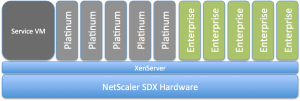
I’d like to buy that instead… what about you guys? Or does this model exist?
//Richard
#Citrix #GSLB blog post – GeoLite City as NetScaler location database
This was a good blog post! And I really like GSLB, of course there may be functionalities that you’d like to advance etc but it’s great! And this post addresses one topic of it;
You may know this problem: Your boss made you build several data centers around the globe with a bunch of NetScalers in the mix to load balance services across the various locations using GSLB (Global Server Load Balancing). But when it comes to configuring a static proximity geo IP database to help with that not too easy to understand dynamic proximity feature you notice most of these databases are commercial and you are out of budget. Luckily though, there are several free versions of geo IP databases out there, which reportedly work quite well. Before using one of those, you should carefully review the license terms. Some aren’t necessarily free for commercial use…
Moreover, these free versions are very popular, well maintained and were frequently updated (I say were because with the assignment of the last IP block by RIPE earlier in 2012 there shouldn’t be too many changes to the databases anymore) . So it’s fair to say that many of our clients who are using these databases are very satisfied with them.
Why is a database with IP addresses and address blocks necessary for such a setup? GSLB responds to DNS requests for a domain name with an IP address of a member service. Which service IP is returned is dependent on the load-balancing algorithm used, for example least connection, simple round robin or more commonly used, proximity to the client (or the clients local DNS to be precise). For proximity based GSLB, when a client sends a DNS request, the system determines the best suitable site…
Continue reading here!
//Richard




 The IT Melting Pot!