Archive
#Citrix #AppController 2.5 Implementation Tips – #CloudGateway, #BYOD
Great blog post by Matthew Brooks!
AppController is a component of the Citrix CloudGateway Enterprise suite that orchestrates access to Enterprise Cloud applications. Those applications may take many forms including Mobile Applications, Software-as-a-Service hosted in public clouds, and Web links. Below I provided some tips to help with the implementation of AppController 2.5 (which is the latest version as of the publishing of this blog).
System Related
Including settings such as the Hostname, SSL certificates, and Restore.
TIPs:
- Take a hypervisor level snapshot after the initial installation so that you can easily return to that base level if configuration or integrations efforts go awry.
- The hostname cannot contain special characters in the AppController certificate signing request.
- The hostname must match SSL certificate.
- The system cert must be chained to its CA/(s).
Active Directory Related
Including settings such as the Server (Domain Controller), Base DN, and Service Account credentials.
TIPs:
- The AppController only supports integration with a single domain. Multiple domains require multiple AppControllers. The NetScaler Access Gateway may be configured to allow users to access a single fully qualified domain name, yet be directed to their respective domain AppController through the use of Global Groups. See CTX116169 for more informationhttp://support.citrix.com/article/CTX116169
- All user accounts must have a first name, last name, and email address configured or they will receive an authorization error when attempting to launch applications. The bind Administrator account must also have email address configured or directory integration will fail.
- Only LDAP (TCP 389) may be configured through the wizard that must be completed initially. Thereafter LDAPS (TCP 636) may be configured through the full administration menu.
- If the server name domain name is a load balanced DNS entry the initial import may work, yet subsequent bind attempts will fail. Alternatively you may use the IP address of an LDAPS load balancer on a Netscaler with specific domain controllers configured as services. See CTX135092 for more information http://support.citrix.com/article/CTX135092
Network Related
Including settings such as the IP address, @Workweb and NTP server.
TIPs:
- Use IP private addresses as system addresses if possible. When Trust Settings are configured for NetScaler Access Gateway it does not allow SSO to public addresses. If public addresses must be used the NetScaler may be configured with an SSL Bridge to access the AppController. See NetScaler Traffic Management document for more information.
- NTP must be configured or SAML authentication may fail for SaaS sites if the time difference is significant.
- When Trust Settings are configured for NetScaler Access…
Continue reading here!
//Richard
Webinar – #Citrix Mobile Device Management – #CloudGateway – @RobSanders
How to secure native iOS and Android email as well as other apps for business use
Thursday, 24th January 2013, 3:00pm GMT (4:00pm CET)
Citrix provides two new mobile apps to support mobile workers with secure email and web browsing on their BYO and corporate mobile devices – @WorkMail and @WorkWeb.Come to this technical webinar to learn more about how these and other native iOS and Android applications can be securely distributed and managed for your business.
Topics include:
- Managing, securing and controlling web and native mobile applications and data
- Secure mobile containers
- Seamless app integration
- Policy-based access controls
- Application-specific Micro VPN
This live webinar presented by Rob Sanders and will be followed by a live Q&A session.
Space is limited.
Register here!
//Richard
New Citrix Access Gateway Release – #AG, #SmartAccess, #Receiver, #Citrix
Ok, just as we expected there is now a new release of Access Gateway that goes hand in hand with the new Receivers as I wrote about in the following posts:
Receiver for Windows 3.4 released
Receiver for Mac 11.7 Released
And of course as you could read in the first post above there are great improvements of the end-user experience when accessing resources, now you have ONE login for both the Receiver and to the Access Gateway plugin. And as that posts also highlights is the support for host check (EPA scans) on Receiver use cases as well! Finally! 😉
More info on the new Access Gateway release 10.0.71.6014.e below:
With the release of Citrix CloudGateway 2.5, comes the release of Citrix Access Gateway 10.0.71.6014.e. Citrix CloudGateway as you are aware, is the Citrix Enterprise Mobility offering, complete with Citrix Receiver running enterprise applications on the end point, Citrix Storefront running your enterprise app store, Citrix AppController running your mobile policy management and Citrix Access Gateway providing remote access to all this infrastructure.
With every CloudGateway release, Access Gateway continues to build incredible integration and smart abilities, which makes it the de-facto remote access solution for your CloudGateway deployments. Access Gateway is the only remote access solution today, which can offer seamless Receiver configuration using Email based discovery and provide intelligent integration with Storefront and AppController, to provide single sign-on to all your enterprise applications.
With this new release, Citrix Access Gateway will be able to provide the following value additions in your CloudGateway deployments:
- Seamless Desktop Receiver experience: With this release of Access Gateway, end users will no longer have to sign into their Access Gateway plug-ins as a manual step, to access apps / sites that require a full SSL tunnel. Receivers automatically launch a SSL VPN session via Access Gateway as needed. Result is – end user just deals with Citrix Receiver and Receiver internally (and automatically) deals with Access Gateway on user’s behalf.
- EPA with ICAProxy / CVPN: Receivers can now seamlessly launch AG plug-ins to connect to an Access Gateway vServer configured with End Point Analysis policies, in ICAProxy and CVPN modes as well. Earlier, this was supported only for Full Tunnel access.
- Session Sharing: Receiver and AG plug-in have always been two separate entities, and because of that, they establish two parallel sessions with Access Gateway. With this release, we have added the smarts in our Receiver and Access Gateway integration, to understand each other, and be able to share the same session with Access Gateway appliance. Good News – this now leads to simplified access from end user perspective, and optimal session/license consumption from Administrator perspective.
- Device Wipe/Lock support for AppController: With CloudGateway 2.5, AppController is launching the ability to register and track mobile devices via AppController. These registered mobile devices can then be locked / wiped, if the..
Continue reading here!
//Richard
#Zenprise is now a part of #Citrix
Zenprise is now officially a part of Citrix! For a press release and additional info read here.
I am really excited about this!! But my initial question about this acquisition is how the offerings will be bundled together. Right now you can purchase CloudGateway to get the MAM capabilities for mobile apps and data, and of course then also deliver XenApp, XenDesktop plus SaaS and internal web services. And that’s a nice offering but now with the more capable MDM parts from Zenprise, what will the license model look like and what will in the end a “Platinum” license provide?
My hope is of course that the whole license model is changed to be aligned with all acquisitions from the past years so that you could purchase a “Platinum” license that truly covers all the capabilities and products to make life easier for everyone….
My fear though is that Zenprise will be added as a separate MDM capability on top of CloudGateway as the “Diamond” edition! 😉 and it will probably exist in both CCU and named user/device models to make life even harder…
Please Citrix: surprise us with a new price and license model that spans the whole product/service stack! 🙂
//Richard
#AppController, #CloudGateway 2.5 released
Hi all,
I guess that some of you already are aware of the new 2.5 release of AppController (a part of the marketing product CloudGateway).. but it’s interesting with a release which I hope is making the product more enterprise ready and that the basic features now are there!
And I guess that many are interesting in that now Android apps, @WorkMail™ and @WorkWeb™ are supported!
I’ll of course do an upgrade and go through my little issue list I created earlier in the post-Synergy post… I hope that these items now are fixed!
- Enterprise/multi-site support with synch of the database. This to ensure that you can have an HA pair setup for instance in Europe and one in the North Americas and have the end-user be logged in against both and have their subscriptions etc. follow them (as well as of course reporting, monitoring etc. etc.)
- Support for really large AD domains with LARGE # of AD users and AD groups
- Support for AD domain structure where the BASE DN is different to where AD users and the AD security groups you want to use for roles
- Role based administration – this has just got to be there. Without it I wouldn’t call it an enterprise product…
These are the updates according to eDocs (they are quite a few so I have high hopes!) 😉
But when reading through the short list of updates I DON’T see multi-site support!! That’s not very Enterprise if you ask me…. This is the first thing I’m gonna check out!
Here is an architectural overview:
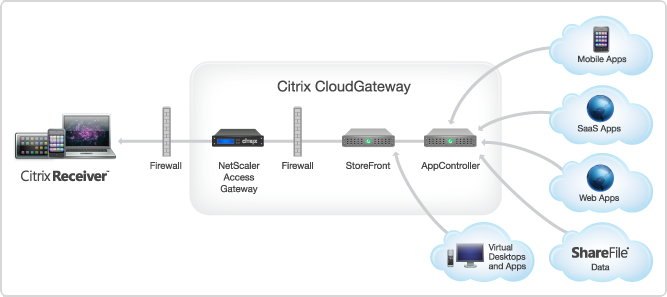
AppController 2.5 supports the following new features:
#Citrix acquires #Zenprise to improve its BYOD capabilities
Wow!
I must say that this is a good move by Citrix! Citrix now gets access to one of the markets most extensive MDM solutions for mobile devices!
The whole story from Citrix has been;
DON’T manage the device, manage the apps and data!
But now I guess that Citrix realised that the need and ideas of many companies out there will require more management of the device and not just the delivery of the apps to it like you’d do with AppController (CloudGateway Enterprise).
So, hat off to this decision! 🙂
Read more about the news here;
Citrix Signs Definitive Agreement to Acquire MDM Leader Zenprise
And why not have a little look at these posts as well;
10 BYOD mobile device management suites you need to know
//Richard
My Post-Synergy View – Update 1 #CitrixSynergy #Citrix #CitrixSummit #ShareFile #CloudGateway
Ok, the week has past and Citrix Summit & Synergy is over. And with this little post I’d like to give you all my view on what the key takeaways are and also how they are related to the enhancement list that I’ve been consolidating.
As always: this is my personal view and I hope you like it, if not browse off to somewhere else! And due to that I missed my wife and kids I took the weekend off completely so this is Update 1, and I’ll summarise my whole Synergy experience in Update 2 later this week! 🙂
I changed the post layout from being a table as we say it in the previous blog into a more “readable” format below. Each heading represents the enhancement request topic and/or the takeaway item, and then the subheading of Description and Status is showing you my personal view on the topic and its status.
Enjoy!
Licensing
Description:
One of the main issues with licensing is that all products don’t supports the license server (NetScaler etc.)
Status:
Not fulfilled.
All products do still not use the license server! This needs to be changed and I’d really like to get some real reporting capabilities in place that can present how licenses are used over time, by whom and by which component (product) in the service stack.
Monitoring & Reporting
Description:
- Ensure that you can get historical concurrent user reports that spans across ALL products (NetScaler/AG, XenApp, XenDesktop etc.).
- Ensure that Citrix provides an end-2-end monitoring and reporting service for the whole Citrix stack. This to ensure that delivery organizations can deliver reports like “Service Availability in %” over time that includes all service components (NetScaler AGEE VIP, StoreFront/WI, PVS/MSC, XenServer, XenApp/VDA, Profile Server, etc. If Citrix isn’t going to do this; then please point on a product that does the job.
Status:
Read more…
Mobile Application Management (MAM) = Complete Mobile Workplace?
Ok, so I’ve been looking at some of the players out there that say they have a “MAM” product and everybody seem so hooked on talking about MAM and how that’s gonna solve all the needs of a Mobile Workplace… and to be totally frank I think that people tend to run to fast with new cool and hip buzz-words or solutions.
To start of with, what is the definition of a MAM system? This is a pretty good summary I’d say that I stole from WikiPedia;
“Mobile Application Management (MAM) describes software and services that accelerate and simplify the creation of internally developed or “in-house” enterprise mobile applications. It also describes the deployment and management of in-house and commercially available mobile apps used in business settings on both company-provided and “bring your own” smartphones and tablet computers.
Mobile application management has also been defined as “the strategy and process around developing/procuring, securing, deploying, accessing, configuring, updating and removing (business) applications from mobile devices used by the employees. To read more at wikipedia click here…”
And does a solution like this provide all the capabilities for businesses today for a complete Mobile Workplace?
Web Interface 5.4 vs. StoreFront 1.2 – What has changed since last comparison?
Hi all,
Ok, let’s start this post by thanking Thomas Koetzing for his newly updated post! Thx a lot man and keep up the great work!
Thomas has summarized most of the features that Web Interface 5.4 offers and how StoreFront matches that, it’s a really good table and one that all of you architects out there shall review and plan accordingly. What are you using today and what are the needs going forward, then once you have your business needs and requirements you have your wanted position and it’s just to make a roadmap of how your service gets there, or not if features are missing, then call Citrix!! 😉
I think that Thomas’s summary is good, one thing to consider though that I really urge you to think of is if you’re planning to use multiple access points around the world for an enterprise. How would this work? What if you have one in Europe, APAC and Americas? You would probably have a couple of NetScalers with AGEE and use GSLB to nicelly provide a simple URL for everyone and network proximity or so to direct the users to the closest entry point. But that regional NetScaler would most likely have its own set of StoreFront servers including a pair of AppControllers to ensure that you don’t have a single point of failure in terms of your internal WAN to get to another regional StoreFront/AppController setup from the local NetScaler AGEE? And if you then think like me; how are you going to do this?
The StoreFront server is relying on the DB for the subscriptions that the end-users have done in terms of selection apps etc for his “workspace”, and the same is with the AppController! There is no “supported” way today that I’ve found where you can synchronize two or multiple sets of HA-pairs of StoreFront or AppControllers so that no matter where the end-user is logging on he/she doesn’t get the same set of subscriptions (apps, desktops, SaaS, etc.) and neither his/her SSO credentials if AppController is used. And just imagine how it would be if you integrate and use the federation of SaaS applications on all locations and an end-user is logging in and subscribing from multiple AppControllers agains for instance Salesforce, and how would you do the overall enterprise reporting? This is the enterprise feature I’m missing and I’m hoping that we could see some solution to this fairly soon!
And it’s now you should start evaluating StoreFront, this is key to understand what it offers now so you know where you are compared to your As-Is architecture with Web Interface and map that to your wanted position going forward!
But a part from that I must say that Thomas did a great job in his comparison and read more about it in detail here!
//Richard




 The IT Melting Pot!