#Ericsson – 10 hot consumer trends for 2013
– Ericsson ConsumerLab has identified some of the most important consumer trends for the coming year
– The cloud reshaping consumer needs and women driving the smartphone market are some of the important trends
– Young people’s behavior changes society and the internet gets put to new use in times of economic uncertainty
As 2012 draws to a close, Ericsson ConsumerLab has identified the hottest consumer trends for 2013 and beyond. For more than 15 years, ConsumerLab has conducted research into people’s values, behavior and ways of using ICT products and services.
Continue reading here!
//Richard
Large collection of Free #Microsoft #eBooks via @anders_keis
This is a great contribution! Thx a lot Anders Keis Hansen for providing the info to me!
A lot of ebooks provided by Microsoft Press including: SharePoint, Visual Studio, Windows Phone, Windows 8, Office 365, Office 2010, SQL Server 2012, Azure, and more.
Many of these ebooks are offered in three formats – PDF, Mobi (Kindle) and epub. Hope you find them useful & Happy Learning!
These books were originally posted by Eric Ligman, you can read the original posts from here:
1- Large collection of Free Microsoft eBooks for you, including: SharePoint, Visual Studio, Windows Phone, Windows 8, Office 365, Office 2010, SQL Server 2012, Azure, and more.
2- Another large collection of Free Microsoft eBooks and Resource Kits for you, including: SharePoint 2013, Office 2013, Office 365, Duet 2.0, Azure, Cloud, Windows Phone, Lync, Dynamics CRM, and more.
Continue reading and downloading here!
//Richard
#Citrix #Receiver 3.4 and 11.7 = is the #SmartAccess story more real now? – #CloudGateway, #AGEE, #NetScaler, #StoreFront
Citrix has now released version 3.4 of the Receiver for Mac and Windows, but what is the main added value with this release?
First of I’d like to ask you to review my previous post where I questioned the Citrix SmartAccess story that I believe is not there end-to-end and that really is a lacking feature for scenarios where you’d for instance want to support more BYOD models etc. You need to determine the person accessing the service and also what what type of device it is, trusted or not etc. And I in the previous post I argued that Citrix doesn’t deliver according to their SmartAccess story;
#Citrix #SmartAccess = A complete story or not? – #NetScaler #AGEE #EPA
And for you that haven’t read about the new Receiver 11.7 or OS X and 3.4 for Windows check these posts:
Receiver for Windows 3.4 released
Receiver for Mac 11.7 Released
The table below is from the previous SmartAccess post and my theoretical review right now is that the SmartAccess story for Windows and Mac OS X clients have improved. As you can see in the two rows for Receiver 3.3 and 11.6 where you would access through a Receiver through an AGEE you would NOT be able to perform host checks using the EPA scans.
This was just not possible though the native Receiver didn’t have that capability to trigger the EPA scans. And the EPA plugin itself was not available in the native Receiver on the OS X, it was bundled into the Access Gateway plugin.
| Client | Access method | EPA/Host-check possible on AGEE | Comment |
| Windows with Citrix Receiver for Windows 3.3 | Receiver 3.3 | NO | You’ll never be able to do host-checks on this device if Receiver access is used due to that the Receiver does not have EPA scan capabilities. |
| Windows with Citrix Receiver for Windows 3.4 | Receiver 3.4 | YES | Now when the Receiver is communicating with the Access Gateway plugin and shares login credentials then you can leverage the AGEE plugin to perform EPA scans and then allow different session policies and profiles depending on the EPA scan result, and at the same time of course also pass that through to StoreFront/WI and into XenApp/XenDesktop.It does however then require that you get the AGEE plugin installed on the devices, which may be another dilemma… |
| OS X with Citrix Receiver for Mac 11.6 | Receiver 11.6 | NO | You’ll never be able to do host-checks on this device if Receiver access is used due to that the Receiver does not have EPA scan capabilities. |
| OS X with Citrix Receiver for Mac 11.7 | Receiver 11.7 | YES | Now when the Receiver is communicating with the Access Gateway plugin and shares login credentials then you can leverage the AGEE plugin to perform EPA scans and then allow different session policies and profiles depending on the EPA scan result, and at the same time of course also pass that through to StoreFront/WI and into XenApp/XenDesktop.It does however then require that you get the AGEE plugin installed on the devices, which may be another dilemma… |
#AppController, #CloudGateway 2.5 released
Hi all,
I guess that some of you already are aware of the new 2.5 release of AppController (a part of the marketing product CloudGateway).. but it’s interesting with a release which I hope is making the product more enterprise ready and that the basic features now are there!
And I guess that many are interesting in that now Android apps, @WorkMail™ and @WorkWeb™ are supported!
I’ll of course do an upgrade and go through my little issue list I created earlier in the post-Synergy post… I hope that these items now are fixed!
- Enterprise/multi-site support with synch of the database. This to ensure that you can have an HA pair setup for instance in Europe and one in the North Americas and have the end-user be logged in against both and have their subscriptions etc. follow them (as well as of course reporting, monitoring etc. etc.)
- Support for really large AD domains with LARGE # of AD users and AD groups
- Support for AD domain structure where the BASE DN is different to where AD users and the AD security groups you want to use for roles
- Role based administration – this has just got to be there. Without it I wouldn’t call it an enterprise product…
These are the updates according to eDocs (they are quite a few so I have high hopes!) 😉
But when reading through the short list of updates I DON’T see multi-site support!! That’s not very Enterprise if you ask me…. This is the first thing I’m gonna check out!
Here is an architectural overview:
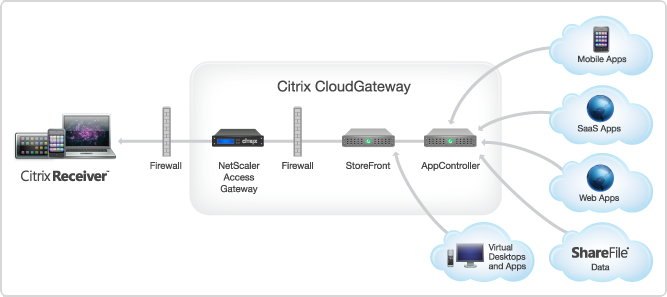
AppController 2.5 supports the following new features:
Receiver for Windows 3.4 released
About Receiver for Windows 3.4
Citrix Receiver for Windows provides users with self-service access to resources published on XenApp or XenDesktop servers. Receiver combines ease of deployment and use, and offers quick, secure access to hosted applications, desktops, and data. Receiver also provides on-demand access to Windows, Web, and Software as a Service (SaaS) applications. You can use it for Web access or configure it for use with Citrix CloudGateway.
What’s new
Citrix Receiver for Windows 3.4 (CitrixReceiver.exe) provides the following new features and enhancements.
- Single authentication to the Access Gateway:
- Use of a single session for both VPN and clientless access so that a Receiver user logs on once for both types of access and consumes only one license. This feature requires StoreFront.
- Automatic routing of ICA traffic through the Access Gateway ICA proxy for optimal user experience.
- Automatic start-up of a VPN tunnel when a user logs on. This feature requires that you disable the Single Sign-On with Windows setting on the Access Gateway.
- Support for Access Gateway SmartAccess controls.
- Improved logon and logoff operations:
- Users are prompted to log on to Receiver only when a logon is required. Actions that require a log on include starting an app from Receiver or the Start menu, using the Refresh Apps command, viewing or searching for apps, or adding an account. A user is logged on only to the account associated with the requested resource.
- Users remain logged on until choosing to log off or exit Receiver, roam from the internal network to an external network, or delete passwords.
- A VPN tunnel is established when a remote user performs an action that results in a logon. Internal users are logged on to StoreFront.
- Support for Windows 8. You can use Receiver for Windows 3.4 on Intel-based Windows 8 devices. (Receiver for Windows 8/RT is available on the Windows App Store for ARM-based Windows 8 devices.)
- Support for Windows Server 2012 R2, 64-bit edition.
- Support for Project Thor Technical Preview (XenApp Connector). Receiver for Windows 3.4 can be used with Project Thor Technical Preview to deliver apps with Microsoft System Center 2012 Configuration Manager.
- Usability improvements, including:
- App and desktop Start menu shortcuts are no longer copied to other devices, enabling users to control the location of shortcuts on each of their devices.
- The Request button is removed. Users can now simply click to add an app and, if a request for permission to add the app is required, a dialog box appears.
- Arrow keys can be used to navigate search results.
- Users will experience fewer dialog boxes when adding and removing apps.
- Error messages and certificate warnings are clearer.
- Users can reset Receiver to factory defaults. For information of preventing user resets, see http://support.citrix.com/article/CTX135941 in the Citrix Knowledge Center.
- Support for session pre-launch. The session pre-launch feature reduces launch times for applications delivered through Web Interface sites.
- Support for ShareFile StorageZones. Receiver for Windows supports both ShareFile-managed cloud storage and on-premises StorageZones.
- Upgraded FIPS support. Receiver for Windows 3.4 supports certificates with a minimum public key of 2,048-bit RSA and a SHA256 signature hash algorithm.
Receiver for Windows Enterprise
The Receiver for Windows Enterprise 3.4 package (CitrixReceiverEnterprise.exe) provides the following enhancements:
- Support for smart card single sign-on for Windows 7 devices. When used with Web Interface, Receiver for Windows Enterprise 3.4 enables smart card pass-through authentication from Windows 7 devices.
- Support for Fast Connect. Fast Connect provides the necessary technology for partners to rapidly authenticate users to Citrix sessions or desktops.
For information about Receiver for Windows Enterprise, including compatible systems, refer to the Receiver for Windows 3.2 documentation in Citrix eDocs.
Receiver for Mac 11.7 Released
About Receiver for Mac 11.7
Updated: 2012-12-19
Citrix Receiver for Mac provides users with self-service access to resources published on XenApp or XenDesktop servers. Receiver combines ease of deployment and use, and offers quick, secure access to hosted applications, desktops, and data.
Receiver also provides on-demand access to Windows, Web, and Software as a Service (SaaS) applications. You can use it for Web access or configure it for use with Citrix CloudGateway.
What’s new
- Single authentication to the Access Gateway:
- Use of a single session for both VPN and clientless access so that a Receiver user logs on once for both types of access and consumes only one license.
- Automatic routing of ICA traffic through the Access Gateway ICA proxy for optimal user experience.
- Automatic start-up of a VPN tunnel when a user logs on. This feature requires that you disable the Single Sign-On with Windows setting on the Access Gateway.
- Improved logon and logoff operations:
- Users are prompted to log on to Receiver only when a logon is required. Actions that require a log on include starting an app from Receiver or the Finder, using the Refresh Apps command, viewing or searching for apps, or adding an account. A user is logged on only to the account associated with the requested resource.
- Users remain logged on until choosing to log off or exit Receiver, roam from the internal network to an external network, or delete passwords.
- A VPN tunnel is established only if needed. Internal users are logged on to StoreFront.
- Usability improvements, including:
- Upgraded FIPS support. Receiver supports certificates with a public key of 2,048-bit RSA and a SHA256 signature hash algorithm.
- Support for ShareFile StorageZones. Receiver provides support for ShareFile StorageZones. StorageZones enable you to optimize ShareFile performance by locating data storage close to users and also allow you to control storage for compliance purposes. For more information about StorageZones, see the Sharefile documentation in eDocs.
Free online Computer Science courses from #Harvard College
Ok, this is really interesting (at least for a nerd like myself)!
I just stumbled across this website where the Harvard College hosts some of its courses online, you can view video recording from classes, get access to all slides, source code etc and take the course for free yourself!
They now have the following courses up there;
- Computer Science 50: Introduction to Computer Science I – Introduction to the intellectual enterprises of computer science and the art of programming. This course teaches students how to think algorithmically and solve problems efficiently. Topics include abstraction, algorithms, encapsulation, data structures, databases, memory management, security, software development, virtualization, and websites. Languages include C, PHP, and JavaScript plus SQL, CSS, and HTML. Problem sets inspired by real-world domains of biology, cryptography, finance, forensics, and gaming. Designed for concentrators and non-concentrators alike, with or without prior programming experience.
- Computer Science 164: Mobile Software Engineering – Introduction to principles of software engineering for mobile devices and best practices, including code reviews, source control, and unit tests. Topics include Ajax, encapsulation, event handling, HTTP, memory management, MVC, object-oriented design, and user experience. Languages include HTML5, JavaScript, Objective-C, and PHP. Projects include mobile web apps and native iOS apps.
- Computer Science E1: Understanding Computers and the Internet – This course is all about understanding: understanding what’s going on inside your computer when you flip on the switch, why tech support has you constantly rebooting your computer, how everything you do on the Internet can be watched by others, and how your computer can become infected with a worm just by turning it on. In this course we demystify computers and the Internet, along with their jargon, so that students understand not only what they can do with each but also how it all works and why. Students leave this course armed with a new vocabulary and equipped for further exploration of computers and the Internet. Topics include hardware, software, the Internet, multimedia, security, website development, programming, and dotcoms. Through optional hands-on sections and workshops, local students have opportunities to dissect as well as upgrade a computer with additional hardware, search the Internet more effectively, build a wireless network, create digital images, eradicate spyware, and design webpages. Problem sets offer online students similar opportunities. This course is designed both for those with little, if any, computer experience and for those who use a computer every day.
- Computer Science E76: Building Mobile Applications – Today’s applications are increasingly mobile. Computers are no longer confined to desks and laps but instead live in our pockets and hands. This course teaches students how to build mobile apps for Android and iOS, two of today’s most popular platforms, and how to deploy them in Android Market and the App Store. Students learn how to write native apps for Android using Eclipse and the Android SDK, how to write native apps for iPhones, iPod touches, and iPads using Xcode and the iOS SDK, and how to write web apps for both platforms.
Continue reading and take the courses here!
Happy coding! 😉
//Richard
Hotfix Rollup Pack 1 for #Citrix #XenApp 6.5 for Microsoft Windows Server 2008 R2
Ok, yet another update for XenApp we need to handle…. sigh…
But I suggest that you have a look at it, try it and get it rolled out…
Read more here!
//Richard
#Citrix #NetScaler Insight 1.0 GA unleashed!!
Ok, here it is! 🙂
Here is the Citrix blog about it;
NetScaler Insight 1.0 Beta has been received with great excitement and with a huge response from a range of customers and field.
Some were waiting for a product like NetScaler Insight since years, some wanted to see what AppFlow can do, some were taken away by the ease of configuration, whereas some ended up writing about ithttp://blog.itvce.com/?p=3101 & http://blog.itvce.com/?p=3167.
With the support and detailed feedback received from 1.0 Beta participants incorporated, we bring you theNetScaler Insight 1.0 GA!!
NetScaler Insight 1.0 brings following key features to the table:
- Centralized Dashboard
- Real time and Historical stats
- Layer 3 to Layer 7 stats
- Complete Application Stats
- Response time measurement
- Client/Server Statistics
- URL level stats with Waterfall
- HTTP request/response analytics
- Debugging and troubleshooting
- Few click setup and configuration
- NITRO API support for Automation
- Add NetScaler under Inventory with SNIP
- Access NetScaler Insight using hostname/IP address
People have been enthralled with what it can do. Don’t miss a chance to experience it yourself!
Download Link:
//Richard
#Citrix acquires #Zenprise to improve its BYOD capabilities
Wow!
I must say that this is a good move by Citrix! Citrix now gets access to one of the markets most extensive MDM solutions for mobile devices!
The whole story from Citrix has been;
DON’T manage the device, manage the apps and data!
But now I guess that Citrix realised that the need and ideas of many companies out there will require more management of the device and not just the delivery of the apps to it like you’d do with AppController (CloudGateway Enterprise).
So, hat off to this decision! 🙂
Read more about the news here;
Citrix Signs Definitive Agreement to Acquire MDM Leader Zenprise
And why not have a little look at these posts as well;
10 BYOD mobile device management suites you need to know
//Richard




 The IT Melting Pot!