Archive
#AppController, #CloudGateway 2.5 released
Hi all,
I guess that some of you already are aware of the new 2.5 release of AppController (a part of the marketing product CloudGateway).. but it’s interesting with a release which I hope is making the product more enterprise ready and that the basic features now are there!
And I guess that many are interesting in that now Android apps, @WorkMail™ and @WorkWeb™ are supported!
I’ll of course do an upgrade and go through my little issue list I created earlier in the post-Synergy post… I hope that these items now are fixed!
- Enterprise/multi-site support with synch of the database. This to ensure that you can have an HA pair setup for instance in Europe and one in the North Americas and have the end-user be logged in against both and have their subscriptions etc. follow them (as well as of course reporting, monitoring etc. etc.)
- Support for really large AD domains with LARGE # of AD users and AD groups
- Support for AD domain structure where the BASE DN is different to where AD users and the AD security groups you want to use for roles
- Role based administration – this has just got to be there. Without it I wouldn’t call it an enterprise product…
These are the updates according to eDocs (they are quite a few so I have high hopes!) 😉
But when reading through the short list of updates I DON’T see multi-site support!! That’s not very Enterprise if you ask me…. This is the first thing I’m gonna check out!
Here is an architectural overview:
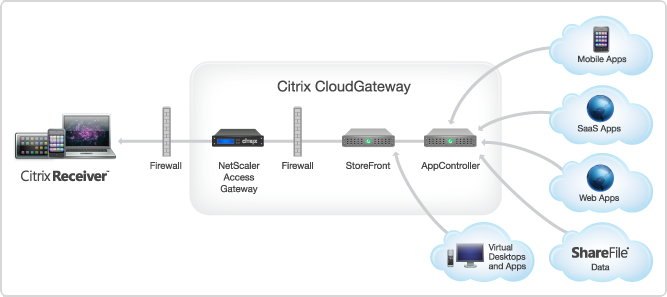
AppController 2.5 supports the following new features:
Receiver for Windows 3.4 released
About Receiver for Windows 3.4
Citrix Receiver for Windows provides users with self-service access to resources published on XenApp or XenDesktop servers. Receiver combines ease of deployment and use, and offers quick, secure access to hosted applications, desktops, and data. Receiver also provides on-demand access to Windows, Web, and Software as a Service (SaaS) applications. You can use it for Web access or configure it for use with Citrix CloudGateway.
What’s new
Citrix Receiver for Windows 3.4 (CitrixReceiver.exe) provides the following new features and enhancements.
- Single authentication to the Access Gateway:
- Use of a single session for both VPN and clientless access so that a Receiver user logs on once for both types of access and consumes only one license. This feature requires StoreFront.
- Automatic routing of ICA traffic through the Access Gateway ICA proxy for optimal user experience.
- Automatic start-up of a VPN tunnel when a user logs on. This feature requires that you disable the Single Sign-On with Windows setting on the Access Gateway.
- Support for Access Gateway SmartAccess controls.
- Improved logon and logoff operations:
- Users are prompted to log on to Receiver only when a logon is required. Actions that require a log on include starting an app from Receiver or the Start menu, using the Refresh Apps command, viewing or searching for apps, or adding an account. A user is logged on only to the account associated with the requested resource.
- Users remain logged on until choosing to log off or exit Receiver, roam from the internal network to an external network, or delete passwords.
- A VPN tunnel is established when a remote user performs an action that results in a logon. Internal users are logged on to StoreFront.
- Support for Windows 8. You can use Receiver for Windows 3.4 on Intel-based Windows 8 devices. (Receiver for Windows 8/RT is available on the Windows App Store for ARM-based Windows 8 devices.)
- Support for Windows Server 2012 R2, 64-bit edition.
- Support for Project Thor Technical Preview (XenApp Connector). Receiver for Windows 3.4 can be used with Project Thor Technical Preview to deliver apps with Microsoft System Center 2012 Configuration Manager.
- Usability improvements, including:
- App and desktop Start menu shortcuts are no longer copied to other devices, enabling users to control the location of shortcuts on each of their devices.
- The Request button is removed. Users can now simply click to add an app and, if a request for permission to add the app is required, a dialog box appears.
- Arrow keys can be used to navigate search results.
- Users will experience fewer dialog boxes when adding and removing apps.
- Error messages and certificate warnings are clearer.
- Users can reset Receiver to factory defaults. For information of preventing user resets, see http://support.citrix.com/article/CTX135941 in the Citrix Knowledge Center.
- Support for session pre-launch. The session pre-launch feature reduces launch times for applications delivered through Web Interface sites.
- Support for ShareFile StorageZones. Receiver for Windows supports both ShareFile-managed cloud storage and on-premises StorageZones.
- Upgraded FIPS support. Receiver for Windows 3.4 supports certificates with a minimum public key of 2,048-bit RSA and a SHA256 signature hash algorithm.
Receiver for Windows Enterprise
The Receiver for Windows Enterprise 3.4 package (CitrixReceiverEnterprise.exe) provides the following enhancements:
- Support for smart card single sign-on for Windows 7 devices. When used with Web Interface, Receiver for Windows Enterprise 3.4 enables smart card pass-through authentication from Windows 7 devices.
- Support for Fast Connect. Fast Connect provides the necessary technology for partners to rapidly authenticate users to Citrix sessions or desktops.
For information about Receiver for Windows Enterprise, including compatible systems, refer to the Receiver for Windows 3.2 documentation in Citrix eDocs.
Receiver for Mac 11.7 Released
About Receiver for Mac 11.7
Updated: 2012-12-19
Citrix Receiver for Mac provides users with self-service access to resources published on XenApp or XenDesktop servers. Receiver combines ease of deployment and use, and offers quick, secure access to hosted applications, desktops, and data.
Receiver also provides on-demand access to Windows, Web, and Software as a Service (SaaS) applications. You can use it for Web access or configure it for use with Citrix CloudGateway.
What’s new
- Single authentication to the Access Gateway:
- Use of a single session for both VPN and clientless access so that a Receiver user logs on once for both types of access and consumes only one license.
- Automatic routing of ICA traffic through the Access Gateway ICA proxy for optimal user experience.
- Automatic start-up of a VPN tunnel when a user logs on. This feature requires that you disable the Single Sign-On with Windows setting on the Access Gateway.
- Improved logon and logoff operations:
- Users are prompted to log on to Receiver only when a logon is required. Actions that require a log on include starting an app from Receiver or the Finder, using the Refresh Apps command, viewing or searching for apps, or adding an account. A user is logged on only to the account associated with the requested resource.
- Users remain logged on until choosing to log off or exit Receiver, roam from the internal network to an external network, or delete passwords.
- A VPN tunnel is established only if needed. Internal users are logged on to StoreFront.
- Usability improvements, including:
- Upgraded FIPS support. Receiver supports certificates with a public key of 2,048-bit RSA and a SHA256 signature hash algorithm.
- Support for ShareFile StorageZones. Receiver provides support for ShareFile StorageZones. StorageZones enable you to optimize ShareFile performance by locating data storage close to users and also allow you to control storage for compliance purposes. For more information about StorageZones, see the Sharefile documentation in eDocs.
Hotfix Rollup Pack 1 for #Citrix #XenApp 6.5 for Microsoft Windows Server 2008 R2
Ok, yet another update for XenApp we need to handle…. sigh…
But I suggest that you have a look at it, try it and get it rolled out…
Read more here!
//Richard
#Citrix #NetScaler Insight 1.0 GA unleashed!!
Ok, here it is! 🙂
Here is the Citrix blog about it;
NetScaler Insight 1.0 Beta has been received with great excitement and with a huge response from a range of customers and field.
Some were waiting for a product like NetScaler Insight since years, some wanted to see what AppFlow can do, some were taken away by the ease of configuration, whereas some ended up writing about ithttp://blog.itvce.com/?p=3101 & http://blog.itvce.com/?p=3167.
With the support and detailed feedback received from 1.0 Beta participants incorporated, we bring you theNetScaler Insight 1.0 GA!!
NetScaler Insight 1.0 brings following key features to the table:
- Centralized Dashboard
- Real time and Historical stats
- Layer 3 to Layer 7 stats
- Complete Application Stats
- Response time measurement
- Client/Server Statistics
- URL level stats with Waterfall
- HTTP request/response analytics
- Debugging and troubleshooting
- Few click setup and configuration
- NITRO API support for Automation
- Add NetScaler under Inventory with SNIP
- Access NetScaler Insight using hostname/IP address
People have been enthralled with what it can do. Don’t miss a chance to experience it yourself!
Download Link:
//Richard
#Citrix acquires #Zenprise to improve its BYOD capabilities
Wow!
I must say that this is a good move by Citrix! Citrix now gets access to one of the markets most extensive MDM solutions for mobile devices!
The whole story from Citrix has been;
DON’T manage the device, manage the apps and data!
But now I guess that Citrix realised that the need and ideas of many companies out there will require more management of the device and not just the delivery of the apps to it like you’d do with AppController (CloudGateway Enterprise).
So, hat off to this decision! 🙂
Read more about the news here;
Citrix Signs Definitive Agreement to Acquire MDM Leader Zenprise
And why not have a little look at these posts as well;
10 BYOD mobile device management suites you need to know
//Richard
Why only Platinum version of NetScaler SDX VPX Package? – #NetScaler #SDX #Citrix
Why does Citrix only sell Platinum versions in bundles of 5 for the SDX platform? Wouldn’t it be great to be able to purchase for instance Enterprise or Standard for the VPX’s you want to setup for capabilities provided by the Enterprise version of NetScaler?
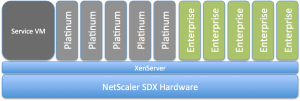
I’d like to buy that instead… what about you guys? Or does this model exist?
//Richard
User Data Mess! #ShareFile, #Podio, #DropBox #SmartAccess etc…
This blog post is not really supposed to give any clear message, just to confuse a bit more and see if anyone out there can assist in clearing the view going forward from a strategy point of view.
The main question is; how are users going to leverage and consume services so that they know where to store and get to their data, collaborate with it, archive it etc.?
Right now I personally live in a very confused world, but I’m still a bit of a geek so I got a fairly good idea on how and where to store my data so that I can reach it and store it the best possible way. But just today I have the following services and capabilities that I consume;
- Personal Data
- DropBox
- iCloud
- Local Macbook Air that is backed up to my TimeMachine
- DVD’s etc…
- Corporate Data
- ShareFile (On-premise and public ShareFile service)
- DropBox
- H:\ drive
- SharePoint (Office 365)
- Document management system
This picture is an ugly and quickly put together one but kind of highlight the problem we face as solution architects when we shall try and paint the way forward and the wanted position for our corporation in terms of how to provide cost effective, simple and intuitive storage services to our end-users.
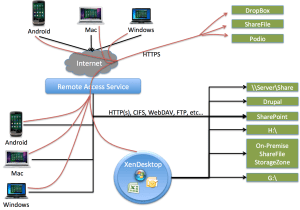
So how are users going to know where to store which type of data, and where and when they can get to it, from which device and from which application? This is getting confusing for them…
#Citrix #GSLB blog post – GeoLite City as NetScaler location database
This was a good blog post! And I really like GSLB, of course there may be functionalities that you’d like to advance etc but it’s great! And this post addresses one topic of it;
You may know this problem: Your boss made you build several data centers around the globe with a bunch of NetScalers in the mix to load balance services across the various locations using GSLB (Global Server Load Balancing). But when it comes to configuring a static proximity geo IP database to help with that not too easy to understand dynamic proximity feature you notice most of these databases are commercial and you are out of budget. Luckily though, there are several free versions of geo IP databases out there, which reportedly work quite well. Before using one of those, you should carefully review the license terms. Some aren’t necessarily free for commercial use…
Moreover, these free versions are very popular, well maintained and were frequently updated (I say were because with the assignment of the last IP block by RIPE earlier in 2012 there shouldn’t be too many changes to the databases anymore) . So it’s fair to say that many of our clients who are using these databases are very satisfied with them.
Why is a database with IP addresses and address blocks necessary for such a setup? GSLB responds to DNS requests for a domain name with an IP address of a member service. Which service IP is returned is dependent on the load-balancing algorithm used, for example least connection, simple round robin or more commonly used, proximity to the client (or the clients local DNS to be precise). For proximity based GSLB, when a client sends a DNS request, the system determines the best suitable site…
Continue reading here!
//Richard
HEADS UP!!! No #Citrix #Receiver in App Store – Where is Receiver for iOS?
Wow!! Not that good!

See this Citrix Blog for additional info and hopefully they’ll post updates on the issue there as well…
Receiver for iOS version 5.6.3 was released on November 28th into the App Store. On release, several customers reported an issue found only in the published release. The Citrix engineering team is researching the issue, working with the Apple team.
To limit the exposure to the customer base, the Receiver for iOS is temporarily removed from the App Store.
Please watch here for updated information.
Thank you for your feedback and patience while we resolve this issue and repost to the App Store.
Continue reading here!
//Richard




 The IT Melting Pot!