Archive
True Scale Out Shared Nothing Architecture – #Compute, #Storage, #Nutanix via @josh_odgers
This is yet another great blog post by Josh! Great work and keep it up! 😉
I love this statement:
I think this really highlights what VMware and players like Google, Facebook & Twitter have been saying for a long time, scaling out not up, and shared nothing architecture is the way of the future.
At VMware vForum Sydney this week I presented “Taking vSphere to the next level with converged infrastructure”.
Firstly, I wanted to thank everyone who attended the session, it was a great turnout and during the Q&A there were a ton of great questions.
I got a lot of feedback at the session and when meeting people at vForum about how the Nutanix scale out shared nothing architecture tolerates failures.
I thought I would summarize this capability as I believe its quite impressive and should put everyone’s mind at ease when moving to this kind of architecture.
So lets take a look at a 5 node Nutanix cluster, and for this example, we have one running VM. The VM has all its data locally, represented by the “A” , “B” and “C” and this data is also distributed across the Nutanix cluster to provide data protection / resiliency etc.

So, what happens when an ESXi host failure, which results in the Nutanix Controller VM (CVM) going offline and the storage which is locally connected to the Nutanix CVM being unavailable?
Firstly, VMware HA restarts the VM onto another ESXi host in the vSphere Cluster and it runs as normal, accessing data both locally where it is available (in this case, the “A” data is local) and remotely (if required) to get data “B” and “C”.

Secondly, when data which is not local (in this example “B” and “C”) is accessed via other Nutanix CVMs in the cluster, it will be “localized” onto the host where the VM resides for faster future access.
It is importaint to note, if data which is not local is not accessed by the VM, it will remain remote, as there is no benefit in relocating it and this reduces the workload on the network and cluster.
The end result is the VM restarts the same as it would using traditional storage, then the Nutanix cluster “curator” detects if any data only has one copy, and replicates the required data throughout the cluster to ensure full resiliency.
The cluster will then look like a fully functioning 4 node cluster as show below.

The process of repairing the cluster from a failure is commonly incorrectly compared to a RAID pack rebuild. With a raid rebuild, a small number of disks, say 8, are under heavy load re striping data across a hot spare or a replacement drive. During this time the performance of everything on the RAID pack is significantly impacted.
With Nutanix, the data is distributed across the entire cluster, which even with a 5 node cluster will be at least 20 SATA drives, but with all data being written to SSD then sequentially offloaded to SATA.
The impact of this process is much less than a RAID…
Continue reading here!
//Richard
Solving the Compute and Storage scalability dilemma – #Nutanix, via @josh_odgers
The topic of Compute, Network and STORAGE is a hot topic as I’ve written in blog posts before this one (How to pick virtualization (HW, NW, Storage) solution for your #VDI environment? – #Nutanix, @StevenPoitras) … and still a lot of colleagues and customers are struggling with finding better solutions and architecture.
How can we ensure that we get the same or better performance of our new architecture? How can we scale in a more simple and linear manner? How can we ensure that we don’t have a single point of failure for all of our VM’s etc..? How are others scaling and doing this in a better way?
I’m not a storage expert, but I do know and read that many companies out there are working on finding the optimal solution for Compute and Storage, and how they can get the cost down and be left with a more simple architecture to manage…
This is a topic that most need to address as well now when more and more organisations are starting to build their private clouds, because how are you going to scale it and how can you get closer to the delivery that the big players provide? Gartner even had Software-Defined-Storage (SDS) as the number 2 trend going forward: #Gartner Outlines 10 IT Trends To Watch – via @MichealRoth, #Nutanix, #VMWare
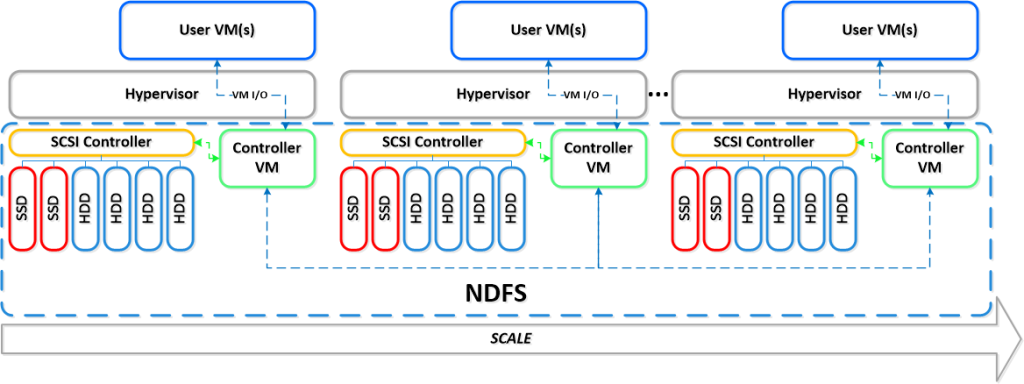
Right now I see Nutanix as the leader here! They rock! Just have a look at this linear scalability:
If you want to learn more how Nutanix can bring great value please contact us at EnvokeIT!
For an intro of Nutanix in 2 minutes have a look at these videos:
Overview:
#Gartner Outlines 10 IT Trends To Watch – via @MichealRoth, #Nutanix, #VMWare
This is also a good analysis I must say, I think that they are spot on! Even though I think that most companies haven’t addressed the whole Mobility aspect of going away from “managing devices” yet, there are a lot of “BYOD” strategies and solutions that companies still need to work on….
And of course I see a great opportunity to transform and build new “cloud” services/datacenters as well and do it in a more up-to-date, agile, scalable and simple way than what we’ve done over all these years. Stop building the old legacy architecture of Compure, Network and Storage and see what the market leaders of IaaS and PaaS are doing. One of the great players here is of course Nutanix as I see it (contact EnvokeIT if you need more info about this great product)!
Gartner Inc. offered a glimpse of 10 trends for IT professionals to pay attention to over the next five years.
The trends were discussed in a Thursday Webinar by David J. Cappuccio, a research vice president at Gartner. He noted that IT pros are busy enough with daily operations, with “74 percent” of IT budgets devoted to those concerns. Still, he contended that there are lots of new technologies and trends that will have an impact on IT departments.
Gartner expects these trends will affect IT over the next five years:
- “Software-defined networks
- “Software-defined storage
- “Hybrid cloud services
- “Integrated systems
- “Applications acceleration
- “The Internet of things
- “Open Compute Project
- “Intelligent datacenters
- “IT demand
- “Organizational entrenchment and disruptions”
End user expectations are affecting IT. New workers getting out of college are expecting access to everything all of the time, from any device, from anywhere, Cappuccio said. They typically own between three and four devices today, he added.
Software-defined networking (SDN) came into general awareness about two years ago, expecially after SDN pioneer Nicira came out of stealth mode, Cappuccio said. Nicira’s idea was to create a software stack that would manage the real-world physical network. The concept resonated well with the marketplace, and Nicira was bought by VMware in a $1.4 billion purchase. SDN represents a new way to operate networks, which can be configured…
Continue reading here!
//Richard
#Citrix #XenServer and #XenDesktop, platforms for CAD – Grid, #vGPU, #NVidia
This is really cool! And I like the innovation that Citrix and NVIDIA is doing around solving this puzzle! Keep up the great job!
For many traditional CAD, CAE and PLM based industries with rigorous product lifecycle control such as Automotive and Aerospace, virtualisation has been approached with caution. CAD moves slowly and the cost of change is large and concerns over network speed, security and the maturity of solutions meant many held off, surveying the Cloud and virtualisation from afar, waiting to see if the benefits outweighed the risks.
This week, with a tech preview of GPU hardwaresharing for VDI; Citrix and NVIDIA introduced another piece to what is now a very compelling portfolio that delivers all the elements needed to virtualise CAD and PLM on large scales. Citrix XenServer and XenDesktop really have become the natural CAD and PLM platform.
vGPU – True hardware GPU sharing
Complementing Citrix’s existing GPU passthrough and GPU hardware sharing for Windows Server workloads,this new technology enables the benefits of GPU acceleration to be exploited at lower costs. GPU passthrough has been in use for a while, enabling designers like those at Boeing to work using applications such as Dassault CATIA remotely. Our existing software GPU sharing technologies have proved great at delivering graphically intensive applications such as Dassault SolidWorks, Ansys Workbench and Fluent and Autodesk Applications. By offering the full portfolio of GPU passthrough and true hardware shared GPUs via vGPU, Citrix’s portfolio offers organisations the best possible flexibility to optimise their usage of GPU technologies. Mayunk has detailed the options available and I’d recommendhis blog post and guides to explore the options.
We’ve been working not only with NVIDIA on their newest GRID cards but also the major server vendorssuch as HP, Dell, Cisco, IBM and Supermicro to ensure these technologies are fine tuned for theXenServer Hypervisor to maximise performance with the NVIDIA GPUs. HP themselves have produced aninsightful guide on the benefits of vGPU over other technologies.
Those who work in CAD know that for every designer designing…
Continue reading here!
//Richard
#Citrix #NetScaler Application Delivery Controller Denial of Service Vulnerability
A denial of service vulnerability has been identified in Citrix NetScaler Application Delivery Controller (ADC). This vulnerability, when exploited, could cause the Citrix NetScaler appliance to become temporarily unavailable for normal use.
This vulnerability affects Citrix NetScaler ADC version 10.0 prior to version 10.0-76.7 only.
Citrix NetScaler ADC versions 10.1 and 9.3 are not affected by this vulnerability.
Continue reading here!
//Richard
How to pick virtualization (HW, NW, Storage) solution for your #VDI environment? – #Nutanix, @StevenPoitras
Here we are again… a lot of companies and Solution Architects are scratching their heads thinking about how we’re going to do it “this time”.
Most of you out there have something today, probably running XenApp on your VMware or XenServer hypervisor with a FC SAN or something, perhaps provisioned using PVS or just managed individually. There is also most likely a “problem” with talking to the Storage team that manage the storage service for the IaaS service that isn’t built for the type of workloads that XenApp and XenDesktop (VDI) requires.
So how are you going to do it this time? Are you going to challenge the Storage and Server/IaaS service and be innovative and review the new cooler products and capabilities that now exists out there? They are totally changing the way that we build Virtual Cloud Computing solutions where; business agility, simplicity, cost savings, performance and simple scale out is important!
There is no one solution for everything… but I’m getting more and more impressed by some of the “new” players on the market when it comes to providing simple and yet so powerful and performing Virtual Cloud Computing products. One in particular is Nutanix that EnvokeIT has partnered with and they have a truly stunning product.
But as many have written in many great blog posts about choosing your storage solution for your VDI solution you truly need to understand what your service will require from the underlying dependency services. And is it really worth to do it the old way? You have your team that manages the IaaS service, and most of the times it just provides a way for ordering/provisioning VM’s, then the “VDI” team leverages that one using PVS or MCS. Some companies are not even where they can order that VM as a service or provision it from the Image Provisioning (PVS/MCS) service, everything is manual and they call it a IaaS service… is it then a real IaaS service? My answer would be now… but let’s get back to the point I was trying to make!
This HW, Hypervisor, Network, Storage (and sometimes orchestrator) components are often managed by different teams. Each team are also most of the times not really up to date in terms of understanding what a Virtualization/VDI service will require from them and their components. They are very competent in understanding the traditional workload of running a web server VM or similar, but not really dealing with boot storms from hundreds to thousands of VDI’s booting up, people logging in at the same time and the whole pattern of IOPS that is generated in these VM’s “life-cycle”.
This is where I’d suggest everyone to challenge their traditional view on building Virtualization and Storage services for running Hosted Shared Desktop (XenApp/RDS) and Hosted Virtual Desktop (VDI/XenDesktop) on!
You can reduce the complexity, reduce your operational costs and integrate Nutanix as a real power compute part of your internal/private cloud service!
One thing that also is kind of cool is the integration possibilities of the Nutanix product with OpenStack and other cloud management products through its REST API’s. And it supports running both Hyper-V, VMware ESXi and KVM as hypervisors in this lovely bundled product.
If you want the nitty gritty details about this product I highly recommend that you read the Nutanix Bible post by Steven Poitras here.

How To: #XenMobile #MDM 8.5 Deployment Part 3: Policies – #Citrix
And here U have part 3 of Adams great blog post series!

In this 3rd part of my 7 part series on XenMobile MDM 8.5 we will focus on policies. Policies within MDM allow you to control a multitude of features on your end users mobile devices, including: WiFi, Email, VPN, Location Services, most all functionality of the device (camera, FaceTime, etc), AppStore access, etc. Most configuration variations you do to control and limit/restrict/configure your end users devices will be done from this tab. This tab is also the location where we can create some automated actions that include notifying your users when they have fallen out of compliance.
If you would like to read the other parts in this article series please go to:
- How To: XenMobile MDM 8.5 Deployment Part 1: Installation
- How To: XenMobile MDM 8.5 Deployment Part 2: Basic Configuration
In this article I was to cover a “base” set of policy configurations that will give you a feel of how the policies work in general. By no means does this cover the breadth of what you can do with MDM, but it at least gives you a glimpse.
I want to accomplish the following in this article:
- Set a passcode policy on the device
- Block iCloud from syncing documents
- Preconfigure a WiFi network on my device (so that your users could come into the office with WiFi already configured and never have been given the password)
- Blacklist Dropbox, Box, and SkyDrive applications
- Notify the user their device as Out of Compliance (OoC) if those apps are installed
- Mark the device as OoC in the dashboard
 .
.Configure a Passcode Policy


How to: #Citrix #XenMobile 8.5 MAM upgrade! Part 2 – #StoreFront, #AppController, #NetScaler
Hi again!
If you haven’t read Part 1 then I highly recommend doing so prior to going directly to the upgrade that we’re covering in this post!
Prepare for a journey in this post about Citrix StoreFront upgrade, uninstallation, console and how messy it could be! NOT all the time, sometimes it “just works”! 😉
My little NetScaler is already upgraded to 10.1 so unfortunately I couldn’t take you on that journey as well, so we’ll start with the StoreFront upgrade from 1.2 to 2.0 in this post. These are the steps that we need to cover as highlighted in the migration guide that seems very short and straight forward:
Upgrade StoreFront 1.2 to 2.0.
- Logon to the StoreFront server console.
- Upgrade StoreFront by running the StoreFront 2.0 installer as an administrator.
- When the upgrade is completed, open StoreFront administration snap-in, remove CloudGateway controller from each store as this will be moved in the migration solution.
- Open NetScaler Gateway Properties and for each gateway defined and change the version field in settings from 9.x to 10.0.x or later.
- Test the configuration by logging on through web browser or Citrix Receiver.
- Verify if the users are able to login and authenticate to StoreFront defined stores configured.
Is it this easy?
Ok, I’ve downloaded the 2.0 installer, and I’m logged on to the server.
Before we even start the upgrade there are things that could go wrong in removal or upgrades of StoreFront. And one that I’ve seen cause a lot of headache for a lot of people out there is that they have the Windows Firewall service disabled. Though the installation and removal wants to delete or add these rules the installation will fail unless this service is running. As you can see in this picture below you see the FW rule added in StoreFront 1.2:

So let’s verify that the Windows FW service is started, and it is!

I’ll now start the installation by double-clicking the StoreFront 2.0 installer!

What is this popup that came directly after starting the installer?

Wait, ok so you guys at Citrix couldn’t ask me whether you could do this for me? My plan is to upgrade, so please just add a little step in your upgrade program that does this for me… change request #1 for the next SF release and it’s upgrade process! Verify pre-requisites or deal with them!
Configuring #ShareFile and #SAML Walkthrough – via @andyjmorgan
Another great blog post by Andrew! Great job!
While working with a customer recently on a sharefile implementation, I set about creating a SAML / Active Directory single sign on deployment. Configuring ADFS and SAML were complete unknowns to me so I set about documenting the process end to end for future reference.
The end result of this activity will allow you to login to sharefile using a native account (think Guest) or an active directory account (think internal user).

What you will need in order to follow this guide:
- An enterprise Sharefile account.
- A local domain.
- An active directory service account. (standard user rights are fine)
- A windows 2012 server to host ADFS (windows 2008 r2 is fine, but you’ll need to install ADFS 2.0 manually).
- This windows server must be accessible via https (443) from the internet. (Netscaler SSL works fine).
- An external trusted certificate for the web server hosting saml (e.g. adfs.yourdomain.com). For this walk through, I’ll assume you have already done this. *
- A copy of the Sharefile User Management Tool.
- About 2-3 hours spare.
* for this, generate a server certificate and import it into the local machines personal certificates.
Steps:
- Installing Active Directory Federated Services.
- Configuring Federated Services.
- Configuring Sharefile for SAML.
- Syncing Active Directory users with Sharefile.
- Testing the saml login….
Continue reading here!
//Richard
How To: #XenMobile #MDM 8.5 Deployment Part 1 and 2: Installation – via @AdamInTheCloud
Wow, it’s like Adam read my mind, I’m doing the same kind of blog post series but for a XenMobile MAM deployment! Will post part 2 of the MAM series later tonight (once it’s done, waiting on some StoreFront issues to solve and I’m getting there!)
But in the meantime have a look at this great series by Adam! Great job Adam!!!
How To: XenMobile MDM 8.5 Deployment Part 1: Installation
n late 2012 Citrix announced they had purchased a 7-year-old startup company called Zenprise that was a hot player in the mobile device security market. Up until that time, Citrix was positioning for that sector with its CloudGateway Enterprise product and focusing mostly on apps and data management..not really the device. Zenprise helped them flesh out their offering, which is now known as “XenMobile”. Although it’s gone through a few iterations it has finally reached a final “form” if you will of three editions: MDM, App, and Enterprise.
The purpose of this article series will be to walk through the installation and basic setup of the MDM (Mobile Device Management) Edition which focuses almost exclusively on managing the device, and not necessarily so much the data or apps. Although it is capable of application pushes and the like… a feature comparison can be found on Citrix’ website HERE. I encourage you to view that. One major difference to note is MDM does not sandbox apps/data, but App Edition does, and Enterprise Edition can.
In researching this product for some internal training we are currently going through it became pretty apparent there is very little information out there on it, and if there is its unfortunately outdated because the product has been rapidly evolving over the first half of the year. In this series of blog articles I will go over how to deploy a single instance of XenMobile 8.5 MDM on an internal network, configure basic policies and rules, and apply them to your devices.
If you would like to read the other parts in this article series please go to:
This, unfortunately is the most boring part of MDM which is the install…but I would be remiss by not going over it for some of you that “have to see” it. So lets get to it so we can get on to the more exciting stuff!
First: Pre-req’s. All of this is straight from eDocs, I’m not reinventing the wheel here.
- MDM 8.5 needs to go on a 2008 R2 or 2012 server.
- Setup an active directory service account and make it a local admin on the MDM server
- Disable IPv6 (not via registry, just uncheck the box)
- UAC disabled
- Firewall disabled (this is my preference..I disable server firewalls but you’re welcome to do as you wish)
- Your service account needs permissions creator/owner/read/write on your SQL server. I will not be using PostgreSQL.
- SQL 2005/2008/R2/2012 in your environment (Reference Architecture recommends SQL for production deployments, not PostgreSQL. See HERE)
- Java SE 7 Update 11 (dk-7u4-windows-x64.exe) installed on the server
- Java Cryptography Extension (JCE) USJP 7 on the serverExternal DNS record such as mobile.mydomain.com
- To install the Java Cryptography Extension
- Install Java SE 7u11
- Open the JCE zip file and copy local_policy.jar and US_export_policy.jar to your computer desktop.
- Navigate to the folder /java/jdk1.7.0_x/jre/lib/security and copy the files from Step 2 to this folder.
- To install the Java Cryptography Extension
- Obtain an Apple….
Continue reading part 1 here and part 2 here!
//Richard




 The IT Melting Pot!