Archive
Watch the #Citrix Consulting Best Practice Webcast Series
Citrix Consulting Best Practice Series
In these webinars, members of the Citrix Consulting team have taken an in-depth look at the steps to desktop virtualisation.
Beginning with the basics, looking at setting priorities, and passing on the knowledge needed to fully understand the processes, what is required for roll-out and of course the value of desktop virtualisation.
This series has been extremely popular and now, is available for you to view at your convenience.
Regardless of where you currently stand with your desktop virtualisation, feel free to look at a single phase or check out the whole series.
Content:
- Introduction: Desktop Virtualisation: Your Insight into the world of Desktop Virtualisation
- Phase 1: Establishing business priorities and mapping these to your desktop virtualisation project
- Phase 2: Analysis – understanding your existing IT infrastructure
- Phase 3: Design – key concepts and approaches for designing your desktop virtualisation solution
- Phase 4: Build/Test – validating your design and making improvements
- Phase 5: Rollout – Going Live and operational with your virtual desktops
Continue reading and watch the webcasts here!
//Richard
Reference Architecture and Deployment Guide – Citrix XenDesktop 5.5 Built on Cisco UCS B-Series Blade Servers
For you that are thinking of looking at Cisco UCS and XenDesktop; have a look at this reference architecture document from Cisco…
“Citrix XenDesktop 5.5 Built on Cisco UCS B-Series Blade Servers, Cisco Nexus 5000 Series Switches, and VMware ESXi 5.0: Reference Architecture and Deployment Guide”
Download here!
//Richard
Lync 2013 client preview for VDI/Hosted Virtual Desktop environments
This is an update in the right direction for getting all Lync features to work in a hosted environment! But where are we on this topic of getting the collaboration features etc. to our end-users in a good way to the “Any Device” and “Anywhere” or BYOD if that’s what you wanna call it?
Before there has been a lot of issues with running Lync and what’s supported feature-wise depending on where you ran Lync, what protocol you where accessing it over and how Lync was presented (either as published desktop or as a published app). And this had it’s challenges for companies that for instance wanted to go to a BYOD model where the end-point device the user was sitting on wsn’t managed and didn’t allowed Lync to be installed and where those users then were relying on their XenApp or XenDesktop environment. And then there are features that aren’t supported or let’s say; didn’t work that well and really loaded the host server.
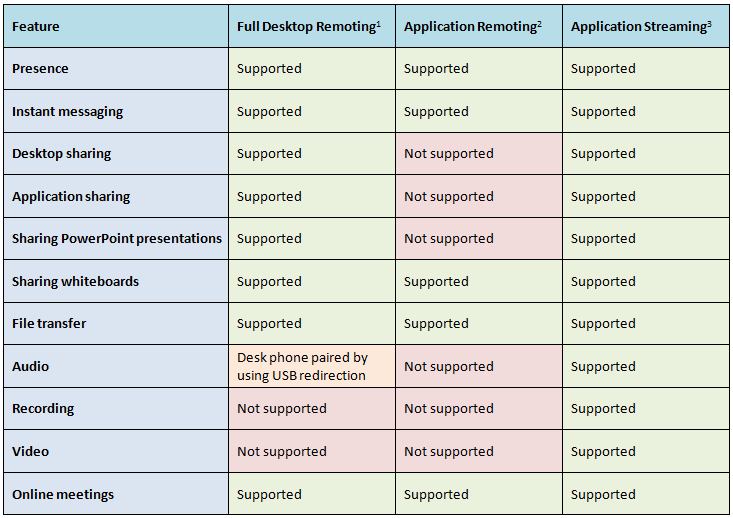
The table below is from a great Microsoft blog post by Jesper Osgaard where he compares the features of Lync in a virtualized environment;
What did Citrix do about it? Well first they released the HDX Realtime Optimization Pack for Microsoft Lync to address these issues and to ensure improved Lync functionality. And I must give Citrix credit for adding support for Linux directly!




 The IT Melting Pot!