Archive
#Amazon WorkSpaces – “#VDI” cloud service – #VDI, #BYOD
This is an interesting offering from Amazon! I however don’t like that everyone talks about the “VDI” concept all the time.. this is based on Windows server with Desktop Experience and not a client OS.
Amazon WorkSpaces is a fully managed desktop computing service in the cloud. Amazon WorkSpaces allows customers to easily provision cloud-based desktops that allow end-users to access the documents, applications and resources they need with the device of their choice, including laptops, iPad, Kindle Fire, or Android tablets. With a few clicks in the AWS Management Console, customers can provision a high-quality desktop experience for any number of users at a cost that is highly competitive with traditional desktops and half the cost of most virtual desktop infrastructure (VDI) solutions.
WorkSpace Bundles
Amazon WorkSpaces offers a choice of service bundles providing different hardware and software options to meet your needs. You can choose from the Standard or Performance family of bundles that offer different CPU, memory, and storage resources, based on the requirements of your users. If you would like to launch WorkSpaces with more software already pre-installed (e.g., Microsoft Office, Trend Micro Anti-Virus, etc.), you should choose the Standard Plus or Performance Plus options. If you don’t need the applications offered in those bundles or you would like to use software licenses for some of the applications in the Standard Plus or Performance Plus options that you’ve already paid for, we recommend the Standard or Performance bundles. Whichever option you choose, you can always add your own software whenever you like.
| WorkSpaces Bundle | Hardware Resources | Applications | Monthly Price |
| Standard | 1 vCPU, 3.75 GiB Memory, 50 GB User Storage | Utilities (Adobe Reader, Internet Explorer 9, Firefox, 7-Zip, Adobe Flash, JRE) | $35 |
| Standard Plus | 1 vCPU, 3.75 GiB Memory, 50 GB User Storage | Microsoft Office Professional 2010, Trend Micro Anti-Virus, Utilities (Adobe Reader, Internet Explorer 9, Firefox, 7-Zip, Adobe Flash, JRE) | $50 |
| Performance | 2 vCPU, 7.5 GiB Memory, 100 GB User Storage | Utilities (Adobe Reader, Internet Explorer 9, Firefox, 7-Zip, Adobe Flash, JRE) | $60 |
| Performance Plus | 2 vCPU, 7.5 GiB Memory, 100 GB User Storage | Microsoft Office Professional 2010, Trend Micro Anti-Virus, Utilities (Adobe Reader, Internet Explorer 9, Firefox, 7-Zip, Adobe Flash, JRE) | $75 |
All WorkSpaces Bundles provide the Windows 7 Experience to users (provided by Windows Server 2008 R2). Microsoft Office 2010 Professional includes Microsoft Excel 2010, Microsoft OneNote 2010, Microsoft PowerPoint 2010, Microsoft Word 2010, Microsoft Outlook 2010, Microsoft Publisher 2010 and Microsoft Access 2010.
#Citrix #Receiver for Linux 13 released
Finally Citrix has released a Receiver version for Linux that for instance has StoreFront support! Can’t wait to try it out and see if it gives the same user experience etc like the one on OS X and Windows!
Here you have some details about it and links to the product documentation:
Access Windows applications and virtual desktops, as well as web and SaaS applications. Enable anywhere access from your Linux thin client/desktop or use web access.
What’s new
The following new features are available in this release:
- Support for XenDesktop 7 features – Receiver supports many of the new features and enhancements in XenDesktop 7, including Windows Media client-side content fetching, HDX 3D Pro, HDX RealTime webcam compression, Server-rendered Rich Graphics, and IPv6 support.
Note: Link-local network addresses are not supported in IPv6 environments. You must have at least one global or unique-local address assigned to your network interface.
- VDI-in-a-Box support – You can use Receiver to connect to virtual desktops created with Citrix VDI-in-a-Box.
- Self-service UI – A new graphical user interface (UI), like that in other Citrix Receivers, replaces the configuration manager, wfcmgr. After they are set up with an account, users can subscribe to desktops and applications, and then start them.
- Deprecated and removed utilities – The pnabrowse command-line utility is deprecated in favor of the new storebrowse command-line utility. The icabrowse and wfcmgr utilities have been removed.
- StoreFront support – You can now connect to StoreFront stores as well as Citrix XenApp sites (also known as Program Neighborhood Agent sites).
- UDP audio support – Most audio features are transported using the ICA stream and are secured in the same way as other ICA traffic. User Datagram Protocol (UDP) Audio uses a separate, unsecured, transport mechanism, but is more consistent when the network is busy. UDP Audio is primarily designed for Voice over IP (VoIP) connections and requires that audio traffic is of medium quality (that is Speex wideband) and unencrypted.
- Packaging – An armhf (hard float) Debian package and tarball are now included in the download packages. In addition, the Debian package for Intel systems uses multiarch (a Debian feature) for installations on 32- and 64-bit systems. 32-bit binaries are also available in RPM packages.
- System Flow Control – Video display has been enhanced on low-performance user devices that connect to high-performance servers. In such setups, System Flow Control prevents sessions becoming uncontrollable and unusable.
- Localization – Receiver is now available in German, Spanish, French, Japanese, and Simplified Chinese.
- Keyboard improvements – You can now specify which local key combination (Ctrl+Alt+End or Ctrl+Alt+Enter) generates the Ctrl+Alt+Delete combination on a remote Windows desktop. In addition, a new option supports Croatian keyboard layouts.
- Deferred XSync – While one frame is still on screen, Receiver can now decode tiles for the next frame. This provides a performance improvement compared with previous releases, in which Receiver waited for a frame to finish being displayed before decoding the next frame.
- Audio and webcam playback improvements – Various changes are implemented that conserve CPU cycles and reduce latency.
- Audio settings – Several new audio settings are now available in module.ini.
For more product and release info read here!
//Richard
#Microsoft Desktop Hosting Reference Architecture Guides
Wow, these are some compelling guides that Microsoft delivered!! Have a look at them! But of course there’s always something more U want! Let Service Providers provide DaaS services based on client OS’s as well!!!
 |
Microsoft has released two papers related to Desktop Hosting. The first is called: “Desktop Hosting Reference Architecture Guide” and the second is called: “Windows Azure Desktop Hosting Reference Architecture Guide“. Both documents provide a blueprint for creating secure, scalable, multi-tenant desktop hosting solutions using Windows Server 2012 and System Center 2012 SP1 Virtual Machine Manager or using Windows Azure Infrastructure Services.
The documents are targeted to hosting providers which deliver desktop hosting via the Microsoft Service Provider Licensing Agreement (SPLA). Desktop hosting in this case is based on Windows Server with the Windows Desktop Experience feature enabled, and not Microsoft’s client Operating Systems like Windows 7 or Windows 8.
For some reason, Microsoft still doesn’t want service providers to provide Desktops as a Service (DaaS) running on top of a Microsoft Client OS, as outlined in the “Decoding Microsoft’s VDI Licensing Arcanum” paper which virtualization.info covered in September this year.
The Desktop Hosting Reference Architecture Guide provides the following sections:
- Desktop Hosting Service Logical Architecture
- Service Layer
- Tenant Environment
- Provider Management and Perimeter Environments
- Virtualization Layer
- Hyper-V and Virtual Machine Manager
- Scale-Out File Server
- Physical Layer
- Servers
- Network
- Tenant On-Premises Components
- Clients
- Active Directory Domain Services

The Windows Azure Desktop Hosting Reference Architecture covers the following topics:
Solving the Compute and Storage scalability dilemma – #Nutanix, via @josh_odgers
The topic of Compute, Network and STORAGE is a hot topic as I’ve written in blog posts before this one (How to pick virtualization (HW, NW, Storage) solution for your #VDI environment? – #Nutanix, @StevenPoitras) … and still a lot of colleagues and customers are struggling with finding better solutions and architecture.
How can we ensure that we get the same or better performance of our new architecture? How can we scale in a more simple and linear manner? How can we ensure that we don’t have a single point of failure for all of our VM’s etc..? How are others scaling and doing this in a better way?
I’m not a storage expert, but I do know and read that many companies out there are working on finding the optimal solution for Compute and Storage, and how they can get the cost down and be left with a more simple architecture to manage…
This is a topic that most need to address as well now when more and more organisations are starting to build their private clouds, because how are you going to scale it and how can you get closer to the delivery that the big players provide? Gartner even had Software-Defined-Storage (SDS) as the number 2 trend going forward: #Gartner Outlines 10 IT Trends To Watch – via @MichealRoth, #Nutanix, #VMWare
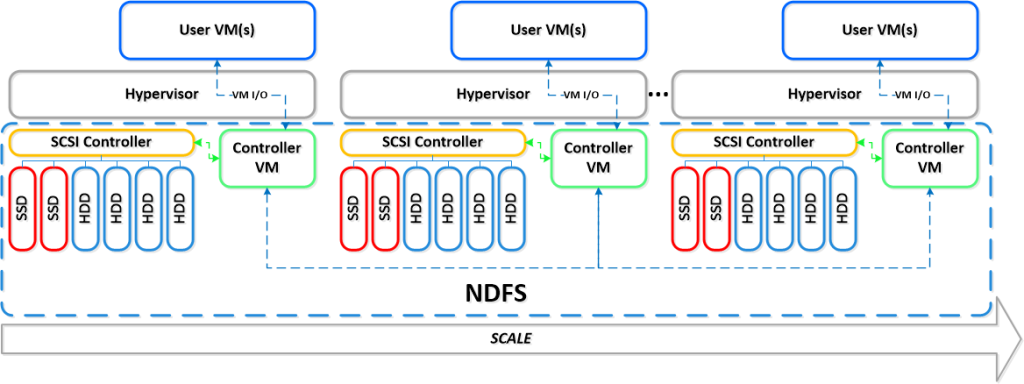
Right now I see Nutanix as the leader here! They rock! Just have a look at this linear scalability:
If you want to learn more how Nutanix can bring great value please contact us at EnvokeIT!
For an intro of Nutanix in 2 minutes have a look at these videos:
Overview:
How to pick virtualization (HW, NW, Storage) solution for your #VDI environment? – #Nutanix, @StevenPoitras
Here we are again… a lot of companies and Solution Architects are scratching their heads thinking about how we’re going to do it “this time”.
Most of you out there have something today, probably running XenApp on your VMware or XenServer hypervisor with a FC SAN or something, perhaps provisioned using PVS or just managed individually. There is also most likely a “problem” with talking to the Storage team that manage the storage service for the IaaS service that isn’t built for the type of workloads that XenApp and XenDesktop (VDI) requires.
So how are you going to do it this time? Are you going to challenge the Storage and Server/IaaS service and be innovative and review the new cooler products and capabilities that now exists out there? They are totally changing the way that we build Virtual Cloud Computing solutions where; business agility, simplicity, cost savings, performance and simple scale out is important!
There is no one solution for everything… but I’m getting more and more impressed by some of the “new” players on the market when it comes to providing simple and yet so powerful and performing Virtual Cloud Computing products. One in particular is Nutanix that EnvokeIT has partnered with and they have a truly stunning product.
But as many have written in many great blog posts about choosing your storage solution for your VDI solution you truly need to understand what your service will require from the underlying dependency services. And is it really worth to do it the old way? You have your team that manages the IaaS service, and most of the times it just provides a way for ordering/provisioning VM’s, then the “VDI” team leverages that one using PVS or MCS. Some companies are not even where they can order that VM as a service or provision it from the Image Provisioning (PVS/MCS) service, everything is manual and they call it a IaaS service… is it then a real IaaS service? My answer would be now… but let’s get back to the point I was trying to make!
This HW, Hypervisor, Network, Storage (and sometimes orchestrator) components are often managed by different teams. Each team are also most of the times not really up to date in terms of understanding what a Virtualization/VDI service will require from them and their components. They are very competent in understanding the traditional workload of running a web server VM or similar, but not really dealing with boot storms from hundreds to thousands of VDI’s booting up, people logging in at the same time and the whole pattern of IOPS that is generated in these VM’s “life-cycle”.
This is where I’d suggest everyone to challenge their traditional view on building Virtualization and Storage services for running Hosted Shared Desktop (XenApp/RDS) and Hosted Virtual Desktop (VDI/XenDesktop) on!
You can reduce the complexity, reduce your operational costs and integrate Nutanix as a real power compute part of your internal/private cloud service!
One thing that also is kind of cool is the integration possibilities of the Nutanix product with OpenStack and other cloud management products through its REST API’s. And it supports running both Hyper-V, VMware ESXi and KVM as hypervisors in this lovely bundled product.
If you want the nitty gritty details about this product I highly recommend that you read the Nutanix Bible post by Steven Poitras here.

Organizational Challenges with #VDI – #Citrix
And yet another good blog post by Citrix and Wayne Baker. This is an interesting topic and I must say that the blog posts still goes into a lot of the technical aspects, but there are more “soft” organisational aspects to look into as well like service delivery/governance model and process changes that often are missed. And as Wayne also highlights below and that’s worth mentioning again is the impact on the network that also was covered well in this previous post: #Citrix blog post – Get Up To Speed On #XenDesktop Bandwidth Requirements
Back to the post itself:
One of the biggest challenges I repeatedly come across when working with large customers attempting desktop transformation projects, is the internal structure of the organisation. I don’t mean that the organisation itself is a problem, rather that the project they are attempting spans so many areas of responsibility it can cause significant friction. Many of these customers undertake the projects as a purely technical exercise, but I’m here to tell you it’s also an exercise in organisational change!
One of the things I see most often is a “Desktop” team consisting of all the people who traditionally manage all the end-points, and a totally disparate “Server” team who handle all the server virtualization and back-end work. There’s also the “Networks” team to worry about and often the “Storage” team are in the mix too! Bridging those gaps can be one of the areas where friction begins to show. In my role I tend to be involved across all the teams, and having discussion with all of those people alerts me to where weaknesses may lie in the project. For example the requirements for server virtualization tend to be significantly different to the requirements for desktop virtualization, but when discussing these changes with the server virtualization team, one of the most often asked questions is, “Why would you want to do THAT?!” when pointing out the differing resource allocations for both XenApp and XenDesktop deployments.
Now that’s not to say that all teams are like this and – sweeping generalizations aside – I have worked with some incredibly good ones, but increasingly there are examples where the integration of teams causes massive tension. The only way to overcome this situation is to address the root cause – organizational change. Managing desktops was (and in many places still is) a bit of a black art, combining vast organically grown scripts and software distribution mechanisms into an intricately woven (and difficult to unpick!) tapestry. Managing the server estate has become an exercise in managing workloads and minimising/maximising the hardware allocations to provide the required level of service and reducing the footprint in the datacentre. Two very distinct skill-sets!
The other two teams which tend to get a hard time during these types of projects are the networks and storage teams – this usually manifests itself when discussing streaming technologies and their relative impacts on the network and storage layers. What is often overlooked however is that any of the teams can have a significant impact on the end-user experience – when the helpdesk takes the call from an irate user it’s going to require a good look at all of the areas to decipher where the issue lies. The helpdesk typically handle the call as a regular desktop call and don’t document the call in a way which would help the disparate teams discover the root cause, which only adds to the problem! A poorly performing desktop/application delivery infrastructure can be caused by any one of the interwoven areas, and this towering of teams makes troubleshooting very difficult, as there is always a risk that each team doesn’t have enough visibility of the other areas to provide insight into the problem.
Organizations that do not take a wholesale look at how they are planning to migrate that desktop tapestry into the darkened world of the datacentre are the ones who, as the project trundles on, come to realise that the project will never truly be the amazing place that the sales guy told them it would be. Given the amount of time, money and political will invested in these projects, it is a fundamental issue that organizations need to address.
So what are the next steps? Hopefully everyone will have a comprehensive set of requirements defined which can drive forward a design, something along the lines of:
1) Understand the current desktop estate:
#Citrix #XenDesktop 7 on #vSphere Validated Design Guide is available now!
Really good design guide by Citrix and blog post by Carisa Powell:
We are pleased to announce the availability of the Citrix Solutions Lab 5000-user XenDesktop 7 on vSphere Validated Design Guide.
Yes, you read that right, XenDesktop on vSphere. XenDesktop is also known to many vSphere customers as the best VDI solution for vSphere, and this design guide showcases the latest release of XenDesktop features and functionality all being hosted on a vSphere hypervisor. XenDesktop is the best of both virtual apps and desktops from a single platform, so XenDesktop is VDI, XenDesktop is app virtualization, XenDesktop is server-hosted apps and desktops, XenDesktop is secure remote access, XenDesktop is mobility…and with XenDesktop 7 you get all of this functionality from a single platform.
This design guide combines everything that is XenDesktop 7 and delivers it from vSphere to showcase how you can provide an app, desktop, remote access, and more solution for any type of user:
- VDI – XenDesktop offers a variety of VDI use cases, whether the user needs a standardized, corporate desktop that remains consistent and routine, or the user needs a personalized virtual desktop that he or she can customize to meet their business needs. This design guide validates XenDesktop Provisioning Services central image management technology for Pooled VDI on vSphere and XenDesktop Personal vDisk technology for delivering Personal VDI on vSphere.
- Server-hosted Apps and Desktops – XenDesktop also offers server-hosted apps and desktops by leveraging Microsoft Remote Desktop Shared Hosted (RDSH) technology to enable multiple users to connect and share resources from a single server. This design guide showcases XenDesktop server-hosted resources from Windows Servers on vSphere.
- Remote Access – XenDesktop leverages Citrix NetScaler appliances to provide secure, remote access from any location. NetScaler can be a virtual or physical appliance, and this design guide highlights the implementation and configurations of NetScaler Gateway virtual appliances on vSphere.
So why showcase all the features and functionality of XenDesktop 7 on vSphere? Staying true to the Citrix vision, XenDesktop continues to remain the only hypervisor agnostic app and desktop virtualization solution – including VDI, virtual apps and more. This means XenDesktop 7 seamlessly integrates with any hypervisor including Microsoft Hyper-V, Citrix…
Continue reading here!
//Richard
Login VSI 4.0 – #LoginVSI, #VDI, #Scalability, #BYOD – @LoginVSI
Login VSI 4.0 released!!
Wow, I can’t believe that my week was this busy… tooo bad though I must say thank you so much to the Login VSI team for giving me the privilege to test Login VSI 4.0 Pro prior to the release… but did I have the time? Nooooo…. 😦
But it’s gonna be one of the first things I do when I get some spare time over some night/weekend in the near future!!
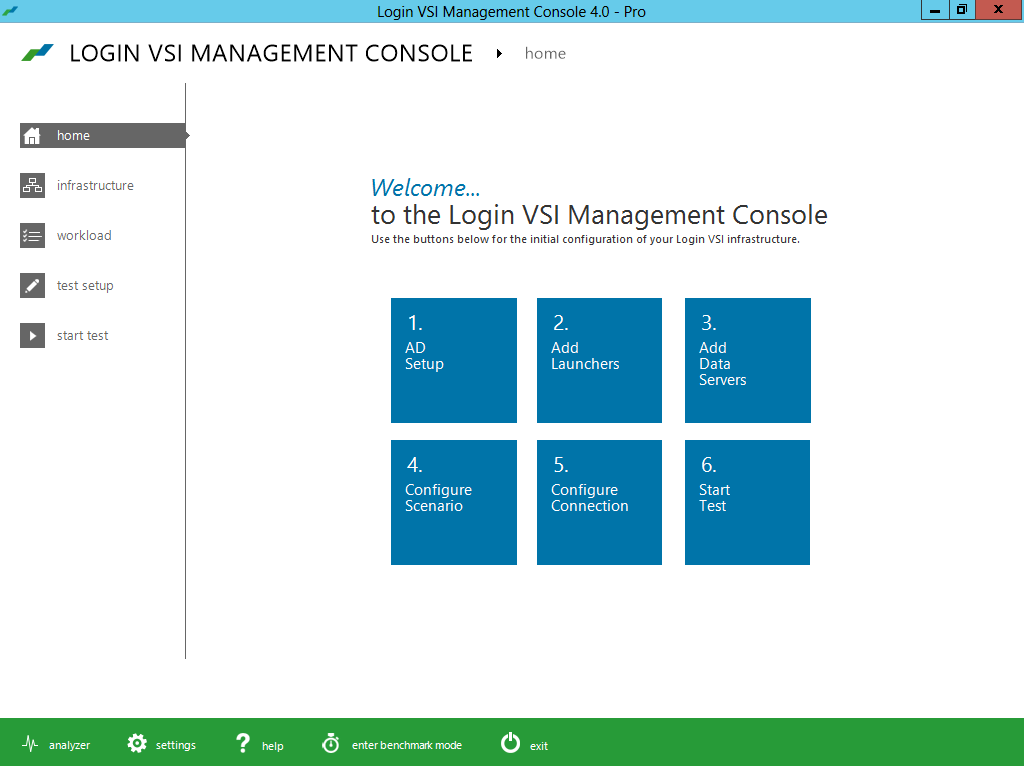
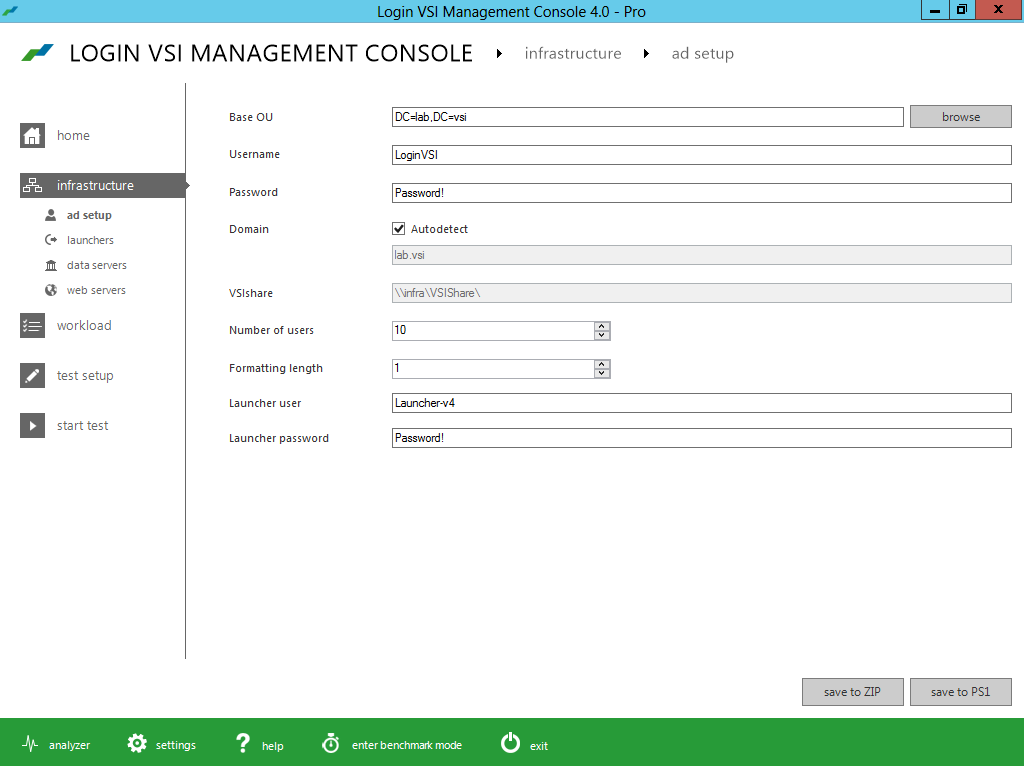
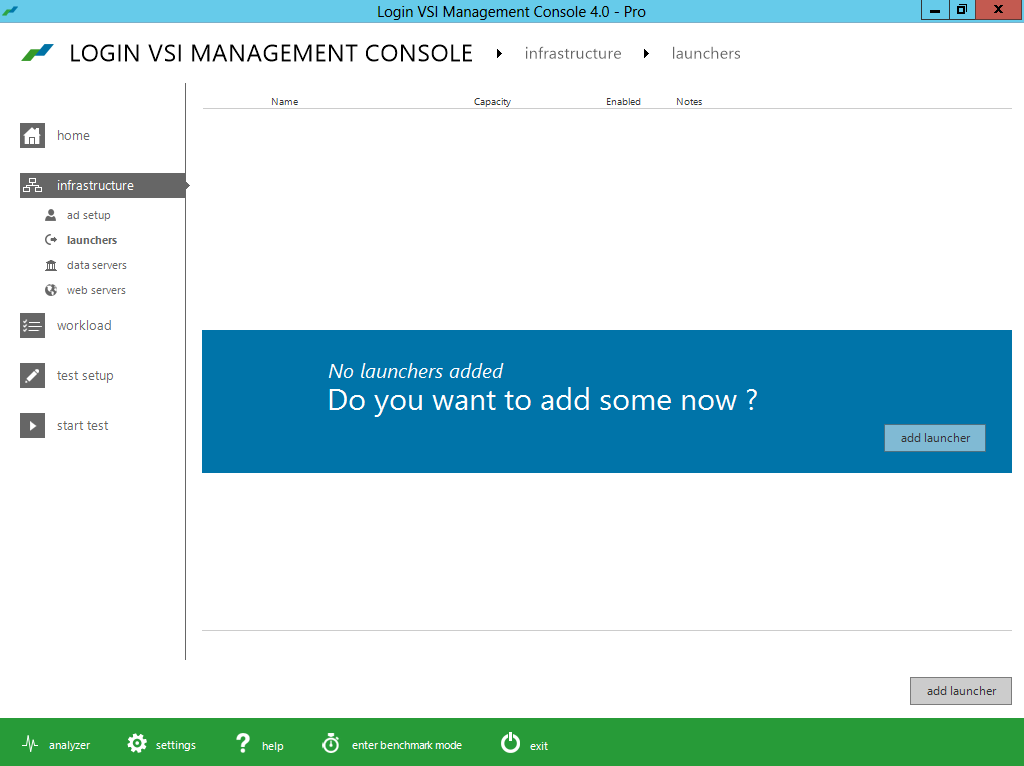
Below you find the press release and a bunch of pictures I got as a part of the “blogger preview” kit!
Improved ease of installation
- Minimized test image footprint
- Centralized management and updates
- Direct Desktop Launch Mode, saves on infrastructure
Improved ease of test creation
- New intuitive and workflow oriented UI
- New editor simplifies workload customization
- Benchmarking mode simplifies comparisons
Improved test realism
- More realistic user workload patterns
- More realistic dataset and data/file access
- Real-world test execution with multiple phases
Improved test insight
- New dashboard with real-time test feedback
- Enhanced VSImax accuracy
- Automated reporting of all relevant data

Simplified VDI Architecture – #Citrix, #XenDesktop
This is a great start of a blog series from Citrix!
There’s a perception that VDI is complicated. I’m far from being a rocket scientist, and I’ve managed to implement many successful VDI projects over the past ten years. I truly believe that VDI is one of those things that is only as complicated as you make it.
It’s like saying that driving is complicated. You’d have to be crazy [or very brave] to take your first lesson in Manhattan…during rush hour. That’s why your driving instructor starts you off on a quiet street. You need to know your boundaries. Being successful with VDI is the same – keep things simple to start with and slowly increase complexity at your own pace, when you’re ready for it.
This raises the question – what’s the quiet street equivalent of a beginner’s VDI architecture? It might not be the most optimized and efficient solution, but it would be quick to implement, do the job well and wouldn’t require specialist knowledge or skills. I’ve been thinking about this a lot lately, and I’d like to share my thoughts.
There’s a lot to consider, so I’m going to break this up over four different blog posts:
- Simplified VDI Architecture – Introduction & FlexCast
- Simplified VDI Architecture – Storage
- Simplified VDI Architecture – Provisioning
- Simplified VDI Architecture – Reference Architecture
Martin Zugec will be helping me out with this blog series and will be referring to his experience on actual customer projects that followed many of these recommendations.
XenDesktop or VDI in a Box?
First up, you need to make a decision on VDI in a Box or XenDesktop. VDI in a Box is easier to setup but does have some limitations. Check out Allen Furmanski’s excellent blog post for guidance on how to make this decision. I’m going to concentrate on XenDesktop for this post.
FlexCast
Although each FlexCast model has its own unique advantages, each additional model included adds complexity to the overall project. There is a great table in the Virtual Desktop Handbook (FlexCast Model Selection – Table 11) that provides guidance on the capabilities of each model. The main thing to note is that all scenarios, apart from offline, can be accommodated using the Hosted VDI model (XenDesktop), either with or without a Personal vDisk. It may not be the optimal selection in every instance, but it is almost always a viable solution.
There are a number of reasons why I think that XenDesktop is simpler than XenApp, including:
- Desktop applications are developed to run on desktop operating systems such as Windows XP or Windows 7. There aren’t many developers that test their applications on Windows Server 2003 or 2008. Therefore, you’re far less likely to run into application issues with XenDesktop than you are with XenApp. Even if your applications run okay on 2008 with XenApp, you’re probably going to have issues getting support from the application vendors.
- Hosting applications on multi-user operating systems can introduce additional application compatibility challenges. Users may share the same configuration files and registry hives, especially if the applications are not multi-user aware. This means that one user may change a setting that affects all other users of that server. There are a ton of tips and tricks to get these apps working correctly but we want to keep things simple and choosing XenDesktop helps us achieve this goal.
- As multiple users are hosted on the same operating system, it is important that XenApp desktops are locked down to prevent security breaches and misconfiguration that could impact all users sharing the environment. Typically, this results in an extremely controlled and restricted user experience, hindering user satisfaction and acceptance.
- With XenApp desktops, a single user can consume a disproportionate amount of resources, impacting the performance of other users sharing the same XenApp server. XenDesktop, on the other hand, allows vCPU and RAM assignments to be controlled on a per-user basis. For this reason, I strongly recommend that heavy users are hosted on XenDesktop rather than XenApp.
- With XenDesktop, it is possible to provide users with fully personalized desktops. This includes the ability for users to install their own applications.
- Unlike XenApp, XenDesktop supports generic USB redirection:

I’m a huge fan of Remote PC, especially when you consider just how simple it is to deploy. However, there are some things Remote PC just can’t do, including:
- You don’t have the flexibility to quickly provision or de-provision desktops based on business demands.
- Image management is more complicated than a virtual desktop because you can’t use MCS and PVS can be challenging with desktops outside of the data center
- You need to have a good connection between your XenDesktop Controllers and the physical desktops. Something not always available for WAN users.
Regardless, Remote PC is a great solution in many scenarios. Consider deploying Remote PC at the very start of your project. It allows you to realize immediate value while you’re designing and implementing your full VDI solution.
If XenDesktop is so much simpler why do so many projects still standardize on XenApp? It all comes down to cost – XenApp offers significantly higher levels of scalability than XenDesktop (some sources quote 300% more users). Let’s take a look at this in more detail.
Processor
The Virtual Desktop Handbook provides us with guidelines on processor requirements for both XenApp and XenDesktop (Processor Requirements by Workload – Table 22):

If processor is the bottleneck, we can estimate the scalability of XenApp and XenDesktop for a fairly typical server configuration (2×8 cores):

As you can see, XenApp offers between 17% (heavy user) and 28% (light user) more users than XenDesktop – but nowhere near 300%! Let’s put this into context, if you had 1,000 concurrent normal users, you would need seven physical servers for ‘XenDesktop: Windows 7’ and six physical servers for ‘XenApp: 2008 R2’. Is one additional server per ~1,000 users enough to justify the additional complexity of XenApp?
RAM
For RAM, the Virtual Desktop Handbook table (Memory Requirements by Workload – Table 23) shows us that ‘XenDesktop: Windows 7’ requires significantly…
Continue reading here!
//Richard
How to avoid the 7 pitfalls of desktop virtualization
Have a look at this!
When it comes to desktop virtualization, we’ve all messed up. Some of us more than others.
But the best among us tend to learn from our mistakes so we don’t repeat them. And the really smart ones learn from others’ mistakes so they don’t have to collect the bruises themselves.
That’s the spirit behind our latest eBook for desktop virtualization project teams:
The 7 Big, Bad Pitfalls of Desktop Virtualization Deployment:
Very avoidable ways things can go wrong (and how to avoid them)

This eBook is all about helping you succeed with your Citrix desktop virtualization deployments. It distills the expertise of our top Citrix consultants into seven of the most common mistakes that project teams make.
And each pitfall has a short list of evasive actions to take to make sure you don’t fall in. It’s a quick read and you’ll come away with some useful ways to keep your next project on track.
Go on: Download it now
BTW – The eBook is brought to you by the team behind the Citrix Project Accelerator, the all-singing, all-dancing desktop transformation project management environment. If you haven’t set up a project in it yet, you’re in for a treat.




 The IT Melting Pot!