Archive
Upgrading to #Citrix #Receiver for #Windows – why and how?
This is something that all Citrix admins should read! How many questions don’t U get about which version of the client to use and why etc?
This document describes the various versions of Receivers for Windows, lists the reasons for upgrading, and recommends best practices for upgrading to the latest version of Receiver based on specific circumstances.
Note: The Online Plug-in 12.x will reach end of its maintenance in March 2013. Customers using Online Plug-in with XenApp 5, XenApp 6.x, XenDesktop 4.x, or XenDesktop 5.x must upgrade to the latest version of Receiver for Windows 3.X prior to that date where practical.
Citrix Receiver is the latest Citrix software you install on Windows end points to gain access to virtualized apps and desktops. It is also regularly installed on virtual desktops to enable access to virtualized apps.
The name of Citrix client software and the built-in functions are changed over the years. The clients in common use today are the Online Plug-in for Windows 12.X and the Receiver for Windows 3.X.

Where the Online Plug-in for Windows 12.X provided Web and PNAgent support, Receiver for Windows 3.X provides additional support. It can be configured for self-service access to applications, VPN-less remote access, single sign-on the Windows, Web, and SaaS applications, and has a built-in method to check for updates.
Both the Online Plug-in and Receiver have two versions.
- The Online Plug-in Web is used solely for Web access to applications and the Online Plug-in (Full) supports Web access as well as PNA Services. The Full version supported SSO, Smart Cards, and access to apps through the Start menu
The standard Receiver for Windows, CitrixReceiver.exe, can be considered is a complete replacement for the Online Plug-in Web and largely a replacement for the Online Plug-in (Full). It can be used for web access. It can be configured to access PNA Services. And it can also be used with the latest versions of StoreFront, CloudGateway (App Controller), and Access Gateway to provide a rich set of services. It contains the latest, multithread, multi-stream HDX engine.

#BYOD + #Messaging + #Collaboration + #Data securely = How??
Yes, how do you solve this?
I’m running into this topic lately with a lot of people and customers….
It’s around the whole BYOD and unmanaged devices and how useful they are in an enterprise world and all the capabilities and way of working that you’re used to in a secure and still cost effective way (and let’s not forget in a USER FRIENDLY way)!
One question that I’ve not yet found an answer to is:
How do we have all offline capabilities needed for an “Office” worker on a BYOD in our enterprise landscape? How do we ensure that you can use our Messaging, Collaboration and Data/Info services on this totally unmanaged device in a SECURE way?
This is a tough challenge! I guess that most of your users are used to using the Office suite locally on their managed device where they can use Outlook offline, work with data/files in Excel and Word etc offline. But what happens if you tell them to use an unmanaged device or their own personal device of their choice?
All of a sudden there is no real good way of providing them with offline messaging and collaboration (Outlook Anywhere and Lync for instance) capabilities in a secure manner. This BYOD/unmanaged device is not a part of your AD, you have no control and cannot enforce anything! So Outlook that is installed on it may use your Outlook Anywhere service but then its data sits on that unmanaged device unencrypted and unsecured!
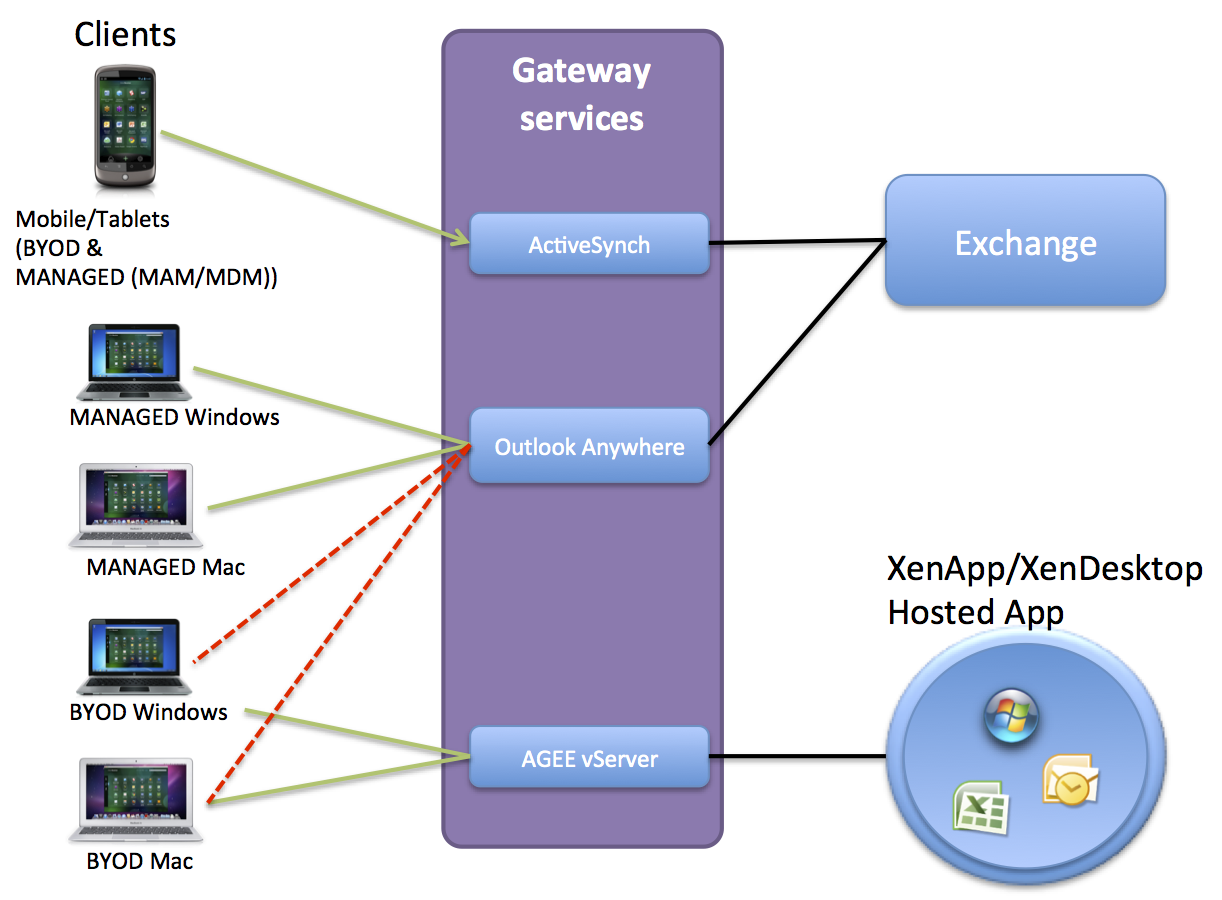
Think of the picture above (yes I know it’s a mess but I just want to illustrate the issue), you have BYOD devices that are running Windows 7, XP, 8 etc and also Mac OS X. What if you open up your Outlook anywhere service to those devices, then all your emails etc. will be unsecured on them!
Citrix and others are focusing on providing this email capability in a secure manner on all mobile OS’s like iOS and Android etc through it’s Citrix Worx apps for mail and also the newly announced Hosted MobileMail. But these are more or less just targeted against mobile devices (smartphones and tablets), but what about the standard laptop users!?!?! They need something as well!
And Windows RMS and other solutions just wont fit very well here… Citrix XenVault was something that could have worked to enable offline support for corporate Messaging services but it’s not there… I’d like to run corporate apps locally on the device offline in a secure and controllable container!!
The same issue you have with Data!!!
ShareFile doesn’t support encryption on Windows or OS X!!!
But it does on mobile devices.. I guess you have to trust your users and BYOD devices that they are encrypted using BitLocker or FileVault etc…. but can you?
So please enlighten me here what the missing puzzle piece is!! Because I have a hard time taking away a managed device form a user and tell them that they on their BYOD device HAVE TO BE ONLINE TO WORK! It’s a step back from a usability and productiveness point of view… but it may be a cost saver though… but is a BYOD/unmanaged device and a VDI or Hosted Shared Desktop always a good option to provide business apps to that laptop? NO! I guess everyone have understood that making business apps and functions web-based or mobile app based is good and a lot of focus is there, but we cannot forget the traditional productive device that the laptop is!
If you know the magic solution to these challenges please let me know! 🙂
Cheers!
//Richard
Ten websites that teach coding and a bunch of other things – via @caleweissman
This is a great summary blog post with many good references to where you can start learning to code!
Seemingly every day there’s a new article or blog post imploring you to learn how to code. “Those who code have the power to transform their dreams into reality.” “Coding will help you keep [your job], or help you make a case for a raise.” “You should learn to program because it’s easy, it’s fun, it will increase your skill set, and… it will fundamentally change your perspective on the world.” What’s more, “If you want to start a technology company, you should learn to code.” New York City Mayor Michael Bloomberg’s New Year’s resolution was to learn how to code. Douglas Rushkoff, who calls coding “the new literacy of the digital age,” wrote an entire book about it. And didn’t Marc Andreessen say that “software is eating the world?” As a result, companies from Codecademy to edx and many others have popped up to meet this rising demand.
As a person who’s grown up in the digital age, I have often heard the cry, “digital literacy or die.” Conventional wisdom – at least today – is that in the way you know how to read and write English, “you need to have some understanding of the code that builds the Web… It is fundamental to the way the world is organized and the way people think about things these days.” If you buy that then you’ll want to start now.
But where should you go? I’ve been dabbling in the black arts, although I am by no means a ninja coder, and am ready to report back. The courses below offer everything from HTML to Python and beyond. HTML and CSS are good, because they’re the basic building blocks of Web design, and in my opinion, Python is useful, because it’s the most universal in many respects. Others say Java is better to learn, because its so prominent on the Web. I would rebut that you can learn Java from Python. Potayto. Potahto.
In any case, each program below emphasizes different pedagogical techniques and philosophies, and they are all mass market in the sense that anyone is welcome. No previous experience is necessary.
MIT Courseware Online
MIT has long been a pioneer of online courseware. One course is their Intro to Computer Science & Programming class, thought by many to be the best, most encompassing intro computing course offered. Taught by tenured MIT faculty, the online course is structured via taped lectures, written assignments, and self-assessment quizzes.
The course itself is quite rigorous as it was an intro course for MIT students. This isn’t a sort of online class you can do some parts and not the other. It requires a certain amount of pre-existing math knowhow to be truly successful. The course description says it only requires high school algebra as a prerequisite but I don’t buy this. I remember being pretty stumped by the second assignment, and I passed AP Calc with flying colors. This doesn’t mean the math is terribly high-level, but that it probably requires a certain amount of mathematical aptitude beyond algebra unless you want to spend the entire course scouring forums for help. As with any MIT course, there is an expectation that you not only know how to do a function, but why that function is performed and from where it stemmed. After attempting to follow this courseware for two sessions, I was officially stumped and dropped it.
edX
MIT and Harvard partnered up to create edX. It is a conglomeration of all of their available open courseware, along with a new department for the two institutions to perform research about the future of online courses and new pedagogical technologies. For MIT courseware, you can watch the lectures anytime, read the assignments, and self-assess. EdX has you follow the course in real time and complete the assignments and exams to receive a physical certificate from the program. It currently offers numerous classes in more subjects than just coding and far beyond the purview of Computers Science….
Continue reading here!
//Richard
#Citrix Knowledge Center Top 10 – December 2012
Citrix Support is focused on ensuring Customer and Partner satisfaction with our products.
One of our initiatives is to increase the ability of our Partners and Customers to leverage self-service avenues via our Knowledge Center.
Find below the Citrix Knowledge Center Top 10 for December 2012.
Top 10 Technical Articles
| Article Number | Article Title |
|---|---|
| CTX129229 | Recommended Hotfixes for XenApp 6.0 and Later on Windows Server 2008 R2 |
| CTX129082 | Application Launch Fails with Web Interface using Internet Explorer 9 |
| CTX132875 | Citrix Receiver Error 2320 |
| CTX804493 | Users Prompted to Download ICA File, Launch.ica, Instead of Launching the Connection |
| CTX105793 | Error: Cannot connect to the Citrix server. Protocol Driver Error |
| CTX133997 | Citrix Receiver 3.x – Issues Fixed in This Release |
| CTX127030 | Citrix Guidelines for Antivirus Software Configuration |
| CTX101644 | Seamless Configuration Settings |
| CTX676151 | How to Install the Citrix ICA Web Clien |
| CTX325140 | Manually and Safely Removing Files that might remain on a System |
Top 10 Whitepapers
| Article Number | Article Title |
|---|---|
| CTX131577 | XenApp 6.x (Windows 2008 R2) – Optimization Guide |
| CTX132799 | XenDesktop and XenApp Best Practices |
| CTX101997 | Citrix Secure Gateway Secure Ticket Authority Frequently Asked Questions |
| CTX133185 | Citrix CloudGateway Express 2.0 – Implementation Guide |
| CTX129761 | XenApp Planning Guide – Virtualization Best Practices |
| CTX134943 | XenDesktop and XenApp Printing – Planning Guide |
| CTX122978 | XenServer: Understanding Snapshots |
| CTX134081 | Planning Guide – Citrix XenApp and XenDesktop Policies |
| CTX128277 | Logon Optimization Guide – XenApp/XenDesktop |
| CTX110351 | User Profile Best Practices for MetaFrame Presentation Server |
Top 10 Hotfixes
| Article Number | Article Title |
|---|---|
| CTX132122 | Hotfix Rollup Pack 1 for Citrix XenApp 6.5 for Microsoft Windows Server 2008 R2 |
| CTX126653 | Citrix Online Plug-in 12.1.44 for Windows with Internet Explorer 9 Support |
| CTX133066 | 12.3 Online Plug-In – Issues Fixed in This Release |
| CTX133882 | Hotfix Rollup Pack 2 for Citrix XenApp 6 for Microsoft Windows Server 2008 R2 |
| CTX135025 | Hotfix XA650R01W2K8R2X64033- For Citrix XenApp 6.5 for Windows Server 2008 R2 |
| CTX116550 | Credential Handling Weakness in Presentation Server Client for Windows |
| CTX135709 | Hotfix XS61E006 – For XenServer 6.1.0 |
Continue reading here!
//Richard
Forrester: 84% Of U.S. Adults Now Use The Web Daily, 50% Own Smartphones, Tablet Ownership Doubled To 19% In 2012
Forrester Research just published its annual “State of Consumers and Technology” report. As usual, it’s chock-full of interesting statistics about how U.S. consumers use the Internet, but the most interesting statistic is probably that the overall online penetration rate in the U.S. has stabilized at 79 percent (the same number Forrester found in 2011). That’s the percentage of U.S. adults that go online at least monthly. What has changed, however, is how many adults go online at least daily: In 2011, that was 78 percent of U.S. adults, and in 2012, Forrester reports that 84 percent now go online at least once per day.
One of the reasons for this is, of course, the growing smartphone and tablet penetration. Forrester found that about half of U.S. online adults now own a smartphone and two-thirds even own multiple connected devices. Tablet adoption doubled since 2011 and is now at 19 percent.
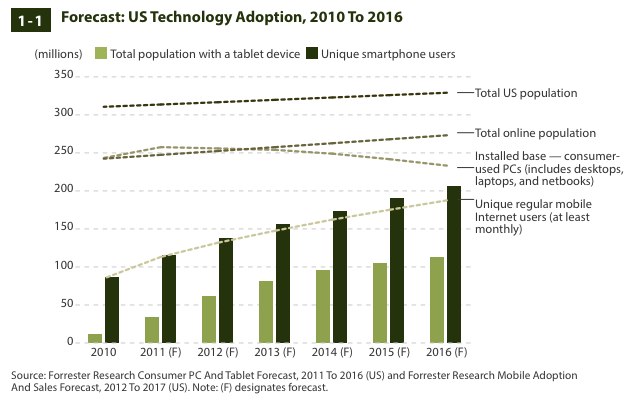
One trend that the Forrester report, which includes…
Continue reading here!
//Richard
Vulnerability in Citrix Receiver with Online Plug-in for Windows could result in arbitrary code execution
Severity: Medium
Description of Problem
A vulnerability has been identified in the Citrix Receiver with Online Plug-in for Windows that could potentially allow an attacker to execute arbitrary code on the client device in the context of the currently logged in user.
This vulnerability is present in all versions of the Citrix Receiver for Windows up to and including version 3.2 and all versions of the Citrix Online Plug-in for Windows up to and including version 12.1.
For more information click here!
//Richard




 The IT Melting Pot!