Archive
Sizing #XenDesktop 7 App Edition VMs – #Citrix
A good update on VM sizing by Daniel Feller!
In the Mobilizing Windows applications for 500 users design guide, we made the recommendation to allocate 8vCPUs for each virtual XenDesktop 7 App Edition host (formerly known as XenApp). Spreading this out across a server with two Intel Xeon E5-2690 @2.9GHz processors and 192 GB of RAM, we were yielding about 200 users per physical server and roughly 50 users per virtual server.
Of course, the design guide is the end result of a lot of testing by the Citrix Solutions Lab. During the tests, we had the Solutions Lab compare many (and I mean many) different configurations where they changed the number of vCPU, RAM size, and RAM allocation (dynamic/static) as well as a few other things. All of these tests were done with Windows Server 2012 with Hyper-V. We ended up with the following:

A few interesting things:
- Dynamic vs static RAM in Hyper-V appeared to have little, if any, impact on overall scalability. The only time when the RAM allocation had a negative impact was when not enough RAM was allocated (no surprise there).
- The 8vCPU and the 4vCPU configurations resulted in very similar user concurrency levels. Get ready… The battle is about to begin as to whether we should use 8 or 4 vCPU. (Is anyone else besides me having flashbacks to 2009?)
A few years ago, we debated about using 2vCPU or 4vCPU for XenApp 5 virtual machines. A few years later, the debate is resurfacing but this time, the numbers have doubled: 4 or 8. Here is what you should be thinking about… VMs are getting bigger because the hardware is getting faster, RAM is getting cheaper and the hypervisors are getting better…
Continue reading here!
//Richard
#XenDesktop 7.1 Service Template Tech Preview for System Center 2012 Virtual Machine Manager – #SCVMM
This is interesting! Really good and can’t wait to try it out!
Introduction
Let’s face it, installing distributed, enterprise-class virtual desktop and server based computing infrastructure is time consuming and complex. The infrastructure consists of many components that are installed on individual servers and then configured to work together. Traditionally this has largely been a manual, error prone process.
The Citrix XenDesktop 7.1 Service Template for System Center 2012 Virtual Machine Manager (SCVMM) leverages the rich automation capabilities available in Microsoft’s private cloud offering to significantly streamline and simplify the installation experience. The XenDesktop 7.1 Service Template enables rapid deployment of virtual app and desktop infrastructure on Microsoft System Center 2012 private clouds. This Tech Preview is available now and includes the latest 7.1 version of XenDesktop that supports Windows Server 2012 R2 and System Center 2012 R2 Virtual Machine Manager.
Key Benefits:
- Rapid Deployment – A fully configured XenDesktop 7.1 deployment that adheres to Citrix best practices is automatically installed in about an hour; a manual installation can take a day or more.
- Reduction of human errors and the unwanted consequences – IT administrators answer 9 questions about the XenDesktop deployment, including the VM Network to use, the domain to join, the SQL server used to host the database, the SCVMM server to host the desktops, and the administrative service accounts to connect to each of these resources. Once this information is entered, the Service Template automation installs the XenDesktop infrastructure the same way, every time, ensuring consistency and correctness.
- Reduction in cost of IT Operations – XenDesktop infrastructure consistently configured with automation is less costly to support because the configuration adheres to best practice standards.
- Free highly skilled and knowledgeable staff from repeatable and mundane tasks – A Citrix administrator’s time is better spent focused on ensuring that users get access to the applications they need, rather than lengthy production installation tasks.
- Simplified Eval to Retail Conversion – Windows Server 2012 and later, as well as XenDesktop 7.1, support conversion of evaluation product keys to retail keys. This means that a successful POC deployment of the XenDesktop 7.1 Service Template is easily converted to a fully supported and properly configured production deployment.
- Easy Scale-Out for greater capacity – SCVMM Service Templates support a scale-out model to increase user capacity. For example, as user demand increases additional XenDesktop Controllers and StoreFront servers are easily added with a few clicks and are automatically joined to the XenDesktop site.
The XenDesktop Service Templates were developed and tested with the support of our friends and partners at Dell, who, in support of the release of XenDesktop 7.1 and the Service Template technical preview, are expected to launch new and innovative solutions that include these and other automation capabilities this quarter. These solutions are based on the Dell DVS Enterprise for Citrix XenDesktop solutions.
Simplification of Distributed Deployments
The XenDesktop 7.1 in-box installation wizard is a fantastic user experience that automatically installs all the required prerequisites and XenDesktop components in under 30 minutes. The result is a fully installed XenDesktop deployment, all on a single server, that is excellent for POCs and product evaluations. The installation and configuration challenges occur when you want to install XenDesktop in production, with enterprise-class scalability, distributed across multiple servers.
Manual Installation Steps

#Microsoft Desktop Hosting Reference Architecture Guides
Wow, these are some compelling guides that Microsoft delivered!! Have a look at them! But of course there’s always something more U want! Let Service Providers provide DaaS services based on client OS’s as well!!!
 |
Microsoft has released two papers related to Desktop Hosting. The first is called: “Desktop Hosting Reference Architecture Guide” and the second is called: “Windows Azure Desktop Hosting Reference Architecture Guide“. Both documents provide a blueprint for creating secure, scalable, multi-tenant desktop hosting solutions using Windows Server 2012 and System Center 2012 SP1 Virtual Machine Manager or using Windows Azure Infrastructure Services.
The documents are targeted to hosting providers which deliver desktop hosting via the Microsoft Service Provider Licensing Agreement (SPLA). Desktop hosting in this case is based on Windows Server with the Windows Desktop Experience feature enabled, and not Microsoft’s client Operating Systems like Windows 7 or Windows 8.
For some reason, Microsoft still doesn’t want service providers to provide Desktops as a Service (DaaS) running on top of a Microsoft Client OS, as outlined in the “Decoding Microsoft’s VDI Licensing Arcanum” paper which virtualization.info covered in September this year.
The Desktop Hosting Reference Architecture Guide provides the following sections:
- Desktop Hosting Service Logical Architecture
- Service Layer
- Tenant Environment
- Provider Management and Perimeter Environments
- Virtualization Layer
- Hyper-V and Virtual Machine Manager
- Scale-Out File Server
- Physical Layer
- Servers
- Network
- Tenant On-Premises Components
- Clients
- Active Directory Domain Services

The Windows Azure Desktop Hosting Reference Architecture covers the following topics:
True Scale Out Shared Nothing Architecture – #Compute, #Storage, #Nutanix via @josh_odgers
This is yet another great blog post by Josh! Great work and keep it up! 😉
I love this statement:
I think this really highlights what VMware and players like Google, Facebook & Twitter have been saying for a long time, scaling out not up, and shared nothing architecture is the way of the future.
At VMware vForum Sydney this week I presented “Taking vSphere to the next level with converged infrastructure”.
Firstly, I wanted to thank everyone who attended the session, it was a great turnout and during the Q&A there were a ton of great questions.
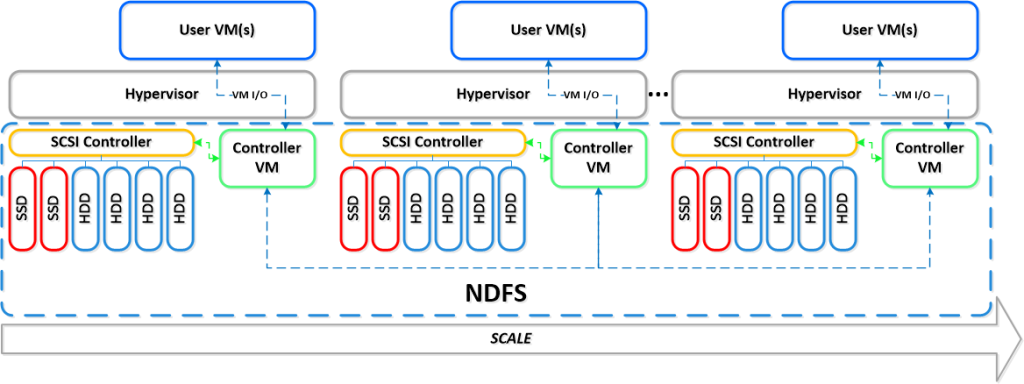
I got a lot of feedback at the session and when meeting people at vForum about how the Nutanix scale out shared nothing architecture tolerates failures.
I thought I would summarize this capability as I believe its quite impressive and should put everyone’s mind at ease when moving to this kind of architecture.
So lets take a look at a 5 node Nutanix cluster, and for this example, we have one running VM. The VM has all its data locally, represented by the “A” , “B” and “C” and this data is also distributed across the Nutanix cluster to provide data protection / resiliency etc.

So, what happens when an ESXi host failure, which results in the Nutanix Controller VM (CVM) going offline and the storage which is locally connected to the Nutanix CVM being unavailable?
Firstly, VMware HA restarts the VM onto another ESXi host in the vSphere Cluster and it runs as normal, accessing data both locally where it is available (in this case, the “A” data is local) and remotely (if required) to get data “B” and “C”.

Secondly, when data which is not local (in this example “B” and “C”) is accessed via other Nutanix CVMs in the cluster, it will be “localized” onto the host where the VM resides for faster future access.
It is importaint to note, if data which is not local is not accessed by the VM, it will remain remote, as there is no benefit in relocating it and this reduces the workload on the network and cluster.
The end result is the VM restarts the same as it would using traditional storage, then the Nutanix cluster “curator” detects if any data only has one copy, and replicates the required data throughout the cluster to ensure full resiliency.
The cluster will then look like a fully functioning 4 node cluster as show below.

The process of repairing the cluster from a failure is commonly incorrectly compared to a RAID pack rebuild. With a raid rebuild, a small number of disks, say 8, are under heavy load re striping data across a hot spare or a replacement drive. During this time the performance of everything on the RAID pack is significantly impacted.
With Nutanix, the data is distributed across the entire cluster, which even with a 5 node cluster will be at least 20 SATA drives, but with all data being written to SSD then sequentially offloaded to SATA.
The impact of this process is much less than a RAID…
Continue reading here!
//Richard
How to pick virtualization (HW, NW, Storage) solution for your #VDI environment? – #Nutanix, @StevenPoitras
Here we are again… a lot of companies and Solution Architects are scratching their heads thinking about how we’re going to do it “this time”.
Most of you out there have something today, probably running XenApp on your VMware or XenServer hypervisor with a FC SAN or something, perhaps provisioned using PVS or just managed individually. There is also most likely a “problem” with talking to the Storage team that manage the storage service for the IaaS service that isn’t built for the type of workloads that XenApp and XenDesktop (VDI) requires.
So how are you going to do it this time? Are you going to challenge the Storage and Server/IaaS service and be innovative and review the new cooler products and capabilities that now exists out there? They are totally changing the way that we build Virtual Cloud Computing solutions where; business agility, simplicity, cost savings, performance and simple scale out is important!
There is no one solution for everything… but I’m getting more and more impressed by some of the “new” players on the market when it comes to providing simple and yet so powerful and performing Virtual Cloud Computing products. One in particular is Nutanix that EnvokeIT has partnered with and they have a truly stunning product.
But as many have written in many great blog posts about choosing your storage solution for your VDI solution you truly need to understand what your service will require from the underlying dependency services. And is it really worth to do it the old way? You have your team that manages the IaaS service, and most of the times it just provides a way for ordering/provisioning VM’s, then the “VDI” team leverages that one using PVS or MCS. Some companies are not even where they can order that VM as a service or provision it from the Image Provisioning (PVS/MCS) service, everything is manual and they call it a IaaS service… is it then a real IaaS service? My answer would be now… but let’s get back to the point I was trying to make!
This HW, Hypervisor, Network, Storage (and sometimes orchestrator) components are often managed by different teams. Each team are also most of the times not really up to date in terms of understanding what a Virtualization/VDI service will require from them and their components. They are very competent in understanding the traditional workload of running a web server VM or similar, but not really dealing with boot storms from hundreds to thousands of VDI’s booting up, people logging in at the same time and the whole pattern of IOPS that is generated in these VM’s “life-cycle”.
This is where I’d suggest everyone to challenge their traditional view on building Virtualization and Storage services for running Hosted Shared Desktop (XenApp/RDS) and Hosted Virtual Desktop (VDI/XenDesktop) on!
You can reduce the complexity, reduce your operational costs and integrate Nutanix as a real power compute part of your internal/private cloud service!
One thing that also is kind of cool is the integration possibilities of the Nutanix product with OpenStack and other cloud management products through its REST API’s. And it supports running both Hyper-V, VMware ESXi and KVM as hypervisors in this lovely bundled product.
If you want the nitty gritty details about this product I highly recommend that you read the Nutanix Bible post by Steven Poitras here.

Delivering #Citrix #XenApp on #Hyper-V with PVS and #McAfee – via @TonySanchez_CTX
Good Citrix blog post from Tony Sanchez!
Architectures—whether physical or virtual—should be flexible enough to adapt to different workloads, allowing them to support changing business needs. Although implementing a new IT architecture takes time and careful planning, the process to test and validate an architecture should be easy. In the case of a virtual desktop architecture, test engineers should be able to follow a repeatable pattern, step by step, simply changing out the workload to validate the architecture under different anticipated user densities, application workloads, and configuration assumptions. The procedure should be as easy as learning a new series of dance steps (think PSY’s Gangnam Style, the most watched dance video on YouTube). The point causes me as a test engineer to ask the question: in the case of VDI, why can’t a hypervisor simply learn a new workload just like I might learn a new sequence of dance steps?
Luckily for test engineers, Citrix FlexCast® provides the ability to learn and deliver any workload type by leveraging the power of the Citrix Provisioning Services® (PVS). Recently I worked with engineers from Citrix and Dell, collaborating to build a FlexCast reference architecture for deploying XenApp® and XenDesktop® on Hyper-V on a Dell infrastructure. Testing of this reference architecture looked at how XenApp and XenDesktop performed under various workloads, altering hypervisor configuration settings and examining the overall user experience and user densities. At the drop of dime, FlexCast and PVS enabled a simple switch of the architecture to a new workload.
Based on that reference architecture effort, we recently began a Single Server Scalability (SSS) test using the latest hardware and software releases available. This blog focuses on that effort — what I call the “XenApp dance step for FlexCast style” and how XenApp workloads perform on Hyper-V. (A follow-on blog article will focus on an alternate “dance” sequence for XenDesktop.) The focus of this blog is how the configuration of the McAfee virus scanning software can impact performance and scaling.
In previous blogs, I describe the testing process and methodology that leverages the Login VSI test harness, along with key tips for success. Since those same methods and recommendations apply here, let’s review the configurations we used for this scalability testing as well as the workloads and actual test results.
For background reading, I highly recommend that you review Frank Anderson’s post on XenApp physical versus virtual testing results with Hyper-V. Frank is my colleague and a great resource for insights about testing, including implementation tips and general best practices. In addition, the related Dell and Citrix white paper describing the FlexCast reference architecture for deploying XenApp and XenDesktop on Hyper-V is available here.
Continue reading here!
//Richard
New Online Training Sessions Available for System Center 2012 – #SC2012, #Microsoft

Microsoft Virtual Academy has released a new training series that delves into System Center 2012 SP1 Service Manager. Topics covered include:
– Import Data and Runbooks
– Build and Publish Request Offerings
– Create, Invoke & Monitor
– Chargeback
These sessions are now available to view online.
And now that System Center Universe 2013 is over, those sessions are also available online. You can now view the System Center Universe 2013 recordings online to learn about VMware and Hyper-V Data Protection, Advanced System Center Reporting, Windows Azure Infrastructure as a Service…
Continue reading here!
//Richard
#Citrix VDI-in-a-Box 5.2, now supports CloudGateway etc. – @VDIinaBox, @CitrixCG
Ok, now VDI-in-a-Box is becoming more and more “complete”! This release delivers some of the features many have wanted for a while! For instance the support of the latest hypervisors as well as CloudGateway!
Read more below taken from the Citrix blog post:
Version V5.2 is now ready for prime time. The focus of this release was to support the latest hypervisors and Citrix components. Actually we did a lot more because we added a few features that our users have been clamoring for.
Support for the latest hypervisors:
As always we need to stay current and so version 5.2 supports vSphere 5.1, XenServer 6.1 and Microsoft Hyper-V Server 2012. The latter should increase desktop density quite a bit. We’d love to hear your experiences along those lines. Please post on the forum what sort of density increases you are experiencing.
Unified access to VDI-in-a-Box desktops and your applications and data:
Version 5.2 now supports Citrix’s Cloud Gateway and allows you to access VDI-in-a-Box through it. Cloud Gateway provides a unified application and data store allowing you to access Windows, web, SaaS and Mobile applications seamlessly and so we felt it important that VDI-in-a-Box work with this application and data aggregation service.
Real-time collaboration with Microsoft Lync:
In addition, we support Microsoft Lync via the Citrix HDX RealTime Optimization Pack for Microsoft Lync. Now users can seamlessly participate in audio-video or audio-only calls to and from other HDX RealtTime users and other standards-based video desktop and conference room systems. This is especially good for call centers and the like who want wide ranging soft phone functionality with their virtual desktops.
Highly available Personal Desktops with PVD:
Many had asked that we provide some form of high availability for Personal (PVD) desktops. We provide this by allowing you to place PVD desktops on shared storage. Here’s how it works. You specify a third datastore which resides on shared storage and VDI-in-a-Box will honor this request and store all Personal desktops using PVD on it.
Turn old desktops into locked down thin clients:
Kids will be kids and so many school lab administrators have asked that we provide a way to lock down the devices used in their labs. Now, you can download the Desktop Lock from the VDI-in-a-Box download page on the Citrix web site. It will allow you to lock down the physical device and essentially turn your old desktops and workstations into a thin client that connects directly to VDI-in-a-Box and keeps the kids from doing any mischief.
Fully automated software update with our Touchless DTagent:
And since we’re always looking for ways to make things simpler, with V5.2, we now have a fully automated way for you to upgrade the VDI-in-a-Box software. We had two issues in the past. First, you had to manually install the VDI-in-a-Box desktop agent on a golden image (that is then used to stamp out multiple desktop instances). Second, when you upgraded the VDI-in-a-Box software, you had to manually update the agent on each existing golden image. In Version 5.1, we automatically install the agent on all new images. With V5.2, we now provide you a list of existing golden images whose agents need to be updated and once you click yes, we walk you through a wizard to automatically upgrade the agent and test the golden image. For more details on this, see the blog by David Liu: http://blogs.citrix.com/2013/01/22/viab-5-2-makes-updating-desktop-agents-easier/.
Continue reading here!
//Richard
Another great blog : Virtualizing XenApp Hosted Shared Desktops on Hyper-V
Thanks a lot for this blog post!
“My latest adventure into density testing for Citrix solutions centers on XenApp (XA) Hosted Shared desktops. For those unfamiliar with the XA Hosted Shared model, it combines application and session virtualization, relying on a single OS instance on a Citrix XA server to publish familiar Windows desktops and applications. The Hosted Shared model centralizes application delivery and management (securing data and applications in the data center), and it scales well to support large user densities. It is designed to provide a locked-down, streamlined, and standardized environment with a core set of applications, making it ideally suited for task workers where personalization is less of a focus. While the XA server can be hosted directly on a bare-metal server on Windows Server 2008 R2, my recent testing explores the densities you can achieve when XA runs in a virtualized environment.”
Continue to read here!
//Richard




 The IT Melting Pot!